How To Reset Yourself In One Day (So AI Can’t Replace You)
One day of planning, doing and reviewing your work with AI, and what changes after.
You probably have mixed feelings about AI.
Grateful for what it can do, frustrated by what it gets wrong, and unsure where any of it is heading.
That’s okay. Most of us feel them. After two years of building with AI nearly every day, I still feel all three.
People land in very different places with AI.
Some refuse to touch it, though as long as they’re online, they’re already using it, whether they like it or not. Some use it, but carefully, keeping it at arm’s length. Some are all in, with high hopes that it’s about to change everything for them.
Many are in regular jobs, white collar, blue collar or somewhere in between, feeling the threat and half hoping it’s all just bubble, or that their own work is too special for AI to ever replace. Still some run small businesses that, from the outside, seem to have nothing to do with technology at all.
Wherever you stand, we share one question: what is AI going to do to my life in the years ahead?
And if it does come for my work, how do I get ready enough that when the massacre hits the job market, I come through the transition instead of being left behind?
Most answers to that question say more: more tools, more courses, more prompts. I tried more. It kept me busy without making me ready. What changed things was smaller: one day of watching how I actually work, with AI beside me.
This article helps you think clearly about where AI is heading, then walks you through that day, and what changes after it.
Getting ready doesn’t take a year. It starts with one day.

I – AI is coming for everything
“History and societies do not crawl. They make jumps. They go from fracture to fracture, with a few vibrations in between.”
- Nassim Nicholas Taleb, The Black Swan
History has always moved this way, only never this fast.
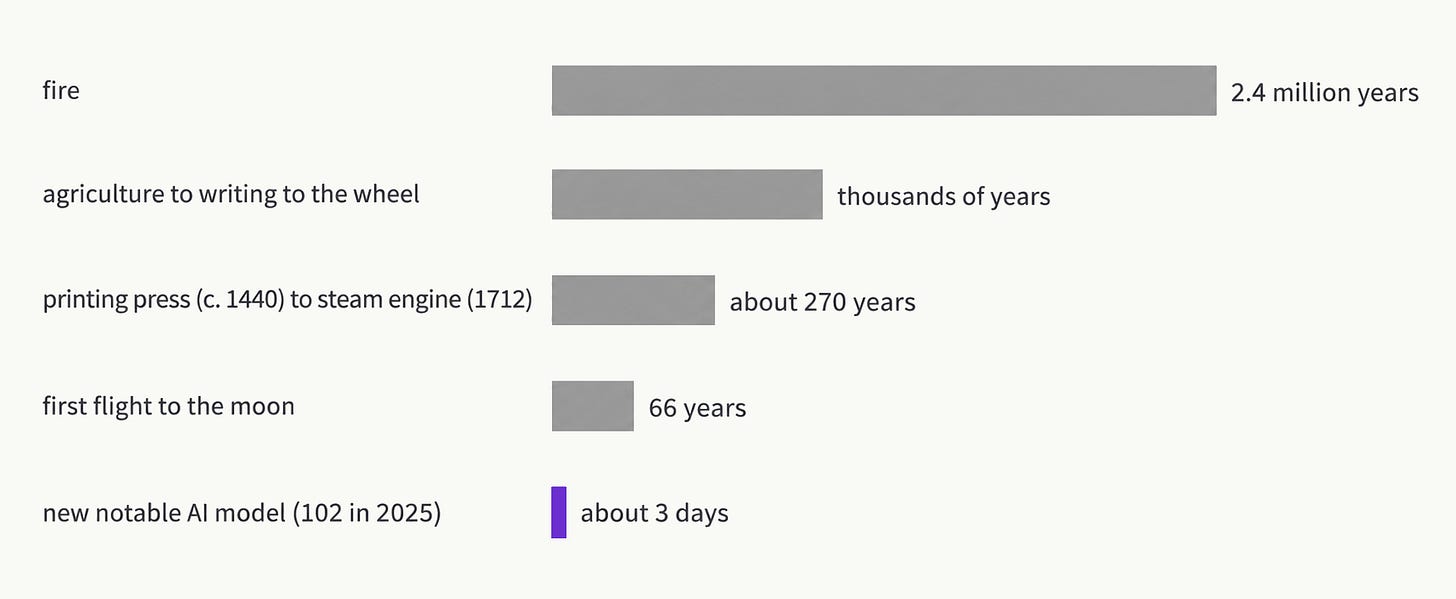
It took our ancestors 2.4 million years to control fire. Even in the last 12,000 years, several thousand years passed between agriculture, writing and the wheel. Then the gaps shrank to centuries: from Gutenberg’s printing press around 1440 to the first commercially successful steam engine in 1712. Then to decades: 66 years from the Wright brothers’ first flight to the moon landing. With AI, the gap is down to days. Stanford’s 2026 AI Index counted 102 notable new AI models in 2025 alone, about two a week.
The futurist Ray Kurzweil called this the law of accelerating returns. By his math, this century holds “more like 20,000 years of progress (at today’s rate).”
A year ago, people argued with me that AI was useless. It just summarizes. It makes things up. It doesn’t do real work.
I don’t hear that argument anymore.
What changed is that AI stopped only answering questions and started doing the work, and each time, an industry felt it.
When OpenAI launched its ChatGPT Atlas browser in October 2025, Alphabet’s stock fell about 2%. In February 2026, Claude plugins for legal, sales and finance work set off a global selloff in software stocks. In April, Claude Design came out, and Figma fell about 7%.
When you watch that happen to companies, you naturally start to wonder: what about me?
It’s already past being a threat. It’s hurting people’s work right now.
After ChatGPT arrived, a study of 92,547 freelance writers on Upwork found their monthly earnings fell 5.2%, and the best-rated writers lost the most. In film, Tyler Perry put an $800 million studio expansion on hold after seeing what AI video could do. Young workers are feeling it first. In Stanford’s payroll study, 22- to 25-year-olds in the jobs AI can do most easily now hold about 19% fewer jobs than they would have if their field had kept pace. The shrinking jobs are the ones built on what you can learn in school or a manual. AI has read those books. The jobs holding up run on judgment you only get from years of doing the work.
So the question widens.
It’s your future job, and how you make sure you’re not the one replaced. It’s how you protect your family.
It’s how you prepare your kids and the younger generation for a world where their first job may look nothing like yours did.
And if you run a team, it’s how you avoid the layoff that backfires.
When I studied past technology shifts for How I Built My AI Survival System, the damage never stayed with one worker. It reached whole households, and sometimes the next generation too.
That’s the heavy part. The hopeful part is that more people are already getting ready, and I’ve interviewed a few of them. , a filmmaker, built his own creator platform after 13 years in film. , built the semantic search tool for Substack readers, then pivoted several times. , turned her frustration with AI filler into a tool more than 400 people use. None of them waited for their fields to decide for them.
They saw early what’s now true for all of us: AI is where the computer was years ago.
Do you absolutely need a computer? You could probably live without one. But if you want a career that stays on track and stays relevant, you don’t get to skip it.
My bold prediction:
The early adoption window for AI is closing, and the mass adoption window is just opening.
In the classic model of how new technology spreads, early adopters end at about 16% of people. Daily AI use at work sits at 15%. That lines up with what I see: the people experimenting on nights and weekends have already moved, and everyone else is about to.
This is the moment to be among the first in the big wave, the ones who make AI change their lives for real.
Of course, I’m not here to wave my arms and tell you AI is golden, that it can do everything, or that you should trust it blindly. It isn’t ready to replace most of our work, it doesn’t make the best version of everything, and it can’t guarantee anyone’s job.
You’ll hit plenty of frustrating moments with AI, and you should expect them.
II – AI is still frustrating
“We tend to overestimate the effect of a technology in the short run and underestimate the effect in the long run.”
- Roy Amara, futurist
You ask for a draft, and it comes back almost right. Close enough that you start editing, far enough that you end up rewriting most of it. You set up an agent to handle a task, and it handles the wrong one. You spend an evening building something that felt productive the whole time, and the next morning you can’t point to what it changed.
If any of that sounds familiar, you’re not alone.
In a randomized study by METR, experienced developers took 19% longer on real tasks when they used AI. Before starting, they expected AI to make them 24% faster. Afterward, they still believed it had made them 20% faster.
In Stack Overflow’s survey of more than 49,000 developers, the top frustration was answers that are “almost right, but not quite.” Outside of code, 40% of desk workers say they received AI-generated work in the past month that looked polished and turned out to be unusable. Each piece took almost two hours to sort out.
Moments like these push people one of two ways.
Some give up: AI is overhyped, it just summarizes, back to doing it the old way.
Others push harder: another tool, another agent, another automation, sure the next setup will be the one that works.
Both come from the same hope underneath, that AI should be doing this for you.
I’ve been on both sides of this. AI has failed me more times than I want to admit, including agents that did exactly the wrong thing. Some days I gave up on it. Other days I answered a failure by building even more.
Across those failure moments, I’ve watched three traps come up again and again, in my own work and in conversations with other builders.
1. Doing more before you understand it.
Automating everything. Vibe coding everything. Building skill after skill. Running tens of agents at once because you can.
I still catch myself here, and I’ve had to make myself slow down and read what the last agents did before starting the next.
Work you hand off without looking at it comes back to you later, usually as an at least two-hour cleanup.
2. Blaming your prompts before you’ve found your question.
Somewhere in a long back-and-forth, you realize you don’t know what you’re asking for, or how you’d judge a perfect answer.
AI can’t know what you want before you do. So ask yourself first: do I know what I want here, or do I need help understanding it?
When my family plans a trip, what used to take days of searches, maps and travel blogs now takes one prompt, because I know what I’m asking for: an orchard near where we’re staying, good for kids, open the hours we’ll be there.
3. Chasing every new tool.
A new tool shows up every few weeks, each with a crowd saying this is the one. Every switch carries the hope that this tool will finally do it for you, and every one costs you the setup, the learning and the habits you’d started to build.
I was talking about this with earlier this year, and we’d both had the same feelings toward AI:
AI makes everything feel possible. It’s capable enough that you start picturing all the work you’ll never have to do again. But when you get to the actual work, you realize it’s a collaboration between you and AI, and never a hands-off outsource.
The places AI frustrates you are the places it still needs you. That’s your judgment at work, the same kind of judgment the Stanford study found holding up while textbook work shrinks. Read the frustration as a map of where you’re valuable.
And the easiest place to lose that judgment is the tool chase, because there’s always a new tool.
III – AI is heading toward one goal
I’ve chased way too many AI tools worth attention in the past 2 years.
ChatGPT came first, for research.
Then Cursor, which I promoted like I worked there.
Then Claude, for its interface and the harness in Claude Code.
Then OpenClaw, for my messages and remote automations.
Then Hermes, for portable skills that improve themselves.
Then back to Claude, once it integrated autonomous workflow.
Then ChatGPT again, with Codex built in.
And now Grok Bot and Meta’s Muse.
Every move felt right at the time.
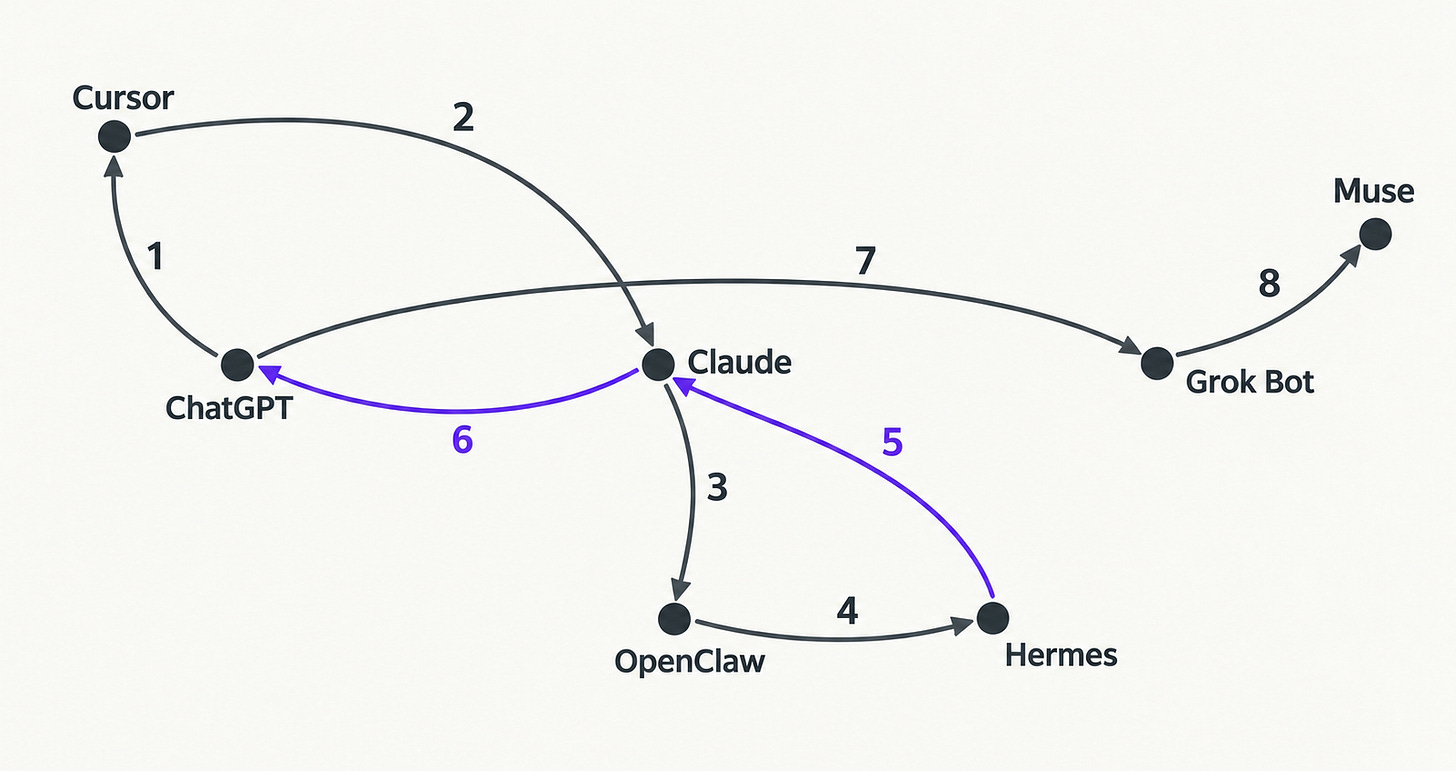
It wasn’t only me. I was often asked questions like this:

When people started canceling ChatGPT in March, Claude hit No. 1 on the App Store. A few months later, developers were writing about leaving Claude Code for Codex. This month, Meta’s Muse hit No. 1 within two weeks of launch.
Migration after migration. It never seems to end.
It wears you down. Every switch means starting over, and not switching feels like falling behind. After a few rounds, you’re spending more time setting up tools than getting work done with them.
But why chasing tools doesn’t pay back?
Because what you learn about one tool loses value fast. Researchers at Deloitte found the same pattern across careers: technical skills “decay in value as more people acquire proficiency in those skills.” IBM puts the half-life of technical skills at about two and a half years. So what you learn about any single tool loses value fast, and the next one will move the buttons.
So if you haven’t settled into a tool yet, ChatGPT is a smart pick right now, with a browser, computer control, scheduling and a friendlier interface. If your work already lives in another tool, a few better features aren’t a reason to move. I keep several myself, and Claude is still the best for coding.
Underneath the different names, every one of these tools is working on the same three problems for you:
Capturing how you work, so you can repeat it.
Reaching the tools and data you already use.
Running the repeat work without you having to start it each time.
Map the major AI tools you’ve seen in the news against those three problems, and each one already has a feature built for them:
Cursor: agent skills, one-click MCP, scheduled tasks for cloud agents
OpenClaw: a skills marketplace, MCP, cron jobs
Hermes: skills that improve with use, MCP, cron jobs
Claude: skills and plugins, connectors, scheduled tasks
ChatGPT: skills inside plugins, apps and MCP, scheduled runs
Perplexity: custom skills, MCP connectors, automations
Gemini: skills and Gems, connected apps, scheduled actions
Microsoft Copilot: custom skills, connectors, scheduled prompts
Manus: skills, MCP connectors, scheduled tasks
Notion AI: skills, MCP connections, agents on schedules
Put those three together and you get the one goal every AI tool is heading toward:
An AI that works the way you do, even when you’re not there.
All three come wrapped in an interface that keeps getting smoother: a better desktop app, a better phone app, and eventually one app that holds all of it.
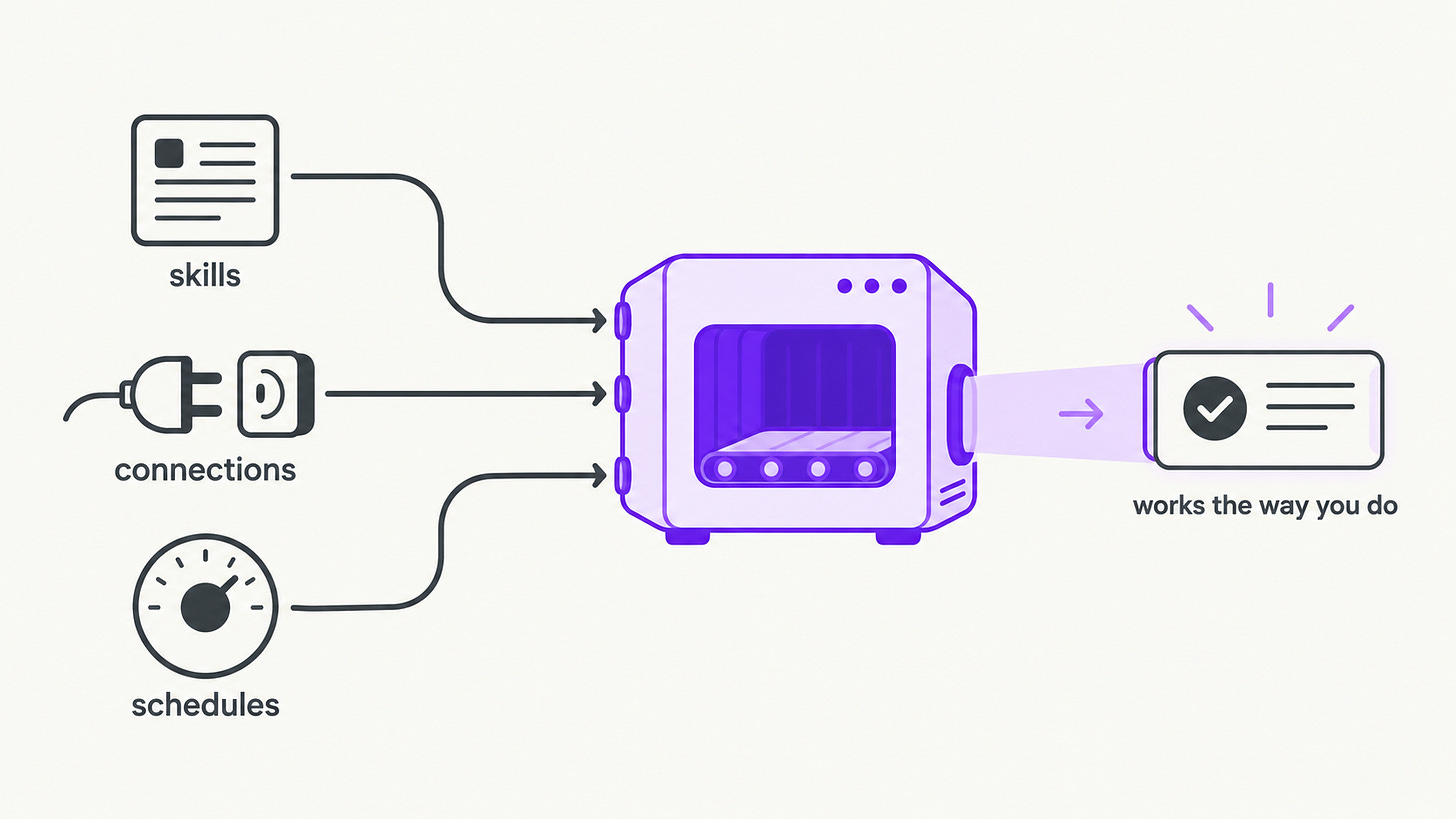
Almost every launch you’ve seen this year is an improvement on one of these, and so will be the next device, the next app, and the next feature with a brand-new name. The names are the part that keeps moving. One write-up put it well: “Connectors, apps, plugins: same mechanism, three names in eighteen months.“ There’s still room to argue about the mechanism, but you can see the direction.
My bet is that most of the AI tools in our careers will converge on that goal, whatever they’re called by the time you read this. Once you experience that, you can stop chasing.
That changes what’s worth your time.
The skills you bring to every tool, like knowing your work and judging what comes back, get more valuable as the tools multiply, because every new one still needs them. It’s the same three problems, seen from your side, and it builds in three stages, each one depending on the one before it:
Know your work.
Start by understanding your own workflow, because you can’t hand AI a process you’ve never looked at. Then break it into parts you can reuse. Those parts are what become skills in any tool you pick up.
Work with AI.
Communicate clearly with it. You could call this prompt engineering, but I mean the mental level of it: saying what you need so clearly that AI captures it and acts on it for you. Then connect AI to your data, your calendar, files and notes, so it works from what’s real. Then take the friction out by letting the steps that repeat run on their own.
Grow yourself.
When vibe coding took away the technical barrier, calling yourself technical became almost a joke, because AI is more technical than any of us. What showed up instead was everything the barrier had hidden: whether a product appeals to anyone, how it looks, and the logic behind it. That’s judgment, the same part of you every frustration with AI kept pointing back to.
It’s like learning to drive. You don’t learn to drive one car. Every car puts the wheel, the pedals and the mirrors in slightly different places, and once you can drive, you can get into any of them and go. The AI tools are the cars. These three stages are learning to drive.
And like driving, you learn it behind the wheel. You find out which of these your own work needs by watching yourself work for one day.
IV – The one-day reset
“Weak human + machine + better process was superior to a strong computer alone and, more remarkably, superior to a strong human + machine + inferior process.”
- Garry Kasparov, “The Chess Master and the Computer”
The whole reset comes down to one habit: watching yourself work. Without it, you’re guessing at what AI should take on, usually by copying someone else’s setup. One day of watching replaces the guessing.
You don’t need a course, a plan, or a week off to reset. You need four things:
One AI subscription. ChatGPT or Claude if you’re new, or whatever you already use. They barely differ on the basic work that makes up about 90% of what you’ll do. Start on the free plan, and move up to Pro or Max only when you hit its limits.
A computer or a smartphone. Whichever you already work on.
An open, collaborative mind. One that takes AI’s capabilities seriously and accepts its limits.
One normal working day, and two or three tasks you’d normally do on a computer.
By tonight, you’ll know what to build next with AI. One day gives you a direction and a first step, not the finished job.
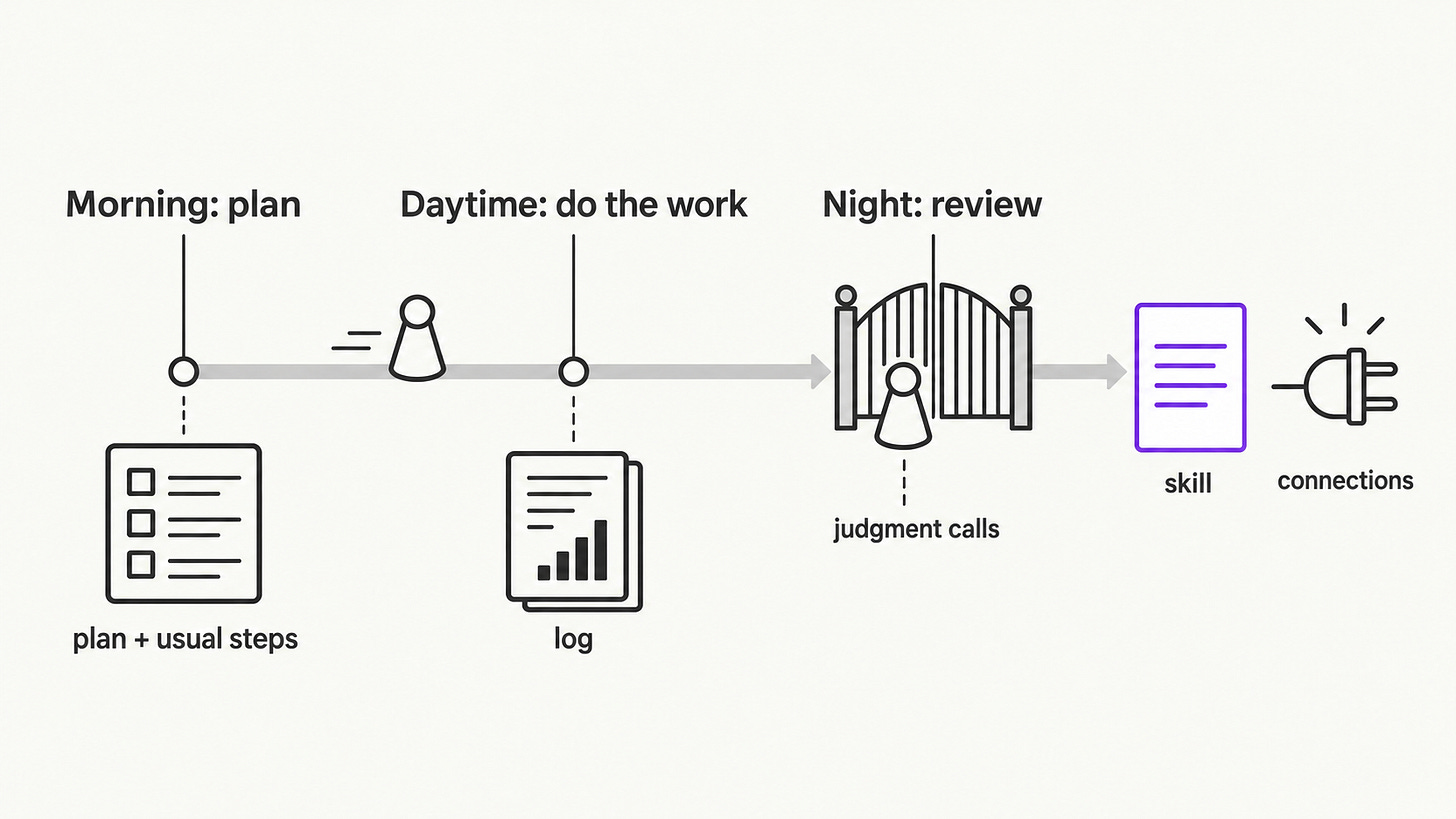
The day has three blocks, and they’re the three stages from the last section, done for real.
In the morning you plan, which is how you get to know your work: you set your goals and define what “done” looks like.
During the day you do the work with AI, researching, gathering and taking action while it records every step. That’s working with AI.
At night you review what happened, keep the judgment calls for yourself, and turn the steps that repeat into something you can reuse. That’s where you grow.
Morning: plan
Twenty minutes. One rule: write your plan down before you open any AI tool.
Split today into a few segments. Each segment is one block of time on one goal. If your work runs longer than a day, the way my articles do, list only today’s segments. Next to each one, write what “done” looks like, then the steps you usually take to get there. Three to five is enough.
Then paste this into your AI, with your segments filled in:
Today I'm working on these segments:
1. [segment]. Done looks like: [what finished looks like]. My usual steps: [step, step, step]
2. [segment]. Done looks like: [what finished looks like]. My usual steps: [step, step, step]
3. [segment]. Done looks like: [what finished looks like]. My usual steps: [step, step, step]

For each segment, tell me what I need before I start, any step I'm missing, and the questions I should answer first. Keep it short.
You’re done when each segment has a “done,” your usual steps, and AI’s notes on what you’re missing.
Daytime: do the work
Your normal working hours. One rule: let AI keep the log.
Now you do the real work, with AI beside you and the log running. Work through your segments the way you normally would. The one change is that AI writes down your process as you go. The log captures three things: the steps you take, the actions AI takes, and the tools it reaches or would have needed. Paste this at the start of each session:
While we work today, keep a running log of my process, grouped by segment. For every step, record:
- the segment it belongs to
- what I asked
- the action you took
- the tool, file or app you used, or would have needed and didn't have
- what I changed or approved
- whether it was one of the usual steps I planned this morning

When I say "wrap up," give me the full log as a numbered list.
Each time you finish a segment, stop and ask yourself two questions:
What did AI just do that I haven’t checked?
What did I just copy and paste into AI by hand?
The first time through a segment, work beside AI step by step. That first pass is what lets you hand it off later. For one of my articles, that means doing the research, the experiment and the write-up of what happened by hand once, with AI beside me the whole way.
If you’re new to AI, keep today to one segment, make it as simple as drafting an email.
If you’re already deep in AI, use today to stop a few things. Stop automating everything. Stop vibe coding everything. Stop skipping the review. Stop creating skill after skill. For one day, build nothing new and let the log show you what’s worth building. And keep maintaining what you’ve already built. It’s not a once and done.
You’re done when every segment you worked on has a log of its steps, the actions AI took, and the tools it used or needed.
Night: review
Thirty minutes. One rule: read the whole log before you decide anything.
If you asked the check-in questions after each segment, you already know at least one thing you pasted in by hand and one step you did more than once. That’s where tonight starts.
Ask AI to wrap up, read the log yourself, then paste this:
Here's my log from today. Using it:
1. Compare the steps I planned this morning with the steps I actually took, and point out the differences.
2. Find the workflow I repeated most and draft it as a skill, in my words and my format.
3. List every step that needed a tool, file or app from outside this chat. Those are the connections I should set up.
4. Mark every step where I made a judgment call. Those stay with me.
The comparison shows you how you actually work. The skill is what you’ll reuse. The connections are what AI needs to reach. The judgment calls are where AI still needs you, and they’re the part worth sharpening.
Save the skill draft wherever your AI keeps reusable instructions, as a skill, a project or a saved prompt, so tomorrow it’s already there.
You’re done when you know where your plan and your day differed, and you have a saved skill draft, a short list of connections to set up, and your judgment calls marked.
One day of mine, filled in
Here’s what the three prompts gave me on the day I made my first YouTube video. I had never made a long-form video, never edited a clip, and didn’t know what A-roll and B-roll meant.
What I pasted in the morning: “Today I’m working on one segment: make my first long-form video. Done looks like: a finished video with chapters, captions and a thumbnail. My usual steps: none, I’ve never done this.” That last line turned out to matter most. AI filled in the steps I was missing, and with them the vocabulary: A-roll, B-roll, fonts, tags, frames and captions.
What the log showed by the end of the day:
Recorded in short passages. Me. Kept the takes I liked. Planned.
Processed each take while I recorded the next. AI, working straight from the folder on my desktop. I named what I disliked, and the fix went into the notes. Not planned, and it repeated all day.
Checked every file it touched. Me. Caught an invalid video file and a half-written one. Not planned.
Designed the thumbnail. AI, generating the images inside the app. I picked one. Planned.
What the night prompt gave back:
Planned versus actual: checking files wasn’t in my plan at all, and it turned out to be the step that saved the video.
Skill: processing each take, the workflow I repeated all day.
Connections: the desktop folder it already reached. Publishing to YouTube came later, and so did Apple Podcasts and Spotify.
My judgment: approving takes and catching broken files.
By the end of the day I had my first video: 14 minutes, with chapters, captions and a thumbnail. The skill kept paying off. Turning the video into Shorts took the same path, and when I wanted it as a podcast, I handed over the audio file and ended up with a live show.
Your days don’t all work the same ways
You might notice my day looks nothing like yours. My days don’t look like each other either. Some days I’m deep in one article, some days I’m building a product, and some days I’m at my day job.
Every one of us wants to focus on one thing, and we all end up doing a whole bunch of different things.
Each kind of day needs AI for different things, so one day shows you only one slice of how you work.
So run the reset on a few different kinds of days, then lay the logs side by side. Running it across them connects the dots. A step that repeats within one day is a skill. A step that repeats across different days is worth putting on a schedule.
Carry it forward
One day shows you one slice of your work. The next few months widen it, one layer at a time:
This week: connect AI to the tools your log showed you needed, like your inbox, your files or your calendar, so your skills reach your real work instead of whatever you paste in.
This month: run the reset on different kinds of days. Turn the steps that show up across them into skills.
In three months: put the skills you use every week on a schedule. They run on their own, and you keep the judgment calls.
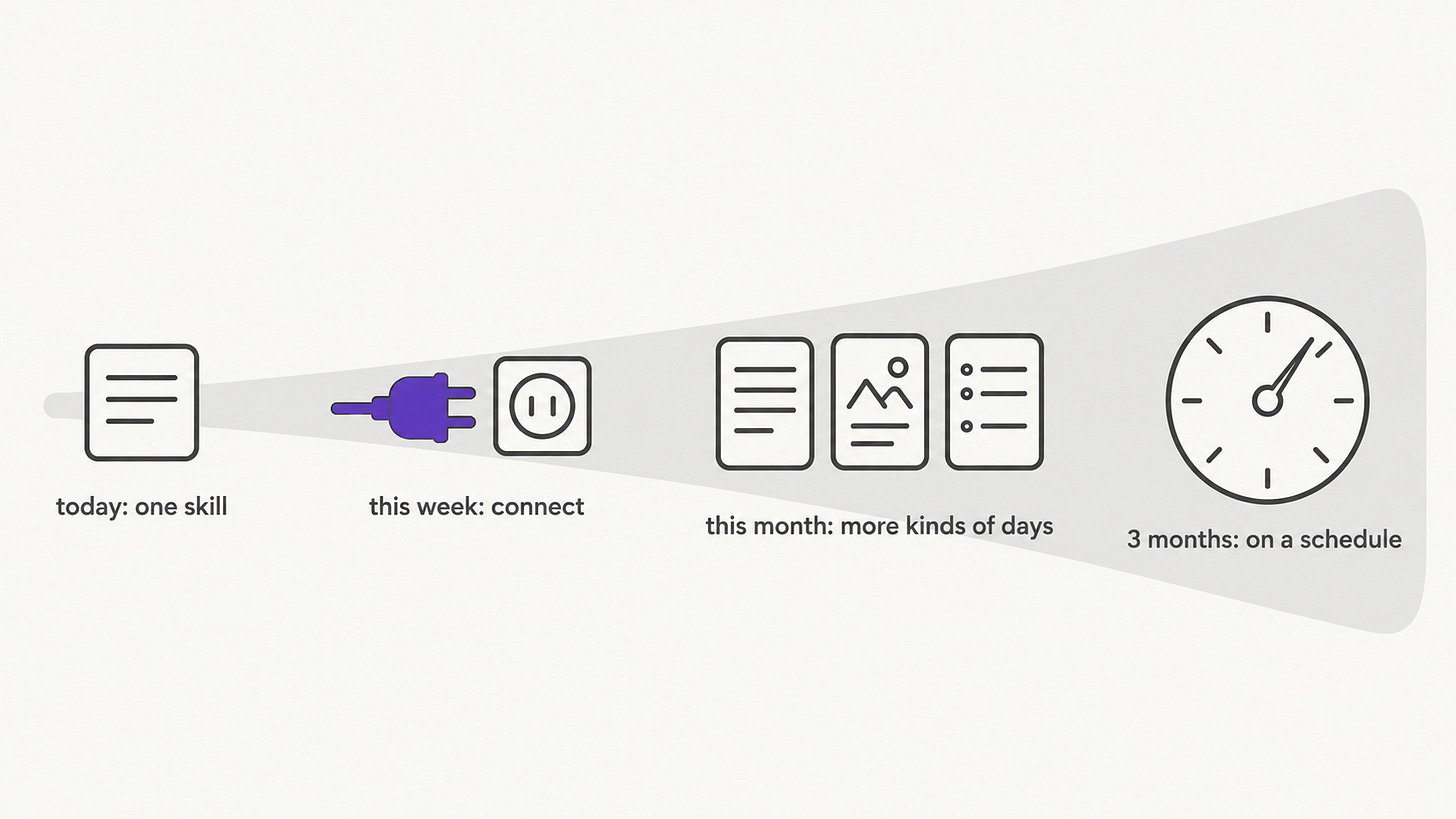
By then, AI stops being a separate tool you chase and becomes the carrier of the work you already master. The mastery stays yours. You built it one logged day at a time, and that’s what makes you hard to replace.
And it compounds. Every day you run it, you find out more of what you’re capable of. When the next shift hits your field, you’re already riding the wave.
That triggers the reset. You’ll feel the change the next time a new tool launches.
V – What changes for you after the reset
A few weeks from now, another launch will arrive with a crowd behind it, the next Muse or the next Grok Bot. Before the reset, that meant starting over. After it, you hold the new tool up against your own log and ask one question: does it do any of my repeating steps better? If it does, you move one skill over. If it doesn’t, you keep working.
The urgency goes first. “AI is going to replace me, I need to do more” gets quieter once you’ve seen your own work written down. The hope stays, and now it has reasons behind it: you’ve watched AI take real steps off your plate, and you know which steps it still can’t.
Your thinking comes first. You use AI to learn faster and get closer to first principles, and you understand your work before you hand any of it off.
You get time back, and you decide where it goes. For me, a lot of it went to things around the house. Repairs, installations, cabinet fixes, finding the right contractor: I’ve done all of them with AI beside me, and the hours it saves go to my family.
When the massacre hits the job market, you’re already moving. The early window is closing and the mass window is opening, and you’ve already stepped through it.
And you’re the one the kids in your life get to watch. Little kids can already talk with AI and get response from it. Older kids meet it as a game first, and that can turn into a habit fast. The way to teach them AI as a companion for learning is to let them see you use it that way.
AI is forcing everyone one layer down, from doing the work to deciding which work matters.
The people who prep are the ones who spend the day learning what questions they actually want to resolve.
Because AI can’t answer a question you haven’t found yet.
Every tool will keep changing. The one skill you’ll keep building on is making the judgment calls.
Now, you may notice I’ve been talking about everything AI, but somehow it ends with everything in you. You simply cannot take a shortcut with AI before you do.
Resources to make sense of it and take action
Everything I’ve mentioned here, from skills to connectors to automation, I’ve written about on its own. These articles explain the concepts in plain terms, gets to the bottom of how it works, and shows how I use it on real work. When you hit one of these in your day of implementation and get stuck, this is where to come.
I’d encourage you to bookmark this article so you can come back to it whenever you’re at a loss.
Here are they, aggregated by purpose.
Getting started with an AI tool
Talking to AI so it understands you
Get your feet wet with a real task
Use skills when necessary
Connect your AI with everything else
Build your own tools
Automation, with you in the loop
If this helped you see where AI fits in your own work, pass it on to someone who might also find it useful.
And if someone shared this with you, subscribe free so you don’t miss the next useful one.
Which part of your work do you think AI will change first?
— Jenny