From AI Tool Paralysis to Daily AI Workflow: The 3-Mode + 3-Prompt System
One mental model that works across ChatGPT, Claude, Cursor, and every AI tool
Everyone said AI would 10x productivity. The tools delivered on the promise.
But I kept watching people freeze at the same point: staring at their task list, cycling through mental tabs. “Which AI tool do I use for this?”
Research a competitor? Perplexity, ChatGPT, or NotebookLM?
Debug code? Claude, ChatGPT, or Cursor?
Write a blog post? Which tool, which model, which approach?
Fifteen minutes of decision paralysis before even starting. Half the time, they’d give up and revert to the old way.
The problem was clear: The tools weren’t the problem.
The decision framework was missing.
I saw it in so many places. Users with ChatGPT, Claude, NotebookLM, Perplexity all bookmarked. Tutorial libraries saved. Prompt collections archived. Newsletter wisdom accumulated.
None of it translating to daily use. Having capabilities and deploying them were two completely different skills.
The gap wasn’t about getting better tools or learning more prompts. It was about having a simple mental model for when and how to use what you already have.
That’s exactly what and I covered in the Day 1 of the 3-day AI workshop on adopting AI for daily life.

Note: If you missed the workshops and want to access the recording and all the materials, check out this new section in Premium Resources page.
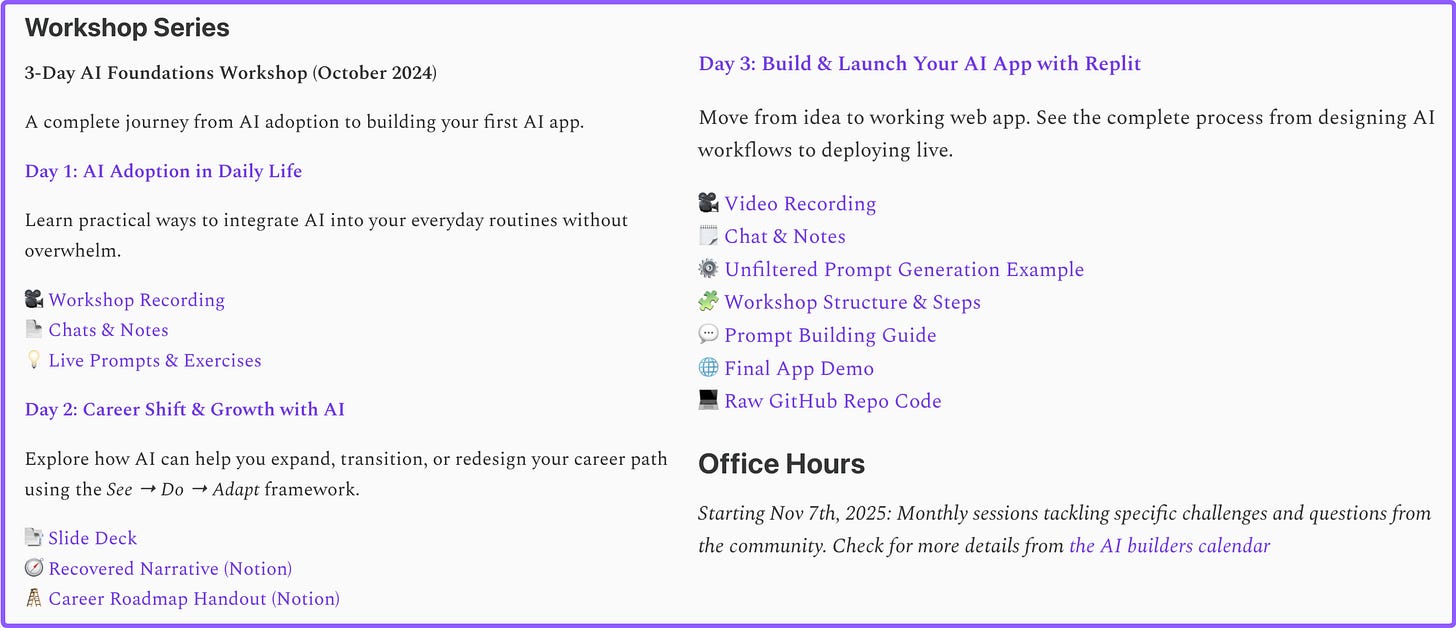
Table of Contents:
The System: 3 Modes + 3 Universal Prompting Techniques
Part 1: The 3-Mode Framework
Part 2: How to Choose the Right AI Tool
Part 3: The 3 Universal Prompting Techniques
Part 4: Using the 3 Techniques Across All Modes
Your Next Steps: Practice the Complete System
How Do I Know If I’m Getting AI Fluent?
From Overwhelm to Fluency: What Changed
The System: 3 Modes + 3 Universal Prompting Techniques
After experiencing the same struggle, trying all the fancy tools, being wowed and disappointed by certain features, the pattern became clear. The system that worked was simple:
Part 1: The 3-Mode Framework A simple way to think about any work you do with AI: Research Mode, Do Mode, Create Mode.
Part 2: The 3 Universal Techniques Three prompting approaches that work across ALL modes and ALL tools: 95% Rule, Reverse-Engineering, Two-Agent Debate.
That’s it. No complex workflows. No tool-specific tricks. A clear framework + versatile techniques.
Let’s dive into how it works in practice.
Part 1: The 3-Mode Framework
Instead of asking “Which AI tool should I use?”, the question became “What mode am I in?”
Most AI tasks fall into one of three modes:
#1. Research Mode: Understanding and Gathering
When in this mode, you are:
Learning new frameworks or concepts
Gathering information from multiple sources
Understanding complex topics
Finding examples or case studies
Analyzing documents or articles
Example scenario: You’re exploring a new programming framework but don’t know where to start. You have 10 blog posts saved, official documentation, and a few tutorial videos.
Tools that work here: NotebookLM (for synthesis), ChatGPT/Claude (for explanations), Perplexity (for research)
Simple examples from real use:
- Researching “fear around AI” with NotebookLM (demonstrated by ): Joel used NotebookLM to research how fear around AI has evolved over the past 2 years. By uploading multiple sources as nodes, he leveraged the MindMap feature to visualize connections between different perspectives and themes. The spatial organization revealed patterns across sources that would have been invisible in linear reading. This transformed scattered articles into a structured understanding of how AI anxiety shifted from existential fears to practical adoption concerns.
After attending the workshop, immediately tried NotebookLM and wrote this article to give you the easiest starting tour.
Want to dive deeper? Read the 4 Ways NotebookLM Will Supercharge Your Research by , and How I Used It to Learn Something Really Hard by .
Fighting unfair property tax with ChatGPT-o3: When I received a property reappraisal that nearly doubled our tax assessment, I asked ChatGPT to research comparable homes, analyze neighborhood pricing data, find historical tax trends, and draft a complete grievance case with supporting evidence. What would have taken days of manual research (digging through public records, comparison shopping, legal research) was completed in 2 hours. The AI-generated arguments were stronger than I could have built alone.
Creating business roadmap with ChatGPT-o3: I asked ChatGPT to research a complete $30K/month online business roadmap based on what it knows about me. It researched real development models across different business types, created an execution timeline with specific KPIs, and synthesized best practices into actionable plans - all from one research request.
#2. Do Mode: Executing and Building
When in this mode, you are:
Debugging code or fixing errors
Automating repetitive tasks
Processing data or transforming files
Building specific features or functions
Executing clear, defined items
Example scenario: You’re building a data pipeline but keep hitting errors. You need to debug quickly, test different approaches, and get working code.
Tools that work here: Claude/ChatGPT (for integration/execution), Cursor (for code), any AI tool with good technical reasoning
Simple examples from real use:
Connecting ChatGPT Actions to Notion: Instead of constantly switching between ChatGPT for brainstorming ideas and Notion to save them, I connected ChatGPT directly to my Notion workspace. Now AI can create and update Notion pages while I stay in conversation - eliminating the copy-paste friction that used to break my flow. The integration handles the execution while I focus on thinking.
Finding files locally with Claude Desktop: Instead of manually searching through folders or trying to remember where you saved something, Claude Desktop can search your local files directly. Ask it to find “that AI workflow I downloaded last week” or “the spreadsheet with Q4 metrics” - it searches your system and surfaces the exact file without breaking your flow. No more alt-tabbing to Finder, no more “Where did I save that?” moments interrupting deep work.
#3. Create Mode: Synthesizing and Producing
When in this mode, you are:
Writing articles, documentation, or content
Designing new features or products
Generating images, designs, or creative work
Prototyping an idea
Building something from scratch
Example scenario: You’re writing a technical blog post about a project you built. You want it to be clear, engaging, and useful for other developers.
Tools that work here: ChatGPT/Claude (for writing), image generation tools (for visuals), any AI tool with strong creative capabilities
Simple example from real use:
Creating consistent thumbnails with 3D cartoon character: Instead of hiring a designer or creating different visuals for every article, I use image generation to render the same 3D cartoon character in different daily-life settings (working at desk, thinking with coffee, presenting ideas). This maintains brand consistency across all content while adapting to each topic’s context - same character, different scenarios.

Jenny is consistently showing up in the interview thumbnails of Build to Launch Friday series
Creating complete articles with Claude (Joel): Joel demonstrated how he goes from research to finished article in one workflow. He uploaded his premium resources into Claude, then used it to draft a complete article in his own voice - from headline to conclusion. The entire article creation process happened within Claude, using his curated sources as the foundation. This eliminated the typical workflow fragmentation of research in one tool, outlining in another, and writing in a third. What normally takes multiple tools and context switches became a single, continuous execution.
He wrote a flagship article capturing the complete workflow.
#4. Why this framework works
Instead of tool paralysis (”Which tool?”), you get mode clarity (”What am I doing?”).
Important: These modes aren’t isolated. Real work flows between them. Research turns into building, building reveals gaps that need more research, creating requires both. One tool handles all three without switching. The framework guides your thinking, not your tool choice.
That solves the first problem: knowing what you’re doing.
But there’s a second problem: knowing how to execute. You know you’re in Research Mode, but which tool opens? Which feature works? How do you know you’re doing it right?
That’s what the next section solves.
Part 2: How to Choose the Right AI Tool
The Sauce: Tools Are Interchangeable
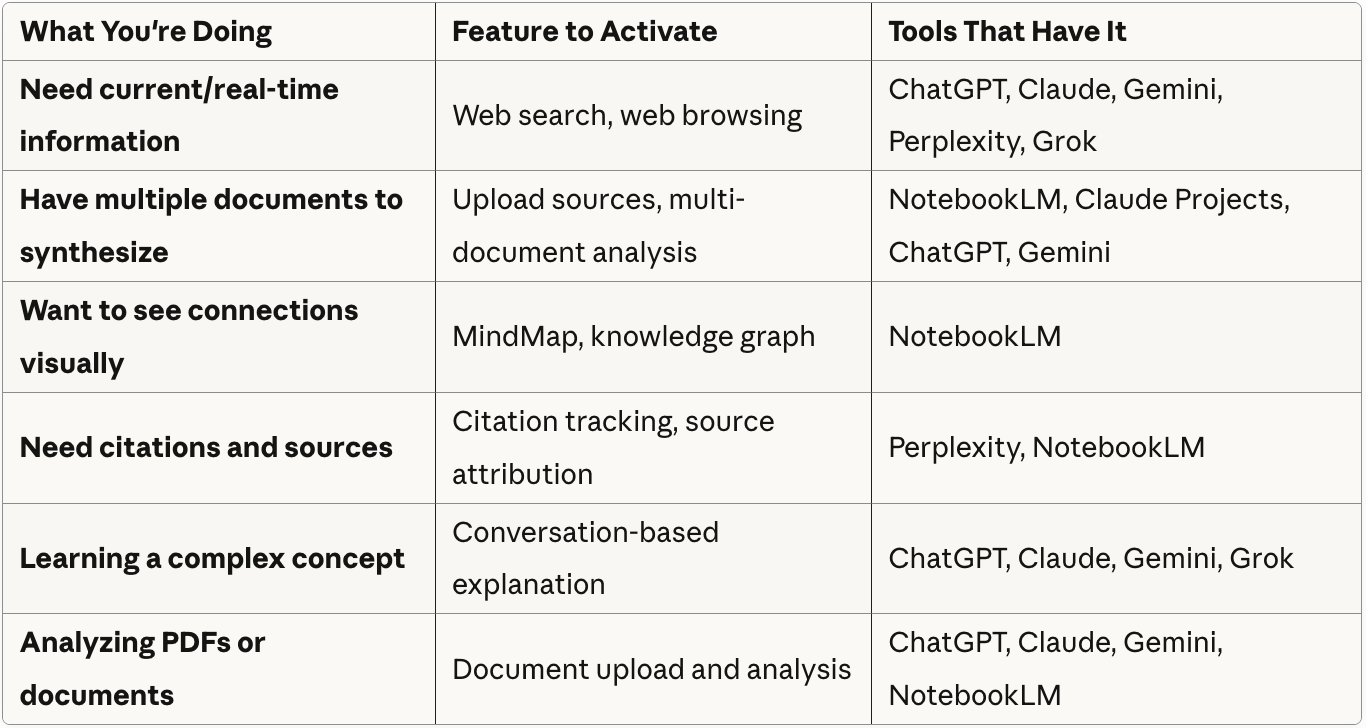
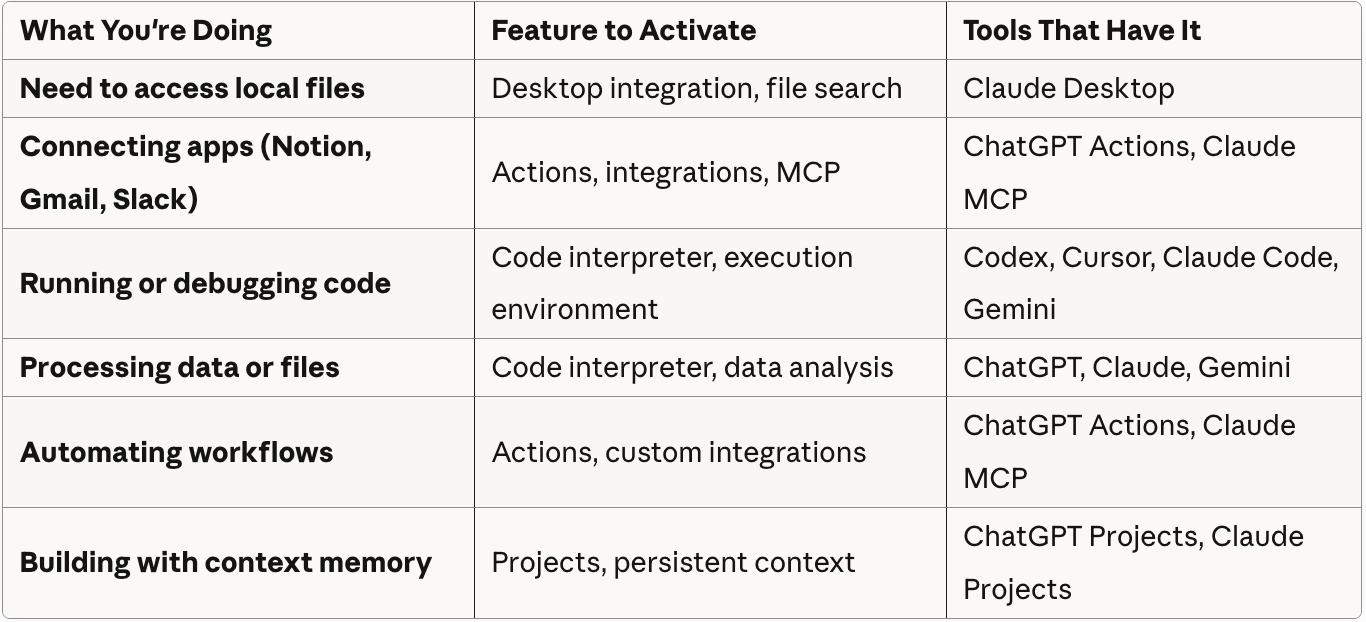
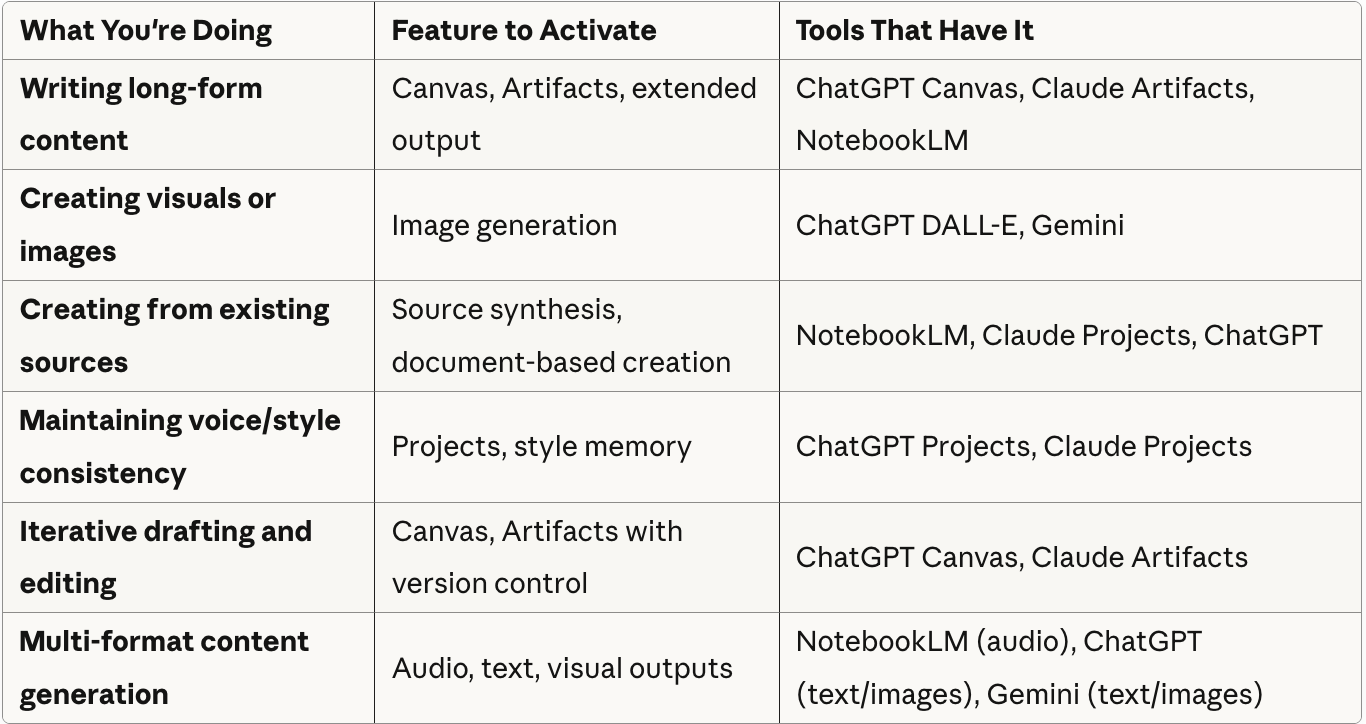
ChatGPT, Claude, Gemini, NotebookLM, Perplexity (and others like Grok, Copilot, DeepSeek, etc.) all work for Research, Do, AND Create.
The difference isn’t the tool. It’s which feature you activate.
Stop asking “Which tool?” Start asking “What mode am I in? What capability do I need?”
Capabilities organized by mode:
Research Mode - Understanding and Gathering
Do Mode - Executing and Building
Create Mode - Synthesizing and Producing
Example: Same task, five different tools
Let’s say you’re in Research Mode - you need to research competitor pricing strategies.
NotebookLM: Web search / Import competitor pages as sources → Use MindMap to visualize pricing tiers
ChatGPT: Web browsing → “Find and compare pricing for [competitors], create comparison table”
Perplexity: Multi-source search → Get citations for pricing claims
Claude: Web search / Upload PDFs → “Extract pricing models and compare approaches”
Gemini: Web search → “Compare competitor pricing, summarize patterns”
All five work. Use whichever one you already have open.
Now you’re not choosing the “best” tool. You’re using whatever’s convenient and activating the right feature for your mode.
Once you’re fluent with modes, let’s add the advanced layer - three universal prompting techniques that multiply your results across all modes.
Part 3: The 3 Universal Prompting Techniques
These three techniques transform how we use AI. They work in Research Mode, Do Mode, Create Mode. They work with ChatGPT, Claude, NotebookLM, any AI tool.
They’re universal.
Technique #1: The 95% Rule
Core principle: Ask AI to interview you until it’s 95% confident it understands your problem.
Most people either give too little context (”Help me debug this”) or try to dump everything upfront and miss key details.
Both approaches fail because you’re guessing what AI needs to know.
Instead, flip the burden: Let AI ask YOU questions.
Start with:
“I need help with [brief description]. Ask me questions until you’re 95% confident you understand what I need and can provide a specific solution.”
Then answer AI’s questions. The AI will gather:
What you’re working on
What you’ve tried
What’s not working
Your specific context and constraints
What outcome you need
This works because:
AI knows what information IT needs (you don’t have to guess)
You avoid cognitive overload of “did I forget something?”
The conversation naturally narrows to the real problem
By the time AI is 95% confident, you often understand the problem better too
Technique #2: Reverse-Engineering
Core principle: Show AI an example you want to recreate, then ask it to reverse-engineer the structure, process, and decisions behind it.
Most people ask AI: “How do I do X?” and spend weeks on trial and error learning the path.
Instead, learn from what already works:
Find an example of what you want to create (article, image, workflow, product)
Show it to AI
Ask: “Reverse-engineer this - what structure, decisions, and process made this work?”
This works because you skip the trial and error. Instead of figuring out the path yourself, you get the blueprint from analyzing successful examples.
Technique #3: Two-Agent Debate
Core principle: Create two opposing perspectives and let them debate to find better solutions.
This is the most powerful technique, especially for complex decisions.
Instead of asking AI for a recommendation, ask for a debate:
“Create two agents with opposing views on [topic]”
“Agent A argues for [approach X], Agent B argues for [approach Y]”
“Have them debate back and forth until they converge on a solution”
The debate format forces the AI to consider multiple angles, challenge assumptions, and arrive at more nuanced insights.
Part 4: Using the 3 Techniques Across All Modes
Now we can get practical. Apply each technique everywhere.
Use #1. The 95% Rule in Any Mode
In Create Mode: Generating Images or Software
Bad approach:
“Create an image of a modern website landing page.”
95% Rule approach:
“I need an image for a landing page hero section. Ask me questions until you’re 95% confident you can create exactly what I’m envisioning.”
AI’s interview:
“What design style are you going for?”
- Clean, modern, lots of white space like Linear’s design
“What are the key visual elements?”
- Bold headline on left, abstract 3D shapes on right
“What proportions?”
- Headline takes 40%, shapes take 60%
“What mood or feeling should it convey?”
- Professional but approachable
“Who’s the target audience?”
- B2B SaaS companies
“Any color preferences or brand guidelines?”
- Soft gradients, blue to purple
“What dimensions?”
- 1920x1080, horizontal
“Any reference designs you love?”
- Stripe, Notion, Linear landing pages
AI responds: “I’m 95% confident about your vision. Creating: Clean B2B SaaS hero with left-aligned bold headline, right-side abstract 3D shapes in blue-purple gradients, 1920x1080, inspired by Linear’s minimal aesthetic...”
What changed: AI asked clarifying questions to match your vision precisely.
Result: Output that matches what you imagined, not generic stock images.
Tools that work: Works for image generation (ChatGPT with DALL-E, Midjourney via Discord), writing (ChatGPT, Claude, Cursor), or any creative work where you need AI to understand your vision.
Key takeaway: The 95% Rule works everywhere because AI asks for what IT needs to know, removing your cognitive burden of guessing what’s relevant.
Use #2. Reverse-Engineering in Any Mode
In Research Mode: Learn Writing from Someone You Admire
Traditional approach:
“How do I write engaging technical articles?”
You get generic advice: “Use clear structure, add examples, write conversationally...”
Reverse-Engineering approach:
“I want to write articles like this one [paste article or link]. Reverse-engineer this article:
What’s the structure and flow?
What decisions make it engaging (hooks, examples, voice)?
What’s the formula - how does each section build on the previous?
If I wanted to recreate this style for a different topic, what would I copy?”
AI responds with:
8-part structure breakdown
Specific techniques (vulnerable voice, extreme specificity, progressive depth)
Formula template you can apply to your topic
Examples of how each section works
What changed: You gave AI a successful example to analyze, not a vague request. AI deconstructed the blueprint.
Result: Actionable formula from real successful work, not generic writing advice.
Tools that work: Works in ChatGPT, Claude, or Cursor (great for analyzing writing with your own drafts in context).
Key takeaway: Reverse-Engineering works everywhere because you learn from what already works instead of spending months on trial and error. Find an example you love, have AI deconstruct it, get the blueprint.
Use #3. Two-Agent Debate in Any Mode
In Do Mode: Deciding Between Technical Approaches
Traditional approach:
“What framework should I use to build my application?”
You get generic comparisons: “Next.js for full-stack, FastAPI for APIs, Django for MVPs...”
Two-Agent Debate approach (using Claude, ChatGPT, or Cursor):
“I’m building a SaaS dashboard with real-time data updates and API endpoints. I need to decide between FastAPI (Python backend + separate React frontend) or Next.js (full-stack React framework).
Create two expert agents:
Agent A: Advocates strongly for FastAPI with separate React frontend
Agent B: Advocates strongly for Next.js full-stack approach
Have them debate this specific use case for 3-4 rounds, then converge on a recommendation.”
What you get:
Agent A: “FastAPI gives you Python’s data science ecosystem for real-time processing. Clean separation between backend and frontend...”
Agent B: “But Next.js gives you server-side rendering, API routes, and unified deployment. Faster development with less infrastructure...”
Agent A: “True, but if you need complex data processing or ML features later, Python backend scales better...”
Agent B: “Fair point. Though Next.js API routes can call Python microservices. And React Server Components reduce API calls...”
Convergence: “If heavy data processing is core: FastAPI + React. If speed to market and simpler infrastructure matter more: Next.js with Python microservices when needed.”
What changed: Debate format forced consideration of trade-offs for your specific building context.
Result: Nuanced technical decision based on your priorities, not generic framework comparison.
Tools that work: Works great in Cursor (with codebase context), Claude Code (for architecture discussions), or during pair programming sessions.
Key takeaway: Two-Agent Debate works everywhere because complex decisions require considering multiple perspectives, not one “right answer.”
Your Next Steps: Practice the Complete System
Now you have the full system: 3 modes + 3 universal techniques. How to practice it:
Step 1: Mode Recognition
Goal: Train yourself to identify which mode you’re in before opening any AI tool.
Practice:
Keep a simple note open (physical or digital)
Before using AI, write down: “Mode: Research / Do / Create”
That’s it. Just naming the mode.
Example:
Need to understand competitor features → Research Mode
Debug failing test → Do Mode
Draft newsletter → Create Mode
You’re building the mental habit of task-first thinking, not tool-first thinking.
Step 2: Pick One Technique, Use It Everywhere
Goal: Experience how one technique works across all modes.
Choose one technique to practice for two days:
95% Rule: Have AI interview you before solving
Reverse-Engineering: Show AI examples to deconstruct
Two-Agent Debate: Create opposing perspectives to debate
Practice:
Use ONLY that technique for two full days
Apply it in every mode (Research, Do, Create)
Notice what changes in your results
Example with 95% Rule:
Research Mode: “Research competitor pricing. Ask questions until 95% confident.”
Do Mode: “Debug this code. Ask questions until 95% confident.”
Create Mode: “Create landing page copy. Ask questions until 95% confident.”
Why this works: Depth over breadth. Mastering one technique across contexts builds intuition faster than trying all techniques superficially.
Step 3: Combine Everything Naturally
Goal: Stop thinking about the system. Just use it.
Practice:
Stop tracking modes explicitly
Use whichever technique feels right for the task
Notice when you switch modes naturally within a project
Example project (building a feature):
Research Mode → Find similar implementations → Reverse-Engineering
Do Mode → Write code → 95% Rule when stuck
Create Mode → Write documentation → Two-Agent Debate for structure
Why this works: The system becomes invisible. You’re not “using a framework” anymore—you’re working with AI naturally.
How Do I Know If I’m Getting AI Fluent?
You’ve achieved AI fluency when these signals appear naturally:
Tool paralysis disappears. You open whatever AI tool is convenient. You activate features based on what you need, not tool brand names. Zero time spent asking “Which tool should I use?”
You start with problems, not tools. Your first thought is “I’m in Research Mode” not “Should I use ChatGPT or Claude?” You know which capability you need before opening anything.
Techniques become reflexive. You catch yourself using 95% Rule without planning to. You naturally show AI examples to reverse-engineer. You create debates for complex decisions automatically.
Context-switching friction drops. Moving between AI tools feels like switching browser tabs. You use 3-4 different AI tools in one project without friction. Features matter more than brand names.
Your prompts get shorter and work better. Less explanation needed because you’re in the right mode with the right technique. AI understands faster. Results improve even though you’re writing less.
The clearest signal: You stop thinking about AI tools as separate things. They become extensions of your workflow, like keyboard shortcuts.
If you’re not seeing these signals after two weeks:
Pick ONE tool and commit. Stop trying to master all tools before starting. Use one tool for everything this week. Mode-first thinking works with any tool.
Practice ONE technique deeply. Stop collecting prompt libraries without applying them. Use one technique for two full days across all your actual work. Master one deeply, not many superficially.
Stay in one tool per task. Stop switching tools mid-task (ChatGPT → Claude → Perplexity). This fragments context and kills momentum. Commit to one tool for the entire task. Fix the prompt, not the platform.
Let modes blend naturally. Stop treating modes as rigid categories. Real work flows between them: research → build → document. Use modes as starting points, not boundaries.
Give it time. Week one builds mode recognition. Week two builds technique fluency. Week three, it clicks.
From Overwhelm to Fluency: What Changed
The real transformation wasn’t learning new prompts.
It was stopping the endless tool evaluation loop. Recognizing that “Which tool?” is the wrong question. The right question is “What am I trying to do?”
That shift - from tool-first to task-first thinking - diminished the AI overwhelm.
No analysis paralysis. No second-guessing. Just clarity.
The system is simple:
3 modes to organize any work
3 techniques that work everywhere
From overwhelm to daily fluency.
The goal isn’t to memorize frameworks. It’s to internalize a way of thinking that makes AI feel like a natural extension of how you work.
Start today: Pick one mode. Use it for a full day. You’ll develop intuition faster than reading any guide.
This article is based on the Day 1 workshop content from my AI workshop series happened during Oct 14-16, 2025. The complete recording and materials can be found at the workshop series section in the premium resources page.