AI Won’t Replace You: How to Build a Workflow That 10× Your Productivity
The 4 Traps That Make Smart People Worse at Their Jobs After Using AI — and the Workflow That Fixes All of Them
AI should be making you more productive. For most people, it's doing the opposite, and they can't figure out why. The answer is 4 specific failure patterns that show up in every AI workflow: outputs that get worse the more you revise them, conversations that collapse mid-project, constant tool-switching that never resolves, and delegation that creates more cleanup than it saves. Each pattern has a name and a fix. Here's the complete workflow.

When ChatGPT first launched, it felt like magic.
People typed in questions and watched as something eerily smart replied. It was new. It was thrilling. It was the future.
Then the future arrived faster than we expected.
Now, CEOs are mandating AI-first strategies.
Snapchat’s CEO went so far as to say: “Don’t hire unless you’ve proven AI can’t do the job first.”
In just months, AI went from “interesting toy” to “default coworker.”
AI is no longer just a tool. It’s becoming a teammate.
And the real competition isn’t from AI, it’s from people who know how to leverage it better than you do.
I shared my thoughts on my Substack notes and Stefan Girard immediately pointed out that:
Clear communication is the most valuable skill, even in AI world.
Well said. The shift is about AI, but more about better communications, and better systems. And stepping into the role of an AI manager.
Maybe you’re thinking:
AI still forgets everything. It hallucinates. It makes dumb mistakes. Isn’t this just adding chaos to my workflow?
Totally fair.
I’ve felt that exact way.
And it’s usually because of silent traps that sneak into your workflow, even if you think you’re doing everything right.
Let’s break those down.
Hi, I’m Jenny 👋
I teach non-technical people how to vibe code complete products and launch successfully. AI builder behind VibeCoding.Builders and other products with hundreds of paying customers. See all my launches →
If you’re new to Build to Launch, welcome! Here’s what you might enjoy:
Claude Code for Everyone: From Zero to Your First Project in 30 Minutes
AI Agents Explained: The One Pattern Behind Claude, ChatGPT, Cursor, and Every AI Tool

Trap 1: I Just Need Better Prompts
What it looks like
You tweak.
It rewrites.
You tweak again.
It gets worse.
Eventually, it forgets what it was doing entirely and starts generating mush.
This is the Dumbing Down Loop, the more you revise, the worse it gets.
Why it happens
You gave fragmented feedback instead of a structured rebrief.
You nudged instead of reset.
You gave vague requests that you thought was clear.
You assumed it could “learn” through chat, it can’t.
The Fix
AI doesn’t guess your standards. It reflects your clarity, or your chaos. Treat each reset like a fresh task. Give it a clean brief, not breadcrumb clues.
Think: “If I hired a new intern right now, what would I hand them?”
Structure your brief with:
A clear goal
The desired format
Context and examples
Constraints or success criteria
The less the model has to guess, the smarter it seems.
Confession:
I’ve never been great at writing prompts. So now, I just tell the AI my problem, and ask it to write the prompt for me. Then I re-use or refine that.
In my second Generative AI challenge project, I got disappointing results from my “Daily Inspirational Quotes Generator.” Why? Because my prompt was vague. I gave no constraints, format, or style examples, and got back a bland soup of platitudes.
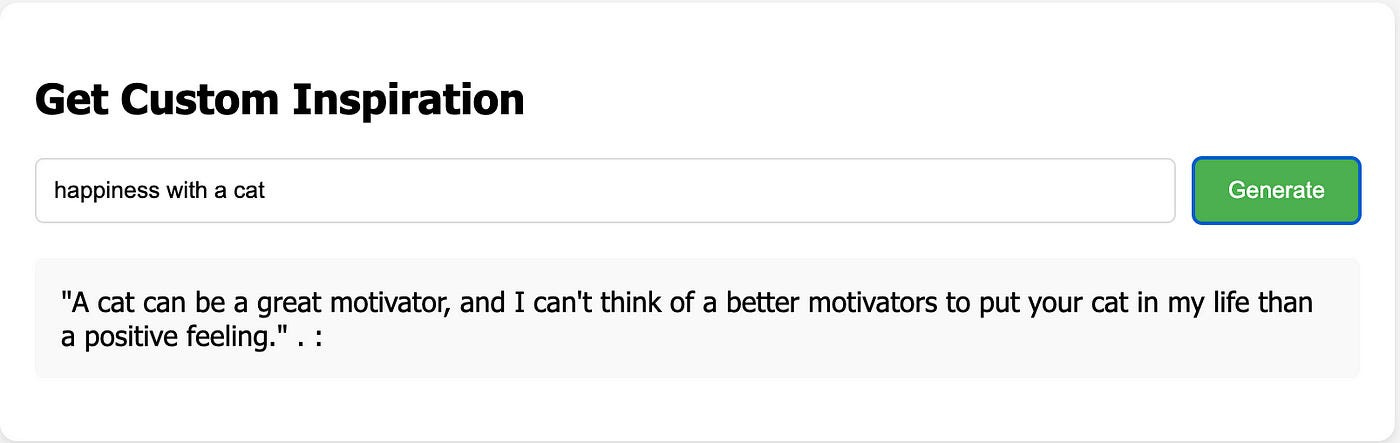
The non-satisfying output from my “Daily Inspirational Quotes Generator”
Pro Tip: Give AI What It _Actually_ Needs
Modern models can handle:
- Images
- Screenshots
- PDFs
- URLs.
Don’t describe your supporting material, give it the actual material.
In my recent article about How I Challenged Home Reappraisal 10x Faster With AI, I shared screenshots and scanned PDFs directly with AI. The results shocked me, it retrieved information I wouldn’t have remembered to include in a prompt.
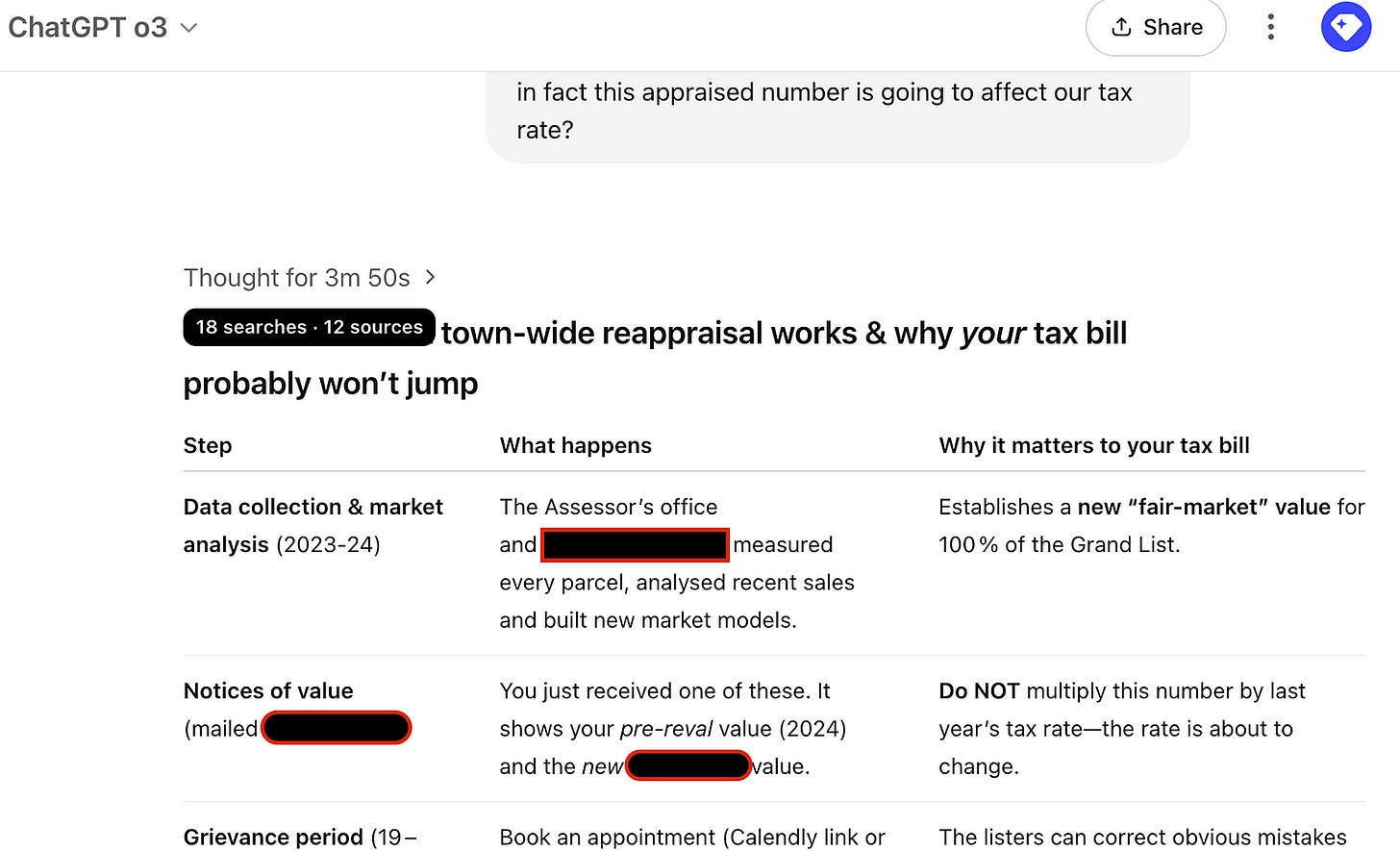
By providing photos of the document received, ChatGPT immediately understood my problem
For the universal system behind all of this — the 4 prompting patterns that transfer across every AI tool — I mapped it here.
Trap 2: Why Does It Keep Forgetting?
What it looks like
AI forgets previous messages, mixes up projects, repeats itself, or just stalls completely.
This is Context Window Collapse: when the model runs out of memory.
Why it happens
Every model has a context window, a hard cap on how much it can “hold in its head.” Once you exceed that limit, it forgets.
This isn’t user error, it’s built-in.
AI doesn’t get smarter with more input. It gets dumber when you overload it.
You’ve seen it happen:
It starts strong… then forgets what you told it
Outputs repeat, drift off-topic, or turn to nonsense
You didn’t break it. You just overfed it.
The Fix: Use the D-C-I Method
Decompose — Break big goals into small, AI-sized tasks.
Don’t ask: “Summarize this book.”
Ask: “Summarize Chapter 1 in 5 bullets.”Compress — Shrink your input without losing meaning.
Use executive summaries, bullet points, or let AI compress the material first.
Even your READMEs, docs, and specs should be briefed like you’re writing for an AI brain.Isolate — Keep unrelated threads apart.
Don’t mix frontend code with backend logic. Don’t ask for brand copy and database schema in the same prompt.
Clean isolation = clear context = better output.
📈 Real-World Impact
When you master the context window:
A 50-page legal doc turns into a 1-page summary, perfectly structured.
A messy codebase becomes modular, explainable, and AI-readable.
Research tasks run in parallel, chunked, compressed, and isolated across models.
You stop brute-forcing AI. You start directing it like a film crew.
After learning the hard way during my Generative AI project described above, I revamped my process in I Made a Note-Generating App to Free My Brain by giving clearer instructions and managing the context window properly. Once the web app went live, I started receiving thank-you notes and feedback from users who found the outputs genuinely helpful.

Screenshots of feedback on the note generation application
This is also why MCP matters — it's the protocol that lets AI hold persistent context across sessions, not just within a single conversation window.
Action Step: Run a Context Audit
Pick a real task you’ve struggled with. Ask:
- Can I decompose this into smaller parts?
- Can I compress the inputs before handing them off?
- Should I isolate this from other stuff that's muddying the waters?
Now, re-run that task with the D-C-I approaches in mind. Track how long it takes. Notice how much cleaner the output feels.
That’s your first taste of AI-native leverage.
Trap 3: I Need the Best Model
What it looks like
You bounce from GPT to Claude to Gemini, hoping one of them will finally “just work.” Each time, something breaks:
Claude rewrites more than you want
GPT makes math mistakes
Gemini sounds robotic
You end up frustrated at all of them.
This is the Model Match Mistake, mis-assigning the wrong model to the wrong job.
Why it happens
You assume all models are interchangeable
You believe benchmark scores will lead you to the one “perfect” model
But here’s the truth:
There is no best model. Only the right teammate for the task.
The Fix: Cast Your Models Like a Team
Each model has its own personality, strengths, and quirks. Your job is to assign roles the same way a manager assigns projects to specialists.
Think of each model not as a generic tool, but as a teammate with strengths, quirks, and specialties:
**🧑💻 Claude 3.7
**Fast, bold coder. Will build entire modules in a flash. But might overstep boundaries and rewrite stuff you didn’t ask for. (See my production-ready vibe coding guide for how to manage this.)
Think: An ambitious junior dev who needs clear specs.**🧠 Gemini 2.5 Pro
**Cautious, logical reviewer. Meticulous with feedback. Less likely to take initiative, but great for second looks.
Think: a meticulous Google engineer meets compliance officer.**✍️ GPT‑4.5
**Creative storyteller. Writes beautifully. Thinks abstractly. Can “hallucinate” facts but nails tone and structure.
Think: the liberal arts class president, insightful, but verbose.**🇨🇳 DeepSeek R1
**Master of Chinese content, especially Xiaohongshu-style. Adds drama, nails tone, but might drift from your script.
Think: a passionate freelance copywriter with flair and feelings.**📊 O1 Pro
**Strategist. Handles planning, diagrams, and deep structure. Great at seeing the big picture, but won’t write your boilerplate.
Think: a quiet architect who draws the map but won’t build the road.
The Secret of Multi-Model Collaboration
You’re not just using models, you’re assembling a cast.
Think of yourself as a film director:
- Claude writes the scenes
- Gemini checks the continuity
- GPT gives it emotional punch
- DeepSeek localizes it for Chinese audience
- O1 Pro makes sure the plot actually makes sense
All done right, that’s not 1 + 1 + 1 = 3.
That’s 1 + 1 + 1 = 100.
This casting model is what the AI world formalizes as "agents" — a perceive-decide-act loop with specialized roles. Here's the one pattern behind all of them.
But Be Careful: This Isn’t Plug-and-Play
Here’s where many people mess up:
They let Claude start a repo… and Gemini overwrite it.
They throw GPT and DeepSeek at the same prompt… and get a tone war.
They “set it and forget it”… and end up reverse-managed by their own AI chorus.
What’s Missing? Clear roles; Proper sequencing; Isolated context; Handoff structure.
To manage multiple models, you need a workflow, not wishful thinking.
Trap 4: I’ll Just Let AI Handle It
What it looks like
You hand off a big project and get back chaos. Misnamed files. Broken formatting. A half-architected repo you didn’t ask for.
This is the AI Nanny Syndrome: when you delegate too much, too soon, and hope it’ll figure things out.
Why it happens
No checkpoints or intermediate reviews
No constraints or output expectations
No feedback loop to guide the process
It’s not that AI can’t build for you, it’s that unsupervised automation invites confusion.
The Fix: Add Supervision, Not Micromanagement
Build light guardrails into your process:
Add intermediate checkpoints
Use checklists and review gates
Define outputs: structure, tone, and format
When I generate technical content, I never let AI run start to finish. I brief the model, validate halfway with a checklist, and only continue when outputs meet the bar. No more 3-hour cleanups.
Orchestrate Like a Pro
Think like a production manager:
Assign roles: Claude for code, Gemini for QA, GPT for docs, DeepSeek for tone
Isolate context: Each model gets only the data it needs
Manage handoffs: Each output becomes the next model’s input — not one shared thread
Build feedback loops: Validate early, often, and clearly
In my work How I Outsourced My Google Research to AI for searching preclinical results, I used one GPT for high-level planning and another for overseeing the execution steps, then Claude to dynamically generate code, and added review checkpoints between every handoff.
The system eventually ran a multi-step search:
Initial search → store results → AI refine search decision → additional search → AI evaluate results → Claude compile results into consistent excel summaries.
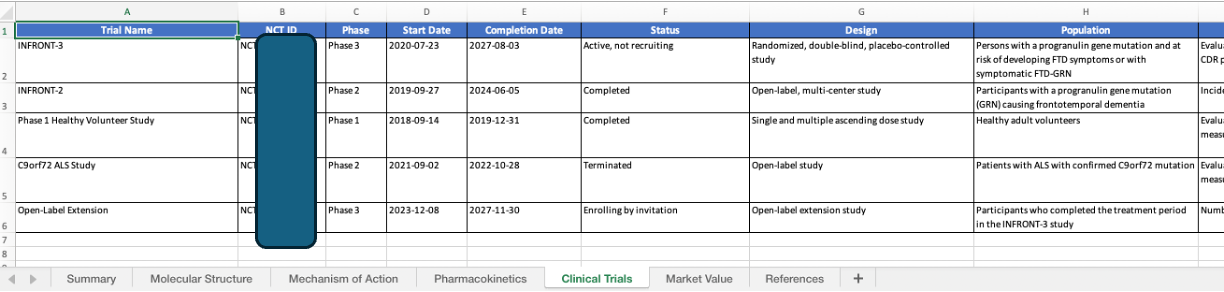
Standardized search output conducted by AI orchestrator
Action Step: Design Your First AI Pipeline
Pick a real task that involves multiple stages, something like:
A blog post
A new product spec
An app feature
A pitch deck
Now ask:
- Who's planning the structure? (O1 Pro)
- Who's creating the content/code? (Claude or GPT)
- Who's reviewing for logic and quality? (Gemini)
- Who's refining tone or language? (GPT or DeepSeek)
Sketch it out like a production line. Run it. Review it. That’s when you feel the shift, from “AI assistant” to “AI team leader”.
The Future of Sustainable Productivity
Going through all the traps, one thing becomes clear:
You don’t need technical mastery to get exponential gains from AI, you need clarity, structure, and leadership. The same skills that help you manage humans? They’re just as essential when managing AI.
Building AI systems that work the way my brain works has completely changed how I approach work. I’ve gone from juggling dozens of tabs and half-written drafts to running workflows that generate results, while I stay focused, calm, and creative.
The biggest shift?
I stopped treating AI like a clever assistant.
And started treating it like a team I’m responsible for leading.
This isn’t just for developers or creators. Whether you’re running a business, designing lessons, writing newsletters, launching products, or even just keeping a household moving, these same principles apply:
Define the outcome, not just the task
Break it into structured roles
Assign the right model to each step
Build systems that run without you
Step back in to guide, review, and improve
The future of productivity isn’t hustling harder. It’s designing workflows that match the way you think, work, and lead.
We’re entering a time where everyone can build their own support system, without needing to code, hire a team, or burn out in the process. The barriers are disappearing. What’s left is your ability to direct, experiment, and design a better way.
This is just the beginning. As the tools grow more powerful, the real advantage won’t come from using AI. It’ll come from knowing how to lead it.
The question isn’t whether AI can do the work.
The question is: What systems will you build to get your time, focus, and energy back?
Start Small, Lead Big
You don’t need to rebuild your whole workflow overnight. Start with one task. One better brief. One smarter handoff. One repeatable win.
That’s the first step, from chaos to clarity, from hustle to leverage.
This isn’t about becoming an AI expert. It’s about becoming someone who builds systems instead of reacting to problems.
That person? Doesn’t burn out. They scale up.
Start leading your AI team like you’d lead your dream team, with clarity, purpose, and momentum.
You’ve already got the blueprint. Now it’s time to build.
What You Can Do Today
You don’t need to rebuild your whole workflow overnight. Start with one trap, one fix, one repeatable win.
Run a context audit on your most frustrating AI task. Use the DCI method from Trap 2: decompose, compress, isolate. Re-run the task and track how much cleaner the output feels.
Cast your models like a team. List the 3 AI tools you use most. Assign each one a role based on its actual strengths — not based on which is “newest.” Stop using one model for everything.
Design your first AI pipeline. Pick a real multi-step task. Map who plans, who creates, who reviews, who refines. Run it once end-to-end with proper handoffs and checkpoints.
If you want to skip the setup and start with pre-built agent prompts, handoff templates, and multi-model config files, I built the AI Agent Toolkit for Everything for exactly this — the orchestration structure from Trap 4, ready to deploy.
If you want to go deeper on the tool layer: How AI Builders Use Cursor covers the setup that makes this workflow possible in practice. And if you’re newer to this and want to start building before optimizing: Claude Code for Everyone is where I’d begin.
If any of this is useful, share it with one person who’s been complaining about AI making their work worse instead of better.
If you’re turning your expertise into products, building with AI, or helping others do the same, you belong here. Join the Vibe Coding Builders community and get featured on Build to Launch Friday.
Which of the 4 traps hit closest to home for you — and what’s the first thing you’re going to change?
— Jenny
Why Subscribe · Build With AI · Templates · Builder Showcase