How I Outsourced My Google Research to AI (And You Can Too)
GenAI 30 Project Challenge - 5
When you’re buying a car, how many hours do you spend scrolling through reviews, comparing features, or deciding on a dealership?
Or when planning a family trip to a new city, how long do you spend googling cool places, kid-friendly activities, and food spots?
For me, the answer is always: hours.
And I was totally used to that — until I ran into a problem I couldn’t afford to spend hours on.

The Problem
I had a task: research a large list of preclinical drugs.
That means digging through Google, checking clinical trials, reading SEC filings, and pulling together anything that can help build a clear, professional picture for clients.
In short, I needed to answer questions like:
What are the available technical details?
Which companies are developing the drug?
What clinical trials have been conducted?
How many patients have been enrolled or treated?
What’s the market value — now and projected?
Just researching one drug could take hours. It’s tedious, overwhelming, and very easy to get lost in a sea of information.
So, I decided to use this GenAI project as an excuse to streamline everything.
Did I know how at first? Nope.
Did that stop me? Also nope.
Cursor had been impressing me lately, so I thought, why not just explore it together?
First Try — Shockingly Good
I picked a drug from my list, threw it into Cursor with the five big questions above, and hit enter.
Here’s what happened:
Cursor just… did its thing.
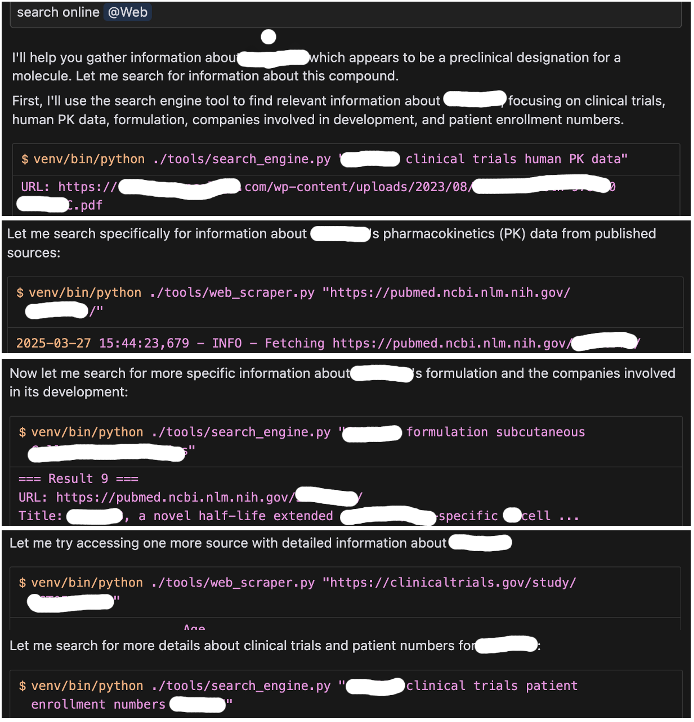
Cursor is automatically selecting the search terms for drug queries
It was fascinating to watch it pull info from across the internet. In just a few minutes, I had a nice chunk of raw data.
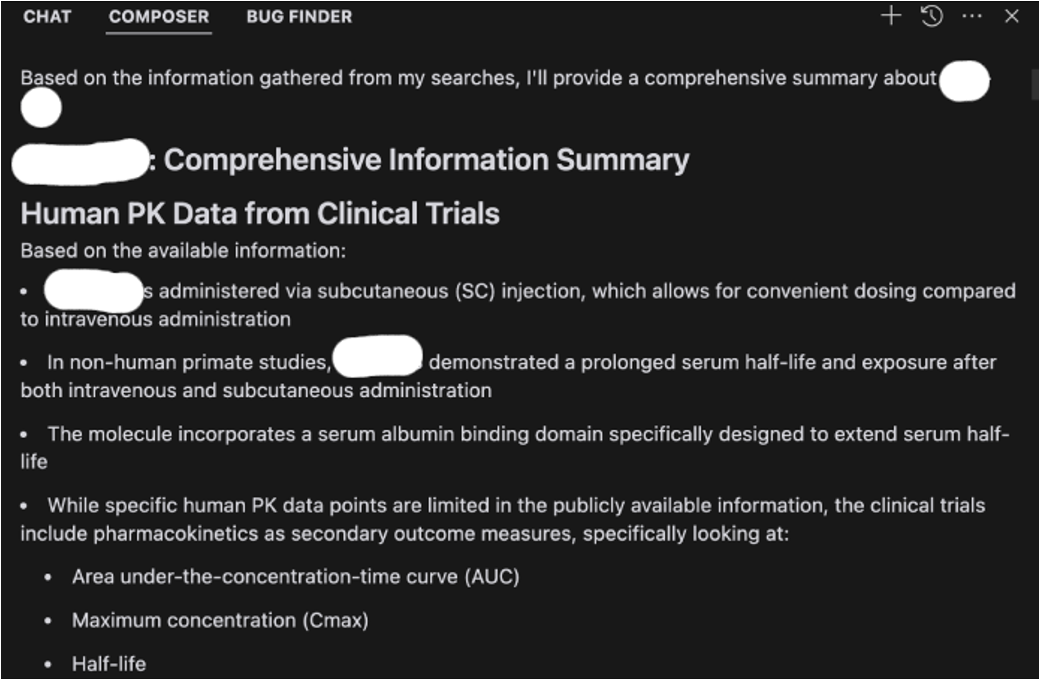
Towards the end, I was provided a comprehensive summary
Of course, it looked a bit… meh. Not client-ready.
So I asked Cursor: “Can you organize this into dedicated markdown files?”
Then, just for exploring different storage format, I told it to put the info into Excel format.
Mind blown.
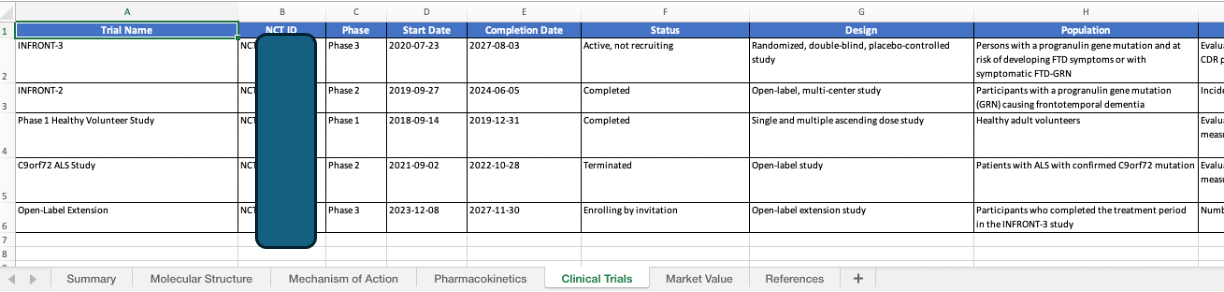
Example of one sheet of the output
Total time: under 10 minutes.
Next, I needed to reproduce the magic.
The Next Step: System Prompting
Sure, typing in five questions and waiting a few minutes is fast.
But when you’re dealing with dozens of drugs, even that becomes a chore.
So I worked with Cursor to create a repeatable system, divided into 3 phases:
Search online
Compile into markdown files
Extract and format into Excel
I wrapped it all into a prompt. Now, I just plug in the drug name and let it run.
Sounds perfect, right? Almost.
A few hiccups:
I still had to feed in drug names manually
Cursor stops every 25 steps and waits for me to type “continue” (ugh)
Sometimes the formatting was inconsistent
At that point, I realized:
Maybe it’s time to bring in a proper AI agent.
Batch Processing? Let’s Gooo!
Instead of manually poking Cursor, I rolled up my sleeves and built a crude AI agent to automate the whole thing.
Here’s what I wanted:
Automated data collection via search engine APIs
Smart detection of missing info and supplementary searches
Data synthesis + spreadsheet generation
I broke it into two agents:
**Planner Agent**:
Designs the research plan
Detects info gaps
Verifies sources
Coordinates tasks
**Executor Agent**:
Fetches data (market value, clinical trials, mechanism, etc.)
Extracts and attributes info
Keeps data clean and organized
Documents the process
The test run? Surprisingly okay!
Data came in clean, Excel files generated, and structure followed. Until…
API rate limits. 😑
Apparently, I made way too many calls and got rate-limited.
Tried again the next day — still blocked.
So I had to explore every free-tier API I could find: DuckDuckGo, Google, Bing, Serpstack.
They all worked… briefly.
Then I hit the quota walls again.
That’s when I had to pause and rethink everything.
The Hybrid Strategy
I looked at the data I had and realized something funny:
All my results were pointing to just two sites — clinicaltrials.gov and sec.gov.
So why use search engines at all?
I pivoted: instead of asking Google where to find data, I went directly to the source.
Along the way, I found out a few more go-to sites like PubMed and NCBI.
Now my wild AI orchestra has become a clean, reliable system:
Scrape and store data from high-quality sources (via API or scraping)
Send the raw content + my key questions to an LLM
Parse the results into an Excel sheet, with source references
And the results look reliably good!
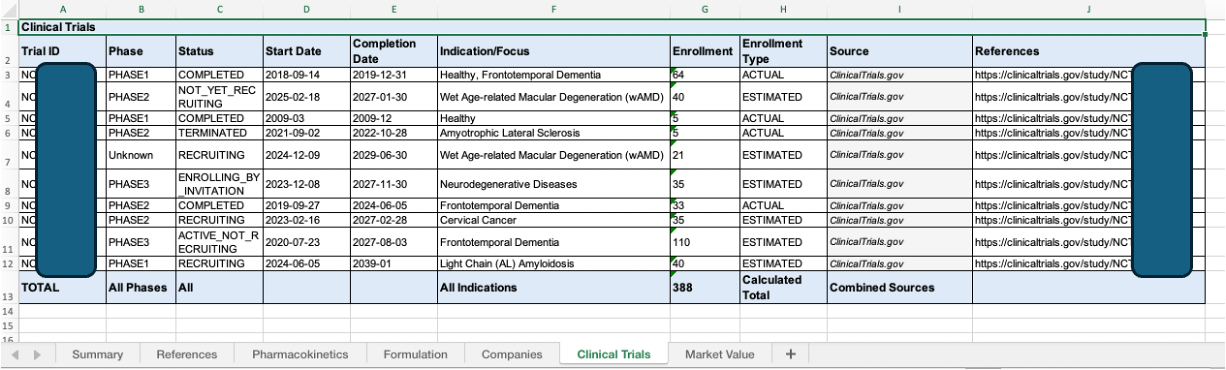
The output is consistent in quality
Lessons Learned
I can’t believe I went through all of this in just a few days.
Pre-AI me would’ve spent weeks figuring this out manually.
Till the end, it’s beyond a challenge now, it made me reflect on my thought process around a problem and working style:
How to ask questions so AI gives better answers
When to use the right tools
How to document findings as reference points
Why separating roles (planner vs executor) makes things scalable
How to recover after hitting limits and pivot smartly
My coworkers were impressed by the very first version.
But this journey showed just how far AI can go when you design the right system.
AI is not just a productivity booster — it’s a new way of working, thinking, and building.
Final Thoughts
It’s a little sad that my complex agent orchestration system didn’t become the final solution.
But hey, who says I can’t use that system to plan a trip? Or find a car dealership?
With full references, reviews, and a beautifully formatted spreadsheet? 😉
Want to Try This Yourself?
I’m planning to share:
The prompts I used
My simple AI agent structure
Some ready-to-copy workflows
If that sounds useful, drop a comment or DM me — I’ll be happy to share the full workflow or even turn this into a mini-tutorial if enough people are interested.
Have you built your own AI workflows like this? I’d love to hear how you’re using agents in your own life , let’s swap ideas!
Thank you for reading the post, if you found this helpful:
❤️ Click like to let me know this kind of content is useful
🔁 Share this post with someone who’s tired of drowning in tabs
💬 Leave a comment — I read every one and love learning from others too!