AI Agents Demystified: 3-Type Framework + 5 Questions to Evaluate Any Tool
Forget the hype. AI agents break down into 3 simple types: copilots, automations, and autonomous agents. Learn to evaluate any AI tool in 60 seconds.
AI agents are programs that take a goal, break it into steps, use tools to complete each step, and decide what to do next — without you managing every action. There are three types: the ones that follow a fixed recipe (like Notion’s AI properties), the ones that adapt their plan mid-task (like Cursor’s agent mode), and the ones that coordinate other agents (like Claude’s sub-agents). Here’s how to tell them apart and evaluate any agent product in 30 seconds.

Have you noticed how every company suddenly wants to sell you an “AI agent”?
Every product announcement, every demo video, every LinkedIn post. Revolutionary AI agents. Agentic systems. Agent mode.
The marketing departments are having a field day, and for good reason. The AI agents market is projected to grow from $7.8 billion in 2025 to $52 billion by 2030.
Meanwhile, the tools we use every day keep adding “agent” features with completely different names. Cursor has “agent mode” and “background agents.” Claude has “Cowork,” “sub-agents,” and “extended thinking.” Notion calls it “AI properties“ and “Q&A.” ChatGPT has “GPTs“ and “actions.”
Are these the same thing? Different things? What even is an agent?
I didn’t have clear answers to these questions until a few weeks ago, when I was running AI onboarding sessions for my company.
We were setting up Claude, and I quickly realized the people in that room had wildly different relationships with AI. Some had never used anything beyond basic ChatGPT. Others were deep in Claude Code, spawning sub-agents and managing multi-file refactors. And everyone in between.
When I tried to explain “agents,” the questions got interesting fast.
“So is Cursor’s autocomplete an agent?”
“What about when Notion fills in a summary automatically?”
“Is Perplexity an agent? It searches for me.”
That conversation made me realize: the concept of agents isn’t complicated at all. It’s the terminology that’s a mess. Every company wraps the same simple pattern in different words, and we end up thinking these are fundamentally different things.
They’re not.
The confusion is so widespread that the Centre for Strategic and International Studies published a paper on it: “Lost in Definition.” Even OpenAI got called out for marketing workflows as agents.
After that session, I spent weeks mapping the landscape. I traced features back to their underlying mechanics. I tested tools across categories — and if you want the raw data, I ran a 3-stage audit of 8 AI coding tools on the same project to see where each one actually wins. Once you understand the agent types, the next question is how they fit into automation — I covered when to use Claude, n8n, and OpenClaw at each level in a separate piece. And I found a pattern so simple it almost felt like cheating.
This article is what I wish I’d had for that onboarding session.
What’s Inside:
What makes something an “agent” (simpler than you think)
Agents you’re already using without realizing
Three universal agent types:
What slash commands, skills, rules, cowork mode, MCP have in common, and how to evaluate any “agent” product
Where to start based on your level (beginner → intermediate → advanced)
I also created an Agent Cheat Sheet + full Agent Toolkit that maps all of this (details at the end).

Hi, I’m Jenny 👋
I run the Practical AI Builder program — for people who already use AI and want to build real things with it. Check it out if that sounds like you.
If you’re new to Build to Launch, welcome! Here’s what you might enjoy:

What Is an Agent, Really?
This is what I figured out after all that research:
Any AI action, no matter how small, triggers an agent.
That’s it. If the AI does something beyond generating text — searches the web, edits a file, calls an API, retrieves from a database — an agent ran. You didn’t “create” it. It was always there, built into the tool you were using.
Two examples that made it click for me.
Example 1: Perplexity (Simplest Agent)
You ask Perplexity: “What is the latest on AI agents?”
Behind the scenes:
Perplexity spins up an agent
Agent searches the web (tool call)
Agent reads and aggregates results (reasoning)
Agent formats and presents findings (output)
That’s an agent. The moment it decided to search instead of answering from memory, it became agentic.
Example 2: Claude Code Sub-Agents (What Devs Keep Hearing About)
If you’ve done any bit of code, you’ve heard “parallel agents” and “sub-agents” constantly in the last few months.
When I was validating a deal aggregator idea, I ran 9 agents in parallel to research 16 sites. Three did technical audits (checking RSS feeds, APIs). Four researched business models by category. Two tested data access. Claude Code orchestrated them, spawning, monitoring, aggregating results.
That’s the same pattern, scaled up. One “parent” agent delegating to “child” agents, each doing a focused task.
The boundary is action. If it acts on the world, even searching alone, it’s an agent.
The Stack (Visual)
This is how I think about it:
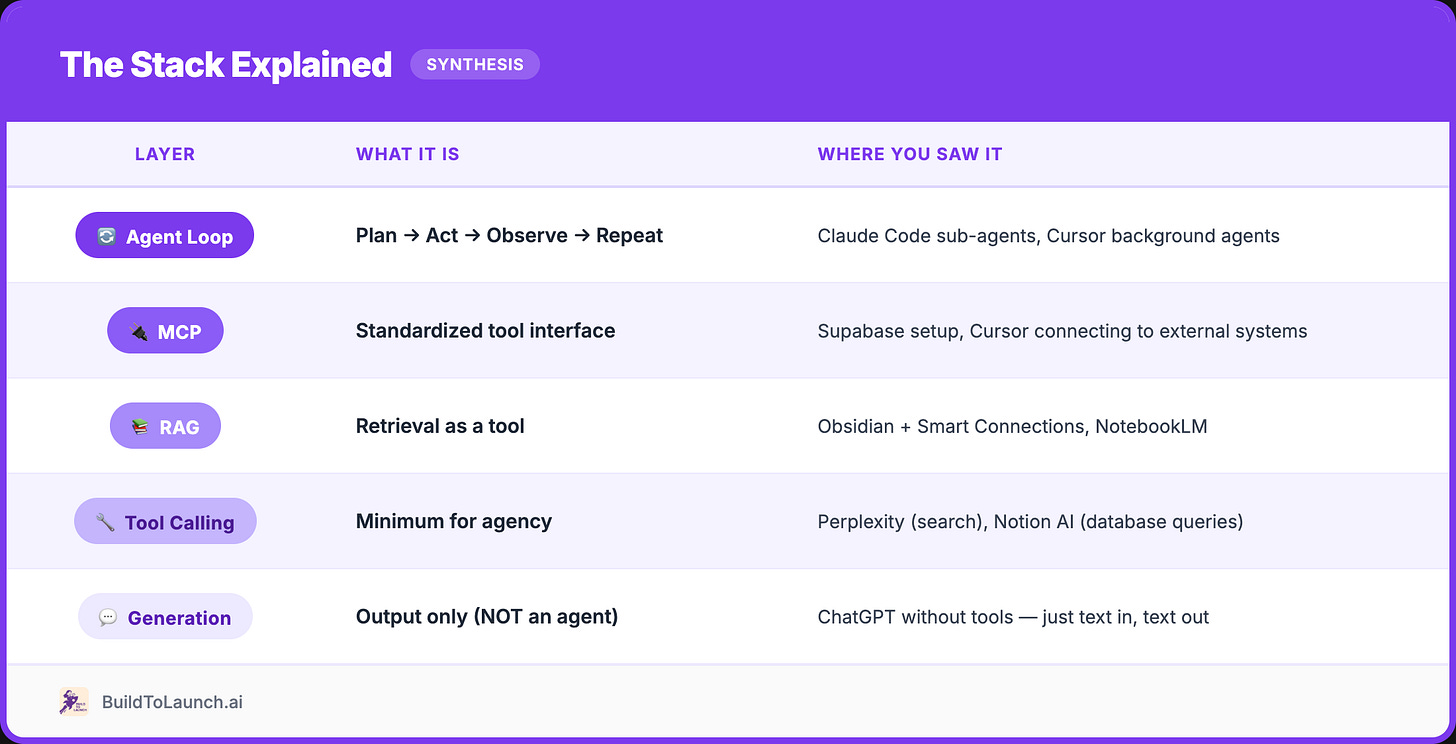
Everything below the “Tool Calling” line? Pure generation. Everything above it? Some form of agent behavior.
We’ll come back to this after you’ve seen examples at every level. But first, the preview that will make sense of everything else:
All those mysterious features: slash commands, skills, rules, cowork mode… they’re pieces of this same stack, named differently by different products.
🎁 I created an Agent Cheat Sheet that maps every feature to where it sits in this stack, get it for free here.
Information Agents (Work With Knowledge)
Now let’s see this pattern in action across three types of agents. We’ll start with ones you’re probably using without realizing it.
Information agents = knowledge workers.
They summarize, extract, query, classify. They turn your information chaos into something usable.
Notion AI → Workspace Agent
If you use Notion, you’ve used an agent without thinking about it.
Ask: “What did we decide in last week’s meeting?”
Notion searches your workspace → finds relevant content → synthesizes answer. That’s retrieval + reasoning = agent.
The deeper behavior: AI Properties.
Add an “AI Summary” property to a database.
Every new row automatically triggers: read content → generate summary → update property. Agent running on data change, no prompt required. (I’ve been playing with Notion’s beta agent features a lot lately, stay tuned for a full breakdown!)
Obsidian → Local-First Agent
Same pattern, more privacy.
Plugins like Smart Connections let you query your vault: “What notes do I have about productivity systems?” Returns files by meaning, not keywords.
The pattern: RAG over your personal knowledge base.
Your notes = retrieval source.
AI = second brain that remembers what you wrote.
I wrote a full breakdown of how RAG works and how to build your own AI second brain, check it out here if you want the deep dive.
Research Tools → Specialized Info Agents
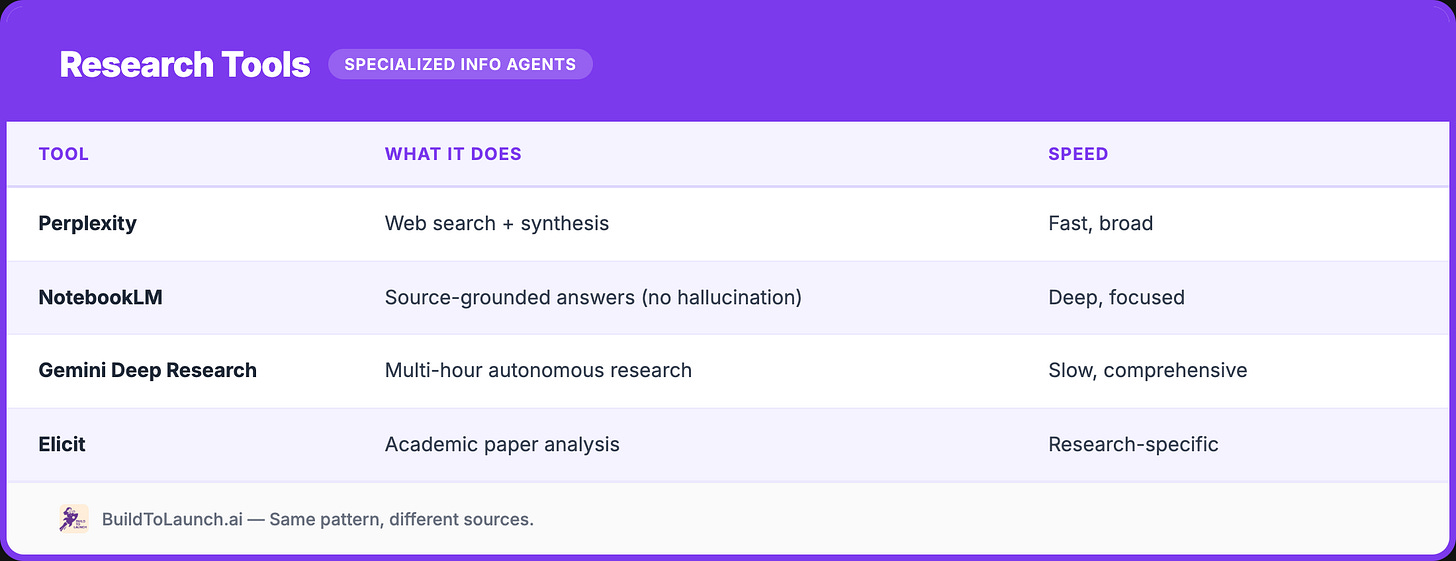
Same pattern, different sources.
Retrieve → reason → respond.
The difference is what they search and how long they run.
Interaction Agents (Talk to Humans)
Information agents work with knowledge. But what about agents that work with you, the human-facing layer?
Interaction agents = conversation handlers.
They chat, route, triage, and hand off to other systems.
Chat Assistants → Router Agents
When you chat with Claude, ChatGPT, or Gemini, you’re talking to an interaction agent.
Key insight: these are routers, not specialists.
Ask Claude to search → routes to information agent behavior.
Ask to write code → routes to operational agent behavior.
The conversation layer decides what to invoke.
This is why general chat products feel so flexible.
Support Bots → Resolution Agents
Enterprise support has gone full agentic:
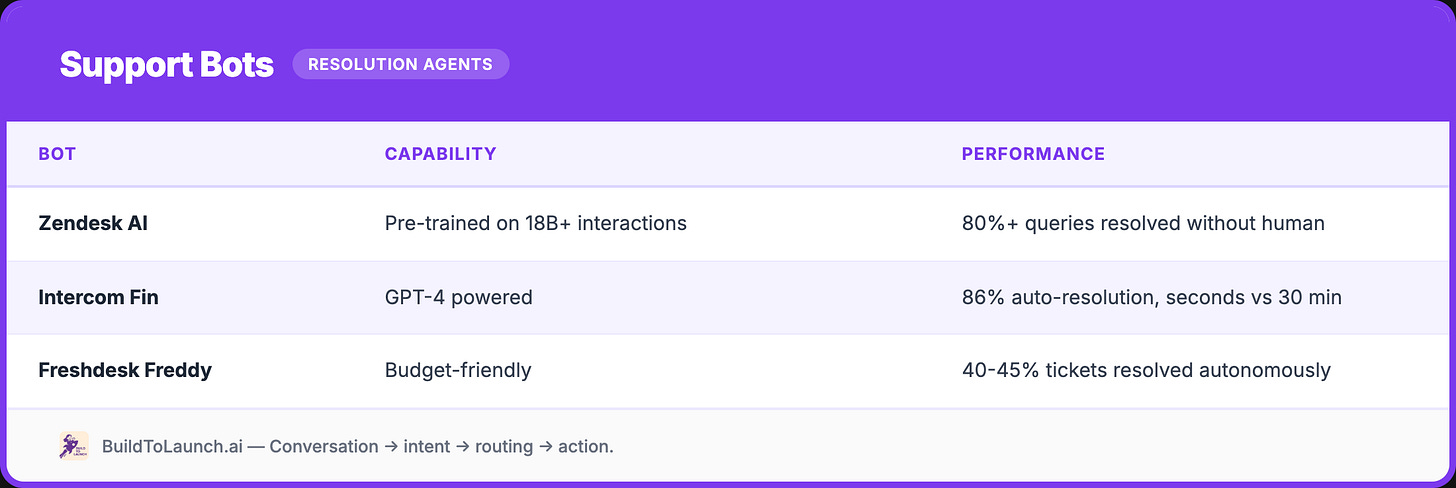
Pattern: conversation → intent detection → routing → action or escalation.
The secret ingredient? Memory.
The best interaction agents remember past conversations, user preferences, and context across sessions. I interviewed the builder behind MemMachine, an open-source AI memory layer. ’s take on why your memories should belong to you (not the AI companies) changed how I think about this space.
These aren’t phone trees anymore. They resolve issues: updating orders, issuing refunds, changing reservations.
Hidden Agents → The Ones You Don’t Notice
What blew my mind mapping this: the best agents are invisible.
These are AI systems acting on your behalf, following the same perceive → decide → act pattern.
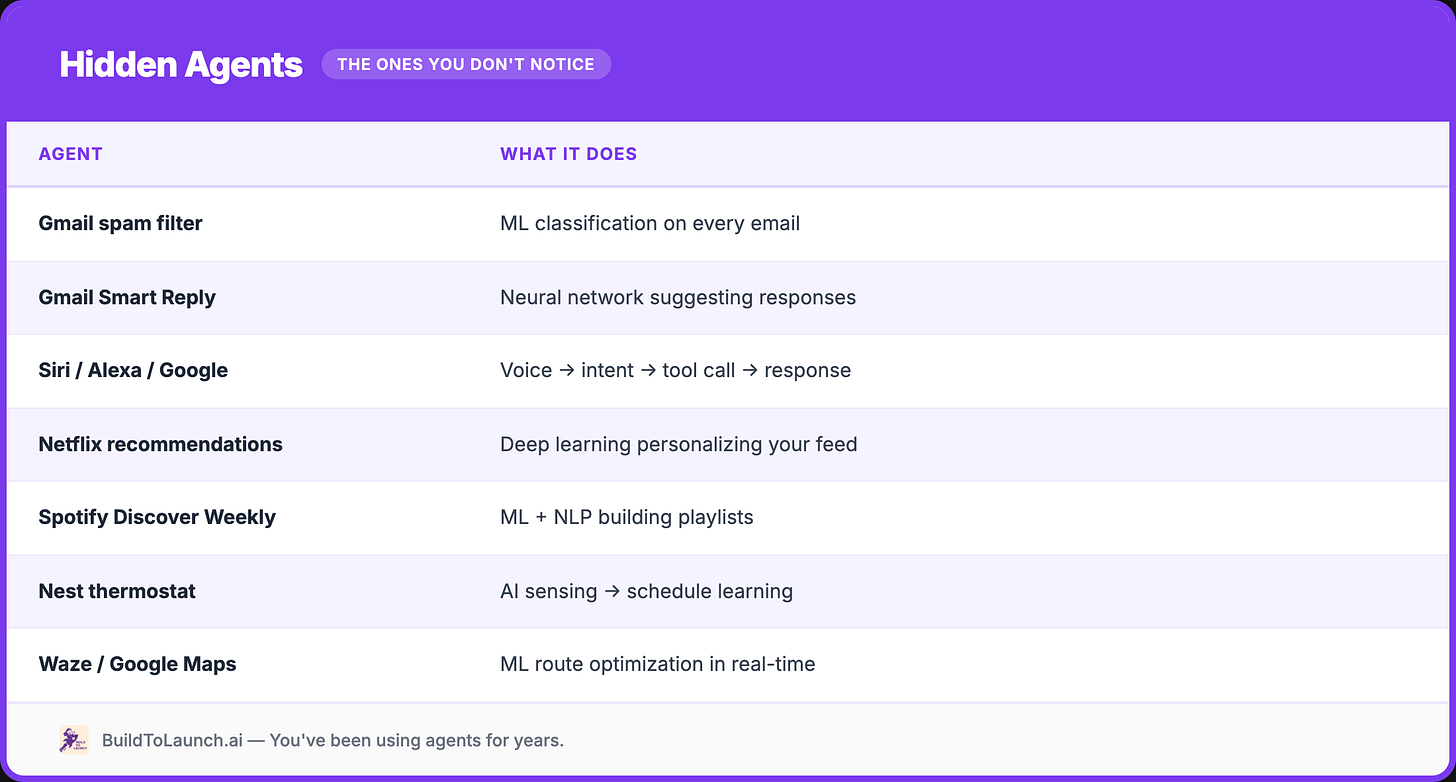
Same pattern: perceive → decide → act. The agent is invisible because it’s embedded in the product.
You’ve been using agents for years. You didn’t call them that.
Operational Agents (Do Things in Systems)
Information agents work with knowledge. Interaction agents work with humans. Now: agents that change state in the world.
Operational agents = action takers.
They edit code, trigger workflows, update CRMs, manage infrastructure.
Code Agents → Where I Live
This is where I spend most of my time. The landscape:
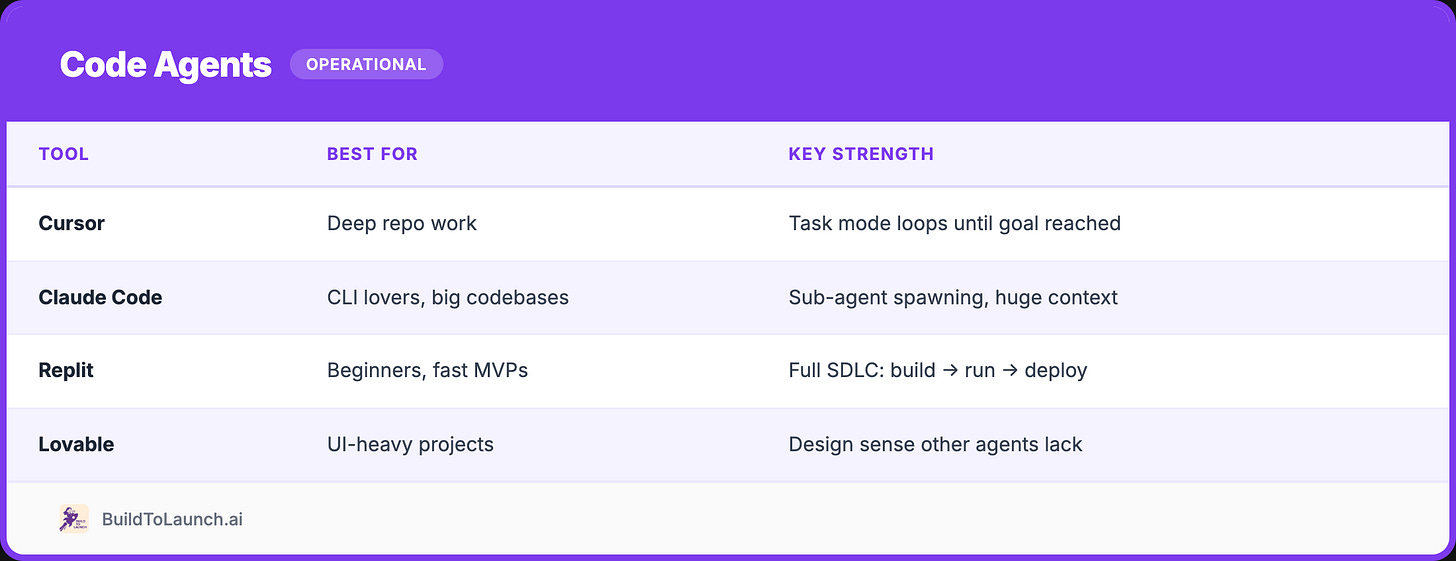
My workflow:
Cursor for multi-file refactors (I shared my prompt templates and rules for this).
Claude Code for massive context tasks.
Lovable when I need something pretty fast, then export to Cursor.
Workflow Agents → Automation
Beyond code:
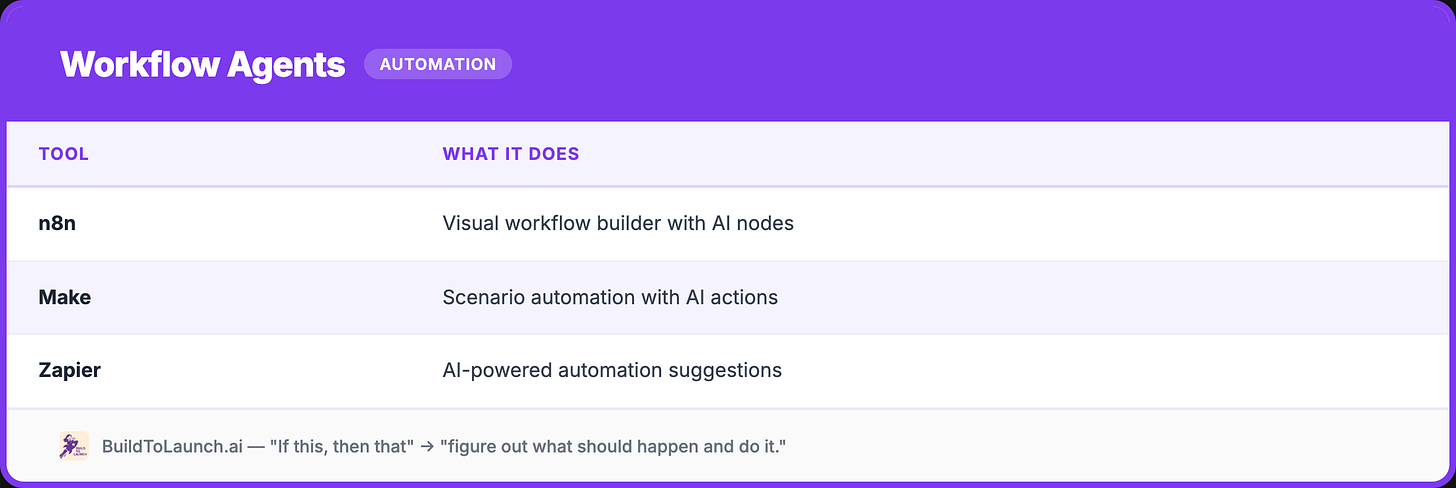
These turn “if this, then that” into “figure out what should happen and do it.”
Enterprise → The Big Bets
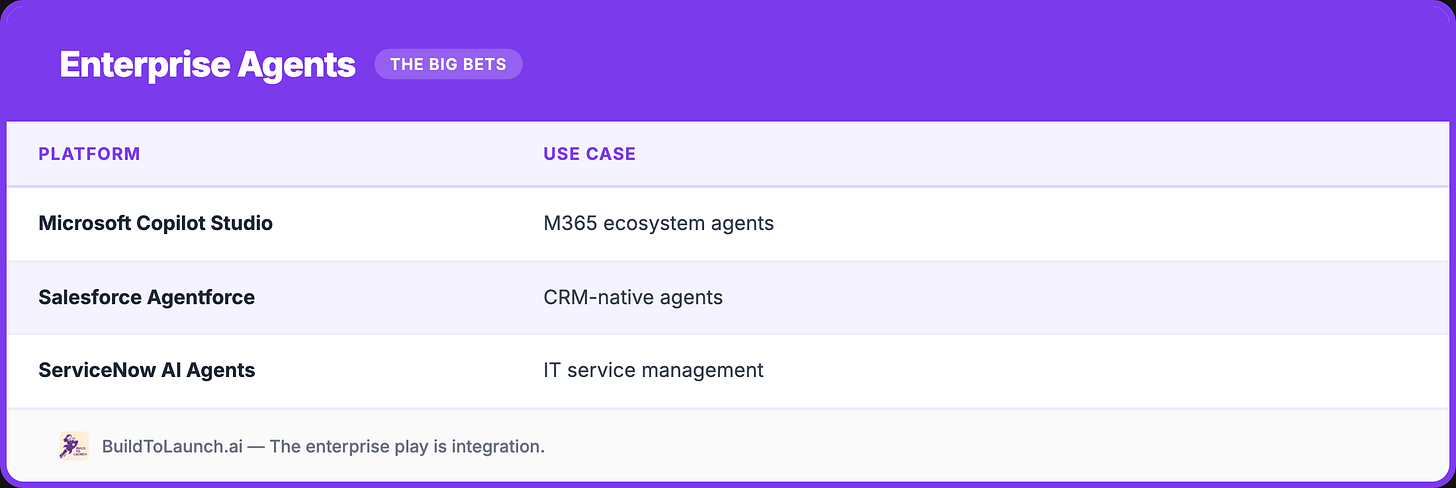
The enterprise play is integration. These agents work because they’re deeply connected to systems they operate on.
MCP: The Infrastructure That Makes It All Work
Why do these operational agents actually work?
MCP (Model Context Protocol).
It’s the plumbing that lets agents talk to your actual data, databases, APIs, files, services. Without it, agents are trapped in chat boxes. With it, they can act on the systems where your real work lives.
My productivity unlock:
I built a content management app with Supabase. Data for every article I’ve written: drafts, published pieces, notes scheduled, collaborations planned. Previously, tracking this meant switching between the database, spreadsheets, and my IDE constantly.
Now, via MCP, I talk directly to my database from Cursor:
“What notes did I schedule for next week?”
“Which articles got the most engagement last month?”
“Show me unpublished drafts that reference AI agents.”
One interface. Zero context switching. The agent queries Supabase, retrieves data, and answers, all without me leaving my editor.
This is what makes agents practical. Not the model’s intelligence. The connections to where your data actually lives.
I wrote a full breakdown of how MCP works and how I built connected intelligence systems, from personal second brains to enterprise data democratization. And this interview with Alejandro who created an MCP server for Substack authors shows what’s possible when you eliminate context switching entirely.
🎁 My cursor rules and MCP configs are included the Agent Toolkit, available to paid subscribers.
The Full Picture (Synthesis)
Now that you’ve seen agents at every level: information, interaction, operational, let’s bring the framework together.
The Stack Explained
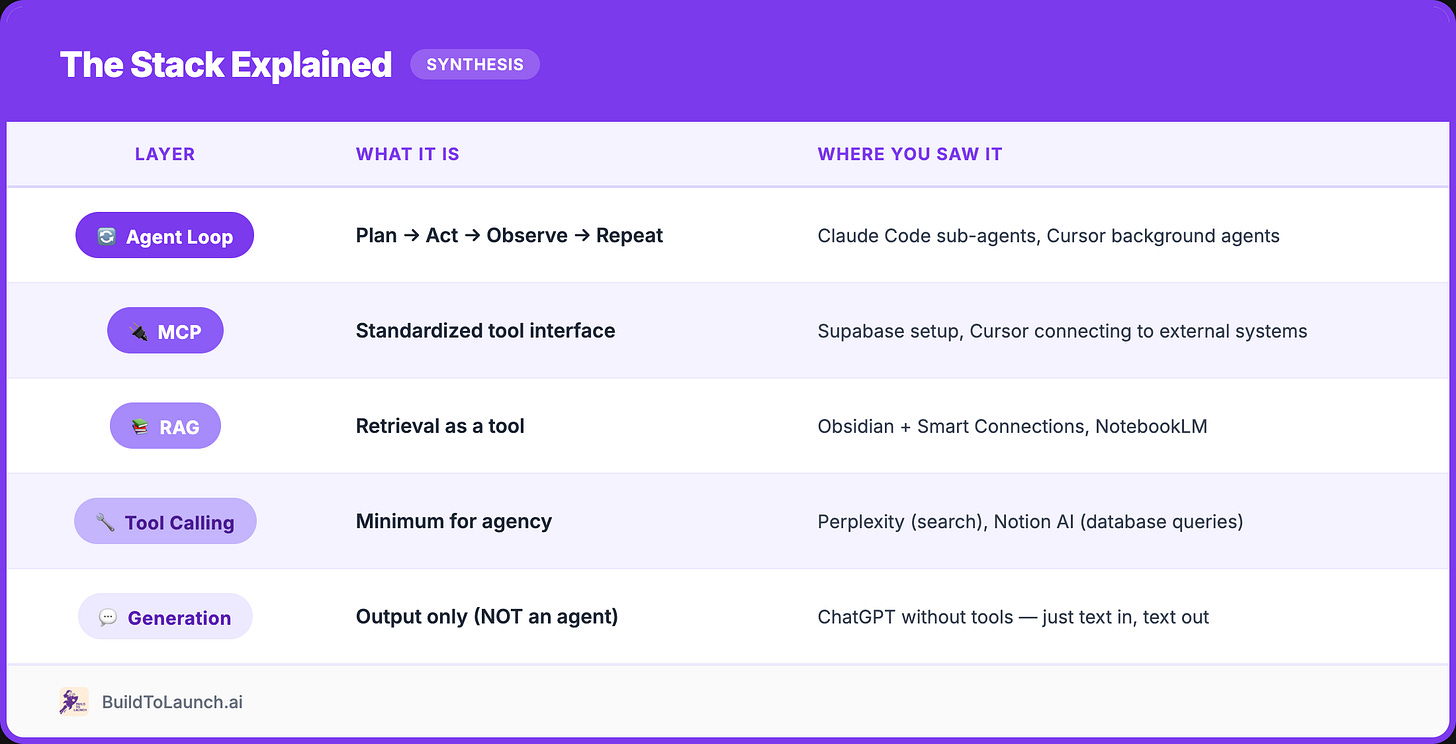
Features → Patterns (The Demystification)
Every product uses different words. Same underlying patterns:
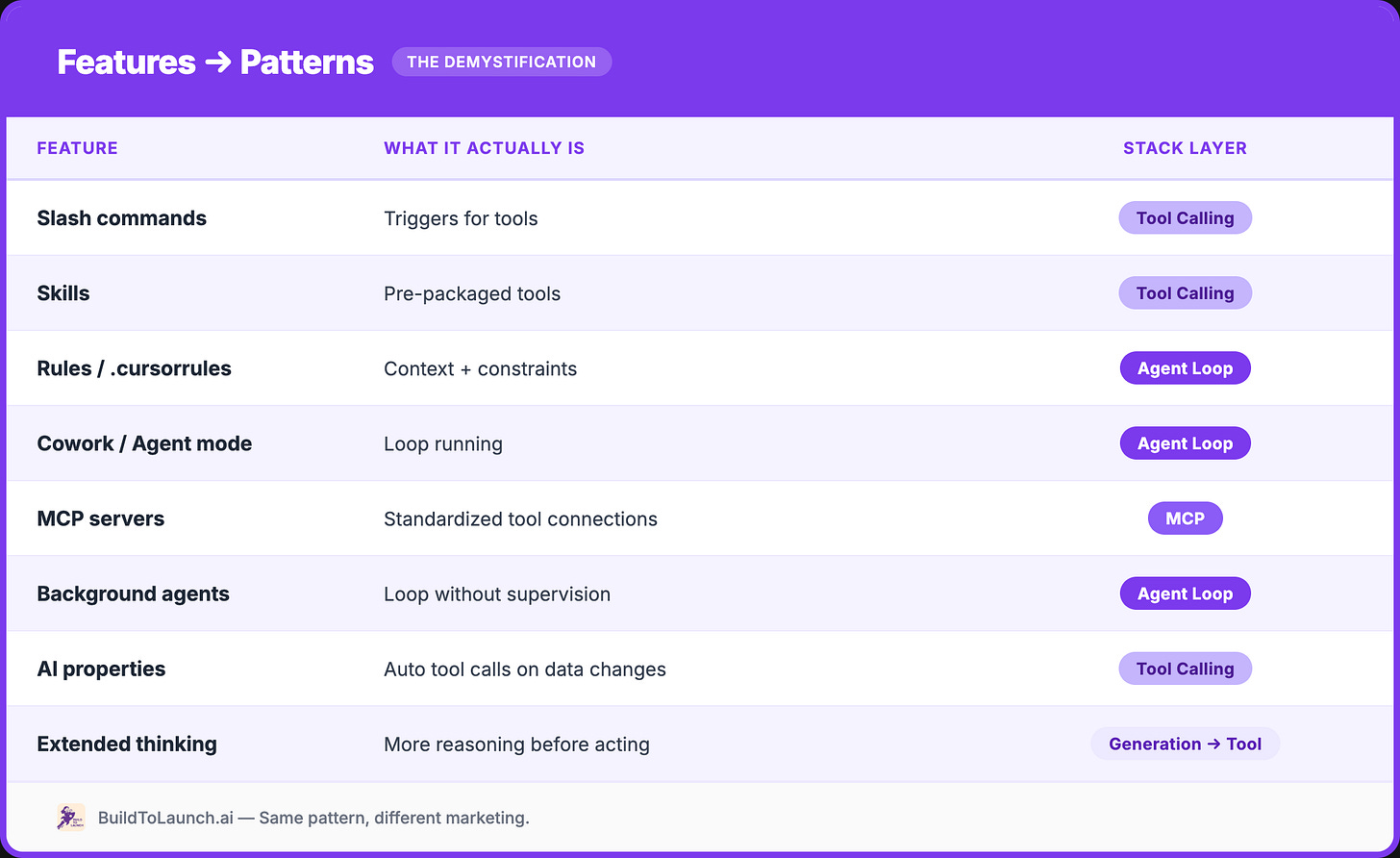
The insight: Same pattern, different marketing.
Multi-Agent Systems (The Frontier)
Beyond single agents: orchestrated systems of multiple agents coordinating.
Manus is the clearest example:
29+ integrated tools
Browse web, write code, manage files, deploy projects
Run market research overnight (50+ competitors analyzed while you sleep)
Architecture: planner agent → specialist agents → aggregator
GAIA benchmark: 86.5% on Level 1 (vs OpenAI Deep Research at 74.3%)
OpenAI’s Computer-Using Agent (originally “Operator,” now integrated into ChatGPT as “agent mode”): browser automation via visual understanding. Navigates websites, fills forms, completes transactions by “seeing” the screen.
OpenClaw takes a different approach:
Open-source infrastructure for building your own multi-agent systems.
Run multiple isolated agents across WhatsApp, Telegram, Discord, Slack, each with its own personality, workspace, and tools.
The DIY route for those who want full control.
My own multi-agent journey started simpler. In early 2025, I outsourced my Google research to AI, with one agent doing drug research across dozens of sources, outputting structured spreadsheets. That was the gateway drug. Now I run coordinated agent workflows daily.
Why is multi-agent hard?
Coordination: Agents need clean state handoffs
Conflicts: Two agents doing incompatible things
Safety: High autonomy = higher stakes
Debugging: Which agent caused the failure?
But this is where real leverage is.
One well-designed system replaces entire workflows.
5 Questions to Evaluate Any “Agent” Product
When a new “AI agent” crosses your feed:
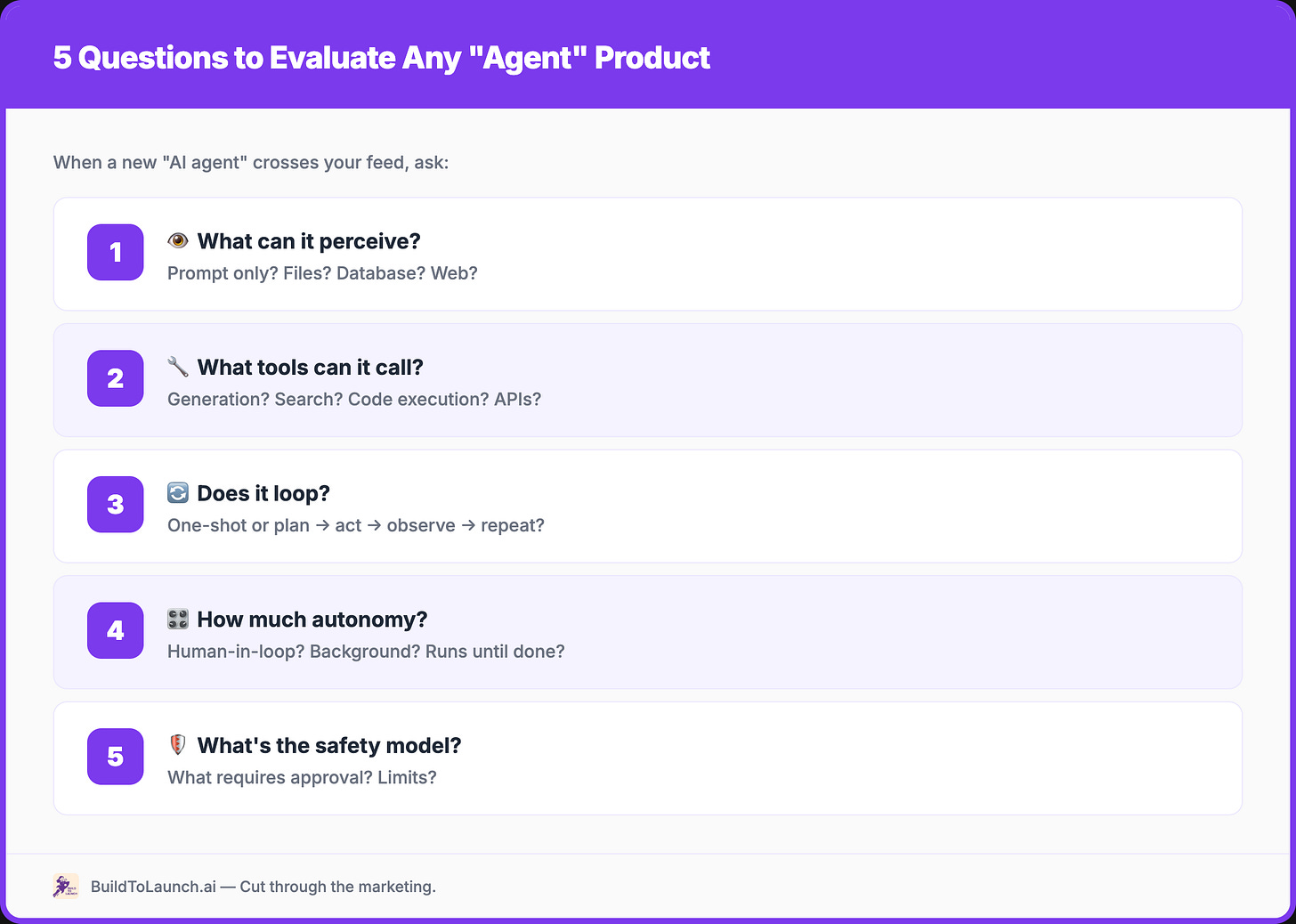
This cuts through marketing. Map to the stack, understand the product.
Next Steps
Beginner: Notice Agents Around You
You’re already using agents. Start seeing them:
Gmail suggests reply → agent decided what to say
Spotify builds your playlist → agent learned your taste
Google Maps reroutes you → agent optimized in real-time
No action required. Just recognition. Once you see the pattern, you can’t unsee it.
Intermediate: Turn On Agent Mode
Now try giving goals instead of questions:
Cursor: “Refactor this function to handle edge cases” (agent mode loops until done)
Claude: “Research X and give me a summary with sources” (extended thinking plans before acting)
Perplexity: “Compare these 5 tools and recommend one for my use case” (searches, evaluates, synthesizes)
Watch how each one plans → acts → observes → repeats. That’s the loop.
Advanced: Connect and Build
Connect MCP servers:
Cursor + Supabase = database-aware coding
Claude Desktop + filesystem = local file access
Try multi-agent without building from scratch:
OpenClaw = run multiple isolated agents across WhatsApp, Telegram, Discord
Each agent gets its own workspace, personality, and tools
Implement your own:
LangChain, LangGraph, or raw tool-calling
Start simple: research agent that searches → evaluates → synthesizes
Build an MCP server for a tool you use
Agents aren’t magic. They’re a pattern. And now that you see the pattern, you’ll notice it everywhere — in the tools you use daily, in the products companies are launching, in the features being added to apps that have nothing to do with AI.
Knowing the pattern is the first step. Building with it is the next one.
If you want to go hands-on: Notion AI Agents in 30 minutes — how I built a house search agent and a self-learning meta-agent inside an existing workspace, no new tools required.
And for the infrastructure layer underneath all of this: MCP is what makes agents context-aware.
Templates
Get ready to use templates to save the trial I went through:
- The AI Agent Toolkit — 15 ready-to-use agents + my configs
If any of this helped cut through the agent hype, share it with someone who’s still confused.
What’s new in Vibe Coding Builders:
Beta Testing Round 1 launched — builders testing each other’s products and giving real feedback
6 projects submitted: CompanionCraft, NoteStack, Replan, Crossworth, Profit Mirror, and more joining
Visit the testing page to pick a project and leave feedback
If you’re turning your expertise into products, building with AI, or helping others do the same, you belong here. Join the vibe coding builders community and get featured on Build to Launch Friday.
What’s the first “agent” feature you’d turn on in a tool you already use?
— Jenny