I Tested Claude Code Against 7 AI Coding Tools on the Same Website — The Deep Audit Changed the Rankings
Claude Code, Cursor, v0, Lovable, Bolt, Replit, Firebase, and Gemini CLI on the same spec. 3-stage evaluation. One crashed. All 8 failed social SEO.
Choosing between Claude Code, Cursor, v0, Lovable, or Bolt for a real website build? Every comparison you’ll find online stops at the demo. This is a full 3-stage evaluation of 8 major AI coding tools. Given the same 12-section website spec on the same day, and covering build speed, design accuracy, performance, SEO, accessibility, and code architecture. The scorecard, the surprising failures, the decision guide, and the audit system you can run on your own build are all here.

Anyone can build a landing page with an AI tool in 3 minutes now. The sections are there. The colors look right. You feel more capable than ever, and honestly, it’s exciting.
Then you open it again. There’s a mismatch you didn’t catch in the preview. The code gets messy when you try to change something. A feature doesn’t work the way you expected. The build that looked production-ready in the demo... isn’t.
So many AI coding tools promise exactly that, production-ready, in minutes.
But does the output look the way you wanted?
Is one tool genuinely better than another?
And if you’ve already started building with one, should you stick or switch to the one showing up in everyone’s feed?
I couldn’t find an article that answered this fully.
Not just which tool is fastest, but whether the builds hold up under a real audit. How each tool actually shines. Where each one quietly falls apart. Whether they can generate consistently good output, or whether “good” just means “good in the demo.”
So I turned a real project into the test.
I was building a partnership website with on Unpromptable Assets, a consulting landing page. Instead of picking my usual tools and moving on, I decided to run the same spec across all eight major AI coding tools on the same day. I normally build in Claude Code or Cursor. But I’ve always been impressed by how Lovable handles UI, and Gemini CLI was something I’d been genuinely curious about. Google’s AI builder was new and worth a real look. This was the right project to find out where each one actually lands.
The test ran in three stages: build race, visual audit, deep technical audit.
Every tool completed all 12 sections of the spec. Every build ran without errors on first pass. Stage 1 (the build race) is where every tool looks capable.
Stage 3 is where one platform’s page crashed on load. Where three tools shipped with no mobile navigation at all. Where every single platform failed to produce correct social sharing metadata. This pattern has a name: 73% of AI-generated apps never reach production because the demo and the production build are two different things.
The final scorecard is right here. Stage 1 results are free. The full visual and technical audit, which tools actually hold up, where each one fails, and the audit system to run on whatever you’re already building with, is what this article delivers.
Here’s where all eight landed:
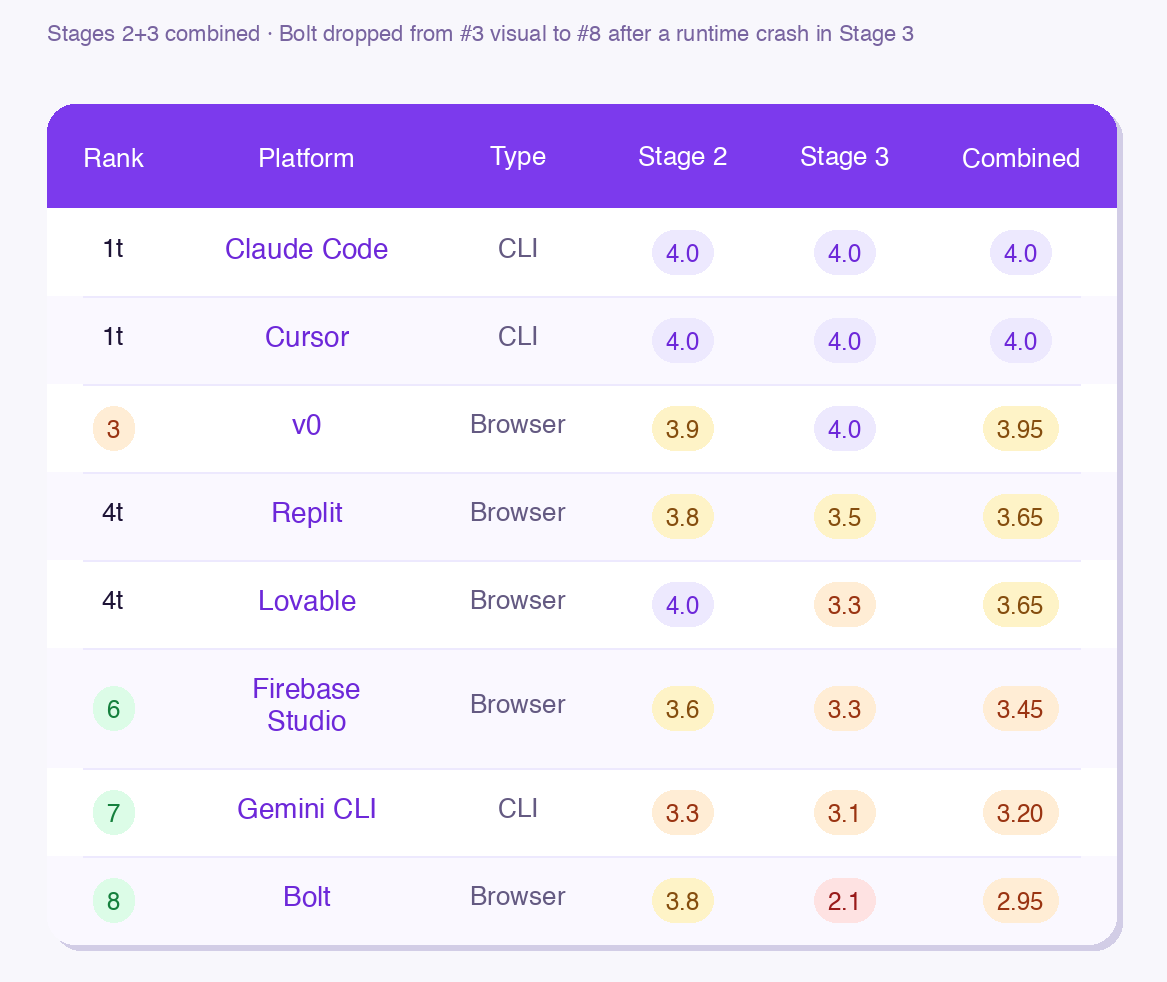
CLI tools claimed the top two spots. The best browser platform (v0) sits just behind at 3.95. Bolt’s Stage 2 visual score was 3.8, Stage 3 found a page-crashing bug.
⚠️ Firebase Studio update: Google announced it will be sunset on March 22, 2027. Scores reflect the tool as tested in March 2026.
What you’ll go through with me:
The coding ecosystem — who’s in this test and what separates the two categories
The test design — the exact spec used across all 8 platforms, and why copying its structure makes any build more auditable
Stage 1: The build race — where every tool looks capable, and why this is the most misleading stage
Stage 2: Visual audit — full design scores + a 2-minute visual checklist for any build you’ve already shipped
Stage 3: Deep technical audit — the specific failures, what’s critical vs. what to cut loose, and the self-evaluation prompts to audit your own build
Which tool for which builder — your tool in one paragraph: what it’s actually good for, where it fails, and the one or two fixes that close the gap
🎁 The spec prompt, audit priority checklist, and self-evaluation prompts are available as a free download at the resources page.
The Ecosystem
In early 2026, AI coding tools split into two categories.
CLI tools run in your terminal or IDE. You give them a prompt, they write files, run builds, push code. They work directly inside your local file system and your existing setup.
Browser tools run in a web interface. You paste a prompt, the code generates in the cloud, you preview and export. Lower barrier to entry, but you’re working inside their environment, not yours.
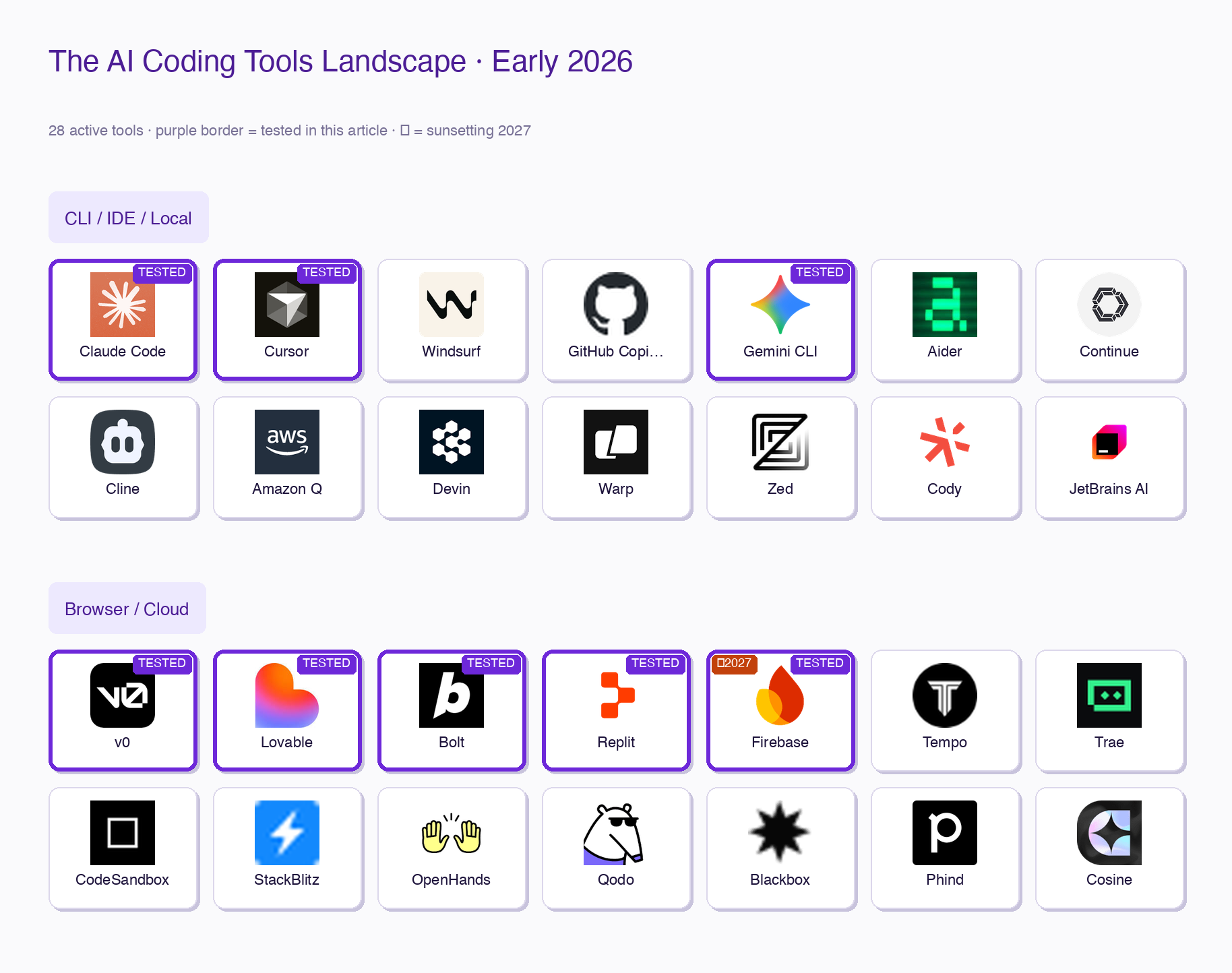
The eight tools in this test:
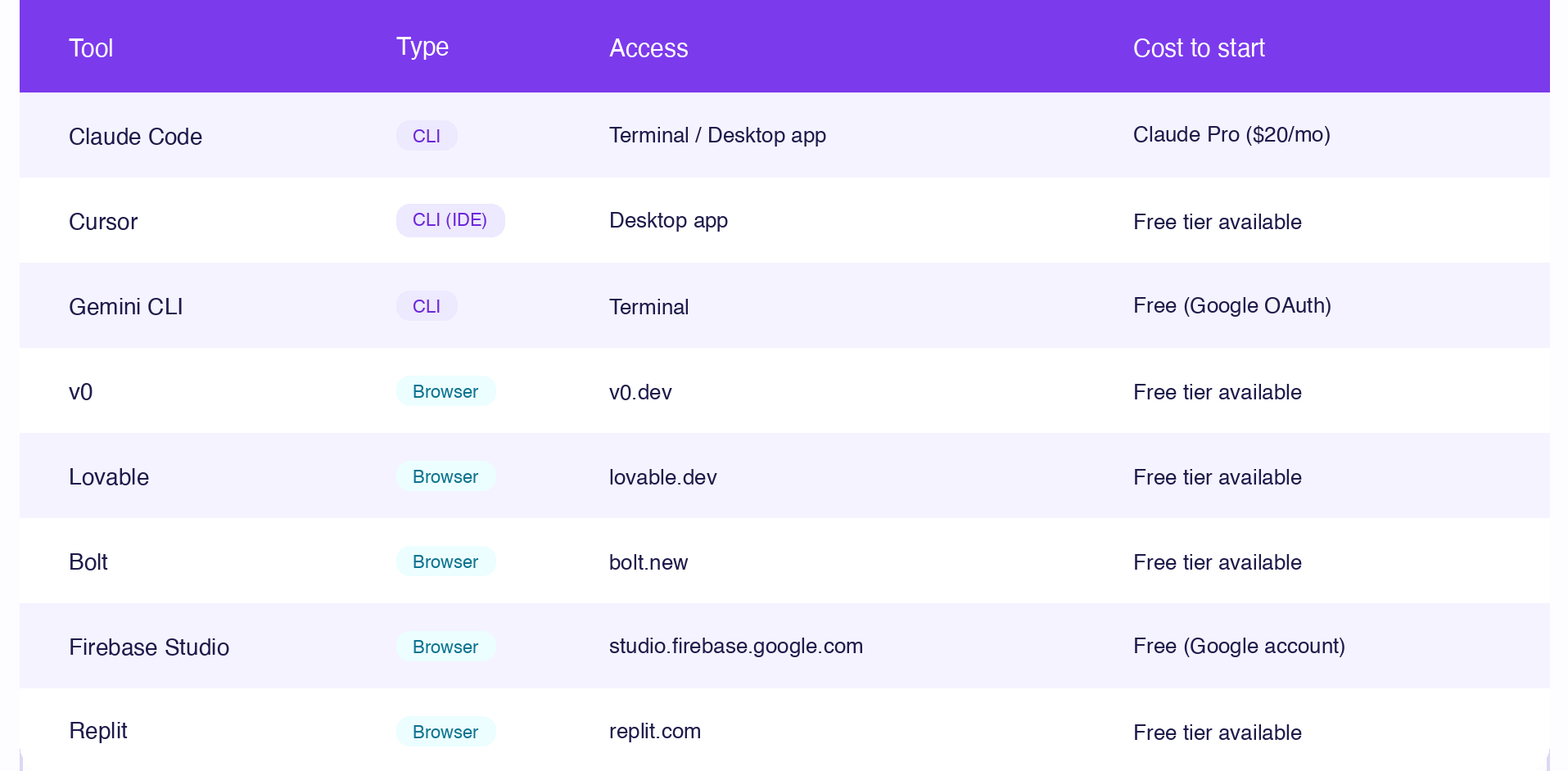
Each category has real trade-offs. CLI tools tend to produce leaner, more structured code. Browser tools are faster to start, especially without a terminal setup. This test measures whether those trade-offs actually show up in the output, and they do. If you're deciding between these ecosystems from a workflow angle — not just build quality — Claude Skills vs ChatGPT GPTs and Gemini Gems is the companion piece.
The Test Design: One Spec, Three Stages, No Exceptions
The spec: A single-scroll premium consulting landing page for a real project, Unpromptable Assets in this case. 12 required sections: sticky nav, hero, problem agitation, how it works, services, qualifying, objection handling, testimonials, team, contact form, FAQ, and footer.
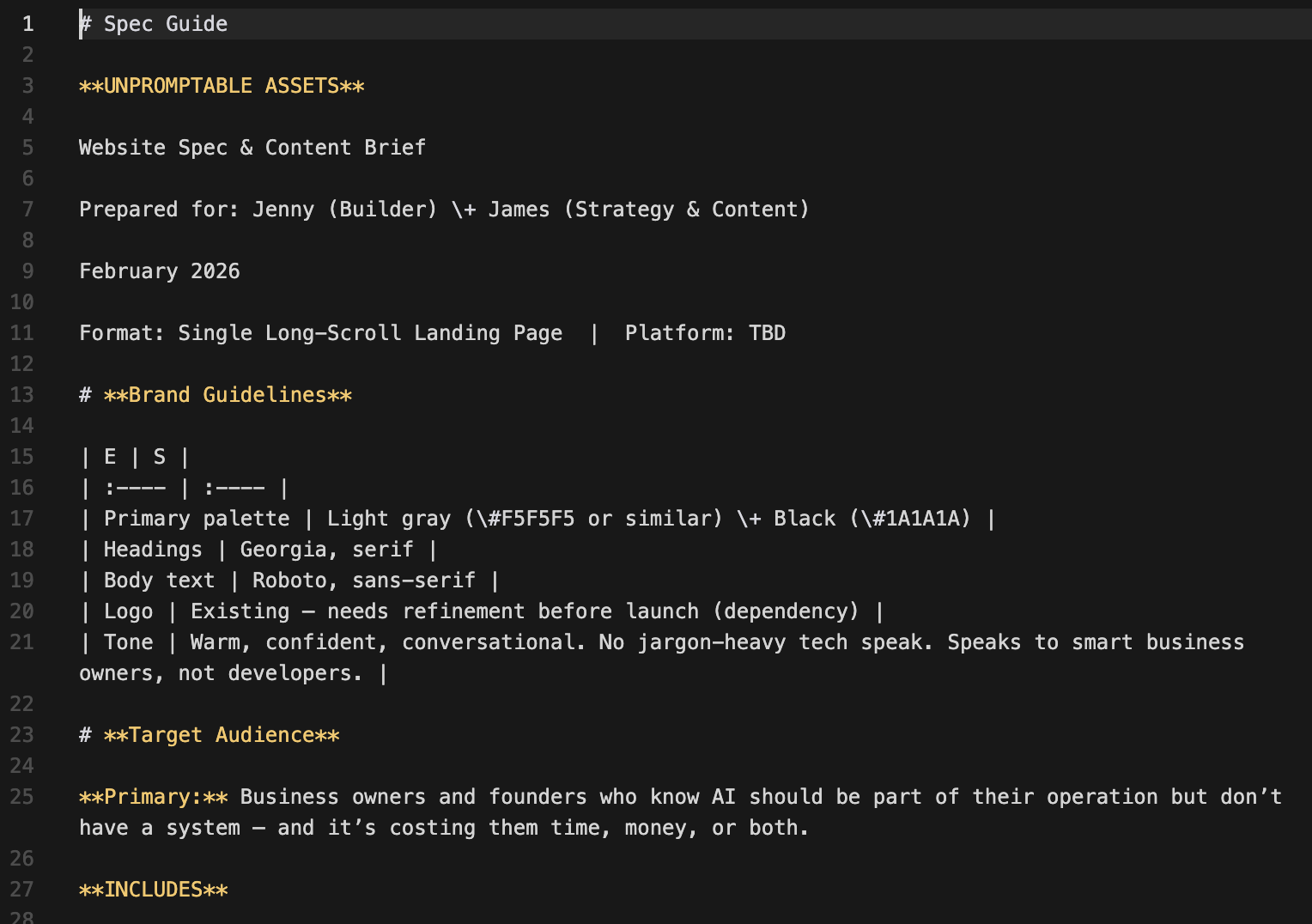
Defined design tokens: specific background, card, text, and accent colors (including a gold accent limited to 3–5 uses), plus Georgia/Roboto font pairing.
Required interactions: sticky nav with scroll shadow, fade-in on scroll, hero CTA hover (black to gold), smooth scroll anchors, FAQ accordion, mobile hamburger menu.
The spec was detailed enough to test accurately but not so complex that any tool couldn’t attempt it. All 8 received identical requirements.
How the 3 stages work:
Stage 1 — Build Race
Same prompt, clock running. Who ships first, and what do they actually produce?
Stage 2 — Visual Audit
Spec compliance check (all 12 sections, correct copy, correct tokens) and design quality scoring across 7 categories. Scored 1–5.
Stage 3 — Deep Technical Audit
8 categories a visual review can’t catch: console errors, performance, computed styles, interactions, responsive breakpoints, accessibility, SEO, code architecture. Same criteria for all 8 tools.
Stage 1 tells you which tools are fast.
Stage 2 tells you which tools are accurate.
Stage 3 tells you which tools are production-ready.
Stage 1: The Build Race
Five browser tools (v0, Lovable, Bolt, Firebase Studio, Replit) received the prompt simultaneously at about the same time.
Claude Code ran as an autonomous subagent.
Gemini CLI received it via stdin pipe (cat prompt.txt | gemini --yolo).
Cursor’s CLI headless mode was broken, that build happened separately in the GUI.
The build race result:
1st: Claude Code — ~3 min — autonomous subagent, ran build check itself
2nd: v0 — 3m 50s — UI showed “Worked for 3m 50s”
3rd: Lovable — ~3 min — version history confirmed save at 12:32 PM
4th: Bolt — ~3–4 min — done by ~12:33 PM
5th: Gemini CLI — ~5 min — single-pass stdin, ran npm run build itself
6th: Firebase Studio — ~7–8 min — generated a plan before building
7th: Replit — 11 min — UI showed “Worked for 11 minutes”
Cursor — N/A — CLI broken; GUI build only, and I lost track of this one in particular
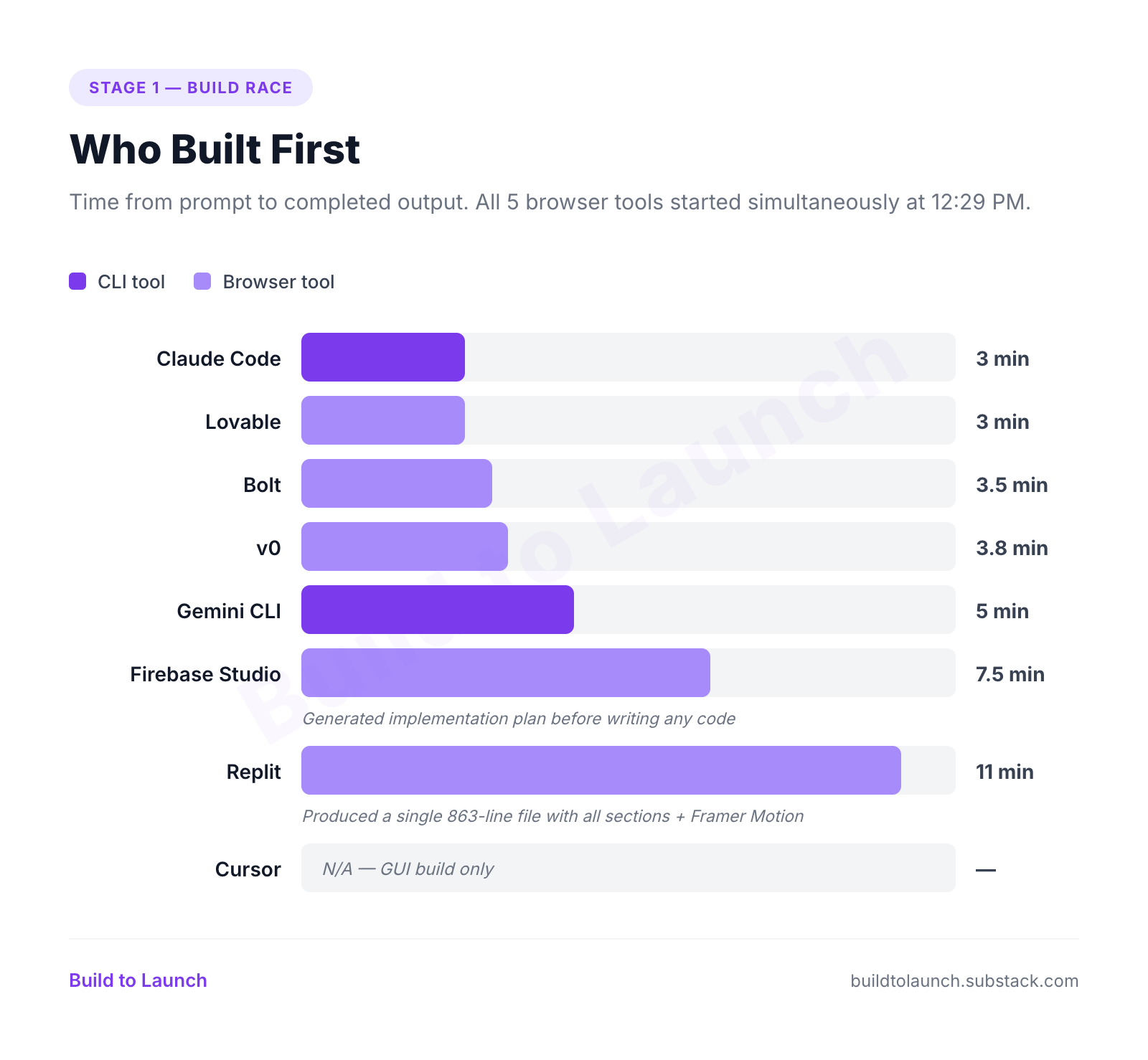
All 8 crossed the Stage 1 finish line. Eight different approaches, eight successful builds.
All 8 builds, side by side
At this stage, every AI coding tool produced a complete landing page.
Same hero crop, same viewport, labeled with platform name, CLI/Browser type, and Stage 2 score.
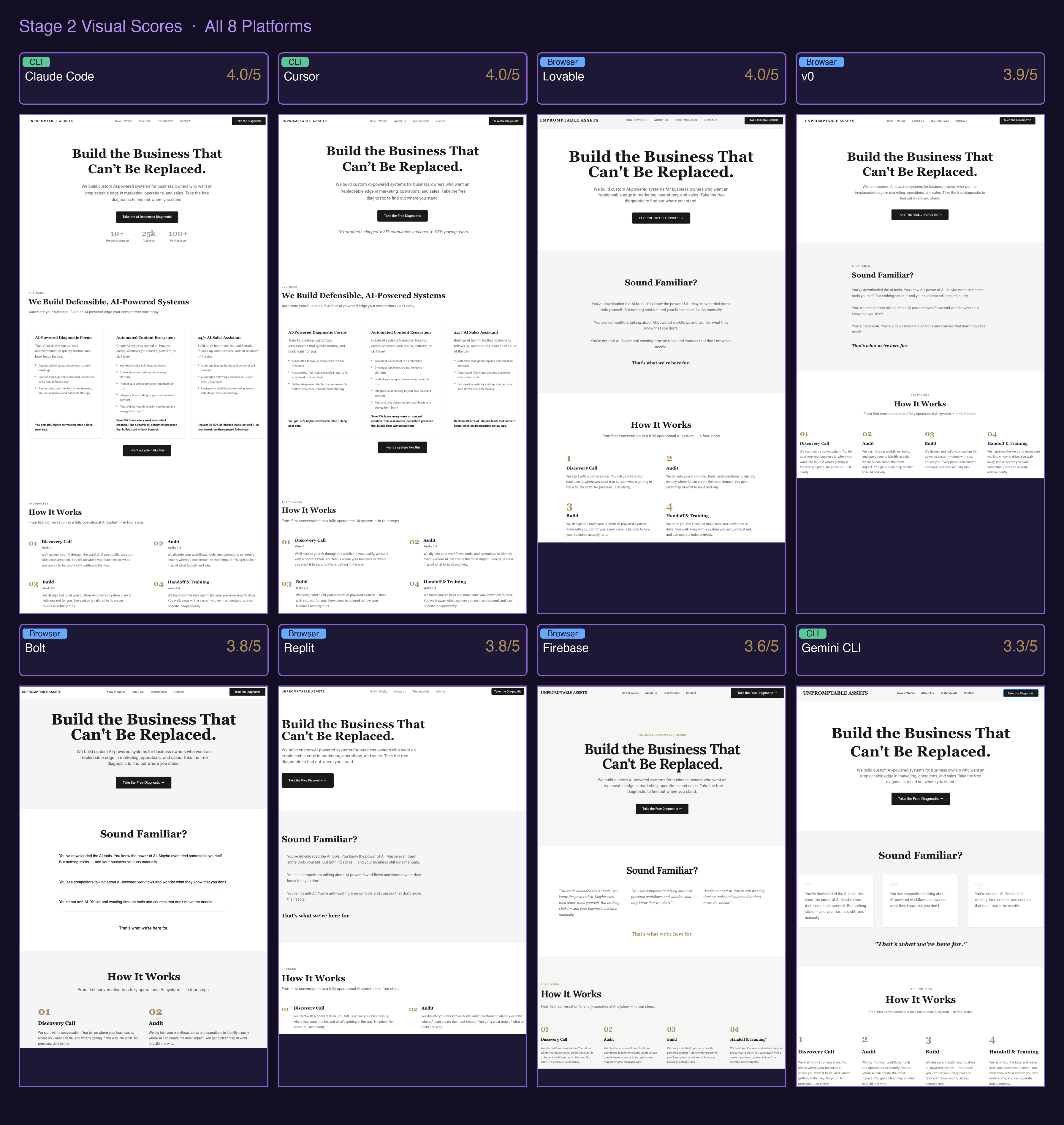
Stage 1 is useful for one thing: understanding how each tool approaches a prompt.
Claude Code reads and plans before building. Lovable phases its work. Bolt writes fast and reports confident. The approach reveals the tool’s character, but not its output quality.
The takeaway: they all look similar here.
What each tool produced
Each tool finished — but each approached the build differently. That approach reveals character.
Claude Code — Parallel subagent, 14 components at once, verified the build itself without being asked.
v0 — Multi-task pipeline, clean output, fastest browser tool.
Lovable — Design system first, components second — the most deliberate process of the browser tools.
Bolt — Straight to
app/page.tsx, ran a build check, reported confident.Gemini CLI — Sequential via stdin pipe, ran
npm run builditself, cleanest token implementation of the batch.Firebase Studio — Wrote an implementation plan before touching a file, then paused for a Gemini API key.
Replit — 11 minutes, one 863-line file, 30 font families loaded when one was needed.
Cursor — Received the spec via
.cursorrules, clean architecture, no build time recorded due to a CLI bug.
Every tool finished. The question is whether they followed what was asked.
If you haven't validated whether what you're building is worth the audit effort, the AI validation framework is the step that comes before Stage 1.
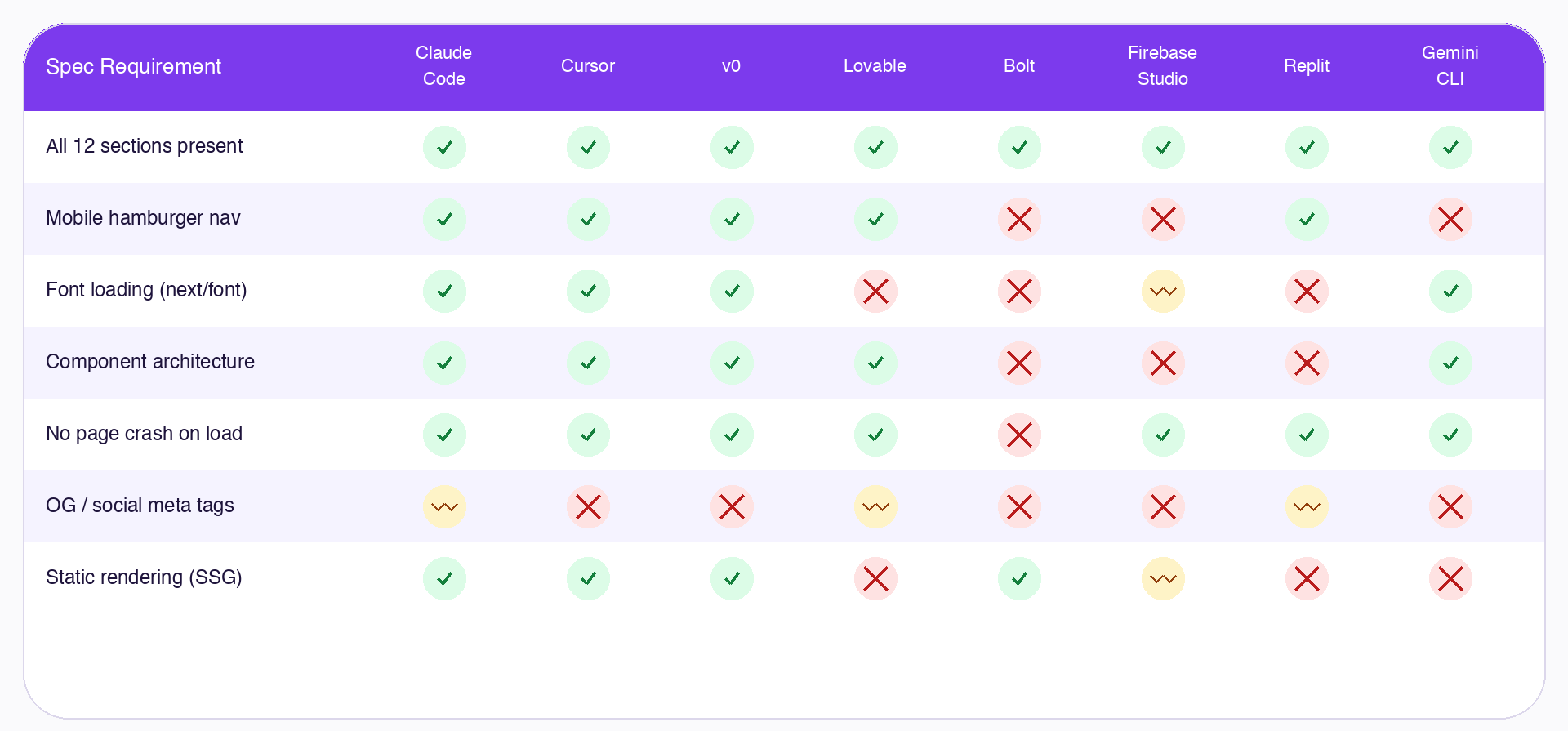
The top row is all green. By row 2, three tools are already failing.
This is the view that Stage 1 can’t show you.
What’s next and why it’s the part that actually matters:
Stage 1 told you who finished and how fast. What it can’t tell you is which builds look right but aren’t, and which ones will break the moment a real user lands on them.
That’s Stage 2 and Stage 3.
Stage 2 — Visual Audit: A 7-criteria side-by-side of every build at the same scroll depth. Typography, color accuracy, editorial feel, responsiveness, interactions. This is where the 0.7-point score spread is earned, and where you’ll see exactly which tools drift from a design spec even when all the sections are present.
Stage 3 — Deep Technical Audit: The 8 categories a visual review can’t catch. Console errors and runtime crashes. Performance and rendering strategy. Mobile breakpoints. Font loading. Code architecture. SEO and social meta tags. This is where Bolt crashes, three tools lose their mobile nav, and one tool loads 30 Google Font families for a page that needs one.
Through out Stage 2 and 3, you’ll get:
The exact spec prompt used to build this, the one that produced consistent 12-section output across all 8 tools, with design tokens baked in from line one
The self-audit prompt that makes any AI tool reflect on its own output and flag what it missed
A priority checklist: which Stage 3 failures to fix before you ship, ranked by impact, and
Final rankings with a “which tool for which builder” breakdown so you know whether your use case maps to a CLI tool, a browser tool, or a hybrid workflow
This article continues for members
Join Build to Launch to read the full article, access all cohort content, and connect with other AI builders.