Best Claude Code Plugins 2026: 11 Tested, 4 Worth Keeping
I tested 11 plugins, fixed broken marketplace files, and built a judgment framework. This is what I'd keep, skip, and watch.
Claude Code plugins can look like a blur of skills, commands, MCPs, and marketplaces if you use AI regularly but have not gone deep into the ecosystem. This guide sorts out what these layers are, which plugins are worth your attention, what broke when I tested them, and how to judge whether they fit your own work.

Claude Code’s plugin marketplace launched quietly. Soon it wasn’t quiet anymore.
Developers started running Claude skills on every session. Marketers installed business plugins and expected them to know their business. Builders stacked MCP servers on top of hooks on top of skills and wondered why things felt slow.
The biggest frustration was never whether plugins work.
It’s that it’s almost impossible to tell what “working” actually means until you’ve run one on something real.
I’ve been building and shipping with Claude Code daily since it launched. When the plugin ecosystem expanded to 101 official plugins, I decided to stop guessing and start testing. I ran content plugins on my actual writing system. Business plugins on my actual positioning questions. Coding plugins on a real feature build for an app I maintain.
For the same real-work test applied to the tools themselves — not the plugins — the 8-tool AI coding audit runs Claude Code, Cursor, and six others through the same three-stage evaluation approach.
Hi, I’m Jenny 👋
I build AI systems and tools, then share how I did it. I run the Practical AI Builder program — for people who already use AI and want to build real things with it. Check it out if that sounds like you.
If you’re new to Build to Launch, welcome! Here’s what you might enjoy:

What’s inside:
What Claude Code plugins actually are — skills, hooks, commands, and MCP servers: the 4 components bundled in one install at three different cost levels
11 Claude Code plugins tested on real work
Best Claude Code plugins for content and writing — Brand Voice found 34 Gumroad products I’d never audited for consistency
Best Claude Code plugins for business workflows — Marketing vs Sales: why one gave me the right answer and one gave me wrong data with a flashy UI
Best Claude Code plugins for coding and development — feature-dev eliminated 4 database tables before a line of code was written
Domain-specific Claude Code plugins: when niche beats general-purpose
How to build your Claude Code plugin stack (after testing 11) — always-on vs session-based toggle logic, by workflow type
Plugin evaluation scorecard — 9 questions before installing anything
Known breakages and workarounds — every failure mode I hit
What Claude Code Plugins Actually Are
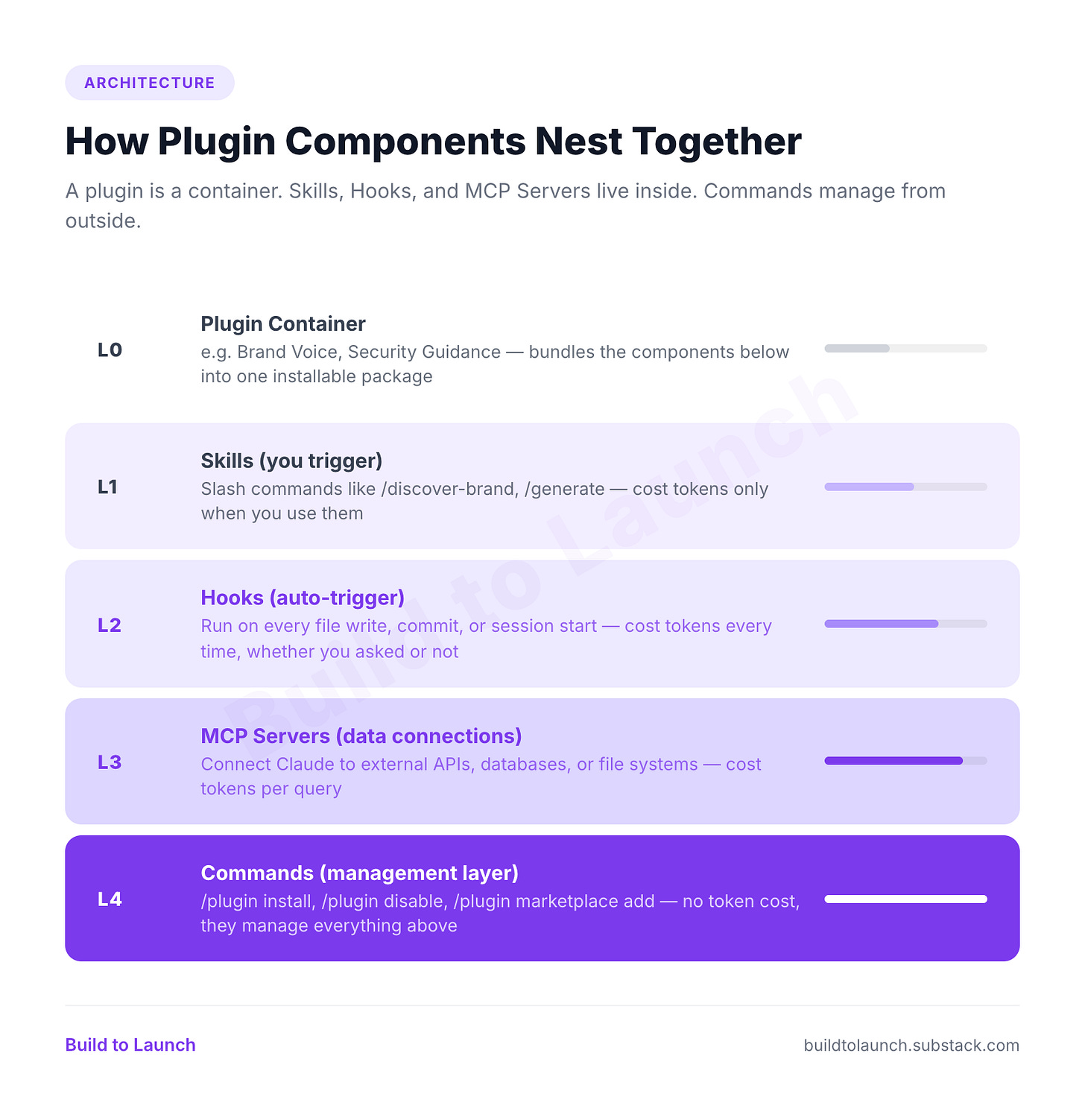
People use “plugin” to mean several different things inside Claude. They do not behave the same way. Once you see the building blocks, the confusion disappears.
Claude Code Plugin Components: Skills, Hooks, Commands, and MCP Servers
A Claude Code plugin bundles one or more of these:
Skills — what most people mean by “using a plugin.” You trigger them with a slash command (
/brand-voice:enforce-voice,/marketing:seo-audit). Runs once, does its job, stops. Cost: per use.Hooks — run automatically in the background. They attach to events (file write, session start, commit) and fire every time without you asking. Cost: every session they are active.
Commands — the management layer.
/plugin install,/plugin disable,/plugin marketplace add. Free. Not the plugin itself.MCP servers — external connections to databases, APIs, file systems. Not plugins themselves, but bundled inside plugins so often that people treat them interchangeably. Cost: per query. (For a specific setup walkthrough, connecting Gmail across multiple accounts via MCP shows the exact installation pattern.)
A Claude Code plugin can bundle skills, hooks, and MCP servers together — one install, three behaviors at three different cost levels.
Why it feels muddy: one plugin can contain skills, hooks, and MCP configs together. You install one thing, you get three behaviors at three cost levels. That matters when you ask “why is this session slow?” or “why did something run that I did not ask for?”
For a full walkthrough with screenshots, see How to Onboard to Claude Without the Learning Curve. This article picks up where that one left off.
Claude Code plugins versus Claude plugins
Three products. Different installation. Different capabilities.
Claude web (claude.ai) — MCPs, web search, built-in tools. No terminal, no local file access, no hooks, no slash-command plugin system.
Claude Desktop — MCP-based extensions for file access, database queries, APIs, browser tools. More capable, but still not the Claude Code plugin layer.
Claude Code — the full system. Skills, hooks, commands, MCP servers, marketplace browsing, always-on vs. triggerable behavior, local file access.
You install through the CLI:
/plugin install security-guidance@claude-plugins-official
/plugin marketplace add owner/repo
/plugin install brand-voice@knowledge-work-plugins
Plugins live in ~/.claude/plugins/ and work across projects once installed globally. The confusion starts here: someone reads about a Claude Code plugin, looks for it in Claude Web, cannot find it. Same brand name, different product.
If you use ChatGPT or Gemini, Claude Plugins are meaningfully different architecture from Claude Skills vs. ChatGPT GPTs and Gemini Gems.
Where Claude Code Plugins Come From: 3 Levels of Trust
Three levels. The trust story is different at each one.
Level 1: Official Anthropic marketplace
claude-plugins-official is built into Claude Code. As of March 2026: 101 plugins (browse here).
33 Anthropic-built: language servers (12), dev workflow (10, including
feature-dev,code-review,commit-commands,security-guidance,frontend-design), setup tools (5), output styles (2), playground (1), messaging (3)68 partner plugins: GitHub, Playwright, Supabase, Figma, Vercel, Linear, Sentry, Stripe, Firebase, and more
Two additional Anthropic marketplaces (require manual add):
life-sciences — 17 biomedical plugins
knowledge-work-plugins — 14 role-based plugins (Sales, Marketing, Finance, Legal, HR, Brand Voice)
There are also 11 plugins tagged “Cowork” on claude.com/plugins. The site labels them Cowork-only. Misleading. I installed and tested Brand Voice, Marketing, Sales, Productivity, and Cowork Plugin Management directly in Claude Code through knowledge-work-plugins. They work.
Level 2: Community marketplaces
GitHub repos anyone can share. Add with /plugin marketplace add owner/repo. No verification. Quality depends on the maintainer.
Worth knowing:
ComposioHQ/awesome-claude-plugins— 25-30 production pluginsjeremylongshore/claude-code-plugins-plus-skills— 346 plugins, quality-gradedalirezarezvani/claude-skills— 192+ plugins
Not everything in these repos is installable. Some have full plugin.json packages. Others are standalone skill files for .claude/skills/. “1,916 skills” does not mean 1,916 things you can /plugin install.
Level 3: Discovery tools
Sites you will hit before finding the official marketplace:
ClaudePluginHub.com — 14,083+ indexed
Build with Claude — 2,865 marketplaces
claude-plugins.dev — community registry
These are search engines, not sources. They scan GitHub for plugin.json and index what they find. Useful if you know how to evaluate. If not, stick with official repos.
From Anthropic’s docs: “Plugins and marketplaces are highly trusted components that can execute arbitrary code on your machine. Only install from sources you trust.”
Private or team plugins sit outside all three levels. Custom builds from a local path or hosted source. If you want to go that route, how to build your own MCP server covers the full process.
11 Claude Code Plugins Tested on Real Work
I tested in four buckets: content, business, coding, and one niche life sciences case. For each plugin, three questions:
Where does it work?
Where does it break?
Does it earn a place in the stack?
Then I used those tests to answer the bigger questions underneath: workflow fit, overlap, collaboration, and whether the plugin was improving my process or just adding machinery.
Best Claude Code Plugins for Content and Writing
The easiest to evaluate. I could run them against my real content engine, Substack workflow, and brand materials.
Every plugin here installs the same way: add it to your claude_desktop_config.json (Mac: ~/Library/Application Support/Claude/) and restart Claude Code. To verify any MCP is connected: open Claude Code and type /mcp — it lists every active server and its status. If a server shows as disconnected, check your config JSON for syntax errors.
How to install the plugins in this section:
# What I actually used during testing
/plugin marketplace add /Users/bouyang/Documents/Zxperiment/media/newsletter_position/knowledge-work-plugins
/plugin install brand-voice@knowledge-work-plugins

# Official plugin in this section
/plugin install explanatory-output-style@claude-plugins-official
Note: knowledge-work-plugins had schema validation issues during testing. I used a local fixed copy. That breakage matters and I come back to it later.
Plugin 1: Brand Voice
What it is: Three-skill plugin. Discovers your scattered brand materials, generates guidelines, enforces your voice.
/brand-voice:discover-brand— searches directories, platforms, and products for brand materials/brand-voice:generate-guidelines— synthesizes into a structured guidelines file/brand-voice:enforce-voice— applies guidelines as you write
Where it works: Most creators have brand guidelines in five places: a Notion doc from 2023, a Google Doc nobody reads, random files in a content folder. This plugin finds all of it and makes it usable.
On my content-engine directory:
Found 15 brand documents across subdirectories
Found 34 Gumroad products I had never reviewed for consistency
Generated a 963-line guidelines file saved to
.claude/brand-voice-guidelines.mdAvailable automatically in future sessions
The output difference was immediate.
Without Brand Voice:
“In this comprehensive guide, we’ll explore the landscape of Claude Code plugins. It’s worth noting that the plugin ecosystem has grown significantly.”
With Brand Voice enforced:
“Claude Code has 30 official plugins. I had one installed. It came from a life sciences template I’d forgotten about.”
Where it breaks: If you create content for different channels with different voices, leaving it on globally steers everything toward one guideline set. That can work against you.
Verdict: KEEP. One-time discovery + guidelines generation pays back on every article after.
For the visual side of the same content workflow — generating hero images, infographics, and carousels — Nano Banana 2 in Claude Code tests 7 creator workflows on 100+ real outputs, the same way this article tests plugins.
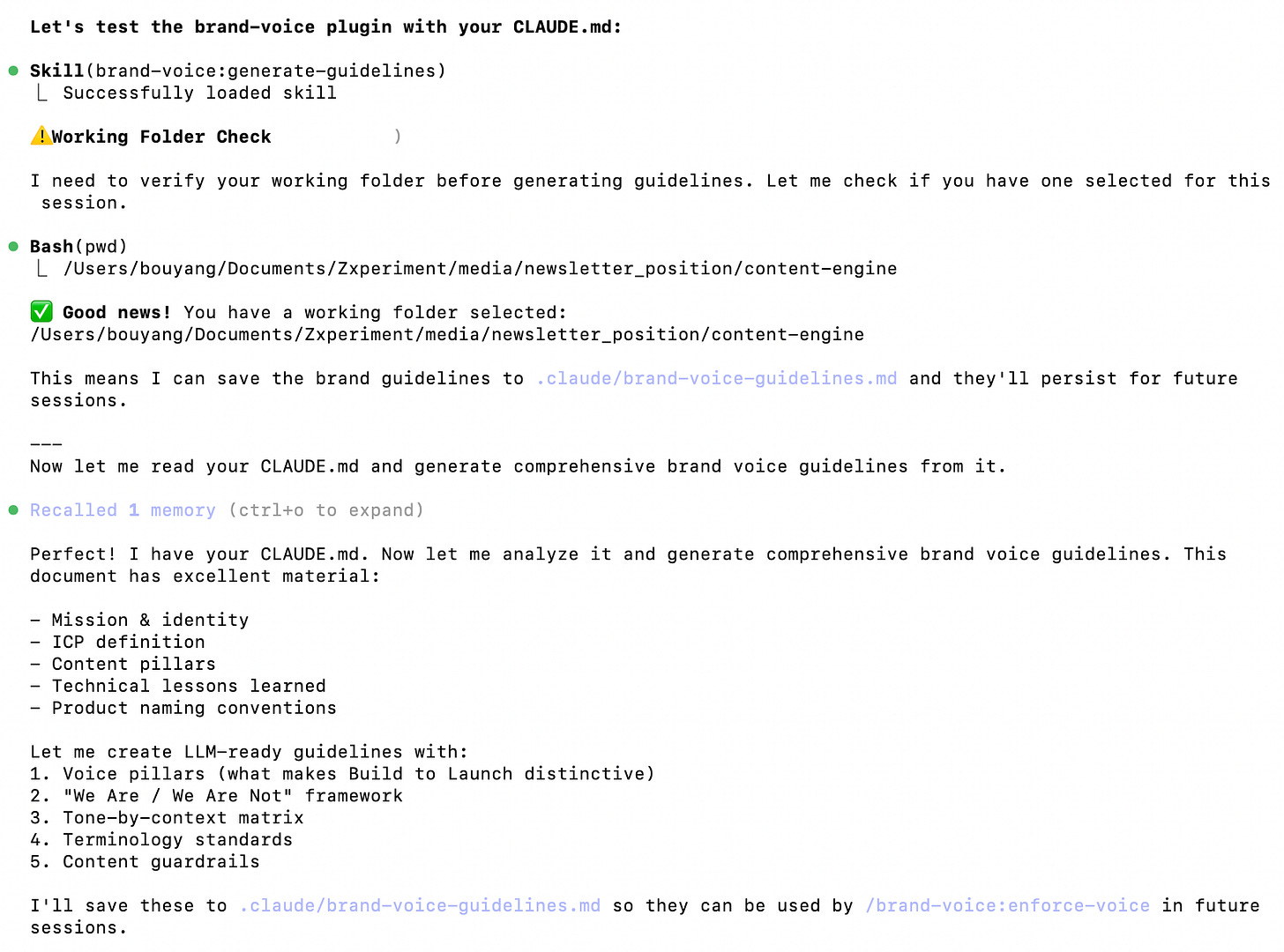
Claude Code applying brand-voice based on my content
The bigger question it raised:
If I already have a voice, or write across multiple channels, when does a plugin like this genuinely help and when does it start steering work in the wrong direction?
Plugin 2: explanatory-output-style
What it is: Always-on hook. Modifies every Claude response: progressive disclosure, layered explanations, insight sections, teaching scaffolding.
Where it works: I asked Claude to explain the plugin marketplace system. Output was 9/10 for clarity: three-layer architecture walkthrough, component deep dives, ASCII flow diagrams, progressive disclosure from simple to advanced. For tutorial writing and technical explainers, this is exactly the structure you want.
Where it breaks: It is a hook, not a skill. It runs on every response.
Quick coding question? Still gets a structured lesson.
Content editing? Still gets a structured lesson.
Adds token cost to every exchange, not just the ones where structure helps.
Verdict: CONDITIONAL KEEP. Strong for tutorials and documentation. Too much for everything else.
The question it left:
When is always-on structure worth the session cost, and when does it become drag?
Best Claude Code Plugins for Business Workflows
This is where I hit the difference between polished output and trustworthy output.
How to install the plugins in this section:
# What I actually used during testing
/plugin marketplace add /Users/bouyang/Documents/Zxperiment/media/newsletter_position/knowledge-work-plugins
/plugin install marketing@knowledge-work-plugins
/plugin install sales@knowledge-work-plugins
/plugin install productivity@knowledge-work-plugins
Plugin 3: Marketing
What it is: Six-skill plugin for the full content marketing workflow: SEO audit, drafting, brand review, competitive research, campaign planning, email sequences.
Skills tested: /marketing:seo-audit, /marketing:draft-content, /marketing:brand-review, /marketing:competitive-brief
Where it works: Each skill is useful alone. Together they chain: audit finds gaps, drafting fills them, review catches compliance issues.
I tested three parts across ~1 hour 40 minutes:
SEO audit (30 min) — full audit of buildtolaunch.com. 25 keyword opportunities, 7 competitors benchmarked, 90-day action plan.
Content drafting (45 min) — three SEO-driven drafts (~2,900, 4,100, 3,600 words) with Brand Voice applied.
Brand review (25 min) — 4 high-priority issues caught: missing personal intros, uncited revenue claims, affiliate disclosure gaps. Compliance score: 85/100.
Where it breaks: Drafts still needed editing. Not publish-ready. But they were real working drafts with structure and voice applied, not throwaway copy.
Verdict: KEEP. Enable for content planning sessions. Disable for Notes and quick social posts.
The question it raised:
How do you tell when a plugin is working with another plugin versus just running beside it?
Plugin 4: Sales
What it is: Ten-skill plugin for sales workflows: competitive intelligence, pipeline review, cold outreach, call prep, forecasting, account research.
I ran /competitive-intelligence on Build to Launch. The HTML battlecard looked finished: tabs, comparison matrix, dark theme, talk tracks, landmine questions per competitor. Generated in 2 minutes.
Then I read the data.
Claimed I had 2,000 subscribers. I have 5,000+.
Compared me to The Rundown AI (2M subscribers) and DeepLearning.AI (7M learners). Completely different league.
The analysis was no better than asking Claude Code without any plugin.
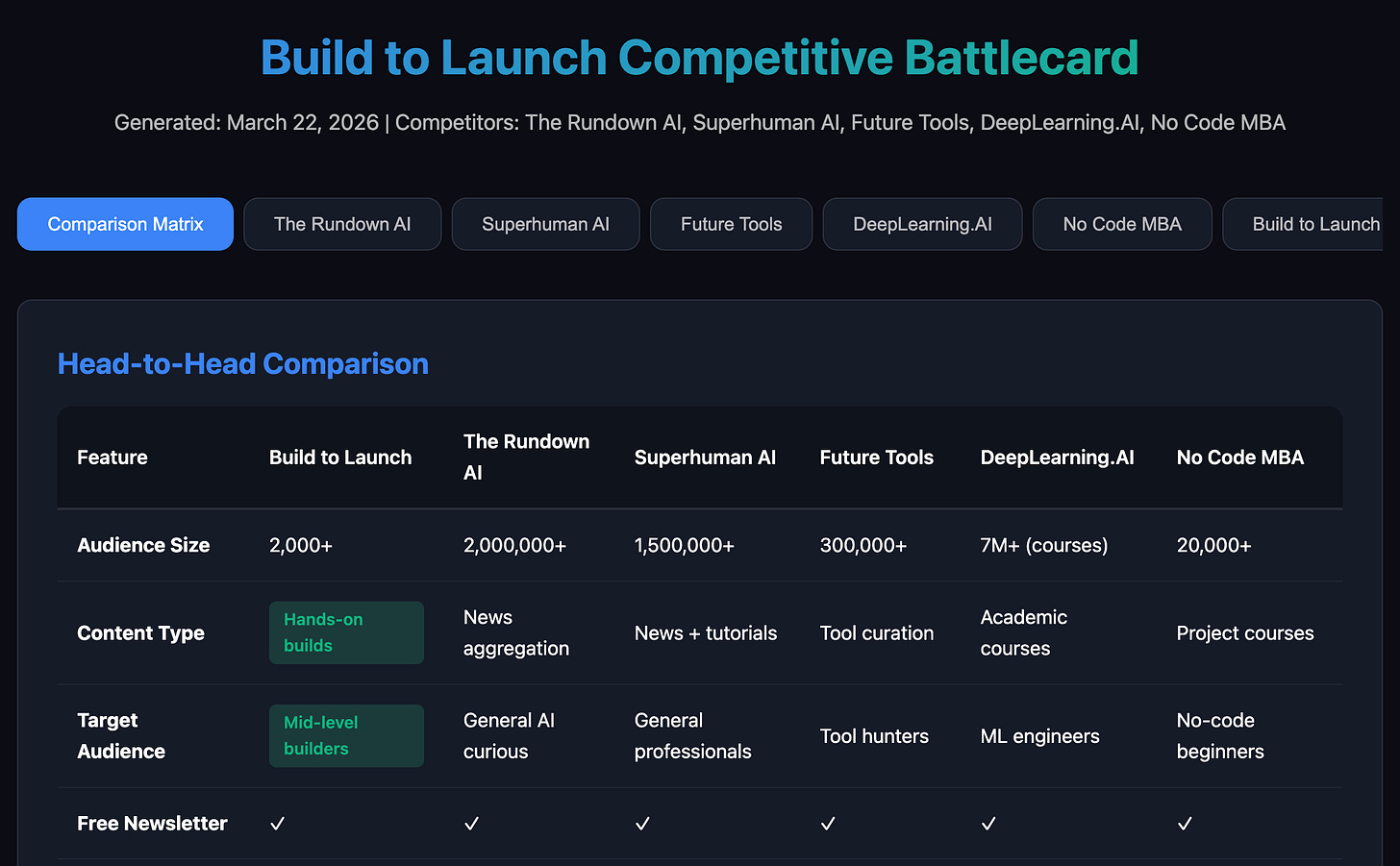
The flashy html page Sales plugin produced for my newsletter
The real problem: Marketing has a competitive-brief skill covering similar ground. I ran both on the same question: who are my competitors and where am I positioned?
Sales — flashy output, wrong data, wrong tier.
Marketing (~45 min) — 3 comparable competitors identified, “stuck-in-the-middle builder” positioning gap found, 10+ content gap opportunities, 7 actions split into quick wins and strategic moves. Grounded in my actual tier.
Most of the Sales plugin is designed for professionals with CRM pipelines and regular customer calls. If that is not your setup, most of its surface area sits unused.
Verdict: SKIP for content creators and builders. The overlap with Marketing is real. When both answered the same question, Marketing was more accurate and more useful.
The bigger question:
When a plugin looks good on paper, how do you tell whether it is for you or for a completely different operator?
Plugin 5: Productivity
What it is: Task management and daily planning. /start creates structured breakdowns, priority rankings, persistent memory across sessions.

Productivity plugin has only one skill available to invoke
Where it works: Thoughtful design. Project-based organization, priority ranking, file-based persistence. If you have no task system, this is a reasonable place to start.
Where it breaks: If you already use Notion, Linear, a custom panel, or even a well-maintained markdown file, this adds another layer managing the same information. I tested /start, confirmed it works, and moved on.
Verdict: SKIP if you have a working system. Try it if you have nothing.
Everything in this article is part of a larger ecosystem. The Claude Code Hub is the master index: every guide on Claude tools, organized by what you're trying to do.
Up to this point, you’ve seen the individual tests.
What changed my mind was not any single plugin result. It was the bigger questions those tests kept raising:
When does a plugin genuinely improve the way you already work?
When do two plugins actually collaborate well?
When is an always-on plugin worth the extra cost and friction?
Next, we’ll go over:
The coding plugin results — five plugins tested on a real feature build, including the one that eliminated four database tables before a line of code was written
The stack I’d actually keep — always-on vs. session-based, with exact toggle logic for content, coding, and UI work
The plugin evaluation scorecard — nine questions that tell you whether a plugin earns a place before you install it
Known breakages and workarounds — every failure mode I hit, and what I’d do differently
Plus: the callout format that separates plugins worth testing from ones that just look polished
This article continues for members
Join Build to Launch to read the full article, access all cohort content, and connect with other AI builders.