Claude Skills Not Working? 5 Fixes That Actually Work
If your AI output is inconsistent, this guide is for that.
Claude Code skills stop working when the file path is broken, the skill is orphaned, or two commands conflict, and none of these surface as errors. This guide covers the decision framework for skill vs. command vs. CLAUDE.md, the two structural rules that prevent silent failures, and the audit script that found 59 broken references in my own 192-file setup.

When Anthropic shipped Claude skills, the AI builder community moved fast.
Not prompts anymore. Not system messages. A real named instruction layer — invokable, composable, loadable on demand. Skill counts climbed into the hundreds. Community repos got shared. Template packs appeared.
Most of them are silently broken. Nobody can tell.I ran the same kind of structured evaluation across 8 AI coding tools — the 3-stage build audit shows what 'silently broken at Stage 1' looks like in build output.
“[Claude] still loves to ignore [the skill] and live it as if it wouldn’t be worth paying attention to at all.” — u/Glittering-Owl-1326, r/ClaudeAI
“I just had Claude set up my system to load them in demand, but they’re all loading at once and now Claude wants to turn them into hooks with trigger phrases, which is a total pain in the ass.” — u/marcopaulodirect, r/ClaudeAI
“I have rules listed in User rules and project-level rules. But models just ignore them — often even when I specifically tell them to use rules — they confirm they can see them.” — Andrii Stupak, Cursor Community Forum
73% of 214 community Claude skills scored below 60/100 in a 2026 audit. Most failed silently. No error message. Just slightly wrong output.
The instinct every time: add another skill to fix it. Which is exactly how you make it worse.
That was what happened in my setup: one for SEO, one for brand voice, one for social notes, one for research, then products, product building, content creation, article, communication, coding, and release workflow…
Six months later, I got 59 broken references pointing to files that had been moved, renamed, or deleted. 20 skills no agent had ever called. Written carefully, completely invisible. 30 duplicate definitions, two versions of the same doctrine diverging without a signal. A 1,239-line legacy command still running alongside the current system, with nothing to flag the conflict.
My AI wasn’t ignoring my skills. It was reading broken paths and getting nothing, silently.
Weeks of cleanup later, I’m finally satisfied with 10/10 reference integrity, 10/10 filesystem consistency, 10/10 single-source architecture. Output consistent for the first time in months, not because the model changed, but because it could finally read what I’d written.
What you’ll go through with me:
Skill, Command, or CLAUDE.md: What Goes Where — the decision most people skip and why getting it wrong compounds everything else
The Two Rules That Prevent Skill Sprawl — the folder shape and scope rule that stops silent divergence before it starts
How Skills Break Without Telling You — five violation types that degrade AI output with no error message
My actual audit from 192 files — real violation counts, what each finding looked like, including the naming disaster I didn’t catch until a script showed me
The complementary-vs-duplicate test — the 10-word check that tells you whether two skills are doing the same job or silently fighting
The
.claudearchitecture template +claude skills auditor— grab them at the end
Loading...
Hi, I’m Jenny 👋
I build AI systems and tools, then share how I did it. AI builder behind VibeCoding.Builders and other products with hundreds of paying customers. See all my launches →
If you’re new to Build to Launch, welcome! Here’s what you might enjoy:
Subscribed

Skill, Command, or CLAUDE.md — What Goes Where
Most guides say: put your instructions in CLAUDE.md. Or: write skills. Or: use commands.
Nobody tells you when to use which one. So you default to wherever you started. Pile everything there. And eventually wonder why Claude stopped listening.
Three containers. Three different jobs.
CLAUDE.md: what’s always true
What it’s for: Rules that apply in every single conversation without exception.
“Use brand voice.” “Never commit directly to main.” “Reference docs live in /docs.” Instructions that should never switch off.
What goes wrong: People put conditional logic in CLAUDE.md.
“When writing articles, do X; when editing for SEO, do Y.” That logic is job-specific. It belongs in a skill. CLAUDE.md can’t turn itself off based on context, so those conditional rules run in every conversation, including ones where they have no business running.
Why it causes trouble: The file bloats.
Each new conditional adds more lines. Past 300 lines, the concrete rules start getting buried in principles and guidelines. Past 500 lines, community research in r/ClaudeAI consistently reports accuracy drops noticeably.
At that point you’re not giving instructions, you’re creating noise that competes with everything else.
A skill: for a specific type of work
What it’s for: Instructions that only apply when Claude is doing a specific job.
One skill, one job, something you could describe in 10 words. The full skill content only loads when the skill is invoked, so it doesn’t pollute every other conversation.
What goes wrong: Two things.
First, people write long, vague descriptions that don’t front-load what the skill actually does. So Claude never knows when to trigger it. The official spec truncates descriptions at 250 characters in the skill listing; anything longer gets cut. If your key use case is buried in sentence three, Claude never sees it.
Second, people duplicate skills across locations without realizing it, so Claude loads conflicting instructions depending on which path a command happened to reference.
Why it causes trouble: A skill with a bad description is invisible.
Claude can’t match it to the right moment, so it never loads, your carefully written instructions are never read. A skill with a duplicate is unpredictable. You edit one version. The other keeps running.
A command: what you invoke directly
What it’s for: Workflows you trigger on purpose at a specific moment: /article-prep, /run-audit, /deploy.
A command orchestrates: it calls skills, sets context, moves through a checklist. The difference from a skill is intent.
A command is something you initiate. A skill is something Claude enters when the work calls for it.
What goes wrong: By default, Claude can auto-trigger any skill when it decides the context is relevant.
Most of the time that’s fine. For workflows with side effects: structural changes, deploys, audits — it isn’t. Without disable-model-invocation: true in the frontmatter, Claude might decide to run your skill because your question sounded architecture-related.
Why it causes trouble: I had a file called collect-article.md (a specific command) and a folder called article-collection (the entire skill system for collected articles) sitting side by side. Similar names, completely different jobs. Claude would invoke either one depending on the session. The naming collision was bad.
The silent auto-triggering made it worse, I had no idea which one had actually run until the output was wrong.
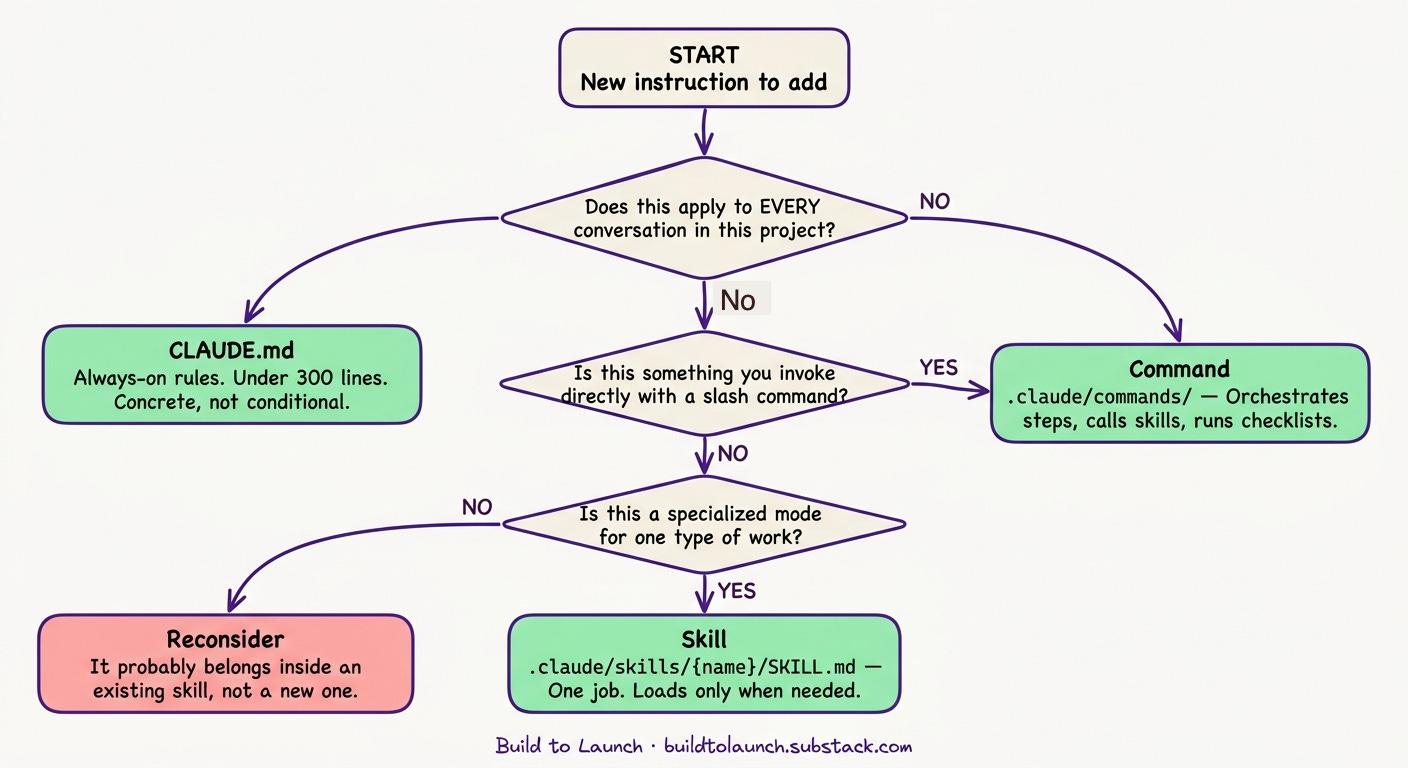
The decision in practice
Does this apply to every conversation in this project?
→ Yes → CLAUDE.md

Is this a workflow you invoke directly (slash command)?
→ Yes → Command in .claude/commands/

Is this a specialized mode for a specific type of work?
→ Yes → Skill in .claude/skills/{name}/SKILL.md
Anthropic has since merged the “skills” and “commands” concepts, the official docs now treat them as equivalent. If you’re reading older guides and finding them contradictory, that’s why. The structural rules below apply regardless of what the docs call the containers.
There’s considerably more to the skill spec for those who want it: subagent forking (context: fork), path-scoped activation, effort levels, tool restrictions, lifecycle hooks, and plugin-style distribution for teams. For day-to-day content and build work, the three containers above handle 90% of what you’ll actually need. When you’re ready to go deeper, the official skills reference has it all.
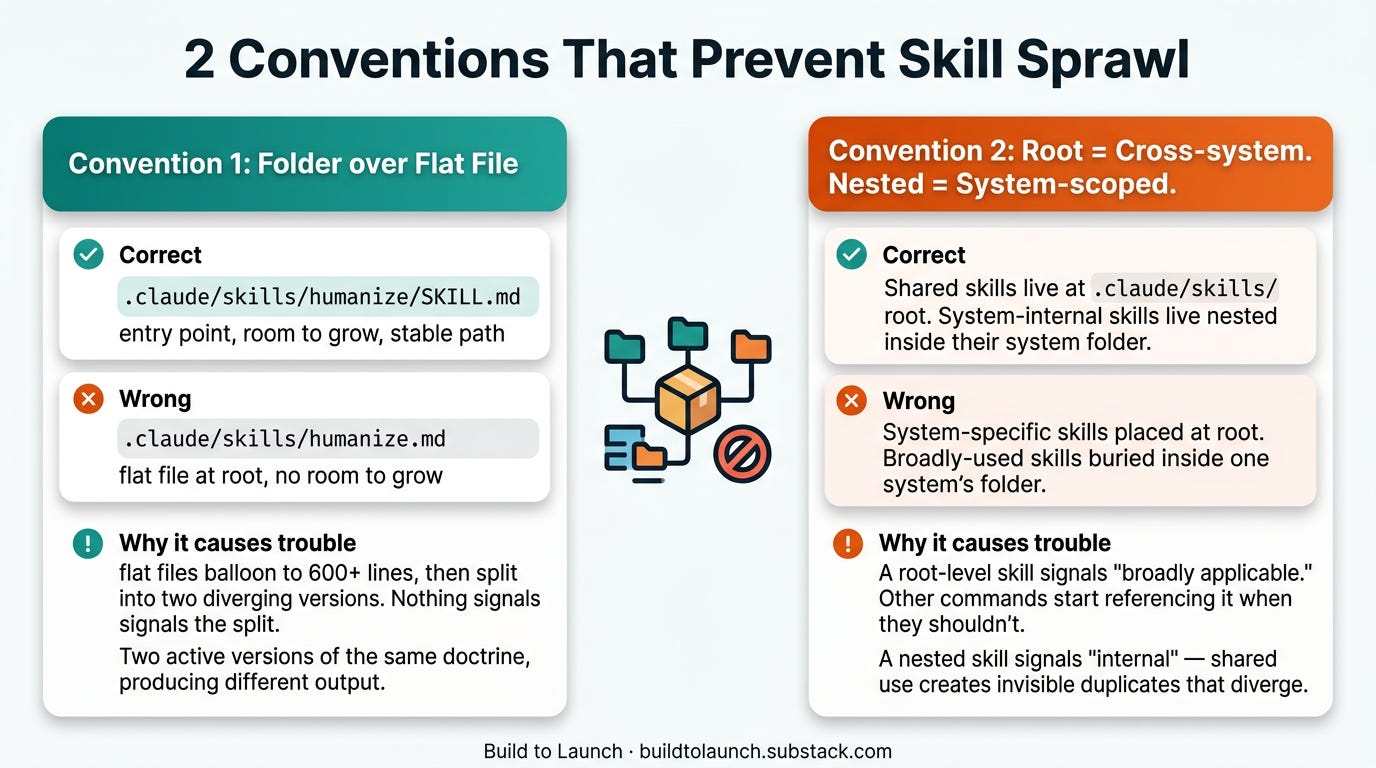
The Two Conventions That Prevent Skill Sprawl
Both conventions enforce the same underlying principle:
Single Source of Truth.
Every piece of doctrine has exactly one authoritative home. When two files both claim ownership of the same job, Claude picks whichever has the most positional weight. You never see which one won.
Most skill problems trace back to ignoring one of two conventions. Once you see them, you can’t unsee them.
Convention 1: Prefer a folder over a flat file
What’s correct: A skill lives in its own folder with SKILL.md as the entry point.
.claude/skills/humanize/
├── SKILL.md          ← entry point (required)
├── reference.md      ← doctrine (optional)
└── examples.md       ← judgment examples (optional)
What goes wrong: People create flat files instead — humanize.md directly in skills/. Claude reads them fine. Nothing breaks immediately.
.claude/skills/humanize.md ← works today, causes problems at scale
Why it causes trouble: A flat file has nowhere to grow. It can’t reference supporting docs cleanly. It can’t hold examples separate from doctrine. So it balloons, 300 lines, then 600, then 800. At that point it either stays as one unmanageable blob, or someone splits it into two flat files that immediately start diverging. Nothing signals the divergence.
Two versions of the same doctrine, both active, producing different output depending on which path a command happened to reference. That’s what the 30 singletons in my audit were.
The folder creates a contract: one stable entry point, everything else in service of it. The path humanize/SKILL.md never changes regardless of how much the skill grows.
Convention 2: Root-level means cross-system. Nested means system-scoped.
This is my own organizational convention, not an official Claude Code requirement, but it’s the one that’s saved me the most confusion.
What’s correct: Shared skills live at the root of .claude/skills/. Skills that belong to one system live nested inside that system’s folder.
.claude/skills/humanize/SKILL.md— any command, any workflow, any other skill can call it.claude/skills/article-creation/skills/intro-system.md— internal to the article-creation system; other systems shouldn’t route to it
What goes wrong: People put system-specific skills at the root level because it feels simpler. Or they put broadly applicable skills nested deep inside a system because that’s where they first needed them.
Why it causes trouble: A root-level skill signals “broadly applicable.” If it isn’t, other commands start referencing it when they shouldn’t. You get unexpected cross-system dependencies that are invisible until they produce wrong output.
A nested skill signals “internal component.” If it’s actually shared, commands in other systems can’t find it cleanly, or they create their own duplicate that immediately starts diverging.
When three similar skills can coexist without conflict
My setup has three skills all in the same domain: humanize, brand-voice, writing-coach.
A fast scan might flag them as duplicates.
They’re not, they have different verbs, different activation stages, zero overlap. Three jobs. Three activation points. They never compete because they never activate at the same stage. The full framework for distinguishing complementary from duplicate is in The Complementary-vs-Duplicate Mental Model.
Duplicate looks like: two files both describing how to write an article, different instructions, neither one deferring to the other. This is the same single-source-of-truth problem that breaks any shared documentation system. I had exactly that. Fixing it meant picking one as canonical and deleting the other.
Knowing the rules is one problem. The harder one: most setups are already breaking them, and nothing tells you.
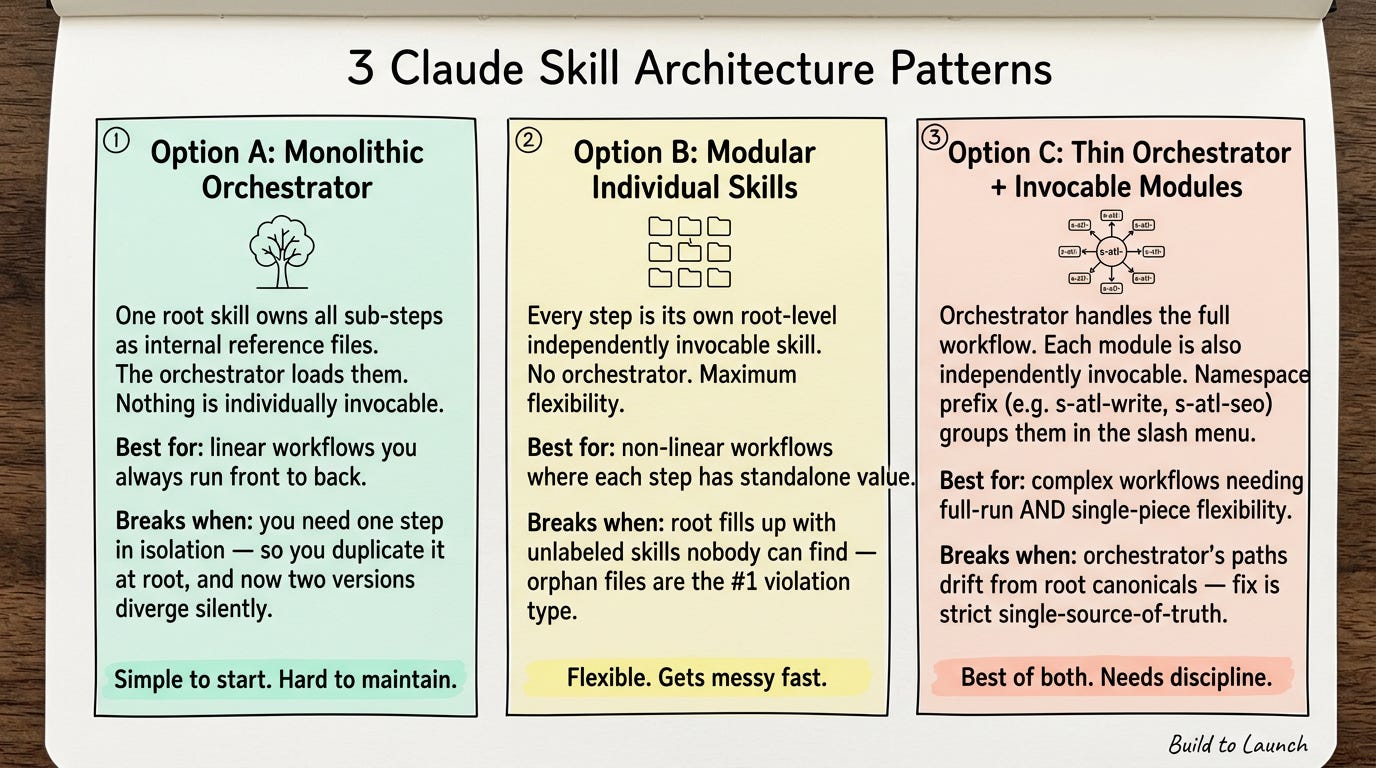
Three Architecture Patterns
Before the conventions can do their job, there’s a bigger decision most people never consciously make: how do you want your skills to relate to each other as a system?
Three patterns exist. Each one changes what counts as a violation, and what breaks silently when you get it wrong.
Option A — Monolithic orchestrator.
.claude/skills/
└── article-creation/
    ├── SKILL.md              ← orchestrator (the only entry point)
    └── skills/
        ├── write-draft.md    ← internal reference, not invocable
        ├── write-intro.md    ← internal reference, not invocable
        └── seo-pass.md       ← internal reference, not invocable
What it’s for: One top-level skill owns all sub-steps as internal reference files. The orchestrator loads them selectively. Nothing is individually invocable. Works when the workflow is linear and you always run it front to back.
What goes wrong: You need to fix one sub-step without running the whole workflow. You can’t — everything routes through the orchestrator. So you duplicate the sub-step as a standalone skill at the root level, and now two versions of the same doctrine coexist with nothing flagging the split.
Why it causes trouble: Silent divergence. The orchestrator keeps loading the original. The new standalone loads in other contexts. They drift apart over weeks. Neither version knows the other exists.
Best for: Tightly coupled workflows where the steps always run in sequence and you rarely need to call one piece in isolation.
Option B — Modular individual skills.
.claude/skills/
├── write-draft/
│   └── SKILL.md             ← independently invocable
├── write-intro/
│   └── SKILL.md             ← independently invocable
└── seo-pass/
    └── SKILL.md             ← independently invocable
What it’s for: Every step is its own independently invocable skill at the root level. No orchestrator. You invoke each piece directly and compose them as the work calls for it.
What goes wrong: The root level fills up fast. Without a naming convention, write-intro, write-summary, and write-cta look identical in the slash menu. You lose track of what’s current, what’s deprecated, what’s article-specific vs. general-purpose.
Why it causes trouble: Orphans — skills nobody calls because nobody can find them. Orphan files are one of the highest-frequency violations the auditor surfaces.
Best for: Non-linear workflows where each step has genuine standalone value and you want maximum flexibility over how to combine them.
Option C — Thin orchestrator + invocable modules.
.claude/skills/
├── article-creation/
│   └── SKILL.md             ← orchestrator (routes to root canonicals)
├── s-atl-write/
│   └── SKILL.md             ← root canonical, independently invocable
├── s-atl-intro/
│   └── SKILL.md             ← root canonical, independently invocable
└── s-atl-seo/
    └── SKILL.md             ← root canonical, independently invocable
What it’s for: The orchestrator handles the full workflow. Each module is also independently invocable when you need to fix just one piece in isolation. Modules follow a namespace prefix — in my setup, s-atl-write, s-atl-bio, s-atl-seo — so they group visibly in the slash menu and don’t get lost among unrelated skills.
What goes wrong: The orchestrator’s spec table and the root-level module drift apart. Someone updates the module at the root. The orchestrator still references the old path. Claude reads the orchestrator, follows the stale reference, and loads the outdated version.
Why it causes trouble: Broken references — the highest-impact violation type. The fix is strict: the orchestrator’s spec table must always point to the root canonical. The root module is the single source of truth. If you edit the module, you do not also edit an internal copy.
Best for: Complex workflows where you sometimes need the full run and sometimes need to fix just one piece — and where discoverability in the slash menu actually matters.
The two conventions above apply within whichever pattern you choose. But if you try to apply them before deciding on a pattern, you’ll end up flagging things as violations that are actually correct for your architecture, and missing violations that would be obvious once the pattern is clear.
My current setup uses Option C. The Single-Source-Of-Truth (SSOT) Audit section shows what that looks like in practice.
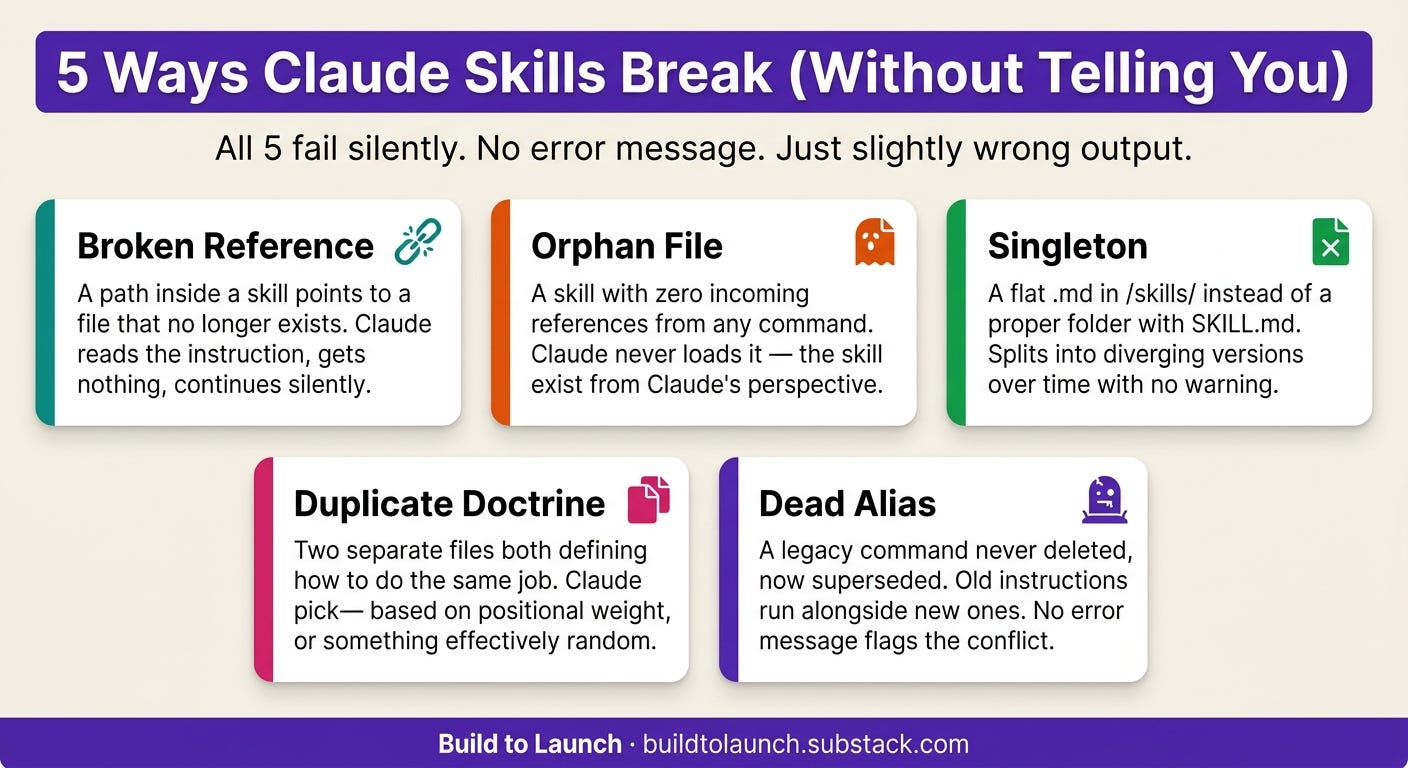
How Skills Break Without Telling You
Claude doesn’t throw an error when it reads a broken path. It reads the instruction, finds nothing at .claude/skills/seo-convert.md, and continues as if that line wasn’t there.
The output looks slightly wrong. You can’t tell why. You add another skill to compensate.
Five ways this happens:
Why this is hard to diagnose:
“The model doesn’t flag these contradictions. It picks whichever instruction has the most recent positional weight, or whichever happens to align with its training distribution, or something effectively random. You won’t know which instruction won until you see the output.”
— InsiderLLM, on prompt debt
The AI doesn’t tell you it’s confused. It just produces slightly inconsistent output. And you assume it’s a model problem.
That same 73%, most setups failing, most failing silently. The most common cause: broken or missing references, not bad instructions.
Not a rare edge case. The default outcome of adding skills without a maintenance system.
The SSOT Audit
When two files both describe how to write an article intro, Claude doesn’t flag the conflict. It picks whichever has the most recent positional weight. You get inconsistent output. You assume it’s the model.
The SSOT Audit makes that invisible structure visible. It runs three passes over your .claude folder:
Pass 1 — Reference scan. Every internal path reference across all skill and command files gets extracted and checked against what actually exists on disk. Paths that lead nowhere get flagged as broken references.
Pass 2 — Structure scan. Every item inside skills/ gets checked for proper folder shape — a named folder containing SKILL.md. Flat .md files at the root get flagged as singletons.
Pass 3 — Doctrine scan. Files with overlapping topic coverage get compared for content divergence. Two files both claiming ownership of the same job, with different instructions, get flagged as duplicates.
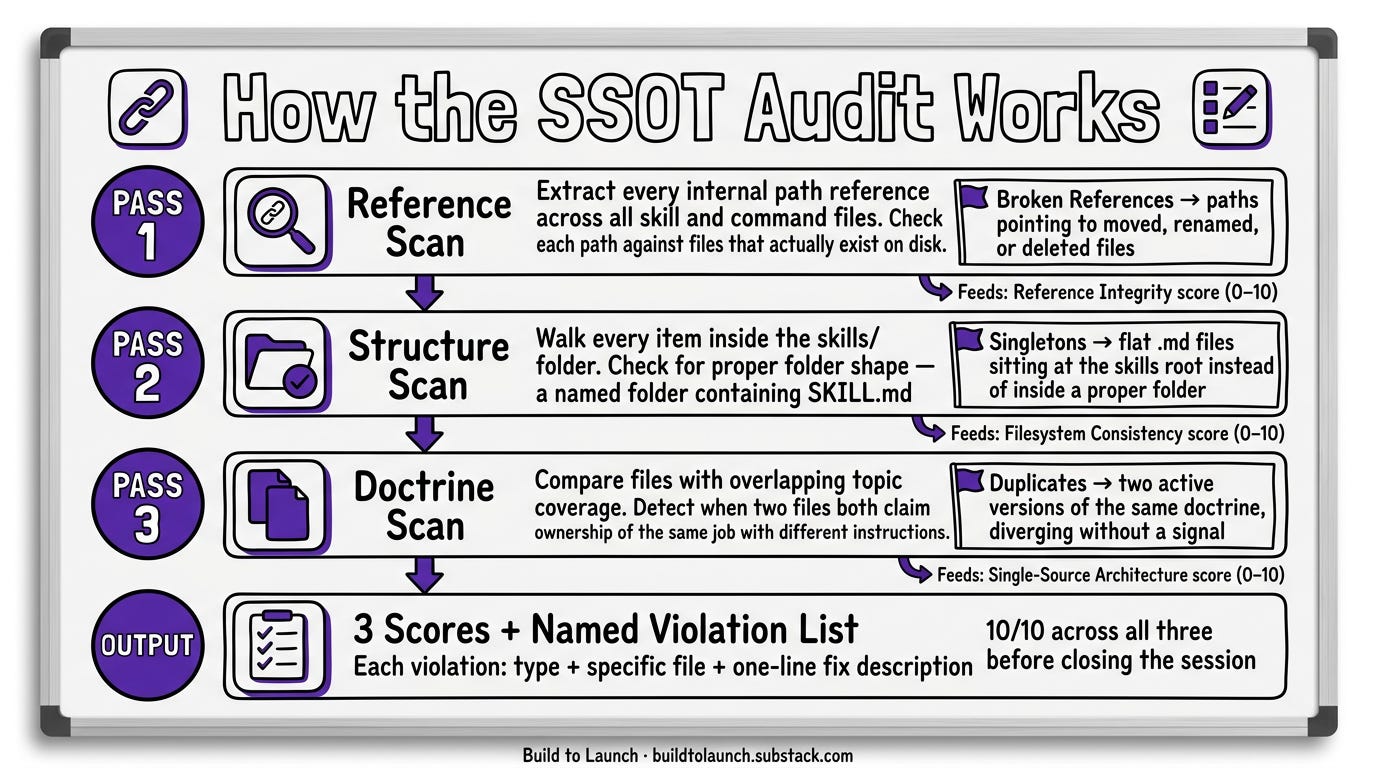
Each pass feeds one score. Each violation surfaces with its type, the specific file, and a one-line fix description. Run it, get three scores. Fix what’s flagged. Run it again. Score should be 10/10 before you close the session.
Knowing what can break is one thing. Knowing specifically what’s broken in your setup is different. Behind the paywall: my actual violation counts from 192 real files, the mental model for resolving what you find, and the script that scores your own setup in 30 seconds.
Next we’ll go through:
My actual audit results — real violation counts from 192 files, what each finding looked like (including the naming disaster I didn’t catch until a script showed me)
The complementary-vs-duplicate test — the 10-word check that tells you whether two skills are doing the same job
The
.claudearchitecture template — folder structure and ownership map, ready to adapt to your setupThe ssot-auditor skill — point it at any
.claudefolder, get three scores in 30 seconds
This article continues for members
Join Build to Launch to read the full article, access all cohort content, and connect with other AI builders.