15 Best Claude Code Prompts That Earn Me 30 Hours a Week
Every prompt shows how much time it earns back. Copy-paste the ones worth your time.
Most “best Claude Code prompts” lists give you 50 developer templates organized by task. These 15 are organized by what you’re actually doing: writing, research, coding, systems with before/after time comparisons for each one. 30+ hours earned back per week, built from 55 production slash commands running daily.

How many “best AI prompts” lists have you bookmarked? At least one. Probably three.
I have way too many. Browser tabs, local repos, Notion pages… everywhere. I created hundreds and shared dozens to paid members, clients, coworkers, friends, family.
Some of them came back:
Too many prompts. It’s overwhelming. I’m losing track of what to use.
They’re all good but I don’t know which one to reach for.
Fair. I was overwhelmed too. So I went deeper, learned the core principles underneath, shared the methodology. I thought that would fix it.
Different questions started coming back:
What prompt did you actually use for that?
Why am I not getting the same output?
I’m tired of having conversations with AI that bring up more problems than I have the bandwidth to resolve.
Not which prompt should I use. But this whole process is exhausting.
That made me I realize, the best prompt isn’t the cleverest one. It’s the one that earns you time back, so quietly you stop noticing it’s running.
That requires evaluation between tools and mapping them against your workflow. So I stopped sharing more prompts and started tracking the ones I actually reach for every day. 15 of them. Across writing, research, coding, and systems. I’m surprised at how much time each one earns back. And especially when Claude Code already has your context: your articles, your codebase, your files; the process can’t be smoother.
Full-time job. Two toddlers. Maybe 4 hours a day for everything else, and I’m building products, running a newsletter, taking on clients. That math only works if something is doing the heavy lifting.
Here’s every prompt and what it earns me per week:
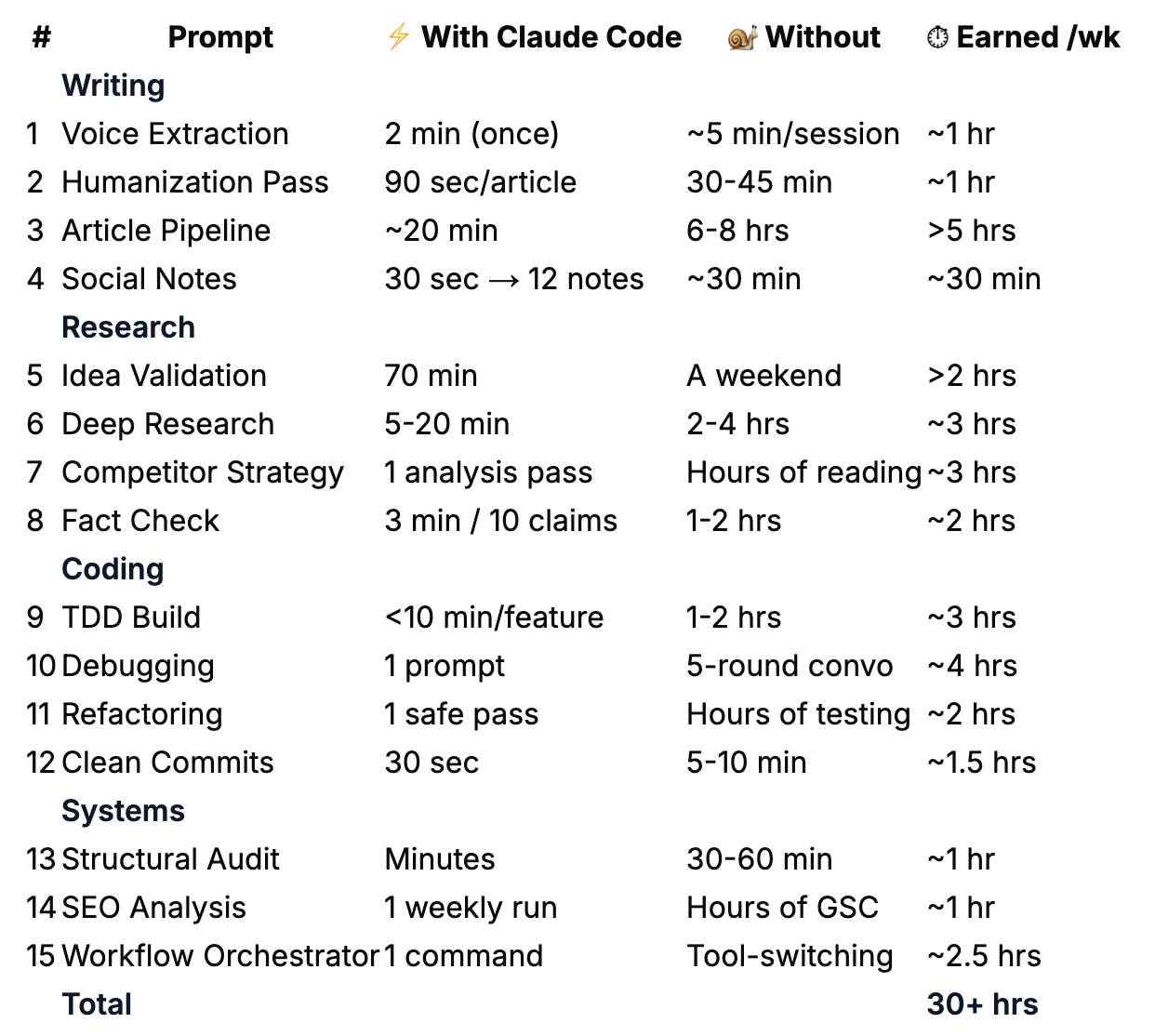
These prompts are optimized for Claude Code, but with enough context, any AI can use them. Use these as anchors. Modify them. Make them yours. The best Claude Code prompt is the one you build from an example and never have to look up again.
What’s Inside:
Claude Code Witing Prompts (4): voice extraction, article pipelines, humanizing, and repurposing
Claude Code Research Prompts (4): idea validation, deep research, competitive strategy, and fact verification
Claude Code Coding Prompts (4): building features, debugging, refactoring, and clean commits
Claude Code Systems and Orchestration Prompts (3): structural auditing, search analysis, and workflow automation
How to Turn Claude Code Prompts Into Slash Commands — copy-paste to slash commands to MCP-connected systems
🎁 Towards the end, you’ll get all 15 prompts, the slash command table, the prompt progression framework, and access to the full 241-prompt kits across writing, research, and coding.
Claude Code Writing Prompts
These four prompts cover the content cycle: voice extraction, AI drift detection, article pipelines, and cross-platform repurposing.
Prompt 1: Voice Extraction — Make AI Learn How You Write
Requires: Five writing samples saved as files. No external connection.
Estimated time returned: ~1 hr/week. Run once, then reuse the Voice Card in later sessions.
The prompt:
Read the articles in [Your Vault]. Use the five most recent unless I also provide engagement data, then choose the five most engaged. They’re all by the same author (me).
Analyze them and produce a Voice Card as a reusable style profile to add to my CLAUDE.md, the project instruction file, under a “## Writing Voice” section.
Cover these 6 layers, from most visible to invisible. The questions are examples of what to look for, not a checklist, follow whatever patterns stand out.
STRUCTURE: How I organize a piece. Front-load value or build to it? How I open and close? Headers, lists, blockquotes, what tools do I reach for?
SENTENCE PATTERNS: Rhythm and construction. Average length, variation, fragments. Where the punch lands. How I handle complex ideas, break them up or let them flow?
VOCABULARY FINGERPRINT: Signature words and phrases I lean on, words conspicuously absent, and plain versus formal choices that reveal formality and personality.
TONE: Directness level, warmth-to-authority ratio, how I handle disagreement, where humor shows up, how I address the reader.
PHILOSOPHY & EMOTIONAL ANCHORS: Beliefs that recur across pieces. What values drive my topic selection. What emotion I consistently try to create in the reader. This is what makes two writers with identical mechanics feel completely different.
WHAT I AVOID: The negative space, patterns, words, structures, and angles conspicuously absent from my writing. This defines a voice as much as what’s present.
Format the Voice Card as markdown I can drop directly into CLAUDE.md.
Then list 3 sentences from the samples that are most “me”, the lines where my voice comes through strongest. Explain why.
Why it works:
Captures why you write (philosophy, emotional anchors, negative space), not just mechanics. Two writers can have identical sentence patterns and feel completely different.
Runs once, works forever. Analyzes 5 articles in under 2 minutes, saves to
CLAUDE.md. Every future session starts with your voice loaded.
When to use it:
Once, at workspace setup. Update every 6 months. I caught AI-induced drift in my own writing workflow this way: longer sentences and smoothed-out edges I genuinely liked.
What makes it different:
Portable artifact, not session-bound. Pasting samples into ChatGPT trains one conversation. The Voice Card persists across every session and project.
Prompt 2: Voice-Checked Humanization Pass
Requires: Your Voice Card and draft saved as files. Review the proposed changes before Claude edits the draft.
Estimated time returned: ~1 hr/week. One final pass replaces a separate manual pattern-hunting read.
The prompt:
Read the Voice Card in my CLAUDE.md (under “## Writing Voice”).
Then read the draft at [Your Vault]/[article].md.
Run these 7 checks against both the Voice Card and the draft:
VOICE DRIFT CHECK: Compare the draft’s sentence patterns, rhythm, and tone against the Voice Card. Flag any sections where the writing drifted from my documented style. Be specific: quote the drifted sentence and explain what my Voice Card says I would write.
EVALUATE INTENSIFIERS: Check every intensifier named in the Voice Card. Read the sentence with and without it. Keep the word only when removing it changes the meaning or contrast.
REMOVE EM DASHES: Try a period first, then a colon, comma, or sentence rewrite. Keep the source at zero prose em dashes.
REMOVE FORMULAIC CONTRASTS: Find sentences that reject one frame only to assert another. State the supported point directly.
APPLY THE BANNED-LANGUAGE LIST: Read the exact vocabulary, setup-phrase, filler, and punctuation rules in the Voice Card.
Report every match before editing it.ADD SPECIFICITY: “hundreds” → “300+”, “takes some time” → “20 hours”, “cheap” → “$0.03 per query”. Name every vague “something,” “in a different way,” or “things started to change.”
PUBLISHED COMPARISON: Read my 3 most recent articles in [Your Vault]/. Find one sentence in the draft that sounds least like something I’d publish, and one that sounds most like me.
Explain why.
For each change, note what was changed and why.
Flag any words you evaluated and chose to KEEP (with reasoning).
Show the proposed edits and wait for approval. After I approve them, apply the changes and show the final diff.
Why it works:
Checks against two sources of truth: your Voice Card and your published articles. Not a vague “make it more human.”
Catches drift you can’t see yourself. The slow creep of longer sentences and smoothed-out edges from weeks of writing with AI.
When to use it:
Last step before publishing. ~90 seconds per article, catches 8-12 changes I wouldn’t spot manually.
What makes it different:
Checks the draft against your own rules and recent samples. The approval step lets you keep an unusual sentence when it belongs to your voice.
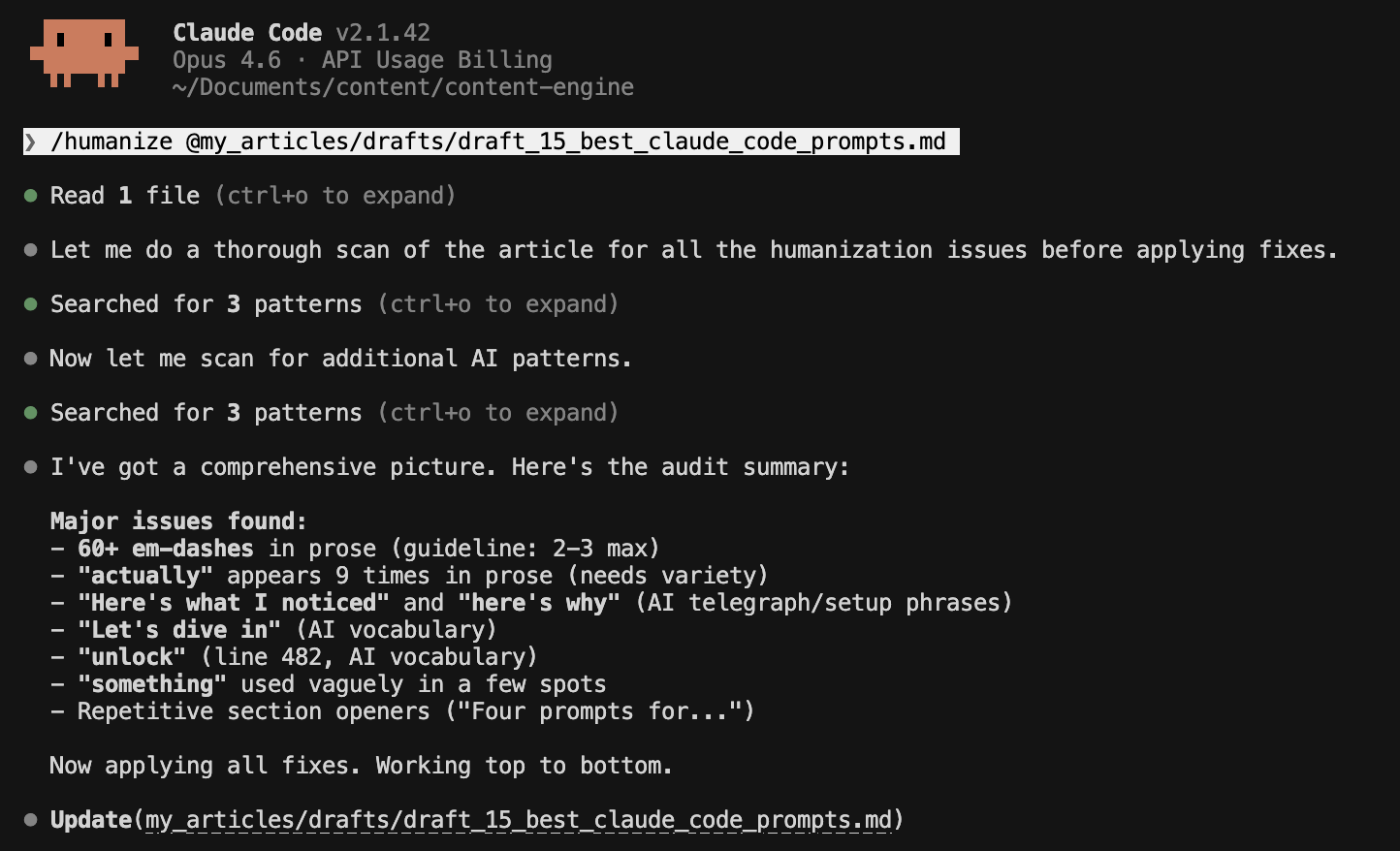
This is my last-mile editing step. I run it as part of a 3-4 prompt sequence before publishing. The full pre-publish pass includes a grammar-and-tense fixer, a line editor for clarity, and a formatting check.
Prompt 3: Draft to Published — The Full Article Pipeline
Requires: An article template, named review instructions, and a known folder structure in your workspace. If those do not exist yet, build them before running the full pipeline.
Estimated time returned: >5 hrs/week. 20-min re-runs vs. 6-8 hours juggling phases manually
The prompt:
Run the complete article pipeline for [article folder]:
Use these workspace inputs:
Article template: [template path].
Editorial rules: [editorial rules path].
Source notes: [research path].
Metadata rules: [metadata rules path].
Phase 1: Check what exists and list what is missing.
Phase 2: Draft against the article template and source notes.
Phase 3: Review structure before polishing sentences.
Phase 4: Verify factual claims against their sources.
Phase 5: Evaluate contextual internal links. Keep only links that answer the reader’s next question at that exact sentence.
Phase 6: Generate title, subtitle, URL slug, and meta description.
Phase 7: Run the pre-publish checklist.
Skip any phase that’s already complete.
Pause after Phase 6. Show every proposed file change and wait for approval before the final checklist or any publication action.
Why it works:
Sequenced workflow with skip logic. Picks up where you left off. Run it mid-process and it skips completed phases.
Built-in review gate before the final checklist.
When to use it:
Every content cycle. First run: 2-3 hours. Re-runs: ~20 minutes. I run this for every Wednesday article.
What makes it different:
Each phase has an input and stopping point. “Skip what’s done” lets the same prompt resume an article without repeating completed work.
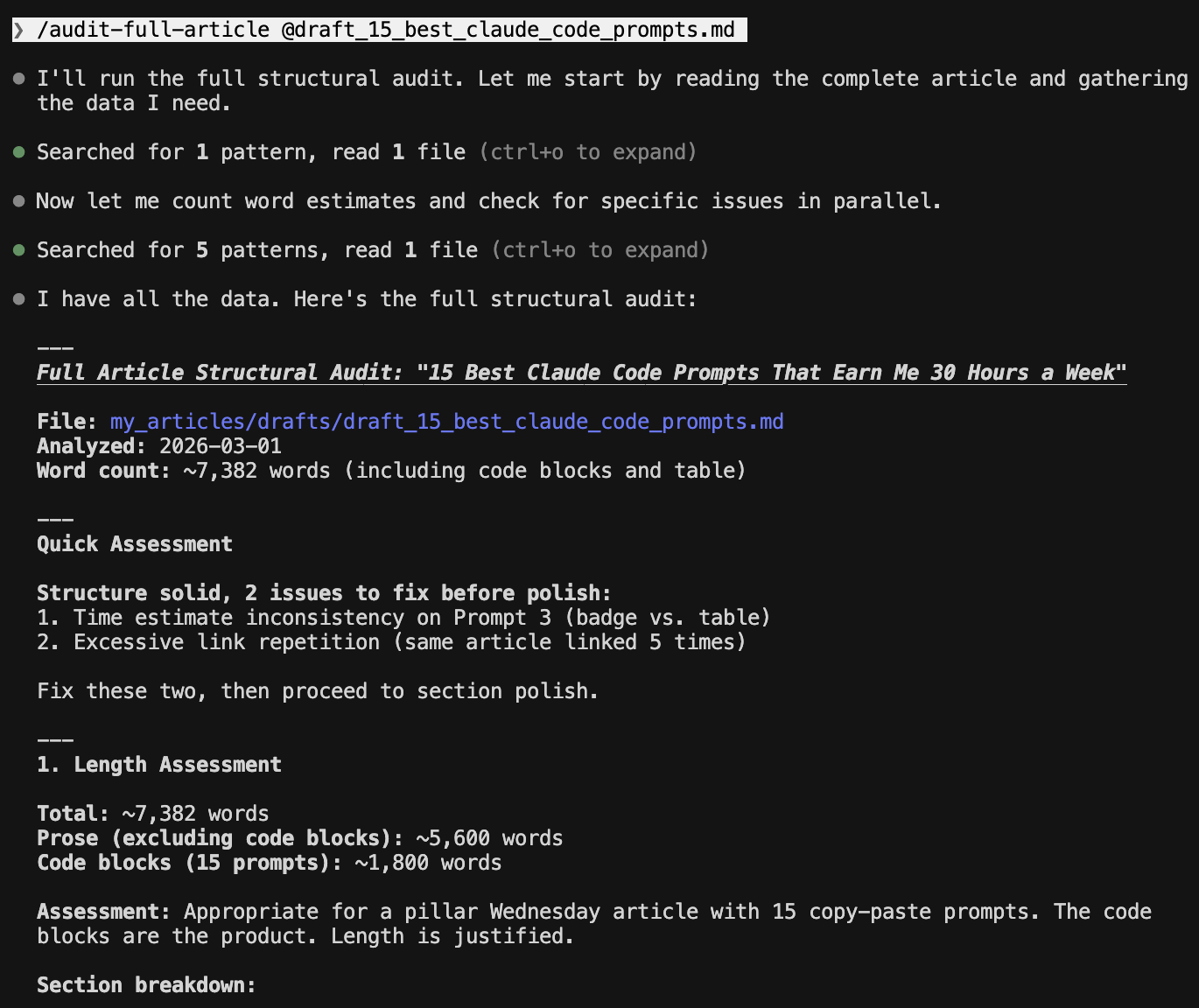
I now keep the reusable version as a Claude skill. The skill points to the templates and checks instead of carrying the entire system in one prompt.
Prompt 4: Turn One Article Into a Dozen Social Posts
Requires: One finished article saved as a file. No external connection unless you want Claude to read current performance data.
Estimated time returned: ~30 min/week. 12 notes in 30 seconds vs. writing each one from scratch
The prompt:
Generate 10-12 social posts from this article.
Use this mix, adjusting the percentages when the source supports it:
[X]% observations or tensions from the article.
[Y]% practical explanations, receipts, or comparisons.
[Z]% personal moments already present in the source.
Build the first line from a specific receipt, tension, or question in the article. Do not invent conflict, certainty, or a personal story.
For each note:Keep every factual claim inside the source material.
Use the exact number when the article supplies one.
Vary sentence length instead of forcing every sentence short.
Give each post one complete idea.
Keep most posts under 100 words.
For tension-based posts:
Name the tension in plain words.
Pull evidence for each side from the article.
State the conclusion the evidence supports.
Write the post without mentioning this analysis process.
Why it works:
The mix prevents one article from becoming 12 versions of the same summary. Source boundaries keep the posts tied to what the article earned.
The debate method (argue both sides of a tension, then synthesize) produces original notes, not summaries. (Full system in The Viral Substack Notes Creation System.)
When to use it:
After publishing. 12 notes in about 30 seconds. That’s 2-3 weeks of content from one article. Works in Claude Code, ChatGPT, or both.
What makes it different:
The debate methodology. “Find tensions, argue both sides, synthesize.” I haven’t found this in other repurposing prompts.
The writing prompt that surprised me most was Prompt 4. I wrote about what happened the first time I went viral with a prompt in Lessons From a Viral Prompt.
If any of these prompts saved you from typing the same instructions again, share this with someone who’s still copy-pasting from browser tabs.
The writing prompts leave an artifact behind: a Voice Card, an edited draft, a complete article folder, or a set of sourced posts. Research needs the same kind of finish line.
Claude Code Research Prompts
These 4 prompts turn source gathering into a saved decision, research file, strategy review, or verification report.
Prompt 5: “Should I Build This?” — Idea Validation Research
Requires: Web access. API or RSS testing is optional and depends on the product idea.
Estimated time returned: ~2 hrs/week. 70-min validated decision vs. a weekend of tab-hopping
The prompt:
This article continues for members
Join Build to Launch to read the full article, access all cohort content, and connect with other AI builders.