How to Install OpenClaw and Run Your First Autonomous Agent
Complete walkthrough for local and cloud installation — plus the cron job that messages you without being asked
Most OpenClaw setup guides stop when the gateway starts. Getting to an agent that actually does things (runs cron jobs, messages you on Telegram, operates on a schedule) takes four steps most tutorials skip entirely. This covers all of them: local and Oracle ARM install side by side, identity files that constrain the agent safely, Telegram including the pairing step the wizard doesn’t mention, and your first cron job firing without you asking.

You’ve seen the posts. A 24/7 employee who never sleeps, handles every digital task you throw at it. An autonomous investor agent that made $14,700 in three weeks. A sleepless developer who ships features while you’re asleep. This is what OpenClaw promises. This is what circulates on social.
If you opened this article expecting that — let’s reset.
OpenClaw can do real things. The gap between “autonomous agent” and something useful you actually trust is exactly where everyone gets stuck. This article is about closing that gap.
I’ve had 12 active cron jobs running on Oracle ARM for weeks: briefings, content research, Substack engagement monitoring, social posts. All autonomous. Two of those exact jobs show up in the cron section below. This is what it took to get there, and what I’d skip if I was starting today.
What’s Inside:
What “done” actually looks like — so you know when you’ve crossed the finish line
Pick your path — which install method fits your situation, without the sales pitch
What most tutorials skip — five production gaps worth knowing before you start
Install OpenClaw — local and Oracle ARM, side by side
Give your agent an identity — what to write in SOUL.md and AGENTS.md
Connect Telegram — including the pairing step the wizard doesn’t mention
Your first cron job — from zero to your agent messaging you without being asked
🎁 SOUL.md, AGENTS.md, USER.md, and cron jobs templates — the ones I use in production — available at the end.
Hi, I’m Jenny 👋
I turn friction into launched AI systems, and help you to do the same. AI builder behind VibeCoding.Builders and other products with hundreds of paying customers. See all my launches →
If you’re new here, you might enjoy:
OpenClaw for One-Person Businesses — the why before the how
4 Levels of AI Automation: When Claude, n8n, and OpenClaw Each Win — how to know which tool fits which job
OpenClaw Live Demo: What It Looks Like After Four Weeks — 18 cron jobs, live MCPs, and what surprised me
MCP Second Brain: Connected Intelligence Guide — how memory works across sessions
Subscribed

What “done” actually looks like
Most OpenClaw tutorials declare success the moment the gateway starts. That’s step one. There are three more.
The complete loop has four stages:
Your machine → OpenClaw gateway → Telegram → you
Done means all four are working:
Gateway running — installed, starts cleanly,
openclaw gateway statusshowsruntime: runningandRPC probe: ok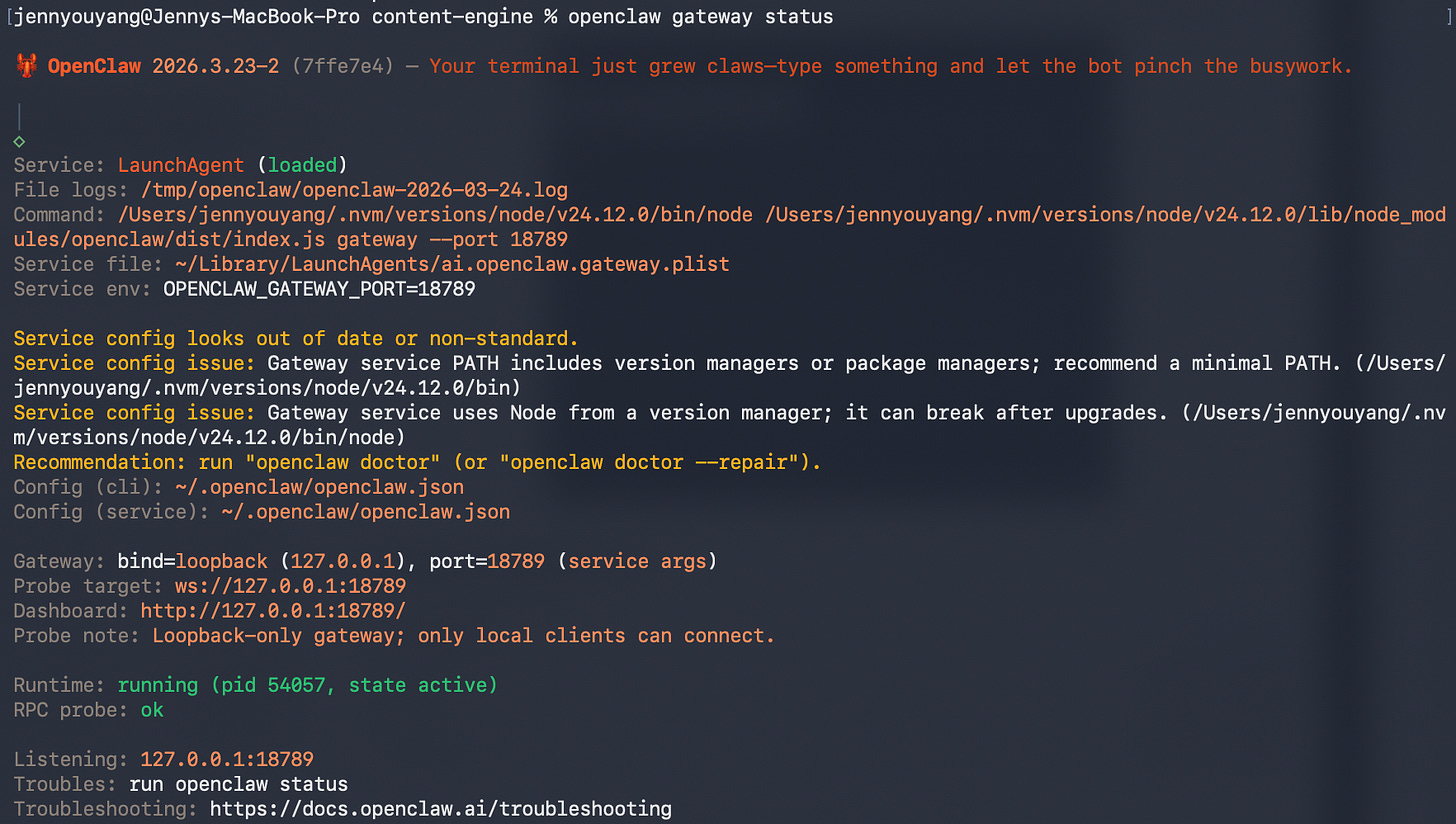
Openclaw gateway open
Identity configured — SOUL.md, AGENTS.md, and USER.md are filled in with real constraints, not default placeholders
Telegram connected — you can message the bot and get a response; the bot can message you first
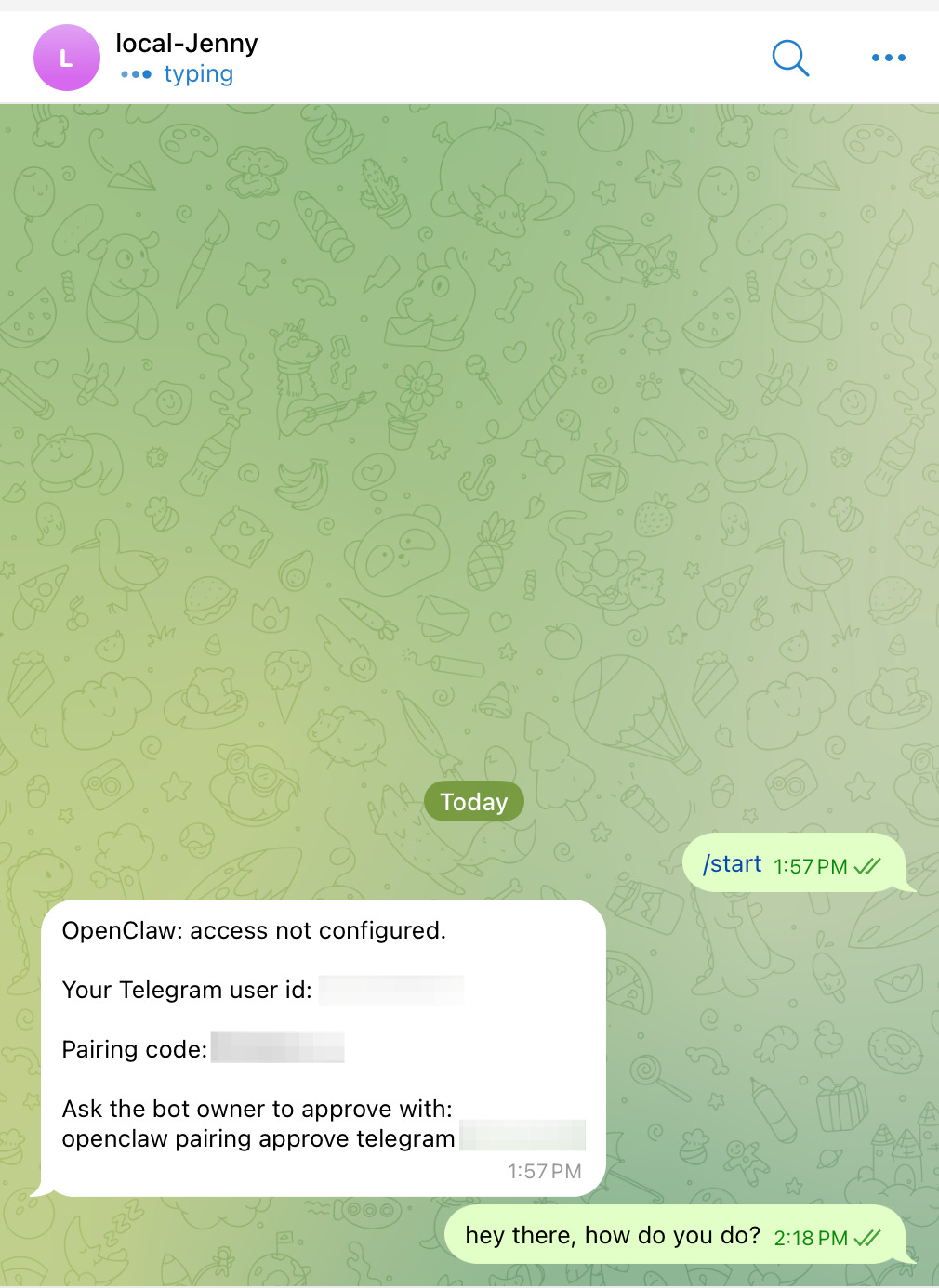
First message with telegram bot
Cron job firing — the agent sends you something without you asking
Stage 4 is the whole point. Everything before it is setup. A gateway that starts but has no identity, no Telegram, and no scheduled work is an expensive chatbot.
Time to expect:
Local (Mac/Linux): about 20 minutes to a working conversation, plus 10 more for the first cron job
Oracle ARM: about 45 minutes including server setup
DigitalOcean: see Pick Your Path — UI bug in the current version
Pick your path
Seven real options. The short version: if you’re on a generic VPS (Hetzner, Vultr, Linode), the setup is identical to Oracle ARM — bare Ubuntu, same manual steps, same systemd config. The only difference is you’re paying for what Oracle gives away free.
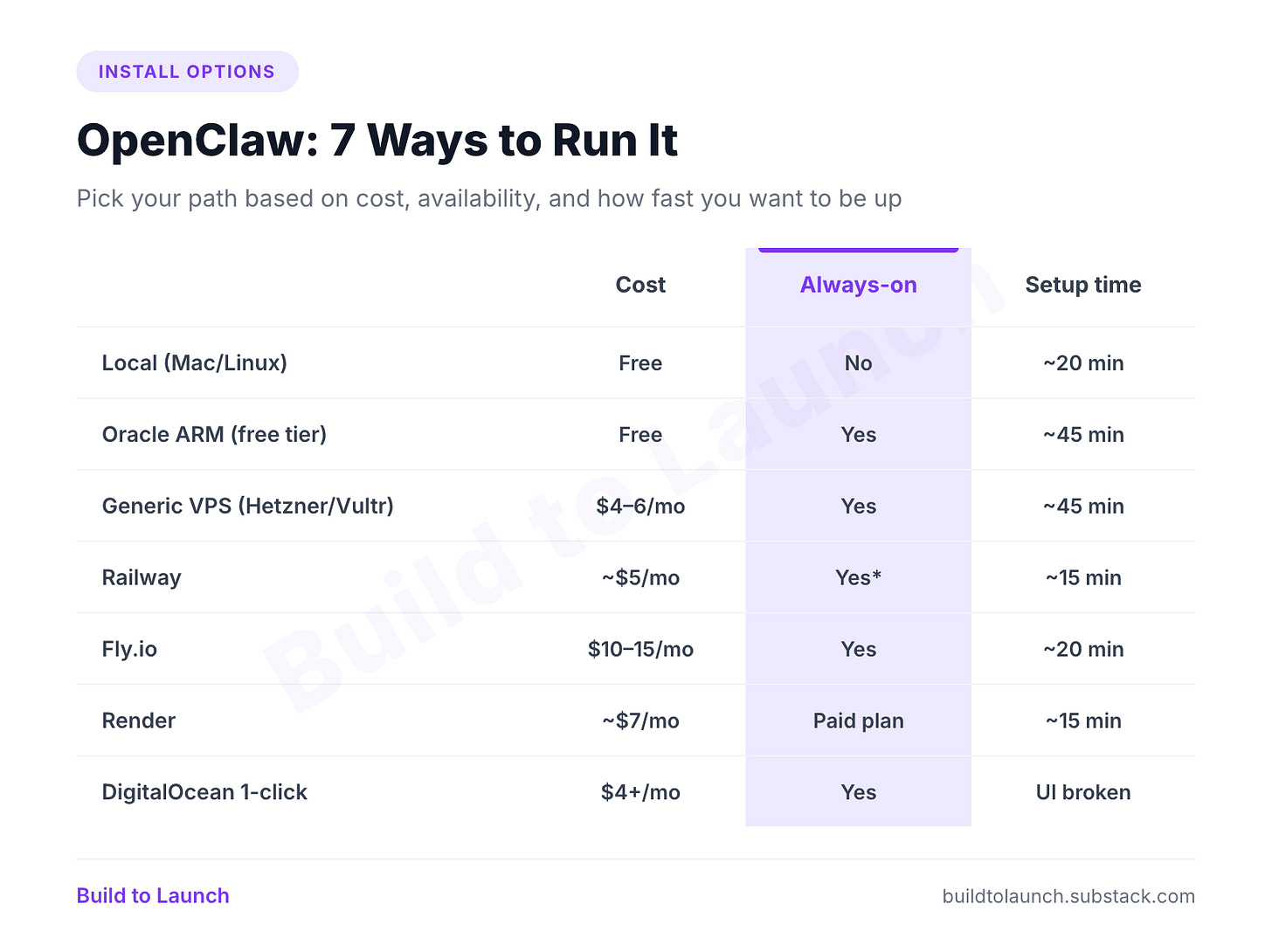
*Railway can scale to zero on some plans, which silently kills cron jobs.
→ Just want to try it? Local. You’ll have it running in 20 minutes with zero infrastructure decisions.
→ Free and permanent? Oracle ARM — if you can get one. The always-free tier gives you 4 OCPU and 24GB RAM, but ARM capacity is heavily contested. I had to hit the API thousands of times programmatically before one provisioned. If you land one, it runs 24/7 without a bill. If you can’t, paid options is the next best thing.
→ Willing to pay? Railway or Fly.io for the shortest path. Render works well on a paid plan — avoid the free tier if you’re running cron jobs. Hetzner and similar VPS providers are solid options if you already have one running; just follow the same Oracle ARM steps.
→ DigitalOcean: OpenClaw exists in their marketplace as a 1-click app, but the Droplet creation UI is currently broken — region selection doesn’t persist and the Create button stays grayed out. Skip it for now.
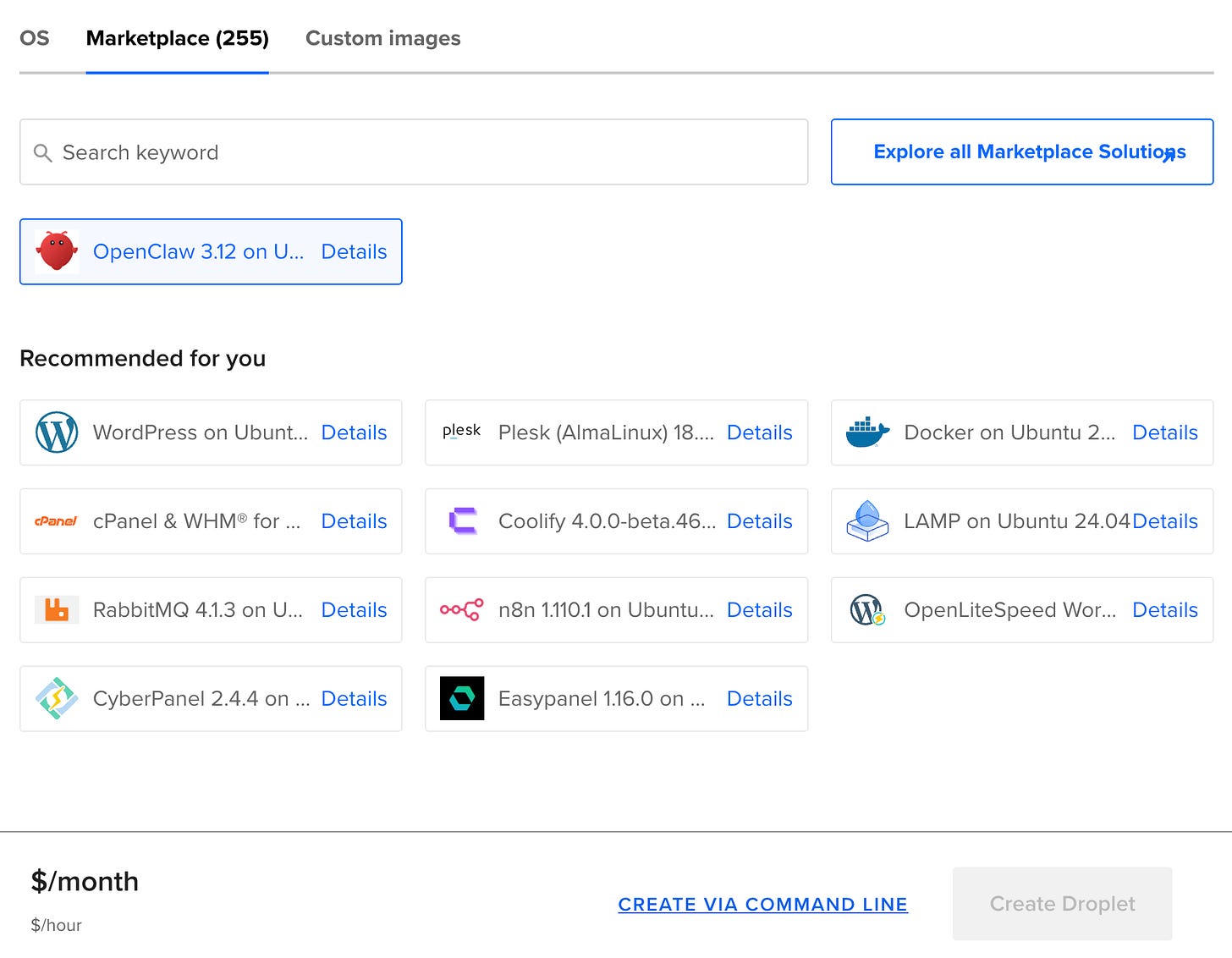
DigitalOcean marketplace listing for OpenClaw showing the 1-click app page
For more on what OpenClaw actually does before you commit to a path, read OpenClaw for One-Person Businesses. And before you start installing: five production gaps worth knowing that most tutorials skip entirely.
What most tutorials skip
Five production gaps. Enough to name each problem — the solutions are in the paid section.
1. SOUL.md without hard constraints is incomplete.
The docs show you how to define a personality. They don’t tell you what happens at 3am when a cron job hits an ambiguous situation and there are no explicit rules to fall back on. A SOUL.md without a hard constraints section is a personality document, not a safety layer. The difference matters when the agent has access to real systems.
2. The Telegram pairing step isn’t in the wizard.
The first time you message your bot after setup, you won’t get a response. You’ll see a code:
OpenClaw: access not configured.
Pairing code: XXXXXXXX
Ask the bot owner to approve with: openclaw pairing approve telegram XXXXXXXX
❌ What people do: assume the bot is broken, restart the gateway, try again.
✅ What works: run openclaw pairing approve telegram [CODE] from terminal. One command.
3. Asking the agent to “work on this” and closing the chat doesn’t work.
Sessions are stateful only while open. Close the window, the agent stops. Background tasks — anything that should run while you’re not there — need cron jobs with an isolated session target. This is the gap between “autonomous agent” and “chatbot you have to babysit.”
4. For cron jobs: use the UUID, not the job name.
❌ openclaw cron run "substack-notes-review" — won’t work
✅ openclaw cron run [UUID from openclaw cron list] — this is what the scheduler uses internally
Also: the CLI times out at 30 seconds. The job keeps running in the background. The terminal returning is not a failure.
5. Scoped credentials before you give it database access.
When you connect the agent to a real system — Supabase, an API, a database — create a read-only or scoped credential specifically for the agent. The hard constraints section in SOUL.md catches intent. Scoped credentials limit blast radius. Both are needed.
💎 Keep reading with a paid subscription
Inside: the complete setup video walkthrough for local — plus the exact files I use in production.
Step-by-step install — local and Oracle ARM in one article, follow your path without switching tabs
SOUL.md and AGENTS.md templates — my production files, cleaned up, with the hard constraints section that stops the agent from acting on something you didn’t ask for
Telegram setup — including the pairing workaround and the group ID trick the docs skip
First cron job — from zero to your agent messaging you without being asked, including MCP setup for external tools
Plus: the
openclaw doctordiagnostic ladder — five commands to run in order before you go hunting for what broke
This article continues for members
Join Build to Launch to read the full article, access all cohort content, and connect with other AI builders.