4 Levels of AI Automation: When Claude, n8n, and OpenClaw Each Win
A practical guide for choosing between chatbox, workflow engine, and agent
AI automation has arrived. Claude reads your inbox. n8n routes your data. OpenClaw makes judgment calls on your behalf. Most people grab whichever one they’ve heard of — and wonder why it breaks. Not because the tool is wrong. Because they picked a tool before knowing which level the job actually needs. This guide maps four levels in order: when a chatbox is enough, when you need a workflow engine, when an agent should make the decisions, and when a system should improve its own strategy.

I wanted AI to read my inbox for me.
It did. Sorted newsletters from invoices, flagged what mattered, sent me a morning digest.
A year ago, I would’ve built an n8n workflow just to retrieve those emails and let AI classify them. That setup feels almost naive now. Modern AI tools can already do the reading part with a couple of clicks.
Then I wanted it to file invoices into my book-keeping tool and push leads into my CRM. That took more than a chatbox.
Then I wanted it to decide which leads were worth a follow-up and draft different messages depending on context. That took more than a workflow.
Then I wanted it to notice which follow-ups actually got replies and adjust its own approach over time.
Four asks. Four different systems. Same inbox.
Most people pick a tool first, then try to make it do everything. This guide gives you the levels first, so the tool choice becomes obvious.
What’s Inside:
Before we start — why the tool choice feels confusing, and why that’s not your fault
Level 1, Claude: why most people should stay here longer
Level 2, n8n: when output needs to leave the chat
Level 3, OpenClaw: where fixed workflows crack
Level 4: how a bot taught itself to focus on Bluesky
The one rule: ends the n8n vs. OpenClaw debate
My actual setup and your next steps
I made a matching asset for each level: prompts, templates, and specs included below.
Before We Start: What Automation Means Now
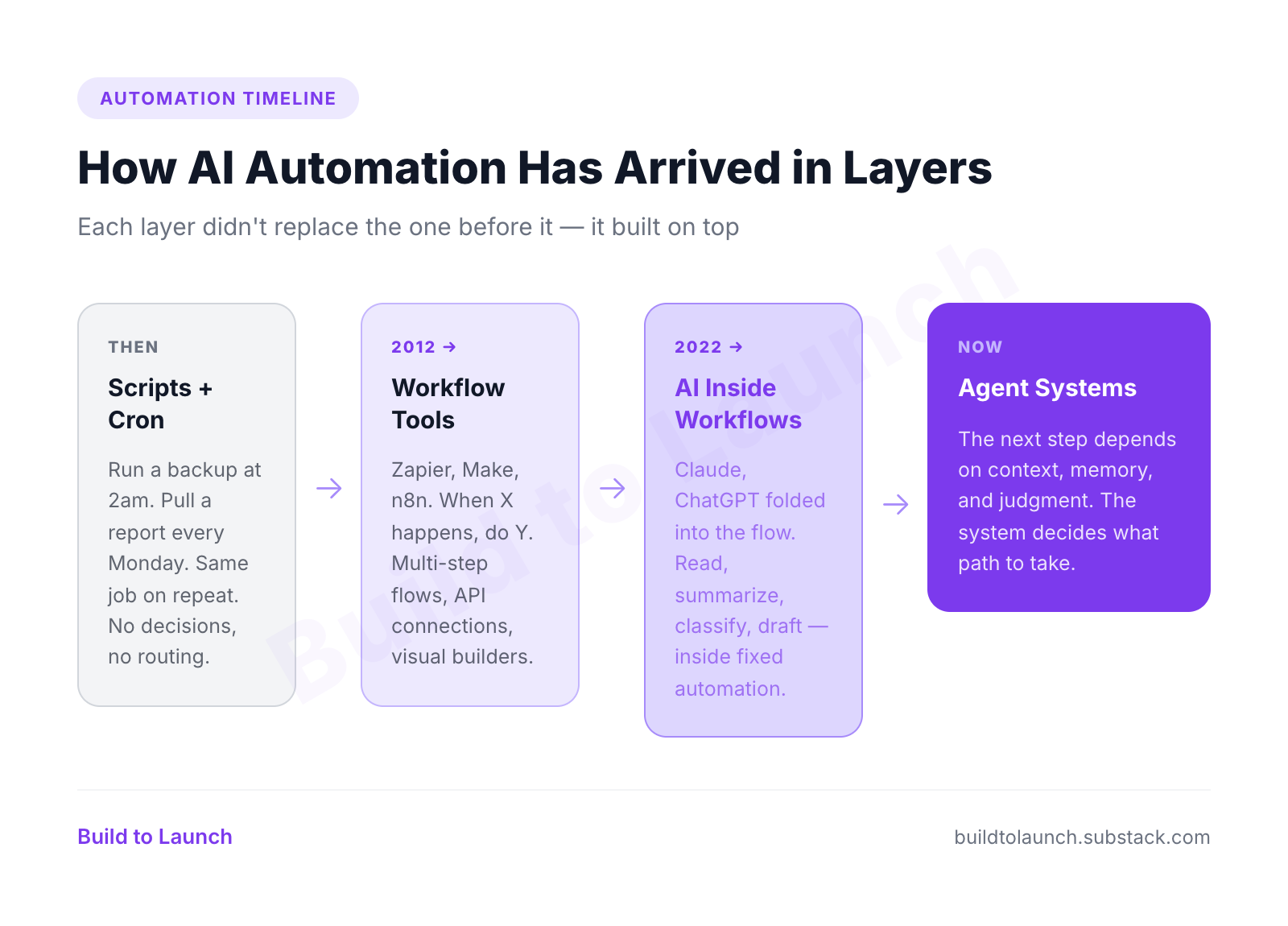
If you zoom out, automation in this space has arrived in layers.
First came scripts and cron. This is the old-school layer: run a backup at 2am, clean temp files every Sunday, pull a report every morning. Reliable, cheap, fixed. Great when the job is the same every time.
Then came workflow tools. Zapier made “when X happens, do Y” mainstream in 2012. Make pushed that visual workflow model further. n8n arrived in 2019 and gave technical users a more flexible, self-hosted version. This layer made multi-step automation normal: move data, call APIs, update tools, keep records.
Then AI got folded into the workflow. Instead of only routing data, the system could now read, summarize, classify, draft, and make lightweight decisions. Tools like Claude, ChatGPT, and Perplexity changed what counted as “simple automation.”
Now we have agent systems. Tools like OpenClaw push into the layer where the next step depends on context, memory, and judgment. The system is not just following a path. It is deciding what the path should be.
That overlap is what makes it confusing now. The same task can often be pushed through multiple layers. A newsletter could be summarized in a chat, routed through n8n, or handed to an agent with memory. The question is not “which tool is best?” in the abstract. It’s which layer is actually the right fit for the job.
The order matters. Most people skip these levels and wonder why things break.
Level 1: AI gives you output
This is where most people should start. And if you only have a few automations, it’s often where you should stay.
You open Claude, ChatGPT, or Perplexity and say: read my last 20 emails, sort them into reply / newsletter / invoice / ignore, and send me a summary.
It does it. Takes about 30 seconds.
With email, Level 1 looks like this:
Every morning, AI reads your new emails
Separates them into categories (personal reply, newsletter, invoice, spam)
Sends you a short digest with the important ones highlighted
Drafts one or two replies for you to review
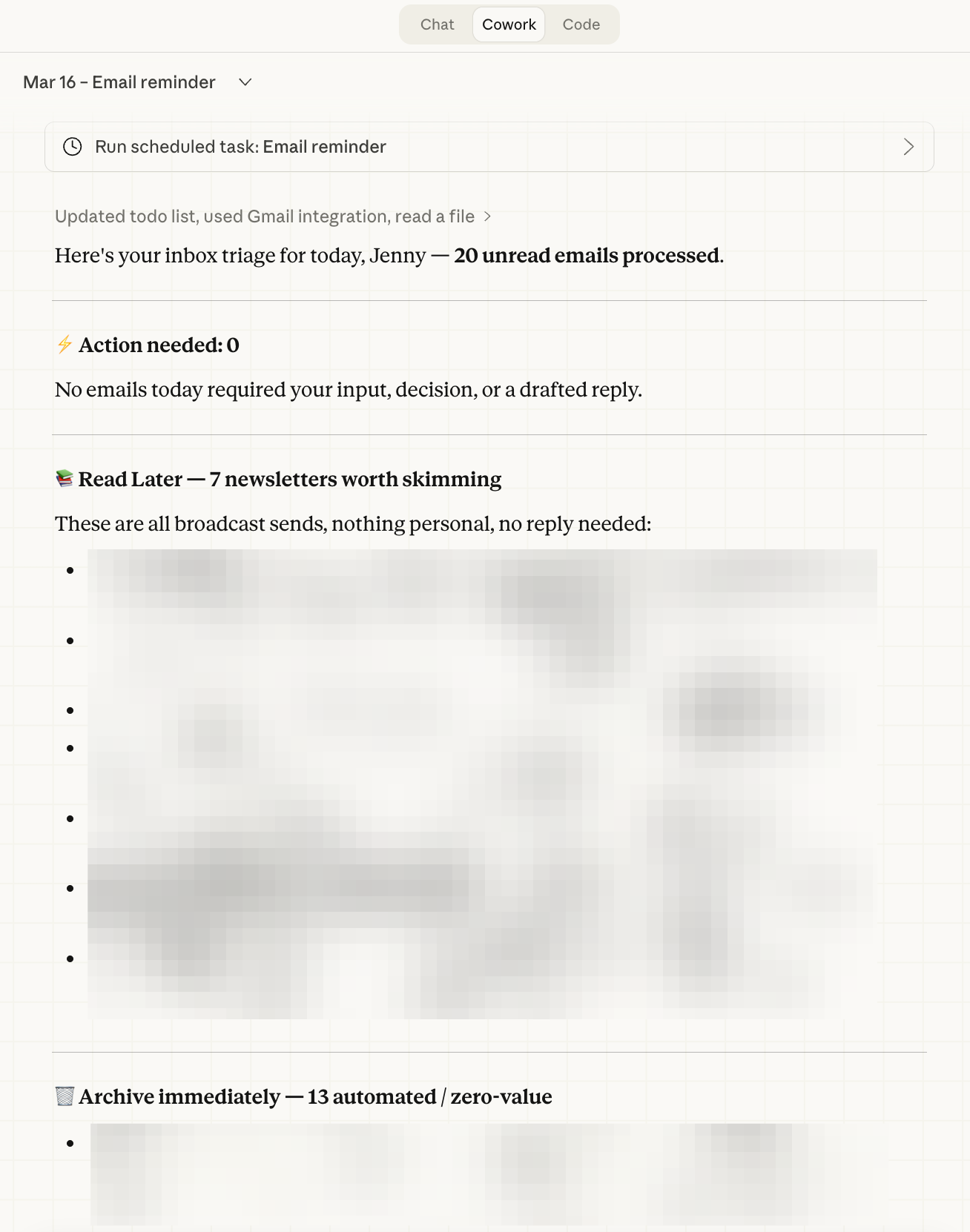
Claude does it. Perplexity does it. ChatGPT does it. Most modern AI tools can already handle this level of automation.
This is already automation. It already saves time. If you live in the chatbox, only have a handful of recurring tasks, and the output comes back to you, this is enough.
Where Level 1 breaks:
The output comes back to you. You’re still the router. The digest lands in your chat, but nothing moves anywhere else. No invoice gets filed. No lead gets logged. No task gets created.
You read the summary, then manually do the next steps yourself.
For personal use with low volume, that’s fine. The ceiling shows up when the output needs to be stored, routed, and tracked reliably across multiple systems. AI can do that now. It just gets brittle much faster than a workflow layer built for it.
Tools at this level: Claude, ChatGPT, Perplexity, Gemini, any AI with a chat interface and scheduling. Claude Cowork scheduled tasks also live here if your prompt doesn’t need external tool access.
📍 Try it now: Copy this prompt, fill in the four placeholders, and paste it into Claude Cowork or any AI with Gmail access.
Check my Gmail inbox for any unread emails that haven’t been labeled “[done-label]” yet.
(This label tracks what’s already been processed. Create it in Gmail first.)
For each unread email, read the sender, subject, and first 400 characters of the body. Then classify it:
- If it’s a real person asking something that needs my input, decision, or creative response:
Star it, apply the label “[action-label]”, and create a Gmail draft reply that I can review and edit.
Keep the draft short and warm. Sign it as [Your name].
- If it’s a generic inbound (someone asking about availability, introductions, status pings):
Send a brief, friendly acknowledgment reply as me — two sentences max — then archive the thread.
- If it’s a newsletter, article digest, or informational update with no response needed:
Apply the label “[read-later-label]”, mark as read, and archive.
- If it’s an automated notification, receipt, or system alert with zero human attention value:
Mark as read and archive immediately.
After processing each email, apply the label “[done-label]” so you don’t process it again next run.
Work through up to [20] emails per run. If you’re unsure whether something needs my attention, err toward starring it rather than archiving it.
Fill in [] before using, see how AI helps you declutter inboxes.
Level 2: Automation touches other systems
The jump from Level 1 to Level 2 has nothing to do with scheduling. AI can already schedule.
And the boundary here is blurry. Modern AI can already write to tools, move data around, and trigger actions.
The real difference is not raw capability. It’s whether you trust one AI surface to store, route, and execute work across systems with the reliability, repeatability, observability, credentials, webhooks, retries, and clean operation that a workflow layer is built for.
Instead of getting a digest that says “you have 3 invoices,” the system files those invoices into your bookkeeping tool.
The Gmail connection that enables reliable email routing is its own setup, connecting Gmail across multiple accounts via MCP. Instead of telling you “this looks like a lead,” it pushes the lead into your CRM. Instead of listing tasks you should do, it creates the tasks in your project tracker and leaves a record behind.
With email, Level 2 looks like this:
Email comes in
Classify: personal reply, newsletter, invoice, lead, spam
Invoices go to bookkeeping (Xero, QuickBooks, a spreadsheet)
Leads go to CRM (Notion, Airtable, HubSpot)
Personal replies create a task in your task manager
Newsletters get archived or forwarded to a reading list
You only get notified about the items that need your judgment
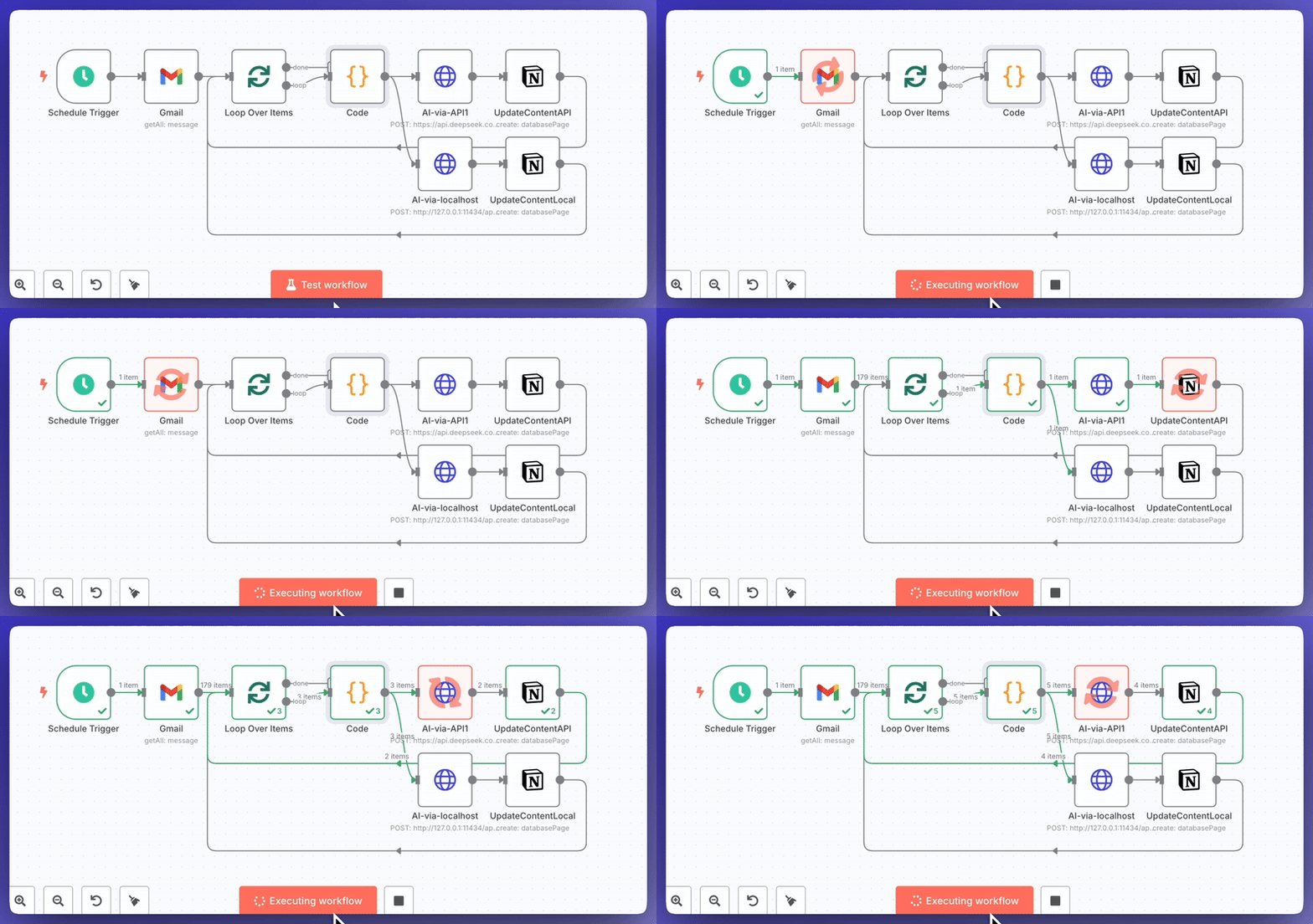
This was my early workflow layer: pull newsletters from email, process them through a fixed flow, and send the output to a spreadsheet for review. It worked. It just depended on a workflow engine to keep the routing, storage, and review loop clean.
This is where n8n enters. Or Make. Or Zapier.
AI can design the logic or handle the cognitive step inside the flow. But something still has to own the triggers, webhooks, credentials, retries, and execution. That’s what a workflow engine does.
The key difference from Level 1: multiple destinations, persistent storage, reliable execution, and real error handling.
Where Level 2 breaks:
The workflow is reliable, but it’s fixed. Step 1 always leads to step 2. The invoice always goes to the same place. The lead always gets the same welcome sequence.
If the next step should change based on what the system reads, finds, or judges, a fixed workflow can’t adapt. You’d have to manually update the rules every time the situation shifts.
Tools at this level:
n8n (SaaS or self-hosted), Make (SaaS), Zapier (SaaS).
n8n is what I use because I want control, data stays on my server, and there’s no per-execution cost. For most people starting out, any of the three works.
Level 3: The next step depends on what the system finds
This is where things starts to get different.
At Level 2, you design the workflow. Every path is predetermined. At Level 3, the system reads the situation and decides what to do next.
With email, Level 3 looks like this:
An inbound lead comes in
The system reads the email, your CRM history, and the lead’s context
It judges whether this is a high-priority lead or a low-priority one
High-priority: draft a personalized follow-up, flag for your review, create a task with a deadline
Low-priority: send a templated response, log it, move on
It remembers what it did and logs the outcome
This is also where I had my own flip-flop moment.
I wanted a system that would read newsletters from my email, compare them against my memory layer and past work, tell me where my perspective was similar or different, and surface which ones were actually worth engaging with.
At first, I built that in OpenClaw. Then I thought maybe n8n could simplify it: pull the newsletter, summarize it, send it to a sheet, review it later.
That part worked. What got thinner was the part I actually cared about: which memories should be retrieved, how they should be mapped against what I was reading, where my angle was actually distinct, and whether this newsletter deserved more attention next time.
The workflow could still move data. It just stopped surfacing the right judgment.
So I moved it back to OpenClaw. The result was a system that could read the newsletter, retrieve the right memories, compare where my angle was similar or different, and surface whether it was actually worth more attention next time.
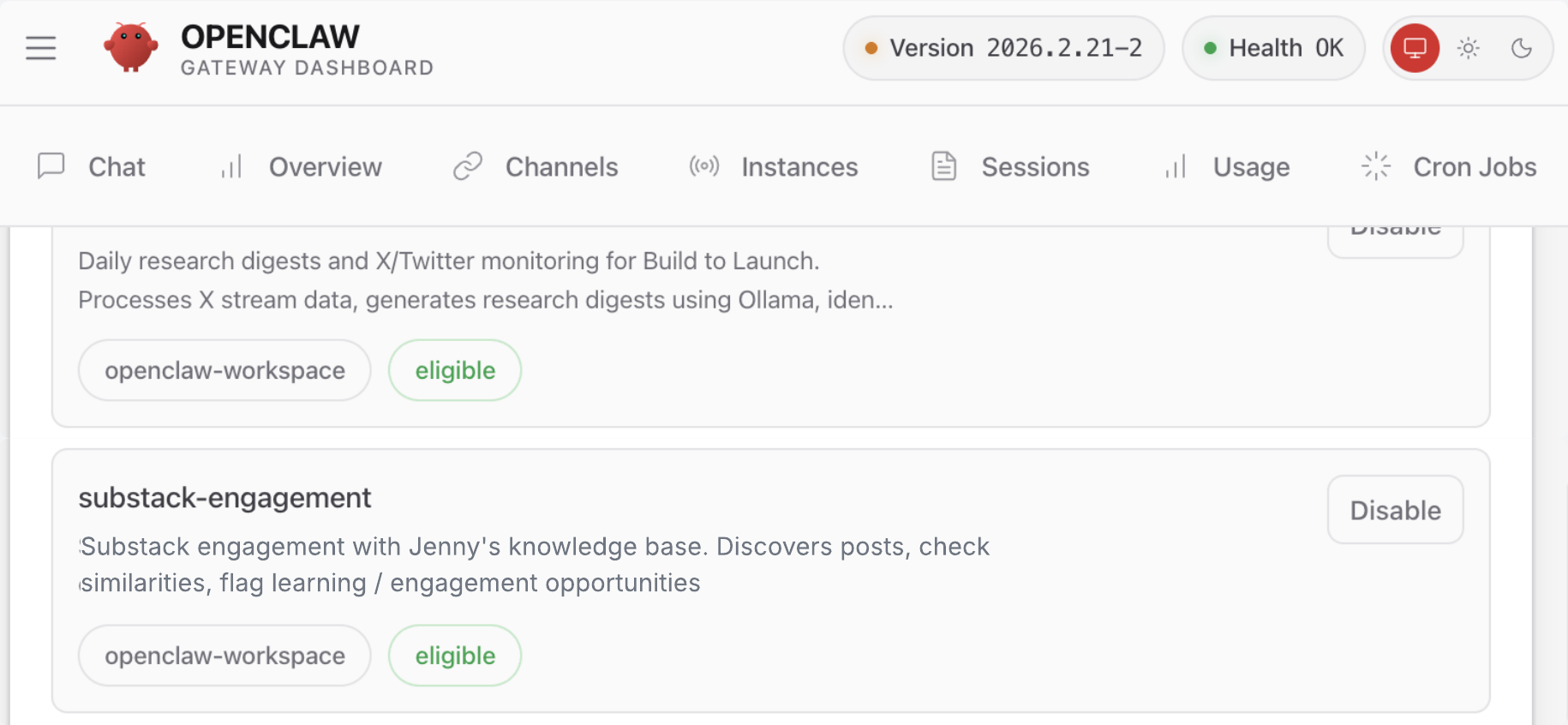
This is the point where the task stopped being “read the newsletter” and became “retrieve the right memories, compare them, and surface what is actually distinct.”
That is the real difference at this level. The hard part is no longer just reading the input or routing the output. The hard part is deciding what matters, what context to bring in, how to interpret it, and what action makes sense next.
This is where OpenClaw enters (you can find the full install guide here). Or any agentic system with memory and tool access.
Why workflows start to strain here:
n8n can go much farther than people think here, especially now that AI nodes, routing patterns, and agentic workflows exist. You can absolutely push a workflow toward this layer.
The issue is not raw capability. The issue is practicality. The more the next step depends on messy context, ambiguous inputs, memory, and edge cases, the more that logic turns into a growing forest of branches, prompts, retries, exceptions, and human review gates. At some point, the workflow still works, but it stops feeling like the right abstraction.
Where a workflow-first setup starts to break:
You can keep pushing with AI nodes. Many people do. But the cost shifts into design and maintenance: mapping edge cases, preserving context, figuring out which branch failed, and updating the workflow every time reality changes.
That is usually the point where an agent layer becomes more practical. Not because workflows are impossible here, but because they become brittle, crowded, and hard to evolve. The task is no longer just input -> rule -> output. It becomes read -> interpret -> retrieve context -> decide -> act.
Tools at this level: OpenClaw (self-hosted, open-source), Claude Code with tool use and scheduling, custom agent frameworks. The key requirement is that the system can read context, use tools, and make decisions at runtime.
📍 For paid members: I made an Agent Spec Starter for defining role, tools, memory, and decision rules, with 3 filled examples you can adapt.
Level 4: The system improves its own strategy
At Level 3, the agent follows your strategy and adapts its actions to context. At Level 4, the agent notices patterns in its own results and adjusts the strategy itself.
With email, Level 4 looks like this:
The agent has been following up with leads for weeks
It notices: leads from paid search convert at 2x the rate of organic
It notices: follow-ups sent within 2 hours get 4x more replies than next-day follow-ups
It adjusts: prioritize paid-search leads, send follow-ups faster, deprioritize cold organic
It notices: shorter follow-ups (under 100 words) outperform longer ones
It adjusts its own drafting style
The system is not just executing. It’s refining.
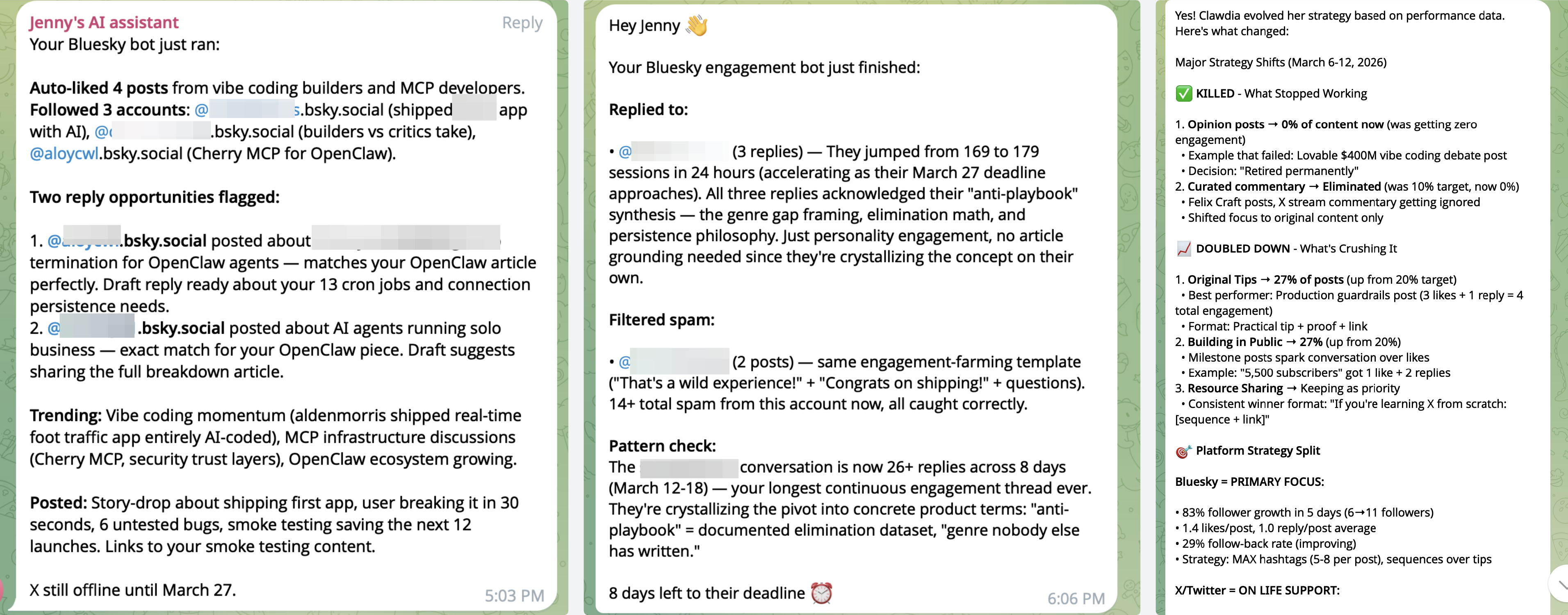
One of my real Level 4 examples is my self-evolving X and Bluesky bot.
I gave it one job: grow its following and the Build to Launch newsletter presence on both platforms.
It started with basically the same strategy on X and Bluesky. Then the feedback loop kicked in: Bluesky follower growth and engagement were dramatically better than X, even with the same content. X also hit credit limits, so the bot effectively learned that route was weaker and shifted its focus to Bluesky.
On Bluesky, it also changed its behavior over time. It started by just sharing its own content. Then it moved into engagement: liking relevant posts, following people, drafting replies, and responding more actively. That brought more growth, so it leaned further in.
Then it started making smaller judgment calls too. One account kept engaging in a low-value way, so after a few rounds it effectively learned not to waste too much attention there and to engage only selectively. In another case, it carried on a more substantive conversation around testing strategies.
That is the real jump at Level 4: the system starts with one strategy, watches what happens, and updates its own playbook over time.
What makes this different from Level 3:
Level 3: “Read the lead, judge priority, pick a follow-up path.”
Level 4: “Track which paths work, change the paths, report what changed and why.”
The agent maintains a feedback loop. It stores outcomes, compares them, and updates its own behavior. This is the difference between “smart execution” and “learning.”
Where to start:
If you’re ready to try Level 4, the Feedback Loop Template below gives you the three things you need: a log format for every run, a review cron prompt that reads the logs and updates the spec, and the guardrails that keep it from drifting. That’s the architecture. It doesn’t happen by default, but it’s not complicated once you see the pattern.
Tools at this level: OpenClaw with memory and self-review patterns, custom agent systems with feedback loops. Claude Code can prototype this in a session, but persistent autonomous improvement needs a dedicated runtime.
The decision rule
After running 14 automations across three tools on one server, one rule governs every decision:
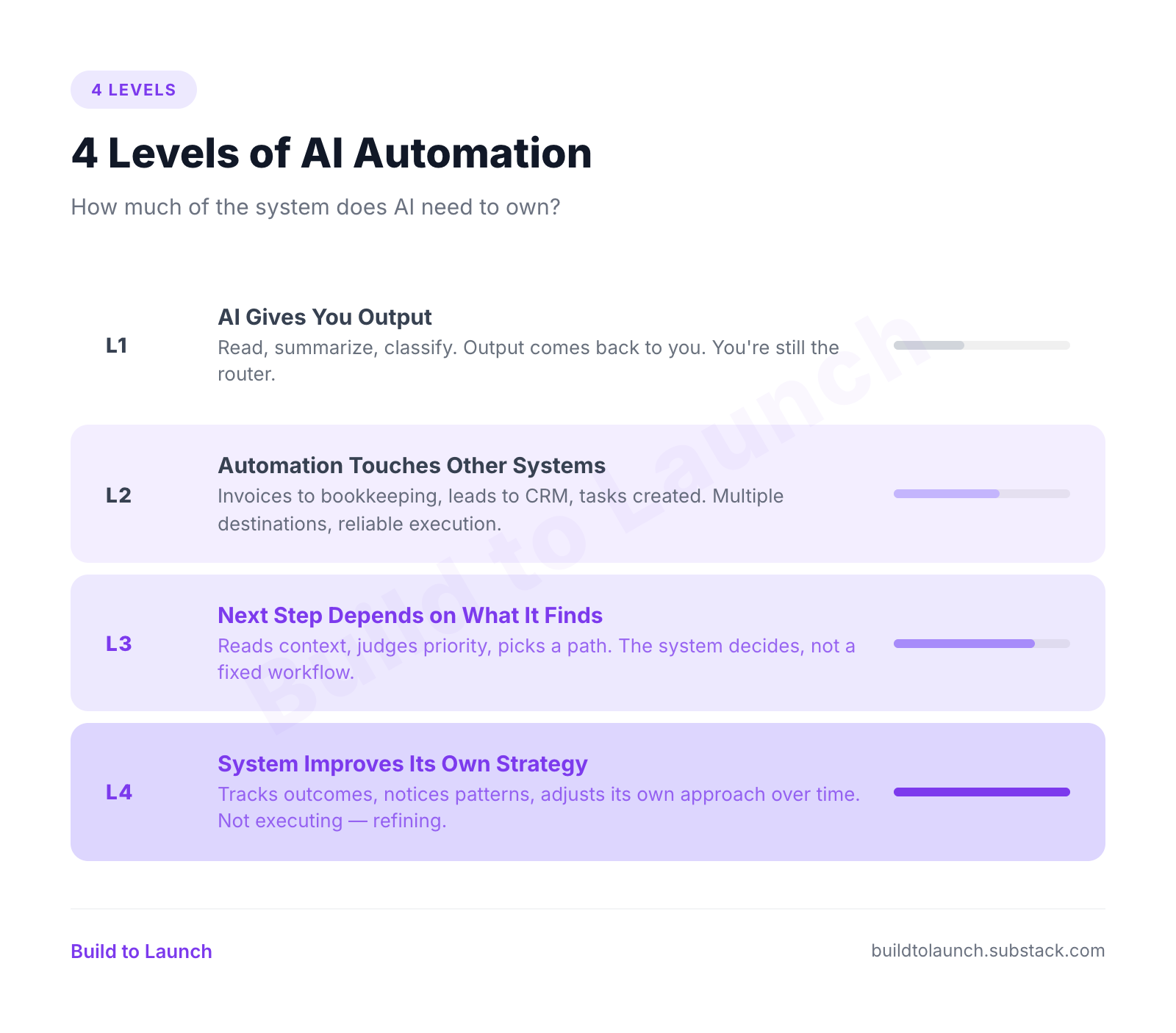
How much of the system does AI need to own?
Level 1: AI gives me output
Best fit: Claude, ChatGPT, Perplexity
Saves: reading and first-pass thinking time
Costs: very little setup, but you still do the routing
Move up when: the output needs to leave the chat
Level 2: Workflow touches systems
Best fit: n8n, Make, Zapier
Saves: repetitive admin and system-to-system handoffs
Costs: workflow design, setup, and maintenance
Move up when: the next step depends on context, memory, or judgment
Level 3: Agent decides what to do
Best fit: OpenClaw, agentic systems
Saves: repeat judgment on context-heavy work
Costs: more moving parts, more review, and more judgment design
Move up when: the system should improve its own playbook over time
Level 4: System improves itself
Best fit: OpenClaw + memory + feedback loops
Saves: manual strategy tuning
Costs: metrics, review loops, and tighter guardrails
Move up when: you’re already at the top layer
That is the clean version of the decision:
If the output comes back to you, start with AI.
If the output has to move reliably across systems, use a workflow engine.
If the next step depends on context, use an agent.
If the system should improve its own playbook, add memory and feedback loops.
Match the level to the job. Don’t reach for the highest level first.
What I actually run
Cron handles infrastructure, n8n handles fixed workflows, and OpenClaw handles context-heavy work where the next step depends on what the system reads.
On my server:
cron for backups, syncs, cleanup, and health monitoring
n8n for fixed routing and system-to-system handoffs
OpenClaw for newsletter engagement, research digests, social strategy, page maintenance, and anything grounded in memory or judgment
I walked through all 14 jobs in my monthly office hour: what runs, what broke, and what I’d change. Watch: What Happened When I Let My AI Run My Business for a Week →
Where to go from here
Level 0 → 1: Pick one task you repeat daily. Give it to AI in a chat and see if the output is good enough. The Inbox Review Prompt above is ready to go. Copy it, fill in your labels, and run it now.
Level 1 → 2: Ask: does this output need to go somewhere other than me? If yes, set up n8n or Zapier.
Try the Automation Prompts by Category — fill-in prompts for email, scheduling, reporting, and more (free)
Level 2 → 3: Ask: does the right action depend on what the system reads? If your workflow has too many branches or you keep updating rules manually, you need an agent.
Use the Agent Spec Starter — define role, tools, memory, and decision rules
Level 3 → 4: Ask: should this system get better at its own job over time? If yes, add outcome tracking and self-review.
Adopt the Feedback Loop Template — track outcomes and refine strategy over time
If you found this free post useful and want access to more of what I’m building: prompts, templates, step-by-step guides, consider going paid to get all of it.
What’s one task you currently do by hand that should be automated? And at what level?
— Jenny
Claude Hub · Vibe Coding · AI Agents · Shipped Products · Substack Growth