Perplexity + Claude in Chrome: How I Built a Competitor Research Workflow in 2 Hours
The AI setup that scans 177 products across 5 platforms and surfaces what your own product is still missing.
How to really effectively run competitor research before a product launch (with Perplexity MCP and Claude in Chrome): 30 minutes to build a scored research board across 177 products and 5 platforms, then 1 hour of iterative analysis that surfaced what my own product was missing.

I had been publishing Gumroad products for months. More products meant more cover page decisions. And the same question kept coming up:
Is this actually good, or does it just feel good because I haven’t seen enough of the market?
My covers were converting. But are they working good? Compared to what? I had no baseline.
Usually if you want to know whether your cover is good, you open a few competitor pages, look around, and go with your gut.
So I did that. I opened tabs. Lots of them.
By session two, I could not remember what tab 8 looked like. I was screenshotting the covers that caught my eye last. Copying a few prices. Leaving with a vague sense of what was out there.
Then making decisions based on that.
My cover felt right because it matched the vibe I remembered. My price felt competitive because it sat somewhere in the range I still had in my head.
Every one of those decisions came from a compressed memory of the market. Not the market itself.
Someone in r/AIAssisted said it better than I could:
“My brain kept overweighting the last 20 ads I saw. I needed a way to hold the whole market in one view.”
What changed things was not more browsing.
It was seeing the whole market at once, then seeing what that changed in me. I used that same logic when testing 8 AI coding tools, for studying the Substack notes performance, and whether my app was worth building.
Hi, I’m Jenny 👋
I build AI systems and tools, then share how I did it. I run the Practical AI Builder program, for people who already use AI and want to build real things with it. Check it out if that sounds like you.
If you’re new to Build to Launch, welcome! Here’s what you might enjoy:

What’s inside:
How AI research shows you the whole market at once — the video, the board, and why tab-based research fails you every time
What Perplexity MCP + Claude does to your research process — the 4 layers of AI competitive research and why orientation is the one that matters
What 177 Gumroad products reveal about covers, pricing, and trust — the first pattern that showed up across every platform
How to spot gaps in your own product using competitor data — what the board surfaced that individual product pages never would
The exact Perplexity MCP + Claude competitive analysis workflow — the prompt, the board builder, and parallel research across 5 platforms
How to set up Perplexity MCP for an autonomous research loop that runs beside you
How to use Claude in Chrome to collect data without manually switching tabs
The exact prompt, scripts, and research board — everything to run this yourself, including the Claude Chrome workflow for cover analysis
🎁 If you want to skip rebuilding this from scratch, the exact prompt, scripts, and the same HTML research board shown in the walkthrough are included below for paid subscribers.
Loading...
How AI Research Shows You the Whole Market at Once
What I mean by “seeing the whole market at once” is exactly what is shown in this video.
Within 30 minutes, it browsed through the websites for me, took enough images and screenshots, and consolidated everything I need into a beautifully scored HTML page: one where I can see everything at once.
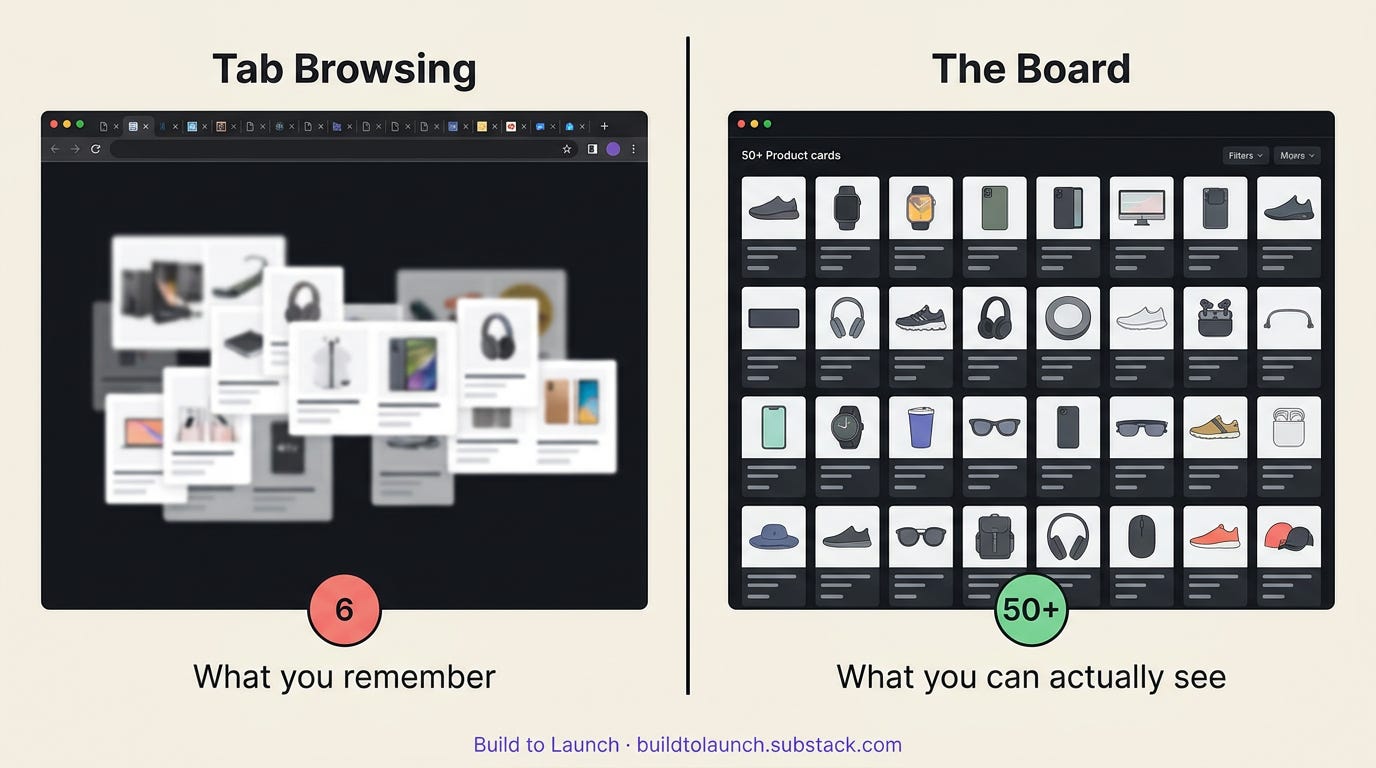
Human short-term memory only holds a small number of items at once. So when you study 50 competitors by switching tabs, your brain quietly turns 50 inputs into 6 or 7 remembered fragments.
But this board fixed that part instantly. Not by making me smarter. Just by holding the full set in view at the same time.
What Perplexity MCP + Claude Does to Your Research Process
I thought the first benefit would be speed.
It was. But that ended up being the least interesting part.
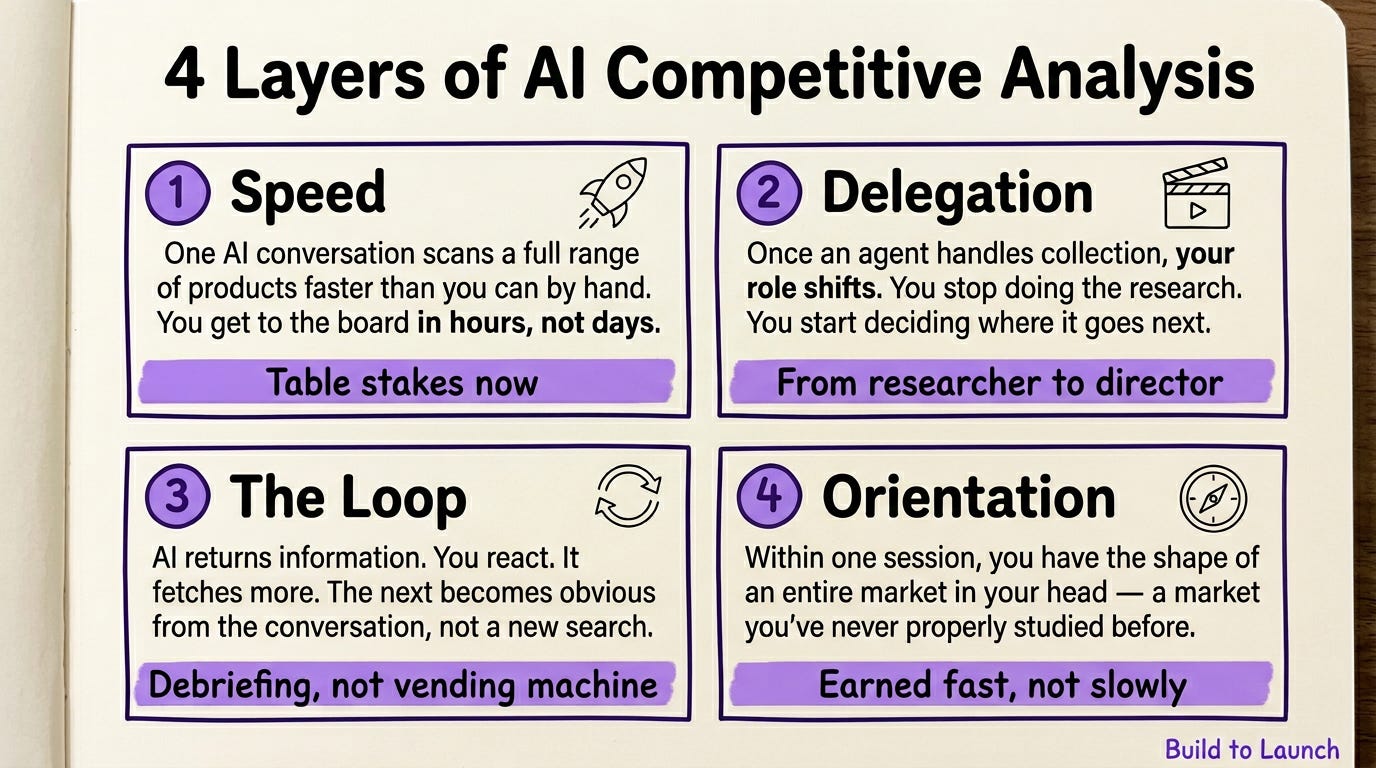
The real change happened in four layers.
Layer 1: speed
One AI conversation can scan a range of products much faster than you can by hand. That matters. It gets you to the board quickly. But that is table stakes now.
Layer 2: delegation
Once I could send a task to an agent and keep thinking while it worked, my role changed. I was not the one doing all the collection anymore. I was the one deciding where the collection should go next.
That sounds small. It is not.
Once you can send a task to an agent and keep thinking while it works, your role changes. You stop being the one doing all the collection. You become the one deciding where the collection goes next.
It moves you from researcher to director.
Layer 3: the loop
The system did not just return information.
It returned information, I reacted to it, it fetched more, I reacted again, and the next move became obvious from the conversation.
That is a different feeling from using AI like a vending machine.
It is closer to debriefing with someone who already did the first pass for you.
Layer 4: orientation
This was the unexpected part.
Within one session, I had the shape of a market in my head that I had never studied properly before. I could see what clustered, what looked strong, what looked weak, where prices concentrated, and which products were winning for reasons that had nothing to do with beauty.
You usually think you earn that kind of orientation slowly.
Here it arrived early.
That is what made the process feel almost wrong at first. It was too fast to feel like real learning.
But it was real learning. It was just front-loaded.
If this is your first time connecting Perplexity MCP to Claude, MCP Setup for Claude, ChatGPT, and Cursor walks through the full install — including how to configure multiple MCPs in the same session.
What 177 Gumroad Products Reveal About Covers, Pricing, and Trust
Before my last Gumroad launch, I built five boards: Gumroad, App Store, Amazon KDP, Etsy, Creative Market. 177 products. Three hours.
The first pattern that jumped out had nothing to do with refined design.
Personal photos beat professional-looking covers. By a lot.
Across 52 Gumroad products, creators who used their own photo on the cover had stronger sales signals than products with cleaner, more polished, photo-free covers.
Not a little stronger.
Obviously stronger.
And the photo did not need to be professional. One of the better-selling products used what looked like a phone selfie.
Technically weak.
Commercially strong.
The point was not beauty. The point was trust.
A face signals accountability. You know who made the thing. You know who you are buying from. That is a different signal from “this looks designed well.”
That is the kind of pattern I would never have trusted if I had seen it one product at a time.
Side by side, it became hard to ignore.
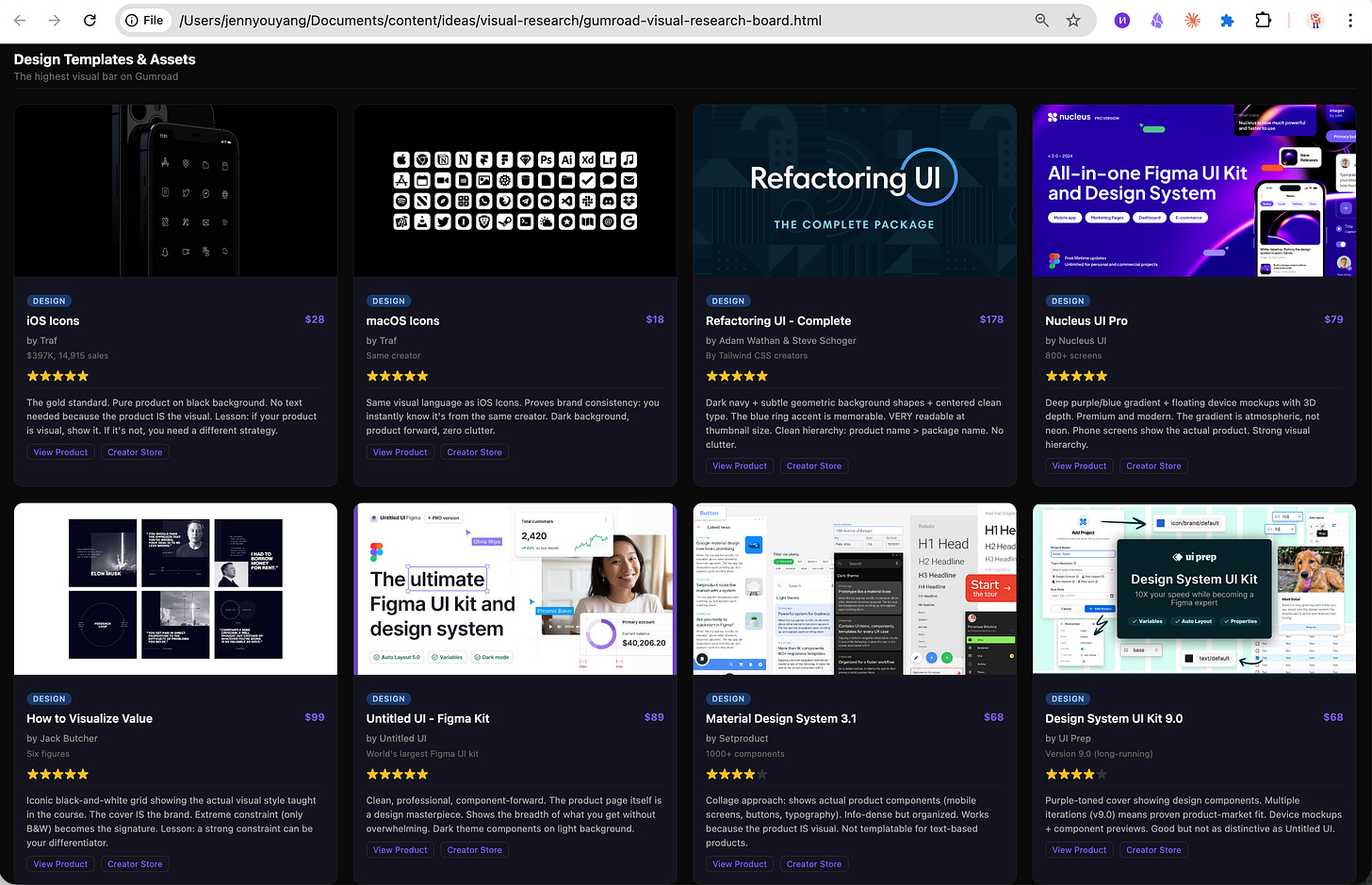
And that was just the first reveal.
The board kept surfacing things like:
clear “what’s inside” titles beating beautiful but vague ones
outlier products selling because of niche specificity or audience, not design quality
pricing clusters creating obvious gaps once the whole range was visible
Those are not individual observations. They are constraints.
And once you can see constraints, you stop guessing.
The same pattern applies to ongoing market monitoring. AI Research Agent for Domain-Specific Tasks covers building persistent research agents that surface new competitors as they appear.
How to Spot Gaps in Your Own Product Using Competitor Data
This is where the article stopped being about competitor research and started being about self-awareness.
I do not come from a design background.
When I see something that looks good, I know it looks good. But I have not had the vocabulary for why.
The board changed that.
It showed me that the strongest products were not all “beautiful” in the same way. They tended to split into two buckets:
Raw human: face forward, personality forward, trust as the main signal
Bold/direct: no softness, no hedging, the statement itself is the design
By accident, I had already been making products in the second category.
That was one reveal.
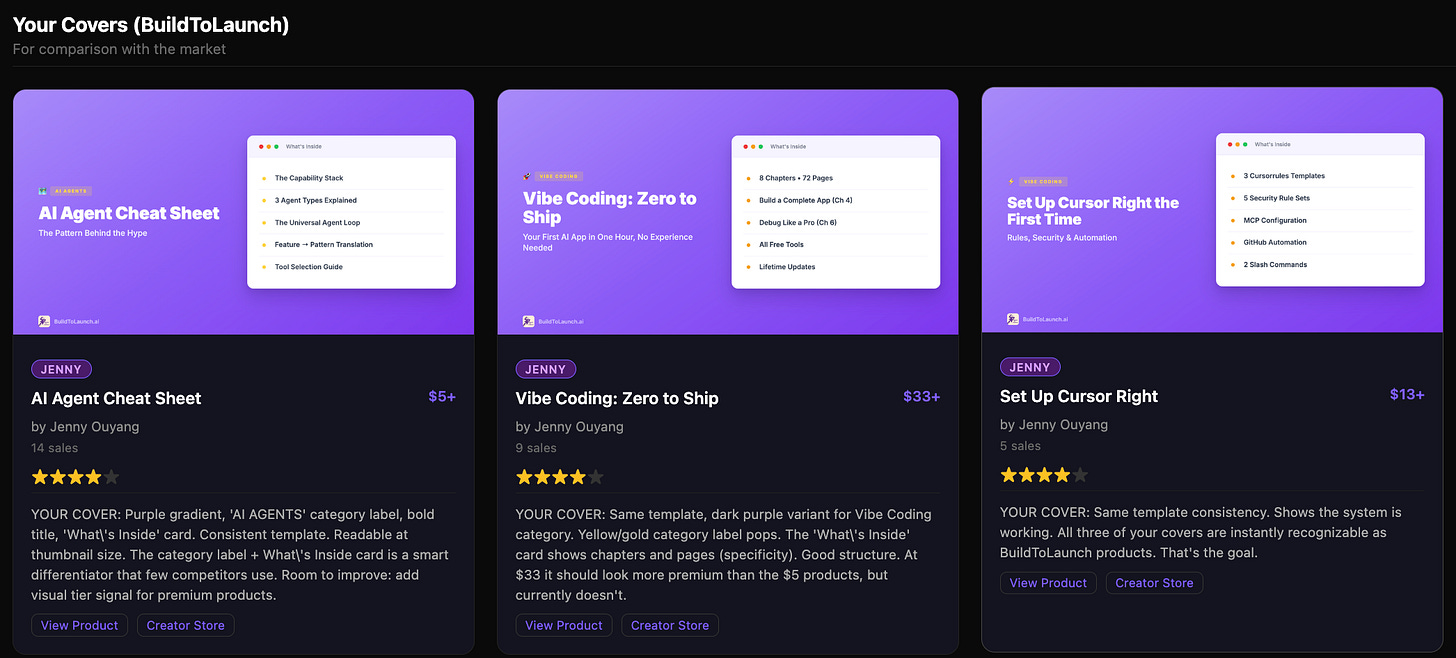
What my products cover pages look like before
The second reveal was harsher and more useful.
The audit pointed to a specific gap: the gradients on my covers were making them feel cheaper than the structure deserved.
That changed the question.
The question was no longer “do I have taste?”
The question became “what exactly is making this look mid-tier, and what is the fix?”
That sent me into a design education session I was not planning to have.
I ended up experimenting on this product with a lot more styles to find the one that speaks to my vibe.
Suddenly I was learning first principles.
What does restraint signal?
Why does typography carry authority?
Why does one aesthetic look expensive and another look generic?
I especially loved these 2 examples:
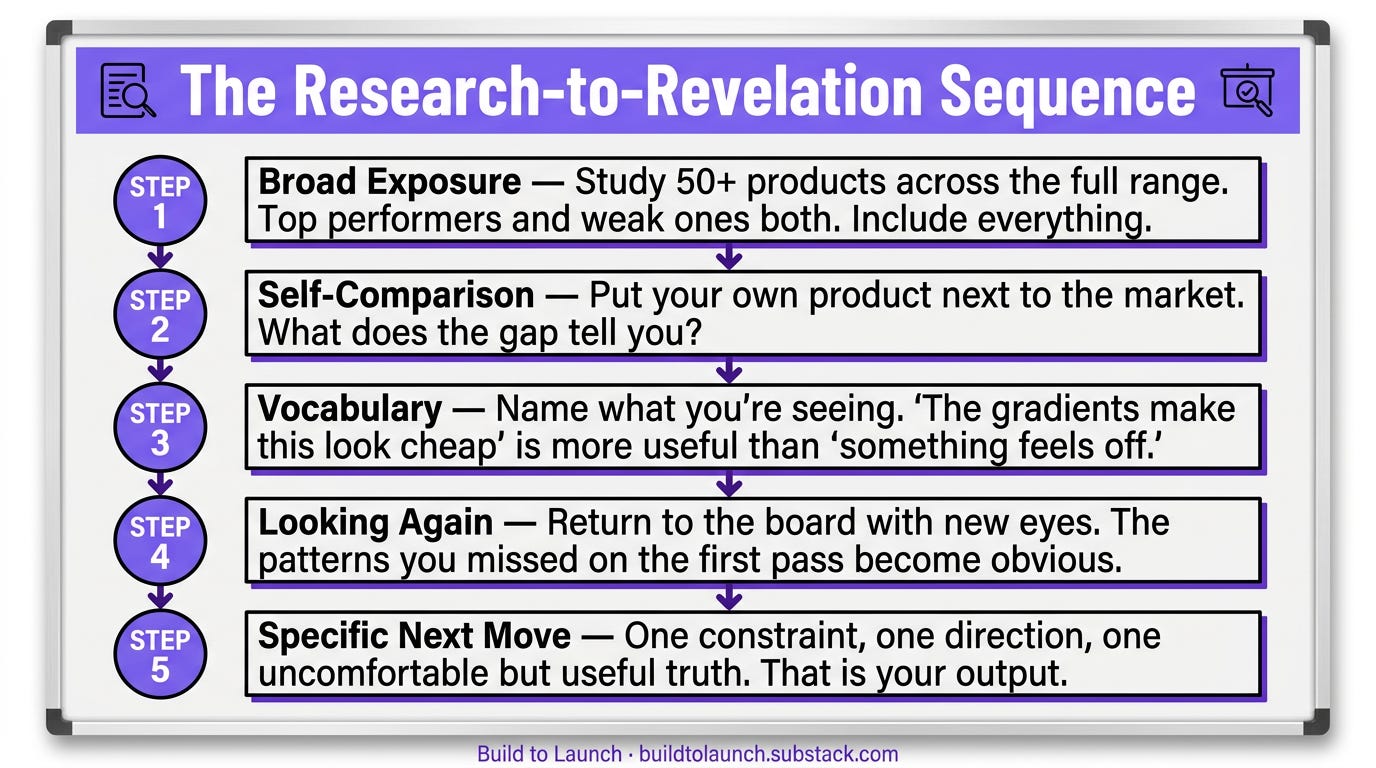
That sequence mattered.
First, broad exposure.
Then, self-comparison.
Then, vocabulary.
Then, looking again with different eyes.
Then, a specific next move.
That is why I keep saying this was not just a research workflow.
It was a learning workflow.
And the most important part is this: everyone comes out of that learning sequence with a different slice.
For me, the slice was design execution.
For someone else, it might be pricing. Or the realization that their category is far less crowded than they thought. Or the realization that the titles that win are all much more literal than the ones they wanted to write.
The board does not hand everyone the same generic lesson.
It reveals what is missing for you.
Once you see it, you cannot unsee it.
Fragmented Research vs. Decision-Grade Research: What Changes Before Launch
This is why I do not think the right contrast is research versus doing the work.
The real contrast is fragmented research versus decision-grade research.
The first one leaves you with vibes.
The second one leaves you with a constraint, a direction, and often one uncomfortable but useful truth about your own work.
That is the frame I care about for Month 1 of the Practical AI Builder Program.
Not research as homework.
Research as the thing you run before any meaningful decision so you can stop building from partial memory.
If you want to layer more data sources into your research setup, Custom MCPs in Claude Code and Cursor shows how to combine Perplexity MCP with other MCPs for richer competitive intelligence.
What’s Next:
The exact competitive analysis workflow, step by step
How I set up Perplexity MCP to run searches through my subscription instead of burning extra tokens
How I set up Claude in Chrome so it works from both Claude Code and Claude Desktop
The prompts I used, with screenshots and a video walkthrough
The complete HTML research boards — so you do not have to rebuild the collection setup yourself
How to Run Competitive Research With Perplexity MCP and Claude in Chrome
This is the full step-by-step version.
The free part showed you why this changes decisions. This part shows you exactly how to run it.
Before you start: set up your two tools
The workflow uses two AI tools alongside the scripts: Perplexity MCP for live research, and Claude in Chrome for browser visits. Set both up once now, then follow the steps below.
This article continues for members
Join Build to Launch to read the full article, access all cohort content, and connect with other AI builders.