MCP, Plugins, and Skills — How to Know Which One to Reach For
Learn when to use MCP vs skills vs plugins in Claude Code. Real token costs, decision framework, and examples from a live content system built on all three.
In less than a year, Anthropic shipped three separate extension layers for Claude.
MCP arrived November 25, 2024.
Plugins entered public beta October 9, 2025.
Skills followed October 16, 2025.
The AI builder community moved fast on all three.
Then people installed all three at once and stopped being clear on what any of them was actually for. Sessions got heavier. Something ran and they weren’t sure what triggered it. Something broke and there was no obvious error telling them which layer to look at.
That confusion has a specific cause. Most people treat plugins as a third category alongside skills and MCP — three parallel choices for roughly the same kind of job. They are not. A plugin is a bundle: someone else’s pre-packaged combination of skills, hooks, and MCP configs. That is the distinction every tutorial skips, and it is what makes the whole decision stay muddy.
I’ve been deep in all three. I run this content engine on skills. I built MCP setups across four Gmail accounts. I tested 11 plugins on real work and kept three.
Which layer to reach for, when, and why. That is what this article settles.
What’s inside:
MCP vs Skills vs Plugins: What Each Layer Actually Does — three separate problems, three separate tools, and why the overlap is where builders get stuck
What Are Claude Code Skills and When Should You Use Them? — the lightest layer, 30–50 tokens each, and the one failure mode that quietly turns them into a mess
When to Use MCP in Claude Code (and When It’s Overkill) — the 55,000-token cost you’re paying before the conversation starts, and the one question that tells you if you actually need it
What Are Claude Code Plugins? (They’re Not a Fourth Category) — what’s actually inside a plugin bundle, and the test for whether one is worth installing
MCP vs Skills vs Plugins: Which One to Use for Each Job:
Repeating workflow with your context baked in → skill
Live API, database, or external system access → MCP server
Reuse across repos or teammates → plugin
How MCP, Skills, and Plugins Work Together in One Stack — the build order that actually compounds, and the GSC automation I run on schedule with all three
Hi, I’m Jenny 👋
I build AI systems and tools, then share how I did it. I run the Practical AI Builder program — for people who already use AI and want to build real things with it. Check it out if that sounds like you.
If you’re new to Build to Launch, welcome! Here’s what you might enjoy:
MCP vs Skills vs Plugins: What Each Layer Actually Does
Once you stop looking at the labels and look at what each layer is doing in real life, the split is pretty simple.
Skills teach Claude how to work in your context.
They are lightweight. Usually just markdown and a little structure. They wake up when needed and stay out of the way when they are not.
MCP servers are the opposite.
They give Claude reach. Files, APIs, databases, browsers, whatever sits outside the conversation. Useful. Heavy too.
Plugins sit on top of that.
They package things together so you can install or share a setup in one shot.
Why this matters: these are not three names for the same kind of thing. They solve three different problems. Skills handle repeated ways of working. MCP handles live access. Plugins handle packaging and reuse.
What goes wrong is the overlap. A plugin can include skills.
A skill can call MCP tools — more on that in How MCP, Skills, and Plugins Work Together in One Stack. When you install something that does both, you don’t know which part is doing what.
Start with the layer you’ll reach for every day. That’s skills.
What Are Claude Code Skills and When Should You Use Them?
What it does: a skill is a markdown file that tells Claude how to handle a specific task. You invoke it with a slash command. Claude reads it, applies it, moves on.
Why it matters: the cost is almost nothing, around 30-50 tokens per skill and only when it is active. You can have 200 skills installed and not pay for any of them until you use one.
This is the layer that removes re-explaining.
Any workflow that repeats, any task where Claude needs your specific context baked in, any job where your way of doing it matters more than fresh outside data, it belongs in a skill.
Code review against your team’s exact standards. Content drafts in your format, not a generic one. Incident write-ups. Deployment checklists.
If you’d explain it the same way twice, it belongs in a skill.
How to build one:
Start with one repeated job, not ten.
Write down the trigger, the goal, the exact output format, and any rules Claude should always follow.
Test it on the same kind of task three times in a row.
Stop when it needs exceptions every other run — that is two skills pretending to be one.
If you want a shortcut, try building your first skill by following the same scoping guidelines in Build to Launch MCP. Same discipline: one job, clear inputs, clear outputs, real testing.
For the official file shape and behavior, Anthropic’s Skills docs are the source to check.
I run this entire content engine on skills. Every article type has one. Every audit has one. The weekly GSC report runs as a skill. Claude already knows exactly what I mean when I say “run the GSC digest.” No re-explaining the format every session.
What goes wrong: this is also where people start overstuffing them.
At first, skills make everything feel cleaner.
Then one starts doing too much. Two start saying almost the same thing. Something stops following through and there is no obvious error telling you why.
That is the good and bad of skills.
The easiest layer to reach for. Also the easiest to quietly turn into a mess.
The other failure mode is using a skill for a job it cannot do. If you need live external data, a skill alone can’t get there. You can write the most detailed content research skill in the world, but if it needs to pull from a live API, you’ve hit the ceiling.
Before going further: if your existing skills aren’t following through, Stop Adding New Claude Skills — Fix the Broken Ones First is the diagnostic to run before adding anything new.
Next is when MCP comes in.
When to Use MCP in Claude Code (and When It’s Overkill)
What it does: MCP (Model Context Protocol) is the plumbing. It lets Claude call external tools, read from a database, post to Slack, query GitHub, pull from an API, without you having to copy-paste data into the conversation.
Why it matters: this is the layer that turns Claude from a smart text box into something that can actually reach the systems your work depends on. If the job involves live data, real-world actions, or systems Claude cannot see on its own, MCP is what makes that possible.
If you’re new to MCP and want a plain-English explanation before going deeper, What Is an MCP Server? Plain-English Guide With Examples is the starting point.
The part most tutorials skip: MCP is expensive in tokens.
A typical setup with five MCP servers uses approximately 55,000 tokens before the conversation even starts. That’s why sessions feel sluggish after you’ve stacked several. Each server loads all its available tools into context up front. Anthropic’s Tool Search feature reduces this by around 85% through on-demand tool discovery, but most setups don’t use it yet.
The fastest management fix: load only the servers you need for the current project, not your entire config every time.
I got a $1,600 Claude Code bill from exactly this pattern. Here’s the system I built to stop it, includes session habits and Desktop settings that keep costs from compounding.
How to build one:
Pick one external system and one concrete job first.
Scope it tightly — not “set up everything for GitHub,” but “let Claude read issues from this repo” or “let Claude pull emails from this inbox.”
Install that server and scope the auth as tightly as you can.
Confirm one tool call works.
Only then connect it to a skill.
—> If you want the most practical starting point, Build to Launch MCP walks through this build mindset in the way I actually use it.
—> For the step-by-step on building your own, Every Way to Build an MCP Server (From the Ones I Actually Shipped) covers every pattern from the ones I shipped.
—> For the official side, use Anthropic’s Claude Code MCP docs for setup and the Model Context Protocol spec when you need the underlying standard.
When MCP is right: you need live data, you need to take real-world actions, or you need Claude to interact with a system you don’t control. Querying a database. Posting to Slack. Reading files from Google Drive. Interacting with GitHub. If it involves reaching something external and live, MCP is the layer that makes it possible.
What goes wrong: people use MCP to solve the wrong problem. If you’re encoding a workflow or process, that’s a skill. MCP doesn’t make Claude smarter about how to work. It gives Claude access to more things. The how-to-work part is still skills.
The other thing that goes wrong is weight. Too many servers, too many tools, too much loaded up front, and the session starts feeling slow before you’ve even asked the real question.
My clearest example: Gmail multi-account setup. I needed Claude to check four inboxes, extract payment data, and flag collaborations across accounts that can’t bleed into each other. No skill can do that alone. It required an MCP server per account, with OAuth scoped separately for each. Once it was set up, a morning brief across all four accounts takes 40 seconds.
For the step-by-step: Gmail MCP for Claude Code: Multi-Account Setup + 5 Workflows.
For the full list of MCP servers worth installing: Best MCP Servers for Claude Code.
Skills teach the how. MCP provides the reach. What plugins actually are is where most people’s mental model breaks.
What Are Claude Code Plugins? (They’re Not a Fourth Category)
What it does: most people encounter “plugin” and assume it’s a fourth category alongside skills, MCP, and something else. It’s not.
A plugin is a bundle. That is the part worth keeping clear. When you install one, you are usually not installing one new capability. You are installing someone’s pre-packaged combination of skills, hooks, MCP server configs, or all three at once.
A note on hooks: hooks are the automation glue inside many plugins. They fire on events — before a tool call, after a session ends, when a file is saved — and run a script without you triggering it manually. They’re what makes a plugin feel automatic rather than manual. When a plugin install suddenly changes session behavior in ways you can’t trace, a hook is usually what’s running.
Why it matters: this changes the decision entirely. You don’t choose “plugins vs skills vs MCP.” You install a plugin when you want a turnkey setup someone else has already assembled. You build a plugin when you want to package your own setup and reuse it across multiple repos, or share it with teammates.
I tested 11 plugins on real work: content creation, business positioning, and a live feature build for a production app. Three made the cut. The other eight were either redundant with things I’d already built, too general to add real value, or actively fighting with existing setups.
How to build one:
Start with a working setup, not a packaging idea.
Get one skill, maybe one MCP server, maybe one hook genuinely useful in one repo.
Confirm that combination is worth reusing before wrapping it.
Package it once it proves out across more than one real use case.
A plugin should be a wrapper around something proven, not a container for vague intentions.
If you want the official structure, Anthropic’s Create plugins docs and Plugins reference are the authoritative sources.
What goes wrong: that is also why plugins get confusing so fast.
You install one thing. Three different behaviors come with it.
A hook runs in the background. A skill shows up when triggered. An MCP config adds more reach. Then the session feels different and you are left trying to figure out which layer changed the behavior.
That is not a plugin problem exactly. It is a visibility problem. But it is why plugins feel blurry much faster than skills do.
The ones I kept each solved a problem I couldn’t solve with a simple skill alone. They bundled MCP connections and hooks that made the workflow actually automatic. The ones I dropped were essentially fancy skill bundles with no external connections. I could have written the same thing myself in 30 minutes. That is the other plugin failure mode: packaged does not automatically mean necessary.
Full verdicts for all 11: Stop Installing Every Claude Code Plugin.
MCP vs Skills vs Plugins: Which One to Use for Each Job
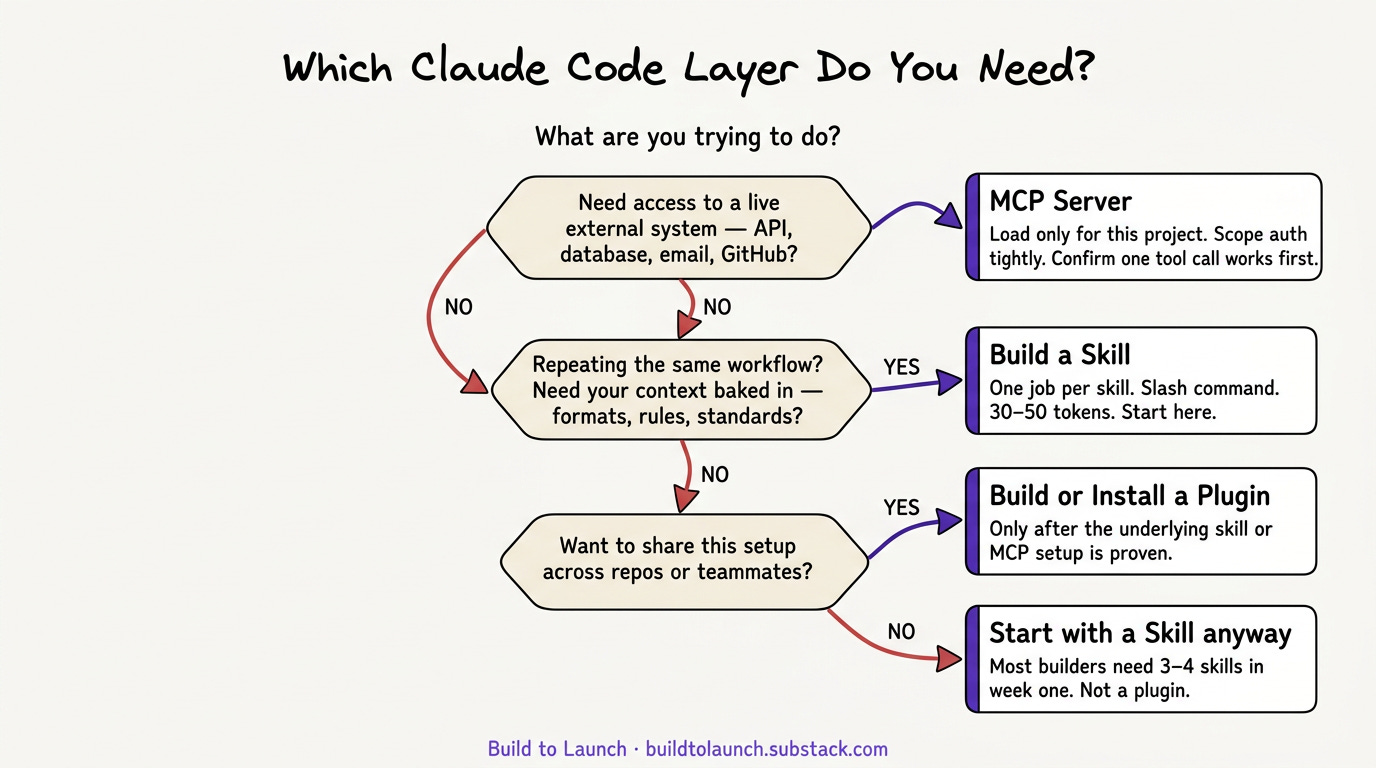
If you’re starting out: build skills first. Add MCP when you hit the wall of needing live data or external actions. Bundle into a plugin only when reusability becomes the actual problem. Not before.
Most builders don’t need a plugin for months. Most builders need three or four skills in their first week.
Once you’re past that, the setup that actually changes things runs all three.
How MCP, Skills, and Plugins Work Together in One Stack
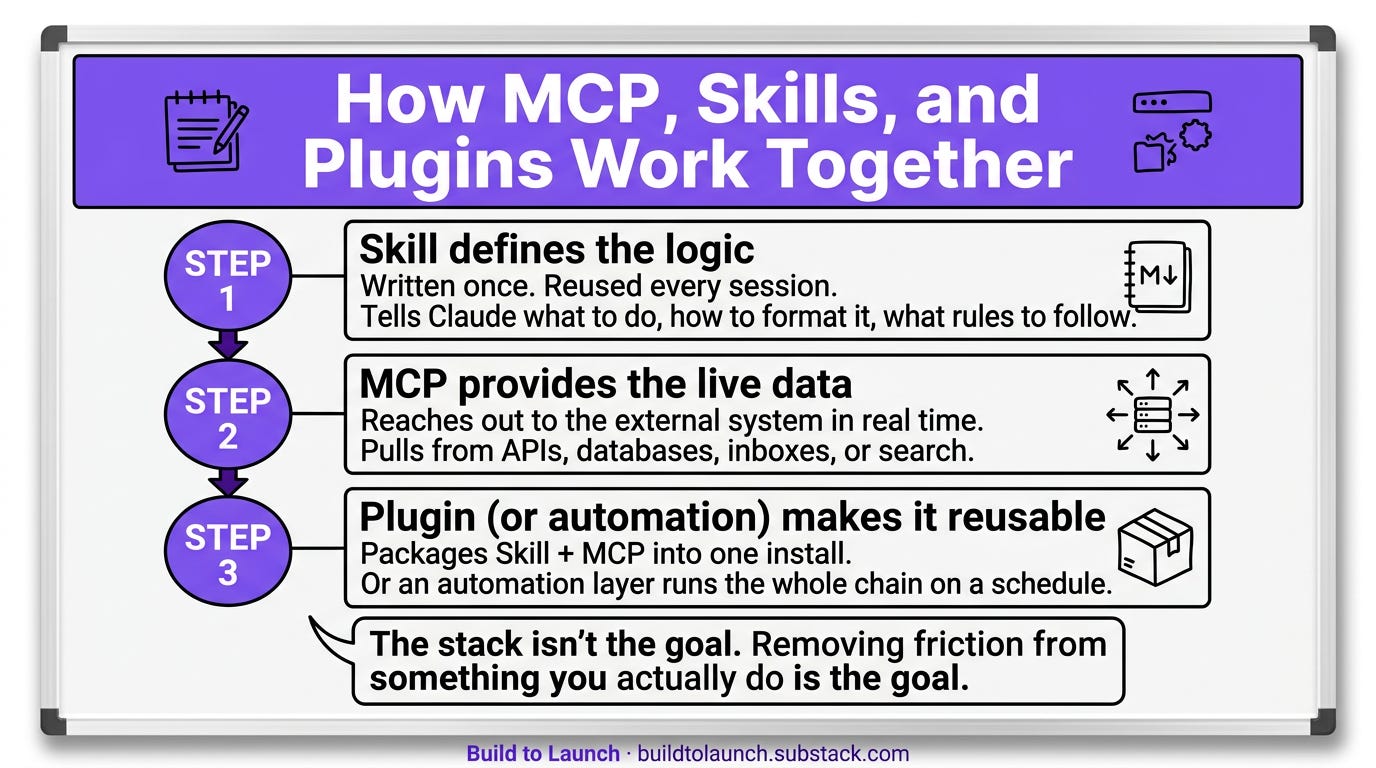
What it does: the most useful setups use all three, but in a specific pattern.
Skill defines the workflow. MCP provides the live data. Plugin bundles it for reuse or scheduling.
Why it matters: once each layer has a clean job, the whole thing starts compounding. The skill holds the logic. MCP handles the reach. The plugin or automation layer makes it reusable. That is how you go from one good prompt to a real system.
Skills can also call MCP tools directly — a skill that defines how to run a weekly report can trigger an MCP tool call to pull the data. The skill holds the reasoning; MCP provides the access. Separating them this way keeps each layer replaceable if one breaks.
I have a skill that tells Claude exactly how to run a weekly GSC report: what to pull, how to format it, what comparisons to make. An MCP server connects to the data source. OpenClaw, an automation layer that runs on a schedule, executes the whole thing without me touching it. Take one layer out and it breaks.
The same pattern scales further than one report. MCP Second Brain: How I Connected Claude to My Data (And Cut Research Time by 10x) shows how skill + MCP compounds when the data source is your own knowledge base.
What goes wrong: people see the full stack and try to start there. I didn’t start there. That setup took months to build up, one layer at a time.
How to build toward this:
Start with one skill for one workflow.
When that skill needs to reach something external, add the MCP server.
When you find yourself copying that setup across three repos, turn it into a plugin.
The stack isn’t the goal. Removing friction from something you actually do is the goal. Build toward that, not toward having all three layers running because you’re supposed to.
How to Start: The Right Order for Your Claude Code Setup
If your setup is still simple, start with one skill for one repeating job. Get that clean first.
If you keep bouncing between tabs, accounts, or systems Claude cannot reach on its own, that is when MCP starts earning its place.
If you already have something working and you keep copying it across repos, teams, or projects, that is when it is worth thinking about a plugin.
The order matters. Reach for the lightest layer that solves the real problem.
If you find this guide useful, share it to anyone you know who might need it.
What is one workflow in your setup right now that feels heavier than it should?
— Jenny