What Is an MCP Server?
MCP stands for Model Context Protocol. Three real examples from my stack with exact numbers, and the honest answer to whether you need to write any code.
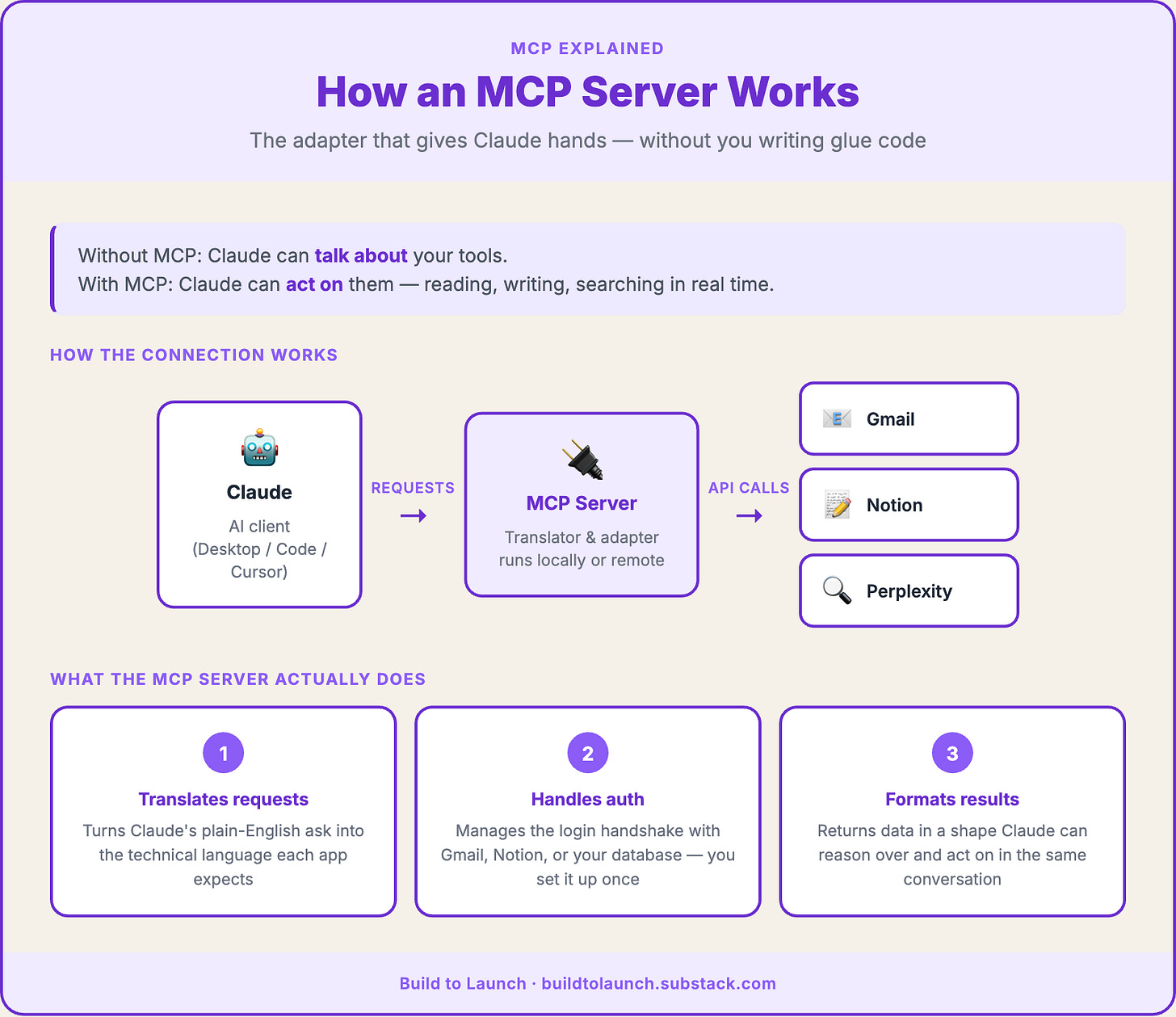
MCP stands for Model Context Protocol. An MCP server is the adapter that lets Claude, Cursor, or another AI tool use real apps and data like Gmail, Notion, or Perplexity. In plain English, it gives the model a standard way to reach outside the chat. In most cases, you do not need to code to use one.

You're using an AI tool — Claude, ChatGPT, Gemini, or anything along the line — and it's useful, but it can't touch anything real. It can't read your actual emails. It can't check your Notion. It can't search the web right now. It just sits there, reasoning from it’s own knowledge base and whatever you paste into it.
MCP is what changes that. It’s how you give an AI tool a direct connection to the apps and data you actually use — without copying and pasting everything in manually.
If you’ve run into the term and found the official docs baffling, you’re not alone. One Hacker News commenter put it well: “What even is MCP? I tried going through the docs on multiple occasions but I couldn’t understand it.”
Another named the exact problem: “One confusing thing to me was the word ‘server.’ An MCP server is a server to the LLM client... but simultaneously a client to the systems it connects to.”
At it’s birth, MCP is what lets Claude reach beyond the conversation into the tools you already use.
When MCP first launched, my honest reaction was: "So it's calling tools to get data. How is this different from what I've already been building?" I dismissed the whole thing as another buzzword. Moved on.
But after I built one. Then built another. Then a couple more. The concept of MCP finally clicked and stuck with me as one of the most exciting tools connecting AI with your personal operating system.
This article is to give you the plain-English foundation to understand what MCP is, why it matters, and whether you need to write any code to use it.
What You’ll Learn
What Is an MCP Server and What Does It Do? — the definition, the right mental model, and why the name throws people off:
MCP Server Examples: Gmail, Notion, and Perplexity in Practice — before/after from my stack, with exact numbers:
Gmail → 918 emails, 7 action items, 40 seconds
Substack database → 30 minutes to 3 minutes
Perplexity → live web results mid-conversation
Do You Need to Code to Use MCP? — three levels, which one you probably are:
Next Steps — what to actually do first, by level
Hi, I’m Jenny 👋
I help non-technical people ship real products with AI. I run the Practical AI Builder program — for people who already use AI and want to build real things with it. Check it out if that sounds like you.
If you’re new to Build to Launch, welcome! Here’s what you might enjoy:
What Is an MCP Server and What Does It Do?
What it is: An MCP server is an adapter that sits between an AI tool and your real apps. It takes Claude’s requests and translates them into API calls the app actually understands.g.
What you get:
Claude can act on your tools, not just talk about them
Your data stays on your machine (for local servers)
No custom glue code for every AI-to-tool combination
What Does MCP Stand For? (Model Context Protocol Explained)
MCP stands for Model Context Protocol.
Created by Anthropic in late 2024
Now an open standard — not owned by any one company
Supported by: Claude Desktop, Claude Code, Cursor, ChatGPT (via Responses API), Gemini, Windsurf, VS Code Copilot
Available: browse servers in Claude Desktop’s built-in integrations page, at Smithery, or at mcp.so
The word protocol just means a shared rulebook. Like how HTTP is the rulebook that lets any browser talk to any website, MCP is the rulebook that lets any AI tool talk to any external data source — with no custom glue code for each combination.
Why Is an MCP Server Called a Server If It’s Not a Traditional Server?
The name breaks down here, and the confusion is real.
What it actually is:
A server to the AI (Claude sends requests to it)
A client to your tools (it calls Gmail, Notion, the database)
Closer to an adapter than a server in the traditional sense
Think of it as a universal outlet standard. Every tool that follows the MCP spec can plug into any AI that supports it. You don’t rewire the wall. You just plug in.
MCP servers also run in two modes:
Local servers run on your own machine and communicate directly with your AI client — nothing leaves your computer.
Remote servers run online and connect over the network, which matters when you're building for teams or deploying something others will use. For most personal workflows, you'll start local.
MCP Server Tools, Resources, and Prompts: What’s the Difference?
Not all MCP servers do the same thing. Three categories:
Tools — actions that do something: send an email, query a database, search the web, write a file. Most popular servers are tool-heavy.
Resources — data the AI can read but not modify: your documents, your codebase, a spreadsheet. The AI gets context without the ability to change anything.
Prompts — instruction templates that define how the AI should approach a task. Less common, but useful for specialized workflows.
For most people installing their first MCP, this distinction is invisible. Once you start building your own, knowing which type you need shapes the whole design.
MCP Server Examples: Gmail, Notion, and Perplexity in Practice
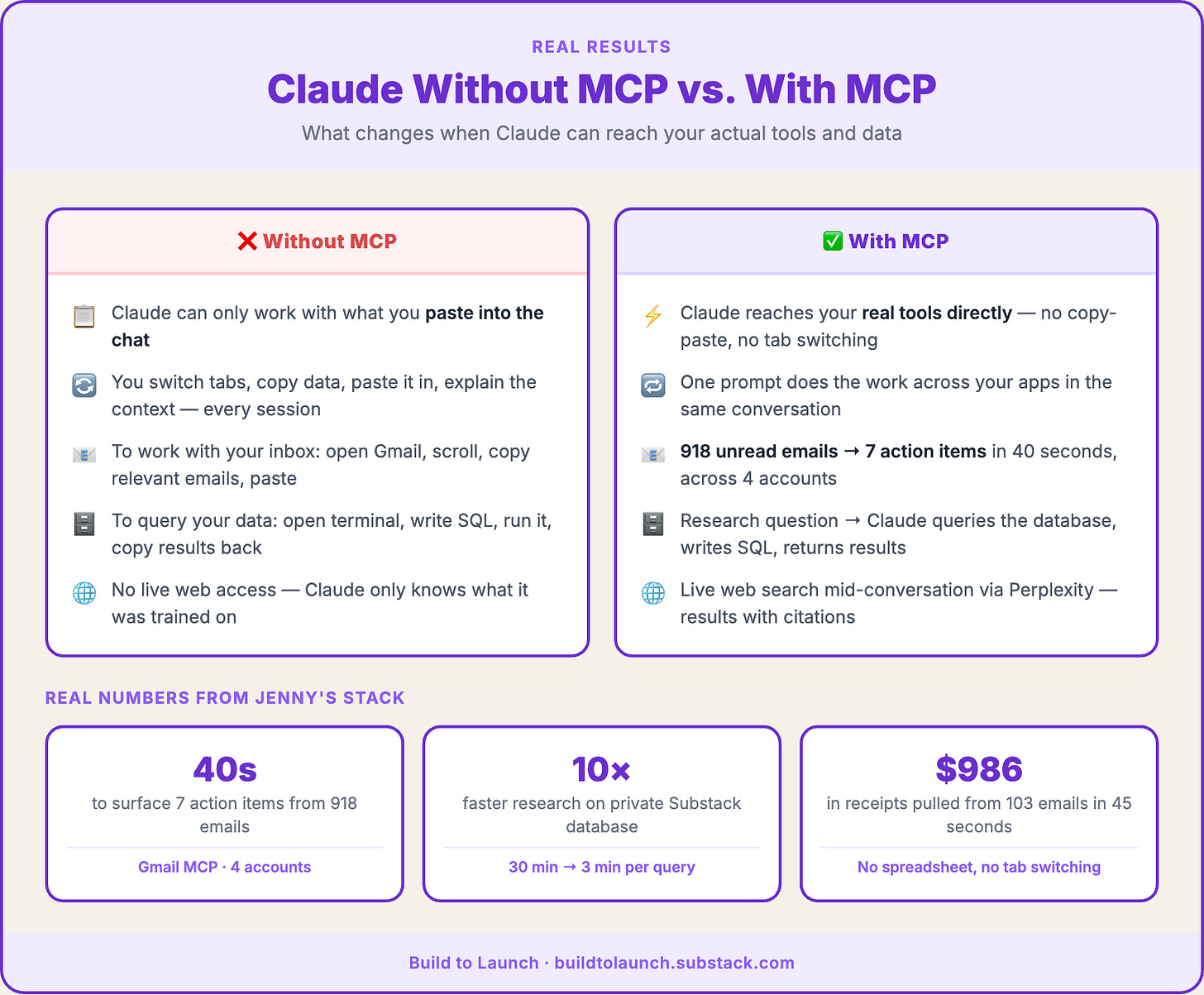
The cleanest way to understand MCP is the before/after. Without an MCP server, Claude can talk about your tools. With one, Claude can act on them.
Gmail: 918 unread emails to 7 action items in 40 seconds
Without the Gmail MCP: Claude can help me draft an email. It has no idea my inbox exists.
With the Gmail MCP running across my four accounts, personal, newsletter, business, and payments, I can ask Claude to scan all four and surface only what needs attention.
On one run: 7 action items out of 918 unread emails, in 40 seconds. A receipt extraction run pulled $986.41 from 103 emails in 45 seconds. Six months of payout history, no spreadsheet, no tab switching.
The MCP server is doing the work of translating “search my inbox” into Gmail API calls. I never see the API. I just see the output.
My custom Substack database: 30 minutes to 3 minutes
Before I built this MCP, every research question about my newsletter dataset meant: open terminal → connect to database → remember table names → write SQL → run → process results. By the time I had an answer, I’d usually forgotten the follow-up question.
The fix was a small Python script, a local server exposing three tools: query_database, get_schema, suggest_query. I connected it to Claude Desktop. Now I ask “How many newsletters are writing about AI in the past 6 months?” and Claude checks the schema, writes the SQL, executes it, and gives me results in minutes. (A version of this same approach powers my Substack research agent for analyzing notes patterns across 3,000+ published notes.)
Same data. Ten times faster. The MCP didn’t change what was in the database. It eliminated the friction between the question and the answer.
Perplexity: fresh web results inside any conversation
Without it: Claude’s knowledge has a training cutoff. Mid-conversation, it can’t search the web.
With the Perplexity MCP: Claude calls Perplexity when it needs current information, gets fresh results, and brings them back into the session. I ask one question. Claude handles the search, the synthesis, and the response. No visible plumbing. The research brief for this very article was sourced that way.
The pattern across all three: MCP servers don’t make Claude smarter. They give Claude hands: the ability to reach into your real tools and act on your real data, instead of just reasoning about them from training. That distinction is what makes MCP matter.
Do You Need to Code to Use MCP?
Short answer: no.
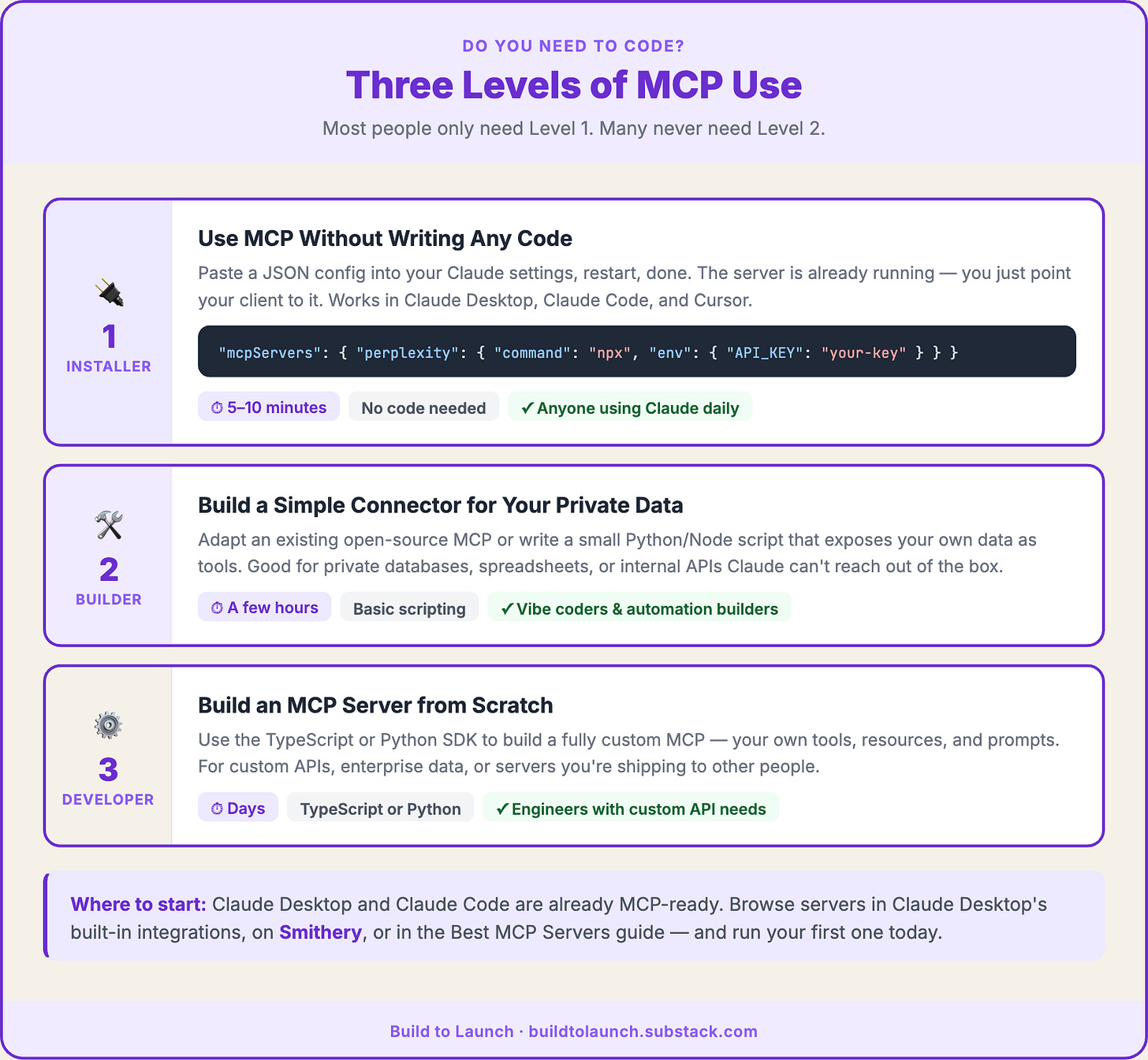
The naming keeps non-developers away from something they could have running in under 10 minutes. Most people only need Level 1. Many never need Level 2.
How to Use MCP Servers Without Writing Any Code
Use when: you want to add a pre-built MCP to Claude Desktop, Claude Code, or Cursor.
What it looks like:
A config file: 5–20 lines of JSON
Paste it into your settings, restart, done
The server is already running somewhere — you just point your client to it
Where to find them: Start with Claude Desktop’s built-in integrations page (in settings) or Smithery for Notion, Slack, GitHub, Google Calendar, Brave Search, and more. mcp.so also has a large directory. My curated starting point with honest difficulty ratings: Best MCP Servers for Claude Code.
A minimal Perplexity MCP entry in your claude_desktop_config.json looks like this:
{
  "mcpServers": {
    "perplexity": {
      "command": "npx",
      "args": ["-y", "@modelcontextprotocol/server-perplexity-ask"],
      "env": { "PERPLEXITY_API_KEY": "your-key-here" }
    }
  }
}
Paste it in, restart Claude, and it’s live. That’s the full install.
One honest caveat: Browser MCP installs at Level 1 but deserves its own mention. It can control web pages through your active login sessions, including updating Google Sheets and navigating sites automatically. I use it occasionally and always with deliberate caution. Start with lower-stakes options first.
How to Build a Simple MCP Server with Basic Scripting
Use when: you want Claude to access your own private data or custom workflows.
What it looks like:
A Python or Node script that exposes your data as tools
Adapt an existing open-source server rather than build from zero
Typical effort: a few hours
My Substack database MCP was a Python script, a database connection, and a schema file. The Gmail MCP I use is a fork of an open-source repo I modified for multi-account reliability. This is the level for vibe coders and automation builders.
How to Build an MCP Server from Scratch in TypeScript or Python
Use when: you need a custom MCP for a private API, enterprise data, or a tool you’re building for others.
What it looks like:
TypeScript or Python SDK
Full control over tools, resources, and prompts
Typical effort: days
Most solopreneurs reading this won’t need Level 3. Many won’t need Level 2 yet. If you’re on Claude Desktop or Claude Code right now, you’re already MCP-ready. The next question is what to plug in first. When you’re ready to build your own MCP server, the complete guide walks through both every way of building MCP from scratch.
Next Steps
Beginner: install one MCP and run one real job
Pick a tool you already use, like Notion, Perplexity, or GitHub. Find its MCP in Claude Desktop's built-in integrations, Smithery, or the Best MCP Servers list.
For step-by-step MCP setup across Claude, ChatGPT, VS Code, and Cursor, that guide covers every client. Paste the config, restart Claude, ask it to do one task you'd normally do manually.
Don't aim for a full stack. Aim for one job that saves 5 minutes.
Intermediate: build a simple connector for your private data
If you have data that lives somewhere private, like a database, a spreadsheet, or an internal API, and you want Claude to query it without you being the translation layer, a simple Python or TypeScript MCP makes sense. The MCP Second Brain guide shows exactly how I started mine.
If you have data that lives somewhere private. A database, a spreadsheet, or an internal API, and you want Claude to query it without you being the translation layer, a simple Python or TypeScript MCP makes sense.
The MCP build guide shows exactly how I started mine, turning a private database into connected intelligence Claude can reason over in real time.
Advanced: think about what data only you have
The most important question isn’t “which MCPs should I install?” It’s “what data do I have that no one else has access to?” Your customer conversations, your research archives, and your domain knowledge are where MCP gets interesting. It turns that private context into something Claude can reason over and act on. Start building from what’s already yours.
If any of this is useful, share it with someone who keeps nodding along when MCP comes up.
If you want the practical layer after the plain-English explanation, the Practical AI Builder program is where I teach builders how to turn this stuff into working systems.
MCP Server FAQ: Common Questions Answered
What does MCP stand for?
MCP stands for Model Context Protocol. It’s an open standard created by Anthropic in late 2024, now supported by Claude, Cursor, ChatGPT, Gemini, and most major AI tools.
Do I need to know how to code to use an MCP server?
No. Most pre-built MCP servers install through a config file, typically 5–20 lines of JSON pasted into your Claude settings, followed by a restart. If you can follow written instructions, you can install one. There are thousands of pre-built servers available for common tools.
What’s the difference between an MCP server and an API?
An API exposes a system to any client — it’s the raw interface a service offers to the world. An MCP server wraps that API specifically so an AI model can use it, handling the translation, authentication, and response format that AI tools expect. When Claude calls your Gmail MCP, the MCP handles the login handshake with Gmail, formats the request in the way Gmail expects, and returns the results in a shape Claude can reason over. MCP doesn’t replace APIs. It sits in front of them.
Which AI tools support MCP servers?
Claude Desktop and Claude Code support MCP natively. So do Cursor, Windsurf, and VS Code Copilot. ChatGPT supports MCP via the Responses API (not the standard chat interface). For setup instructions across every client, the MCP setup guide covers each one step by step.
What’s the easiest MCP server to start with?
Perplexity MCP and Brave Search MCP are the lowest-friction starting points. Both extend Claude with live web search without requiring access to any of your personal accounts or data. Install one, run a search question, and you’ll see exactly how MCP changes the conversation. For a fuller list of vetted options with honest difficulty ratings, the best MCP servers guide is where to go next.
What is MCP in Claude Code?
Claude Code has native MCP support built in. You configure servers via a .mcp.json file in your project root, and Claude Code picks them up automatically when you open that project. This means your MCP stack can be project-specific: one set of tools for your client work, a different set for your personal builds. It’s one of the reasons Claude Code is the primary client for anyone doing serious work with MCP.
What’s the first thing you’d connect Claude to if you had an MCP running right now?
— Jenny
Why Upgrade · Practical AI Builder Program · Templates · Builder Showcase