LLMs Don't Read, They Parse: How to Format So AI Actually Uses Your Words
LLMs parse text by structure and position, not prose. How to format prompts, CLAUDE.md, and posts (Markdown, XML, JSON) so AI follows and cites you

I lost one entire afternoon arguing with Claude over one rule.
It was right there in my CLAUDE.md. Bold, clear, impossible to miss. Sitting in the middle of a long file.
Claude broke it anyway. So I wrote it again, lower down. Then a third time, louder.
It got worse.
My wording was never the problem. My placement was.
The model doesn’t read your file top to bottom.
It parses it.
It scans for boundaries and weighs position. A rule buried in the middle gets the least attention of all.
I write skills files, prompts, and Substack posts for AI every week. The same placement hides a rule from Claude, and a line from AI search.
Once you see text the way the model sees it, the fix stops being guesswork.
The same move every time: clear boundaries, the important part where it looks.
It works on a prompt, an agent file, and a post you want cited. We walk through all three.
What’s inside:
What formats do LLMs like to read: Markdown, XML, JSON, or YAML?
By the end: you can format any prompt, CLAUDE.md, or post so the model actually uses it
🎁 The LLM Format Decision Cheat Sheet: grab it at the end
Hi, I’m Jenny 👋
I believe anyone can thrive with AI, not by mastering the tools, but by building real things with them. I run Build to Launch and the Practical AI Builder program, where we go from experimenting to shipping. Come build with us.
If you’re new to Build to Launch, welcome! Here’s what you might enjoy:

Why does it matter if AI can read your writing?
Your words have two readers now. You, talking to the AI. The AI, talking about you to everyone else. Most people write for one and forget the other, and the formatting is what decides whether either one lands.
Three reasons it is worth getting right.
So the AI does what you actually asked. When the model can parse your prompt, you stop running the same request three times to get one clean answer. The fix is small, and it pays off on every prompt after it.
So what you build on top of AI holds up. Wire a model into an agent, an automation, or a workflow, and it only runs reliably when it reads its instructions the same way every time. Readable instructions are a reliable system. Sloppy ones are the bug you cannot reproduce.
So AI can find you, understand you, and recommend you. More people ask ChatGPT or Perplexity now instead of Google. If a model cannot parse your post, your product page, or your site, you are invisible in the one channel that is growing. Format it so the machine reads cleanly, and you become the answer it hands back.
The first two are AI as your tool. The third is AI as your audience. Same move, pointed two ways: write so the machine can parse it. That starts with seeing how it reads.
How does AI read your text?
It scans for structure and pulls out the parts it can find. It does not read top to bottom the way you do.
Picture how you read a page. Left to right, line by line, holding it all in your head. A model does not do that. It breaks your text into tokens and leans on the cues that mark where one thing ends and the next begins. A heading. A blank line. A bullet. Those boundaries are what it grabs.
There is a mechanism under this. A 2025 study called SepLLM (arXiv 2412.12094) found that separator and punctuation tokens pull a disproportionate share of the model’s attention, more than the meaningful words between them. The model leans on your dividers to find its place. A boundary is not decoration. It is a handhold the attention actually grabs.
So a wall of text and the same text broken into labeled sections carry different amounts of signal, even when the words are identical. The prose version makes the model guess where the parts are. The structured version tells it. That is the first thing the model does with your text: it organizes by the boundaries you give it.
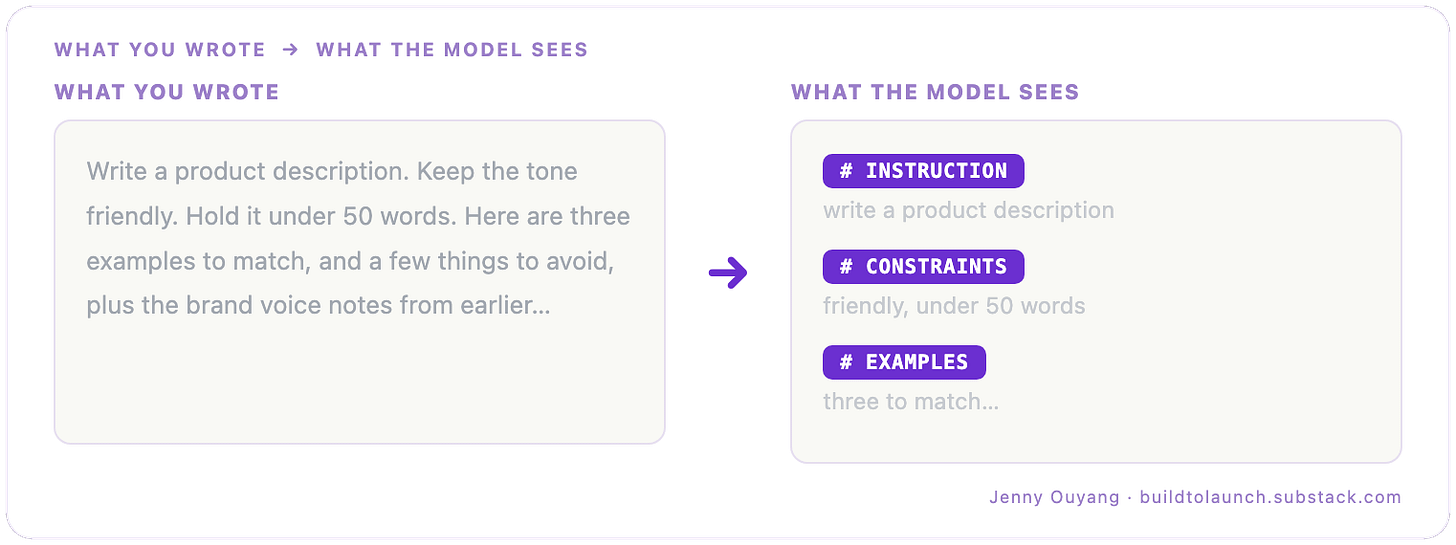
What you wrote v.s. what the model sees
But position matters even more than structure. Researchers named this “lost in the middle.” A 2023 study from Stanford, Berkeley, and Samaya AI (arXiv 2307.03172) tested models on long inputs and found a U-shaped curve. Information at the very start and the very end gets used. Information in the middle falls off by more than 20 points of accuracy.
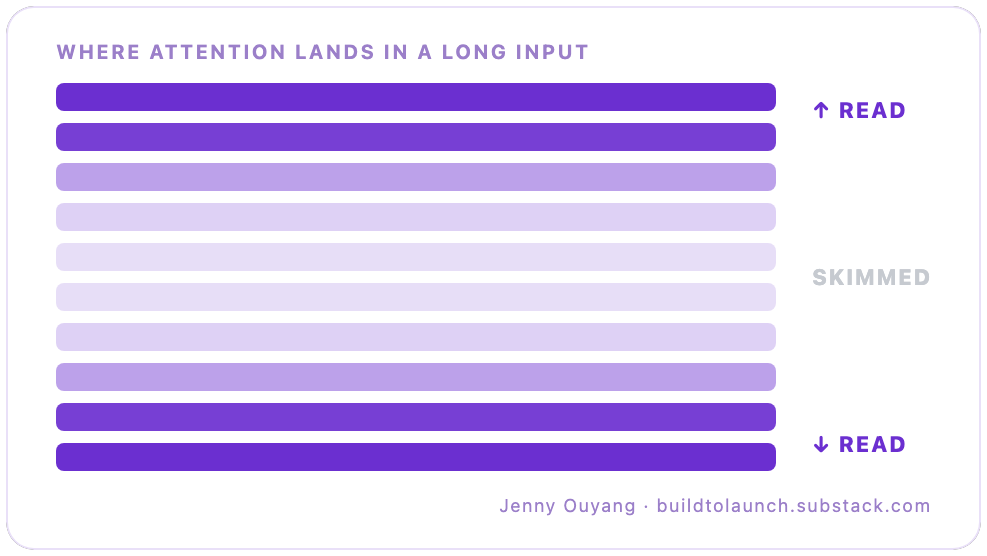
Simplified model attention heatmap
A bigger context window does not fix this. It adds more middle. NVIDIA tested 17 long-context models on a benchmark called RULER (arXiv 2404.06654). Most degraded as the input grew, and only about half held up at 32,000 tokens. A 2026 analysis (arXiv 2603.10123) argues the curve is baked into how a causal transformer attends, present from the start of training, which is why a longer window does not erase it.
The cleanest proof that position alone moves results comes from Anthropic. They buried one fact in a long document and asked Claude 2.1 to find it. Recall sat at 27%. They changed nothing in the document. They added one line near the end, “Here is the most relevant sentence in the context:”, and recall jumped to 98%. The same lab found that on complex inputs, placing your question at the end, after the context, improves quality by up to 30%.
Same model. Same document. Same question. The only thing that moved was where the model was pointed.
That is the model you are writing for. It organizes by the boundaries you give it, and it spends its attention on the edges, not the middle. Once you can picture that, writing for it stops being mysterious. You are not learning some AI dialect. You are making the model’s job easier, and it comes down to a handful of rules.
How do you write so AI follows it?
Give the model clean boundaries, and put the important part where it looks. That is the answer, in five moves. No new research here, just what the section above tell you to do every time you write a prompt.
Separate the kinds of information. Instructions in one block, context in another, examples in a third, not fused into one paragraph. There are a few ways to draw those boundaries. The lightest is Markdown headings:
# Instructions
# Context
# Examples
OpenAI’s GPT-4.1 guide says to start there. When the blocks get long or you need harder walls, XML tags do it:
<instructions> ... </instructions>
<context> ... </context>
Anthropic recommends exactly this so Claude can parse each block “unambiguously.” There are no magic tags. Any consistent label works. The point is the boundary, not the syntax.
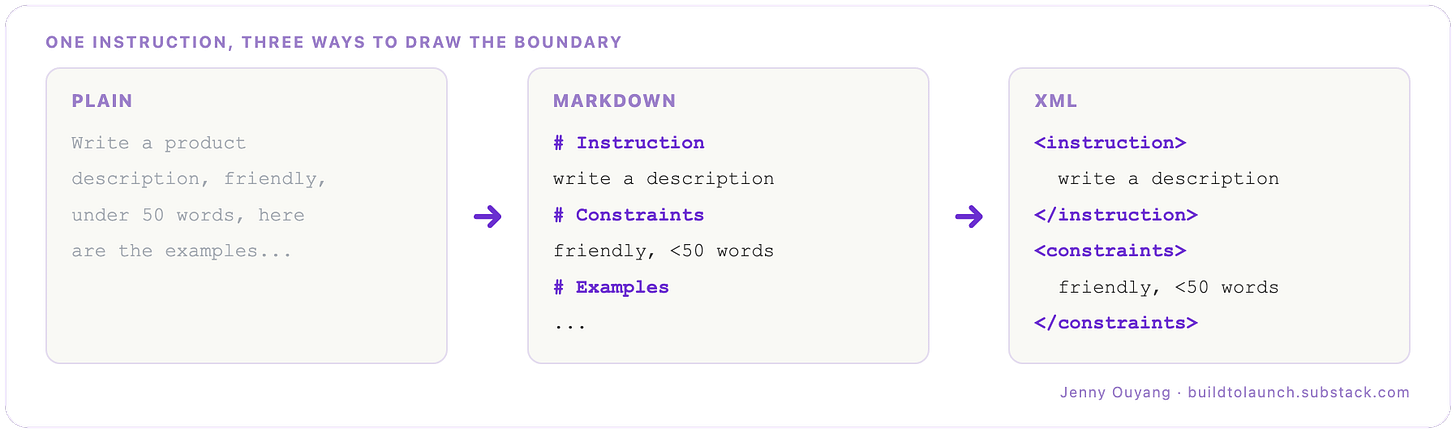
Boundary progression with different formats
If Markdown and XML are new to you, do not worry about the syntax yet. You have only met them in passing here. The next section introduces all four formats properly, with what each one actually is.
Put your most important instruction first. This is the CLAUDE.md from the start of this piece (if you have not set one up yet, I’ve written a Claude onboarding guide that covers it). My rule did not fail because it was wrong. It failed because it sat in the middle of a long file. Top of the file, first line under the heading, not buried three rules deep.
For a long input, repeat the key ask at the end. The model reads the edges best, so bracket your request: state it before the context and again after. That is the move behind the jump from 27% to 98%.
Do not strand one critical line in the middle. If something has to live deep in a long document, lift it out. Put it at the top, or wrap it so it reads as its own block. The middle is where attention goes to die.
Keep your formatting consistent. Pick one structure and hold it across the prompt, instead of mixing headings, tags, and loose lists. Which structure to pick, Markdown, XML, or JSON, is exactly the next question.
What formats do LLMs like to read: Markdown, XML, JSON, or YAML?
Four of them: Markdown, XML, JSON, and YAML. Markdown and XML are for talking to a model; JSON and YAML are for handing it data.
You met the first two in passing last section, so time to meet all four properly, definitions first, because the names hide what they are.
Markdown is a lightweight way to format plain text with a few symbols. Simply put: # for a heading, - for a list item, ** for bold. It was built to stay readable as raw text and to convert cleanly into web pages. It is the format you are reading right now.
# Task
- Tone: friendly
- Length: under 50 words
XML (eXtensible Markup Language) wraps every piece of content in a named, nestable tag: <thing>...</thing>. You invent the tag names yourself, which is the “extensible” part, so you can label each piece exactly.
<task>
  <tone>friendly</tone>
  <length>under 50 words</length>
</task>
JSON (JavaScript Object Notation) stores data as key-value pairs and lists, inside braces and brackets. It is the default way programs pass structured data around, and the model reads and writes it natively. OpenAI calls it “highly structured and well understood, particularly in coding contexts,” though it found JSON “performed particularly poorly” as a wrapper for many documents, and every brace is a token.
{
  "task": "write a description",
  "tone": "friendly",
  "length": "under 50 words"
}
YAML (YAML Ain’t Markup Language) holds the same key-value data as JSON, but uses indentation instead of braces, which makes it easier for a person to read and edit. It is what most config files are written in.
task: write a description
tone: friendly
length: under 50 words
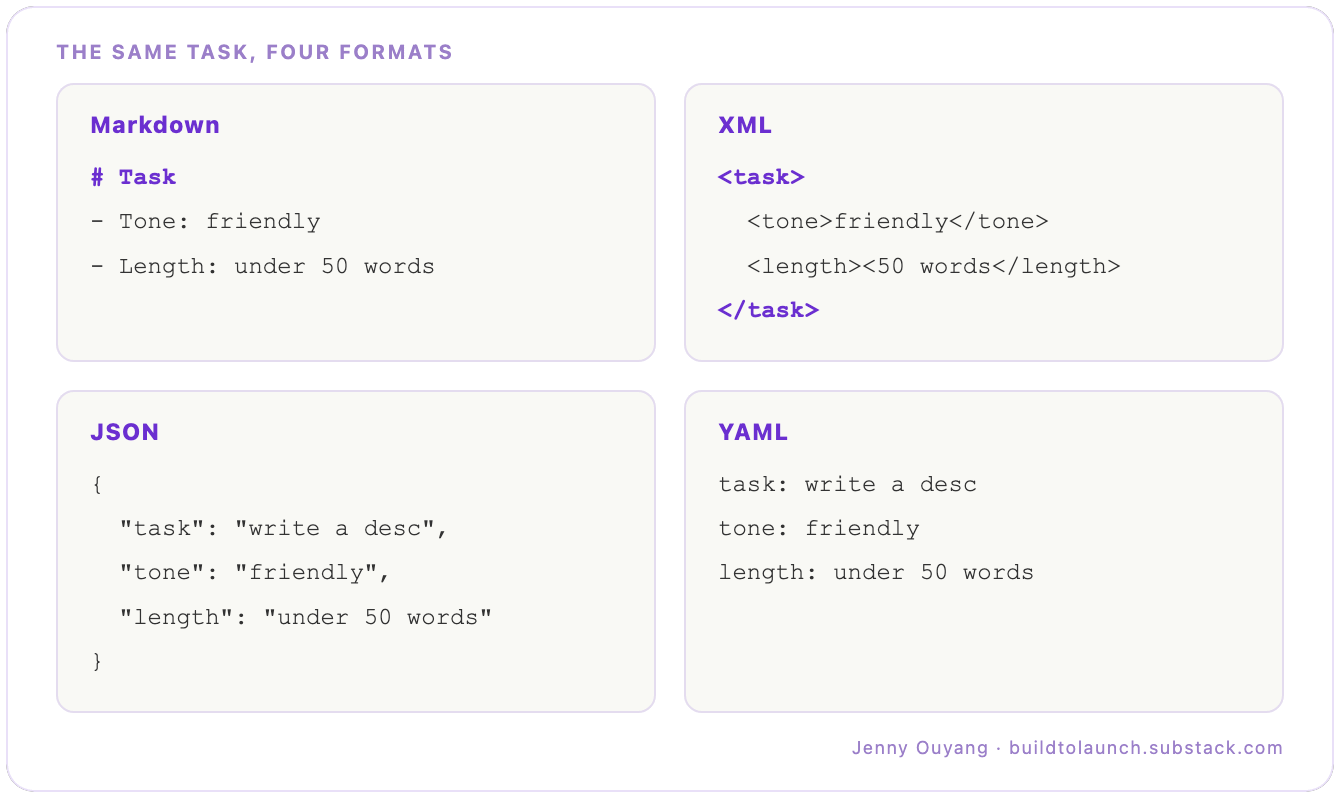
Four shapes of text
Now the split is easy to see. Markdown and XML are how you talk to the model. JSON and YAML are how you exchange data with it. The four side by side:
!function(){"use strict";window.addEventListener("message",(function(e){if(void 0!==e.data["datawrapper-height"]){var t=document.querySelectorAll("iframe");for(var a in e.data["datawrapper-height"])for(var r=0;r<t.length;r++){if(t[r].contentWindow===e.source)t[r].style.height=e.data["datawrapper-height"][a]+"px"}}}))}();
All three labs land in the same place: structure beats no structure, and the choice matters less than staying consistent. Gemini’s guide puts it in one line, “choose one format and use it consistently within a single prompt.” Mixing Markdown headers, XML tags, and loose JSON in one prompt is worse than picking one and holding it.
Does format actually change accuracy? On older or smaller models, yes, a lot. A Microsoft and MIT study (arXiv 2411.10541) found GPT-3.5-turbo’s accuracy swung up to 40% on the same task from the template alone, and on one task JSON beat Markdown by 42 points. A separate study, FormatSpread (arXiv 2310.11324), found up to 76 accuracy points of spread on Llama-2-13B from formatting choices a person would call cosmetic. Bigger models are more robust. More robust is not immune, and you do not always control which model runs your text.
On token cost, the honest version. There is no authoritative per-format table, so be wary of confident percentages. As a feel for the spread, a quick tiktoken count of the same content lands plain text and Markdown lowest, then YAML, then JSON (in one run, roughly 65, 76, 98, and 117 tokens). The order is solid. The exact numbers are not.
When does structure backfire? When you over-constrain. Forcing a model to answer inside a rigid schema can cost it reasoning room: a 2024 study (arXiv 2408.02442) found stricter format restrictions hurt performance on reasoning tasks. The counter, from dottxt, is that structure matched or beat free-form when you let the model reason first and convert to the format after. The takeaway holds either way: structure your input generously, but do not strangle the output into a tight schema before the model has thought. Let it reason, then format.
That covers what each format is for. The decision, on one page:
!function(){"use strict";window.addEventListener("message",(function(e){if(void 0!==e.data["datawrapper-height"]){var t=document.querySelectorAll("iframe");for(var a in e.data["datawrapper-height"])for(var r=0;r<t.length;r++){if(t[r].contentWindow===e.source)t[r].style.height=e.data["datawrapper-height"][a]+"px"}}}))}();
Two of those carry a number worth keeping. On a complex prompt, Anthropic found that putting the question last, after the context, improves quality by up to 30%. And on a CLAUDE.md, lean wins: a 2025 benchmark (arXiv 2507.11538) found per-rule adherence drops as instructions stack, to about 68% at 500 instructions, the model favoring the earliest. The “under 200 lines” rule of thumb (techsy) points the same way.
That table is the quick version. Download the full cheat sheet and share it to your AI, so it formats everything by these rules.
That is writing to a model. The other direction is getting a model to quote you, and that is where the last format finally comes in.
How do you get cited by AI?
Structure a page the way a model likes to read, and you are far more likely to be the source it quotes.
When someone asks ChatGPT or Perplexity a question, it pulls from pages it can parse cleanly and lift in pieces. Same physics as your prompt: boundaries it can find, answers it can extract. The pages that get cited are the ones built like lookups.
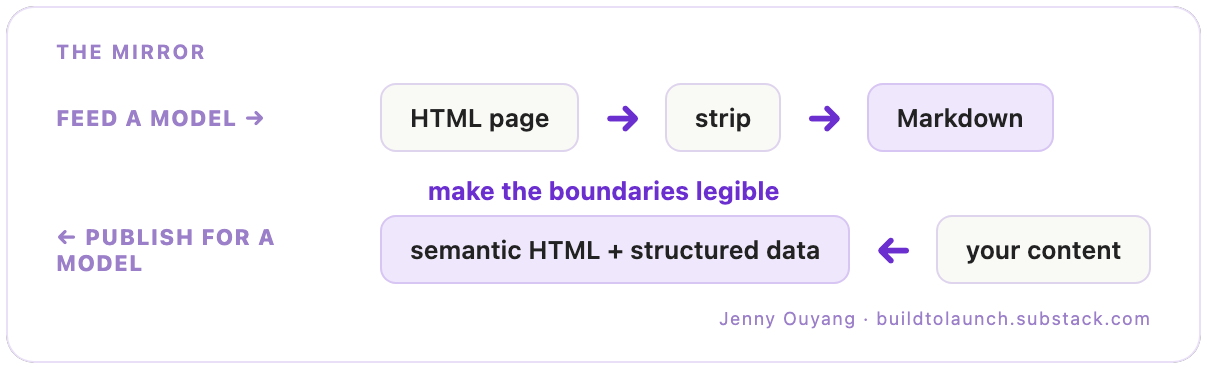
This is where HTML finally earns its place. You strip it out when you feed a page to a model, raw HTML is mostly markup, and converting to Markdown can cut the tokens by roughly a third or more. But when you publish, HTML is how a model finds you. Semantic HTML, real headings, lists, and tables, with structured data underneath, is the boundary system a crawler reads. Same principle as everything above, pointed outward.
A few patterns show up again and again in citation studies. These are correlations from SEO and vendor research, not promises from the model makers, so hold them loosely:
Tables get pulled. Nectiv’s study found ChatGPT citations were 2.3x more likely to include a table than Google’s results, 30% against 13%. A comparison table is a pre-chunked answer.
Comparison listicles lead. The Digital Bloom’s 2025 report put comparative listicles at 32.5% of all AI citations, the single most-cited format.
Short answers win. kime.ai found self-contained passages of 40 to 75 words cited about 3x more than longer ones. State the answer, then explain it.
How-to beats opinion. Presence AI’s data shows how-to pages cited 54% of the time and FAQ pages 58%, against just 18% for opinion pieces. Teach a step; do not just take a stance.
One honest limit, since the question is what crawlers actually parse best. These studies measure content structure, the table, the short answer, the how-to. The narrower question of file format, plain Markdown versus semantic HTML versus JSON-LD, has much thinner public data. The safe read: publish clean, semantic HTML with structured data underneath so the crawler can tell a heading from a caption from an answer, and shape the content itself as answer-first chunks. Structure at both levels, since only one of them is well-measured.
Notice the mirror. To feed a model, you strip a page down to clean text. To get cited by one, you publish structure the crawler can read. Same goal from both ends: make the boundaries legible.
This article is built that way on purpose. Plain question headers. Short answers up top. A table you can lift. That is the thesis in practice.

You have the physics, the formats, and the publishing side. One move ties them together.
What’s next for you
Open your CLAUDE.md right now and move your single most important rule to the top.
That single move uses everything above: position (the top, where attention lives), a clean boundary (one Markdown line), and the rule that outlasts every format debate.
Here is that rule, the one under all the others. Models do not read, they parse. So write for the parser: give it boundaries it can find, put what matters at the edges, and say what to do instead of what to avoid. That last part is its own small fix, and it is measured: a 2026 study (arXiv 2601.08070) found “don’t do X” instructions failed far more as the pressure rose, and when they failed, the model was attending to the forbidden word more than to the “don’t.” So “use sentence case” lands better than “do not use title case,” because “title case” is a phrase you just handed it.
The jump from 27 to 98 at the start was not a smarter model. It was the same model, finally pointed at the right place. Your prompts, your CLAUDE.md, and your posts each have a right place. Now you know where it is.
If this article made AI feel a little more predictable, pass it on to someone who’s still fighting with prompts instead of building with AI.
And if someone shared this with you, subscribe free so you don’t miss the next guide.
What is the one rule your AI keeps ignoring? Move it to the top, and tell me in the comments if it finally sticks.
— Jenny
Claude Hub · Vibe Coding · AI Agents · Shipped Products · Substack Growth