ChatGPT Codex App: 4 Things I Built, and Whether to Leave Claude
New ChatGPT app with Codex, Chat, and Work in one desktop app. Four jobs I ran through it, what broke, and whether to switch from Claude

ChatGPT helped me find my first way to make money online.
It talked me through the apps I was too unsure to build. It made the consistent hero images that still sit at the top of everything I publish.
But this year, I mostly lived inside Claude. The native file system did something no chatbox could. It let an AI read and write the actual files on my machine.
So I stayed. Real files beat clever answers when you are trying to ship.
That changed on July 9, as Codex folded into the ChatGPT desktop app.
I was already running Codex inside my own agent pipeline, with results I trusted. So the merge was not a surprise to me. It was a workflow I had been waiting to run.
Over two years of using both established their roles differently in my world:
Claude is the strategist, logical, neutral, effective.
ChatGPT is the creative one. The mentor that reframes the problem, the collaborator that expands the idea, the tool that generates the image.
Codex brought the part builders already trusted: a strict engine that follows instructions to the letter. The merge bolted that onto ChatGPT’s creative sense, the exact thing I kept reaching for in Claude and not finding.
So I finally stress-tested it. Four types of job I had fought with, or overpaid for, in Claude.
A video. A podcast. A workflow I could finally see, and a small one that quietly saves me money every week.
What’s inside:
Hi, I’m Jenny 👋
I believe anyone can thrive with AI, not by mastering the tools, but by building real things with them. I run Build to Launch and the Practical AI Builder program, where we go from experimenting to shipping. Come build with us.
If you’re new to Build to Launch, welcome! Here’s what you might enjoy:
Best Claude Code prompts: it was written in Claude, but you could use them to drive ChatGPT as effectively
Best Claude projects: same project ideas tranfer across platforms

What the ChatGPT App and Codex Are, and What Just Shipped
Let’s start with what most of us are familiar with:
Plain ChatGPT talks back.
Codex does the work on a real computer.
A little bit more about Codex:
It reads the files and repositories on your machine, runs terminal commands, tests the code, and hands you the changes as edits you accept or reject.
It runs in a few places. A command-line tool, a code-editor extension, the cloud, and now the ChatGPT desktop app.
You give it a goal, and it can work for hours, breaking the task into steps. More than 5 million people use it every week, and over a million of them for work that is not coding at all.
Since July 9, the app opens with a picker at the top-left: you choose ChatGPT or Codex, each with its own history.
Under ChatGPT you toggle Chat, the normal conversation. You toggle Work, an agent for long knowledge jobs that pulls from your connected apps and files and builds finished documents, slides, and sheets. Codex is the separate view: the coding agent that touches your local files, repositories, and terminal.
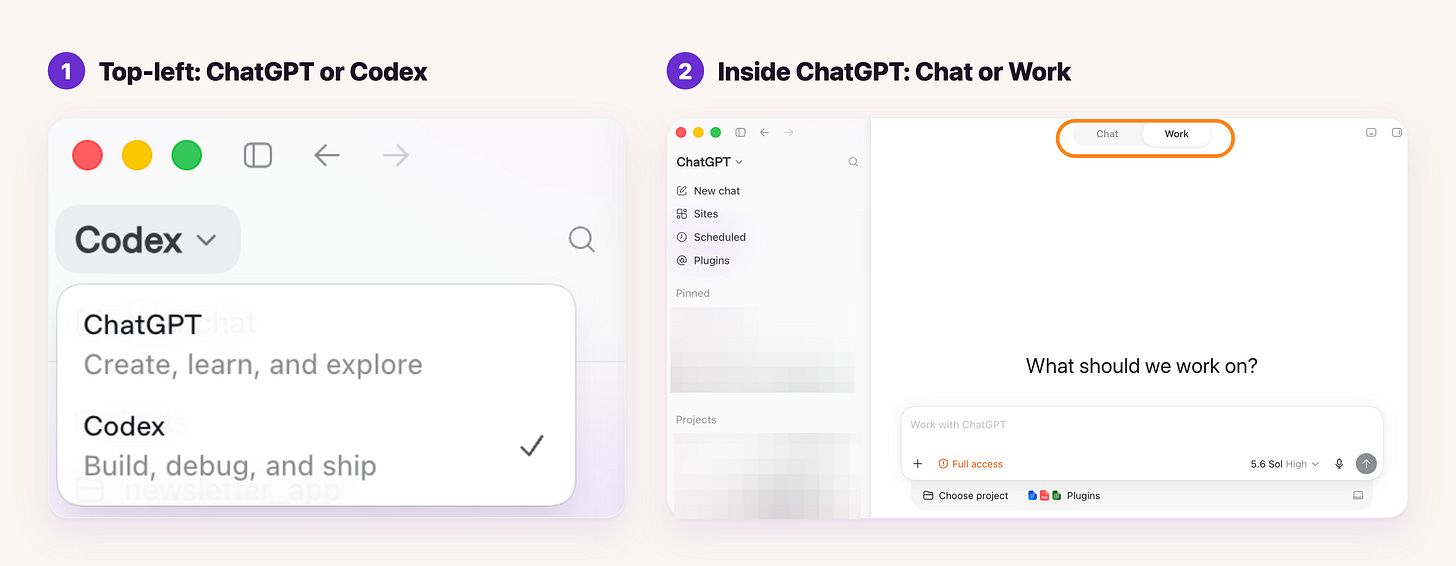
How the ChatGPT app is structured: the top-left picker switches between ChatGPT and Codex, and inside ChatGPT a Chat and Work toggle sits at the top.
If you came from the old Codex app you call it the Codex app, and if you came from ChatGPT you call it the ChatGPT app, but it is the same download.
Chat talks, Work does business work, Codex does software. All of it runs on every plan, including the free one.
The reason it is worth your attention right now is the pace. In about a month, this shipped:
June 2. Sites lets you build and deploy a website, dashboard, or web app that OpenAI hosts for you.
June 9. Import to Codex brings your existing setup straight over from Claude Code and Claude Cowork.
June 18. Record and Replay turns a task you demonstrate once on your Mac into a reusable skill.
June 25. Codex Remote reached general availability, so you can start or continue work on your Mac or PC from your phone.
July 9. Codex moved inside the ChatGPT desktop app, with in-app code editing, GitHub pull-request review, multi-repo projects, and the current GPT-5.6 model.
July 16. A Codex CLI release got better at catching dangerous terminal commands, like forced
rm, before running them.
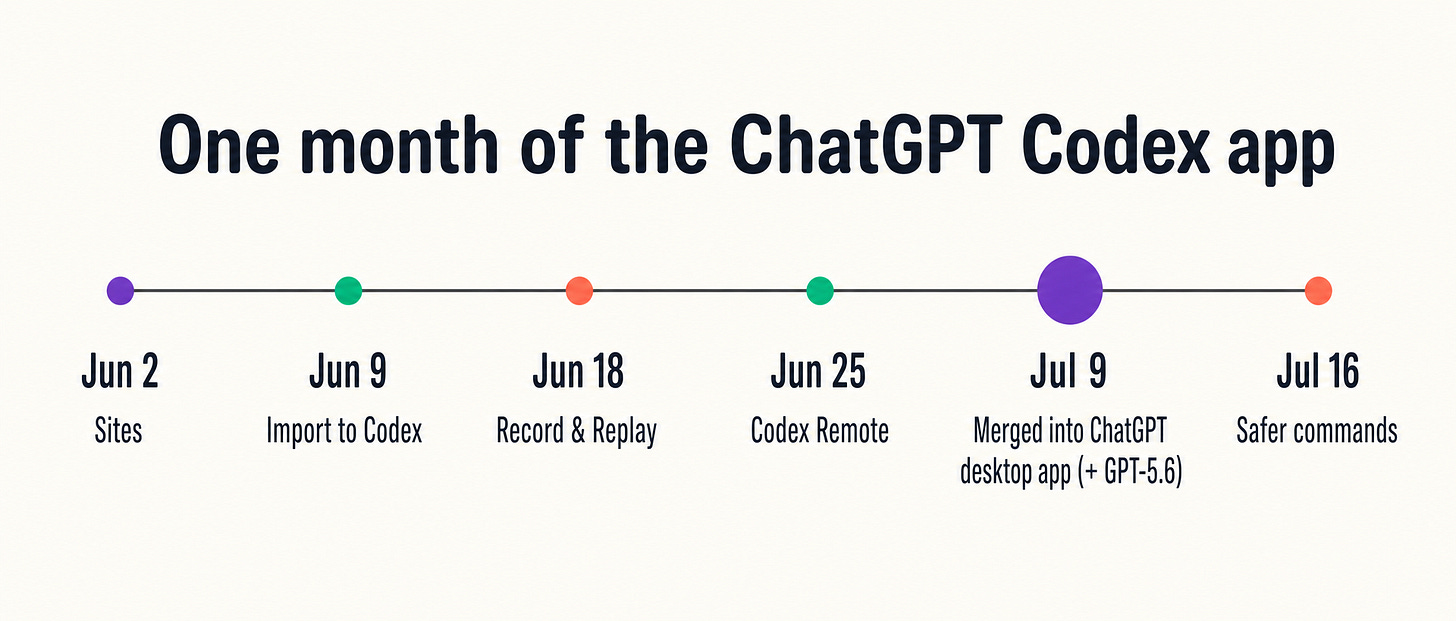
That is a lot of surface area for four weeks. What matters is not the changelog. It is which of your real jobs it can now finish, start to end.
I built four things with it in one week. Here they are.
How I Made My First YouTube Video Without Touching an Editor
I had never made a long-form video. Never appeared on YouTube, never edited a clip, no idea what the roles or the beats even were.
So I spent a day just exploring. The app walked me through A-roll and B-roll, then fonts, tags, frames, and captions, until the vocabulary I had been missing made sense.
Then together we made a video-processing pipeline.
I recorded in small passages. While I filmed the next take, the app watched the drop folder and processed the last one, reaching into the files already on my desktop and stitching them into finished segments.
I never touched an editor. When I disliked a result, I went back to the same task, named the problem, and the fix went into the handoff notes and back into the skill.
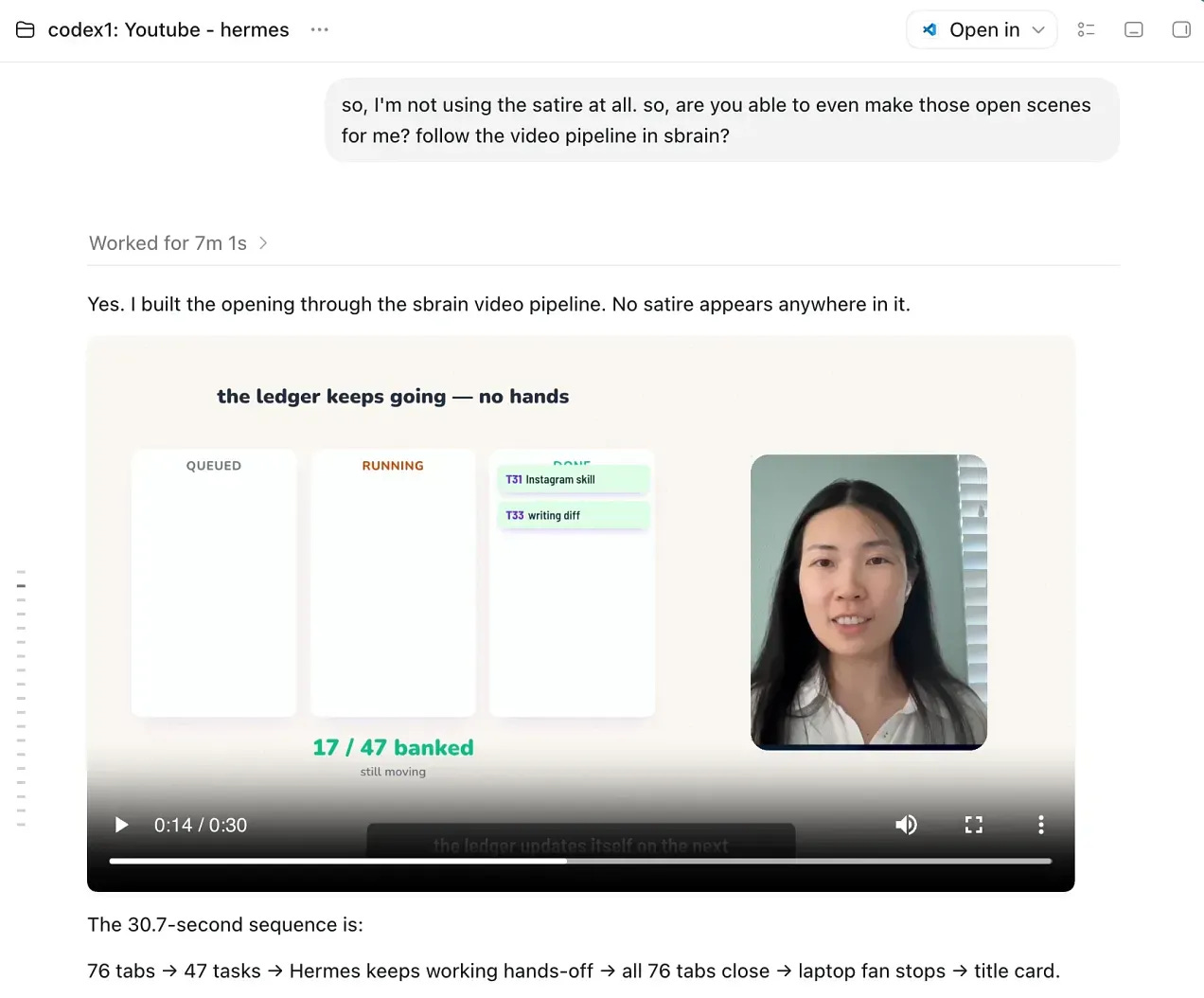
The part I did not expect was the visuals. Codex designed the thumbnails and generated the images inside the app, so I never switched to a browser tab and never spent an extra API credit. Image generation is included in the subscription.
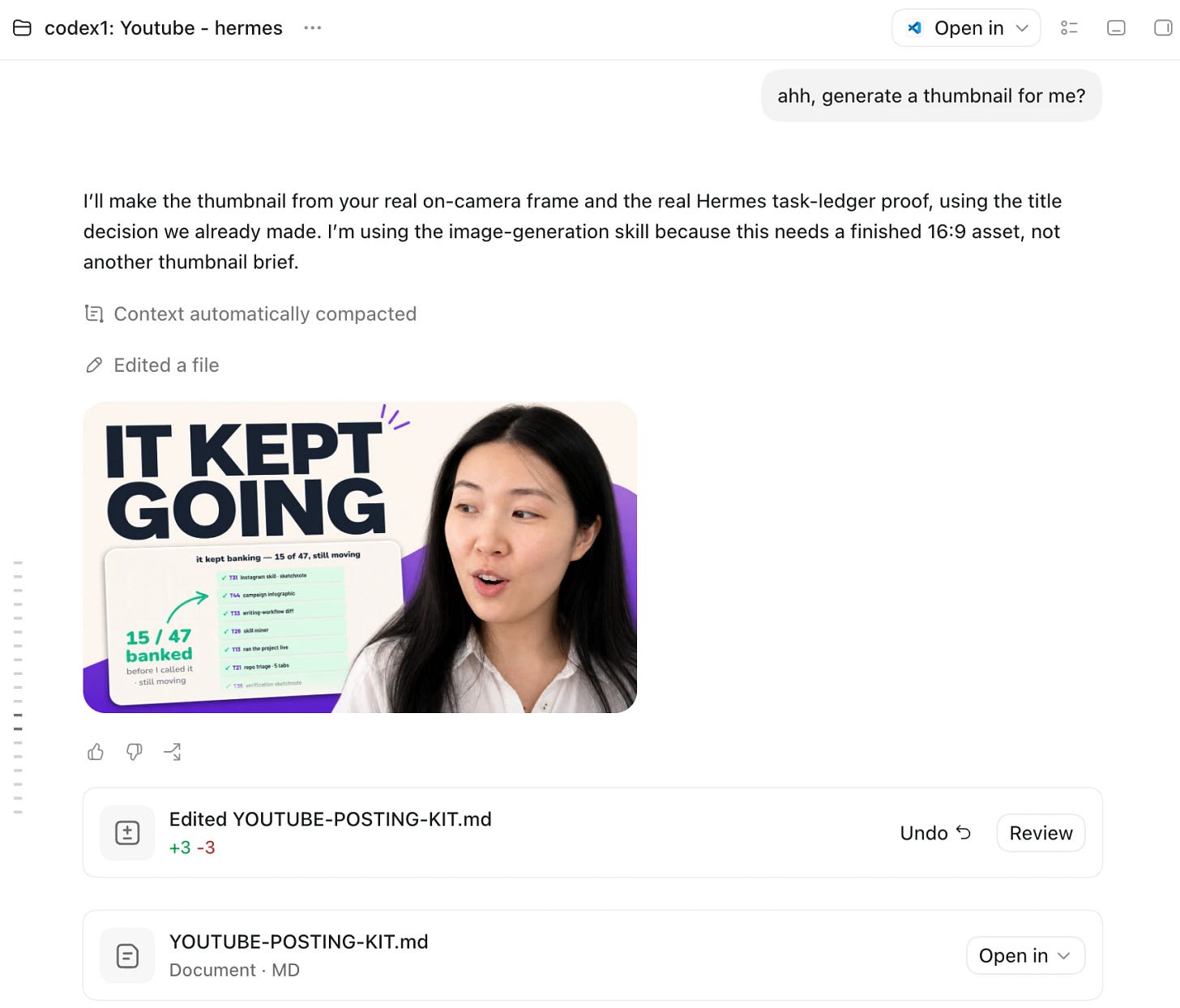
Codex generating the YouTube thumbnail options
The result was my first video: 14 minutes, published with chapters, captions, and a thumbnail.
Later, turning the video into Shorts took the same path. The app cut the captions and decorations, and I approved the takes.
Not all of it was smooth. The rendering hit real bugs. At one point it produced an invalid video file, and once it nearly treated a half-written file as finished.
I caught both only because the app shows me every file it touches. That was the shape of the whole build: strong at the work, safe because I could see and check it.
So the takeaway is not that the app is flawless. It is that you do not need to already have the video skill. You need a system that will build the skill with you on the first real job, catch its own mess when you are watching, and keep the skill for the next one.
Turning That Video Into a Podcast on Apple and Spotify
I wanted the video be accessible to people while they commuted or did the dishes, not only when they could sit and watch a screen.
So I gave ChatGPT one thing: an approved MP3 from the video project, and the outcome I wanted, which was a show on Apple Podcasts and Spotify.
It did the rest in one build. It researched what each directory requires, then set up the storage, a server that streams the audio, the RSS feed, the episode format, a one-command publisher, and the tests.
I did not stitch any of that together. I control one feed, and Apple Podcasts and Spotify both read from it.
This is the clearest instruction-following I have seen from an agent. I gave it a real project, a named input, a defined output, and a way to check its own work. It returned deployed infrastructure, not a suggestion.
The full build is documented in this article:
How I Built a Podcast Self-Publishing System in 13 Minutes
The honest limit is that it did not invent the audio. I handed it the MP3, and it did everything after.
An idea became a live show. Next I wanted to visualize a workflow I had never got around to build.
3 Clickable Prototypes for a Workflow I Could Never See
My Substack Notes engine runs on files, skills, schedules, and sources. It works, but it is invisible. When a Note does not go out, the cause could be a weak source, a failed intake, an expired login, a scheduling clash, or a broken worker, and I cannot see any of it.
I had been building this way for months. Workflow after workflow, automation after automation, but no visualization I’d actually look at. So I asked ChatGPT to show me the process before wiring anything to the backend.
It built three working prototypes side by side, all running the same real Notes data.
First, a Daily Desk, an attention-first queue.
Second, a Source Flow board that traces where each Note came from.
Third, a Calendar Studio for scheduling the week.
These were not pictures. I could type into them, move cards, review a Note, and drag an approved one onto a day.
So I picked. I took the operating behavior from one and the warm editorial look from another, and the app merged them into the single design I signed off on.
Then it began making that design real, connecting the interface to the live engine, its 27 Notes and 79 sources, behind a read-only path first so nothing could break by accident.
There was a bonus I did not plan. Because Codex follows instructions so strictly, I can call it from inside Claude Code and use Codex for the rule-following and Claude for the reasoning.
It works the other way too. I get both wings instead of choosing one.
It got me most of the way, fast, and the last stretch is still human work. That is exactly what I wanted from it: something to see and steer, not a magic finished product.
A workflow I could never see is now a surface I can click. Which points at the smallest win of all, the one that quietly saves me the most.
How Codex Finds Any Task Again and Runs My Pipeline for Free
The most token-efficient way to run AI is to keep chats short. One task per conversation, then a new one. It saves tokens, and it leaves you with dozens of little tasks you can never find again.
I accidentally archived the task where I was planning this very article. So I opened a new one and described the conversation I had lost.
Codex found the exact archived task, restored it, opened it, and pinned it to the top of my sidebar. It even checked the wrong task first, took my correction, then landed on the right one.
Task history stopped being a list I scroll. It became something the agent operates for me, and it can locate the task a conversation lives in, plus the smaller tasks I spun off it, without opening or changing anything.
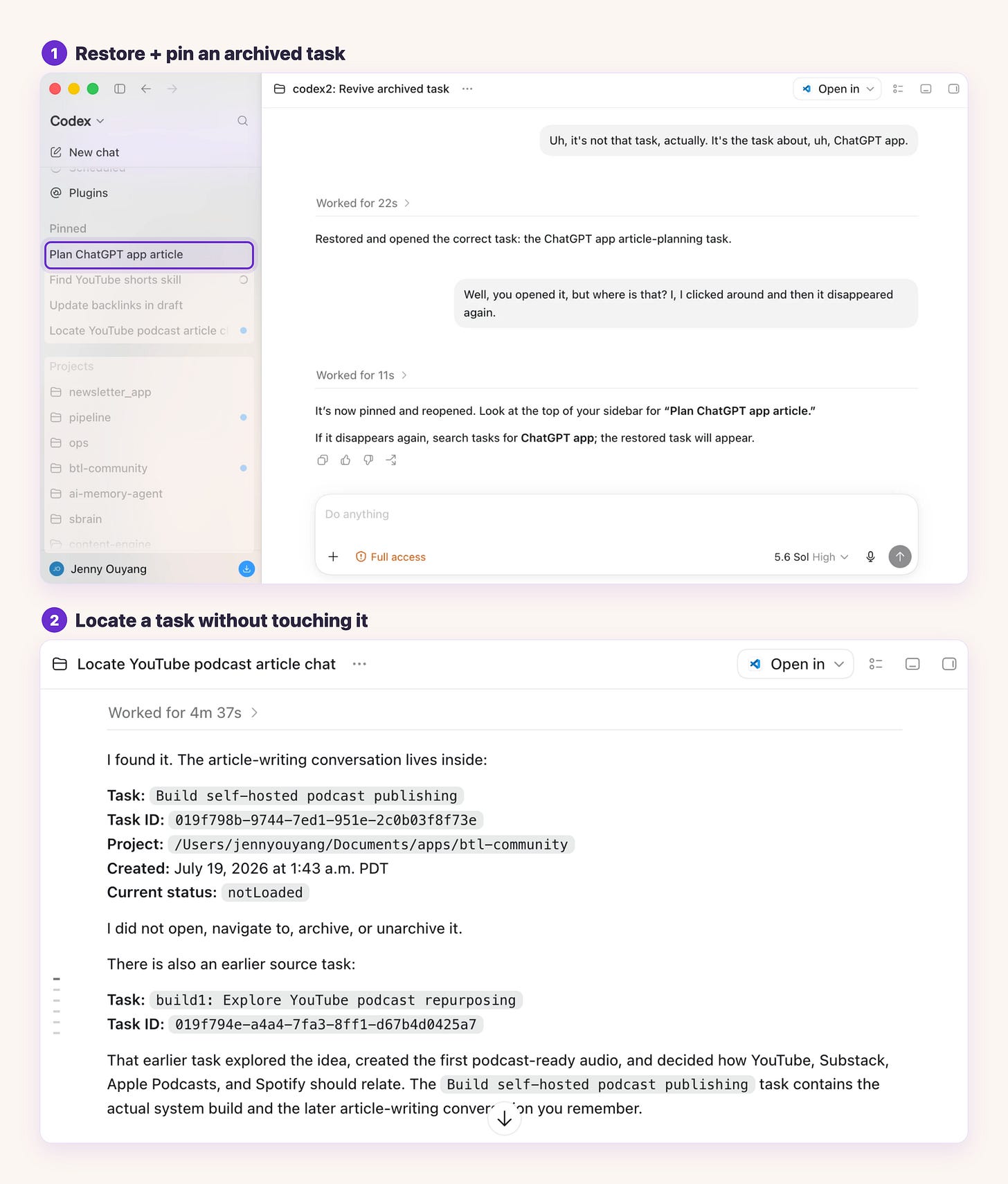
Two moments of Codex operating task history, stacked: on top it restores an accidentally archived task after a correction and pins it to the top of the sidebar, with the pinned task highlighted and the other tasks muted; below it locates the task a conversation lives in, plus its earlier source task, without opening or changing anything.
The other quiet win costs nothing extra. I run a pipeline in Hermes, my own agent runtime, where I drop in tasks and let workers keep going in the background.
I set a ChatGPT model as the driver, so the quality stays high. Because I reach it through my ChatGPT subscription, that background work does not bill me per call the way an API key would.
This is not flashy. It is the leverage you only feel after a week of real use.
The Small Interface Details That Make Codex Nicer to Use
Those four builds explain why I picked up the app. The small interface details are why I stayed in it.
Inside a chat, Codex spins up parallel agents, the same way Claude does. The difference is that you watch them work. Each one shows up with its own job, and you can open any of them to read what it is actually doing.
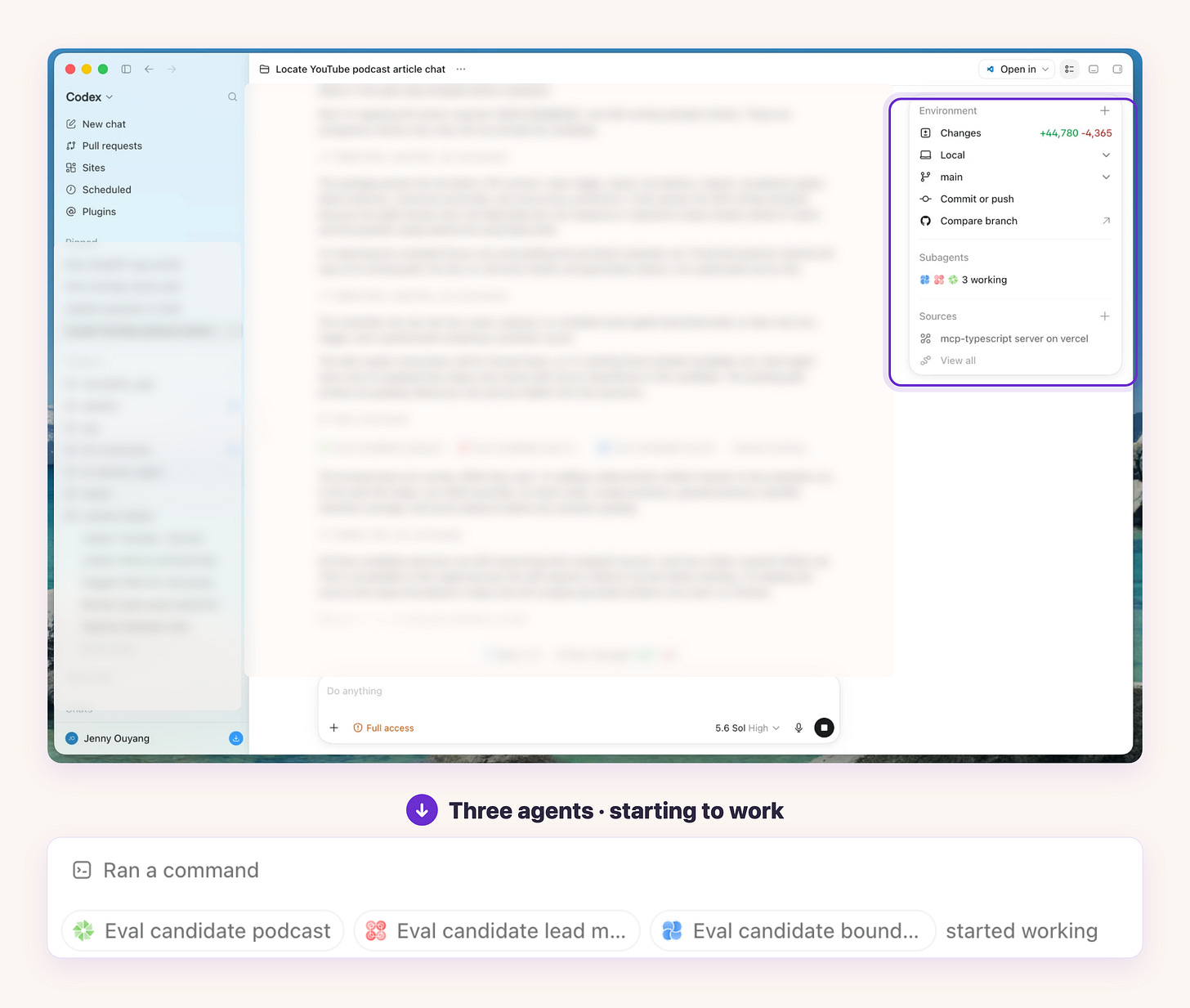
The ChatGPT Codex app with a Subagents side panel reading “3 working,” and below it the same three agent pills (podcast, lead magnet, boundaries) starting to work.
When three agents grade a draft at the same time, I click into one and read its reasoning without losing my place. Elsewhere that work is a wall of text. Here it is a panel I open and close.
There is even a pet. Click your name, choose “Show pet,” and a small pixel character pops up carrying the live status of every task Codex is running.
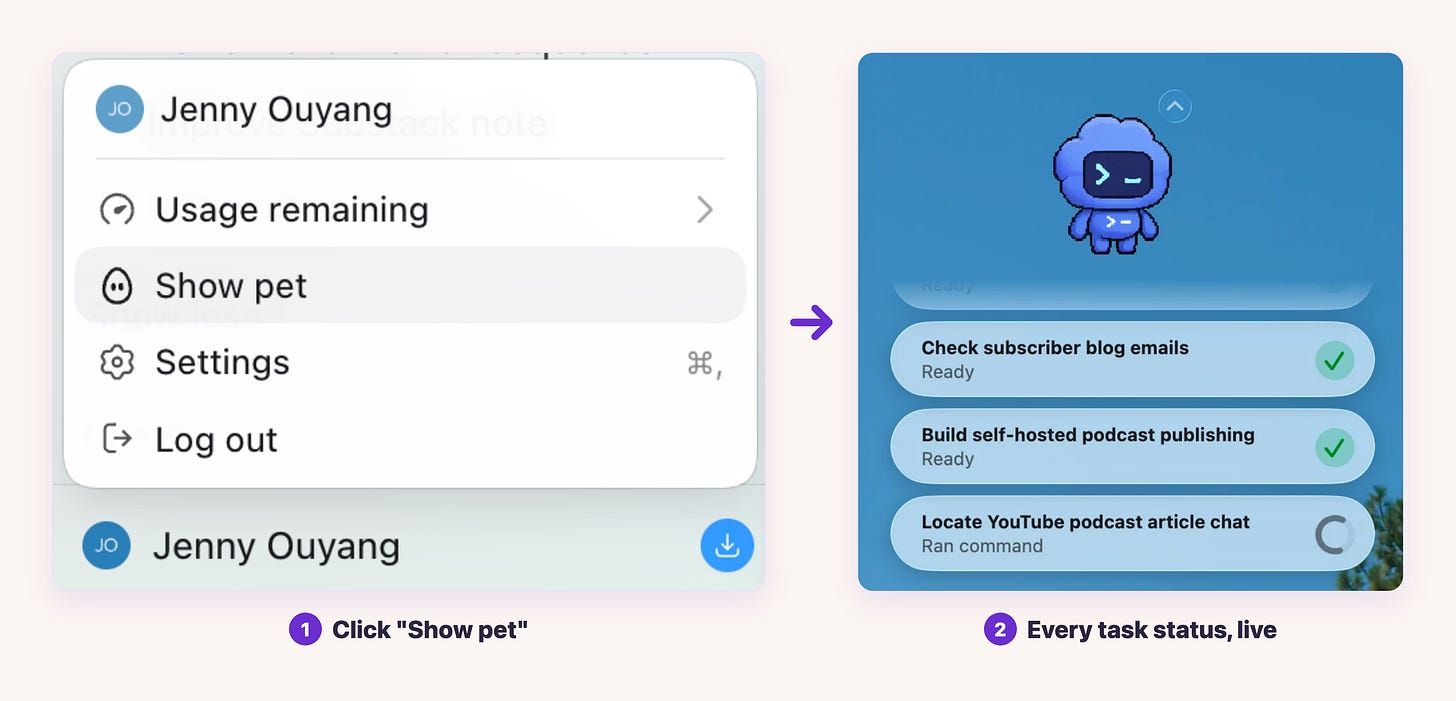
The account menu with “Show pet” selected, then the pixel-robot pet it summons, floating above live task statuses: Check subscriber blog emails (Ready), Build self-hosted podcast publishing (Ready), Locate YouTube podcast article chat (Ran command).
It is cute, and it is genuinely useful. One glance tells me what finished and what is still running, without opening a single thread.
The best part is the detail I kept wishing Claude had. Open a file in the sidebar, select one part of it, and a small menu offers “Add to chat.”
That selection drops straight into the thread, so Codex keeps working on the exact block I pointed at. No copying a file path. No pasting a snippet and then explaining where it came from.
The same move works inside the conversation, and this is the one that won me over. Highlight any part of a reply, add a short comment, and it attaches as an annotation.
Instead of retyping or copying what I struggled with, I highlight it. The composer carries a “2 annotations” chip, and Codex reads each one as the exact line I mean and what is wrong with it.
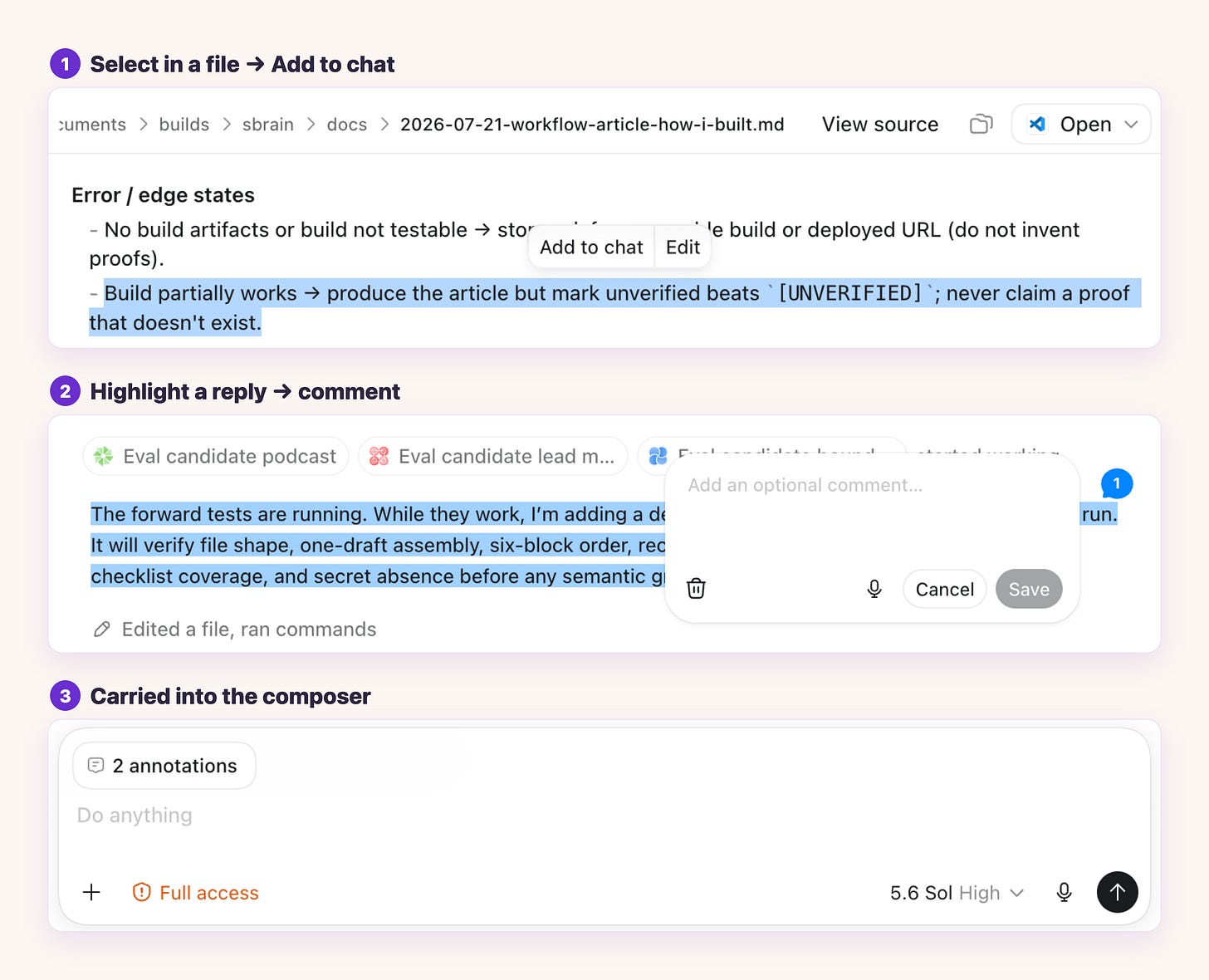
Two ways to point instead of retype in Codex: select text in a file and choose “Add to chat,” highlight a chat reply to leave a comment, and the composer showing a “2 annotations” chip.
The piece I rely on most comes at the end of a task. When Codex finishes editing, it lists every file it touched, with the lines added and removed, and lets you open any of them, review the diff, or undo.
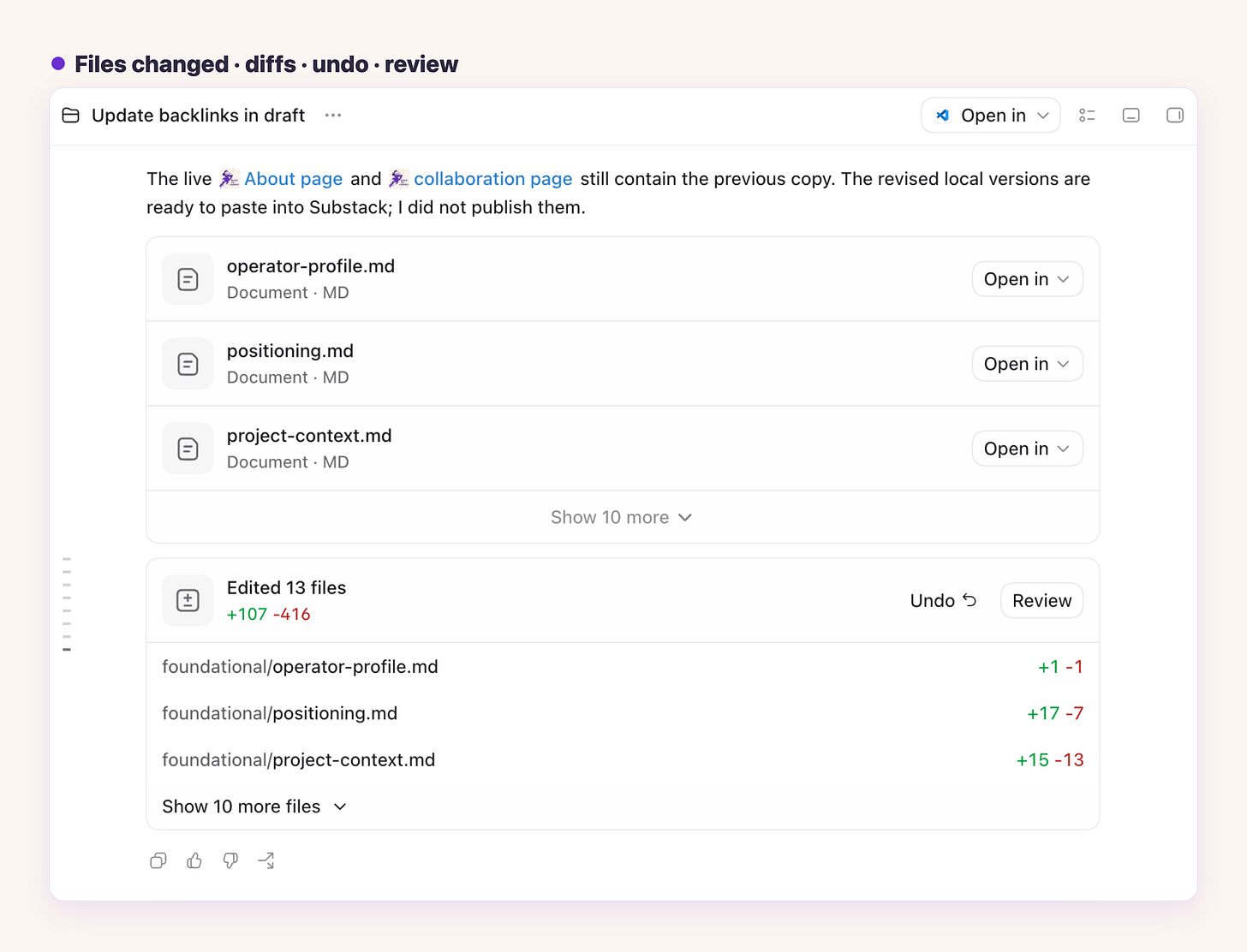
Codex showing “Edited 13 files, +107 -416” with per-file diffs for operator-profile.md, positioning.md, and project-context.md, plus Undo and Review buttons.
You see which files it changed, and even which files it only read, so the thinking is visible instead of hidden. I am not guessing what the model did. I open the files and check.
That is the whole point. When you are the human in the loop, the one making the judgment calls, this is the interface the job needs. For day-to-day work, that is where it pulls ahead of Claude for me.
Those are the small wins that add up. Which leaves the real question.
Should You Move to ChatGPT and Codex Now, or Stay on Claude?
First, the honest cost of moving. Everything carries over, and that is expensive.
When I imported my workspace, it also dragged in a fleet of old MCP servers I no longer needed, the same process pile-up that once had my computer overheating. I wrote the full fix in a separate guide; the short version is to route repeated servers through one shared porter so the app is not launching ten copies of the same thing. Audit your MCP setup before you import, not after.
On usage, size the job to the plan. Bounded projects ran cheaply for me early in the week. But later, I had three long-running tasks, with large histories, high reasoning, and many agents, used most of my weekly allowance in a single day.
The lesson is to match the model and reasoning level to the task, not to read one early number as the price.
So, move or stay?
If you are deep in Claude and have never touched Codex, I am not going to push you. Claude is a strong strategist, and it will keep doing that job well.
But if you want what Codex is good at, or the cost of your current setup is starting to sting, it is worth trying yourself. Start at twenty dollars a month. That is enough to actually drive Codex and feel the agentic side, without overpaying to find out.
For the work I do, the honest verdict is that the new app is no longer behind Claude Code. It follows tasks, calls tools, runs skills, coordinates agents, and holds project history, and its visual output is stronger than what I expect from Claude Code. A clean head-to-head still needs matched tasks run side by side, so I am not turning one week into a scoreboard.
So did I move for good? Honestly, no. I kept both.
The same skills, MCPs, and scheduled tasks run across Claude and ChatGPT. Underneath them I keep one working second brain, a single source of truth that any AI provider plugs into instead of starting over.
You do not have to pick the tool when you own the system underneath it. If you want to see how that shared second brain works, tell me in the comments and I will write it up.
Before you decide, run this quick check:
Do you have a file-backed workspace, with real files, skills, and instructions on your machine? If yes, the move is low-friction.
Are you paying per-call API costs for background or agent work? If yes, a subscription may cost you less.
Does your work need strong visuals, like images, thumbnails, or interfaces? That is where this app is strongest.
Before importing, audit your MCP servers so you do not carry process debt across.
Start on the twenty-dollar plan and match the model and reasoning level to each job.
If this helped, share it with the one person you know who is still deciding.
If someone shared this with you, thank them and subscribe so the future build walkthroughs land in your inbox.
What is the one job you would build with ChatGPT first?
— Jenny
Claude Hub · Vibe Coding · AI Agents · Shipped Products · Substack Growth