If Your Computer Keeps Overheating While Using AI Tools, This Is Why
From 797 Processes to 15: A Step-by-Step Fix for Mac Overheating, High RAM Usage, and Runaway MCP Servers
If your computer is overheating and you have MCP servers installed, the two facts are connected, and the connection is countable.
MCP servers are the plug-ins that give AI apps their tools: email, web search, scraping, payments. Most AI app on your machine (Claude Desktop, Claude Code, Cursor, ChatGPT) starts its own private copy of every one you configured, once per session, and most of them never clean up.
You installed 15 servers. Your machine is running hundreds.
I lived in that state for eleven weeks. This is the whole story of fixing it, told in the order it happened. By the end you can run the same diagnosis on your own machine, and know exactly what has been running your fan.

What’s inside:
By the end you can run the census, move every server behind one shared daemon, and prove the count stays flat the next day.
The MCP Health Kit (the diagnostic, the runbook, the working files): paid members claim it at the end.
Hi, I’m Jenny 👋
I believe anyone can thrive with AI, not by mastering the tools, but by building real things with them. I run Build to Launch and the Practical AI Builder program, where we go from experimenting to shipping. Come build with us.
If you’re new to Build to Launch, welcome! Here’s what you might enjoy:

Why Your Desktop Runs Hot With AI Apps
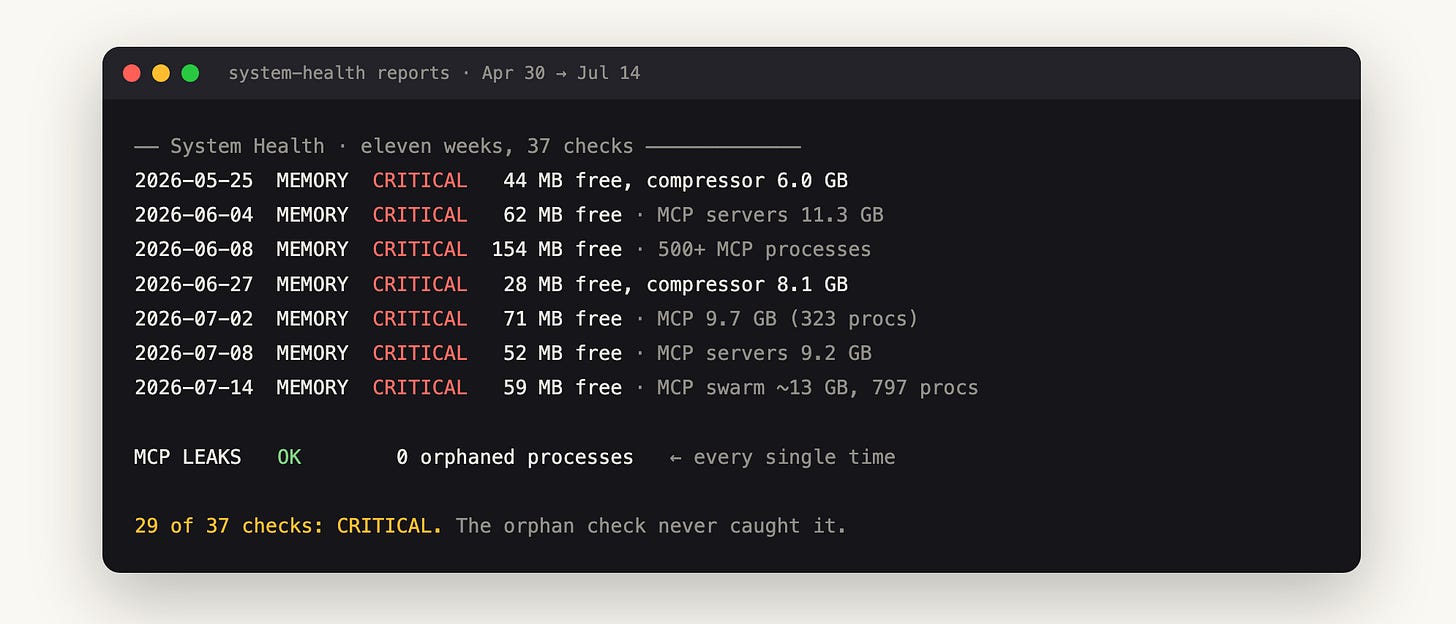
For eleven weeks my Mac kept running out of memory. I ran a health check 37 times, and it came back CRITICAL in 29 of them.
Free RAM sat under 200 MB for weeks at a stretch, the compressor held 6 to 10 GB, and the fan ran constantly while I did nothing heavier than write markdown.
You know the surface symptoms. The fan spins up while you type. Apps beachball on switch.
Activity Monitor says 23 of 24 GB used, and when you scroll the process list you find dozens of identical node processes you never launched and cannot name.
Every standard fix helps for a while, then stops. Restart the app: good for a day. Remove unused servers: good for a week.
Close Chrome tabs: good until lunch.
I tried each of those more than once across those eleven weeks, and the reports kept coming back CRITICAL, because the advice treats the symptom while the process count climbs right back.
The cause has a number attached. Mine was 797.
How to Check the Root Cause of an Overheating Desktop
Before any theory, get your own number, because the number is what makes the rest of this real.
Run this before you read further:
pgrep -f mcp | wc -l
That counts every process on your Mac with MCP in its command line. Then see who they are:
ps -eo command | grep -oE "npm exec [a-z0-9@/._-]+" | sort | uniq -c | sort -rn
The morning I finally counted, it said 797.
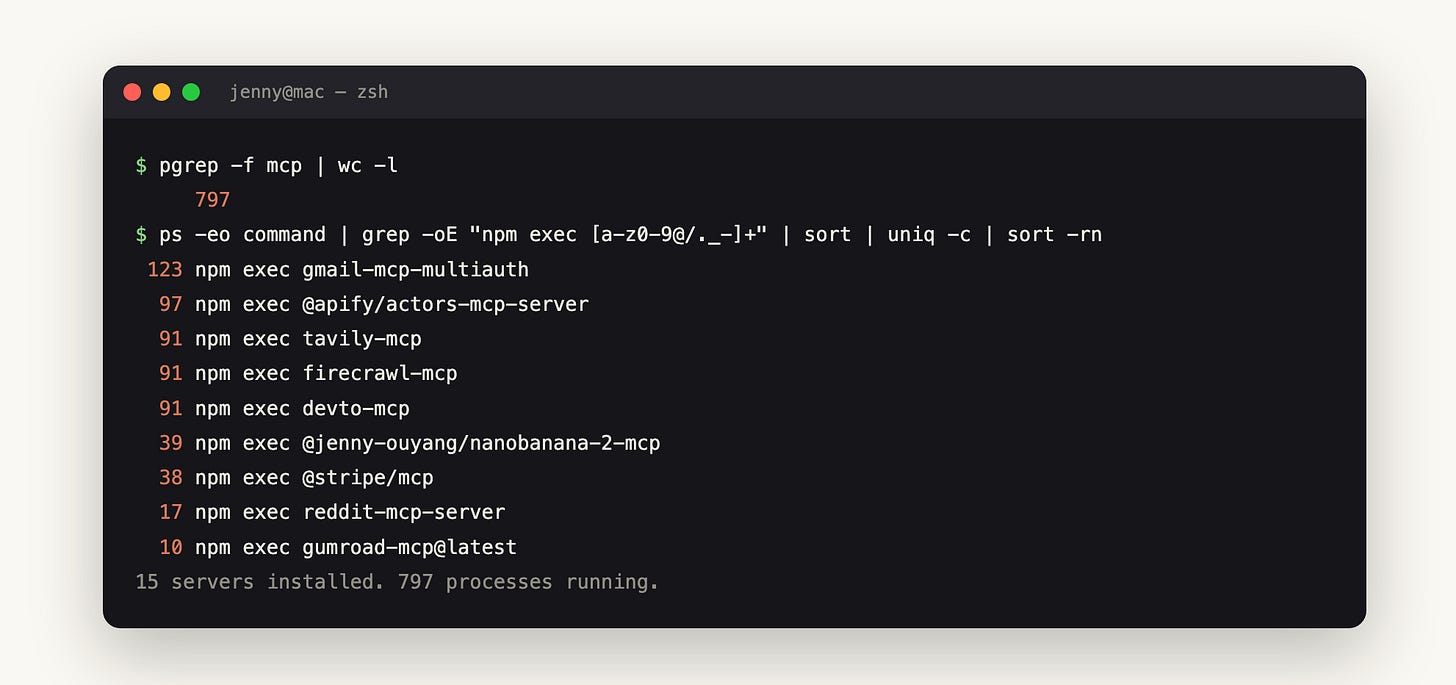
One gmail server, 123 running copies. Together they held roughly 13 GB of RAM, which on a 24 GB machine explains the 59 MB of free memory the health check found that morning.
Nothing was broken. Every process was healthy, idle, and waiting for a session that had already closed.
Your number will be smaller if you run one app with three servers. It will not be 15 if you have 15 installed. Hold onto that gap between 15 and 797, because closing it is the whole story.
Why the Same MCP Server Multiplies
A number that strange demands an explanation, and mine had three separate layers, each of which made sense to somebody.
First, the protocol layer. MCP’s default transport is stdio: the spec says the client launches the server as a subprocess and talks to it through stdin and stdout. Those pipes belong to one parent.
A stdio server cannot be shared, by construction, so every new session spawns a fresh copy of every configured server. Ten servers, four sessions: 40 processes, working exactly as designed.
Second, the cleanup layer, and this is where it goes wrong. The MCP lifecycle spec says the client SHOULD shut the server down when the session ends. SHOULD, not MUST.
When an app skips that step, the orphaned copies keep running with no client connected to them. This is a known open issue in Claude Code, and the same bug lives in Copilot CLI. The leak shows up across tools because the spec only recommends the cleanup, it does not require it.
Third, the layer nobody expects: your AI apps read each other’s configs. ChatGPT’s Codex engine imports Claude’s MCP configuration and spawns the same fleet on its own.
I watched it happen. Three minutes after I cleaned the fleet out of my Claude config, ChatGPT spawned a fresh copy of all ten servers from a snapshot it had taken at launch. Configure a server once, and three apps each run their own copies of it.
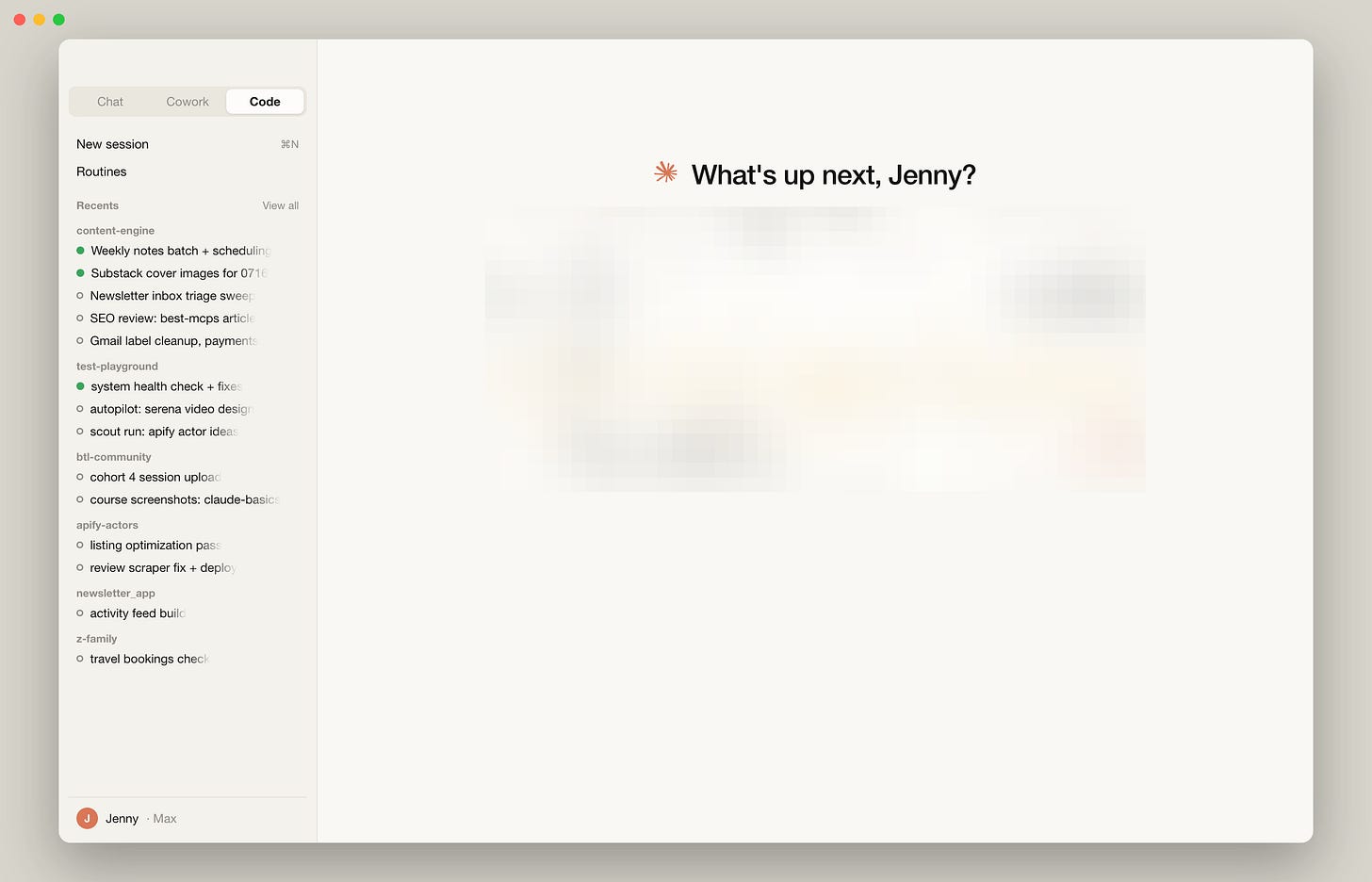
A normal working week: 14 sessions across 6 projects, three still running, the oldest open for two days. In the per-session world, every row in that sidebar owned a full copy of every server. (UI reconstruction from the app’s design system.)
Now the math behind the 797. I had five gmail accounts configured as separate servers.
Multiply by the sessions I opened across a working day, then by the apps importing the same config, and 123 gmail processes stops being mysterious. It is arithmetic.
Why killing them never holds
The obvious move is to kill them all, so I did, and measuring what happened next is what taught me the real shape of the problem.
A SIGTERM sweep of the whole fleet freed 5.1 GB in seconds: free RAM went from 173 MB to 5.3 GB, and the machine was fast again.
Eighteen hours later the census read 474. The processes were back because the architecture that spawns them was untouched. Every new session rebuilt its private fleet, and closed sessions kept failing to reap.
Cleanup scripts have a second, quieter problem: they hunt for orphans, and there are none. The classic definition of a leaked process is one whose parent has died, leaving it reparented to the system.
Across all 37 reports, the orphan count was zero in 21 of them, report after report, while the machine kept running out of memory. All 797 processes had a living parent process. They were legitimate child processes, not orphans, and orphan-hunting logic cannot see them.
Sometimes the honest fix is deletion, not architecture. For me, a Cloudflare MCP server with 87 tools pinned a CPU core near 100% for five and a half hours, twice.
I replaced it with the wrangler CLI, which covers the same platform on demand with zero idle processes. If a heavy server duplicates a CLI you already have, remove it and keep the CLI.
For everything else, the fix is structural.
How to Fix the Problem for Good
Everything above is the diagnosis. This is the repair: the architecture that ends the multiplication, the tool that packs it into one install, and the exact steps to move every server behind it and prove it held.
The fix is architecture: one server, many clients
Once you see the problem as multiplication rather than leakage, the fix follows directly, and the computing world solved this problem decades ago.
Unix solved shared-service access with daemons: one long-lived process, with many clients connecting through a single socket. Databases repeat the pattern with connection poolers like PgBouncer. MCP’s ecosystem is converging on the same pattern, and the pieces sort into three groups.
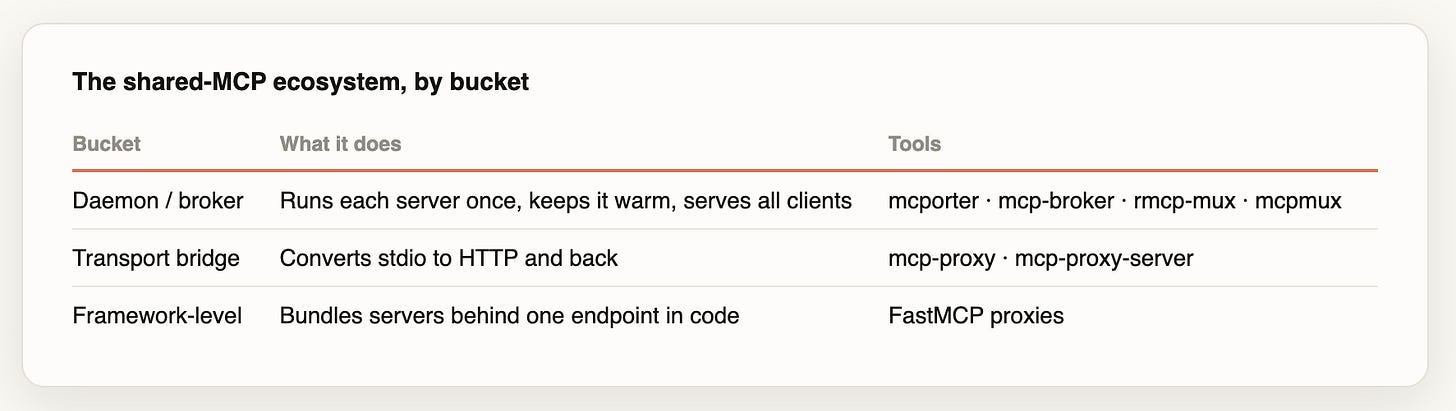
The first group is daemons and brokers, which keep one instance of each server alive for every client that asks.
The second is transport bridges, which translate a stdio server into the kind that can be shared over a local address.
The third is framework proxies, which bundle several servers behind one endpoint in code. What every one of them does, underneath, is replace many private copies with one shared instance.
The daemon shape works because MCP’s second transport allows it. Streamable HTTP servers run as one independent process handling many client connections, each carrying its own session.
So the design becomes simple to state: run every server once, expose each at a local address, and point every AI app at it. Clients that speak HTTP spawn nothing of their own. Clients that only speak stdio get a thin shim, a pipe adapter of a few dozen MB, instead of the full server.
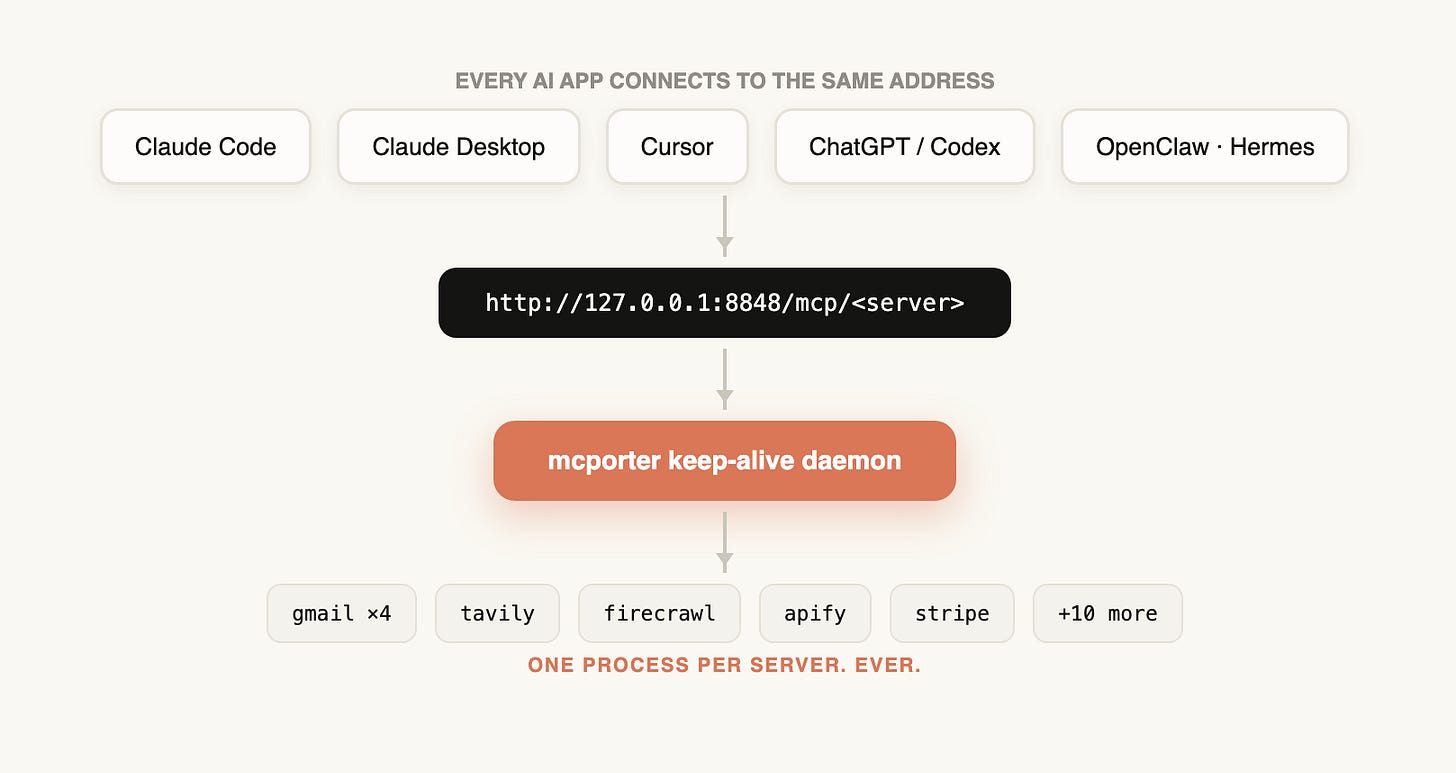
Who built mcporter, and why it fits
Before you install anything, it helps to know who made the tool you are trusting with every server on your machine. The provenance here is unusually good, and it explains why the tool fits so well.
I built mine on mcporter, from OpenClaw creator Peter Steinberger. He built the agent and its MCP layer together, rather than bolting one onto the other, and it shows.
The daemon, the HTTP bridge, and the stdio shims all live in one installed tool that already knows how they fit. That is why one tool covers the whole job here, instead of three stitched together.
There is a second reason I trust the pattern, and it is the most convincing kind. Two of my agents never had this problem at all.
If you run Hermes, it uses mcporter as its MCP layer by default, so it started life with the shared architecture this whole fix builds toward. OpenClaw centralizes its own server definitions too, which keeps its duplication surface small, though its registry is its own rather than mcporter’s.
The point stands either way. Every client above broke in its own way precisely because each one keeps its own copy of the wiring. The two that keep none stayed clean the whole eleven weeks, while my Mac overheated.
Set up the mcporter daemon
Start with one server and prove it works before you touch a single existing config, because a shared daemon becomes a dependency for every client and you want to trust it first.
The commands below pin mcporter 0.12.3, the version I tested. Newer releases may change the config format, so check the docs before mixing a newer package with this exact block.
Install it, and confirm the version:
npm install -g [email protected]
mcporter --version
Define one server in ~/.mcporter/mcporter.json, copying the command, args, and env straight from one of your existing client configs:
{
  "mcpServers": {
    "tavily": {
      "command": "npx",
      "args": ["-y", "tavily-mcp"],
      "env": { "TAVILY_API_KEY": "YOUR_KEY" },
      "lifecycle": { "mode": "keep-alive" }
    }
  }
}
That file holds credentials, so lock it down with chmod 600 ~/.mcporter/mcporter.json.
Start the daemon, then expose every server at one local address:
mcporter daemon start
mcporter serve --http 8848
Each server now answers at http://127.0.0.1:8848/mcp/<name>, and mcporter list tavily verifies it end to end by returning its real tool names. Run that check on every server as you add it. Mine caught a search server that had been silently broken in every config for months, because its package had renamed its binary and nothing had ever tested it.
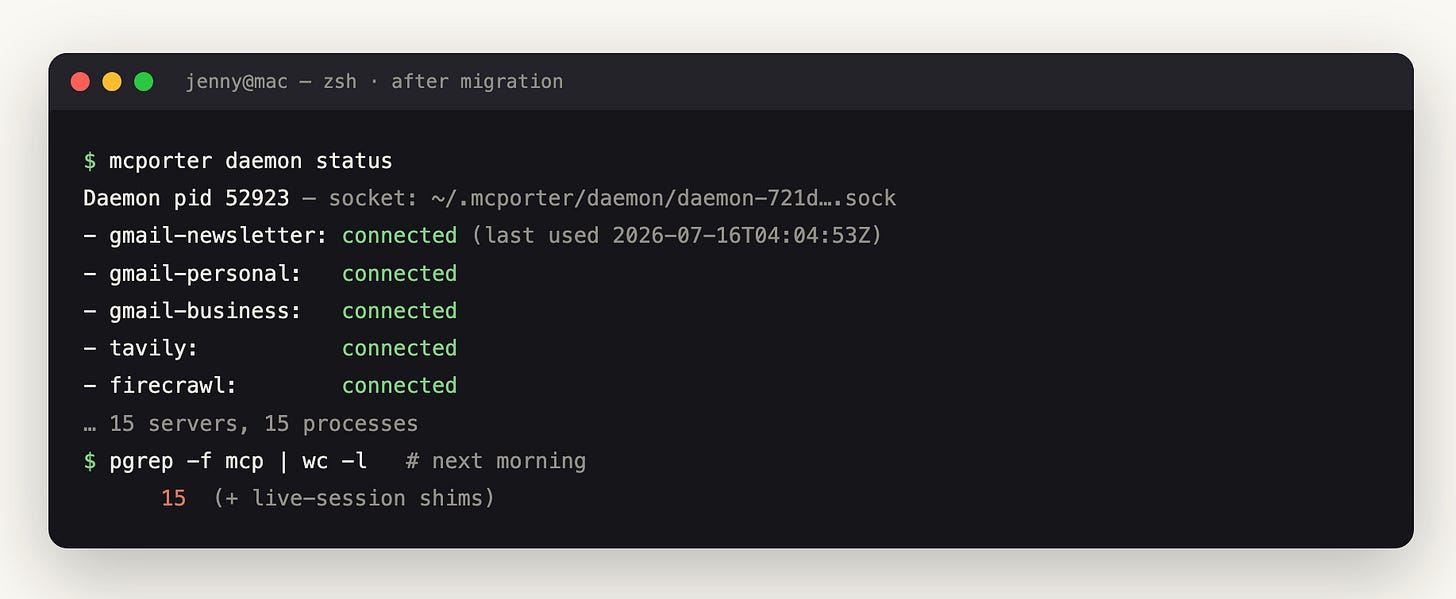
Make it survive reboots with a LaunchAgent, so the bridge starts at login and restarts if it dies. Mine respawned in four seconds when I killed it as a test, and the plist ships in the kit.
One warning before you wire any clients in. I lost about an hour each to three separate traps.
One is a config key that gets silently ignored.
One is a behavior where the bridge does not see new servers until you restart it.
One is a fallback mode where a client spawns its own copy anyway if the daemon is not ready when it starts.
Each has a fix, and all three are written up in the kit’s runbook. The path above works; the traps cost time when you do not know they are coming.
Connect Claude, Cursor, and ChatGPT
Move one server at a time, verify it with a real call, and only then delete its old entry, so a working client never breaks mid-migration.
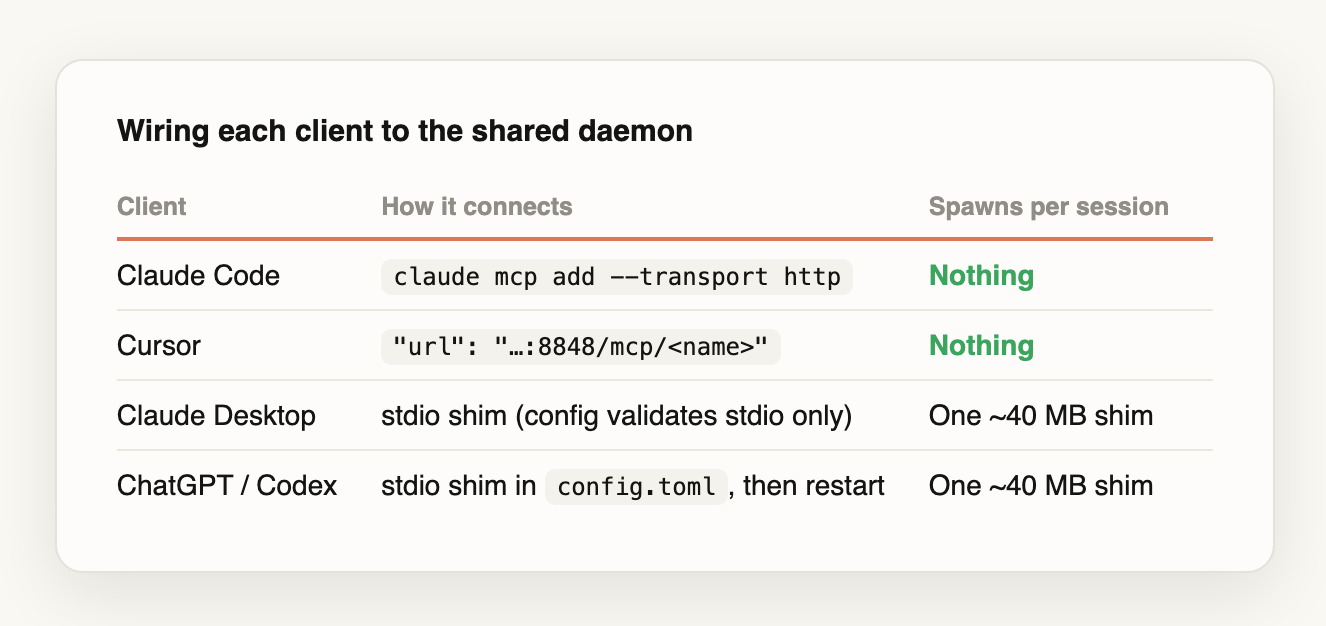
Each client speaks to the daemon differently. Claude Code and Cursor both accept a plain local URL, so they connect to the shared server and spawn nothing of their own. Claude Desktop only validates stdio entries in its config, so it gets a thin shim: a small adapter that forwards to the daemon instead of starting a full server.
ChatGPT is the one to get right, and it is where the migration broke for me. On my build, a plain URL in ~/.codex/config.toml produced an error that blocked the thread from resuming at all: url is not supported for stdio. The fix that worked was the same shim Claude Desktop uses, pointed at the daemon with the full path to mcporter:
[mcp_servers.tavily]
command = "/absolute/path/to/mcporter"
args = ["serve", "--servers", "tavily", "--stdio"]
Finally, comes the step that actually ends the sprawl: delete the old stdio entries from every config, keeping a backup first. As long as one config still defines a server the old way, sessions on that config rebuild it, and ChatGPT will faithfully import and copy whatever you leave behind.
Prove it held: the soak test
A fix that survives an afternoon proves nothing, since mine already regrew from 23 to 474 processes in eighteen hours once. The real test is the next morning.
Run the census test again a full day after you migrate. Three signs tell you it held: the count stays flat instead of climbing, mcporter daemon status shows your servers connected with recent activity, and no app shows its own npm exec servers after a relaunch.
One pattern is not a failure, and it is worth knowing so you do not misread it. ChatGPT threads you created before the migration carry their old config and respawn the old servers when you reopen them. Those die when the thread closes, so judge the soak by whether new sessions stay flat, not by what an old thread brings back.
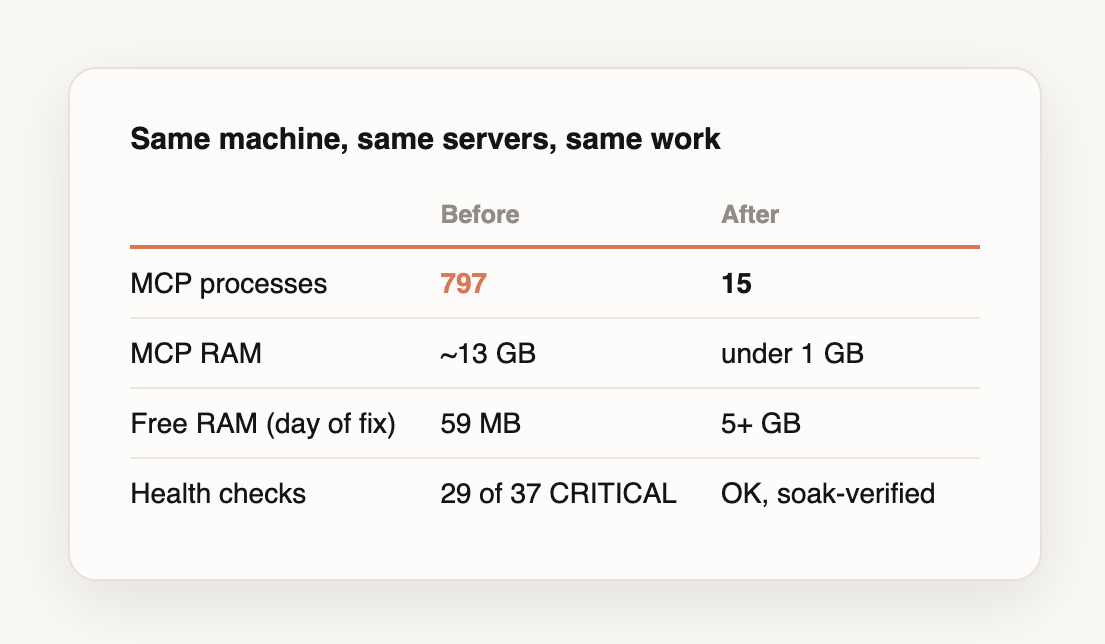
Here is the gap I asked you to hold onto at the start, closed. The 797 processes are 15, and the 13 GB is under 1.
The health check that came back CRITICAL 29 times out of 37 came back clean, and stayed clean through a full day of the same work across all four apps. Same servers, same machine, same load. The only thing that changed is that each server now exists once.
Run the census tonight. If your number is close to your server count, you are fine. If it is ten times that, you now know exactly what has been running your fan.
The MCP Health Kit
You can rebuild everything above by hand, from the census to the LaunchAgent. If you would rather drop it in, the MCP Health Kit is the apparatus as working files.
It has three pieces.
The system-health skill is the diagnostic that generated this article’s 37 reports. It drops into Claude Code, and you run it monthly to catch the next round of multiplication before it heats your Mac.
The migration runbook is the ordered walkthrough, with all five traps documented and fixed. Those are the silently-ignored config key, the snapshot that hides new servers, the shim that spawns a duplicate, the ChatGPT parser that rejects a URL, and the old threads that respawn their birth config.
The working files are the parts you would otherwise write from scratch: the mcporter config template, the LaunchAgent that keeps the daemon alive across reboots, and the copy-paste wiring block for each client.
Claim it with your paid-member account here.
Next Steps
What you can do today:
Run the census now:
pgrep -f mcp | wc -l. If the number is far above how many servers you installed, you have the sprawl.Stand up the shared daemon with one server, verify it with a real call, then move the rest over one at a time.
The next morning, run the census again. A count that stays flat is your proof the fix held.

If this made your hot, slow Mac make sense, pass it on to someone who runs several AI apps and cannot work out why their fan never stops.
And if someone shared this with you, subscribe free so you catch the next guide.
What did your census return the first time you ran it?
— Jenny