How to Use Claude Code for Real Problems, Not Just App Ideas
19 problems from work, home, and family time, each mapped to four build levels: Task, Workflow, App, and Agent. Pick the level, then pick the build.
Claude Code can handle much more than app development. These 19 practical use cases start with real friction from work, personal life, and family time. For each one, I’ll show you four possible solutions: a one-off Task, a reusable Workflow, a shareable App, or an Agent that runs on a trigger.
I learned this progression through systems I kept using: a local search tool for more than 12,000 family photos, a Gmail digest that processed 918 emails in 40 seconds, and smaller workflows that gradually became reusable tools.
You can start with the smallest useful version. If the problem keeps returning, the same idea can grow into a workflow, app, or agent.

I wrote an article earlier this year about building apps with Claude Code. 15 projects, tiered by difficulty, with the exact first prompt for each.
The most common reply wasn’t “great, I’ll try Project 4.”
It was some version of:
“I don’t actually want to build an app. I just want to fix the stuff that’s eating my time.”
“I have Claude Code now, but I don’t really know how to or want to do code”
Tell me if this sounds like you.
You have Claude Code open. You’ve run through the basics. Maybe you even shipped something small. And now you’re looking at a list of Claude Code project ideas. Nothing on that list matches the friction you actually have right now.
The contract you need to understand before tomorrow’s meeting.
The survey responses nobody has had time to read.
The family plan you need to update but never get around.
None of those are apps.
All of them are builds.
That’s what I felt too since building with Claude Code in 2024. (At that time, Claude Code was Anthropic’s terminal-based coding tool: plain-English instructions, runs on your machine, no prior coding required.)
My first project was a local photo search: 30 minutes, 12,000 images now searchable by description, nothing uploaded anywhere. I shipped it, then retired it. I built it because I was spending 20 minutes a week digging through folders. That problem is gone.
The Gmail digest I built later: 918 emails processed in 40 seconds, before I open my inbox. Did not make to an app. But stayed as a workflow, which I later turned it into a cluster of workflows with multi-account gmail MCP.
The thing I learned: any friction point is a build.
That build to friction could be:
A Task you do once.
A Workflow that runs every time.
An App you can hand to someone.
An Agent that runs without you.
You don’t have to go all the way. Instead, you pick the level that actually solves the problem.
The previous article was about building apps. This article is about everything between “I opened Claude Code” and “I shipped a product.”
We’ll map out 19 friction points from real daily work, personal life, and family time. Each one shown across these four possible levels.
What’s inside:
By the end: a starting point from your own friction and the level of build that fits this weekend
The build map: grab it at the end
The Four Levels
Not every friction point needs an Agent. Not every problem is worth building an App.
The four levels exist so you can match the build to the time you have and how often the problem comes back.
Task. You do it once, right now. No setup, no build. Bring a file or a situation, get a result. Works in Claude Code or claude.ai. Good for one-off problems. Not building in the engineering sense, but going from friction to result in one shot. That’s enough.
Workflow. You build it once so it runs the same way every time. Usually a skill or a slash command in Claude Code. Good for anything you do more than twice a week.
App. You ship it so other people can use it without opening a terminal. Good when the friction isn’t just yours.
Agent. It runs without you. Scheduled, connected to your real accounts, triggered by events. Good when you want the result to exist before you even think to ask for it.
The rule: stop at the level that actually solves the problem. A Task that takes 5 minutes is worth more than an Agent you spend three weeks building for a problem you have once a month.
The Complete Loop: One Starting Point, All Four Levels
Every entry in the article follows this same shape. Here’s the full progression on one real problem.
Starting point: You finished the call. You have rough notes. You promised a summary, an action list, and a follow-up email. It’s been three days.
Everyone has this. Consultant, manager, IC (individual contributor), coach, contractor conversation. The notes exist. The deliverables don’t.
Task: do it once, right now
Paste your raw notes into Claude Code (or any AI). Ask:
Turn these into:
(1) a 5-bullet meeting summary,
(2) a numbered action list with owners and deadlines,
(3) a short follow-up email I can send today.
All three in under 2 minutes. You paste, edit lightly, send. The whole thing takes less time than writing the email alone used to take.
This is Task level. You brought the input, you got the output, nothing was built. Useful. Done.
Workflow: build it once so it runs the same way every time
If you’re running more than two meetings a week, doing the Task version manually starts costing you.
Build a /session-debrief skill: a saved set of instructions that tells Claude how to format your summaries, what to call out in the action list, and what tone to use for the follow-up. Load it once. Every future debrief runs in your structure, in your voice, in under 60 seconds.
What changes at Workflow level: you stop thinking about how to prompt it. Paste the notes, type /session-debrief, done.
Built with: skill + slash command · one afternoon.
App: ship it so others can use it without a terminal
If you’re a coach, consultant, or team lead, and the people around you have the same problem, App level makes sense.
A simple web interface: paste notes, click Generate, get summary + action plan + follow-up email. No Claude Code. No terminal. No friction for the people using it.
What changes at App level: it’s no longer just yours. Other people get the same quality without needing to know how it works.
Built with: plan mode + deploy · a weekend (if you’ve deployed before; add a day if you haven’t).
Agent: it runs without you
Agent level is where the problem stops existing.
Connect Claude Code to your calendar via MCP. When a meeting ends, the Agent triggers: pulls notes from a watched folder, runs the debrief skill, saves the output to a shared doc, drafts the follow-up in your email. By the time you close your laptop, it’s done.
You didn’t think about it. You didn’t paste anything. The summary exists because the meeting happened.
What changes at Agent level: you’re not in the loop anymore. The build replaced the task entirely.
Built with: MCP (Calendar + Gmail) + hook + scheduled routine · half a day on top of the Workflow.
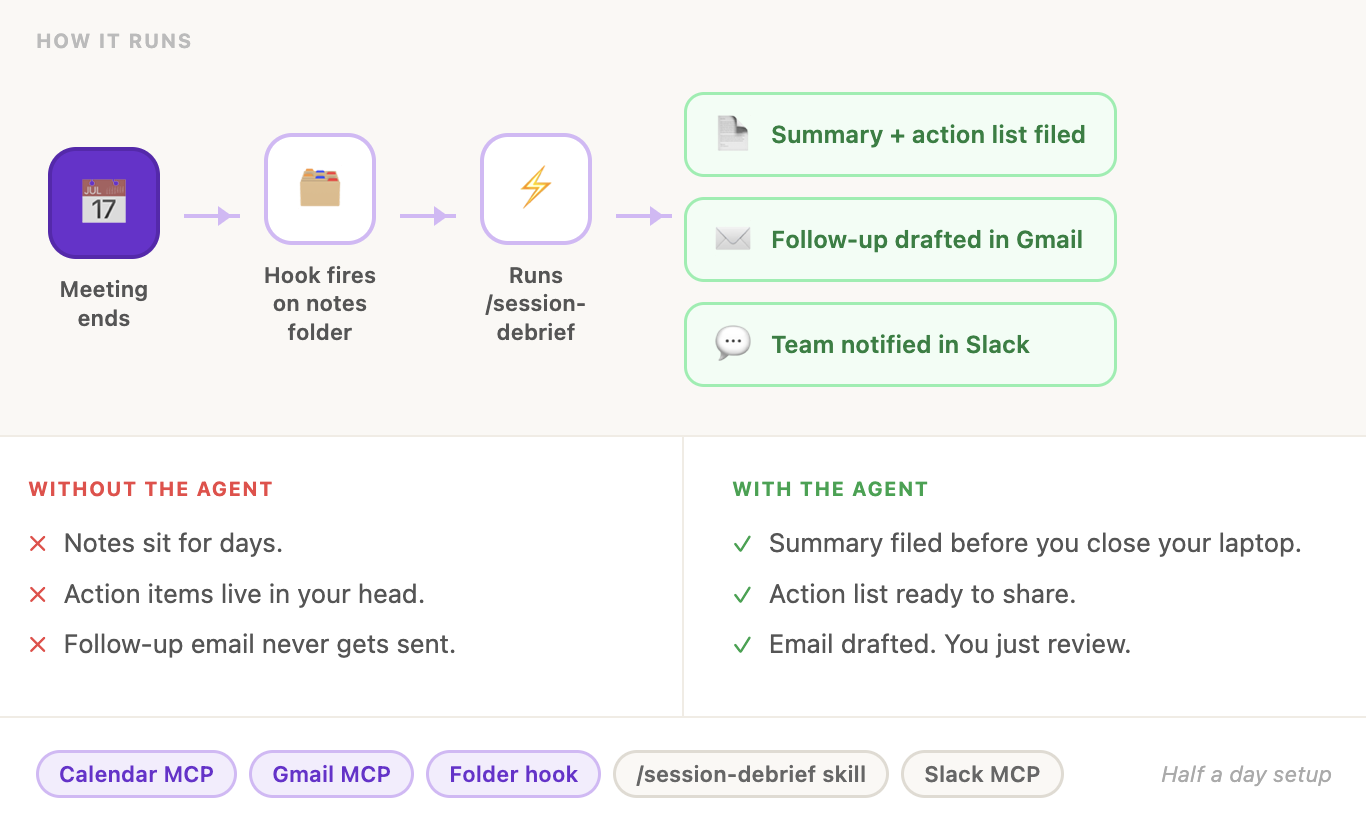
That’s one starting point across all four levels.
The gap between Task and Agent isn’t complexity. It’s how often the problem comes back.
That meeting happens once a month: Task is enough. It happens every day: build the Agent and stop thinking about it.
The next sections map 18 more starting points the same way across the Daily Work, Personal Life, and Family Time.
Each build shows you where to stop. A few show you not to start at all.
Next:
18 friction points with prompt examples explained in detail. With daily work, personal life, and family time, each mapped across all four levels.
Work builds (6): contract review, survey analysis, content repurposing, literature synthesis, job research, competitive intelligence scanning
Personal builds (6): purchase research, negotiation prep, travel planning, deal tracking, file organization, home reappraisal and financial disputes
Family builds (6): math worksheets, grammar drills, craft step-guides, drawing guides, rainy day activity planning, learning explainers for any question your kid asks
Every build starts at the friction already exists. Every build tells you exactly which level to stop at.
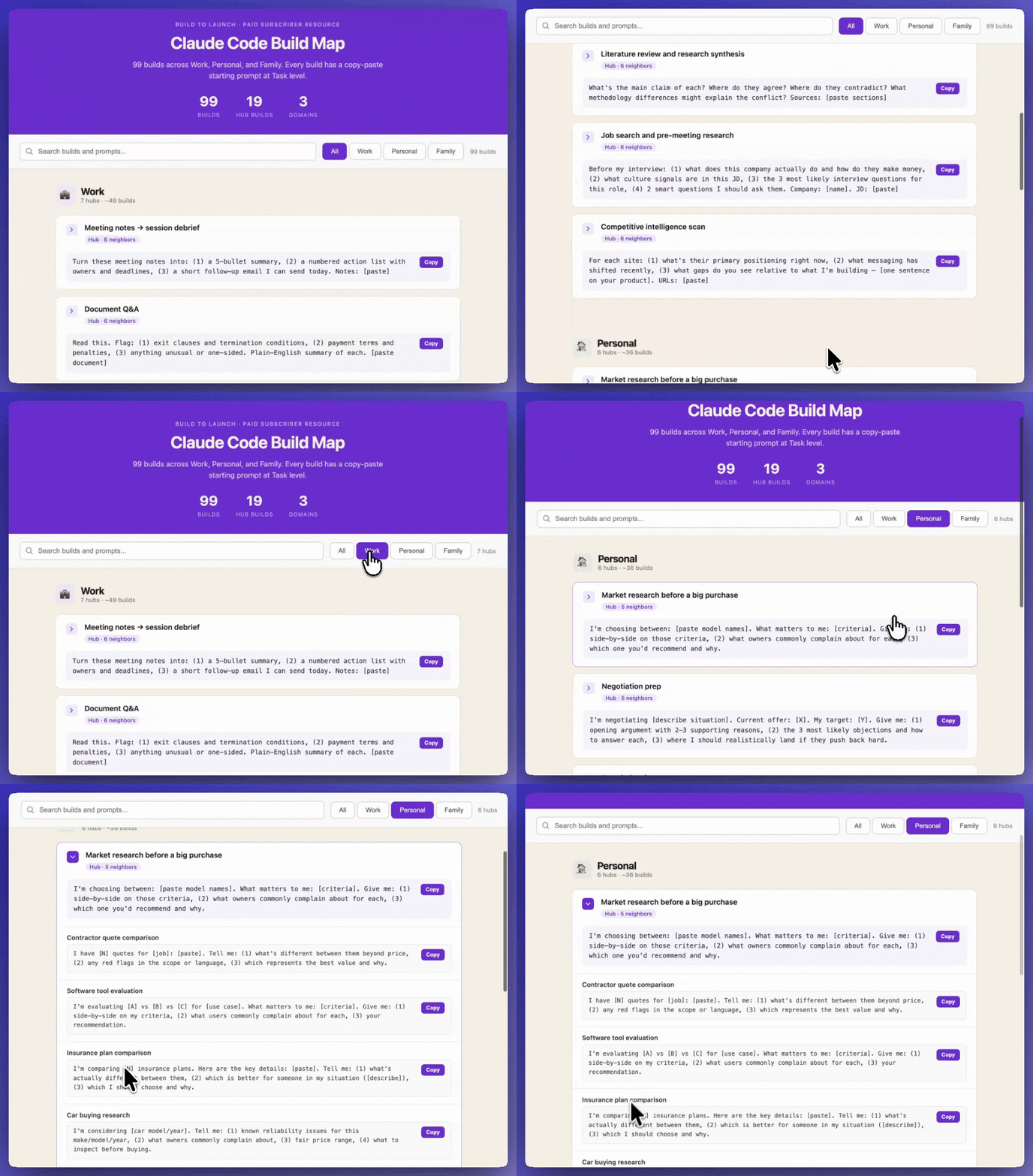
🎁 The build map with 99 builds total across Work / Personal / Family friction points.
This article continues for members
Join Build to Launch to read the full article, access all cohort content, and connect with other AI builders.