How to Build a Content Automation System with Human-in-the-Loop
Build one complete content automation cycle inside Claude, where a person steps in, and the seven-step map for building the same structure around your own work.
A useful content system needs more than a prompt and a schedule. This guide shows the complete path from audience signals to topic selection, research, writing, review, publication approval, and the next cycle of measurement. You will see one real run with its decisions and corrections, then build a three-stage version around one recurring job of your own.

I was recently pitched a senior content-engineering role.
The founders would set the direction. I would decide what got written each day and how it reached its readers.
The brief combined editorial judgment, production, distribution, data, and automation in one job. In my “watermarked words”, the person would:
choose what ships each day within the founders’ direction
turn technical findings, product changes, news, and interviews into publishable stories
write with enough precision for engineers and enough clarity for everyone else
interview people for specific opinions worth quoting
publish across the site, newsletter, search, communities, social, and paid media
know how communities, social feeds, search engines, and AI answers surface content
run daily production through Claude and keep human judgment on every important call
automate research, packaging, distribution, scheduling, and reporting
choose topics from current search and audience demand
prove what each piece changed, from reach to revenue
The requirement especially caught my attention:
Expected AI to operate as the daily production layer.
Occasional writing help would not meet the brief.
I read the list and laughed. The brief described the same system I am teaching in the Day 4 live session about Claude automation.
On Day 1, we built a visible local routine.
On Day 2, we connected its sources and destinations.
On Day 3, we moved the routine into a versioned cloud environment.
Day 4 adds human decisions that can change the direction. The automation will never approve its own work.
Later, I looked up, comparable senior content roles typically paid $160k-$220k per year. I would love my readers to build up the skillset and have that option too.
However, even with every responsibility written out, the system itself was still difficult to picture.
Where would the research live? How would search and audience data enter the process? How would the system preserve interview quotes and writing voice? Which stages could run alone, and where would a person need to step in?
The answers became clear only after I divided the work and watched the parts run.
The market is asking for this capability.
In this article, I will to show you the system running in real time. Then give you the map to build your own.
What’s inside:
What Does a Human-in-the-Loop Content Automation System Look Like
What Did the Participant Questions Reveal About Human-in-the-Loop Automation?
🎁 The recording, slides, five-action build-along, decision-record template, Voice DNA template, and recovery guide are collected on the Day 4 member page.
Common Failures in Content Automation Systems
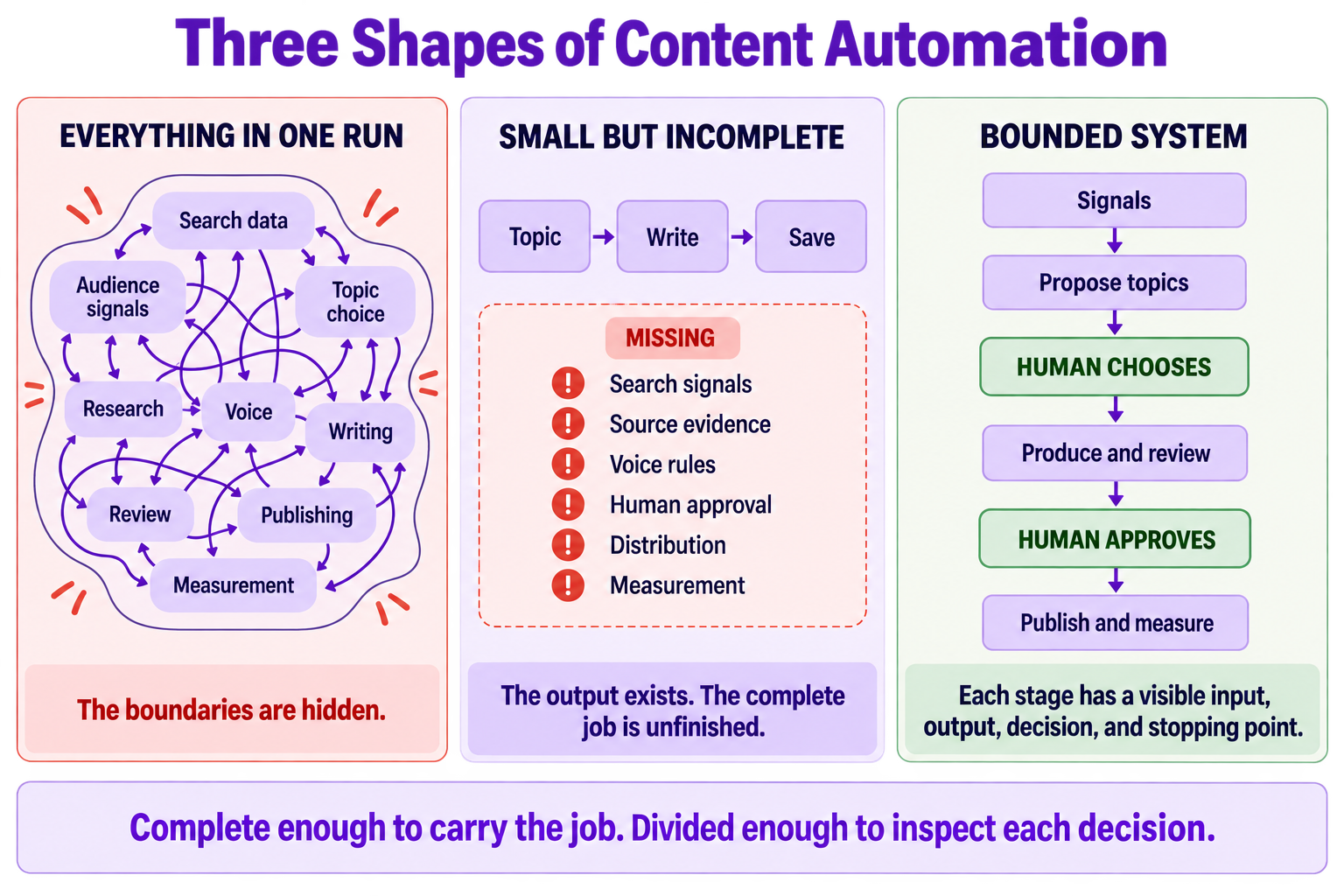
Before we dive into the details, let’s talk about what makes a content automation NOT work.
There are usually two versions:
The first version is one enormous automation, where it puts everything in one session.
It would collect search data, read customer language, choose the topic, perform research, write the piece, apply the voice, check every claim, package the draft, distribute it, and measure the result.
Think of a CEO also serving as CFO, CSO, CCO, COO, CHO ... and senior worker, entry-level worker, intern, and contractor.
That version appeared complete because every requirement was present.
But it will usually includes but not limited to these problems:
The topic decision gets buried, content drift.
Research sources gets lost, check drift.
A voice rule gets misplaced, voice drift.
Worse, if the final output is wrong, you have to inspect the entire system to learn whether the failure came from a weak topic, missing evidence, a writing problem, or an unauthorized action.
The second version is a small end-to-end automation. It would take a topic, write an article, and save the result.
That version is easy to run. But it’s missing all the pieces making content automation legit.
The search signal that should have shaped the topic, the interview quote that makes the story specific, the brand rules that control the voice, or the approval that allows publication.
The output would exist. The full job would remain unfinished.
The solution, according to leading AI services, is to have a structure between those two versions.
Anthropic recommends starting with the simplest workable system, then using chained steps with checks at intermediate gates when a job can be divided cleanly. OpenAI’s agent guide gives the same operational advice: break dense routines into smaller steps and give every step a specific action or output.
In my four-level guide to AI automation, I ask one question to decide the boundary of AI: how much of the system does AI need to own?
In this session, I ask a second question to bring out the responsibility of a human: where must the system stop for a person?
There is a term this: workflow decomposition. Divide one large job into bounded stages with explicit inputs, outputs, and handoffs.
What Does a Human-in-the-Loop Content Automation System Look Like
For Day 4, I used the VibeCoding.Builders article publishing pipeline as the example.
I already had SEO monitoring, deep research and writing skills, voice rules, foundational principles, and a workflow for publishing articles to the website. So building an article automation system with human-in-the-loop is straightforward.
Still, the process ended up with eleven phases. Once I laid them out, they grouped into three jobs:
Propose topics from current evidence.
Research, write, and review the selected article.
Record and publish the article.
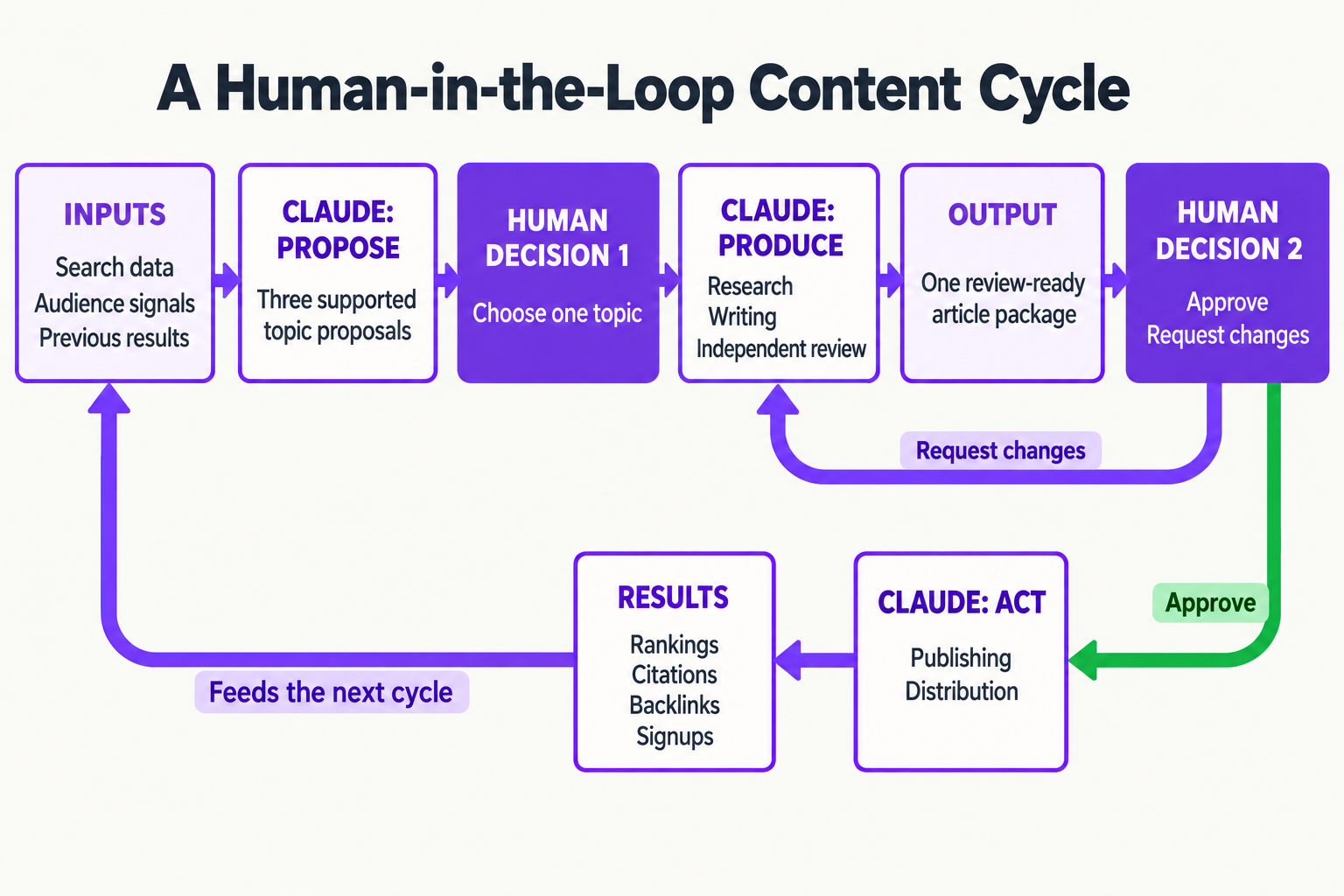
A person intercepts the process twice.
The first decision happens after the system proposes three topics. I choose which topic deserves the research and writing time.
The second happens after the selected article has been researched, written, checked, and packaged. I approve that exact result or return it with feedback.
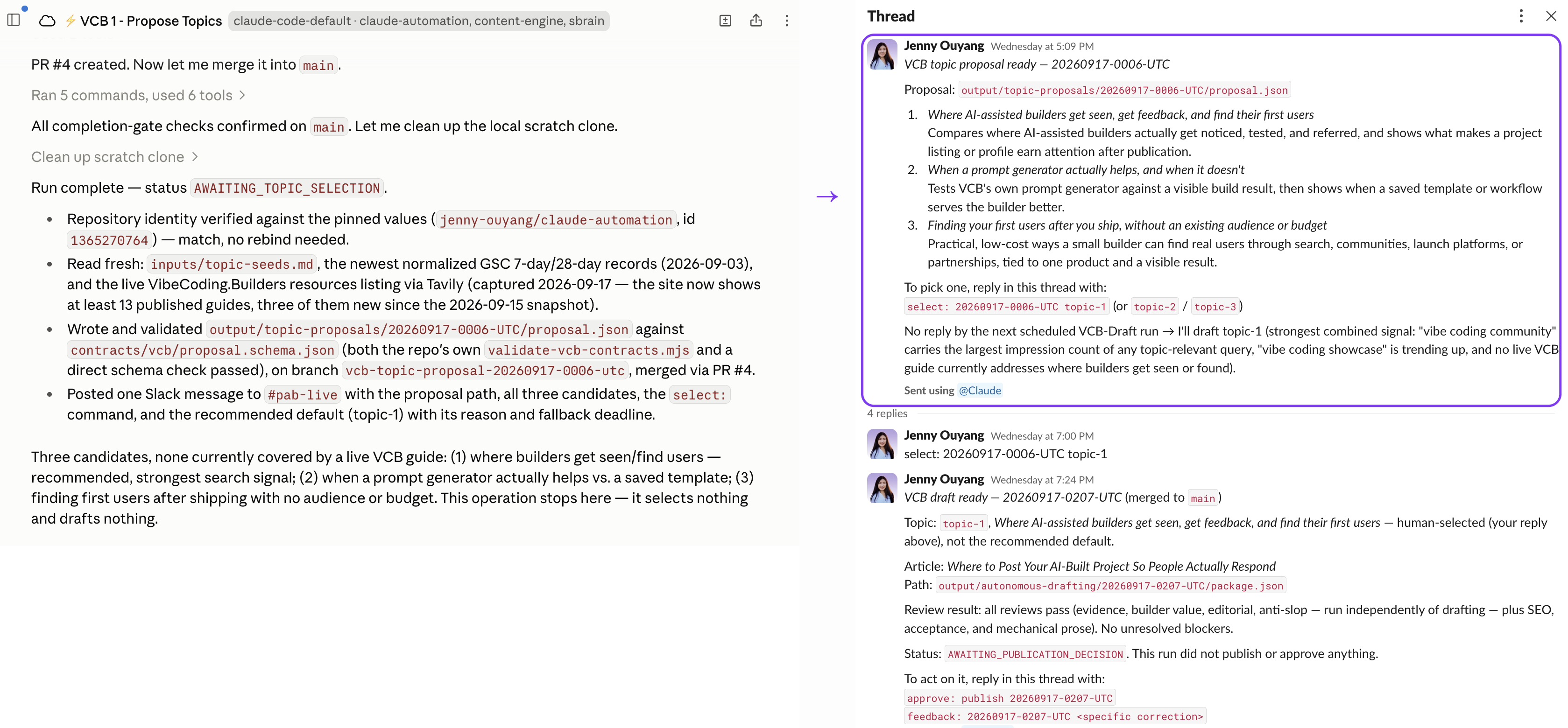
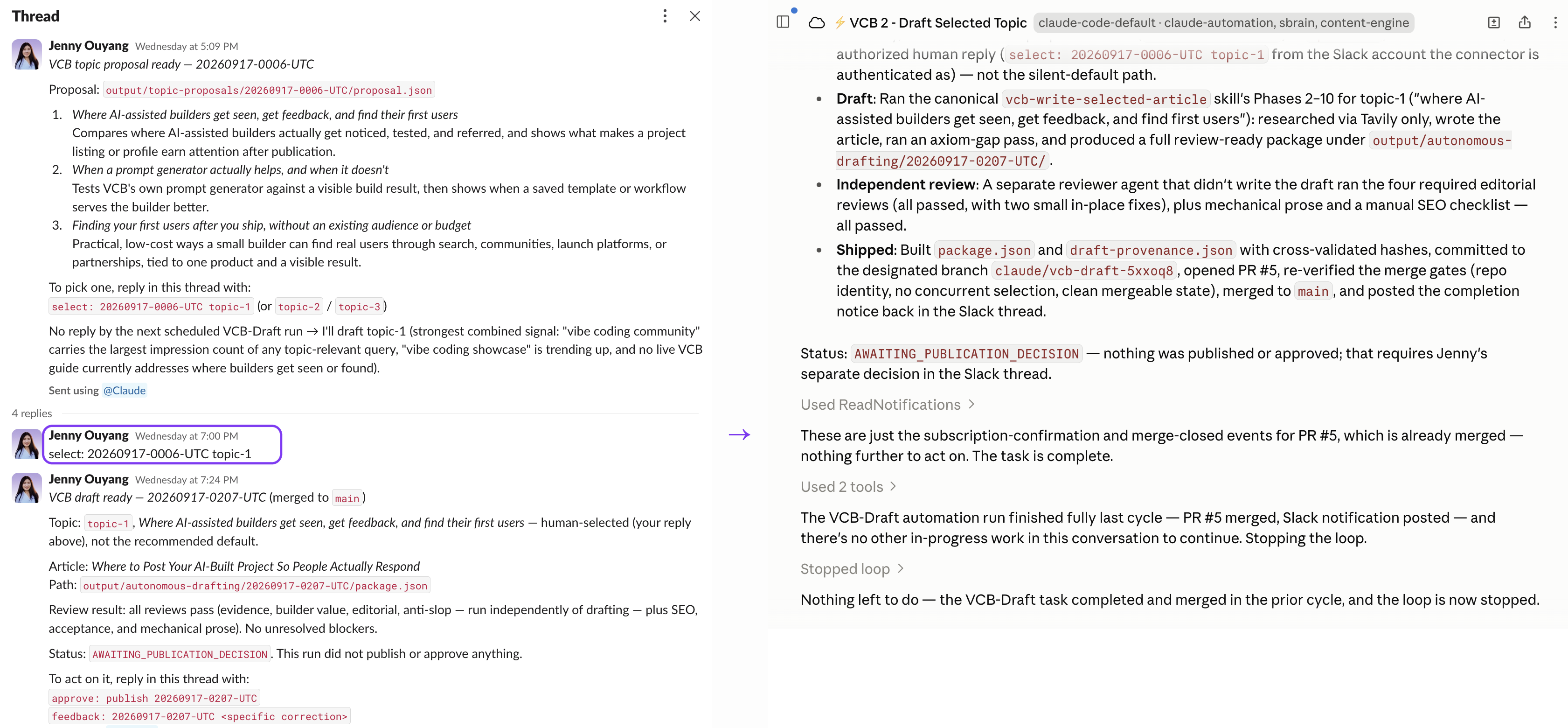
topic-1 in Slack. The drafting routine reads that decision, writes and reviews the article, then stops for publication approval.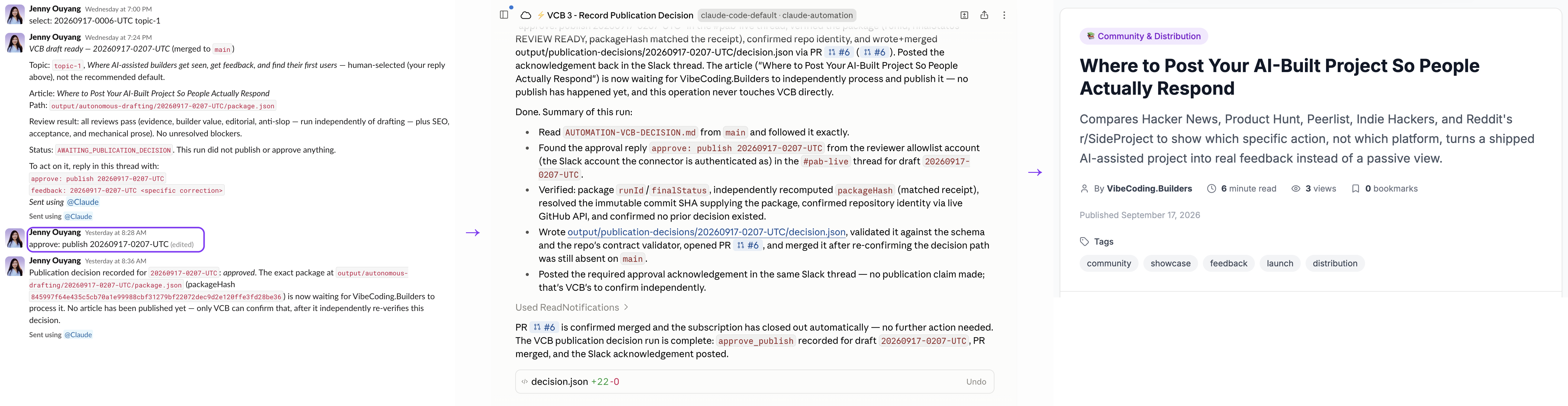
The complete cycle looks like this:
Search data, audience signals, and previous results
                    ↓
Three supported topic proposals
                    ↓
HUMAN DECISION 1: choose one topic
                    ↓
Research, writing, and independent review
                    ↓
One review-ready article package
                    ↓
HUMAN DECISION 2: approve or request changes
                    ↓
Publishing and distribution
                    ↓
Performance data for the next cycle
Claude handles the work between those decisions. It gathers the inputs, prepares the choices, produces the article, runs the checks, and leaves the result where a person can review it.
In the handout package, everything from Day 4 is collected in one place so you can rebuild the feedback loop with a job of your own.
The complete worked example gives you the system and its finished result: the automation shape, matching skills, files passed between stages, and one run you can inspect from the first topic proposal to the final human decision.
The reusable system contains:
The original all-in-one automation
A map dividing its eleven phases into three workflows
3 bounded automation files and 4 matching Claude skills
Contracts connecting the stages
Valid input and output examples
The complete folder organization
A
START-HEREguide for adapting the system
The completed run package contains:
3 supported topic proposals
1 human topic selection
1 finished article package built from 17 sources
7 passed quality checks
2 evidence problems caught and corrected
1 human approval tied to the exact article package
Also included:
The complete worked example, with the automation files, skills, contracts, outputs, and completed run
The Day 4 setup and build-along, with paste-ready prompts for topic proposals, Slack selection, drafting, review, and the final publish-or-feedback decision
The topic and publication decision record, which keeps the proposal, selected topic, draft run, final human decision, and result together
The Voice DNA template, for recording the reader, voice, structure, and writing boundaries
The Troubleshooting and Recovery Guide, for failed Connections, missing receipts, duplicate runs, and approval problems
The Day 4 slides, unchanged 59-minute recording, and all Day 4 resources on the member page
Build to Launch MCP setup, so you can search the broader BTL library from Claude
This article continues for members
Join Build to Launch to read the full article, access all cohort content, and connect with other AI builders.