Make Your AI the Partner You Build With (Introducing the new Build to Launch MCP)
One connector for Claude, ChatGPT, Grok and Cursor. I ran 7 jobs through it, from an app idea to a launch check.
Some of the best things in Build to Launch started as your questions. "How do you set up Claude so it remembers my work?" became a guide. "Can AI check these newsletters for me every week?" became a workflow. A build we broke down became an example someone else could borrow.
That is what Build to Launch has always been about: the build and the launch, with AI, tested on our own work.
After 184 articles, that work had become a library, spread across all of them.
Now it lives in one place that your AI can reach: the Build to Launch MCP. The first version, in April, was a small server with the workflows I had collected. Then it grew with every question you asked.
Today it holds a library of guides and workflows, and live research buddies.
At our AMA last week, I promised a manual for it. This is the start of that manual.
You do not need to learn any of it by name. The front door takes a job in one sentence: what you want done, what you have, and what you want back. It picks the right guide, workflow or buddy, and it tells you the plan before it starts.

In this manual, you will see:
What is the Build to Launch MCP now?
Seven examples. How do you:
check an app idea before you build it?
learn from the bigger businesses in your space?
automate your weekly reading?
design the first screen and a visual?
know a post is worth writing?
check your writing for AI flavor?
know it is ready to launch?
What else is in there? Including my favorites
What would these jobs cost you elsewhere?
How do you connect the BTL MCP and ask it for a job?
What is left for you once the setup is done?
What Is the Build to Launch MCP Now?
An MCP (Model Context Protocol) server is a connector that lets your AI app use outside tools and content inside the chat. The Build to Launch MCP lives at one address, mcp.buildtolaunch.ai, and it works in Claude, ChatGPT, Codex, Cursor and other apps that add a remote MCP server.
Its shape follows the work. It starts with the build: the products, the workflows, the checklists and the best practices.
Once the build is more or less done, the next big step is the launch. If you have ever launched something, you know how fast one step turns into ten. You list the product and promote it, research the competitors and do the SEO, write about it, and make the images, the landing page and the videos. Each of those jobs got its own door.
After the launch, the operations matter more than the product: the weekly jobs, what breaks, what keeps it all going. Those became two more doors, Automate, and Fix and maintain.
And each of those jobs needs data from outside: keyword numbers, what a competitor posted, what a platform shows. The buddies fetch it.
So today the MCP has two sides:
The library: 155 workflows, 107 guides, 81 setups, 72 prompts and 60 examples, sorted into 9 job doors: Use cases, Get started, Research, Write, Images and video, Build, Automate, Sell and grow, and Fix and maintain.
The buddies: 143 of them, each reading one kind of public data, in families such as Substack, SEO, web search, jobs and websites, plus Instagram, YouTube and Reddit.
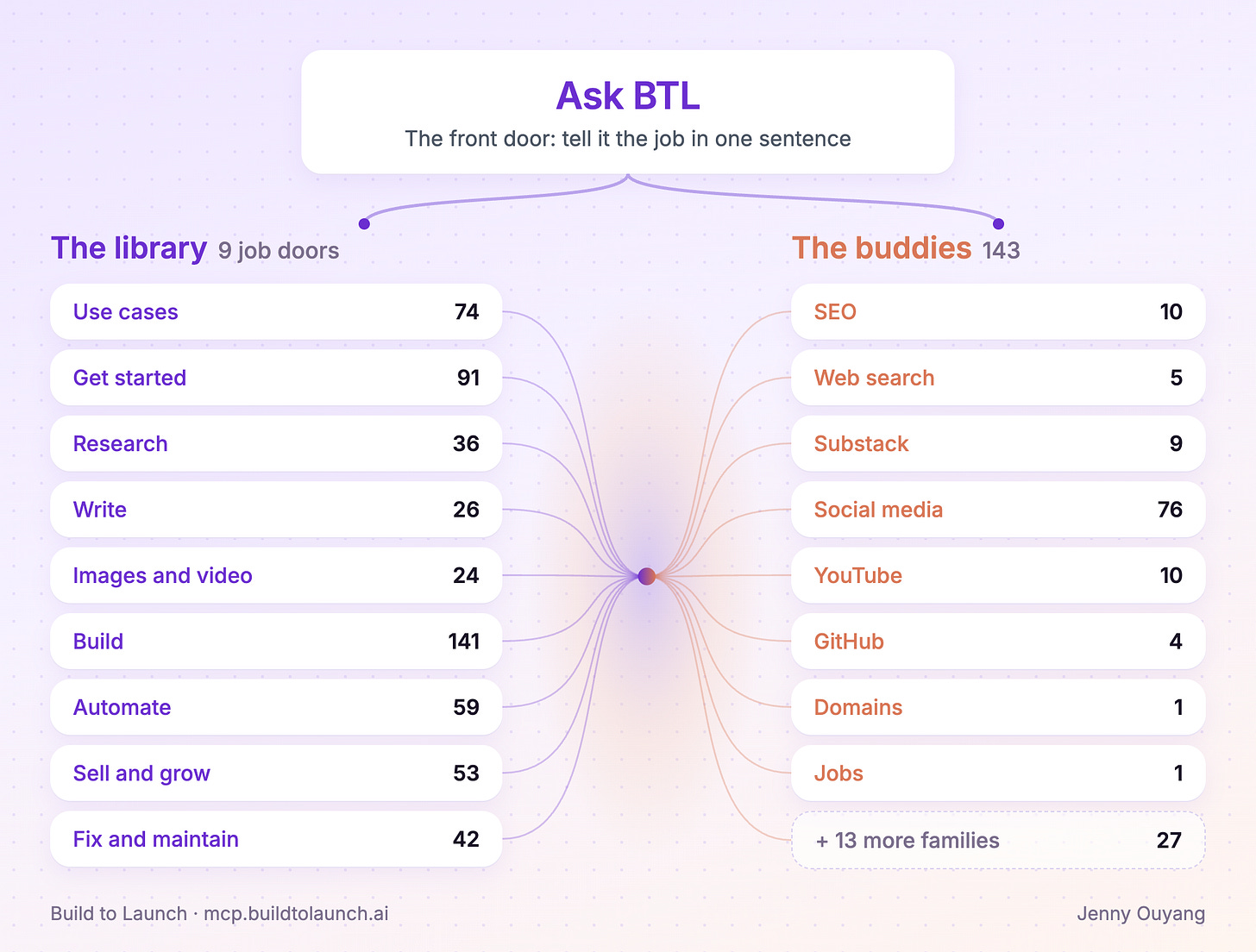
The library grew from the jobs. The buddies grew from the data those jobs needed.
The front door from the start of this manual, ask-btl, sits above both sides.
If you ever want to see what is inside, ask your AI:
Ask BTL: Is there a guide, workflow or buddy for this job?
I'd rather show you than tell you what it can do. So below are seven jobs I ran through it, from a product idea, to search intent, to a launch check. After them, how else you can use it, and how to connect it to your AI.
Example 1: How Do You Check an App Idea Before You Build It?
I check an idea before I build it. I wrote the method down in Research with Claude Code: Validate Your App Idea in 70 Minutes, and the library now has a check for it: "Research your idea in depth".
My ask.
Ask BTL: I want to build a simple app to keep track of my backyard garden. It should tell me when to trim my trees, what vegetables to plant and when, and when to harvest. Help me research the validity of this app idea.
What BTL did. Before any search, it showed me how it read the idea and asked one question: is the app for me alone, or for other people too? I said other people too. Then it ran the buddies to find out:
which garden apps already show up on Google
how many people search for this, and whether that interest is growing
what people say about these apps on Reddit and Hacker News
how a review page compares them
The verdict: change the angle. The app I described already exists. But people search "when to prune" far more than "garden planner". So it gave me three angles to test.
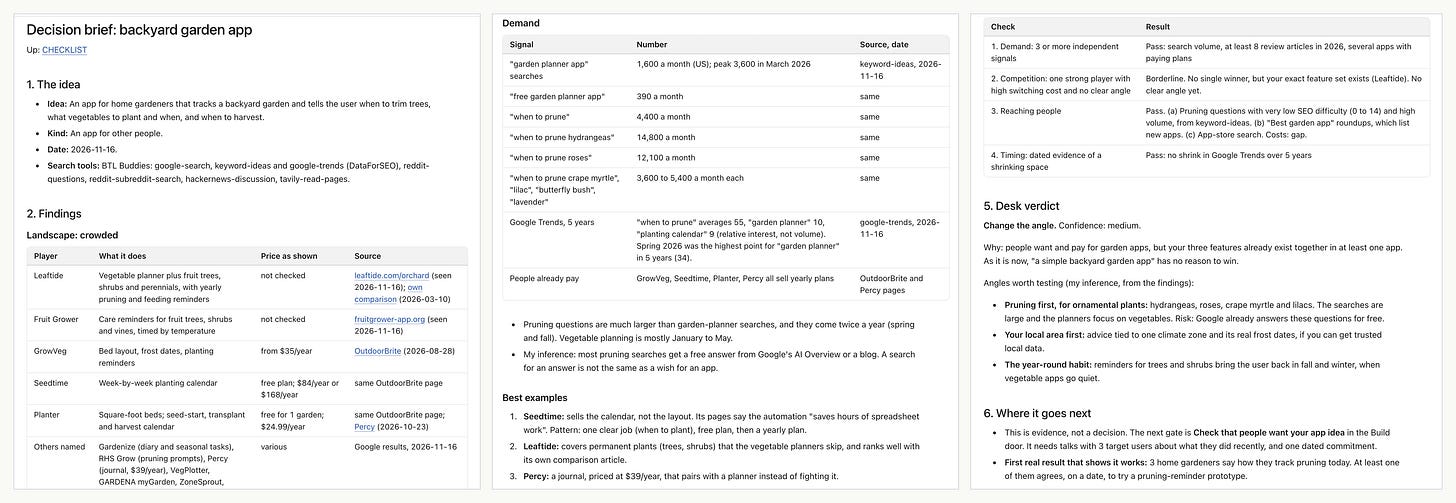
The decision brief for my garden app idea. Click to zoom.
Why it helps. AI took away most of the technical barrier. Now it is easy to feel we can build anything, pick one direction and build a thing that might not need to exist. This first step looks at what already exists, the market and the demand, before you spend a weekend on it.
One exception. If you build it for fun, or only for yourself, you can skip the market check. Use the research to see how other apps handle the same job, and learn from their ideas.
Example 2: How Do You Learn From the Bigger Businesses in Your Space?
The research named two bigger garden apps, so I looked at how they work as businesses. I did the same for creators in This Claude Code Prompt Reverse-Engineers Any Creator's Business.
My ask.
Ask BTL: The research named Seedtime and Leaftide as bigger garden apps. I want to know how they make money, how they get users, and what their strategy is, so I can see where my pruning-first idea could fit.
What BTL did. My AI picked Creator Scout and ran the buddies on both apps to find out:
how each one makes money, from its plans and pricing pages
how it gets users, from its Google and Meta ads, YouTube and Reddit
which Google searches send it visitors
It made 17 calls on its own, and it kept only the YouTube channels that belonged to the two brands. Then it wrote one report on each app, and one on where my idea fits.
Seedtime gives away a full vegetable planner. It earns from yearly plans and a seed store. Its 30 Meta ads all point to the free account.
Leaftide runs no ads. Its founder posts free tools on Reddit and builds what the commenters ask for.
Neither one owns "when should I prune this plant, here, now". That is where the suggested idea fits.
In consideration of space, I'm only showing two parts of the 15-section report for SeedTime below.
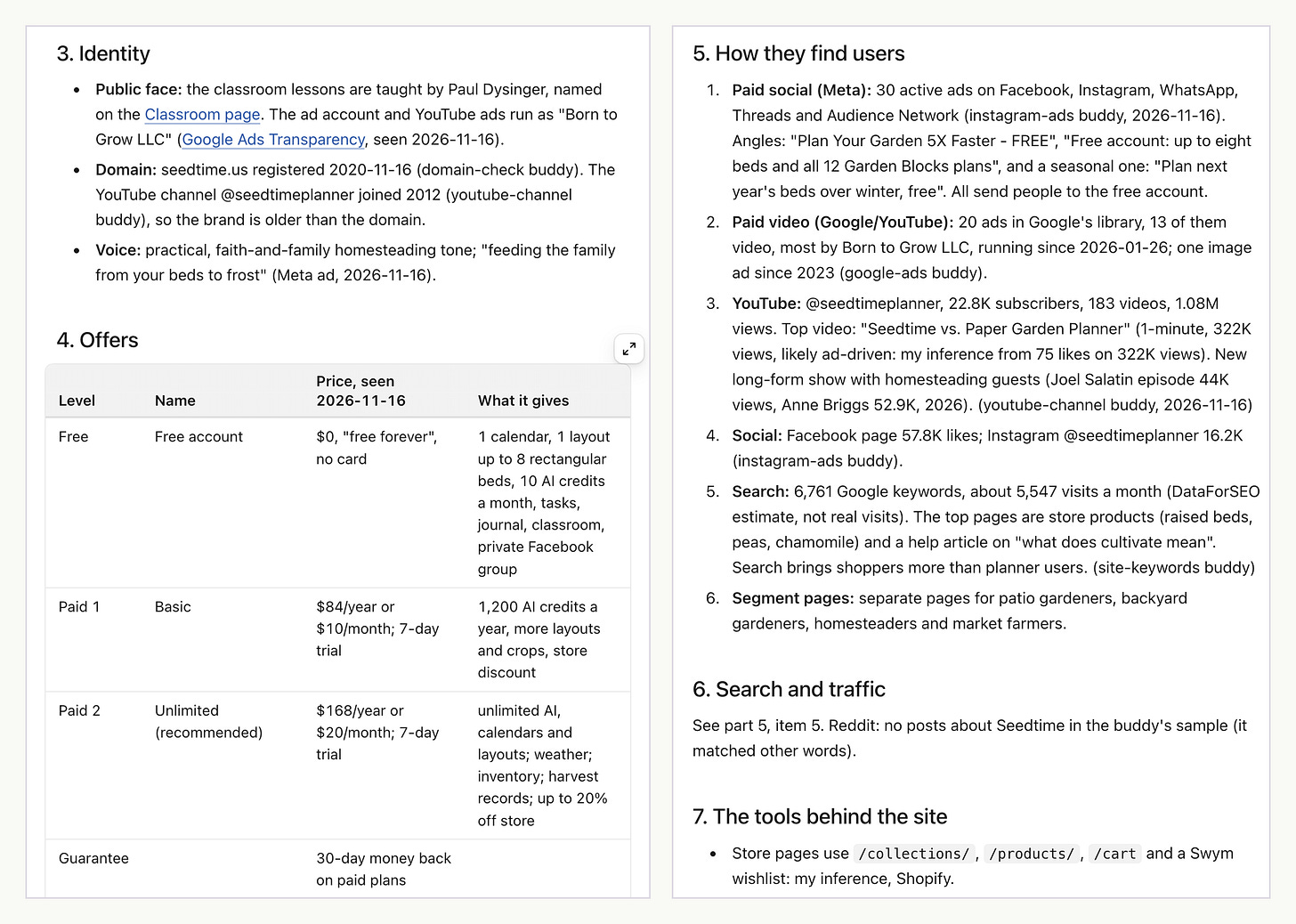
Two parts of the Seedtime report: its offers, and how it finds users.
Why it helps. A bigger app already paid to learn what sells. Its prices, its ads and its free plan show you that lesson before you choose your own path.
Pro tip. Look at the ads. The ads buddies show what a company pays to say, so they show what it believes sells. All 30 of Seedtime's Meta ads sell one thing: the free account.
Example 3: How Do You Automate Your Weekly Reading?
While I plan the app, I want to keep learning about gardens, without reading everything that comes in.
My ask. First, I asked for sources:
Ask BTL: Recommend 2 or 3 of the best Substack newsletters and YouTube channels about gardening.
Then I asked for the digest:
Ask BTL: Every week I want one digest of these gardening newsletters and YouTube channels. Use Jev to score each post and video for how useful it is for my backyard garden, so the scores stay the same week to week. Then set it up to run every Sunday.
Jev is a scoring item in Build to Launch. It answers the same questions about every post, so a score means the same thing each week.
What BTL did. It used the buddies to find which gardening newsletters and channels still post often, and picked three of each, such as The Gardening Mind, The Beautiful Edible Garden, Epic Gardening and GrowVeg. Then Ask BTL opened "Design an automation for a job you do by hand" and:
tested one source first, then all six, so it knew every feed could be read
scored each new item and built the digest
set up the Sunday task, with a "Run now" test so I saw the first digest before Sunday
The first digest had 3 new items for the week, ranked by score.
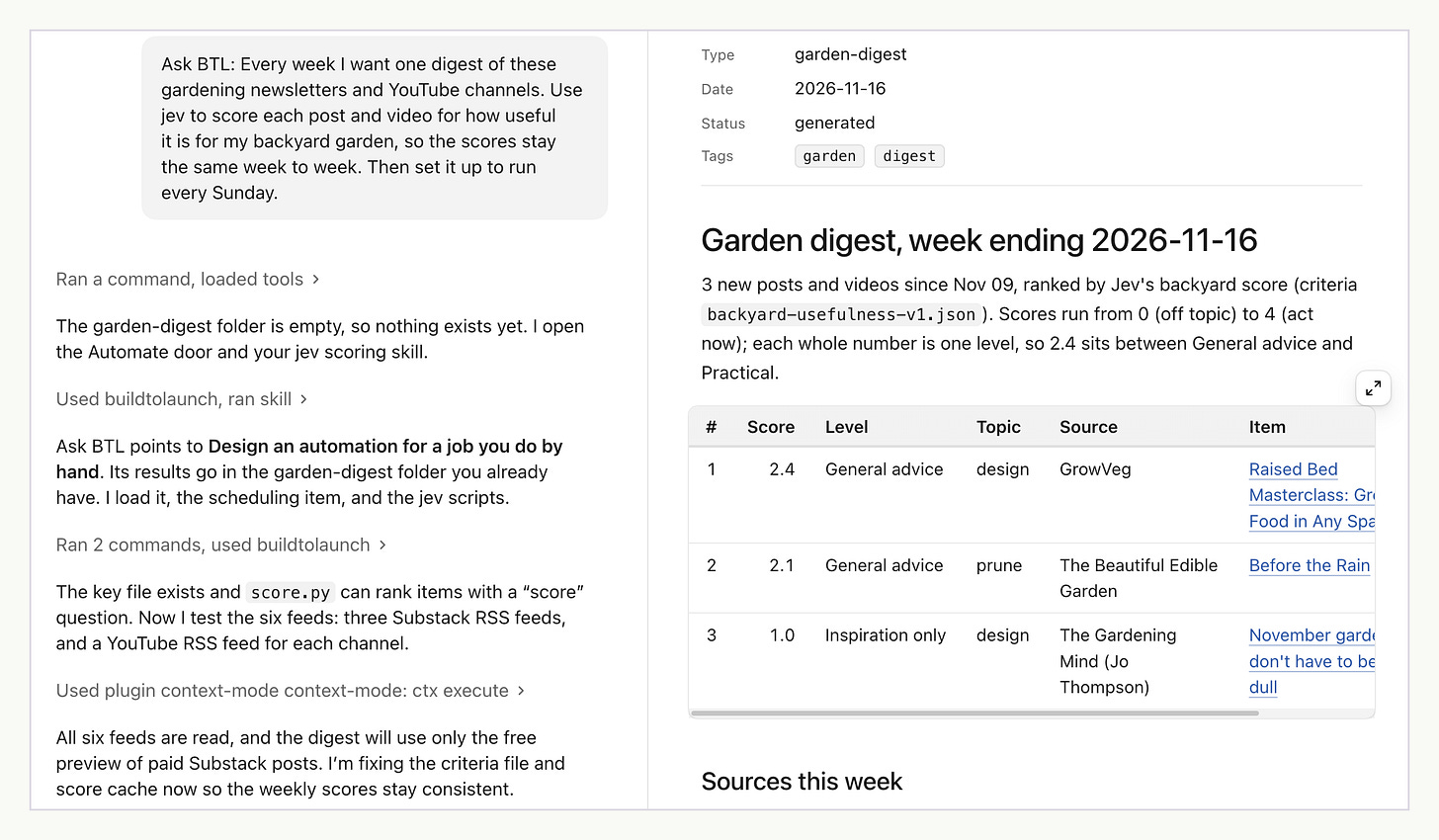
The first weekly digest, ranked by Jev's score.
Why it helps. The same questions score every item the same way, so a 2.4 out of 4 this week means the same as a 2.4 next week. I read the top of the list and skip the rest.
Pro tip. Name the tool when it matters. My AI first scored with a Jev skill on my own computer, and the digest in the picture comes from that first run. When I said "use the Build to Launch Jev", it switched to "Jev: typed judgments" from the MCP.
Example 4: How Do You Design the First Screen and a Visual?
Then I wanted to see the app.
My ask.
Ask BTL: Design the first screen of my pruning-first garden app. I have no code yet. On the screen, I pick my plant, I enter my zip code, and it tells me "prune now" or "wait". Then use the Impeccable design skills to critique and polish it.
What BTL did. The Build door pointed to the Impeccable design skills. Then:
my AI built the screen
a separate reviewer on another model scored it, to catch what the builder could not see: 27 out of 40, with 8 issues
the top issue: on a phone, the answer sat below the fold
my AI fixed all 8
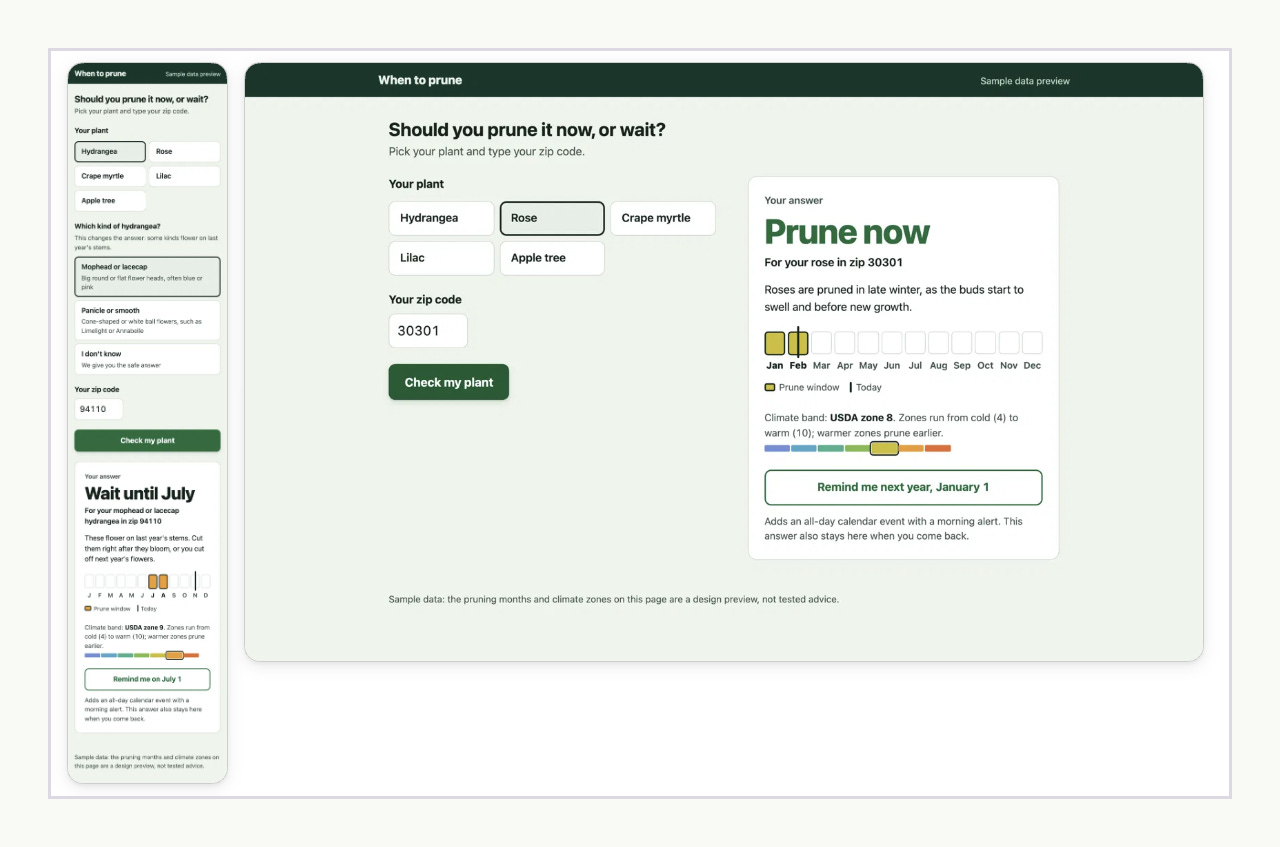
The first screen after the critique and polish, with sample data.
Then I asked for a visual to go with it:
Ask BTL: Make a one-page pruning calendar for the trees and shrubs in my yard in Central Valley, California, as a picture I can print. Use real pruning months, not sample data.
The Images and video door picked the infographic item. My AI read 11 University of California pages with the buddies, and drew the months for five trees.
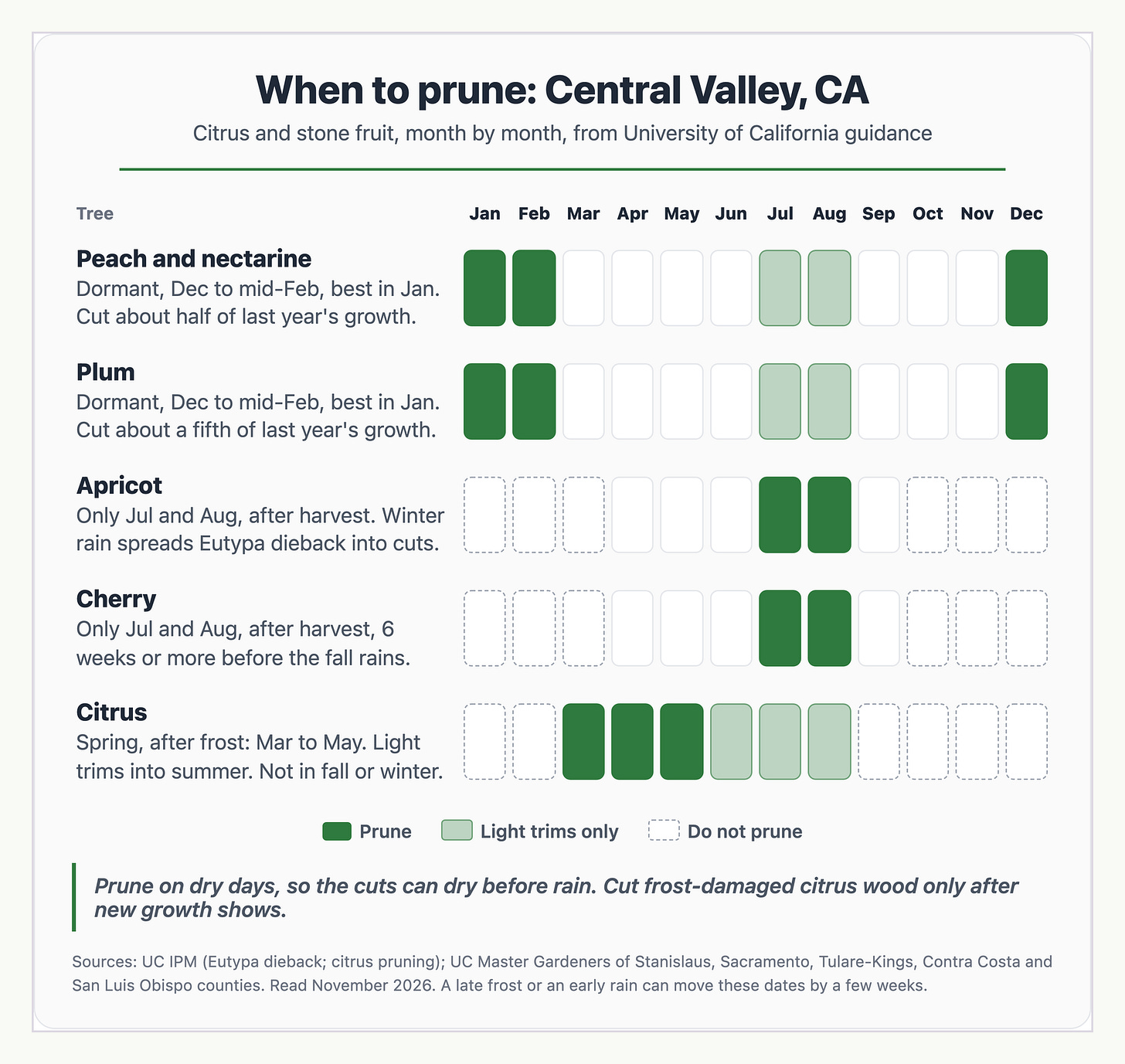
A printable pruning calendar, from University of California guidance.
Why it helps. You see the app before you write any code, and a second set of eyes checks it before you do.
Pro tip. Set your design system first: the colors, the font and a few rules. Then every screen and every visual comes out in the same look. My AI picked the calendar font to match the app screen for that reason. In the Build door, "Give your coding AI a design brief before it builds" saves those rules for every page.
Example 5: How Do You Know a Post Is Worth Writing?
I already wrote about how models read prompts in LLMs Don't Read, They Parse. Before I spend days on a first-principles article, I wanted to know if people still look for it.
My ask.
Ask BTL: I am thinking about writing an article on LLM & how AI work from the first principles. Are people still interested? What is the search intent, and what would the article need to rank?
What BTL did. It went straight to the SEO buddies to find out:
how many people search for it
whether interest is growing
what Google shows for it today
The answer: yes, and interest is going up. "How does AI work" gets about 18,100 US searches a month, and interest in it is about 4 times higher than in late 2024. The searchers are mostly beginners who want to learn. It also listed what the article needs to rank, starting with the answer in the first 2 lines.
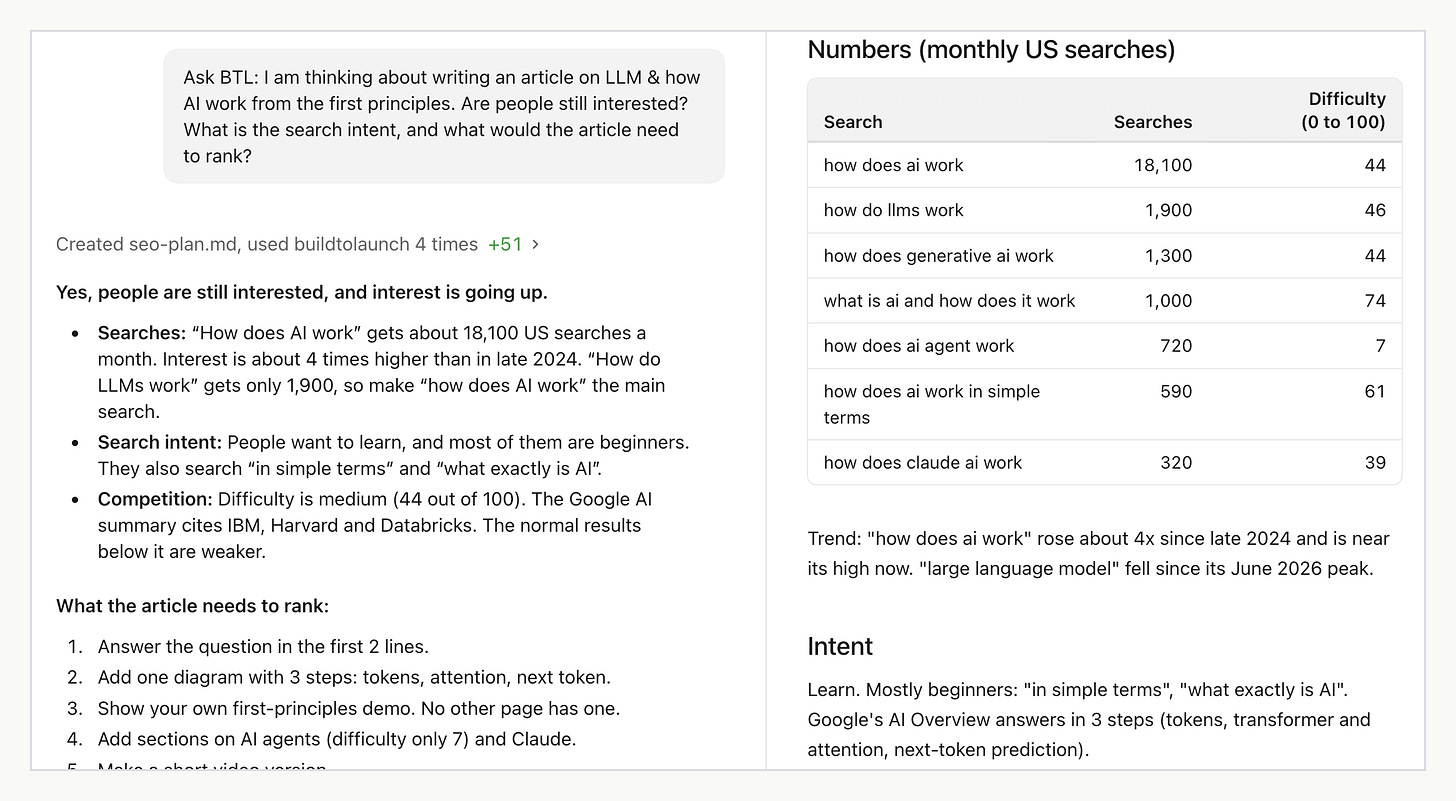
The search check before I write: interest is going up.
Why it helps. Before you write, you know if people look for the topic, which words they use, and what the page needs to rank.
Pro tip. Ask about the topic, and let the data pick the words. I asked about LLMs. "How do LLMs work" gets 1,900 searches, and "how does AI work" gets 18,100, so that will be the exact wording I use.
Example 6: How Do You Check Your Writing for AI Flavor?
This draft comes from the autonomous technical writing I run for Vibe Coding Builders (VCB), with a human in the loop. It is already designed to avoid the obvious AI shapes. I wanted to see what a second check would still catch anything.
My ask.
Ask BTL: My automation wrote this draft by itself. Check one section for AI flavor, and fix only the parts that sound like AI. Keep the facts. The draft is attached. Check only the section "Putting Haiku in charge lowers the team's ceiling".
What BTL did. Ask BTL opened "AI Writing" from the Write door, and it checked the section layer by layer. It still caught 4 spots that sound like AI. It fixed 3 and asked me about 1. Three of the four came from one habit: short one-line beats that stage or repeat the point.
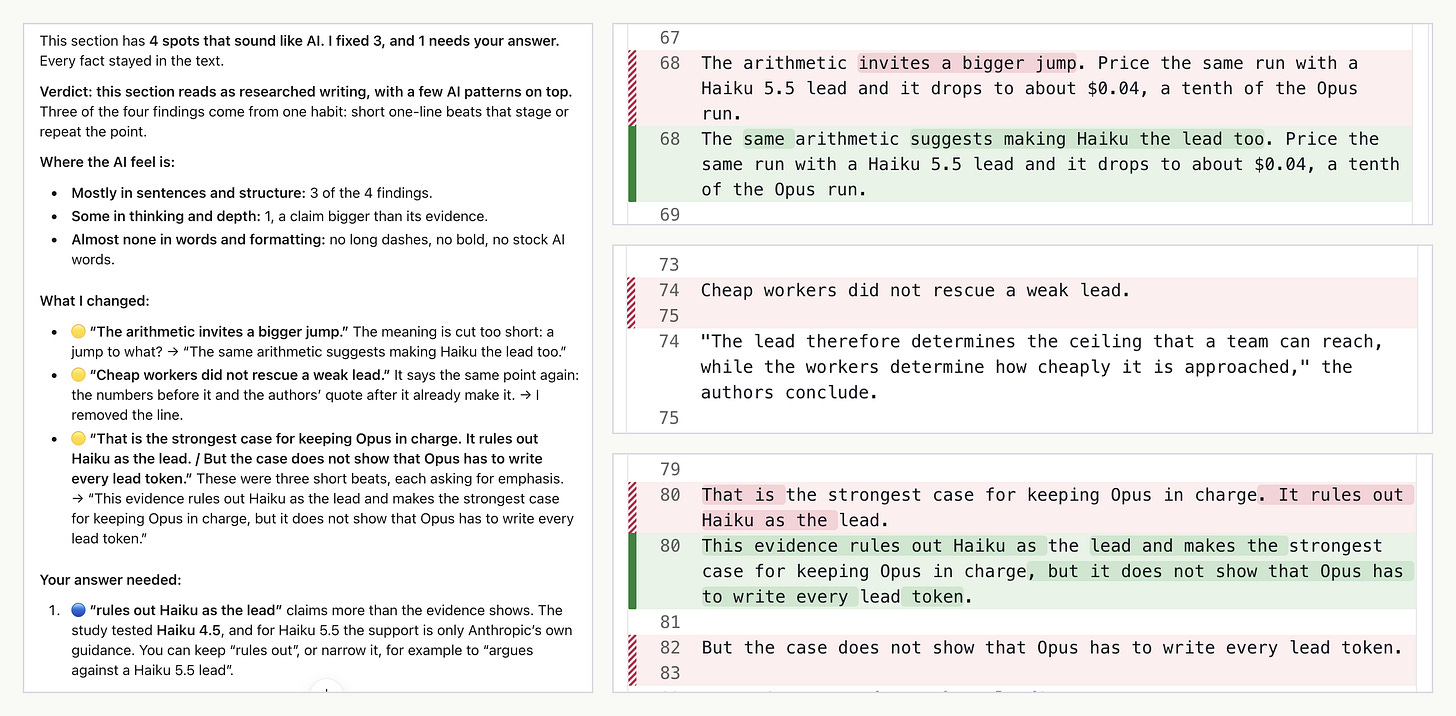
The AI flavor report, and the three fixes it made.
Why it helps. A list of banned words catches the surface. This check found the AI flavor in the structure, where my pre-prompting did not reach. The 9 layers of AI flavor explain why.
Pro tip. Treat each flag as a choice. Some AI flavor is subtle, and sometimes you want it there: a short line for emphasis can be the point. Different people, and the same person on different days, want different things. So read each flag and keep what fits you. The check helps here: on the fourth spot, it asked me instead of changing the sentence.
Example 7: How Do You Know It Is Ready to Launch?
My garden app is not built yet, so I ran this step on vibecoding.builders, a directory I run for people who build with AI.
My ask.
Ask BTL: Is vibecoding.builders ready for more users? Check everything I should have in place before I send more people to it, and check how it shows up in Google and in AI search next to 3 similar sites.
What BTL did. Ask BTL picked "Get your app ready to go live" from the Build door. It read the code and checked the live site to find what could break at launch, and it changed no code. Then it ran the SEO buddies on my site and 3 similar sites, to see how Google sees each one:
what shows up in the results
how much authority each site has
which searches each site ranks for
what each page tells a search engine
The answer: the site is ready for more users, if I do 3 things first. But people cannot find it in Google yet. Its links are the strongest of the small sites, and it still ranks for only 5 searches. It is open to every main AI crawler, and Google's AI summaries do not cite it yet.
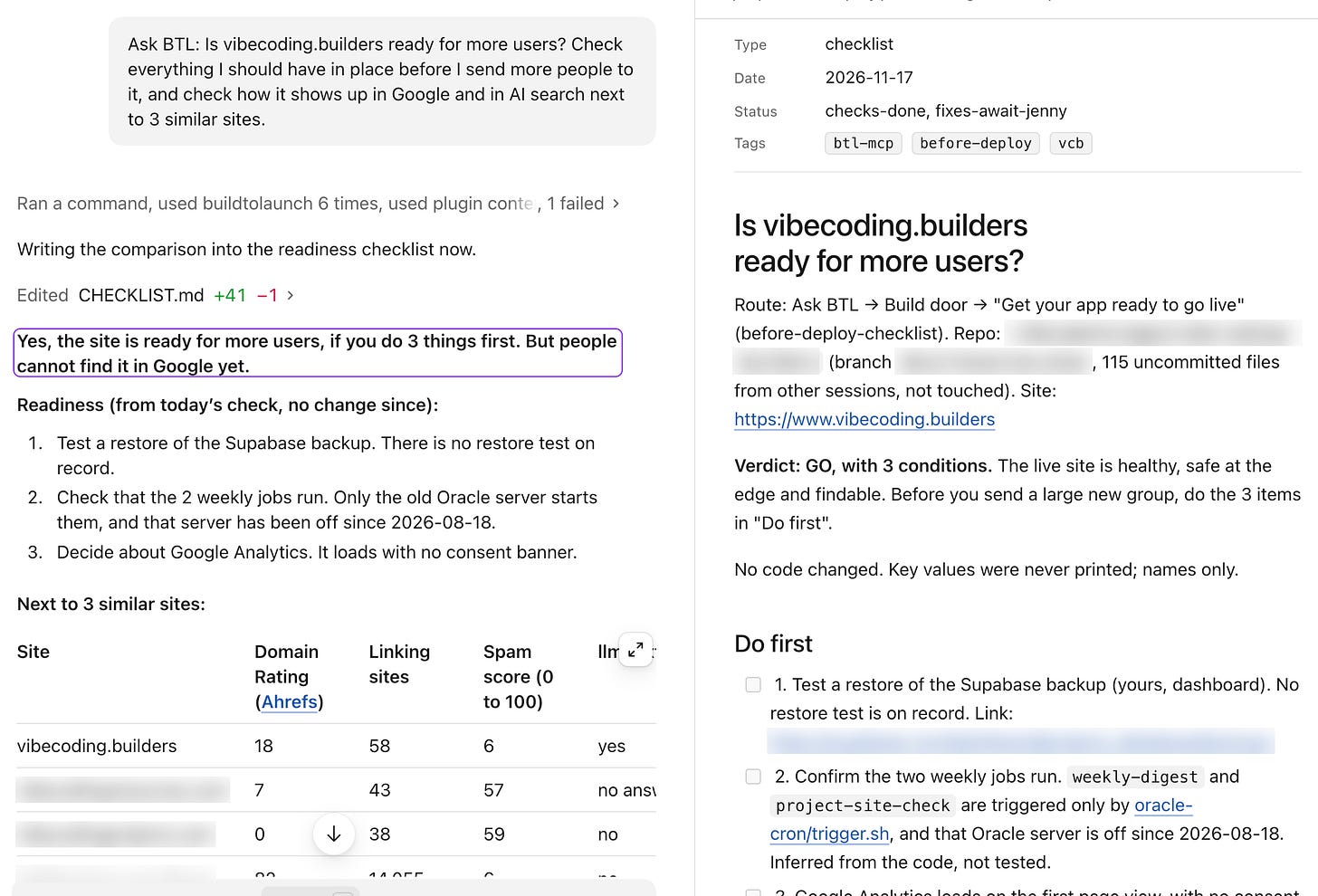
Ready for more users, and not yet found in Google.
Why it helps. Before you send people to it, you know if the site holds up, and if people can find it without you.
Pro tip. Ask for both checks in one prompt. Ready and found are two different checks. My site passed the first one and failed the second.
What Else Is in There? Including My Favorites
You saw seven examples above. Behind them are 475 library items and 143 buddies, across nine doors for different kinds of job. Here are my favorites, by kind.
Fix and maintain items are the ones that keep my work running. They do not look exciting, but they're my favorites and I use them most.
"Fix a Mac that runs hot and slow with AI tools." With many agents, MCP servers and apps running, my computer heats up. This item finds what uses the memory and the processor, and how many copies of each MCP server run. The full story is in If Your Computer Keeps Overheating While Using AI Tools: from 797 processes down to 15.
"The AI Says It Is Fixed. Make It Prove It." Before I trust a "done", the AI runs a check for the problem I first reported and shows me the real output.
"Keep the AI working until the job is done." For a long job, the AI makes a save point and a task list, and it works through the list without stopping to ask "shall I continue?"
Meta skills: they make every other ask better.
"Make your ask deeper before the AI starts." It asks what a top professional would add, then rewrites my ask before any work begins.
"Meta prompts: make the AI think deeper about the job." The AI adds short lines to my request that change how it thinks about the job.
"Question the plan, before and after." The AI questions my plan before I start, and finds the weak points of the result before I act on it.
Learning: courses and articles you can ask.
Courses. Your AI can teach you a Build to Launch course one lesson at a time. It starts at the first lesson you have not done and records your progress. For example: "Ask BTL: teach me the prompting course." The course examples include Prompt Engineering, Claude Introduction, Connectors and MCP, and Vibe Coding: From Zero to Shipped.
My articles. Ask a question, and your AI finds the article that answers it, with the actual content.
Inspiration: the Use cases door. It holds builds with AI, from apps and Substack growth to research and automation, that you can pick and make your own.
What Would These Jobs Cost You Elsewhere?
You saw what it does. Now, what would the same jobs cost you if you bought them separately? Each kind of job has another way to get done: a tool plan, or a person you hire. The prices come from the vendors' own pricing pages as of November 2026.
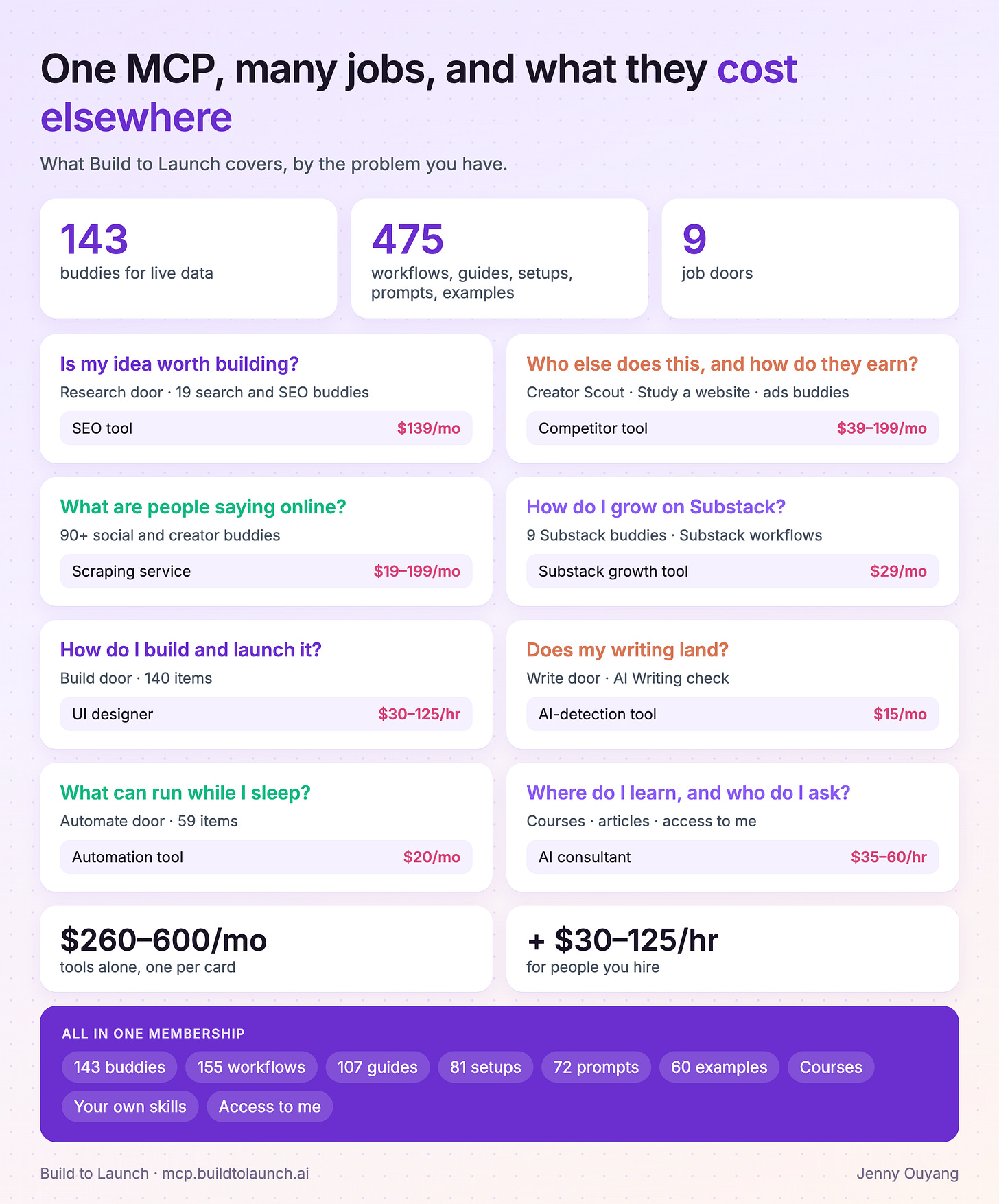
Prices from each vendor's own page, 17 November 2026: Semrush, SpyFu and Similarweb, Apify, Upwork, Originality.ai, Zapier. The Substack growth tool price is from my own notes.
Bought one by one, those tools come to $260 to $600 a month, before you hire anyone. All of it is in one membership: 475 library items, 143 buddies, the courses, and your own saved skills. You also get access to me, at the monthly member AMA.
What it means for you:
If you are already a paid annual member: you locked in your price. It stays the same for as long as you stay subscribed. Everything above is new value added to your MCP access now. Just connect with your membership email and it's ready to go.
If you joined during the founding window: everything you have access to stays as it is. The upgraded MCP is a new benefit for you. Future workshops, sprints and challenges are free for you too, and you keep direct support from me.
If you have been on the fence: this is the best time to join. I rarely run discounts like this, and it is the only kind for this year: $112 a year, 30% off, and you keep that price for as long as you stay a member. It ends on 30 November. After that, the yearly price is $160. And the next chance may be a year away, at a different price.
How Do You Connect the BTL MCP and Ask It for a Job?
There are three ways to connect it. Pick the one for your app.
1. An AI agent with a terminal (Claude Code, Codex, Cursor, Gemini CLI). Paste this line:
Read mcp.buildtolaunch.ai/install and connect Build to Launch for me
Your AI adds the server. You only click the sign-in link in your email, then Authorize.
2. Claude web (claude.ai, the desktop app or the mobile app).
Click Connect Build to Launch. Claude opens its connector settings with the name and address filled in. Click Add.
Click Connect next to Build to Launch.
Sign in with your email, open the link we send you, and click Authorize.
It then works in Claude on the web, the desktop app, the mobile app and Claude Code, on the same Claude account.
3. ChatGPT web (at chatgpt.com).
Open Settings, select Plugins on the sidebar.
Click + from the top right corner, then "Add custom MCP server".
Name: Build to Launch. URL:
https://mcp.buildtolaunch.ai. Authentication: OAuth. Click Create.Sign in with your email, open the link we send you, and click Authorize.
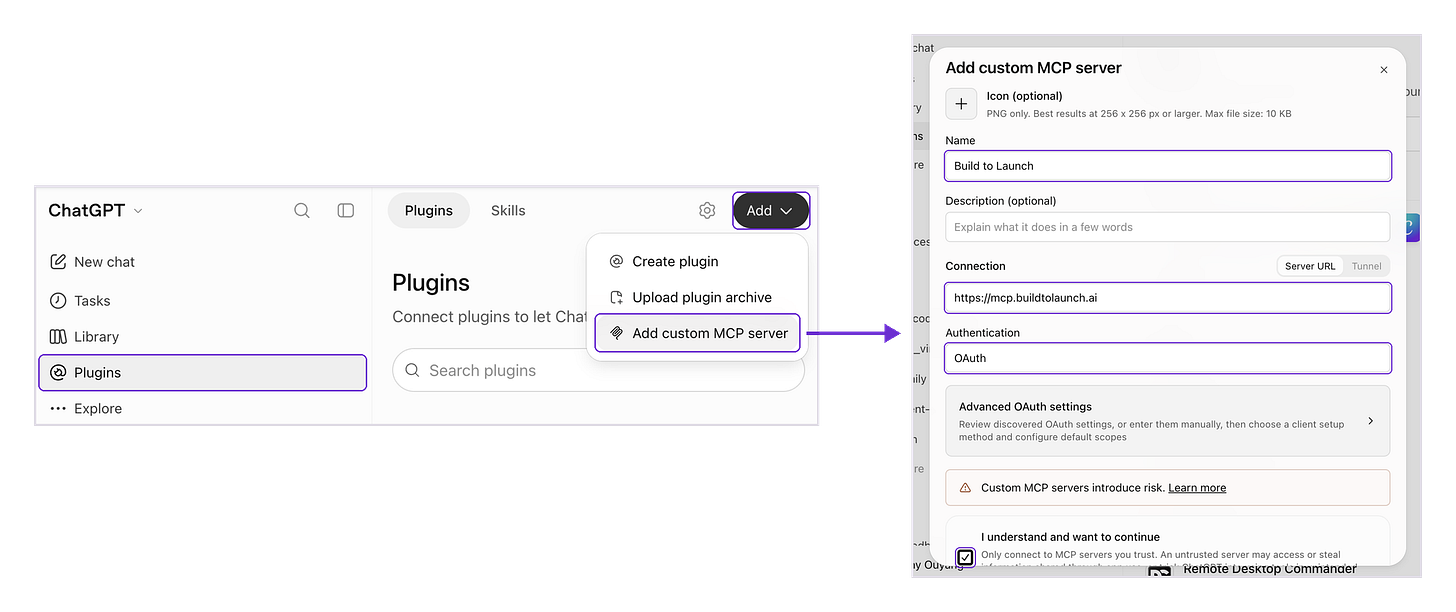
In ChatGPT: Plugins, Add, "Add custom MCP server", then fill in the form.
In every app, members sign in with their membership email. Without a membership, you can still connect and try the free items. The connect guide has the steps for every other app.
How to ask it for a job
Give it three things: the job, what you have, and what you want back. You never need an item's name. This first prompt works in any AI app:
Ask BTL: My job: {{what you want done}}. What I have: {{your draft, link, list or site}}. What I want back: {{a list, a table, a plan or a file}}.
Make it yours
Want an item to work your way? Ask your AI to change it and save it to your Build to Launch account. Your version is private to you, and from then on it runs in place of mine.
An idea, a request, or something broke? Tell your AI. It sends your note to me through the MCP, on the members' community board, so I can answer it and fix what needs fixing.
What Is Left for You Once the Setup Is Done?
Over the past few years, many of us wondered where AI would lead our work, and how strange that path might get.
For a while, AI felt like the boss. We copied, pasted, searched and reported back, then waited for the next instruction.
That path gets clearer every day.
In Example 2, the AI made 17 calls to the BTL MCP on its own. It found a YouTube channel from a different brand and dropped it before anyone read the report.
The searches, the checks and the setup can sit with the AI now.
What stays with you is the part only you can do. You pick the idea worth building, decide who it is for, and know when it is ready to launch.
With the mechanics out of the way, you can finally give that work more focus and more care. That is where you grow, and where your work starts to scale.
That is the part I want to build with you, in this newsletter and in the BTL MCP.
— Jenny