How to Make AI Writing Sound Human: The 9 Layers Most Humanize Lists Miss
A banned-words list only fixes the surface. These are the 9 layers of AI flavor underneath, with a correction prompt for each and the checker that catches it.
How to humanize AI writing when a banned-words list stops working: the 9 layers of AI flavor, from word choice and em dashes to invented evidence, lost depth and missing stance, with a correction prompt for each layer and the checker that catches it: code, Jev or an AI reviewer.

Have a look at these two passages. Both explain where to put instructions for Claude Code. Which one is easier to follow on the first read?
Version 1
Derivable from the repo is the delete column. Must hold every time is the hook column. Only matters while I am working in one directory is the paths: column.
Version 2
Delete a rule when the repo already supplies it. Use a hook when the rule must hold every time. Use paths: when the rule belongs to one directory.
The first passage came from an AI draft of my guide for CLAUDE.md. The second came from improved edits.
When I read the first version, I knew the subject, but I still felt uncomfortable following the explanation. The sentences were short. Most of the words were ordinary. Yet I had to turn each sentence around in my head to understand what it wanted me to do.
I had already given the AI rules for my voice. I wanted clear, relaxed prose, like explaining something to a friend. Somehow, the attempt to be concise still left all these twists in place.
My banned-word lists gave me no way to catch this. Adding another rule would leave the sentence structure untouched.
That made me look beyond vocabulary when I reviewed my AI drafts.
I started checking how the sentences explained an action, whether an edit kept my reasoning, and whether a confident claim had evidence behind it.
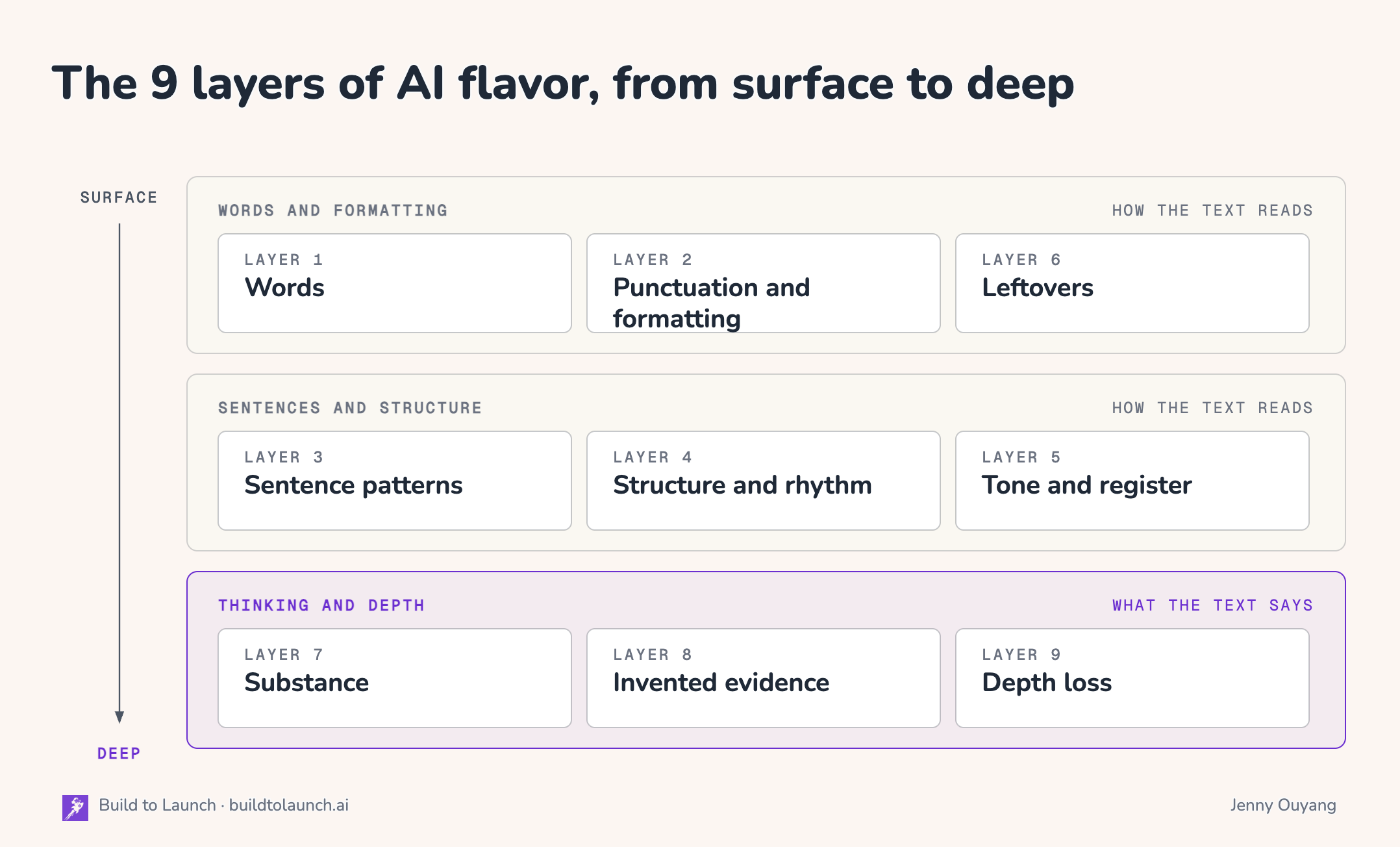
In the end, I grouped the problems into nine layers. For each one, I’ll show you an example, a correction prompt, and who or what is best placed to catch it.
What’s Inside:
Why a banned-words list never finishes the job
The 9 layers of AI flavor, from words to thinking, each with a correction prompt
What breaks when you hand all nine layers to AI
3 ways to catch AI slop: code, an AI reviewer, and Jev
Next steps


Why a banned-words list never finishes the job
A ban list does one thing well. It finds the exact phrases you put on it. But it has four limits.
It goes out of date.
Words fade once people name them: researchers saw “delve” drop in academic writing soon after it was pointed out in early 2024 (Geng and Trotta 2025).
In testing my articles against the claude-seo cleaner, with 48 phrase swaps, it left 53 of 58 AI articles unchanged, because current models already avoid those phrases.
A ban list is a snapshot of one model at one date.
It creates new tells.
One file in my own writing skill tells the model to replace “delve into” with “explore.”
Another file in the same skill warns against “let’s explore” as an announcement.
Replacing a phrase still leaves you to judge whether the replacement fits.
Some problems have no word to ban.
An invented detail, a reason that got cut, a sentence in the wrong order… none of them is a word you can put on a list.
The first passage in the opening used ordinary words, but I still had to work out who should do what.
A missing reason needs a different check again, you have to compare the draft with the source.
The same pattern sometimes helps.
A repeated phrase might amplify your intent. Short sentences might give a passage the pace you want.
In six of my published guides, 43 percent of paragraphs are a single sentence. When either appears throughout an article without a purpose, the repetition becomes tiring. A list doesn’t know which choice serves your piece.
Wikipedia’s Signs of AI writing says the same about transition words: on their own, they are an ineffective sign.
That is why I use AI flavor as the broader name. It includes familiar patterns, explanations that are hard to follow, and details or reasoning that AI has weakened. Some patterns are worth keeping in the right context. An invented fact or a lost distinction still needs correction.
Adding to the list is whack-a-mole, and there is no end to the chasing and fixing. I’d rather chase the root cause than the aftermath.
The root cause: AI slop is effort moved from the writer onto the reader. Pangram, an AI-text detector, calls it an “effort asymmetry between readers and writers” in its technical report.
A tired word costs the reader a second of attention.
An explanation that is hard to follow costs them a reread.
A gap in the thinking costs the most: an invented fact needs a check they don’t know they need, and a missing reason takes the point with it.
So before choosing a fix, we need to know whether the problem sits in the words, the explanation, or the thinking behind it.
The 9 layers of AI flavor, from words to thinking
I’ve arranged the nine layers from habits you notice on the page to problems that only the source or the author’s judgment can catch.
Each layer follows the same shape:
One sentence of explanation.
What it looks like
What it costs your reader
An example before fixing
An example after fixing
A prompt for fixing that layer of AI flavor
You can spot a repeated phrase immediately during reading. But an explanation that lost part of your reasoning only shows when you compare it with the source.
I suggest reading all nine once, so you know what each one covers. Then, when you return with your own draft, focus on the layers that match what feels wrong.
Each layer has an example and a correction prompt. Every prompt tells the model not to add facts that aren’t in your draft. Use only the relevant ones.
Layer 1: Words
A fancier or vaguer word where a plain one would do.
Looks like: “delve,” “leverage,” “serves as” where “is” would do, and a hedge such as “happen to” on a point you are sure of.
Costs the reader: a second of attention each time.
Before: “rules happen to match what Claude reads best.”
After: “rules match what Claude already handles well.”
Find the words in this draft that stand in for a plainer word or for the concrete thing: delve, tapestry, landscape, leverage, pivotal, serves as, stands as, boasts, intensifiers such as truly, really and actually, and hedges such as "happen to" on a point the writer is sure of.
Replace each one with the plain word ("is", "has", "use") or with the specific thing it points at. Remove a hedge that the writer does not need.
Keep a word when it is the exact technical term for the subject.
Do not add any fact, number, name or example that is not already in the draft.
Return the revised draft and a list of every change.
Kobak and colleagues counted “delves” rising 28 times over in PubMed abstracts in 2024. Lists like this date fast, so put a date on yours, and keep a listed word when it is the exact technical term for your subject.
Layer 2: Punctuation and formatting
Marks and layout that make a page look machine-made.
Looks like: em dashes, bold on phrase after phrase, a bold label and a colon at the start of every bullet, title case in every heading.
Costs the reader: the page looks like a template before they read a word.
Before: “I sit in one place — Claude Code — and everything flows.”
After: “I sit in Claude Code and everything flows from there.”
Fix only punctuation and formatting in this draft. Do not change any other words.
Replace each em dash with a period, comma, colon or parentheses. If none fits, rewrite that one sentence.
Keep bold only for a defined term or a warning.
Turn bullets that start with a bold label and a colon into sentences when the labels carry no information of their own.
Use sentence case in headings. Remove emoji used as bullets.
Return the revised draft and a list of every change.
These habits differ by model. In a 2026 preprint by Freeburg, GPT-4.1 wrote 10.62 em dashes per 1,000 words and GPT-5.4 wrote 1.43, against 3.23 for human writers. So tie any rule about em dashes to a model and a date.
Layer 3: Sentence patterns
Sentence shapes that sound like insight without adding any.
Looks like: “It’s not X, it’s Y” and its cousins, such as “Not because X. Because Y.” Also “Here’s the thing:”, “The result? Twice the signups.” and lists of three by habit.
Costs the reader: a setup sentence before every real point.
Before: “The problem isn’t your prompt. It’s your context.”
After: “The problem is your context.”
Find sentences in this draft that reject one idea to assert another, with or without the word "not". Delete the rejected half and state the claim directly.
Keep a contrast only when the negative half corrects a real fact, number, date, name or scope.
Delete openers that announce a point instead of making it ("Here's the thing", "Let's dive in"), and rhetorical questions that the next sentence answers.
Cut the third item in a list of three when it adds nothing. Turn a trailing "-ing" phrase that comments on importance into its own sentence with a specific claim, or cut it.
Remove "Moreover", "Furthermore" and "Additionally" at the start of sentences. Keep "because", "so", "if" and "but" when they carry a cause or a condition.
Do not add any fact. Return the revised draft and a list of every change.
The contrast shapes reject an idea nobody held, so the next sentence sounds like insight. Transition words are a weaker sign: on their own, “moreover” and “furthermore” don’t prove that AI wrote something, but a connector every two paragraphs empties the text.
Layer 4: Structure and rhythm
The shape of the entire piece: how it opens, how its parts repeat, and how it ends.
Looks like: three sentences of warm-up before the point, paragraphs that are all the same size, a conclusion that repeats the intro, an ending any article could have, a heading called “Key Takeaways.”
Costs the reader: time on openings and endings that say nothing new.
Before: “The future looks bright for the company. Exciting times lie ahead as they continue their journey toward excellence.”
After: “The company plans to open two more locations next year.”
Read the first paragraph and the last paragraph of this draft side by side. If the last one repeats the first, replace it with the last concrete fact or one action the reader can take.
Cut any sentences that come before the first real point.
Flag any heading that could sit on any article ("Key Takeaways", "Conclusion", "Why It Matters") and suggest one that names what the section holds.
List any run of four or more paragraphs of about the same length. Do not rewrite them.
Do not add any fact. Return the revised draft and a list of every change.
The Before/After pair comes from Wikipedia’s Signs of AI writing. Most of this layer comes from practitioners, and nobody has measured it yet. The one structural habit with strong evidence is length: in a 2023 study by Singhal and colleagues, longer answers alone explained 70% to 90% of the measured improvement from preference training.
Layer 5: Tone and register
A tone that performs instead of telling: polite like a chatbot, excited like an ad, urgent with no fact behind it.
Looks like: “Great question!”, “a seamless, cutting-edge experience”, and stakes made of adjectives, such as “an incredible source of danger.”
Costs the reader: the work of looking past the performance to find the fact.
Before: “Presence, not a chatbot. Technology that’s regenerative instead of extractive. That’s a rare thing to be building.”
After: “I really love the idea of an oblique reflection that lets people see their own patterns.”
Find sentences in this draft that perform a tone instead of saying something: chatbot politeness ("Great question", "I hope this helps"), ad words with no fact behind them ("seamless", "world-class", "cutting-edge"), and stakes made only of adjectives ("absolutely crucial").
Replace each one with the plain statement, backed by a fact that is already in the draft. If the draft has no such fact, cut the sentence or write [NEEDS AUTHOR: the fact that supports this].
Do not add any fact. Return the revised draft and a list of every change.
The chatbot politeness has a measured cause: preference training rewards agreement. In a 2023 study by Sharma and colleagues, Claude 2’s reward model preferred a flattering answer over a truthful one 95% of the time, and OpenAI rolled back a GPT-4o update in April 2025 after it became too agreeable.
Layer 6: Leftovers
Text that was meant for you, the chat window or a tool, but reached the reader anyway.
Looks like: “Here’s a polished version of your intro:”, “As of my last update…”, “[Your Name]”, “utm_source=chatgpt.com” left inside a link, and pipeline labels such as lens codes “L1” to “L8”.
Costs the reader: a line that was never meant for them.
Before: “Here’s a polished version of your newsletter intro with a stronger hook:” and then the intro.
After: the intro alone.
Find text in this draft that was meant for the person who prompted it, or for a tool, and not for the reader: replies such as "Here is a revised version" or "Let me know if", knowledge-cutoff lines, unfilled placeholders in brackets, citation codes such as "oaicite" or "turn0search0", tracking tags such as "utm_source=chatgpt.com", and drafting labels such as "Hook:" or "CTA here".
Delete each one. Do not change anything else.
Return the revised draft and a list of every deletion.
Every leftover gets the same fix: deletion. Academ-AI, a project that tracks AI residue in research papers, catalogued 768 published papers that kept chat residue, and 337 of them still carried a knowledge-cutoff line. None of the outside lists I collected names pipeline labels. They appear once AI writes inside a multi-step pipeline, and my own drafting runs now scan every draft for them.
From here, the layers change. Layers 1 to 6 are about how the text reads, and a careful edit can fix them. Layers 7 to 9 are about what the text says: the fix needs a fact, a source or a decision that only you have. These are the gaps that cost the reader most.
Layer 7: Substance
A claim with nothing behind it: importance stated instead of shown, or a summary where the detail should be.
Looks like: “This marks a pivotal moment.”, “Many businesses are discovering the power of automation.”, and the rhythm of detail with no detail, such as “I tried dozens. Dropped most. Kept a handful.”
Costs the reader: a claim they must take on trust, with nothing to check.
Before: “I tried dozens. Dropped most. Kept a handful.”
After: “I have four of those.”
Find sentences in this draft that claim importance or change without showing it: "marks a pivotal moment", "highlights the importance of", "a significant shift", "many people are discovering".
Also find general claims or summaries where a specific number, name or example should be.
For each one, replace the claim with what changed, using a number, a name or an example that is already in the draft.
If the draft has no such detail, do not invent one. Write [NEEDS AUTHOR: what changed, and by how much] in its place.
Return the revised draft and a list of every change and every marker.
The second line holds facts the first one doesn’t. You can’t get there by rewording: you have to know what happened. Models did not invent the hype either. They amplify a habit that human writing already had: hype words in science writing were rising from 1985, across about 900,000 NIH abstracts, Millar and colleagues found, long before ChatGPT.
Layer 8: Invented evidence
Proof that looks real and isn’t: an unnamed expert, a number with no source, a detail nobody gave.
Looks like: “Experts agree…”, “Writers who use this method see 3.7x more engagement” with no source, and a colleague or a personal detail that never existed.
Costs the reader: a fact-check they don’t know they need.
Before: a humanizer skill’s rewrite of my sample text added this line: “I have been using Build to Launch for about six months.”
After: the line is gone. Nothing in the source said it.
List every claim in this draft that rests on evidence: a named or unnamed authority, a statistic, a study, a quote, or a personal experience.
For each one, say where the draft gives its source. If it gives none, mark it [NEEDS SOURCE].
Do not add sources, numbers, quotes, people or stories. Do not rewrite anything.
Return only the list.
The usual humanizer advice makes this layer worse. “Add specific details” sounds like good editing, but a model that has no details produces them anyway. Kalai and colleagues at OpenAI describe the cause: models hallucinate “because the training and evaluation procedures reward guessing over acknowledging uncertainty.”
Layer 9: Depth loss
I call this scratching the surface: the text keeps what is immediately there for everyone and drops the reasoning that moves the thought one level deeper.
Looks like: two separate features merged into one tidy choice, an exception dropped, a finding from one study stated as a general truth, and a sentence turned around so you must work out who does what.
Costs the reader: the reasoning, and with it the point.
Before: “Derivable from the repo is the delete column.” (Version 1 in the opening)
After: “Delete a rule when the repo already supplies it.” (Version 2)
Here are my source notes and my draft.
List every distinction, condition, exception, number and actor in the source. For each one, say whether the draft keeps it, merges it with something else, or drops it.
Flag any sentence in the draft where the actor is missing, the order is reversed, or a pronoun could point at more than one thing.
Do not rewrite the draft. Return only the list.
You can’t catch this layer by reading the draft alone. The loss only shows against the source.
A bigger case came from a course I was planning with ChatGPT. The first structure for Lesson 3 of my Claude Basics course was organized around decisions a learner makes. That made it tidy, and it merged separate features. Model choice, effort and extended thinking became one “reasoning” decision. Web Search and Research became one “information source” decision. Every sentence was true, and a learner would finish the lesson without recognizing each control.
Research narrows what this layer claims: models lose scope and what matters more often than they lose facts.
Across 4,900 summaries of science papers, Peters and Chin-Yee found that LLM summaries overgeneralized the findings nearly five times as often as expert summaries. Asking the models for accuracy roughly doubled the rate.
When it still reads as AI
Most of the time, when a draft still reads as AI after all nine layers, the reason is simpler: it has no stance.
It weighs every option, holds no clear point of view, and has none of the human polarization that comes from a writer who cares which side wins. In studies by Herbold and colleagues and by Jiang and Hyland, AI essays carried fewer signs of the writer’s own view than students’ essays did.
That is the skill AI finds hardest to articulate, and none of my checks could judge it well. It stays with you.
What breaks when you hand all nine layers to AI
Once you’ve seen all nine layers, “fix all of it” sounds like a reasonable prompt. My own drafting pipeline runs an AI anti-slop review like that. A fix in one place can break another for two reasons.
One pass holds too much at once.
A fix-everything prompt puts your whole draft and every rule into one long input. And models will give the middle of a long input the least attention due to the context window limit.
Fixing one layer breaks another.
Cutting words for the early layers removes the clauses that carry the reasoning in layer 9. Asking for specifics in layer 7 invites the invented details of layer 8.
My own rule files even disagreed with each other in 26 places, from two or three em dashes per article to zero, which leaves the model to make a choice that was mine.
The surface fix doesn’t fool a detector either.
In Pangram’s own report, humanized text got past its detector in 44 of 10,223 documents, just 0.43%.
One pass can’t hold nine layers. So find the problem first, then use the checking method that fits its layer.
3 ways to catch AI slop: code, an AI reviewer, and Jev
I would use these three checking methods to handle AI flavors, because each one is good at something different from the other.
Code catches exact strings and counts. A script finds every em dash, “serves as,” “delve” and bracket placeholder, for free and without error. Layers 1, 2 and literal forms of layer 3 belong to code.
An AI reviewer, invites Claude or ChatGPT to read the draft and understand the meaning. It can rewrite a flagged sentence. With your source beside it, it can list what the draft dropped.
As a judge, though, it lets go of it’s own flavor too easily. You can make your ai-writing pipeline to run through ten LLM reviews on a draft with “PASS” on every check, but you’d still catch obvious AI flavors in it.
This is where Jev fills the gap between those two. Jev is a decision model from TypeSafe AI. You ask it a typed question about a sentence or a paragraph, and it returns a fixed answer to (1) yes or no with a probability, (2) a score on a scale, or (3) one choice from a list.
It never writes text, so it has nothing to invent. It’s also incredibly affordable, a full 3,000-word draft cost me under a tenth of a cent to check.
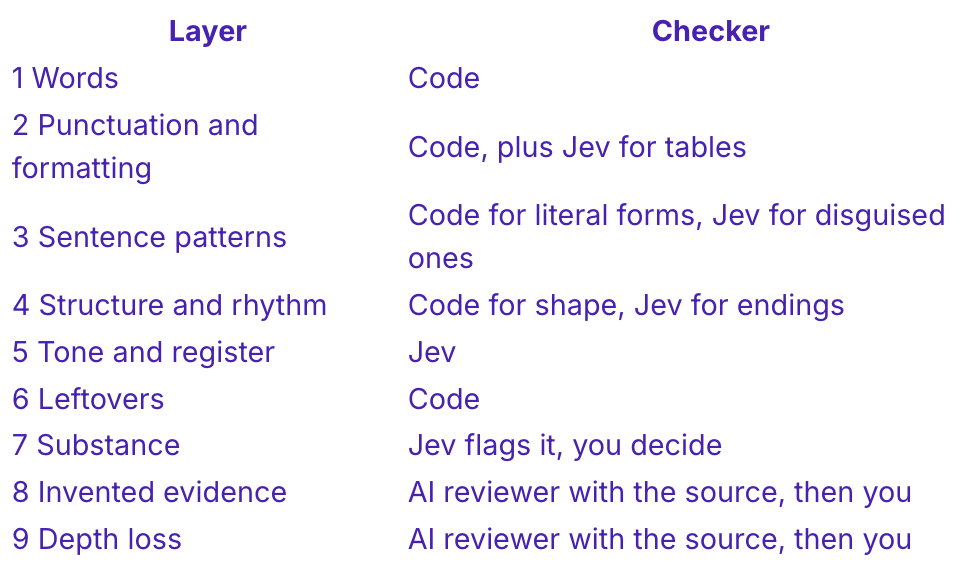
Layers 8 and 9 stay with you, and so does the stance. A checker can point at the sentence. But only you know whether it happened, what the source said, and which side you’re on.
An AI flavor checker finds the flag. Whether to fix it is still your call.
Fix every flag and you get a different kind of slop: a voice with nothing left in it that belongs to you.
The rule I’d use: if a fix makes the text sound less like how I’d say it, do not make it. The flag stays, marked as kept on purpose.
So keep some flags on purpose, and write down why, with a boundary.
Next Steps
What you can do today:
Choose one passage. Open a recent AI-assisted draft and pick a paragraph that feels wrong. Use the nine layers to name the problem before asking AI to change it.
Use the relevant prompt. Paste the prompt for that layer beside the passage. Include your source notes when you check evidence or lost reasoning.
Compare the repair with the original. Check whether it keeps your meaning and reads more naturally. Keep any deliberate style choice, and note why it works in that passage.
This article gives you a sense of each layer. Behind each one, I have collected 90+ pages of examples, fixes and the reasoning behind each, they are simply too long for one article. So for paid members, I put together the full set:
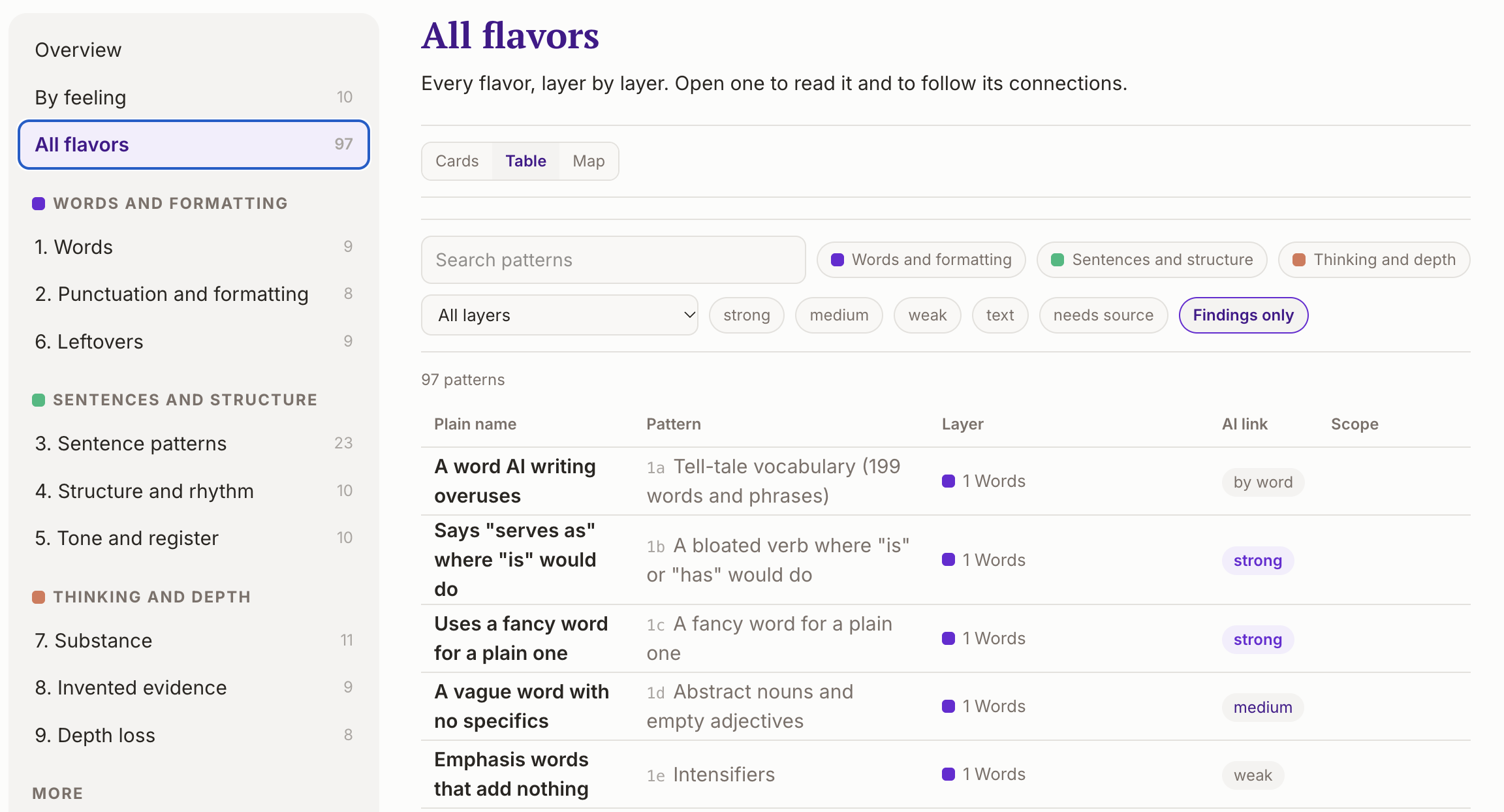
The AI Flavor Handbook. All nine layers in full, with 97 patterns you can search and filter, and the 199-entry vocabulary list with the sources behind each flag
Real reports, walked through. Three AI Writing reports on published drafts, with what to fix, what to keep, and why. The live pages stay unchanged, so you can check each report against the text.
The AI writing skill on the Build to Launch MCP. Run the same review on your own drafts in Claude or ChatGPT, with Jev’s checks built in.
If someone comes to mind who keeps asking AI to “humanize” a draft and still dislikes the result, share this guide to them.
And if someone shared this with you, subscribe free so you don’t miss the next guide.
Which layer keeps slipping past you?
— Jenny