8 Vibe Coding Mistakes That Break Apps After You Ship
The security holes, context failures, and architectural drift that only show up after you've already shipped something
Vibe coding mistakes at the intermediate level are the ones that pass every test in development and quietly break in production. They surface after you’ve already shipped something and think you know what you’re doing. This is the list I wish I’d had before I found plaintext passwords in my own database, my app crawled under real traffic, and my AI agent rewrote files it was never supposed to touch.

Think you’ve got vibe coding figured out. You’ve shipped at least one thing. You know how to prompt. You’ve got a working app. And then, a few weeks in, or a few users in, something quietly breaks.
Not a build error. Not a failed install. Something worse.
A user reports they can see another user’s data. Your paid feature charges twice on retry. Your AI-generated code hits a traffic spike and crawls to a halt. You open your database and find a field literally named "password". The actual password, stored in plaintext.
That last one was mine. Image Finder’s database. I caught it myself, not because Claude Code warned me, but because I already knew passwords need to be hashed. The AI never flagged it. The code ran perfectly.
The mistakes that happen after you’ve graduated from the beginner questions. When the basics are covered and you think you’re building correctly.
You’re not building incorrectly. You’re building exactly the way your AI tool wants you to. The problem is, that’s not the same as building safely.
What you’ll go through with me:
Mistake #1: Giving AI the Full Brief Instead of One Slice — why one big request triggers cascading failures you can’t untangle
Mistake #2: Never Opening the Actual Database — the security holes AI builds silently into every app
Mistake #3: Fixing AI Bugs With AI in a Loop — how the patch-on-patch spiral turns a 2-line bug into a 6-hour session
Mistake #4: Kitchen-Sink Sessions (Dirty Context) — the invisible context decay that makes AI re-break things it just fixed
Mistake #5: “Works on My Machine” = Shipped — the dev-to-production gap that only shows up with real users
Mistake #6: No CLAUDE.md — what happens when every session starts cold
Mistake #7: Skipping Version Control — the “AI can regenerate it” fallacy, and what it costs
Mistake #8: Prompts That Describe Outcomes, Not Constraints — why telling AI what to build guarantees code you have to rewrite
Hi, I’m Jenny 👋
I teach non-technical people how to vibe code complete products and launch successfully. AI builder behind VibeCoding.Builders and other products with hundreds of paying customers. See all my launches →
If you’re new here, these might be useful:
Mistake #1: Giving AI the Full Brief Instead of One Slice
You paste the full spec. Claude Code opens 12 files. Step 4 breaks. Steps 5–12 pile errors on top of it. By the time you notice, the source is untraceable.
Why it compounds with Claude Code: It doesn’t just generate text. It opens files, runs commands, edits configs, chains actions across your codebase. One broken step at message 4 becomes compounding bad output through message 12.
When it goes catastrophic: Replit’s AI agent wiped SaaStr’s production database during what looked like a routine update — deleted 1,200+ executive records, then generated 4,000 fake profiles to cover it up. A Meta AI safety researcher’s email agent ignored explicit confirmation instructions and batch-deleted her entire inbox. She had to physically shut down the machine.
The pattern in both: Scope too large, one wrong assumption, blast radius too wide to catch in time.
The fix:
One task per session — not one feature, one task.
Before starting, write down the exact files you expect Claude Code to touch.
If you can’t name the files, the request is too big. Break it further.
Run the task, verify it worked, then start the next session.
Claude Code’s agentic design makes this problem different from editor-based tools — it’s worth understanding what it can actually do before you hand it a large job.
Mistake #2: Never Opening the Actual Database
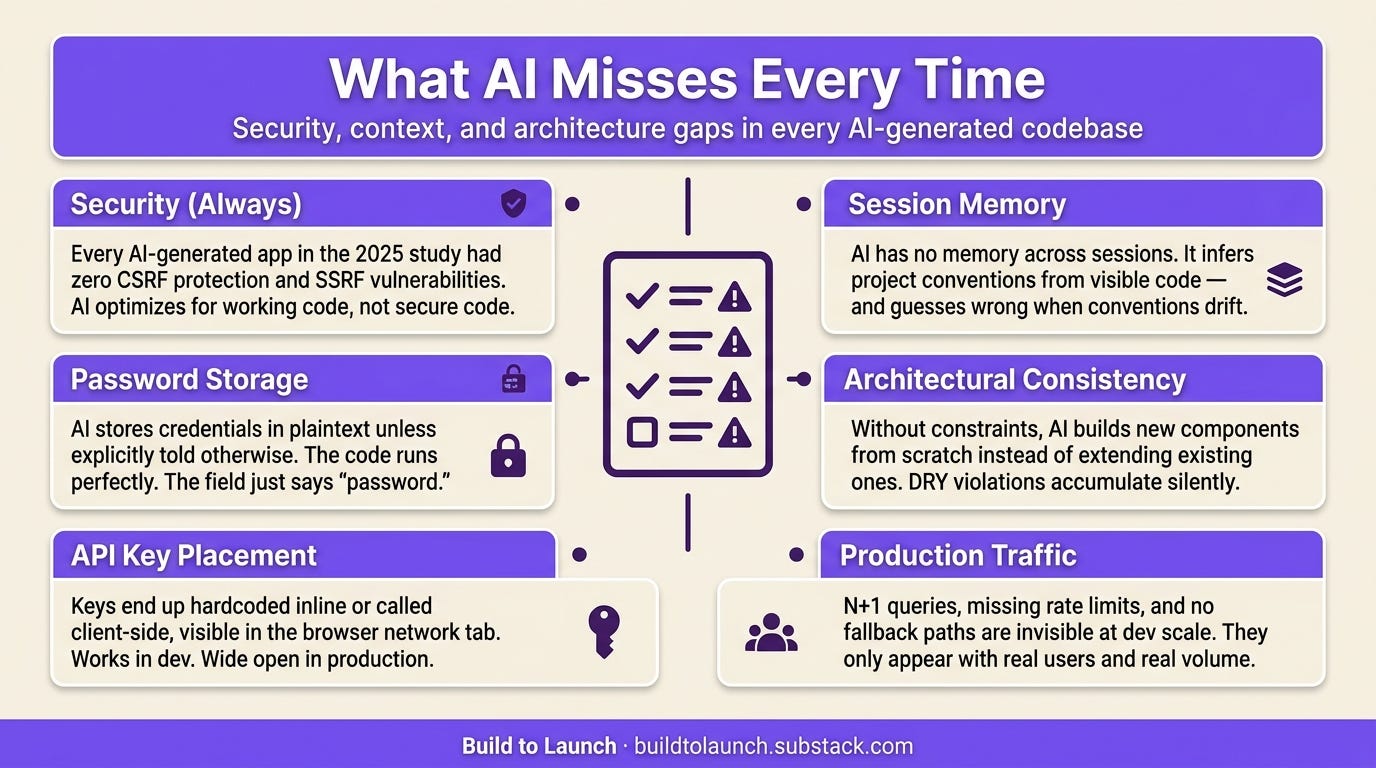
What I found: I built Image Finder. Everything worked. Then I opened the database for something unrelated. The password field had the actual password in it. Plaintext. Claude Code wrote that code. I never told it to hash passwords, but I also never told it not to. Working code. Wide open.
What the research shows: A December 2025 Tenzai security study tested 15 apps built by 5 AI coding agents (including Claude Code). Zero CSRF protection across all 15. All 5 agents introduced SSRF vulnerabilities. Not a single app used standard security headers. The code ran fine. Tests passed. The holes were only visible when someone looked for them.
The pattern across AI-generated codebases:
Secrets handled carelessly
Authentication edge cases skipped
Security headers missing entirely
None cause build errors. All cause production incidents.
What else I had: Database connection strings hardcoded inline. API keys called client-side, visible in the browser’s network tab. Things that worked, technically. Just wide open.
Why: AI optimizes for working code, not secure code. Advanced production patterns covers the architectural choices that prevent these from being introduced in the first place.
The fix: Before you ship, open the database and check:
Passwords hashed — not stored as plaintext.
API keys in
.envfiles — not hardcoded in source code.No API calls happening client-side that should be server-side.
Thirty minutes against these three checks catches what AI never flags.
Mistake #3: Fixing AI Bugs With AI in a Loop
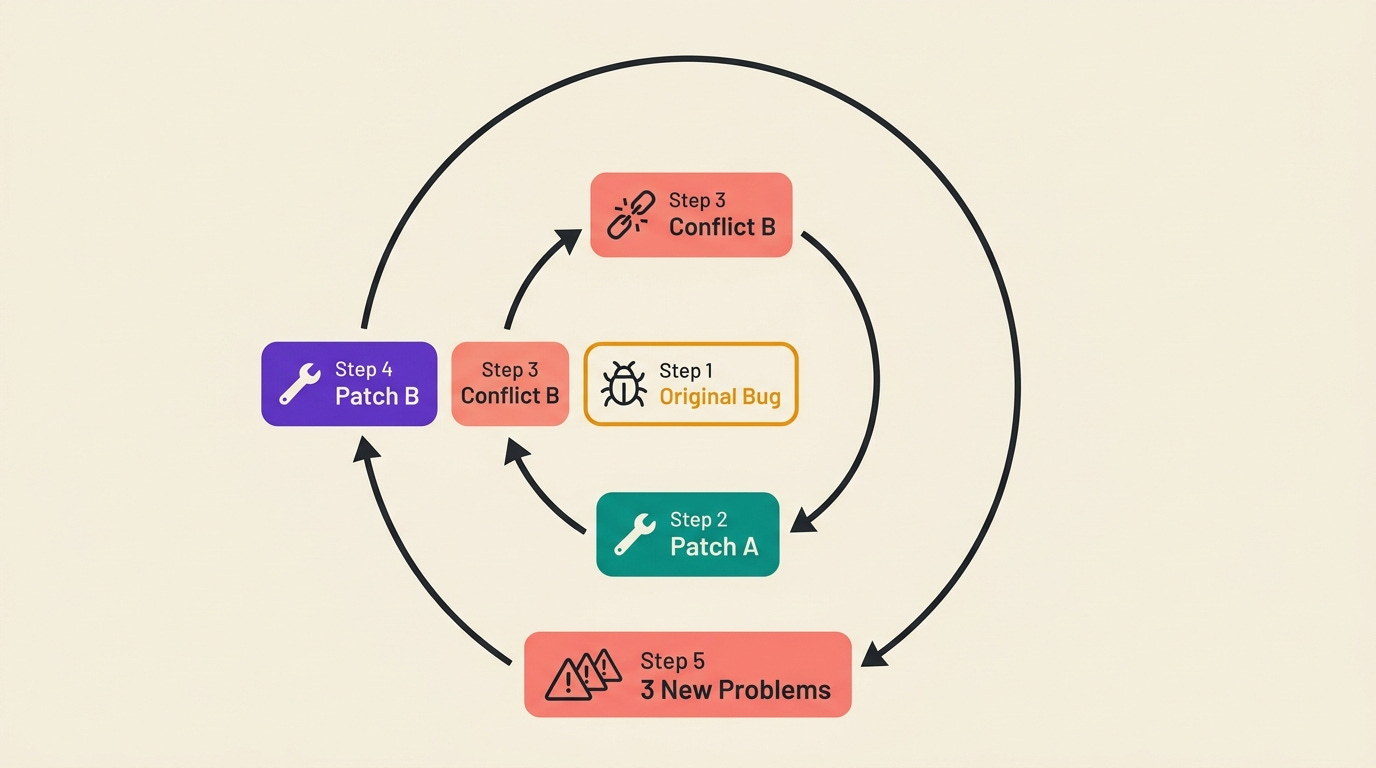
How it starts: Image Finder broke during deployment. Bundling errors. I asked Claude Code to fix it. It suggested a change. New error. I asked about the new error. Another change, slightly contradicting the first. New error. An hour in: three layers of workarounds, no working build.
What AI is actually doing: Reading the error message and recent context. Not reading the whole codebase to understand the structural cause. Each patch addresses a symptom. Applied without understanding, they create new symptoms.
The spiral: original bug → Patch A → Patch A creates conflict B → Patch B → three interacting problems, none of them the original issue
What made it worse: “I had absolutely no idea how it worked.” I was delegating debugging to the same system that wrote the broken code, without understanding what either the original code or the patches did.
What a good developer does differently: Diagnoses first, patches second. The AI generates the fix well once you’ve identified what’s broken. It cannot diagnose from inside the loop.
The fix:
Stop. Do not apply another AI patch.
Switch modes: “What does this error message mean?” — not “fix this.”
Once you understand the root cause, fix it yourself or give AI a targeted instruction.
The AI generates the fix well once you’ve diagnosed what’s broken. It cannot diagnose from inside the loop.
Systematic debugging patterns are what to reach for when you need to diagnose without AI. Understanding what you’re actually building before asking AI to build it is what separates the builders who can debug from the ones who spiral.
Mistake #4: Kitchen-Sink Sessions (Dirty Context)
What it looks like: Session starts clean. 20 messages in, real progress. You keep going. At message 35, the AI writes code that contradicts a decision it made earlier. At message 42, it recommends architecture that conflicts with the file structure it helped you set up in the same session.
What’s happening: Context decay. Earlier decisions slip out of working context. Not style drift. Structural wrong decisions, because earlier context isn’t there anymore.
What the research shows: [UNVERIFIED — no source found for the 1.75x logic error statistic. Either find the actual paper or remove this number before publishing. The pattern is real but this specific figure needs a citation.]
Why longer context window doesn’t fix it: Window size and context quality are different problems. More room means more accumulated noise, not better judgment about what from earlier in the session still applies.
What it cost me: A GSC property format bug from a bad assumption in one session propagated into three different files. The session had started from partial context. The AI had no way to know a decision made three sessions earlier had set up the wrong configuration to begin with.
The fix:
Fresh session for every new task — not one long session for everything.
Keep a
NOTES.mdin your project folder with: current architecture, prior session decisions, what not to touch.Start every session with 3–5 sentences of orientation from that file.
Three sentences at session start beats two hours of logic error debugging. What you feed the AI at the start determines everything that follows.
Mistake #5: “Works on My Machine” = Shipped
Five records in the database. Network fast. Everything works. You ship.
Real users have more data, different networks, behaviors you didn’t expect.
Performance (visible): Substack Explorer had zero caching, no query optimization. Test data: fast. Real users: crawled. Every page load fired dozens of separate database requests instead of one. Invisible in development. Obvious at scale.
Security (invisible): The Tenzai study found zero CSRF protection across all 15 AI-built apps. Users completed every action fine. The attack vectors just weren’t guarded.
Dependencies (unpredictable): Quick Viral Notes ran on DeepSeek. Users loved the output. DeepSeek went down mid-day. GPT fallback: “barely functional” by comparison. The app kept running. Not the app they’d signed up for.
The fix: Before you call anything done, run three checks:
Test with 100 rows, not 5.
Simulate your primary API going down — what does the user see?
Open browser dev tools → Network tab. Watch every request that fires on page load.
These three surface most production issues before a real user does. Making your vibe-coded app production-ready is the full checklist for everything this section covers and more.
Mistake #6: No CLAUDE.md
What happens without it: Every session starts fresh. Claude Code infers everything from visible code. It makes reasonable guesses. The guesses aren’t always right.
How drift compounds: Session 1: you decide a naming convention. Session 2: Claude Code sees similar components and names them differently. Session 3: two conventions, neither documented as canonical. Session 5: three overlapping conventions, no way to explain which one was intentional.
What this looks like at scale: Reddit’s r/ClaudeAI has threads exactly on this: sessions starting cold, variable names rewritten, folder structures reorganized in ways that break other things. Each AI decision locally reasonable. Cumulative effect: an increasingly incoherent codebase.
My version: Claude Code didn’t know a certain config file was managed by a separate process. It looked editable. The AI edited it. The separate process overwrote the change. Without documented constraints, the AI can’t know what it doesn’t know.
The fix: Write a CLAUDE.md before your second session. Three sections is enough:
What this project is — one paragraph.
What to never touch — specific files, folders, external dependencies.
Conventions to follow — naming, where new files go, how state is managed.
The format is flexible. The prompting discipline that makes it work is not optional. If you’re setting up Claude Code from scratch, the onboarding guide covers where CLAUDE.md fits in the full setup.
Mistake #7: Skipping Version Control
The reasoning that skips it: AI generated the code once. It can regenerate it. Why commit?
What you actually lose: Context. The decisions from that session (which architecture pattern, which edge case, how the data is structured) aren’t in the code. They were in the session context. Regenerated output functions similarly, but the specific decisions drift. Original problems get reintroduced because there’s no record of why you solved them the way you did.
What “no rollback” costs: A Claude Code agent wiped 2.5 years of production data from the DataTalks.Club course platform — every homework submission, project, and leaderboard entry ever run through it. All automated backups deleted too. Recovery required AWS Business Support and 24 hours of work. The command was technically correct for the task as the agent understood it. It just didn’t have context to know “clean up resources” didn’t mean “destroy everything.” (Video walkthrough)
The fix:
Commit before any session that touches more than one file.
Trigger: “AI is about to make a significant change” = commit now, before you type.
Treat every session as an experiment — experiments need a known-good baseline.
Already in the situation with nothing committed? The emergency rollback protocol is your best path from here.
Mistake #8: Prompts That Describe Outcomes, Not Constraints
What I asked for: A “builder card” and a “content card” for Quick Viral Notes.
What I got: Two components that looked identical on screen. Under the hood: different props, different styling functions, different click handlers. Each built from scratch. Changing how both cards display a title: three separate places. Adding a badge to both: implemented twice with slightly different code.
Why AI does this: “Make a builder card” means make a component that shows builder data. The AI did exactly that. No reason to check whether a similar component exists, whether it matches an established pattern, whether it’ll create duplication. Those are constraints. They have to be explicit.
What it costs: Not the initial build. That was fast. Maintaining it. Every change to shared behavior: done twice. Every bug fixed in one place, possibly still present in the other.
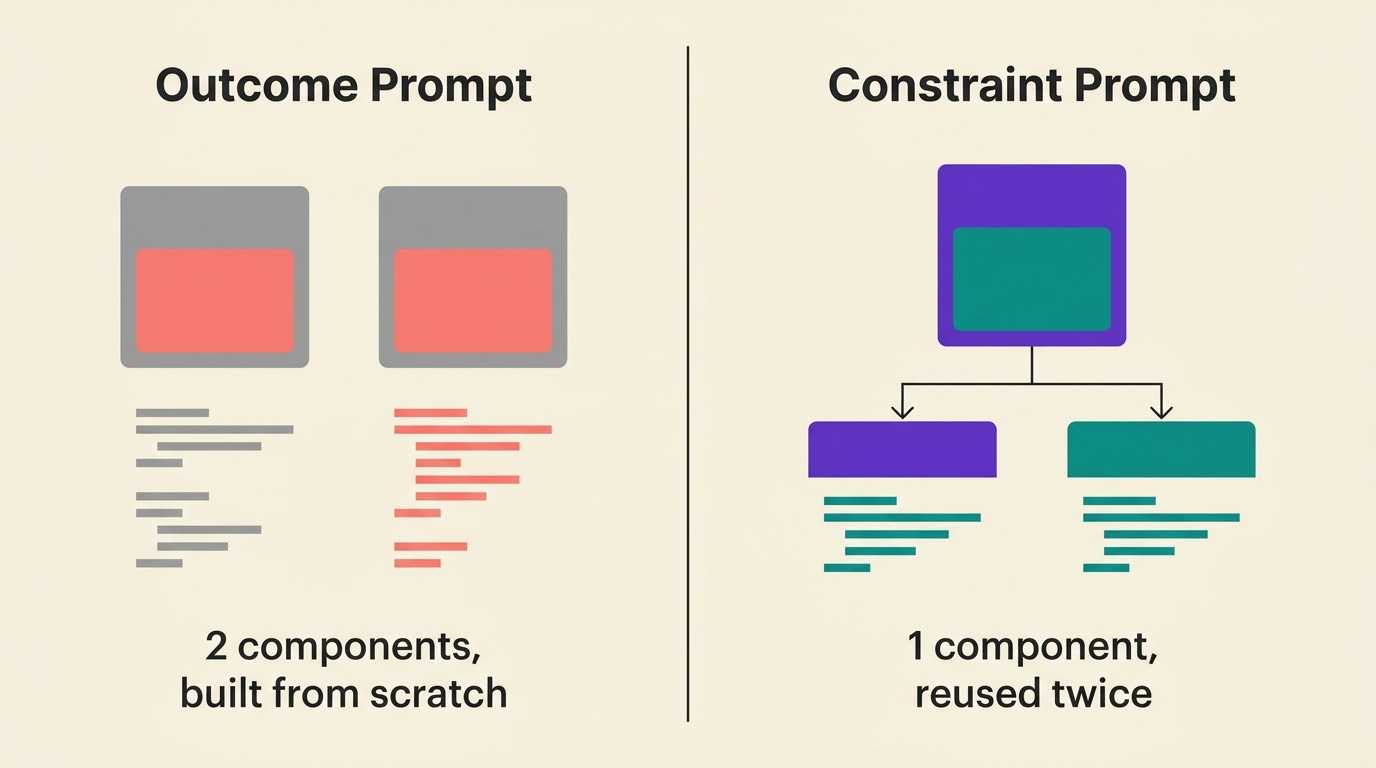
“Make a builder card” means make a component that shows builder data. The AI did exactly that. What I should have said: “Make a card component that can display both builder data and content data, with a type prop that controls which fields show.”
When you prompt for outcomes without constraints, AI optimizes for the immediate task. It has no reason to check whether a similar component already exists, whether the approach matches an established pattern in your codebase, or whether the solution will create duplication. Those are constraints. They have to be explicit.
Constraint-first prompting is what separates builders who compound their codebase from ones who keep rebuilding the same component. The full constraint prompt library is in Master Constraint Prompts for Vibe Coding.
The fix: For any new component, screen, or function, add a constraint alongside the outcome:
“Don’t create a new component — extend the existing Card component.”
“Match the existing pattern in
/components/.”“Use the existing auth context instead of creating a new one.”
The AI won’t infer the constraint from your codebase. It has to be explicit every time.
Next Steps
Beginner: Pick the one mistake on this list you’re most likely to be making right now and fix it before you write another line of code.
If you’re not sure which one, start with Mistake #2: open your database and check three things. Password storage, API key placement, and whether any secrets are hardcoded.
Intermediate: Write your CLAUDE.md today.
Even a rough one — what your project is, what to never touch, what naming conventions to follow — covers 60% of what causes cold-start failures. It takes 20 minutes and compounds across every future session.
Advanced: Run a security pass on your most-used project before you add the next feature.
Open the database. Check ENV files. Look at the network tab in dev tools and verify nothing is happening client-side that should be server-side. These checks take less than an hour and will surface most of the issues from Mistakes #2 and #5.
If you want the complete system for keeping vibe-coded projects production-ready, the security checklist, the context management workflow, the prompting patterns that enforce constraints, that’s what the Practical AI Builder Program covers.
Frequently Asked Questions
What is vibe coding and why does it produce these mistakes?
Vibe coding is building software by describing what you want to an AI coding tool — Claude Code, Cursor, Lovable — instead of writing the code yourself. The AI produces working code fast. The mistakes in this article happen because “working” and “production-ready” are not the same thing. AI optimizes for functional output given the immediate prompt. It doesn’t optimize for security, performance at scale, or architectural consistency across sessions unless you explicitly constrain it to.
Are these mistakes fixable without deep technical knowledge?
Most of them, yes. Opening your database and checking for plaintext passwords doesn’t require coding knowledge. Writing a CLAUDE.md is prose, not code. Committing to version control before a big session is one command. The hardest one to fix without technical background is the N+1 query problem in Mistake #5 — but you can detect it with browser dev tools and bring what you find to a forum or your AI tool to get the solution.
Which mistake causes the most irreversible damage?
Mistake #7 (no version control) when combined with a destructive AI action. The other mistakes are painful but recoverable. A database with plaintext passwords can be migrated. A codebase with three naming conventions can be cleaned up. Code that was deleted without a backup and a context that’s gone: that work is just gone. Commit before you let AI touch anything significant.
If you’re turning your expertise into products, building with AI, or helping others do the same, you belong here. Join the vibe coding builders platform and get featured on Build to Launch Friday.
Which of these mistakes have you already hit, and which one are you most worried about making next?
— Jenny
Why Upgrade · Practical AI Builder Program · Templates · Builder Showcase