Claude Cowork Scheduled Tasks vs Local Routines vs /loop vs Cloud Routines: What's Actually Different (2026)
The product map Anthropic never drew: four scheduling modes, five surfaces, and one failure-cost test that routes every automation job.
Claude Routines run in the cloud without your machine. Cowork Scheduled Tasks run locally. /loop lives in your terminal session. Anthropic shipped most of these in the same year, and the product map was never drawn. This guide maps all five Claude surfaces, compares the four native scheduling modes, and gives you one question that routes every automation job to the right tool.

You open Claude Code to schedule one recurring task. Then the names start multiplying:
Some run in the cloud. Some run only while your machine is awake. Some live in the terminal. Some live in the desktop app. Two share the same app and the same local scheduling engine, but show up in different places for different builders.
I ran into that wall with Cowork tasks firing on my laptop, Cloud Routines configured in the Claude Code desktop app, and /loop sessions open in a terminal. Three of those things competed for the same jobs. Figuring out the split took longer than it should have because the only way to understand what each one breaks on is to watch it break.
After sorting which jobs belong in each Claude tool, I finally have a clean mental model. This guide is that map.
What’s Inside:
Hi, I’m Jenny 👋
I build AI systems and tools, then share how I did it. I run the Practical AI Builder program, for people who already use AI and want to build real things with it. Check it out if that sounds like you.
If you’re new to Build to Launch, welcome! Here’s what you might enjoy:
Claude Code /loop: How to Keep It Running Until the Work Is Done
Claude Code Redesign Breakdown: Routines vs Cursor vs OpenClaw

What’s in Claude’s Complete Ecosystem?
They’re all Claude. But five different surfaces. Two of them share the same desktop app and still behave differently from each other.
“Claude Code” sounds like one thing. It isn’t. The CLI and the desktop app are both called Claude Code, but they target different users and their automation features run in different environments. Cowork lives inside the same desktop app as Claude Code. They feel like siblings when you look at them side by side. They’re not.
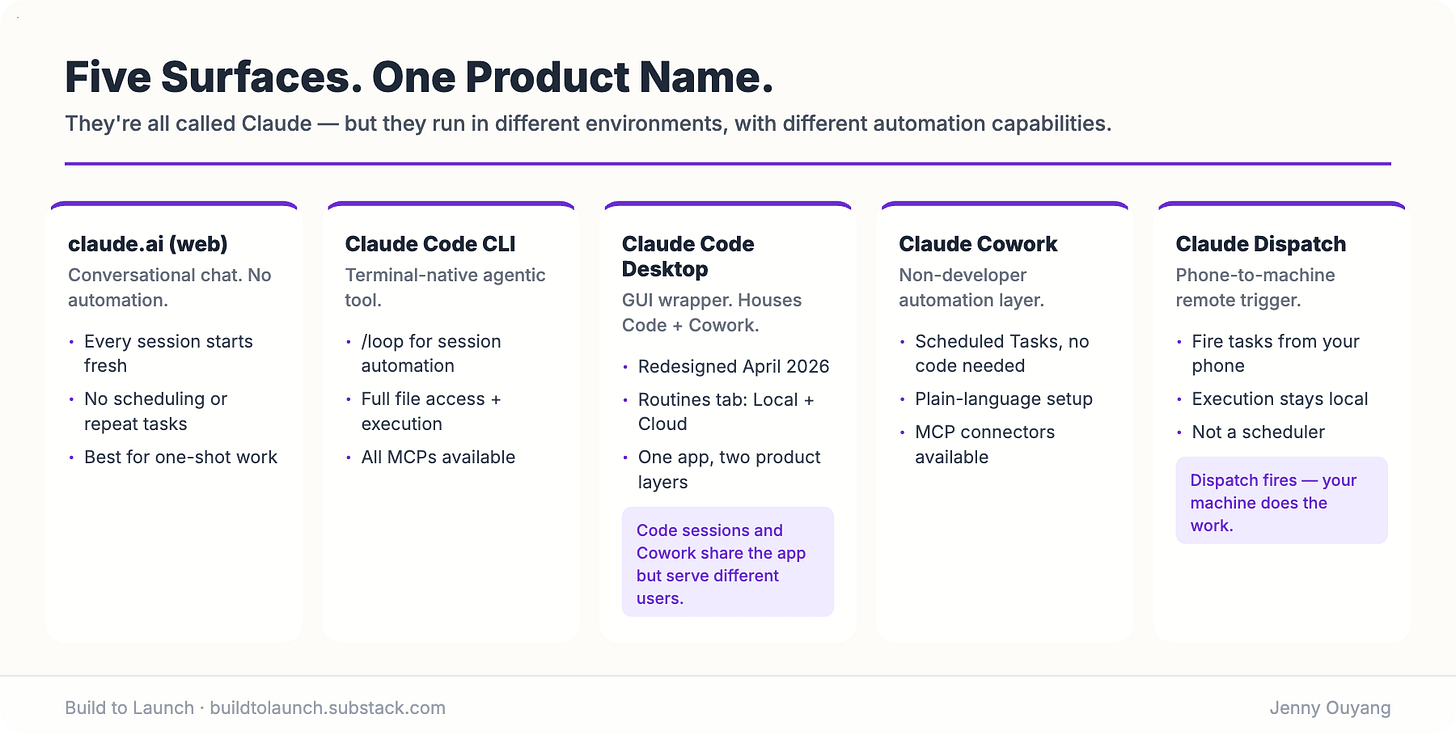
claude.ai (web): Conversational chat. No automation. No scheduling. Every interaction starts fresh. The right tool for thinking out loud, drafting, and one-shot work that doesn’t need to repeat.
Claude Cowork (inside Desktop): The non-developer automation layer inside the same Desktop app as Claude Code. Its automation feature is Scheduled Tasks: the non-developer entry point to the same Desktop Scheduled Tasks engine that Claude Code’s Local Routines use. Same local execution, different interface, different user. Cowork’s path is designed for knowledge workers: plain-language task setup, MCP connectors, no code required.
Claude Code CLI (terminal): The terminal-native agentic tool. This is where /loop lives. Developer-first. File access, code execution, MCPs: all available.
Claude Code Desktop App: The GUI wrapper for Claude Code, redesigned in April 2026. The sidebar shows your projects, parallel sessions, and a Routines tab. This is the app that houses both Claude Code sessions and Cowork. One app, two distinct product layers.
Claude Dispatch: Not an automation tool. A remote trigger bridge. Dispatch lets you kick off Claude Code tasks from your phone and have them execute on your machine. The execution still happens locally.
Once you know which surface you’re in, the tool choices narrow fast.
Claude’s Four Scheduling Modes: Which One Is Right for You?
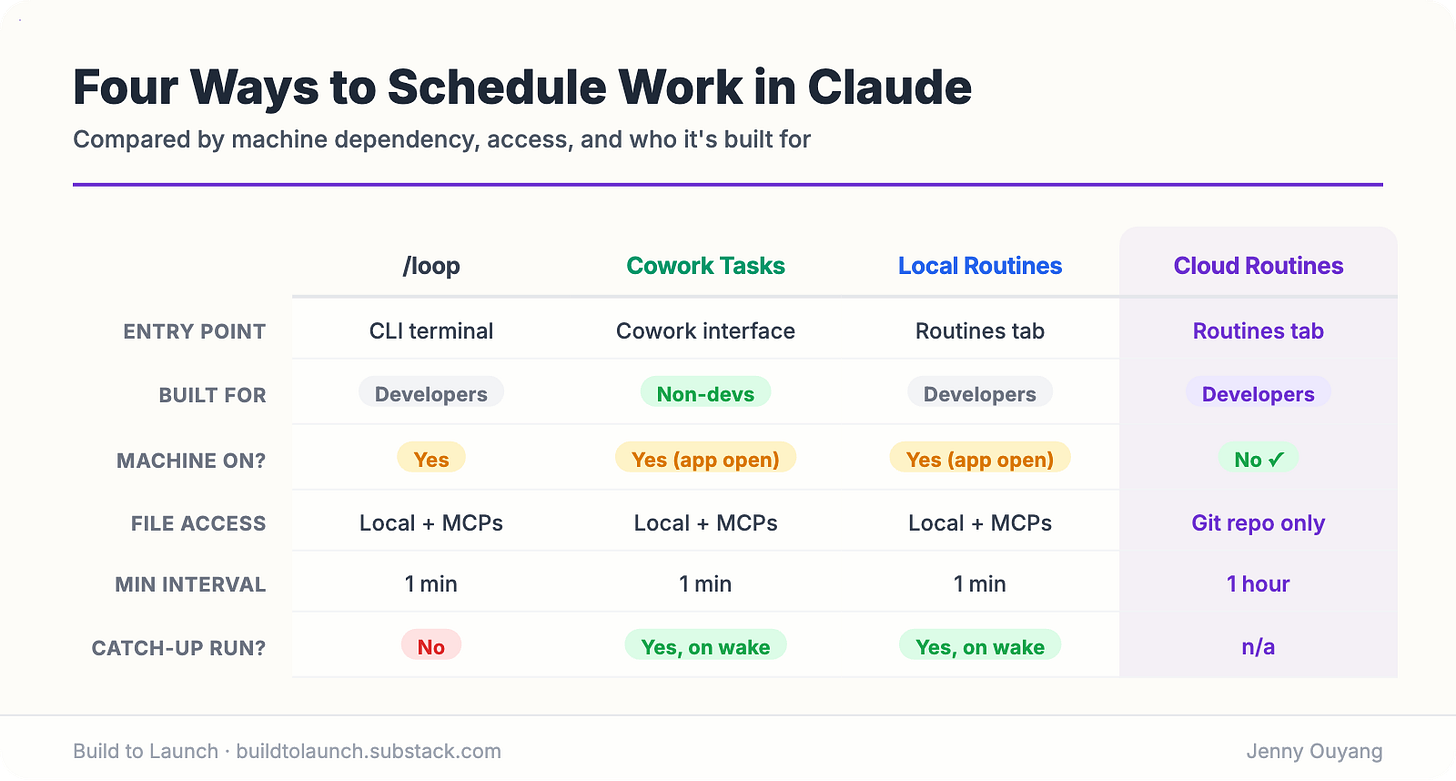
Four options. People lump the middle two together. That’s exactly where the confusion starts.
/loop is session-scoped: terminal only, dies when you close it.
Cowork Scheduled Tasks are the non-developer path: you set them up inside the Cowork interface. They run remotely, on their cadence, even with your computer asleep and the Claude Desktop app closed. The one exception the docs name: a task that needs local files or apps runs locally instead.
Desktop Scheduled Tasks are the developer path to a genuinely local run: Claude Code Desktop, Code tab, Routines, New routine, then choose Local. Despite the button, what you get is a Desktop scheduled task, which has its own product page and its own behavior.
Cloud Routines run on Anthropic’s infrastructure. Your machine can be completely off.
That was true when I published this in May, and it stopped being true on July 7.
Anthropic’s release notes for that date: Cowork “runs your sessions remotely (in beta), so your sessions and files are saved to your Claude account and go where you go, on any device. Work continues when you close your laptop, and scheduled tasks run with no device online.”
Two months after this guide went up, the thing it described moved house.
It is still a beta, and it rolled out by plan, starting with Max. So there is a real chance you read that and think mine are definitely still local. You may well be right. I have 21 scheduled tasks running on this Mac at this moment, sitting in ~/.claude/scheduled-tasks/, one folder each, and they only fire when the app is open and the machine is awake.
But those are Desktop Scheduled Tasks, which is a different product that happens to share most of a name. Check the folder. If your tasks are in there, they are local, and the July change does not touch them.
What kills each one
/loop:
Close the terminal. Dead immediately.
Computer sleeps. Dead.
Seven days pass. Recurring tasks expire 7 days after creation: the task fires one final time, then deletes itself.
Context window fills in long sessions.
Cowork Scheduled Tasks:
The task needs a local file or a local app. It drops to running locally, and then your machine does have to be awake.
You are actually running Desktop Scheduled Tasks and calling them Cowork tasks. Check
~/.claude/scheduled-tasks/— if your tasks are folders in there, they are the local ones, and everything below about remote execution does not describe them.You expected it to reach a folder on your Mac. By default it can’t: scheduled tasks work with your connectors and the files saved to your Claude account.
A closed app or a sleeping machine no longer kills the default remote run. If you built around the old catch-up behavior, that scaffolding is now dead weight.
Consumes quota faster than regular chat. Multi-step planning and file reading adds up.
Desktop Scheduled Tasks:
Machine asleep or off at the fire time. This is the mode that genuinely needs the machine on.
You assumed it behaves like a Cowork Scheduled Task. It doesn’t, not any more.
Worth knowing: it runs against your working directory as it actually is, uncommitted changes included, unless you enable the worktree toggle when you create it.
Cloud Routines:
Task needs local files that haven’t been committed to git. Invisible. Starts from a fresh clone each run.
Task needs a local MCP tool. Not available in the cloud environment.
State needs to persist between runs. Doesn’t happen unless you write it somewhere yourself: an external file, a database, a commit.
Uncommitted changes. Not accessible.
The same task run four ways
Task: check whether your tests are failing every 30 minutes.
/loop: /loop 30m run tests works perfectly while you’re actively coding. Close the terminal and it stops. Useless overnight.
Cowork Scheduled Task: Set it up in plain language through the Cowork interface. Fires locally on schedule. Off at the scheduled time? Missed: one catch-up runs on wake.
Desktop Scheduled Task: Set it up via Claude Code Desktop, Routines, Local. This is the one that can actually run your local tests, because it runs on your machine and sees your working directory as it stands. Minimum interval one minute, so every 30 minutes is comfortable.
Cloud Routine: Configure a schedule, or an API trigger you POST to, or a GitHub trigger on pull request and release events. Never misses. But it only sees committed code, and its minimum interval is one hour, so every 30 minutes isn’t on the table. If you’re testing a local branch that hasn’t been pushed, the Routine is running against something else.
All four can run this job. The right one depends on where you are in the app, what it needs to read, and whether your machine will be on.
Knowing what kills each one is more useful than knowing what each one can do.
To use /loop for real work, read this loop guide on write, code, research.
To build Claude Routines, check out Claude Routines worth scheduling.
To see Cowork Scheduled Tasks & workflows, check out Cowork use cases.
Three Different Things Are Called “Scheduled Tasks”
This is the part that will cost you an afternoon if nobody tells you.
Search for Claude scheduled tasks and you can land on any of four products. They run in different places and fail in different ways.
Cowork Scheduled Task
Documented at support.claude.com
Runs on Anthropic’s infrastructure
Your machine does not need to be on
/loopDocumented at code.claude.com/docs/en/scheduled-tasks
Runs on your machine, inside the session
Your machine needs to be on
Desktop Scheduled Task
Documented at code.claude.com/docs/en/desktop-scheduled-tasks
Runs on your machine
Your machine needs to be on
Claude in Chrome scheduled task
Shipped in the November 24, 2025 release notes
Runs in your browser
Your machine needs to be on
If you want the wider version of this, I mapped every AI scheduled-task surface I use across Claude and everything else. This section is the Claude-only slice of it.
Look at the middle row. The /loop documentation lives at a URL ending in scheduled-tasks. A reader searching that exact phrase can land there, read that tasks are session-scoped and die when the session ends, and walk away believing that’s how Claude scheduling works. It’s how one of the three works.
And the naming gets worse inside the app. Claude Code Desktop has one Routines screen with a New routine button. It offers Cloud and Local. Cloud gives you a Routine. Local gives you a Desktop Scheduled Task, which is a different product with a different page. The button you click and the thing you get have different names.
The One Question That Routes Every Automation Job
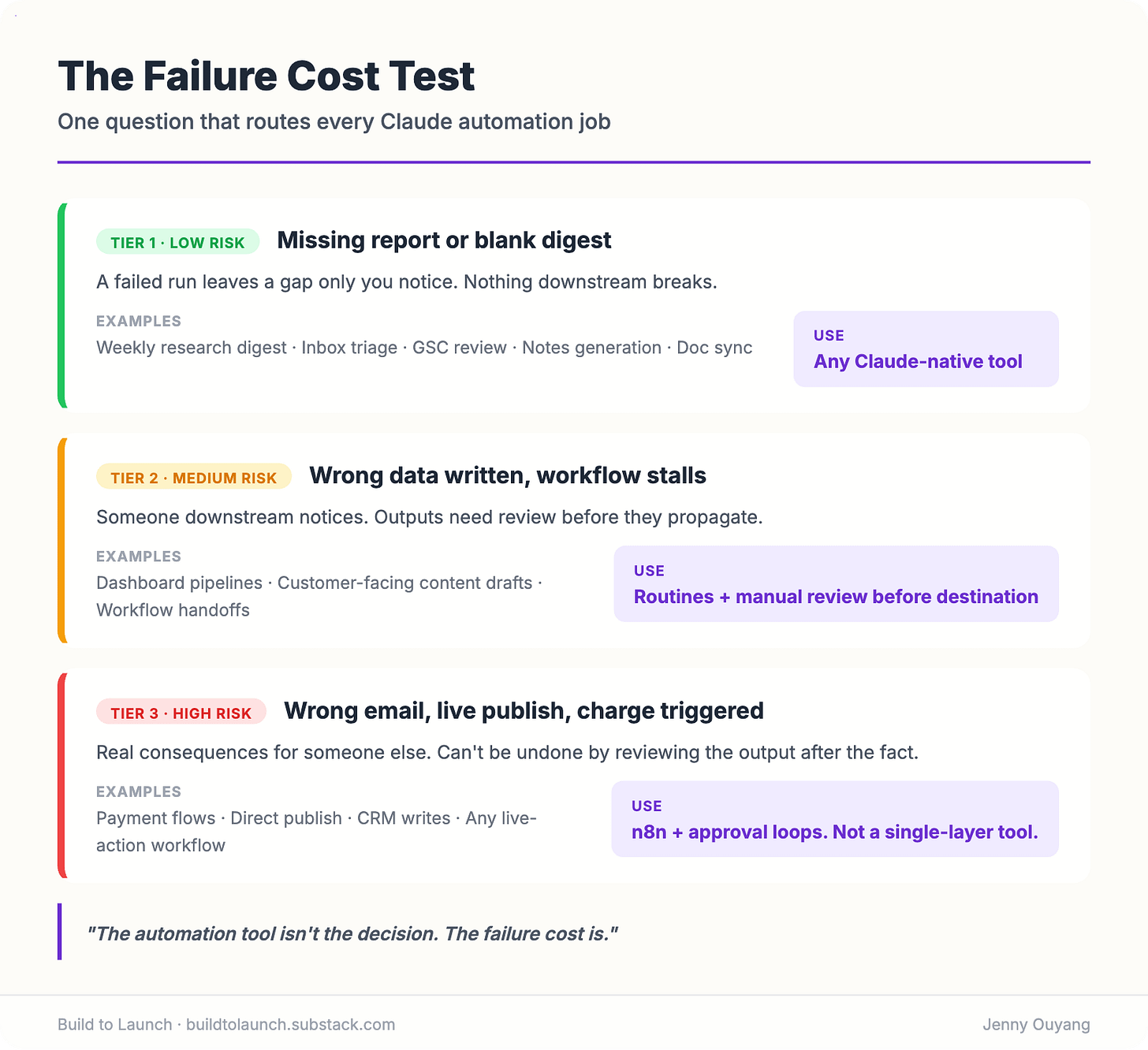
Ask one question: what happens if this run fails?
Not “will it fail.” It will. The question is what failure looks like and whether you can live with it.
Three tiers:
Tier 1: Low risk. A failed run leaves you with a missing report, a stale planning file, no Slack notification, or a blank digest. Nothing downstream breaks. Any Claude-native tool is fine.
Examples:
weekly research digest
GSC opportunity review
daily inbox triage summary
notes generation
doc sync
Tier 2: Medium risk. A failed run means wrong data written somewhere. A workflow stalls. Someone downstream notices. The outputs need review before they propagate.
Examples:
data pipelines feeding dashboards
customer-facing content drafts
workflow handoffs where the next step depends on the output
For these: use Scheduled Tasks or Routines, but review the output before it reaches its destination. Don’t set and forget.
Tier 3: High risk. A failed run sends the wrong email. Deletes data. Publishes publicly. Charges someone. Blocks another workflow that can’t recover.
Don’t automate these with any single-layer Claude tool. You need approval loops, execution logs, and a system that handles errors explicitly.
This rule explains why /loop is fine for checking test status but not for drafting customer emails. Why a Cloud Routine is fine for a weekly SEO report but not for pushing to production. Why n8n exists even though Claude is smarter at reasoning.
The automation tool isn’t the decision. The failure cost is.
When Claude’s Native Tools Reach Their Ceiling
Two things push past what Claude’s scheduling tools can do natively.
Memory across runs. Routines don’t remember last week. Each run starts fresh. If your workflow needs to track findings over time, that’s where a persistent agent system like OpenClaw fits. It holds state between runs in a way no Claude-native tool does. Full breakdown at OpenClaw autonomous agent.
Strict determinism. When a workflow touches payments, CRMs, or production databases, you need every step logged, retried on failure, and auditable. That’s n8n. Not because Claude can’t reason about it: for high-stakes operations you need a guarantee, not a judgment call.
The decision flowchart routes to both when the job requires them. For most recurring automation, it won’t.

My Actual Automation Stack: Which Jobs Live Where
Each job in my setup lives exactly one place. It took running things in the wrong tool, watching them break, and moving them. After the April 2026 redesign, I went through every OpenClaw workflow and asked whether Routines could take it.
About 80% moved to Routines. 20% stayed.
Not because Routines are more powerful. They aren’t. But most of what I wanted was smaller than I’d built: check a source, read a file, write a brief, clean an inbox, send the summary. That doesn’t need a full agent system.
Jobs that live in `/loop`
Active error monitoring during a coding session. I run
/loop 5m check for errorswhile building. Closes when the session ends.Short-lived polling during a build: “tell me when the deploy finishes.” Terminal-scoped, intentionally temporary.
Jobs that live in Local Routines
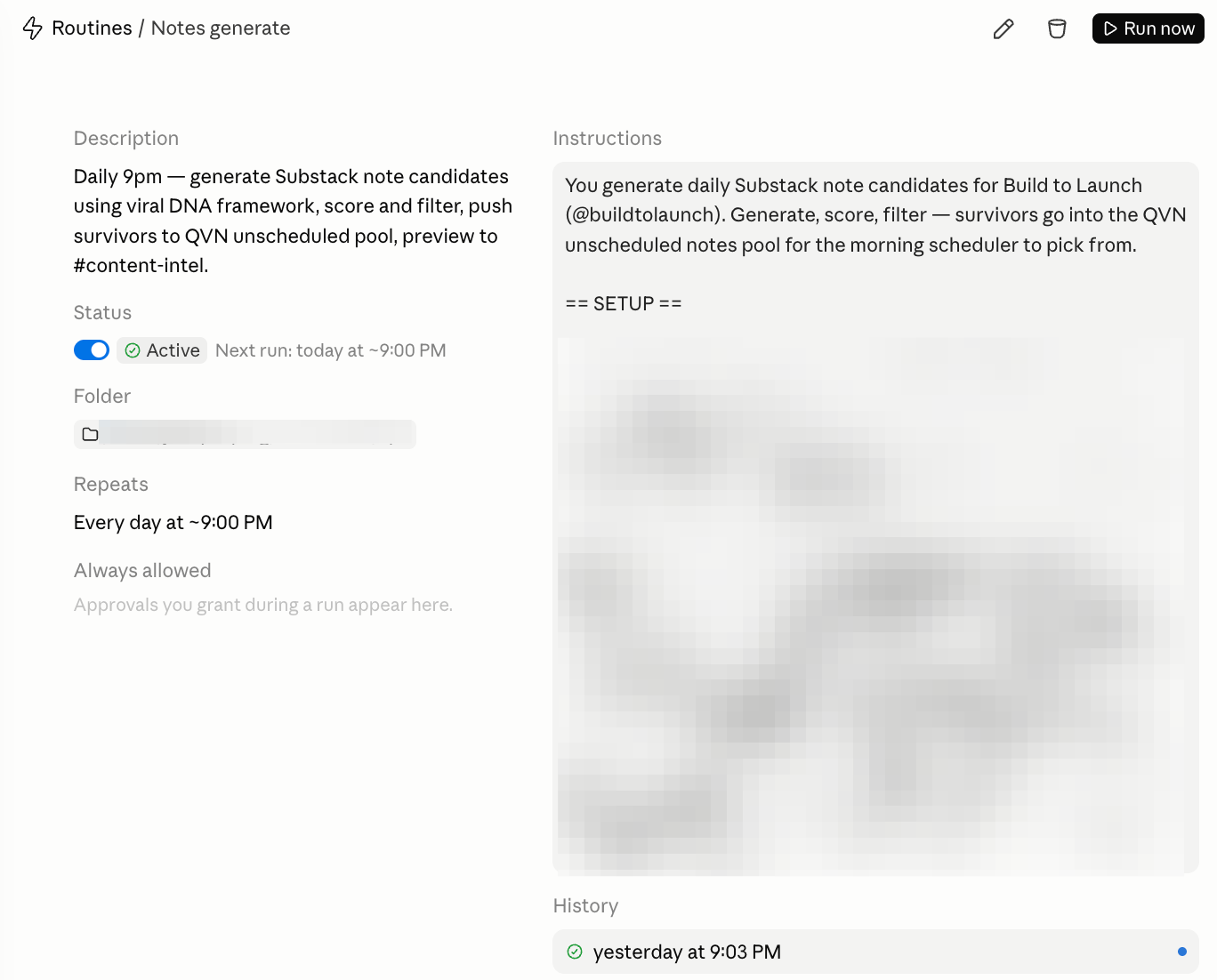
Notes scheduling. My Substack notes queue accumulates during the week. A Local Routine connected to the Substack MCP checks the unscheduled pool, applies spacing rules, and assigns publish times. It needs local MCP access and produces an output I review before anything goes live.
Local file-dependent tasks where I want the familiar Cowork project context but don’t need the job to run when my machine is off.
Jobs that live in Cloud Routines
These all moved from OpenClaw after April 2026.
Weekly research digest. Reads my watchlist, cross-references the content roadmap, writes a scored brief with the top 3 opportunities. Committed to git, notification to Slack when done.
Daily inbox triage. Sweeps all four Gmail accounts, classifies by routing rules, archives noise, flags anything infra-related. Digest in Slack by the time I’m at my desk.
GSC opportunity review. Reads the latest Search Console export, groups findings into three buckets, surfaces the top 3 SEO moves this week. Entirely file-based, no MCPs needed.
Social notes pipeline. Generates Substack Note candidates nightly, scores them against viral DNA markers, pushes survivors to the unscheduled pool.
Doc sync and weekly strategy review. Checks git logs, updates stale documentation, reviews posting performance, updates the strategy file.
All of these are: repeatable, file-based, scoped enough to review after the fact, and low enough risk that a missed run means a missing report. Not a broken workflow.
If you want the exact prompts and setup for any of these: 7 Cloud Routines worth scheduling.
The remaining 20% are workflows that need persistent memory or full file system access, they stayed outside Claude’s native tools entirely.
The rule I now use
If the work is repeatable, scoped, and reviewable, start with a Claude Routine.
Routines aren’t the top of the automation ladder. They’re the missing middle: small enough to set up today, strong enough to remove real recurring work.
How to Decide Where Each Claude Automation Lives
Start here. One question at a time.
The five questions
Question 1: Does it need to run while your machine is off?
Yes → Cloud Routines. Skip the rest.
No → continue.
Question 2: Does it need local files, MCPs, or local context that hasn’t been committed to git?
Yes, and you’re non-technical or using the Cowork interface → Cowork Scheduled Tasks.
Yes, and you’re in Claude Code Desktop → Local Routines.
Yes, and it only needs to run during your active session → /loop.
No → continue.
Question 3: Does it need memory from previous runs — actual context that accumulates over time?
Yes → OpenClaw. This is the hard ceiling for Claude-native tools.
No → continue.
Question 4: Does it touch external systems — CRM, payments, databases, production APIs?
Yes → n8n. Every step needs to be wired explicitly, logged, and deterministic.
No → continue.
Question 5: If this run fails, what breaks?
Missing report or stale file? → Any Claude-native tool. Pick based on where it runs.
Wrong data written or workflow stalls? → Use Scheduled Tasks or Routines, but build in a review step.
Wrong email sent, data deleted, live publish, charge triggered? → n8n with approval loops. Not a single-layer tool.
Five questions. One answer.
Where to Go From Here
The tools are not competing for the same jobs. They’re a stack.
If the flowchart pointed you to Cloud Routines, the fastest first build is the Weekly Research Digest. Takes one run to validate the output, one commit to make it live.
If it pointed you to Local Routines, start with one task. Not five. One.
If it pointed you to OpenClaw, start with the setup guide before touching any workflows. The architecture decisions you make early compound.
If it pointed you to n8n, the trigger is the place to start. Get the data into n8n first. Add the AI reasoning step after.
Most serious setups use at least two of them.
Frequently Asked Questions
Does Claude Cowork run when my laptop is closed?
No. Local Routines (Desktop Scheduled Tasks) require the Claude Desktop app to stay open and your machine to be awake when the task fires. If your machine is off, the run is skipped. One catch-up run does fire when your machine wakes or the app restarts, for the most recently missed time. Cloud Routines are the right tool if you need automation to run reliably on schedule regardless of your machine.
Can I use Cloud Routines without knowing how to code?
Yes. Routines are written in plain language: describe what you want Claude to do, how often, and which tools it can use. No scripts, no cron syntax required. The constraint is that Routines only see code you’ve committed to git. They run from a fresh clone each time.
What’s the difference between Claude Dispatch and Cloud Routines?
Dispatch is a remote trigger. It lets you start a Claude Code task from your phone. The task still executes on your local machine. Routines run on Anthropic’s cloud infrastructure, independently of your machine. Different execution environments, different use cases.
Is n8n still worth learning now that Claude has Routines?
For different jobs, yes. Routines are AI-native, reasoning-capable, and great at “figure this out” tasks. n8n is deterministic, integration-rich, and essential when you need every step logged and auditable. They complement each other. Builders who have both running use Routines for the reasoning layer and n8n for the data plumbing.
If I already have OpenClaw set up, should I move things to Routines?
Probably some of them. Jobs that are repeatable, scoped, and file-based are a clean fit for Routines. You no longer need OpenClaw’s infrastructure to run them. Jobs that need persistent memory, full system access, or self-improving behavior should stay in OpenClaw. I moved about 80% of my OpenClaw workflows to Routines after the April redesign. The remaining 20% are the jobs Routines genuinely can’t do.
The automation tool isn’t the decision. The failure cost is.
What’s the first job in your stack that you’d hand off if the right tool was already running?
— Jenny