Claude Code vs Cursor vs OpenClaw: How the 2026 Redesign Changes the Comparison
What actually changed in Claude Code's April 2026 redesign, how it compares to Cursor now, and the exact migration map I used to sort 18 OpenClaw automation jobs.
On April 14, 2026, Anthropic shipped a full redesign of the Claude Code desktop app: a new sidebar, parallel sessions, project tabs, and an automation layer called Routines.
I haven't been able to close the tab since. Half the time I'm delighted. Half the time I'm whispering yikes.
If you've followed my work, you know I've loved Cursor for writing and coding because it gave me one place to think. And when OpenClaw arrived, I went deep on its highest-level automation and self-learning capabilities for the same reason: nothing else could do that layer of work.
This is the first time Claude has felt like it might start collapsing both into one stack.
Not all the way.
But fast enough that I had to stop and re-evaluate my whole setup.
Four days in, here’s what I found.
What’s Inside:
What actually changed on April 2026 Claude Code desktop redesign: the old vs. new comparison that makes the thesis credible
How Claude Code UI compares to Cursor right now: where it wins, where Cursor still leads
What Claude Code Routines are: and how they compare to your own cron or OpenClaw at the capability level
What OpenClaw tasks are replaced by Claude Code Routines: the three-way migration with real job examples
How a non-developer gets the full value from Claude Code UI: including the Slack approval loop that runs with zero code
What are the real bugs and limits of the new Claude Code UI?
Where Claude Code is going next: and three things worth building now
Subscribed
Loading...

Hi, I’m Jenny 👋
I build AI systems and tools, then share how I did it. I run the Practical AI Builder program, for people who already use AI and want to build real things with it. Check it out if that sounds like you.
If you’re new to Build to Launch, welcome! Here’s what you might enjoy:

What is Claude Code UI and why it suddenly matters
Claude Code UI is Anthropic’s redesigned desktop interface for Claude Code, shipped April 14, 2026.
The short version: it’s a full application layer on top of the Claude Code CLI, built around parallel sessions, project organization, and a cloud automation system called Routines.
On paper, that sounds like a nicer wrapper around the CLI.
It is not.
Why that matters becomes obvious fast.
For years, building with AI meant removing one kind of friction at a time.
The first friction was contextual.
Too many docs. Too many tabs. Too many files. You broke your own thought just to fetch the one thing the model needed. Coding tools like Cursor solved that beautifully. Not just as a coding tool, the whole workspace.
The next friction was access.
Even in one clean workspace, AI still could not reach the systems real work depended on: email, files, storage, tools, live data. MCP and the CLI changed that surgically.
Then came automation.
Not another dashboard. Not another brittle control panel. Not another login just to see if the workflow was still alive. Skills that self-evolve, running on their own. That’s where OpenClaw shines.
Each of the last few AI moments were a huge unblock from before.
Cursor: one workspace.
MCP + CLI: one AI reaching real systems.
OpenClaw: one workflow that keeps running.
Now, Claude Code UI + Routines: the first thing that starts pulling all three into one place.
That is the personal reason the redesign lands so hard. Not because it looks better. Because it feels like convergence.
And the strategic pattern is impossible to miss now. Anthropic keeps watching what builders value, then shipping it natively.
That’s not criticism. It’s a roadmap signal.
“Claude’s roadmap: collaborate with rivals, learn from their prompts and orchestration, match them, then replace them.”
The UI redesign isn’t a feature drop. It’s a cycle completing.
What actually changed on April 2026 Claude Code desktop redesign
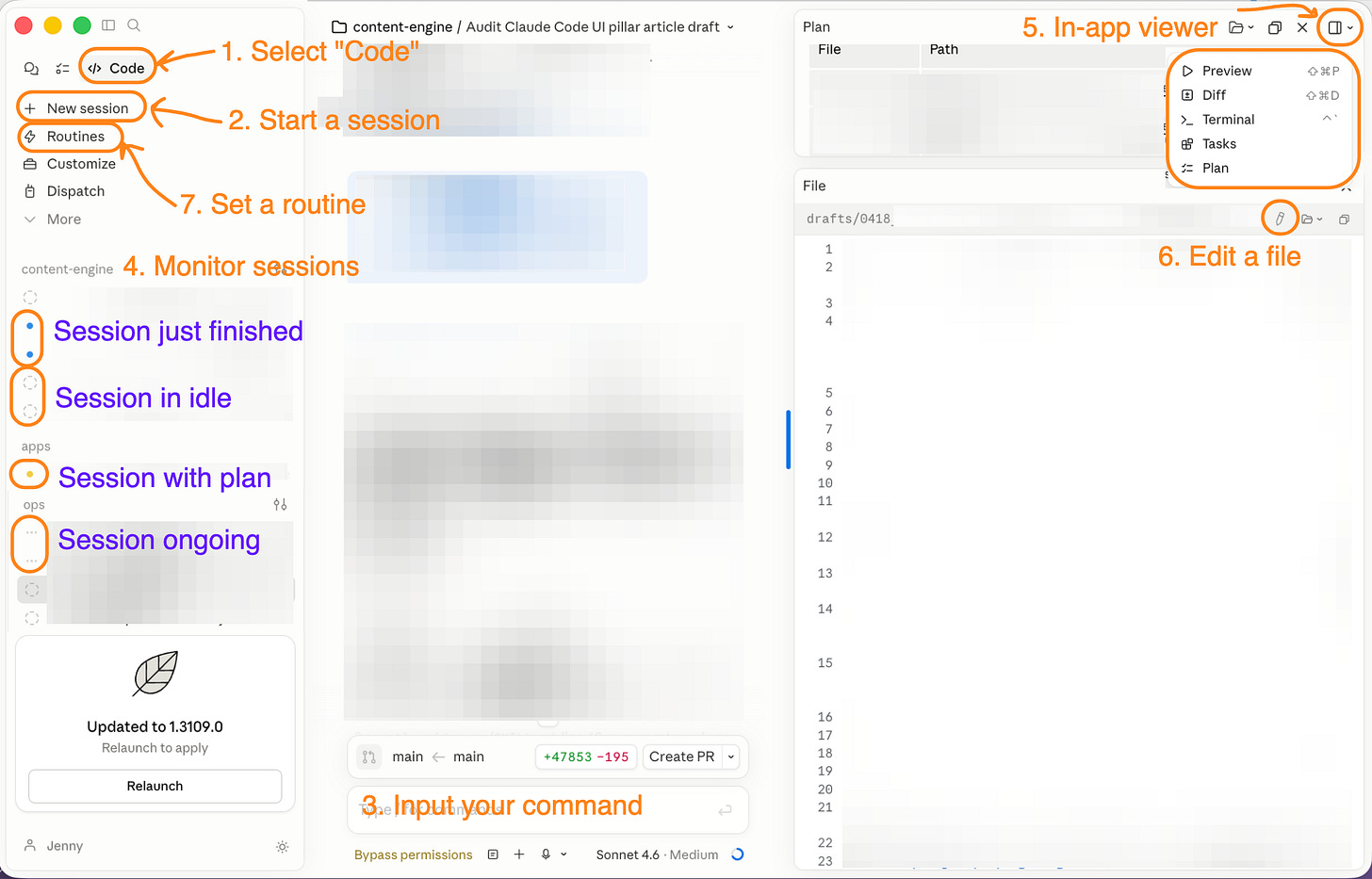
The previous Claude Code desktop experience was a thin wrapper: one session at a time, basic file viewer, no project organization. The April 14 redesign is a ground-up rebuild. What shipped:
Session management:
Sidebar showing all active and recent sessions, grouped by project
Filter sessions by status (running, paused, complete), project name, or environment
Drag-and-drop layout: reorder or resize the session list
In-app editing and execution:
Integrated terminal (run commands without switching apps)
In-app file editor (view and edit files from inside the Claude Code window)
Rebuilt diff viewer for reviewing agent-proposed changes before accepting
Automation layer:
Routines: cloud-hosted Claude Code sessions that run on Anthropic infrastructure, triggered by schedule, API endpoint with auth token, or 13+ GitHub events (PR opened, commit pushed, issue labeled, etc.)
Remote edit from
claude.ai/code/routines: no SSH, no local machine requiredMCP connectors that pre-wire tools into your routine at creation time
Output handling:
HTML, PDF, and local-serve rendering built in
Session URLs (shareable, though currently sometimes open blank; more on that in the bugs section below)
What the redesign was responding to:
The community had been building workarounds for everything above:
Session management: tmux plus dashboards like
siteboon/claudecodeui(a webUI literally called “Claude Code UI”),Ark0N/Codeman, andStargx/claude-code-dashboard.Automation: stacks like OpenClaw.
In-app editing: IDEs such as Cursor.
The April 14 redesign closed all three gaps in one release. Anthropic even shipped it under the same name the community had already given it. That’s unusual velocity.
The two tools under the most pressure here are obvious: Cursor and OpenClaw.
Start with Cursor.
How Claude Code UI compares to Cursor right now
Cursor and Claude Code UI are now solving some of the same pain.
They both give you sessions.
They both cut down the old tab-switching mess.
They both let AI work live closer to the thing you’re doing instead of in a separate chat silo.
The MCPs and skills are now equally visible
But Claude Code UI pushes that one step further.
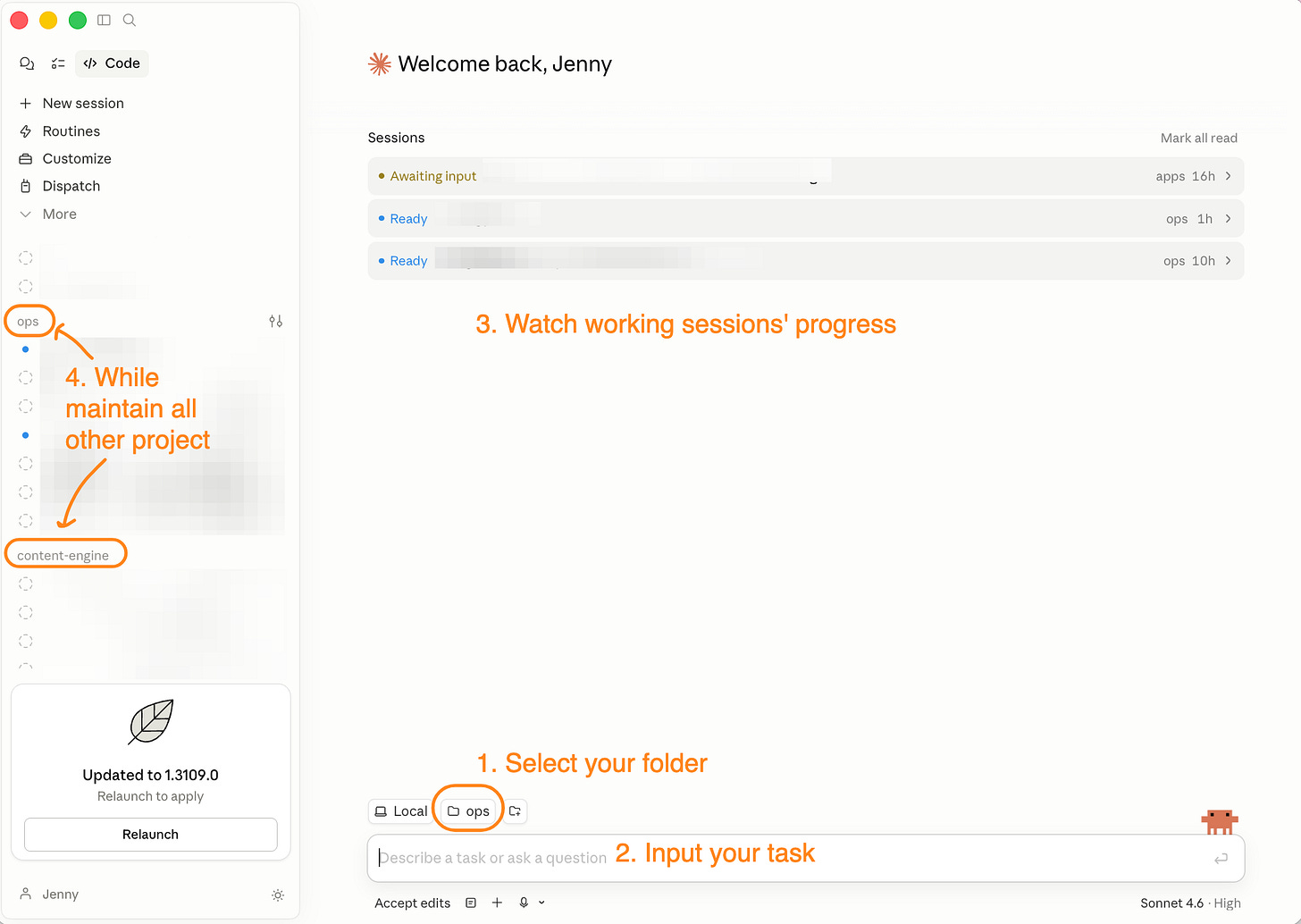
Cursor still works one project window at a time. If you’re midway through one repo and want to jump to a different project, you open another window. More computer load. More visual clutter. More context switching.
Claude Code UI removes most of that. You create a new session, point it at a different working folder, and keep going in the same app. Best part: you can still see what all the other sessions are doing while this one runs.
That is the real UI gap between them.
Cursor is still the better editor. Claude Code UI is the better session manager.
Cursor still wins on the smaller surgical things:
Inline diff-as-you-type edits: the autocomplete layer that rewrites code while you type, not after you ask
Full-page file view with a repo-structured sidebar
Raw editor speed for surgical changes
Claude Code UI now leads on:
Parallel session management
Cloud automation through Routines
Project-level organization across multiple agents
MCP-connected workflows that don’t need the editor open
The outcome-first comparison:
If your workflow is “AI helps me write code while I’m looking at it”, Cursor is still faster and smoother.
If your workflow is “I give AI a task and come back when it’s done” (or you’re managing multiple agents across multiple projects), Claude Code UI is the better home.
The session-vs-editor framing:
Cursor is editor-first. Sessions live inside files.
Claude Code UI is session-first. Files live inside sessions.
Once you internalize that inversion, the comparison stops feeling like “which is better” and starts feeling like “which is right for this task.”
But Cursor is only half the story.
The bigger shift is what happens once Claude leaves the editor and starts running on its own. That’s the part that puts real pressure on OpenClaw.
What Claude Code Routines are
Routines are cloud-hosted Claude Code sessions that run on Anthropic’s infrastructure.
You write the instruction in natural language.
You pick a trigger: schedule (hourly to weekly, plus custom intervals), an API call, or a GitHub event.
Claude runs it with whatever MCP tools you’ve wired in.
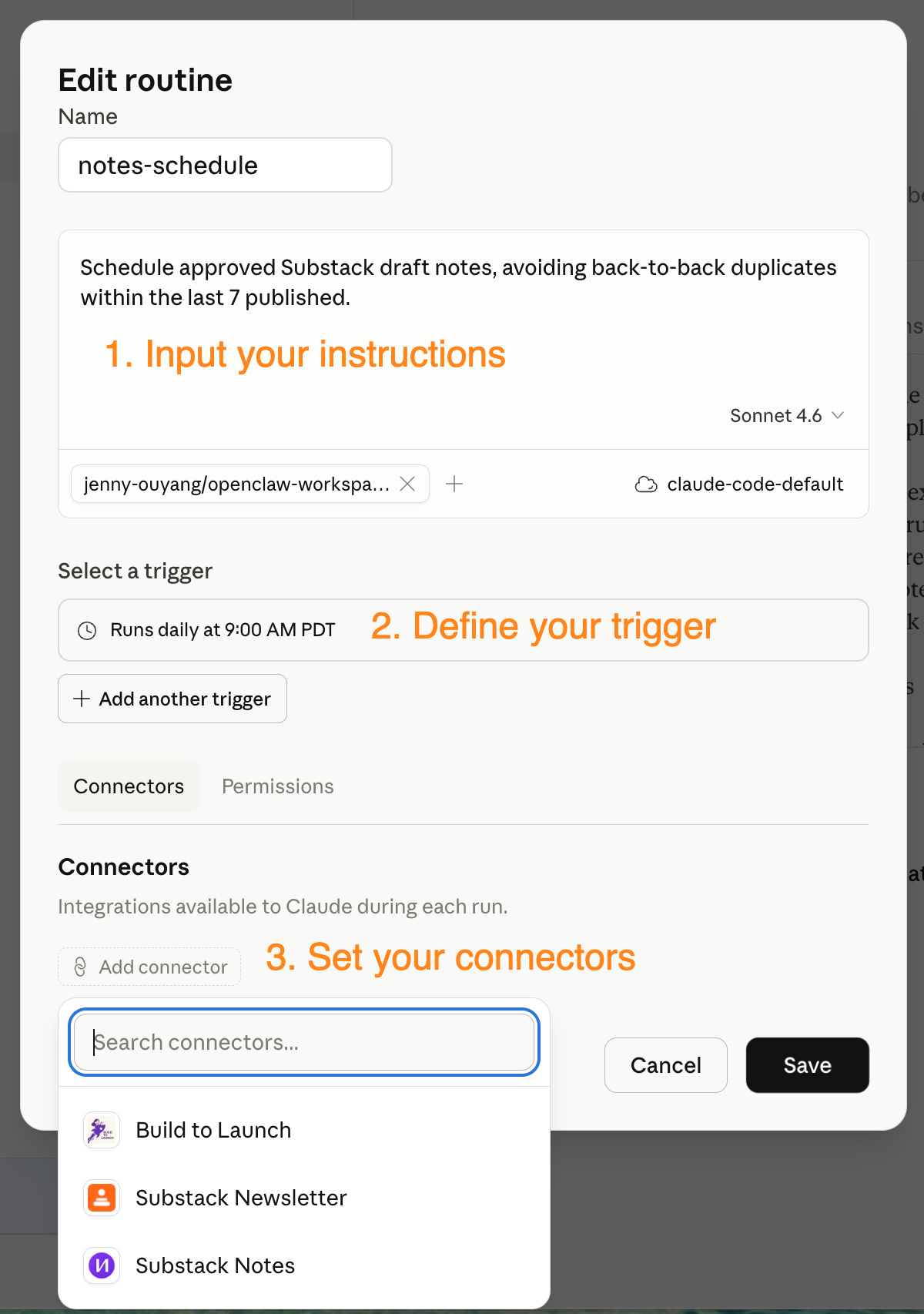
Simple 3 step to create your first routine
Local vs Remote: when you click New routine, you choose Local (runs on your machine, needs it awake) or Remote (runs on Anthropic’s infra).
Remote is what makes this different from a cron job on your laptop. Pick Remote unless you specifically need local file access.
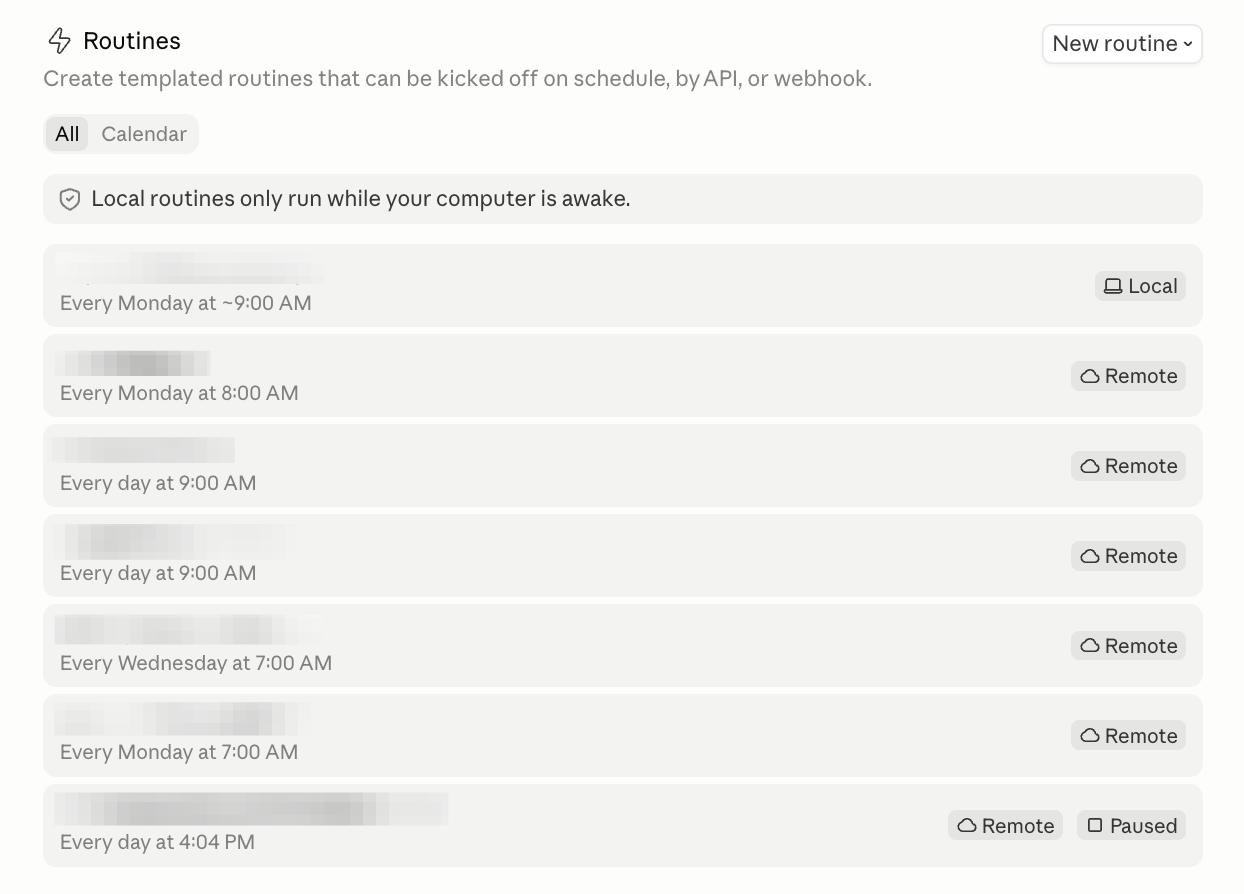
Routines list with local v.s. remote categories
Plan limits (for routines hosted on cloud): Pro gets 3 runs/day, Max gets 15, Team and Enterprise get 25. Each Routine is a full Claude Code session, so steps burn tokens. Pro’s allotment gets tight fast. Max is the practical floor for anything beyond a handful of jobs.
It’s worth noting that local routines are unlimited for paid plans.
claude.ai/code/routines lets you view, edit, and create routines from any device. No SSH. No local machine. No waiting to get home to change a schedule.
That’s what makes Routines different. With OpenClaw, editing a job means SSHing into the server or connecting to the VPS. Remote edit is a genuine quality-of-life improvement, especially for non-developers.
You can read this post to make sense of how Claude automation types compare.
Routines vs OpenClaw: the capability comparison
Both are AI agents on a schedule. The real difference is where they run and how far they reach. Routines are Anthropic-hosted, fast to ship, and edit-from-anywhere. OpenClaw is self-hosted, self-evolvable, and can chain with anything else you’ve built.
Here’s the capability-level view.
!function(){"use strict";window.addEventListener("message",(function(e){if(void 0!==e.data["datawrapper-height"]){var t=document.querySelectorAll("iframe");for(var a in e.data["datawrapper-height"])for(var r=0;r<t.length;r++){if(t[r].contentWindow===e.source)t[r].style.height=e.data["datawrapper-height"][a]+"px"}}}))}();
What the table says:
Routines win on convenience, deployment speed, and remote editability.
OpenClaw wins on depth, self-evolution, and no limits.
The migration question isn’t “move everything”. It’s about knowing which tier each job belongs to.
If you’ve spent a year building around Cursor or a cron stack like OpenClaw, the real question isn’t whether the redesign is impressive. It’s what you actually move, what you keep, and what breaks if you move the wrong thing.
I sorted my own 18 OpenClaw jobs in two days using a three-tier map:
Cloud Routines for what runs clean on Anthropic’s infra,
Mac launchd for what needs local files,
OpenClaw for what needs self-evolution or multi-channel orchestration.
Twelve stayed self-hosted. The rest moved out, and none landed in the wrong tier.
Next: the three-tier migration I ran on my own stack, with every job named and the decision rule for each, plus the do-it-now toolkit, the non-developer recipe, and the honest-take bug list.
The OpenClaw migration map: 18 jobs sorted in two days, with the tier decision rule on each
The do-it-now toolkit: the 3-question test to sort your own automations into the right tier in 10 minutes, plus a copy-paste Slack approval loop you can have running today in 30 minutes
The self-evolving experiments: 6 freed OpenClaw slots running self-improving, self-correcting, and cross-job memory patterns, now pointed at a kids’ language app, an investment scouting loop, and shared family access
The Cursor concession ranking: which features close in 2026, which hold longer, so you can plan your year
The non-developer playbook: routines and project tabs without writing a line of code
The full “what breaks” list: 4 desktop bugs and 1 workflow gotcha I hit personally, 2 Routines bugs I hit personally, the two MCP issues everyone’s reporting that I haven’t, plus 4 performance fixes and 8 community UI issues with GitHub numbers
Plus: the forecast: where Claude Code is going next, and 3 things worth building now to compound on it.
What I kept on OpenClaw and what I moved to Claude Code Routines
When the redesign dropped, I had 18 active jobs on Oracle OpenClaw. Two days later, I had 12. Here’s exactly where everything went and why.
This article continues for members
Join Build to Launch to read the full article, access all cohort content, and connect with other AI builders.