Claude Cowork Use Cases From 17 Creators: 15 That Genuinely Work, 4 Who Walked Away
Real workflows from real users, the honest dropouts, and the friendlier Claude Code alternative most people don’t reach for.
If you’ve heard of Claude, you’ve heard of Claude Cowork. And if you’ve heard of Cowork, you’ve heard two voices that don’t agree.
Some call it the absolute game changer. The unlock. The thing that made AI feel like a coworker.
Some say it sucks. That it never actually works. That whatever they tried, nothing held up.
My world is split right between them. The programmers I know are in the second camp: what’s the point. The non-technicals are in the first: this could be the unlock. I sit squarely in the middle, agreeing with both sides.
Cowork isn’t that surprising, because I come from the code side. But part of my job is onboarding people to Claude. From that vantage, Cowork is the closest glimpse most people will get of real agentic work, the kind a seasoned developer already takes for granted.
The people who loved it couldn’t understand the dismissal. The people who dismissed it couldn’t understand the hype.
So I asked 17 creators how they actually use Claude Cowork: what works, what doesn’t, and how to decide if you should bother.
The goal was simple: understand Cowork from every angle, including both its potential and its limits. Like any new product, some parts are good and some are not. The important part is figuring out how to make the most of it for you, not anyone else.
What came back fell into three buckets: the shapes of work Cowork actually fits, the honest takes on where it doesn’t, and the tool that has quietly become the better answer for everything in between.

In this post:
What Claude Cowork is (skip if you already know)
Hi, I’m Jenny 👋
I build AI systems and tools, then share how I did it. I run the Practical AI Builder program, for people who already use AI and want to build real things with it. Check it out if that sounds like you.
If you’re new to Build to Launch, welcome! Here’s what you might enjoy:

What Claude Cowork actually is
(Skip this section if you already know the product.)
Think about the scenario, every morning you pull information from three places, paste it into a doc, format it, and send it. It takes 30 minutes. You’ve done it fifty times. You’ve thought about automating it, but the SQL is too much, the n8n is too complex, the APIs are too fiddly, and you don’t have an engineer to ask.
That’s the gap Cowork fills.
Cowork is a workspace for Claude that does three things a regular chat doesn’t:
It holds context. Inside a Cowork project you load source files, instructions, brand context, whatever Claude needs to do the work properly. The next time the project opens, the context is already loaded. You’re not re-explaining who you are or what you’re building.
It runs on its own schedule. A task is a prompt that fires at a time you set — every morning at 8am, every Wednesday, the first of the month. You write it once. It runs forever.
It touches your tools. Cowork connects to Gmail, Google Drive, Notion, Slack, Substack, and a growing list of others through built-in connectors and custom plugins. The output doesn’t sit in a chat window. It lands in your inbox, your doc, your channel.
That works for almost anything with a recurring shape: your daily metrics report, your overnight news scan, your weekly content brief, your follow-up email queue, your inbox triage. Anything you do on a rhythm that ends with an output someone needs to act on.
Cowork is what makes Claude show up to work, not just answer when called.
What this unlocks:
Persistent context. Claude remembers the project across sessions.
Scheduled work. Tasks run while you sleep.
Tool access. Claude reads from and writes to your real systems.
Hands-off delivery. The output lands where you actually work, not in a chat window.
If you want to get sorted on how Cowork Scheduled Tasks compare to Local Routines, /loop, and Cloud Routines, start there, it changes which use cases actually apply to you.
That’s the mechanical part. The harder part, and the reason this post exists, is figuring out which of your work is shaped to fit it.
Here’s where it actually shines: four categories of work, nineteen builders who built them, and what to copy.
Where Cowork Really Shines
Daily Reports and Briefings
Three workflows that run on schedule and deliver before you sit down at your desk.
Cowork’s strongest single muscle is scheduled work. You define the inputs, the format, the delivery channel. Cowork does the rest, every morning, without you.
Daily Intelligence Briefing | by
The problem before: 20+ sources checked manually each morning — TechCrunch, Wired, MIT Tech Review, press releases, primary filings. Browser tabs open everywhere. Duplicate research on stories already covered. 45+ minutes of context-switching before writing a word.
The setup: A Cowork task runs at 8am CET, searches across 4 research pillars (AI enterprise, fintech, workflow automation, cross-industry tech), deduplicates against a Notion Reading List database, curates 10 stories, and delivers a formatted briefing to a dedicated Slack channel. Geographic split: 40% Europe, 30% LATAM, 30% Asia. Tools: Notion MCP, Slack MCP, web search. The Notion Reading List doubles as a research archive Raghav can query later for newsletter content.
Why it works: The briefing is waiting in Slack when Raghav sits down — even on vacation. “I’ve gone from 45 minutes of source-checking to 5 minutes of reading pre-curated intelligence. The Reading List means I never waste time on stories I’ve already covered.” The time savings matter, but Raghav puts the psychological shift first: “I stopped carrying the mental load of ‘did I miss something important?’” The intelligence compounds too — each day builds on prior coverage instead of starting from zero.
Raghav’s take: “I thought I’d need to manually verify every story. Turns out, if you tell the system to prioritize primary sources (press releases, filings, official dispatches), the quality is high enough that spot-checking is sufficient.”
Read Raghav’s full setup guide →
Daily Content Intelligence System | by
The problem before: Blank page every morning. No pipeline feeding ideas in.
The setup: Four sequential Cowork tasks starting at 6am. Task 1 identifies new videos from 17 target YouTube channels and logs URLs in Notion. Task 2 extracts full transcripts via DownSub. Task 3 analyzes each transcript against 5 audience-specific questions — what problem does my audience have that this surfaces, what was learned the hard way, what mistake are people making, what trending subject has a strong opinion attached, what belief do I hold that most people don’t — and writes 10 post ideas per video: 5 X posts and 5 Substack Notes. Task 4 cleans up Notion and purges entries older than 7 days. All ideas land in one dated Notion page as plain text: “copy-paste ready. No clicking into database rows.” Writing rules live in Project Instructions and a local skill file, active across every task.
Why it works: One job per task. Running two parallel agents on the same prompt produced completely inconsistent output. “The fix was breaking one massive prompt into four atomic tasks, each with one job. Consistency improved a lot after that.” Each idea is grounded in a concept from the source video, not a generic reframe of the topic.
Daily Business Metrics Report | by
The problem before: A proper daily metrics report required SQL and engineering time Margot didn’t have. She wanted the report without the build.
The setup: Amazon Seller Central and Triple Whale reports land in her inbox on schedule. Cowork pulls them at 6:10am, analyzes the data, and builds a daily report into Gmail drafts. No APIs, no code. Margot reviews before sending.
Why it works: “It works! (95% works)” — that’s the headline and the caveat both. Durability is still the open issue. Claude kept pulling prior-day files from her downloads folder instead of the current day’s. “I don’t make the rules, it’s just one of those things.” Telling it to explicitly click and download, not just locate, fixes it most of the time. Token economy is another friction: “Claude loves to format things you did not ask to be formatted. It wastes tokens and takes forever.” Margot’s verdict: “a misleading report is worse than no report at all” — so the daily review before sending isn’t overhead, it’s the point. It’s good, much faster than coding the whole thing, and not fully autonomous yet.
Margot’s take: “I am proud of this reporting system I built. It’s good, much faster to create, but not as reliable as coding the whole thing out — at this point.”
Read Margot’s full breakdown →
Content Pipelines
Five workflows that take rough material and produce something ready to ship.
Content work is repetitive in shape (same passes, same checks, same format) but variable in substance. That’s exactly the kind of work a persistent project context handles well. Cowork shines when you write the recipe once and let the project carry it.
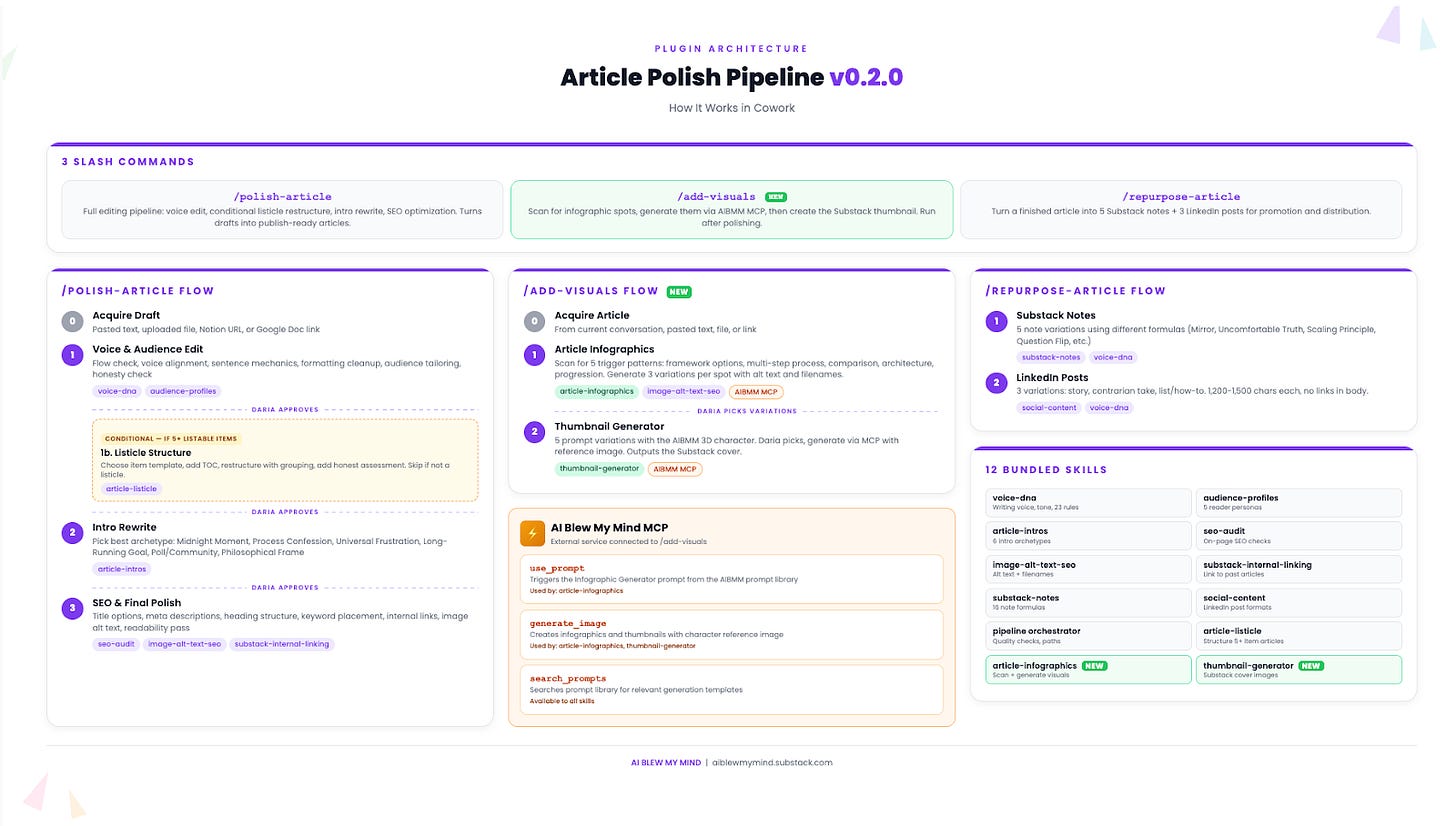
Article Polish Pipeline | by
The problem before: Every article required 3-4 hours of post-writing work: editing for voice, restructuring, SEO, thumbnails. Each a separate manual step.
The setup: Three slash commands. /polish-article rewrites for voice consistency, evaluates listicle structure, rewrites the intro, and runs an SEO audit. /add-visuals scans for infographic opportunities, generates them via a custom “AI Blew My Mind” MCP, and creates a branded Substack thumbnail. /repurpose-article turns the finished piece into Substack Notes and LinkedIn posts. 12 bundled skills, all running inside Cowork.
Why it works: The approval gates. Daria put it plainly: “It doesn’t just dump a final version. It shows me each stage, tells me what it changed and why, and waits for my OK before moving on. I catch things I’d miss in a single-pass edit.” A pipeline that waits at every stage is different from one that auto-applies. The writer stays in control because the tool earns each next step.
Course Lesson Builder | by
The problem before: 47 YouTube video lessons for a complete n8n automation course. 31+ hours of content. Converting them into structured written lessons with exercises was a “never gonna happen” project alongside a full-time job.
The setup: A project folder with brand voice guidelines, course structure, target audience definition, and all prior lesson drafts. A YouTube transcript skill. Each session: one lesson instruction with explicit references to what came before and what’s next. Cowork drafts each lesson complete with exercises and copy-paste prompt blocks students can use immediately.
Why it works: Persistent context maintained continuity across 47 lessons. “Because Cowork had the full project folder with all previous lessons, it actually caught those overlaps and would reference back instead of re-explaining.” Dheeraj put it directly: “That was the moment I realized the project-level context is what makes Cowork different from just chatting with Claude in a regular conversation.” The system is now repeatable — he’s running the same pattern for his Claude Code course. Everything else in his workflow runs through Claude Code; this course-building pipeline is what Cowork does better.
Dheeraj’s take: “Cowork’s strength for me is that you don’t need to think about orchestration. You drop your context files in the project and have a conversation. For someone who doesn’t want to open a CLI, that’s a big deal.”
Content Flywheel | by
The problem before: “Most content creators operate with no memory. Every week starts from scratch with the same blind spots and angles. You’re not building anything new. You’re just producing stuff.” Wyndo’s weekly planning was a 2-hour research session: manually scrolling past posts, digging through notes, guessing at angles, repeating topics without realizing it.
The setup: A folder structure Claude reads and updates on its own. CLAUDE.md operating file, profile.md, stats.md with top-performing posts, memory.md (starts blank, builds over time), newsletter archive, social history, and a brain-dump directory. One command: “Run content flywheel.” Claude reads brain dumps, maps the archive, surfaces untapped ideas from social history, and outputs a weekly brief: 5 validated ideas with working titles, audience fit, performance predictions, and social content packs for the top 2. Saves automatically to Outbox/weekly-briefs/. No plugins.
Why it works: Each run updates memory.md. “Weekly planning went from a two-hour research session to a 10-minute conversation.” The flywheel earns its name: every run builds on the previous one, and over time the system knows the content history better than Wyndo does.
Automated Article Sync | by
The problem before: Every time Asli published a new article, she had to manually copy the content and save it to a local folder. Miss that step and her Substack Notes generation pipeline ran on outdated material.
The setup: A custom skill called becomingwithai-article-sync runs every Tuesday at 9am. It opens the newsletter archive, checks for new articles since the last run, fetches full text, and saves a .txt file with title, URL, publish date, and body. Skips already-saved articles by comparing URLs. Uses Claude in Chrome. The skill file starts with a single instruction: “Check the archive for newly published articles and save any new ones as .txt files into the articles folder.” On the occasional Tuesday when her computer was off, she triggered it manually — the Scheduler only runs when the machine is on.
Why it works: Closes the loop between publishing and downstream pipelines automatically. Hard-won tip: hardcode the exact target folder path in the skill file. Letting Cowork choose where to write creates location drift. “Sometimes the best way to learn a tool is to build something small, break it, and fix it.”
Asli’s full Cowork setup guide →
Substack Notes Scheduling | by
The problem before: Substack notes and ideas were sitting in a backlog with no scheduled date. The queue existed. Deciding when each one went out was a manual check every time.
The setup: A Cowork skill connected to the Substack MCP. It pulls the unscheduled notes queue, checks what’s already scheduled for the next 7 days, and assigns publish times to the unscheduled ones based on spacing rules — no two notes at the same time, non-sharp minutes, category variety across the week. One skill, one run, queue cleared.
Why it works: The notes don’t pile up. The MCP gives Cowork direct read/write access to the queue, so the scheduling happens without a dashboard. The taste decisions happen earlier, when the notes are written — not at the scheduling step.
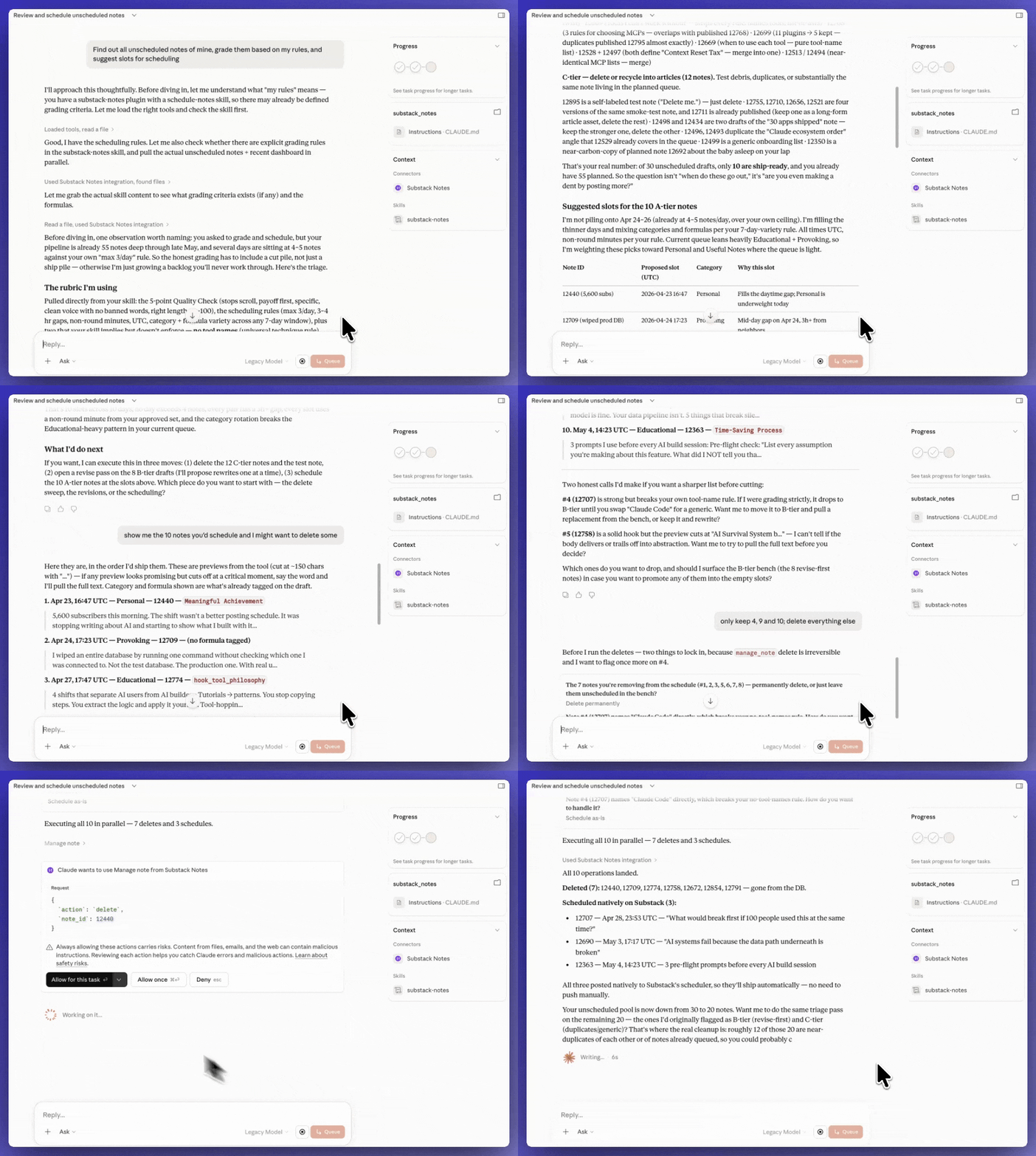
I asked “Find out all unscheduled notes of mine, grade them based on my rules, and suggest slots for scheduling”
The notes scheduling is one piece of a larger system on How to Grow Your Substack With Limited Time and Zero Social Energy.
Personal Assistant Work
Four workflows for the things you don’t want to do yourself.
Not every Cowork use case is strategy or content production. The most underrated category is “thing I keep meaning to do that I never do.” Folder cleanup. Follow-up emails. Weekly brain dumps that need processing. These tasks are well-shaped, low-stakes, and benefit from running without you.
Desktop Cleanup | by
The problem before: Screenshots and screen recordings piling up on the desktop, indefinitely.
The setup: A Cowork skill that runs every Wednesday. Accesses the Desktop folder, lists all files matching Screenshot*.png and Screen Recording*.mov, and deletes them. Reports the count. Nothing else touched.
Why it works: Set it, forget it. Joel’s own assessment: “it’s really the only thing I use Cowork for — I do everything else on Claude Code.” The constraint is the design: exactly two file patterns, no deviation. A boring task disappears on a schedule.
HubSpot Follow-up Engine | by
The problem before: 30-45 minutes daily: researching contacts, writing follow-up emails from scratch.
The setup: A Cowork task at 8am daily. Connects to HubSpot, surfaces all follow-up tasks due that day, reads call and meeting notes from each contact record, and builds a draft email in Patrick’s tone and style. Drafts land in Gmail drafts. Patrick goes to the folder at 8:05am, edits, and sends. Uses a custom tone/voice/style skill.
Why it works: Patrick put it directly: “It easily saves me a half hour to 45 minutes a day not having to research each contact and prepare the emails from scratch myself.” The skill carries voice rules so every draft starts in the right register. The research is done — Patrick edits a first draft, not a blank page.
Weekly Brain Dump Processor | by
The problem before: Ideas captured in a Notion phone widget but losing context before they could develop. A few weeks later the idea was there; the thinking that made it interesting was gone. Ilia also uses an audio-to-text app to capture ideas on the go before they disappear entirely.
The setup: Notion MCP connected to a specific Notion page. A weekly-brain-dump-processor prompt reads all entries, rates each for newsletter potential (yes/no plus one sentence why), generates working title, angle, and 3 questions for strong ideas, skips tasks and personal reminders, and saves results to a Notion database with status tags.
Why it works: “I have lost too many ideas at this point.” Every idea now has context preserved alongside it. Vague entries get tagged “Unclear” with a note on what’s missing. The ideas that matter are ranked and ready. Ilia can run it after any new idea, not just on the weekly schedule.
Car Buying Agent | by
The problem before: Buying a car meant contacting multiple dealerships, tracking who had which inventory, managing back-and-forth emails. All manual. All tedious.
The setup: Cowork built a tracking spreadsheet of Houston dealerships meeting Margot’s criteria, drafted and sent outreach emails, filled web forms on dealership sites, and managed reply threads. Within an hour, several dealerships had responded with inventory details. Claude then replied to follow-up questions in a second round of communication.
Why it works: Low-stakes, approximate work — exactly the right shape for agentic action. Margot’s honest verdict: “It is as futuristic as everyone says. It’s also more child-like than people say.” Critical note: be explicit about which account Cowork is authorized to send from. “Be VERY clear with Cowork about where it is taking actions on your behalf — the risk of sending from the wrong account is very real.” Her first run sent from an unexpected email address. When Claude gets stuck on a specific task, tell it to move on: “next time I’d tell Claude to move on to the next one if it gets stuck.” Scope clarity before the agent acts.
Margot’s take: “I’d recommend anyone who is in the market for a car try something similar, if you’re relatively comfortable with AI. It could save you hours.”
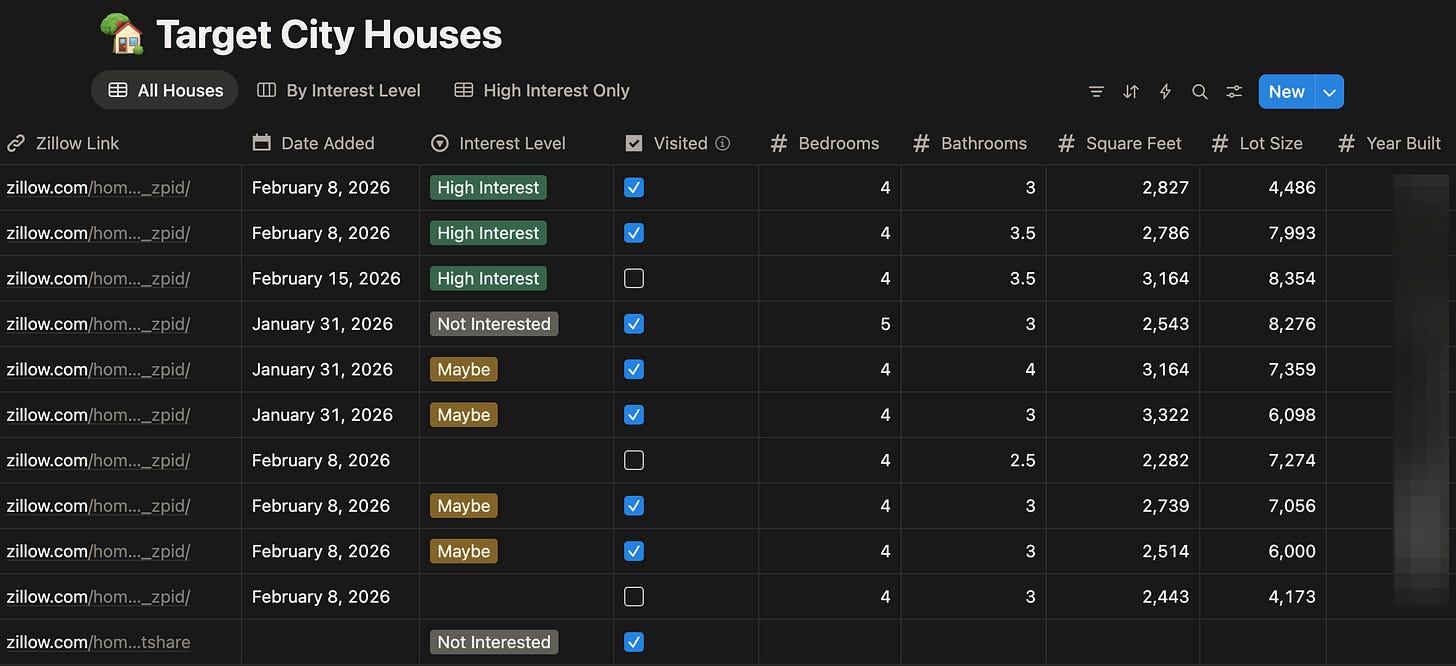
House Search Tracker | by
The problem before: House hunting across a new city meant 30+ browser tabs, a Google Sheet maintained by hand, post-viewing notes scattered across voice memos and texts, and two people who needed to stay in sync without duplicating everything.
The setup: A Notion database holds the criteria — school district rating, commute threshold, solar panels owned or leased, whatever matters to this specific search. A Cowork skill connects via Notion MCP. Drop in a Zillow URL. Cowork fetches the listing, extracts the fields that match the criteria, creates a structured Notion entry, and adds a summary note of what stands out or falls short. Post-viewing impressions get added the same way: talk, or paste, and Cowork writes into the database.
Why it works: The criteria live in Notion, not in the prompt. That means every new listing gets scored against the same standard without re-explaining anything. “Good schools” stops meaning “Google 4.2 stars on a Tuesday” and starts meaning “GreatSchools 7/10+.” The agent isn’t smarter — the documentation is tighter.
Cowork as the Interface Layer
Two workflows that don’t use Cowork as an assistant — they use it as the interface.
This is the most architecturally interesting category and the smallest. Both contributors here treated Cowork not as “AI that does my work” but as “the layer my team or product talks through.” Different shape, different ceiling. Worth seeing because it shows the upper bound of what Cowork can be when you architect for it.
Team-Synced AI Operations | by
The problem before: Moving to Claude Teams meant losing over a year of personal Claude history for everyone on the team. “Moving to a Teams account means starting from scratch. You can’t transfer any of that.” Without a shared system, every session started from zero — three people working the same client carrying slightly different context.
The setup: Google Drive Desktop syncing a shared team folder. Each client workstream has its own PROJECT_INSTRUCTIONS.md inside. Each team member’s Cowork project points at their local sync of that folder. Company context and brand rules live in Cowork project instructions. Custom skills handle specific execution patterns. Everyone keeps their personal Claude account intact.
Why it works: Two layers: Cowork instructions carry the “who we are” context, PROJECT_INSTRUCTIONS.md carries the “where we are right now” context. Whoever works last updates it. Zain’s framing: “Most people think of Cowork as a personal productivity tool. But if you combine it with a shared file system and a clear instruction architecture, it becomes a team operating system.” The mental model: project instructions as the director, skills as department managers. No Teams account required.
Cowork as UX Over Supabase | by
The problem before: Data scattered across Notion, file system, NotebookLM. Multiple knowledge stores, no unified interface to reach them.
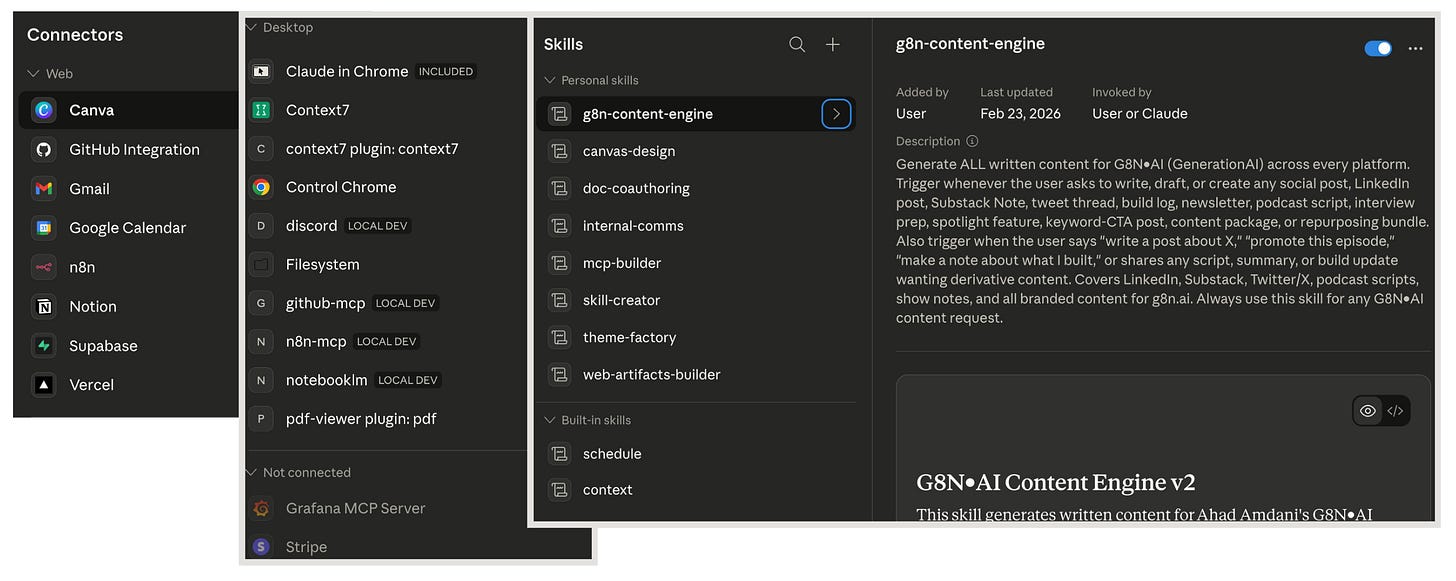
The setup: A Supabase core database as the primary sink for content, articles, knowledge, research, tasks, contacts, and calendar events. A custom PWA called coreOS as the viewing layer. Cowork as the natural-language interface to the inference engine and the database. Connected skills and MCP connectors work across Claude Chat, Cowork, and Code.
Why it works: Ahad describes it as three distinct layers: a core database as “the ultimate sink for all the various data” — Notion, file system, NotebookLM, all centralized in Supabase; coreOS as the PWA dashboard for viewing it; and Cowork as “where the work happens.” The architecture separates UX, inference, and data — each layer swaps independently. The payoff is attention: “the more things I can use it for, the more I try to use it for those things, and get those time savings back to do things I actually care about, instead of stuff I really don’t.”
Where Cowork Doesn’t Fit — and Why Four Builders Left
This is where the programmers’ side of my opening starts to make sense. The catalog above is real: those workflows ship, save time, and run without their builders. But there’s a shape of work Cowork doesn’t fit, and four builders ran straight into it.
The shape that doesn’t fit: open-ended building, complex multi-step iteration, anything requiring deep tool access, real session resilience, or the ability to debug its own state. Cowork’s strengths become its constraints when the task is fundamentally open-ended.
Four builders found this out directly.
The simple refusal |
The view: Sam didn’t send a write-up. He sent a text: “I only use Claude Code. I keep trying to think of a reason for using Cowork but I honestly can do everything I need with Claude Code.”
Why it lands: The one-line refusal is its own evidence. For builders already fluent in Claude Code, Cowork solves a friction that doesn’t exist for them. Sam didn’t struggle with Cowork, didn’t try it and bounce — he just never reached for it. There was no gap for it to fill. If you’re not reaching for it naturally, that’s a signal worth respecting.
Tried it, went back to Claude Code |
What she tried: An SEO plugin for her Substack workflow and a 30+ step newsletter research process — research, outline, draft, revision, the works.
The view: The SEO plugin was too rigid. “I kept wanting to tweak things, and realized the time I’d spend editing the plugin would be better spent building my own skill or workflow from scratch in Claude Code.” The newsletter research workflow was worse: every change meant fighting the format. “Every time I wanted to change a step, I was fighting the format instead of just changing it.” Token burn was fast. Her actual workflow lives in local files — Obsidian and Notion — edited directly. “My actual workflow lives in local files (Obsidian + Notion), and I just use a prompt that has Claude run through all the steps. When I want to make changes, I edit my files directly.” She’s tried local agents too — OpenClaw and Hermes. None of it gave her a reason to return: “I haven’t found a use case yet that I can’t replicate faster with other tools.”
Why it lands: Mia didn’t walk away frustrated. She walked away with a clean principle. Her verdict: “The plugin format works if you want something packaged and repeatable out of the box, but for anyone who builds and iterates on their own workflows, the flexibility of just writing your own prompts and keeping your steps in editable files is hard to beat.” Format-for-packages, files-for-iteration. That line is the one that matters.
Wrong tool for the build phase, right tool for the ops layer later |
What she tried: Using Cowork to build her diagnostic app — a Next.js app, Supabase backend, Vercel deployment, server-side API routes, RLS policies, and tiered access logic.
The view: Dee is blunt about the framing problem: “The ‘non-developer’ framing is a trap.” She wasn’t using AI to avoid building — she needed an engineering partner. And Cowork isn’t that. “Cowork handles files and tasks; Claude Code handles codebases and systems.” The diagnostic came down to this: “I would have stalled at the first deployment failure. Cowork has no surface area for debugging a broken RLS policy or a service role key that won’t write to the database.” She hit repeated deployment failures, Supabase write permission issues, webhook problems. Resolving them required the iterative loop: read the error, form a hypothesis, rewrite the logic, redeploy, check again. “That loop is Claude Code’s native environment. Cowork doesn’t participate in that loop at all — it operates above the code layer entirely.”
Why it lands: Dee’s three-lane framing is the clearest any contributor gave: “Claude Code is your engineering partner. Claude (chat) is your thinking partner. Cowork is your operations assistant. The mistake would be asking any of them to do the other’s job.” She hasn’t fully deployed Cowork yet — she’s being deliberate, scoping it to file and asset management for her three-tier newsletter. The design principle she’d share: “scope it to one trigger before you touch anything else.” The ROI isn’t dramatic, it’s compounded: “I’m not saving hours in a single session — I’m eliminating the 15-minute tax I pay repeatedly when I’m hunting for a draft, re-checking a tester status, or manually pairing an asset to the right essay.”
Dee’s take: “If you’re spending 20 minutes a day on file organization, tracking spreadsheets, and hunting for the right draft–Cowork probably cuts that to five. That’s not transformative. But compounded across a month of heavy publishing and beta coordination, it’s meaningful.”
The technical autopsy |
What she tried: Organizing 100+ receipts in different formats — screen captures, PDF invoices — into an expense report. Server timeout errors. Maximum tool call limits. Twenty minutes of babysitting. She gave it to Claude Code instead. It finished in five minutes.
The view: Karen came back with a structural breakdown. Five reasons Cowork struggles with complex, high-volume work:
VM overhead. Cowork and Code run the same agentic architecture, but Code executes natively on your machine. “Cowork runs inside a sandboxed virtual machine, and every file read, every sub-agent spawn, every step passes through that virtualization layer. That overhead adds up fast on complex, multi-step tasks.”
Quota burn. Cowork chews through your usage window far faster than Code for equivalent work. Karen notes: “Anthropic’s own docs acknowledge that Cowork sessions are compute-intensive and can consume as much quota as dozens of regular messages.”
No session resilience. Machine sleeps, task dies. Code offers remote sessions on Anthropic’s cloud that survive interruptions. Cowork doesn’t.
Tool call limits. Cowork caps how many actions Claude can take in a single turn before it pauses and asks for “Continue.” For 100 receipts, that’s constant interruptions. Claude Code has no per-turn ceiling.
Hub-and-spoke only. Cowork’s sub-agents report back to a single coordinator and can’t communicate with each other. Code has Agent Teams — multiple Claude instances coordinating peer-to-peer.
Why it lands: Not a user error. Structural. Karen’s conclusion is surgical: “Small-to-medium-sized simple tasks: Cowork. Anything involving volume, mixed formats, sustained execution, or parallel coordination — even if the task has nothing to do with writing code: Claude Code.”
Karen’s take: “Cowork is great for a lot of things. But for complex tasks, I think Claude Code is faster and more reliable.”
The pattern is the same in all four. The work was the wrong shape, and Cowork’s strengths became its constraints. All four pointed at the same door.
Most people don’t know how much that door has changed.
The Better Alternative Most People Haven’t Tried
The default story about Claude Code is “it’s for developers.” That story is out of date.
On April 14, Anthropic redesigned the Claude Code desktop app. Parallel sessions. A project-grouped sidebar. A cloud automation layer called Routines. The redesign collapsed three tools into one and quietly fixed the part that kept non-developers out.
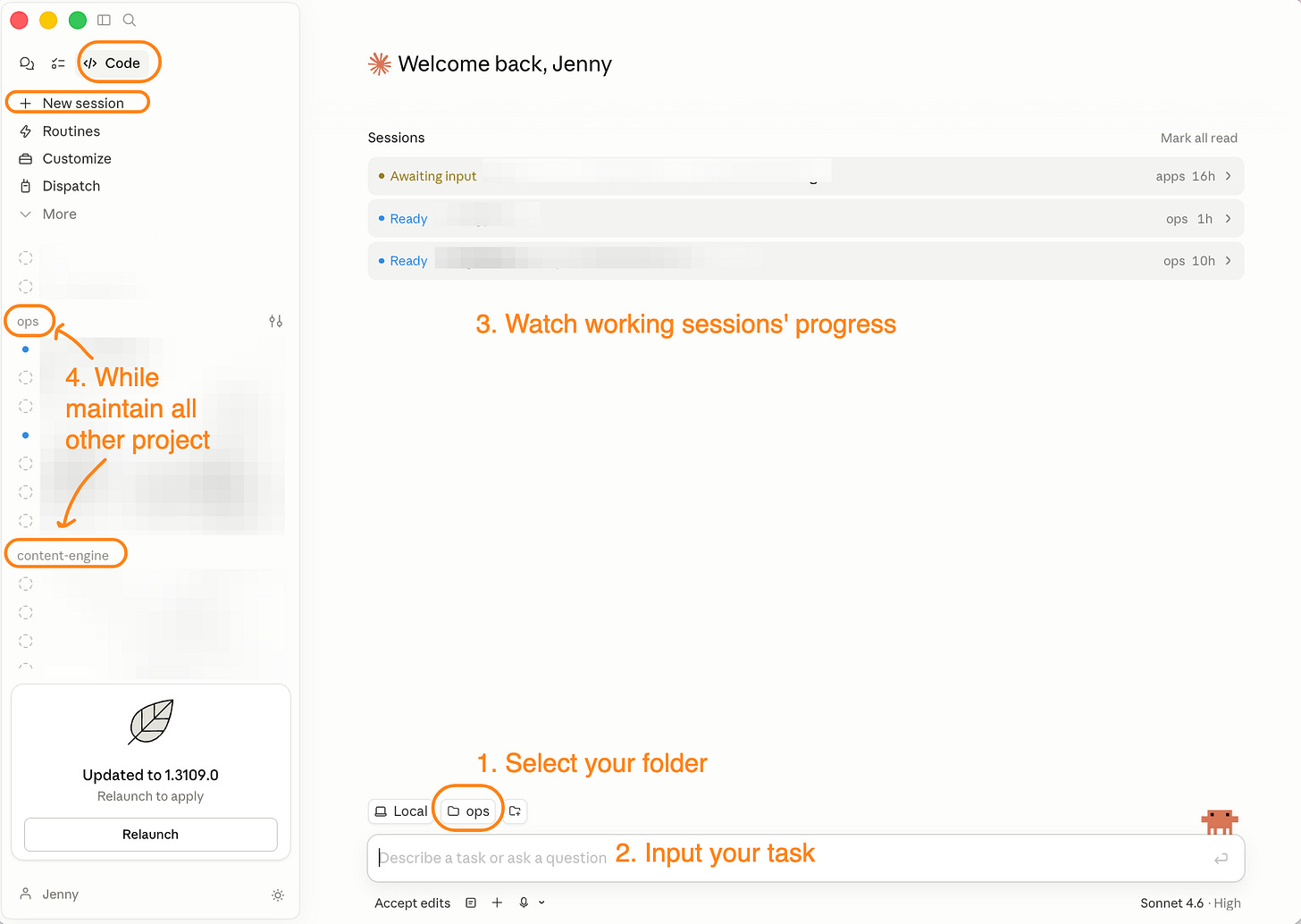
Most of the work Sam, Mia, Dee, and Karen wanted to do is now genuinely doable in Claude Code without writing a line of code. Routines are written in plain language: describe what you want Claude to do, how often, and which tools it can use. That’s the entire interface.
One workflow worth naming: a cloud Routine posts note drafts to a Slack channel, one thread per draft. Thumbs-up moves it to scheduled. Thumbs-down vetoes it. No dashboard. No code. Just emoji reactions as a taste gate.
That’s my most joyful AI moment in 2 years of building with AI. Not because the technology is new. Because the tool finally coheres, and that cohesion is what non-developers have been waiting for.
For the full breakdown: the non-developer onramp, the Routines comparison, the bugs nobody else is writing about, and the migration map I used myself, read: How Claude Code’s Redesign Reshaped My Cursor and OpenClaw Workflow.
How to Set Up Your First Cowork Project
The contributors who succeeded got one thing working before they tried the next. The ones who walked away often tried to make Cowork do everything at once. Three decisions before you build.
Pick the right shape first.
If the task is shaped like a daily report (same inputs, same format, runs on a schedule, delivers to an inbox), start there. If it’s a content pipeline (same process applied to different material each time), start there. If it’s open-ended building, debugging, or anything that needs to iterate on its own state, go to Claude Code.
The four categories above are the decision guide. Find the one that matches your task. Build that first. Not five things. One.
Set up project context once.
What goes in the project: an instructions file (who you are, what you’re building, how you want things handled), source folders Claude needs to read, tool connections for whatever your workflow touches, and a schedule if the task runs on its own.
Two patterns worth copying: Wyndo’s folder-as-living-system (CLAUDE.md, memory.md, archive, brain-dump: self-updating context that compounds over time) and Zain’s PROJECT_INSTRUCTIONS.md (a shared single source of truth that keeps a team in sync without a Teams account). Both give Cowork the context to show up already knowing the project.
Start with one workflow.
Raghav got the briefing running before thinking about what to build next. Ryan got the content pipeline stable before adding parallel tasks. The failure mode isn’t picking the wrong workflow. It’s building five before any of them are stable.
Now it’s your turn
Four shapes Cowork is genuinely good at. Four creators who showed where it isn’t. One alternative that’s friendlier than most people have been told.
Both camps in my opening were partly right. Cowork is real agentic work in a wrapper most people can use. And it isn’t the right tool for everything. The decision isn’t “is Cowork good?”; it’s “is this shape of work the kind Cowork is good at?” That’s the question, for you, not anyone else.
Thank you to all 17 contributors: Raghav, Ryan, Margot, Daria, Dheeraj, Wyndo, Asli, Jenny, Joel, Patrick, Ilia, Zain, Ahad, Sam, Mia, Dee, and Karen. Every one of them took the time to share what actually happened.
If any of these workflows hit, follow the person who built it. Every one of them is publishing more of this.
Which use case would you apply today?
— Jenny
Why Upgrade · Practical AI Builder Program · Templates · Builder Showcase