How to Prompt AI to Build Any App
The 7-round conversation system that resolves architecture before you open Claude Code, Cursor, Codex, Replit, Lovable, or Bolt — with fill-in templates for every round
When you prompt AI to build an app, the first result looks close enough. The gap is what comes next: getting AI to build the right thing coherently, without losing context halfway through. This is the 7-round conversation system that turns any app idea into a production-ready prompt chain. Works with Claude Code, Cursor, Replit, Lovable, Bolt, Gemini, Codex, or any AI coding tool you use.

“Build me an app that does X.”
That prompt works for demos. It doesn’t work for production.
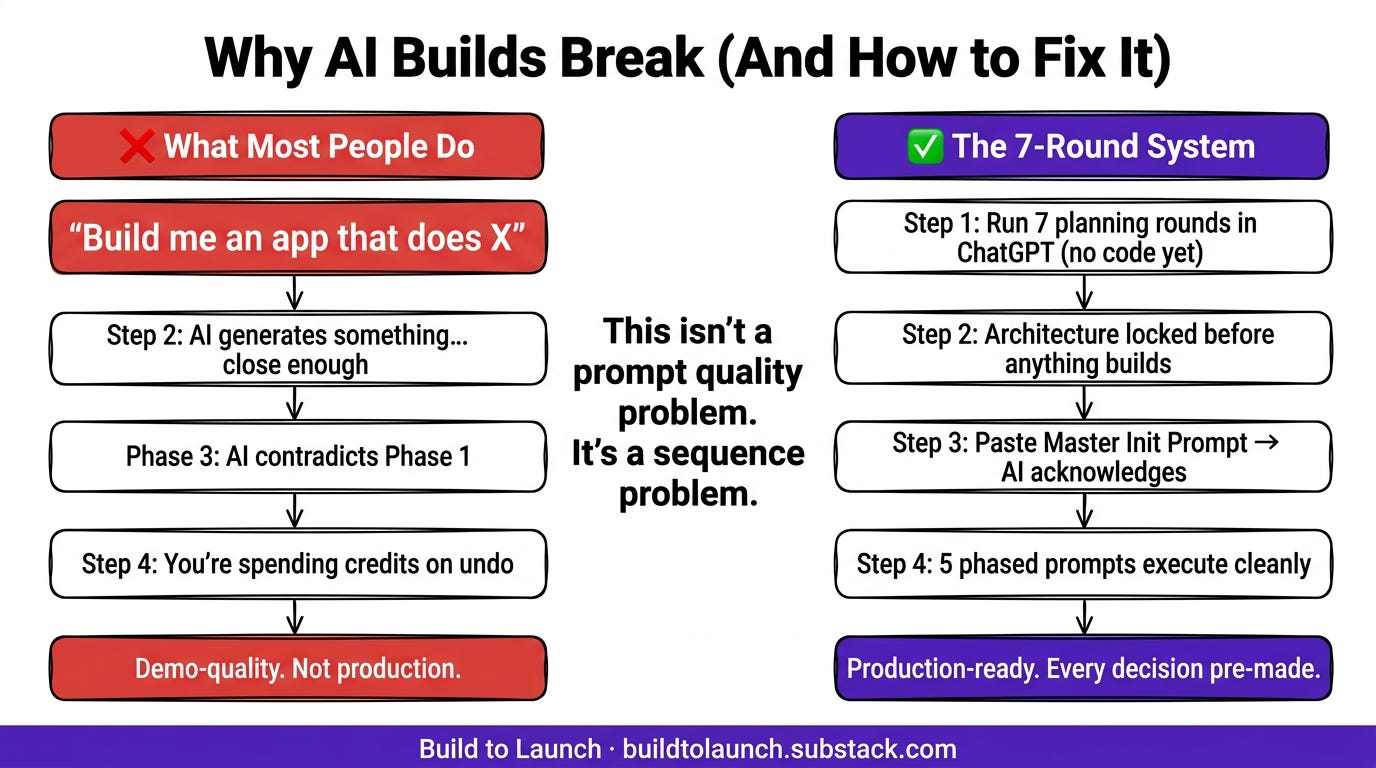
The AI generates something. It sort of matches what you described. But the data model is wrong for what you actually need on day two. The architecture doesn’t account for the thing you forgot to mention. By Phase 3, the AI is making decisions that contradict Phase 1, and you’re spending credits trying to undo them.
This isn’t a prompt quality problem. It’s a sequence problem. You asked for code before you resolved the architecture. The AI filled in the gaps. And it filled them wrong.
The 7-Round system below fixes this. It’s a structured conversation chain you run in ChatGPT (or Claude) before you open any coding environment. By Round 7, you have a Master Prompt and a phased build sequence. The AI executes it with minimal course-correction. You’ve already resolved every hard decision. The coding environment just executes.
You can use this for any AI-assisted build: a data dashboard, an automation tool, a customer-facing app, an internal tool. The rounds work the same way regardless of what you’re building or which platform you’re building on.
What’s inside:
Quick Start (one-message variant) — for when you want to skip to the prompt
Round 0–7 — the full conversation chain with fill-in templates for each round
Decision checkpoints — what to lock in before moving to the next round
Plug-and-play mini templates — schema, categories, scale assumptions, AI defaults
Hi, I’m Jenny 👋
I help non-technical people ship real products with AI. I run the Practical AI Builder program — for people who already use AI and want to build real things with it. Check it out if that sounds like you.
If you’re new here, welcome! Here’s what you might enjoy:
Subscribed

Why Most AI Builds Break at Phase 3
It’s not the AI’s fault. It’s the order of operations.
Skip the architecture conversation and the AI fills in the gaps itself. Those assumptions work for demos. Not production. By Phase 3, they compound. The data model is wrong for what you need. The ingestion logic contradicts the schema. You’re spending credits undoing decisions the AI made without you.
The 7-Round system runs the architecture conversation first. By the time you open Claude Code, Cursor, or Replit, every decision is already made. The coding environment just executes.
Before You Build: How to Talk to AI Like an Architect
The rounds below take you from a vague idea to a fully specified app. Architecture locked. Build prompts ready to paste.
You’re not asking AI to write code yet. You’re asking it to think with you about the problem first. That distinction is what separates builds that ship from builds that stall.
How to use this:
Replace the fill-in sections with your own project specifics.
Walk through each Round as a conversation with ChatGPT or Claude.
At the end, you’ll have a Master Initialization Prompt and a phased build sequence to paste into your coding environment.
For the 7-phase build walkthrough that shows what this produces in practice, see the companion build guide.
![The Complete 7-Round AI Prompting System flowchart. Round 0 Problem Statement: one-sentence app description plus stack recommendation, what you get: stack direction locked. Round 1 Requirements: AI asks 12 clarifying questions, what you get: architecture assumptions surfaced. Round 2 Architecture: AI draws full system in words, what you get: data flow and DB schema proposed. Round 3 Constraints: lock data model and processing flow, what you get: finalized architecture. Round 4 Final Details: hand off from planning to execution, what you get: last open questions resolved. [FREE/PAID divider line] Round 5 Master Init Prompt: single prompt the coding tool reads first, what you get: AI acknowledges full project context. Round 6 Phased Build Prompts: 5 scoped prompts one per layer, what you get: Phase 1-5 execution plan. Round 7 Verification: end-to-end test checklist, what you get: production-ready checklist. Rounds 5-7 plus templates available for subscribers. Build to Launch by Jenny Ouyang](https://substackcdn.com/image/fetch/$s_!7FwC!,w_1456,c_limit,f_auto,q_auto:good,fl_progressive:steep/https%3A%2F%2Fsubstack-post-media.s3.amazonaws.com%2Fpublic%2Fimages%2F9dd934d4-f5c7-4900-b705-4b751d7a6606_1376x768.png)
Quick Start (One-Message Variant)
![Quick Start — Copy This Prompt card. One-Message App Architecture Prompt. Dark card with monospace text: Act as a systems architect. Ask me only the essential questions needed to design a small web app that [goal], then deliver: (1) a concise architecture and data flow, (2) a Master Initialization Prompt for Replit/Cursor/Lovable (no code), (3) Phases 1-N prompts (no code). Use Next.js App Router plus TypeScript plus Tailwind plus [DB choice] plus [AI choice]. Assume Vercel deployment. Rule: No code — only high-level prompts the coding tool will execute. Works with ChatGPT, Claude, any LLM. Best for: simple projects with 1-2 integrations. For complex apps: use the full 7-Round system. Build to Launch by Jenny Ouyang](https://substackcdn.com/image/fetch/$s_!PhTC!,w_1456,c_limit,f_auto,q_auto:good,fl_progressive:steep/https%3A%2F%2Fsubstack-post-media.s3.amazonaws.com%2Fpublic%2Fimages%2F6168e33f-93a6-4d13-9a97-91d3f74aae03_1376x768.png)
If you want to skip the full 7 rounds and get a working prompt chain in one message:
“Act as a systems architect. Ask me only the essential questions needed to design a small web app that [goal], then deliver: (1) a concise architecture and data flow, (2) a Master Initialization Prompt for [your tool — Claude Code/Cursor/Replit/Lovable/Bolt] (no code), and (3) Phases 1-N prompts (no code). Use Next.js App Router + TypeScript + Tailwind + [DB choice] + [AI choice]. Assume future Vercel deployment. Don’t generate code — only high-level prompts the coding tool will execute.”
This works for simple projects. For anything with multiple external integrations, multiple users, or real production requirements, go through the full 7 rounds. The questions in Round 1 will surface decisions you didn’t know you needed to make.
Round 0 — Problem Statement
Purpose: Establish what you’re building and what a successful v1 looks like. Get the AI oriented before it proposes anything.
You say:
“I want to build a web app that [goal in one sentence]. The core workflow is [one-line flow]. I’ll likely host on [Vercel / Railway / other] later. I need you to recommend the tech stack and outline the plan. Keep it practical and concise.”
The AI should: Propose 1–2 viable stacks, sketch the minimal product flow, list key uncertainties it needs resolved.
Decision checkpoint: Pick your stack direction before Round 1. Example: “Next.js App Router + Supabase + OpenAI.” Lock this — changing the stack in Round 4 restarts the whole conversation.
Round 1 — Requirements Clarification
Purpose: Surface every assumption the AI is about to make for you. Better to resolve these in a conversation than discover them as bugs.
You say:
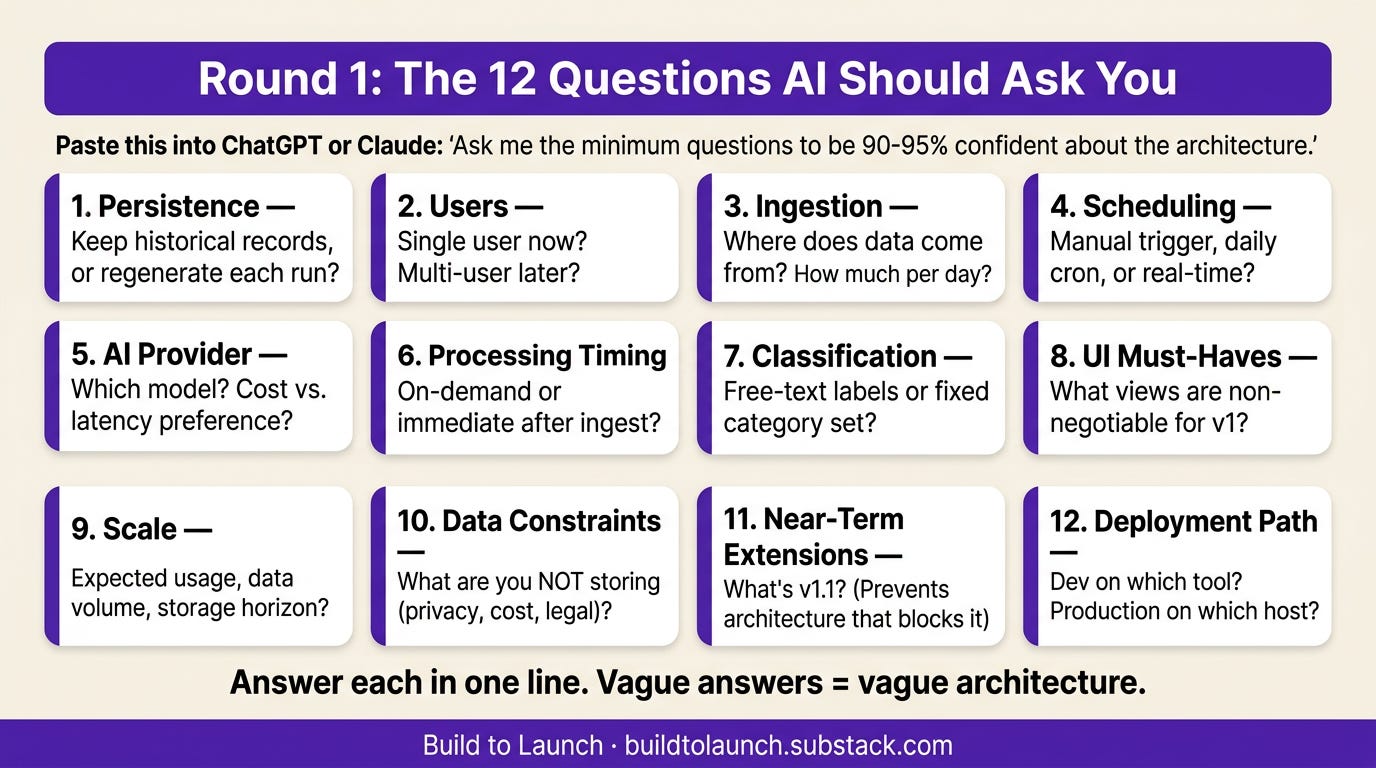
“Ask me the minimum number of questions you need to be 90–95% confident about the architecture.”
The AI should ask about:
Persistence — Keep historical records or regenerate each run?
Users — Single user now? Multi-user later?
Ingestion — Where does data come from? How much per day?
Scheduling — Manual trigger, daily cron, real-time? Where does the job run?
AI provider — Which model? Cost vs. latency preference?
Processing timing — On-demand or immediate after ingest?
Classification — Free-text labels or fixed category set?
UI must-haves — What views are non-negotiable for v1?
Scale — Expected usage, data volume, storage horizon?
Data constraints — Anything you’re NOT storing (privacy, cost, legal)?
Near-term extensions — What’s v1.1? Knowing this prevents architecture that blocks the next step.
Deployment path — Dev on [tool], production on [host]?
When I ran Round 1 for my AI digest app, the scheduling question stopped me cold. I hadn’t decided if processing would run on a cron or trigger manually. Twenty minutes of conversation here saved three days of refactoring later.
Decision checkpoint: Answer each in one line. You’re locking direction, data shape, and operational model. Vague answers here produce vague architecture.
Round 2 — Architecture Proposal
Purpose: Get the AI to draw the system before it builds it. Catch structural mistakes while they’re still just words.
You say:
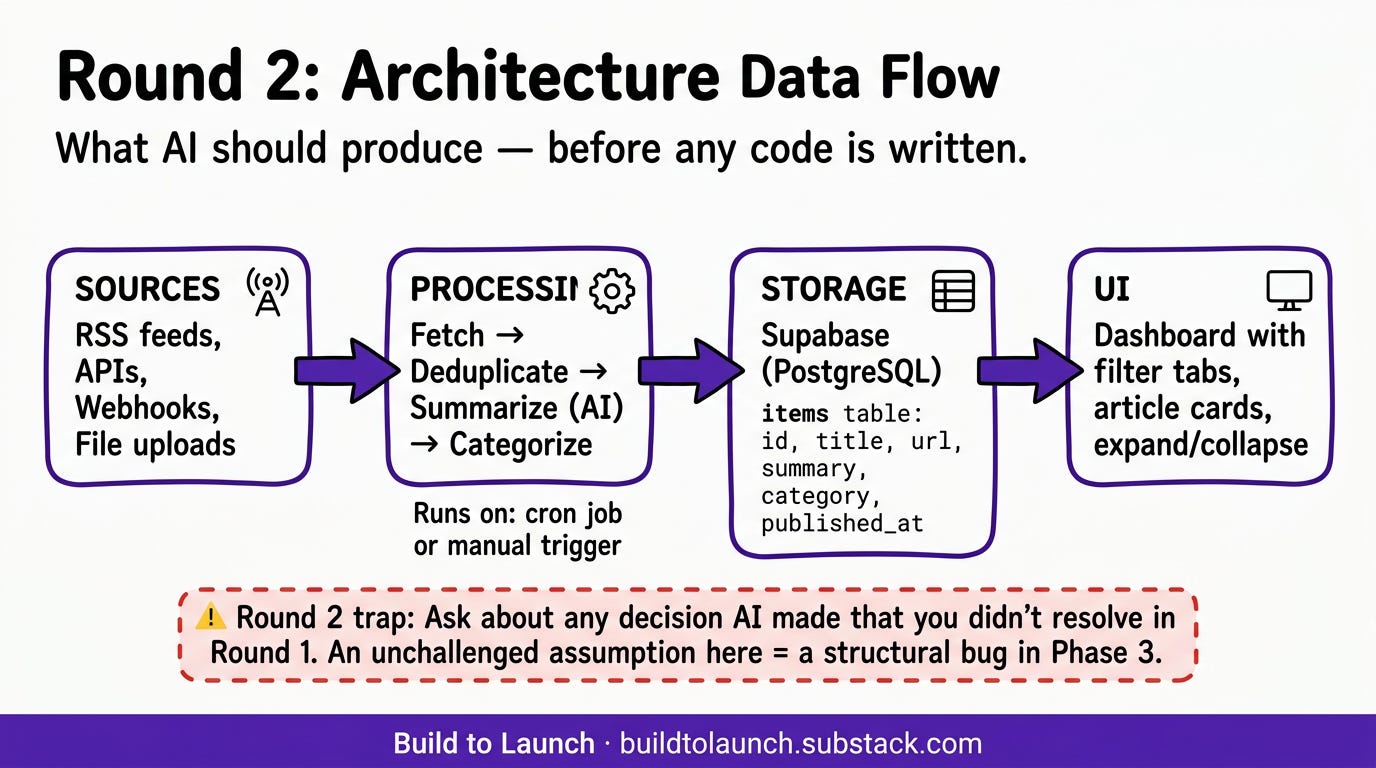
“Given my answers, propose the architecture and data flow. Call out tradeoffs. Be specific about components, but don’t write code.”
The AI should: Present the full data flow (sources → processing → storage → UI), specify database tables and relationships, explain the ingestion and deduplication strategy, justify its stack choices against your constraints.
What to look for: Any decision it made that you didn’t explicitly resolve in Round 1. Ask about those specifically before moving on. An assumption left unchallenged here becomes a structural bug in Phase 3.
The architecture the AI drew for my first build looked right on first pass. Then I caught it: it planned to store raw article content. I hadn’t asked for that. One question in Round 2 prevented a database that would have doubled in size every month.
Round 3 — Constraint Changes and Revisions
Purpose: Lock the final data model and processing behavior by testing your assumptions against the architecture.
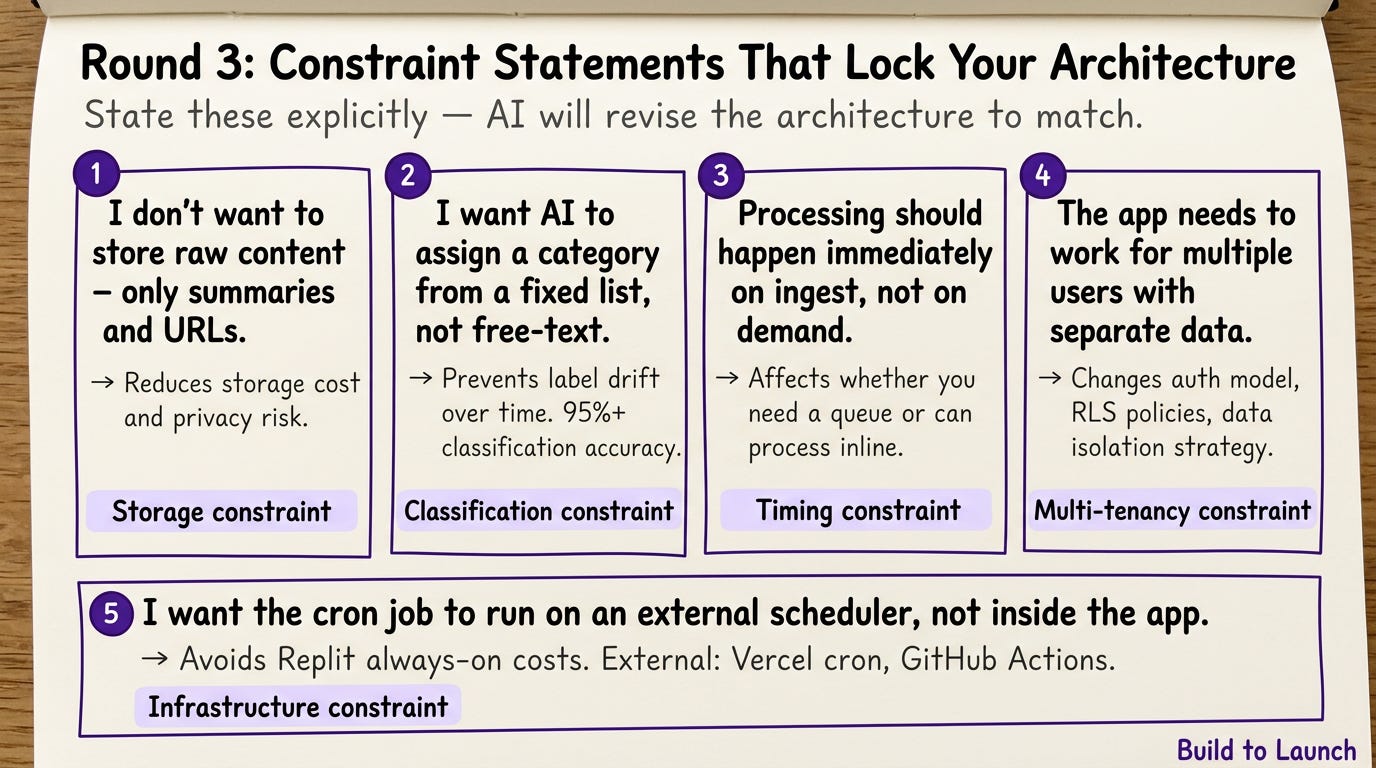
Examples of constraints to add:
“I don’t want to store raw content — only summaries and URLs.”
“I want AI to assign a category from a fixed list, not free-text.”
“Processing should happen immediately on ingest, not on demand.”
“The app needs to work for multiple users with separate data.”
“I want the cron job to run on an external scheduler, not inside the app.”
I added three constraints that changed my architecture completely. No raw content storage. Fixed categories instead of free-text. External cron instead of in-app. Thirty seconds each to state. The rewrites they prevented took days.
State each constraint explicitly. The AI will revise the architecture to match.
Decision checkpoint: By the end of Round 3, you should have a locked data model and a clear processing flow. If you’re still debating either, don’t proceed. Those decisions will surface as bugs if you leave them open.
Round 4 — Final Details Before Prompting
Purpose: Hand off from architecture to execution. Confirm the last open questions before generating prompts.
You say:
“I’m ready for build prompts. I’ll use [TypeScript / JavaScript / Python]. [Your tool] should manage [DB / API] credentials. I want high-level prompts only — no code — so the coding tool does the scaffolding. Generate a Master Initialization Prompt and then phased prompts. Before you generate, ask any last two questions you need.”
Give the AI room to ask those two questions. It’s been uncertain about something since Round 1 and hasn’t raised it yet. This is the last cheap moment to surface it.
Both times I’ve run this, the final two questions caught me off guard. They surfaced something I hadn’t thought to specify. Don’t skip straight to the prompt.
Round 5 — Master Prompt
Purpose: Generate the single prompt you’ll paste first into your coding environment. This is the full mental model of the project — the AI reads this and knows everything before it writes anything.
You say:
This article continues for members
Join Build to Launch to read the full article, access all cohort content, and connect with other AI builders.