I Analyzed 1,512 AI Workflows to Study Graph Engineering.
You already use at least one.
I analyzed 1,512 popular AI workflows written by other people. Because someone told me mine was effective but too dense, and I want to it to be effective AND simple.
I ran a Claude automation sprint in mid-September. On day four I showed everyone the pipeline that researches, drafts and publishes my articles on my app.
Throughout, I only need to make a decision twice.
But afterwards told me:
it felt a wee bit too dense for my brain
That was expected, because it literally handles everything.
That was also unexpected. Because I know Dee. She is not a beginner, she had already built Claude skills and automation, adaptive to connectors, very tech savvy. She also knew what she wanted out of this sprint.
In fact, after the session finished she went through and built her own automation system, then published it with clear understanding and steps.
But her words stuck with me.
People have been complaining about AI powered automations, meanwhile people are also craving ready-made skills.
The contrast point me to a few hidden questions that we are all curious about but seldom explored.
Am I writing AI automation the way it is supposed to be done?
Is there an established standard that already works no matter what?
Why does every example I open look nothing like the last one?
I’ve heard many versions of those questions, and I teach this.
Behind the scenes, all the questions can be answered by one phrase:
Graph Engineering.
It means you design the work as a map of steps and the paths between them, instead of one long unstructured prompt.
I know, it’s too bold for me to claim that.
So I went and analyzed 1,512 of them to unwrap the story.

What you’ll go through with me:
The seven shapes, and the name for using them. The vocabulary defined once, so the rest of the study reads cleanly.
The workflows I chose, and the ones I threw out. 440 repos in, 1,512 files out, and the five rules that decided it.
How I tested 1,512 files for seven shapes. The scoring method, the hand-check against it, and where it is weak.
What the shapes look like inside one real file. One skill opened up, with every shape named where it happens.
How to apply the graph shapes to your own workflow. Three steps you can run on anything you have already built.

AI Workflows Have Common Shapes. That Is Graph Engineering.
Prompts. Commands. Skills. Agents. Loop. Graph. Workflows.
By far, you’ve heard at least one of these names.
Each time they appear, they trigger a massive hype and expectations.
Underneath, they’re the same things with added conditions:
Prompts: instructions to AI, you type every time
Commands: a prompt you saved, you invoke
Skills: a prompt you saved, you invoke & it self invoke
Agents: a skill with it’s own session, it runs steps, you don’t
Loop: a prompt that runs repeatedly
Workflows: several prompts in an order you chose
Graph: the same workflow drawn with convention.
Notice that they all carry instructions to AI? That defines the backbone of any fancy terms that involve working with AI.
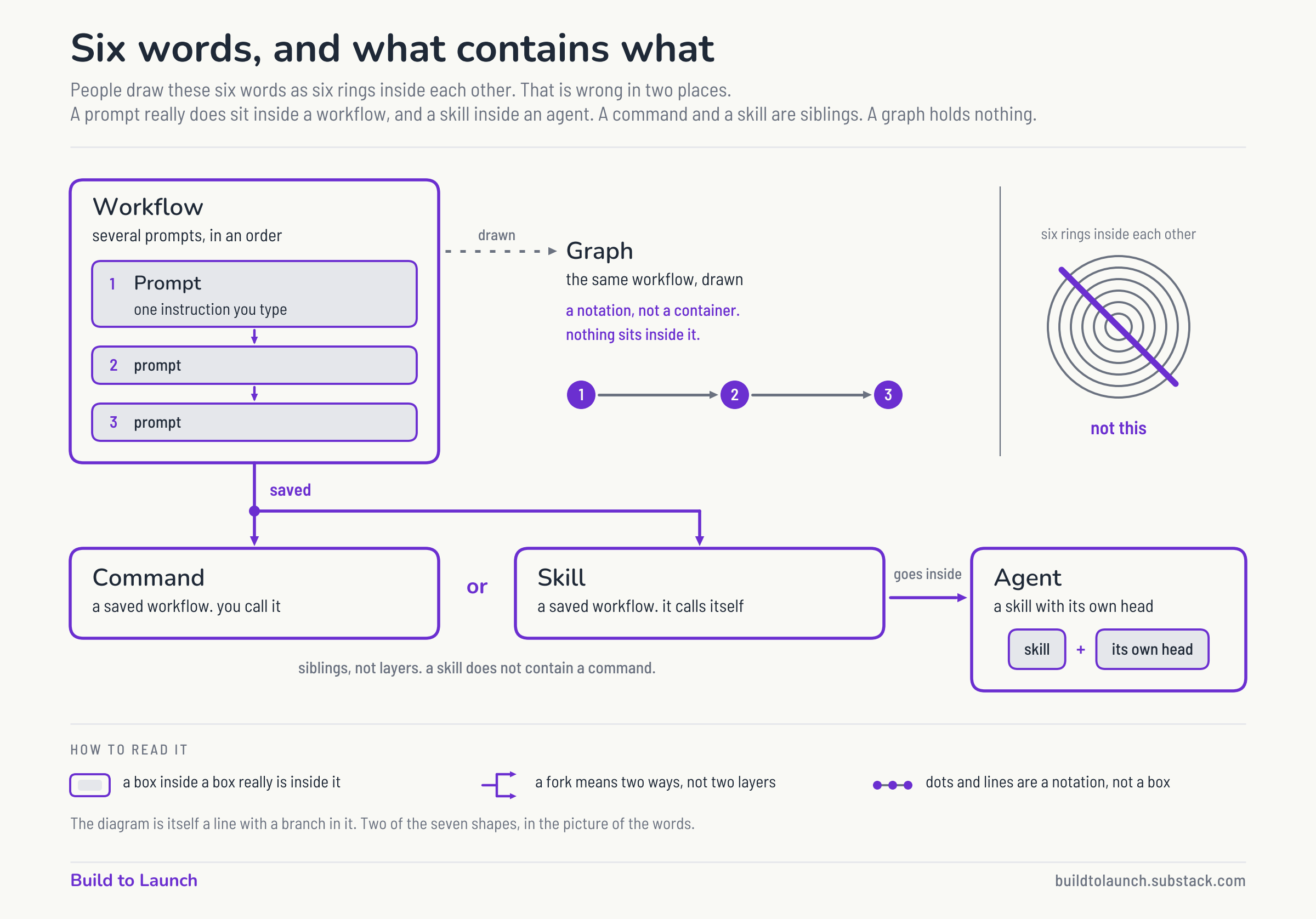
To simplify terms throughout this article, I’ll use “workflows” to refer to these different types of AI instructions. And SKILL.md files are the carriers of these instructions.
And nearly every prompt has a shape, and that shape is what we use to describe the “graph”.
There are easily millions of AI workflows now. But the patterns, or I’d call it “graphs”, of these workflows are still simple and traceable.
Nothing about the shape of these instructions is new. Automation worked them out decades before a model could read a sentence.
There were 7 most common graph shapes, and I bet you’ve used at least one of them.
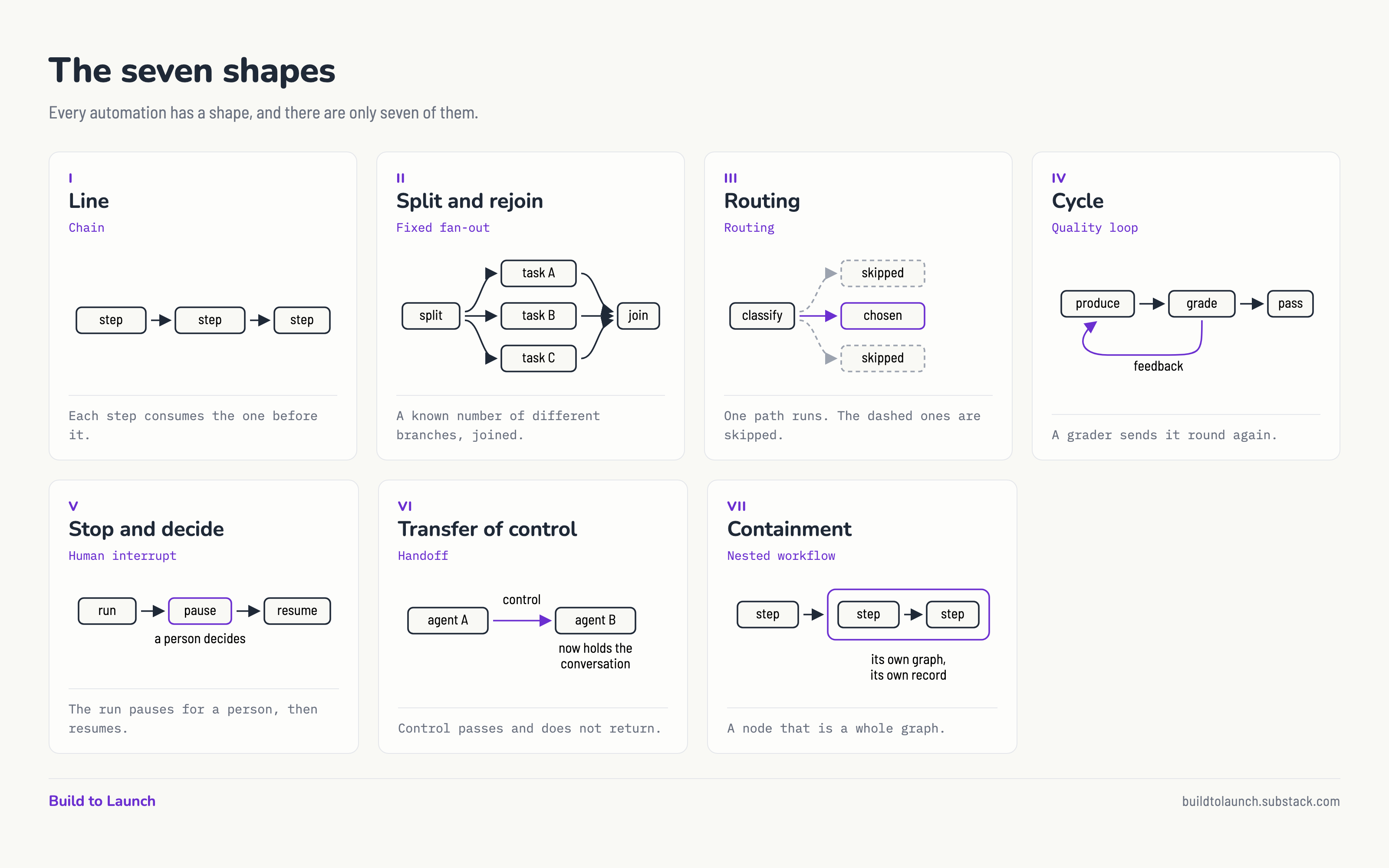
To satisfy your curiosity, and to have a broader understanding how people have been writing their workflows, I designed a simple study below.
The AI Workflows Chosen for this Study
Where do you find the most reliable and popular AI workflows?
GitHub open source repositories.
My criteria for choosing them are simple (and picky):
They have to be packaged in SKILL.md. So I don’t spend too much time deciding whether a .md file is even worth studying.
They have to be good workflows. So having at least a few thousand stars on GitHub is a reliable filtering bar.
The topics have to be broadly distributed. Meaning they can’t just focus on solving one problem, such as writing.
They have to include a range of different sources. So known companies such as Anthropic and OpenAI, and indie hackers all get to join.
I also sneaked in a few of my favorite daily workflows. To know where I am compared with these great sources.
To compare with non-AI controls, I also added well known n8n workflows into the candidates.
I got 440 repos as candidates, and after deduplicating on content hash, 1,512 files entered the final pool.
How I Analyzed the 1,512 SKILL.md Files to Extract Their Shapes
What is the easiest method to analyze markdown files?
Frontier AI models.
What is the easiest method to analyze markdown files with simple classification?
Jev.
So, I listed the criteria below, with each of the seven graph shapes became one yes-or-no question.
Line.
Does the file give steps meant to run in a stated order? Numbered, or “then”, or a named sequence. A list of topics is not a line; a list of steps is.
Split and rejoin.
Does the work divide into parts that run independently, and then come back together into one result? Both halves are needed. Dividing without rejoining is not this shape.
Routing.
Is there a stated rule that sends the work down one path and not the others? A decision table, or “if X do A, otherwise B”. One path is taken and the rest are not.
Cycle.
Does anything send the work back to a step that already ran? “Repeat until”, “loop back”, “re-score and iterate”, a fix-then-revalidate pass.
Stop and decide.
Does the procedure stop and wait for a person before it may continue? The person must be able to change what happens next. A question you answer in passing is not a gate.
Transfer of control.
Does the work leave this unit for another named unit and not come back? Hand off, and the receiver owns the rest.
Containment.
Is one step itself a whole workflow with its own steps? A subagent with its own instructions, or an external pipeline invoked as one move.
The entire study came to about 23 cents in less than 30 seconds.
Your AI Workflows Follow At Least One Graph Shape, Just Like n8n
Does the study finish successfully?
I had a hypothesis.
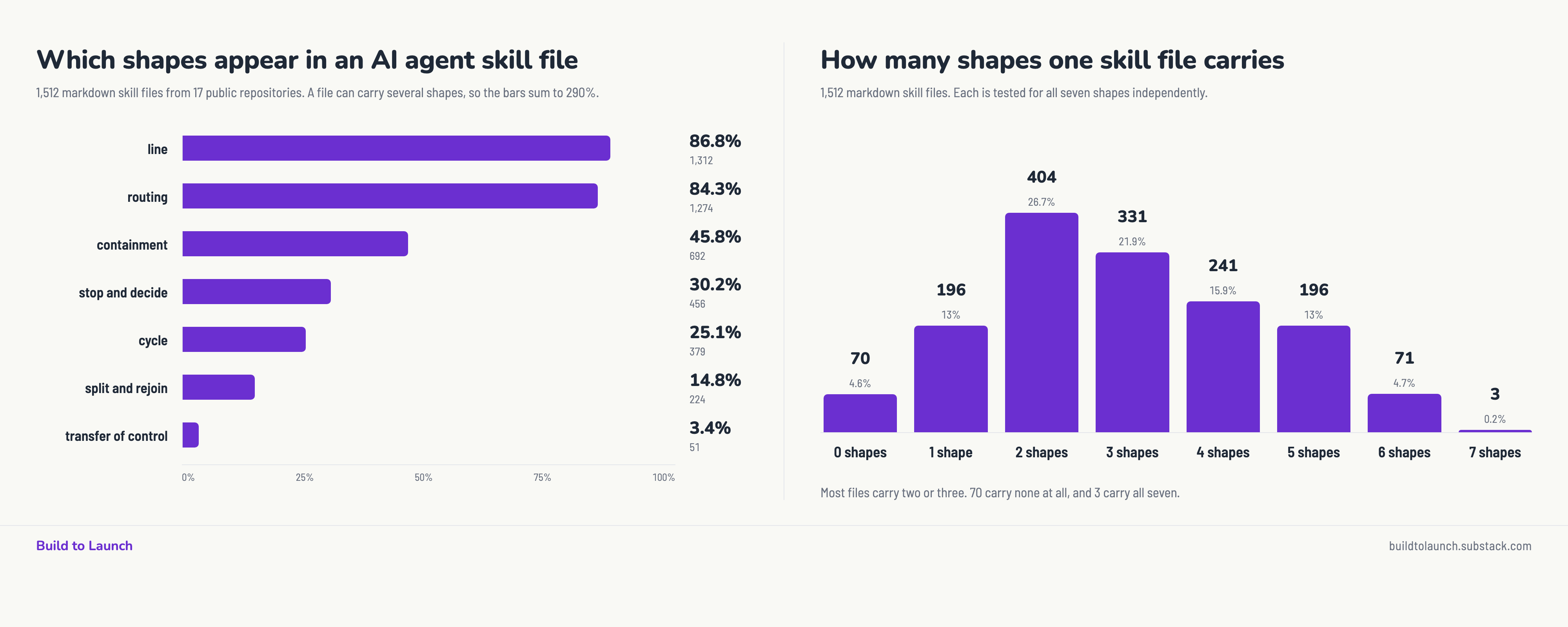
Line and routing should run away with it.
Telling an agent to do this, then this, and to pick the right branch when the situation varies, is what writing instructions is.
If those two had come back low I would know the test was broken.
Next, onto the fun part:
1. One file in five contains a line and a branch shape and nothing else.
These two graph shapes are so foundational that most of the skills pick these up.
2. Transfer of control appears in only 51 files out of 1,512.
So most of the skills are self-contained. We’ve been hearing agent orchestration, human-in-the-loop like it’s the baseline of using AI. But in reality, they’re not used that much, and they don’t need to.
3. Very few have just one shape.
4. Very few has every shape.
Most skills are complex enough that you can’t trust your memory of them.
But simple enough that you already know every part and can usually be captured by a handful of shapes.
5. Some skills have no shape at all. Why?
Because they are checklists for AI to screen for work, they carry simple instructions, but act like workflows.
6. When something is genuinely more complicated, it gets folded.
That’s the nature of corporate work too.
They look suspeciously like how a static workflows, such n8n, Zapier, and Make templates.
So I collected 12,000+ working automation workflows, and compared them against these AI workflows.
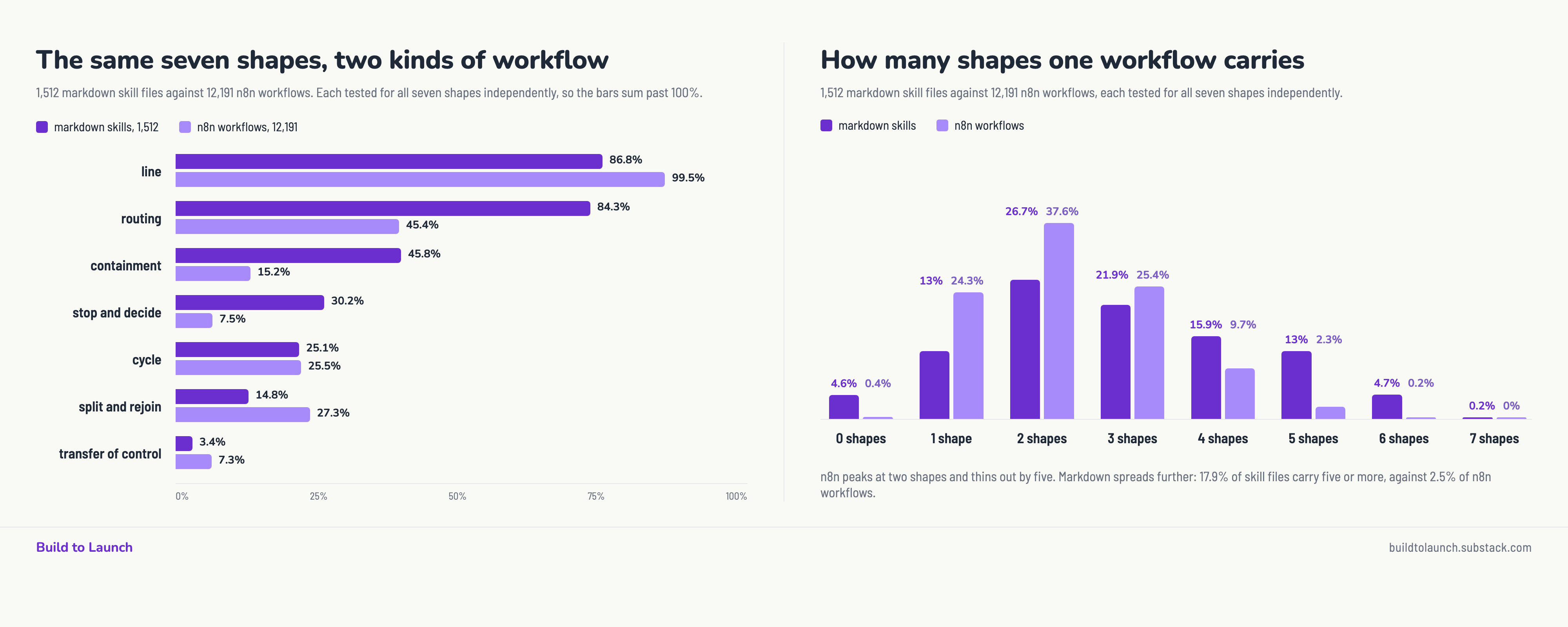
Two takeaways:
1. Traditional automation is good at running simple things.
n8n draws a line better than anything else, and it splits work to run in parallel twice as often as a skill file does.
2. What the markdown files do differently is decide.
They branch nearly twice as often. They fold a whole procedure behind one line three times as much. And they stop to ask a person four times more.
So AI is partly taking over automation’s job, but also supplement automation’s capabilities.
How Do Graph Shapes Occur in an AI Workflow
Counts only get you so far.
Can you actually see a shape when it is sitting in front of you, in someone else’s file, with no labels on it?
Let me take one real file and show you.
canvas-design, from Anthropic’s own skills repository. Apache-2.0 license, 129 lines.
It carries six of the seven shapes. Broken down one by one:
1. Line
Complete this in two steps:
Design Philosophy Creation (.md file)
Express by creating it on a canvas (.pdf file or .png file)
The philosophy has to exist before anything can interpret it, so the order is a real dependency.
2. Transfer of control
What happens next: Then, the same version receives the philosophy and EXPRESSES IT VISUALLY - creating artifacts that are 90% visual design, 10% essential text.
ARTISTIC FREEDOM: The next Claude interprets the philosophy visually - provide creative room
Leave creative space: Remain specific about the aesthetic direction, but concise enough that the next Claude has room to make interpretive choices
This is the rare shape, 51 files in 1,512, and here it is the whole architecture. Half the file exists to produce an artifact for a different run to act on, and it is designed for that handover rather than merely allowing it.
3. Split and rejoin
With both the philosophy and the conceptual framework established, express it on a canvas.
Two things are made separately, the philosophy and a deduced conceptual reference, and they converge here.
4. Cycle
Take a second pass. Go back to the code and refine/polish further to make this a philosophically designed masterpiece.
5. Containment
HOW TO GENERATE A VISUAL PHILOSOPHY
A whole procedure with its own steps, folded behind step 1 of a two-step skill.
6. Routing
Text as a contextual element: Text is always minimal and visual-first, but let context guide whether that means whisper-quiet labels or bold typographic gestures. A punk venue poster might have larger, more aggressive type than a minimalist ceramics studio identity.
Present but thin.
7. Stop and decide
Absent, and absent in the strangest possible way. It scored lowest of all seven in this file. It never pauses for a person. But look at how the final section opens:
IMPORTANT: The user ALREADY said “It isn’t perfect enough. It must be pristine, a masterpiece if craftsmanship, as if it were about to be displayed in a museum.”
The user did not say that. The skill scripts the critique, then answers it. Instead of stopping to ask whether the work is good enough, it writes the human’s dissatisfaction into its own instructions and loops on that.
To visualize how actions happen, I ran the canvas-design skill over this article, and monitored the steps AI took and what shapes happen in each of the step.
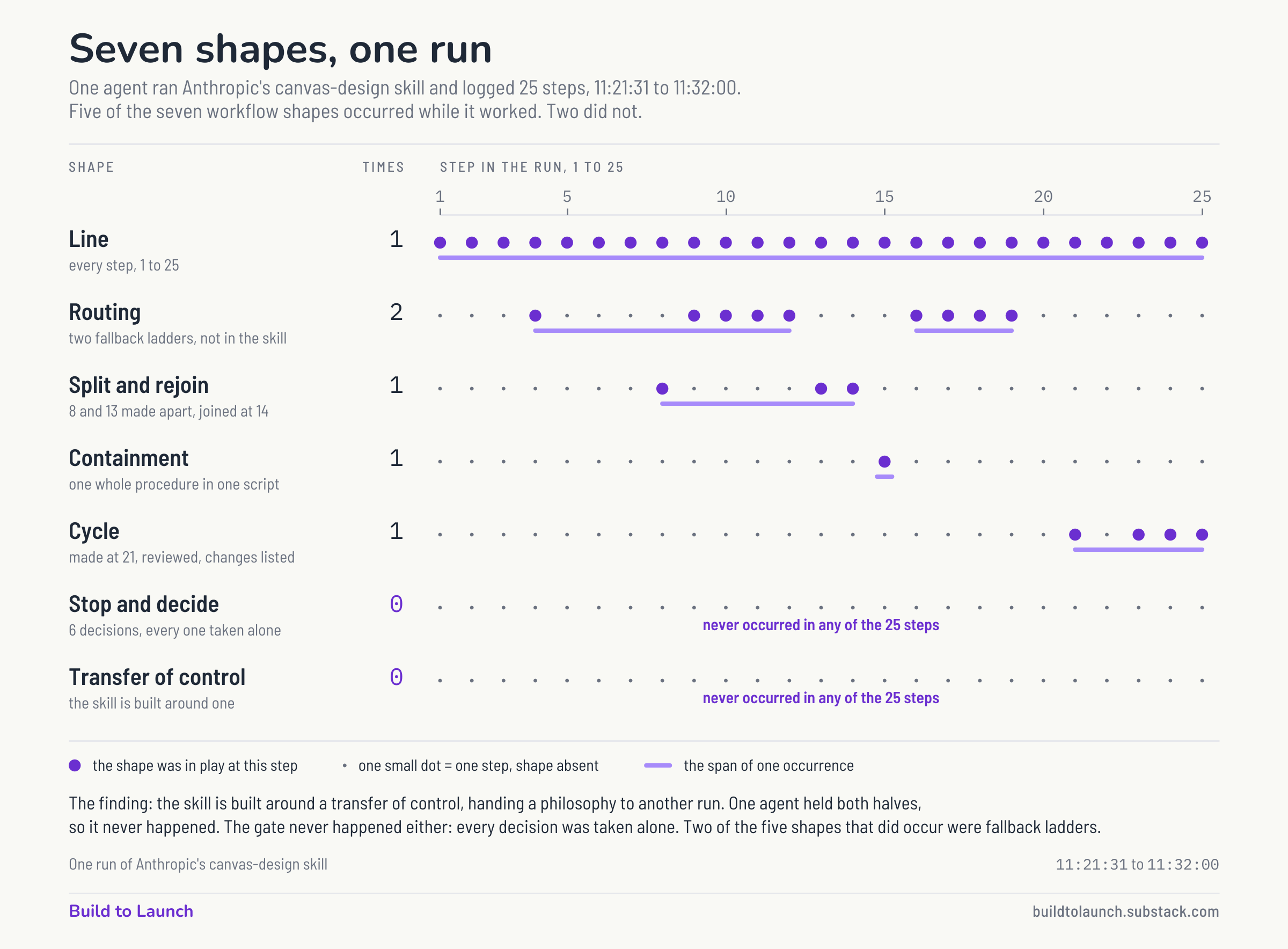
This is a rather complex workflow to chase down 25 steps. Which brings me back to Dee.
The session she found dense on Day 4 was the one went through all 7 shapes, multiple times, 30+ steps.
So it was dense at first glance.
But after seeing it work, Dee was able to carry out her own. So, how can you apply it too?
How to Apply the Graph Shapes to Your Own Workflow
I hope this study helped you take apart the simple components behind the complex and abstract terms about automation, workflows, and graph engineering.
The next steps to hammer it home is to put it to practice. I’d suggest three steps of work that’ll bring you up to speed with minimum effort.
Step 1, practice the line shape.
Take one thing you already run. A skill file, a prompt you reuse, a checklist, the 2 things you do every Monday morning.
Strip out any branches and external sources, build just one linear step by step action.
Step 2, add a branch to the linear action.
Think of the conditions you encounter.
It looks like: “If the email I expect said thing one, my AI should take action A; otherwise, my AI should take action B”.
Most people find a line and a branch, and nothing else.
Step 3, reference one skill inside of another skill.
Let’s call them the parent skill and the child skill.
The parent skill could carry out the linear shape.
The child skill may have lots of varieties. Routing, fan out, loop, etc.
Then you’d be surprised by your creativity and the potential it unlocks.
Thanks for reading Build to Launch! This post is public so feel free to share it.For inspiration, here’s the shapes of work I’ve done:
Stop and decide: a content system where a person steps in
All seven shapes: SEO monitoring that runs itself
Five shapes: growing a Substack with MCP workflows
Five shapes: a local business finder
Split and rejoin: dynamic workflows
Routing and containment: making AI writing sound human
What graph shapes do you use the most?
— Jenny