How to Move a Claude Automation From Local to Cloud (Without Breaking the Job)
The private GitHub home, Slack handoff, failed first remote run, Tavily repair, and passing receipt from
This guide shows how to move a Claude Code routine from a local computer to a private GitHub repository, start a read-only Claude Code session from Slack, run a Remote Routine, and diagnose missing cloud Connections before enabling the schedule.

Five source attempts produced zero usable results.
That was the result of our first Claude Remote Routine run on Day 3.
The cloud container started.
The private GitHub repository cloned correctly.
Claude read the approved Instructions.
BUT every source route failed.
The exact same task had run perfectly fine on my computer on Day 2.
As you schedule more remote automations, you will run into this gap again: a task works locally, but fails in the cloud.
Today, we’re fixing that gap.
A quick recap and a refresh of the plan:
On Day 1, we got our first win by scheduling a visible local task.
On Day 2, we connected that local task to its input sources and output destinations.
On Day 3, we’re giving the automation’s instructions and receipts a private, versioned home, moving everything to the cloud, and establishing two-way communication channels.
What’s inside:
Why Does a Claude Automation Work Locally but Fail in the Cloud?
What Did the Participant Questions Reveal About Remote Automation?
What Else Can You Run From the Same Versioned Automation Path?
Why Does a Claude Automation Work Locally but Fail in the Cloud?
When you run a Claude automation locally, its instructions are only one part of what makes the job work.
It can read the files its configuration permits, use credentials available through your local environment or credential store, and call MCP servers that only work locally. It can even reach whatever your current accounts and network already allow.
A Remote Routine starts in a far more restricted environment. Anthropic’s cloud-session documentation explains that a cloud session runs on cloud infrastructure, clones the selected repository, and uses the network and tools configured for that environment. And your local configuration does not come with the repository.
In simple words, a remote job needs four reachable things:
An approved repository.
Every required Input through a supported Connection.
A working Output location.
The Controls. The prompt boundary, branch rule, receipt, notification route, schedule, and pause switch must already be defined.
We already knew the connectors from Day 2 worked from the local Claude session. But some of those connectors became unavailable on Day 3. The repository arrived. The runtime access did not.
This is why I always insist on getting a successful local test before moving to remote. When a remote automation fails, you can ask one precise question:
Which part of the local environment never received a remote route?
Let’s refresh our memory about the five-part model we’ve been following in the first two days:
Inputs: the approved sources and raw material.
Connections: GitHub, Slack, and the remote services the run can reach.
Instructions:
AUTOMATION.mdandSOURCES.mdon the approved branch.Output: the useful report or file.
Controls: permissions, review boundaries, receipt, schedule, and pause behavior.
Take the failed automation from the earlier part of the article: the repository and Instructions passed; the Connections failed; the Output was empty; the receipt recorded the result.
So we need to fix the Connections part.
What Does GitHub Add to a Claude Automation?
GitHub gave this automation three things: one private home, named saved versions, and recoverable history.
But first, let’s match these GitHub terms to something we’re familiar with:
A repository is the online project folder.
A commit is a named saved version.
A push sends that version to GitHub.
History is the record we can inspect or return to later.
Claude handles the Git mechanics better than almost anyone. Your job is to choose the repository boundary, review changes, check rules, and approve the commits.
My free guide to what GitHub gives non-programmers explains the same idea outside this sprint: GitHub can be a filing system that remembers every accepted version, even when the person using it never types Git commands.
Day 3 added two action blocks to the automation:
Synchronize: the local session, Slack-started Code session, and Remote Routine read the same approved GitHub version.
Maintain: a person can inspect a change, preserve history, recover an approved version, review a run, and stop the schedule.
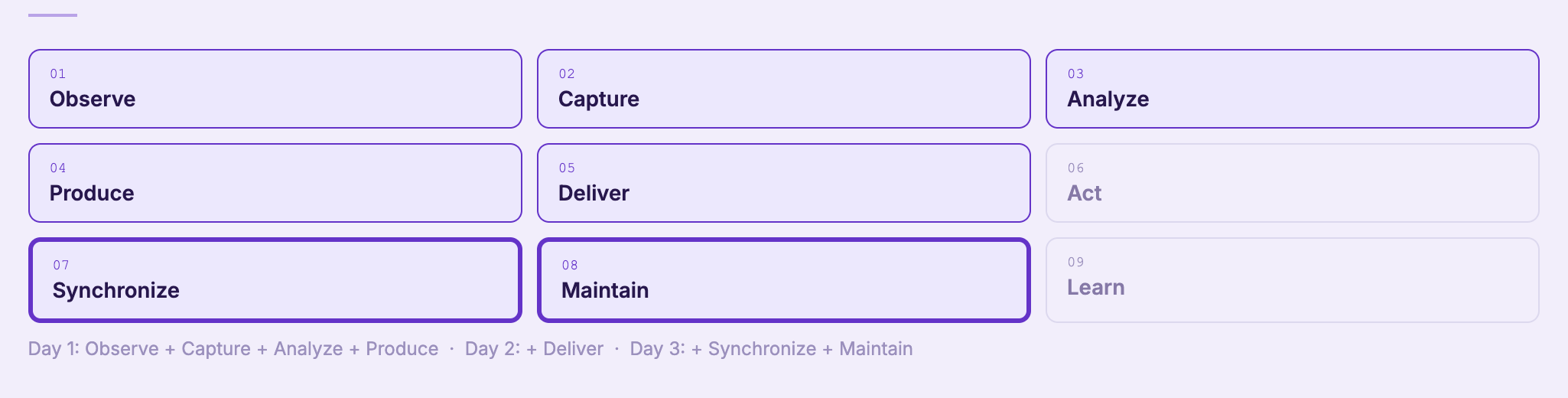
GitHub carries the approved version between runtimes. But a connector still has to be configured where the work happens.
What Makes a Remote Routine Ready to Schedule?
When a Claude Automation session shows a “completed” mark, it is easy to assume the automation succeeded.
But that mark does not tell you whether the automation did useful work.
Our first remote session completed. It also reported that no page could be read from five attempts and no row reached available status. That problem could be identified through a proof chain:
The repository is correct. The run starts from the intended branch and reads the approved Instructions.
The Connections exist in that environment. Every required Input has an available route.
Useful Output appears. A report, file, or record matches the contract in
AUTOMATION.md.The receipt stays separate. It records the run ID, timing, source status, counts, Output location, policy version, and failures.
The notification matches the run. Slack reports the same result and points back to the work.
The pause control works. Repetition begins only after the manual proof passes.
This extends the complete map of AI scheduled tasks: the trigger and runner matter, but the Controls and proof tell you whether the recurring job deserves to keep running.
Use Run now.
Fix the Connection.
Swap the source.
Run it again.
Everything from the session is collected in one place so you can rebuild the connected routine and adapt it to your own job.
Inside:
Four step-by-step modules: Connect Claude to GitHub, Connect Claude and Slack, Prove Slack, Claude, and GitHub, and Create and prove the Remote Routine
Five paste-ready prompts: create the first reviewed GitHub version, run the read-only Slack acceptance test, run the existing automation remotely, repair the failed remote Connections with Tavily, and create the VCB drafting automation
Proof checkpoints for repository scope, file boundaries, manual runs, receipts, Slack, and pause behavior inside the four modules
The Day 3 slides
The unchanged 64-minute recording with synchronized English captions on the Day 3 member page
Every supporting guide and member resource attached to the session, including Build to Launch MCP access
Live: Move a Claude Routine From Local to Cloud in 5 Steps
This article continues for members
Join Build to Launch to read the full article, access all cohort content, and connect with other AI builders.