Supercharge Your Claude Routine With Connectors (and Make It Actually Use Them)
Three connections, four sources, and the six-minute check that told the truth.
This guide shows how to connect a Claude routine to bounded inputs and one useful destination. You will test each connection separately, register the proven source, update the recurring procedure, and read the run receipt before expanding the job.

At 37:28 in our live session, a completion message appeared in Slack. Claude had produced a Public Signal Brief and delivered a notification to the private channel we chose.
Six minutes later, the report gave us a more useful receipt. It said four sources had been consulted. Apify and Gmail were connected and registered. The procedure still carried an older rule that blocked connectors and third-party research tools.
The Slack message proved delivery. The Public Signal Brief proved that technical access and recurring use are separate checks. Both were true at the same time.
This was the second session in our five-day Claude Automation Sprint. Day 1 gave the recurring job a visible local home. Day 2 connected that same job to real inputs and a real destination.
What’s inside:
What Else Can You Connect to the Same Routine?: Five ways to extend the same pattern
Start Here: Connect One Source and One Destination: The smallest bounded test to run
Session Timeline: Original-recording timestamps for every major result and diagnosis
🎁 The full recording, slides, six-step build-along, Connection Shortlist, MCP Directory, and Connected Automation Opportunity Atlas are collected in the Day 2 member resources.
If You’ve Been Putting Off MCP, Read This Part
A member told me via DM (yes, I have lots of conversations with my paid members via DM. When they ask, I do my best to answer in 2 days) that they really needed to catch up on MCP, but hadn’t been able to start. In their words:
“I’m not familiar with MCPs so knew I needed to read up on that first. Just didn’t have the time to and I think the upfront work to get to that level of knowledge to do that was intimidating. Bit overwhelmed on what to read and learn from the resources in order for me to get started.”
The pressure they feel comes from a reasonable place.
MCP sounds like infrastructure. Infrastructure sounds like something you get to later, after the easy things are done. And every post you see about it is either “here are 24 MCP workflows” or “here is what MCP means.”
Almost nobody hands you a map, because the definition and ecosystem behind it are messier than it reads from a guide.
Before MCP had a standard name, I was already building this pattern with small scripts inside Cursor. One fetched web research. One called Pandas for data analysis and visual output. One exported results in a fixed format. Cursor read my guidelines, chose the right script, and repeated the loop until the task was done.
In my first full article about an MCP second brain, I wrote:
We weren’t waiting for MCP to be invented. We were waiting for it to be recognized and standardized.
MCP turned that hand-built pattern into a shared way for AI to reach tools and data. The installation replaced the script. The test stayed the same.
Most people use “connector” to mean MCP, and that’s fair, because MCP is the standardized one.
I’m using the word wider than that, and I built the map that follows around that wider meaning. A connection is any data exchange between your AI and another source: a file on your laptop, a hosted service, a database holding records you read and write.
Local files. Anything on your machine. The Day 1 routine already reads these. If you’ve done any of this before, you’re already on this shelf.
MCP and APIs. The standardized plug. This is where MCP sits, and it’s the easiest shelf to start on, not the advanced one.
Sources that hold state. Databases, CRMs, project tools, anything you read and write. Same mechanics as the shelf above. Higher consequences.
Where the compute lives cuts across all three. Local sources run on your machine and need it open. Hosted sources work when your laptop is shut.
In Day 2 work, you can learn MCP without touching the other two shelves yet. The map exists so you know what you’re not missing, not so you do all of it at once.
I keep a directory of 70 to 80 connectors for you to explore on the Day 2 member page.
What Happened Six Minutes After It Looked Like It Worked
Two things drifted in the same window.
The first was the set of sources the routine was supposed to retrieve.
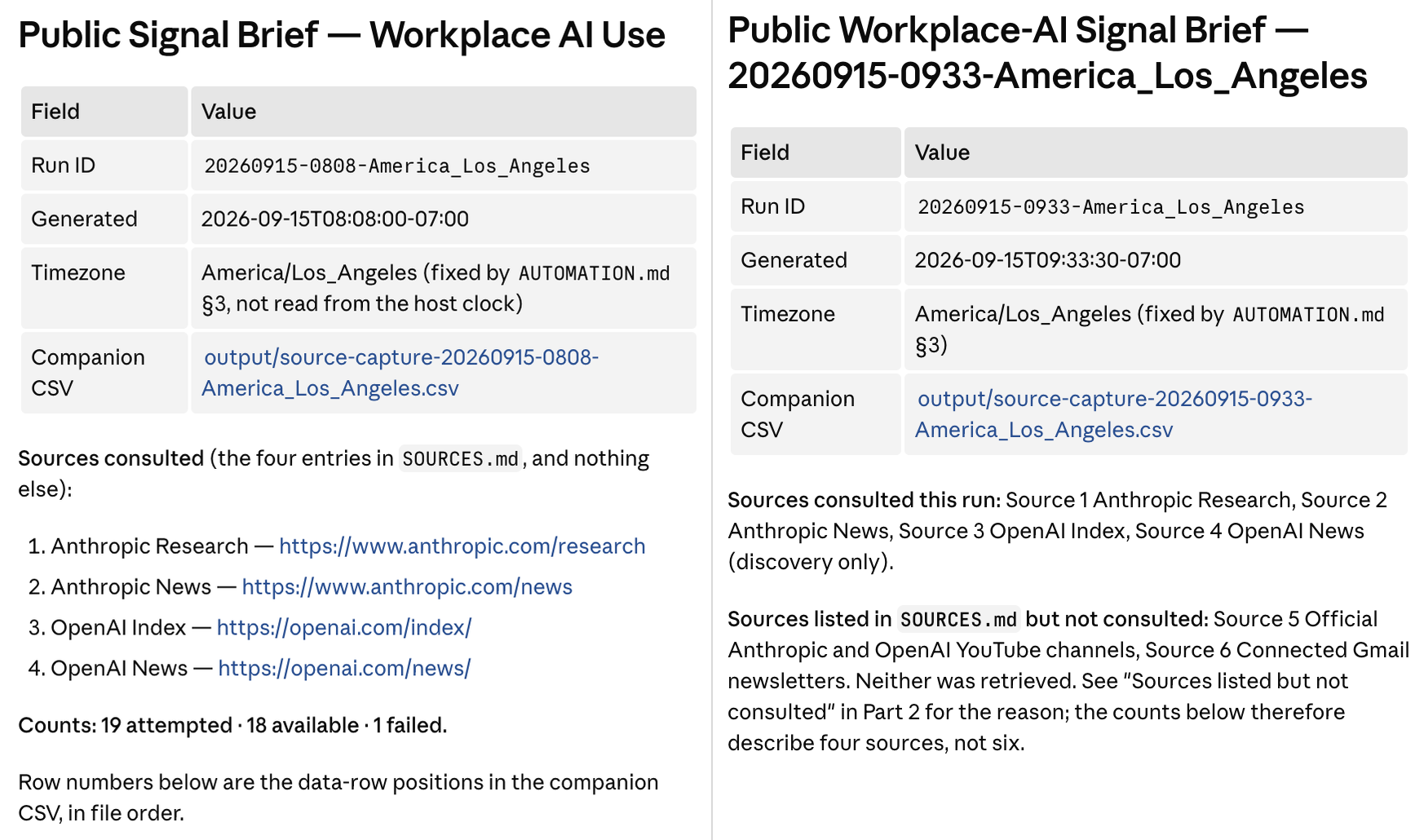
At 43:44, the report showed four consulted sources. Two Anthropic pages and two OpenAI pages. Those were the four sources already defined on Day 1. On Day 2, we connected Gmail and YouTube, but both were invisible to that run.
And we found the reason. AUTOMATION.md still carried an older rule that said no connectors and no third-party research tools. Claude followed the saved procedure exactly.
Nothing was broken, but the automation was still wrong because of a hidden rule in its instructions.
The second drift is the format of the output from each run.
The earlier runs produced perfectly numbered listicles, but this run came back with a collapsed paragraph.
Both symptoms came from the same missed step: rereading the procedure after each update.
The Green Checkmark Is the First Proof, Not the Last One
The easiest part of using a connector is the install. You watch the UI display “connected” and it feels solved.
The hard part comes when you ask yourself:
What should your automation read and where should it write?
The answer gives you the direction of the work. Then three proofs tell you whether the connection belongs in the recurring job.
Access. Claude can reach the source or destination. This is the only thing the checkmark proves.
Scope. Claude reaches the intended account, records, time range, and allowed actions. Not the neighboring account. Not the wider search.
Procedure. The recurring instructions name when and how to use the connection.
Apify passed access when it returned 10 YouTube video results. Gmail passed access and scope when Claude read up to five publication emails from the previous seven days in the one account I selected out of four. Slack passed its destination test when the message appeared in the private channel.
A misconfigured read gives you a thin report. It’s quiet, disappointing, but recoverable.
A misconfigured write puts a message somewhere you didn’t choose. You find out from a person.
So we shall always start with the smallest write available.
Everything from the session is collected in one place so you can rebuild the connected routine and adapt it to your own job.
Inside:
The Day 2 setup and build-along, with the six-step sequence for the Day 1 inspection, Apify, Gmail, Slack,
AUTOMATION.md, and the connected runThe Connection Shortlist, for choosing one source or destination that fits your job
The Complete MCP Directory, for checking available connection routes
The Connected Automation Opportunity Atlas, with connected job ideas to adapt
The Day 2 slides
The cleaned 58:27 live recording with synchronized English captions on the Day 2 member page, with the unchanged original preserved as the evidence source
Every supporting guide and member resource attached to the session, including Build to Launch MCP access
Live: Connect and Supercharge Claude Routine in 6 Steps
This article continues for members
Join Build to Launch to read the full article, access all cohort content, and connect with other AI builders.