Obsidian + Claude Code: How to Build a Second Brain that Remembers, Connects, and Runs Itself
Build a second brain with Obsidian and Claude, it remembers your work, links itself, answers across your history, and get smarter over use. By the end, a

For a long time, I was my AI’s memory.
Not because it had none. It had plenty. ChatGPT remembers. Claude remembers. My agents on OpenClaw remember.
The problem is the kind of memory.
It’s linear. A running log. Each new thing pushes the old ones down, then out. It keeps what’s recent and drops the arc.
So it can’t answer the question I actually care about. Pull up one topic across my whole history. What I thought, what I researched, what others said, how it evolved, where every file lives.
A log was never going to hold that shape.
You could make the AI read back through everything, every time, to find what connects. I tried. It is slow, and the token bill is brutal. You can’t afford that on every lookup.
So what you need isn’t a better log. It’s a second brain.
A connected store of everything you know and have done. You land on one idea, and everything tied to it comes up with it. Across your whole history. Without re-reading it all.
That’s the thing I was missing.
I got there sideways. Every time I asked AI to read or write my work, it kept pulling me toward markdown. Plain text files.
And markdown is the first thing Obsidian is built on.
So the jump was small. Put my notes where the AI already reads best. Then connect them.
I went through every question I had about Obsidian until it clicked. Then I wired it to Claude.
That was the day I stopped being the memory.
This is the build, start to finish. The notes, the connection, the setup.
What’s inside:
What makes Obsidian so good
Why Obsidian and AI work together, and the tools that extend it
What a connected Obsidian + Claude second brain looks like
How to connect them: the bridge
How to set up Claude to run it
How to keep the vault organized so Claude finds the right note
By the end: an Obsidian vault Claude Code reads, updates, and interlinks as your second brain
The obsidian second brain kit: grab it at the end
🎁 The Obsidian Second Brain Kit: the pre-built vault, the context-file templates, the bridge setup sheet, the self-updating skills, and the cleanup checklist.
Hi, I’m Jenny 👋
I believe anyone can thrive with AI, not by mastering the tools, but by building real things with them. I run Build to Launch and the Practical AI Builder program, where we go from experimenting to shipping. Come build with us.
If you’re new to Build to Launch, welcome! Here’s what you might enjoy:
Subscribed

What Makes Obsidian So Good?
Obsidian is a free notes app that stores every note as a plain .md file on your own computer.
No cloud account. No database you can’t open. If Obsidian disappeared tomorrow, your notes still open in any text editor.
It has three parts:
A folder, also called vault, is where all your notes are saved;
.md files, also called notes, is the format that stores your notes, one idea at a time;
A graph, shows the connection between all saved notes.
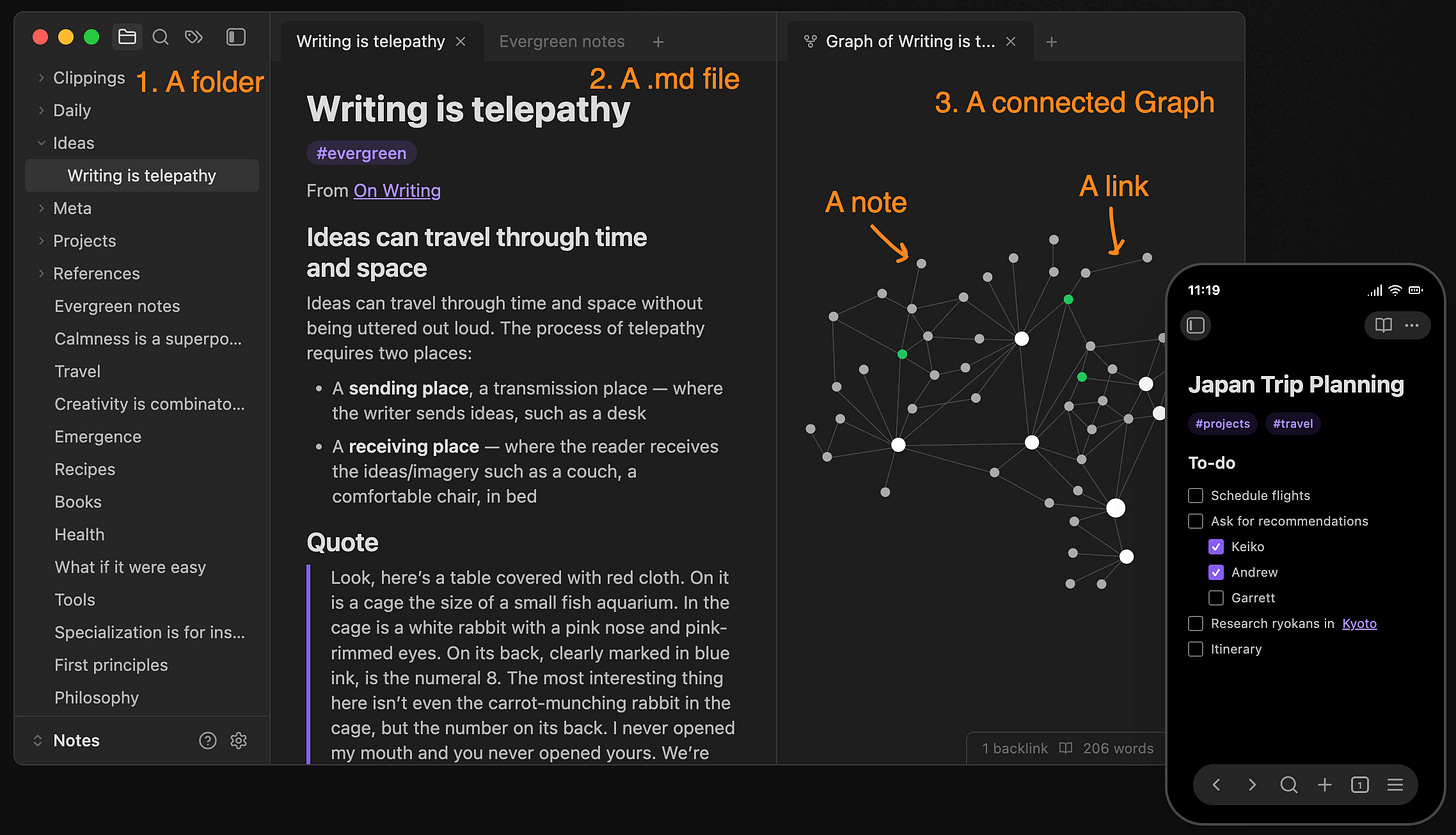
From: https://obsidian.md/
The connection and relation of files are made possible by two built-in features:
Links.
Also known as wikilinks after the wiki-style brackets. Type a note’s name in double brackets in another note,[[Example Note Name]], and the two are connected.![Type “[[]]”, and Obsidian will display the most recently edited file as link candidate](https://substackcdn.com/image/fetch/$s_!1be8!,w_1456,c_limit,f_auto,q_auto:good,fl_progressive:steep/https%3A%2F%2Fsubstack-post-media.s3.amazonaws.com%2Fpublic%2Fimages%2Fef405911-58cc-4779-a83f-ef34442414f5_1068x674.png)
Type “[[mcp]]”, and Obsidian will display the most relevant file as link candidates
**Properties
**They are custom fields at the top of a note: status, source, project, date. Written as plain YAML, they let Claude read the note as data, not just prose, and you can sort and filter on them like a table.
Tags are a special type of property, they are searchable and clickable in Obsidian.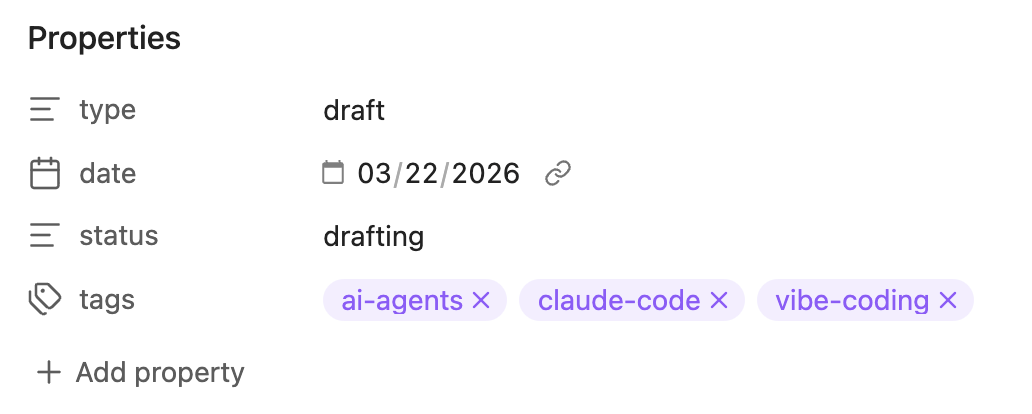
Obsidian has custom properties (add however you want) and built-in properties (Tags)
The links + notes build a graph view, which turns your vault into a picture.
Every note is a dot. Every link is a thread.
A vault with no links is dust: notes floating, nothing touching. Add links and it clusters. You can see which ideas belong together and which are stranded.
The search within Obsidian is cheap and crazy fast.
A developer tested it on a 4,663-file vault. Finding the disconnected notes by brute-force grep took 15.6 seconds. Through Obsidian's index: 0.26, about 60 times faster. Have an AI do the same scan by reading every file and it burns roughly 7 million tokens. Through the index, about 100. Same answer, 70,000 times cheaper.
Why?
When your vault loads, Obsidian reads every note once and builds an in-memory index called the metadataCache: every link, tag, heading, and property in the vault.
After that, it works from the index. A link resolver maps every [[wikilink]], so backlinks and orphans surface instantly, with no full-vault scan.
Your notes are still plain .md files. The index sits on top. You get database speed without trapping your notes in a database.
You made the connection once. Next time you land on one idea and the connected ones come with it, because the connections were stored once and the index keeps them ready.
That is the Obsidian side.
Now you may say, sure, Obsidian seems powerful in note-taking and graph-drawing, but what makes it so special with AI?
Why Do Obsidian and AI Work Together?
If you’ve been building with AI for a while, you already know the pattern: Markdown files are first-class citizens.
Obsidian treats Markdown files the same way.
Same foundation. That is why the pairing works.
Obsidian gives Claude four things at once: readable files, a steady stream of source material, writable memory, and paths to follow.
Put those together and you get the shape of a graph memory agent: your vault as long-term memory, Claude as the part that reasons over it.
Reason 1: Claude can read it
Obsidian’s rules happen to match what Claude reads and writes best:
Markdown gives it clean text.
Wikilinks give it paths between ideas.
Properties and tags give it filters.
One idea per note gives it the exact thing, not a 5,000-word file to wade through.
You do not have to teach Claude a new format. Obsidian already speaks it.
Reason 2: the vault keeps getting fed
Obsidian is built for capture.
Your own ideas, meeting notes, book quotes, articles, and videos can all land in the same vault.
The online half is the Web Clipper, Obsidian’s official browser extension. Click once on an article and the page lands in your vault as clean markdown. On YouTube, the same button saves the page in a stripped-down read mode. Highlight as you read, and each saved sentence keeps a link back to the exact spot.
Everything you read and watch becomes something Claude can reason over.
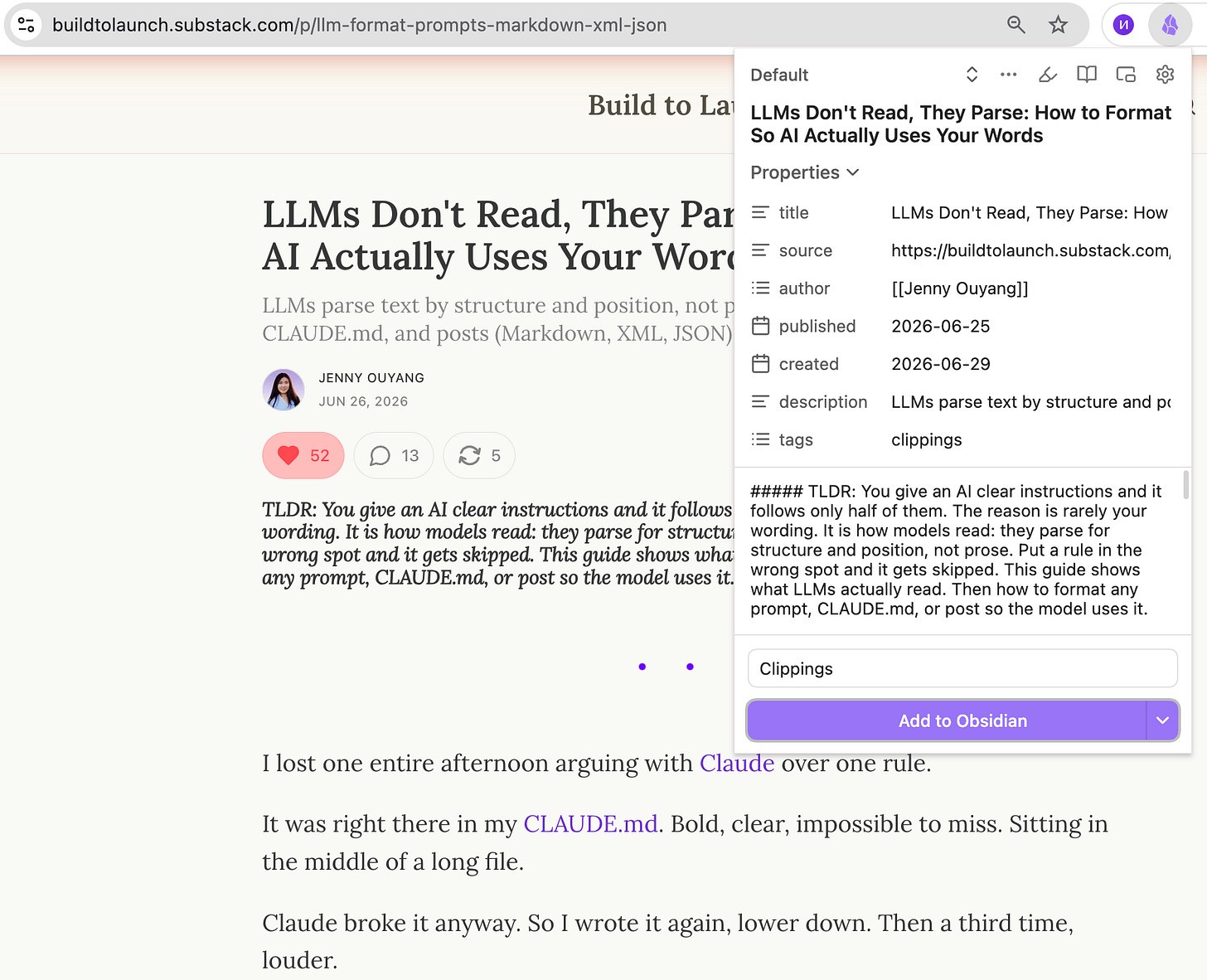
Screenshot of Obsidian web clipper saving my article on 4 formats LLMs like to read
Reason 3: Claude writes back
Open a normal AI chat, solve a problem, close the tab.
Tomorrow the work is gone.
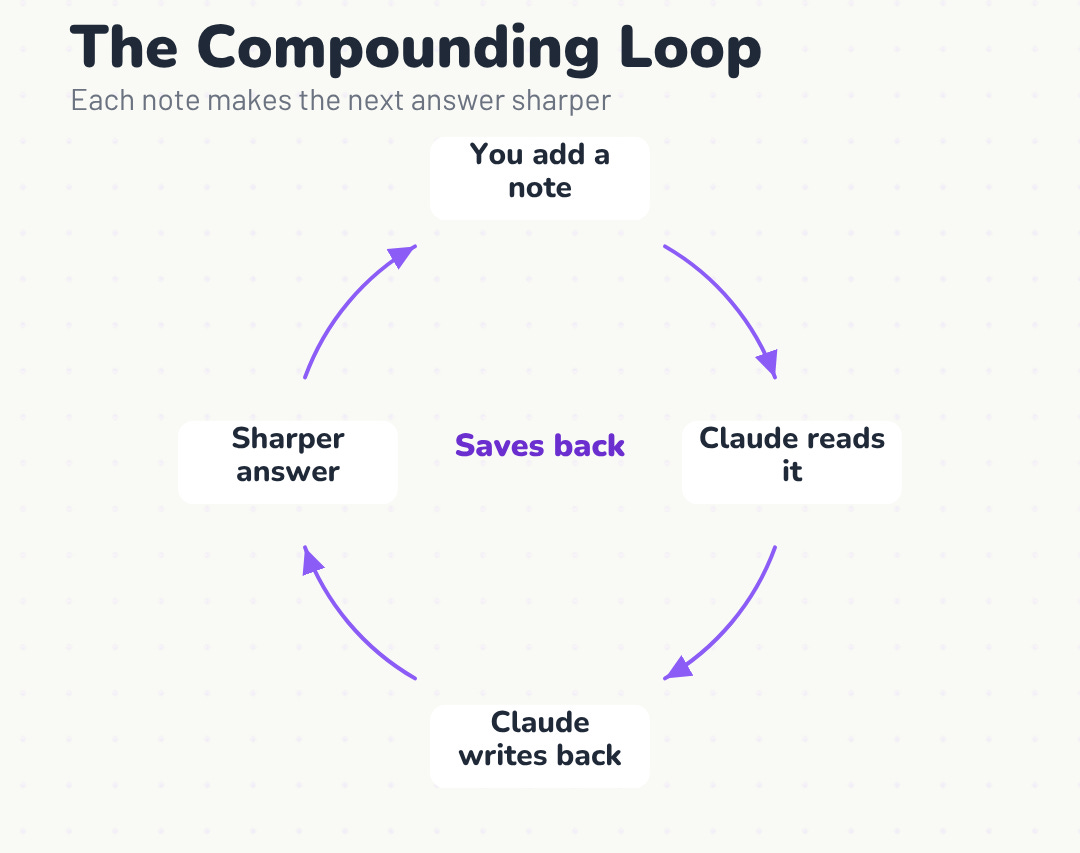
A vault breaks that. Claude is not read-only here. Every session can write what it worked out back into your notes.
What you figured out today is there tomorrow.
That creates the flywheel:
The AI writes better notes.
The better notes give it more context.
The next answer is sharper, and that gets saved too.
Your knowledge compounds instead of evaporating. After a few weeks, the vault stops feeling like storage and starts feeling like it’s thinking with you.
Reason 4: Claude can navigate without drowning
Claude does not need to read the whole vault.
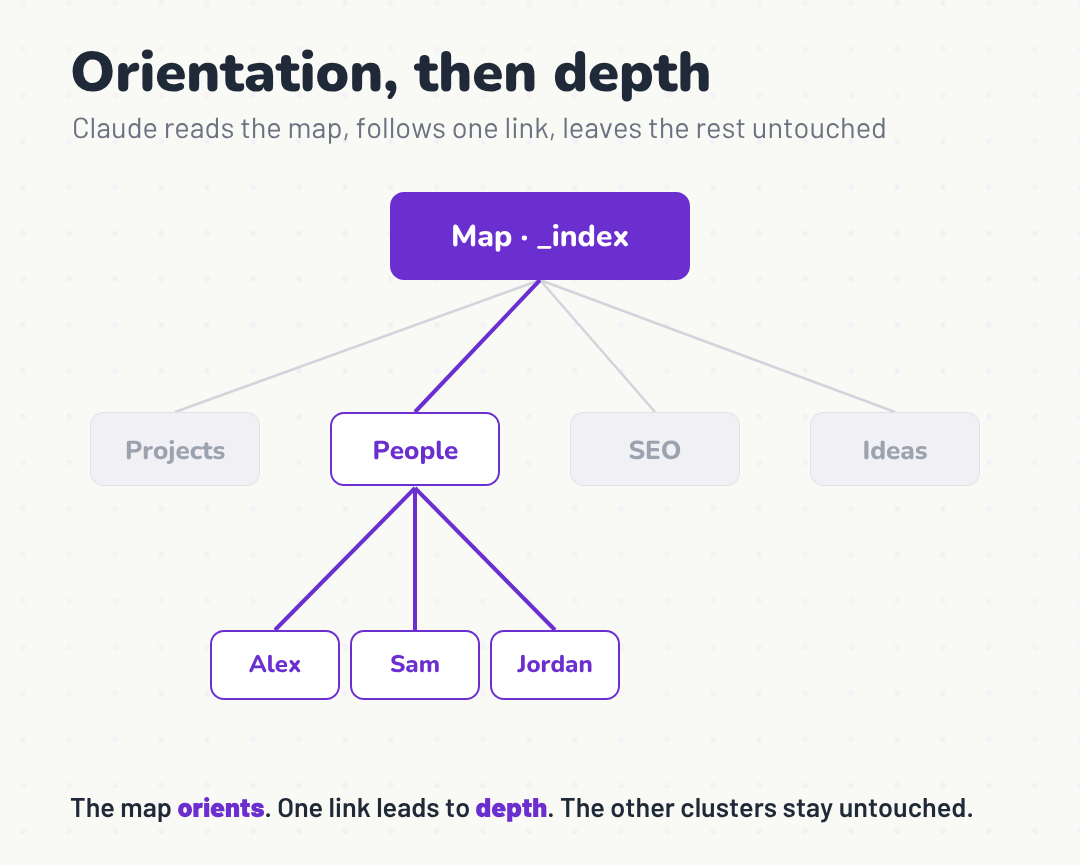
It reads a small map first: a short file that says what exists and where. Then it follows the links to dig only where it needs to.
Ask it, “Which of these people haven’t I followed up with?” It reads the list, follows each link to that person’s note, checks the last date, and answers.
The map gives it orientation. The vault gives it depth. The index keeps every link ready, so following one is near-instant, even across thousands of notes.
The ecosystem extends it
Plugins extend the vault in two directions: how you see it, and how you talk to it.
Copilot lets you chat with your own notes.
(I’ve written about how Obsidian Copilot works well with the concept of RAG and building a second brain here)Smart Connections surfaces related notes by meaning, even ones you never linked.
Dataview turns your notes into a database you can query and lay out any way you want.
You need none of them to start. They’re there when you want them.
What that looks like in real work
Once wired, the vault can:
Pull one topic across your whole history: what you thought, what you researched, how it changed.
Answer “what did I decide about this?” with the note where you decided it.
Draft from your own past work instead of a blank page and generic advice.
Read across everything you’ve saved on a subject and hand back the patterns and the gaps.
Surface a note you’d forgotten, right when it’s relevant.
Your version will depend on what you feed the vault and how you connect the dots.
Mine became a working memory layer. This is what that looks like.
What Does a Connected Obsidian + Claude Second Brain Look Like?
My vault went through several versions before it settled into this.
Now I use it for five things, all from the same connected vault.
Pull one topic from everywhere
A connected vault lets me ask one question across my whole history.
I can ask, “What did my vault say about SEO?” and Claude pulls the answer from strategy docs, draft notes, GSC data, and old decisions. It gives me the point, then shows the file each piece came from.
No folder-hunting. No rereading everything.
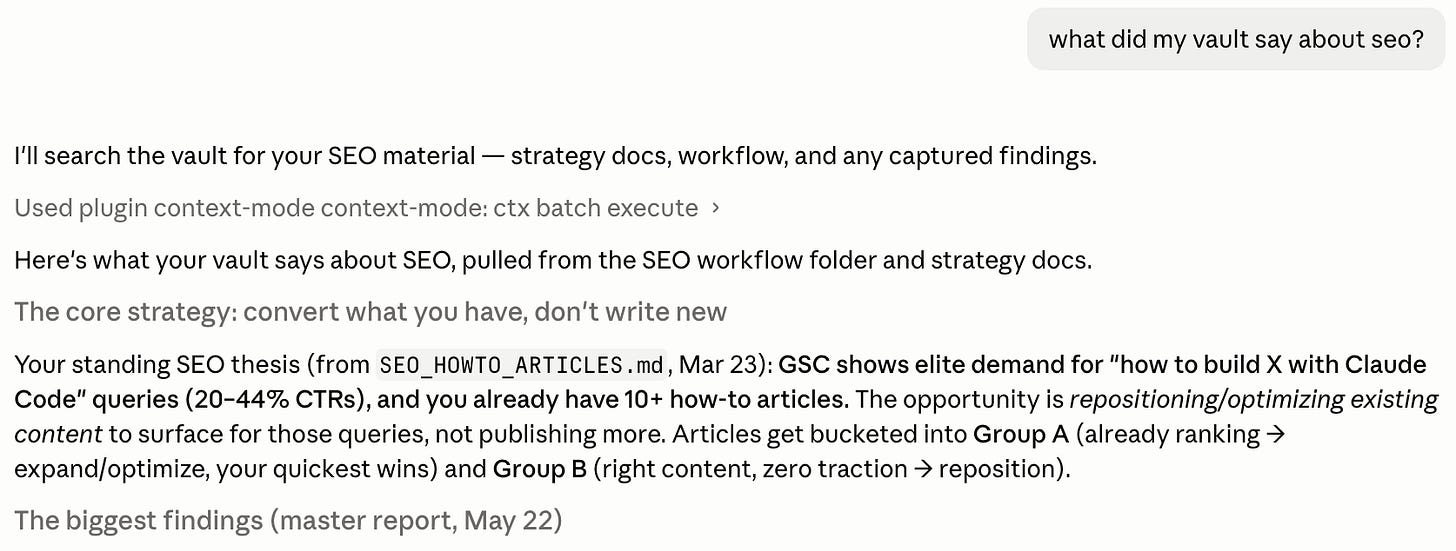
When I want the raw cluster, I can search by tag instead. obsidian search query="tag:#mcp" pulls 428 MCP notes across articles, short-form posts, programs, and products.
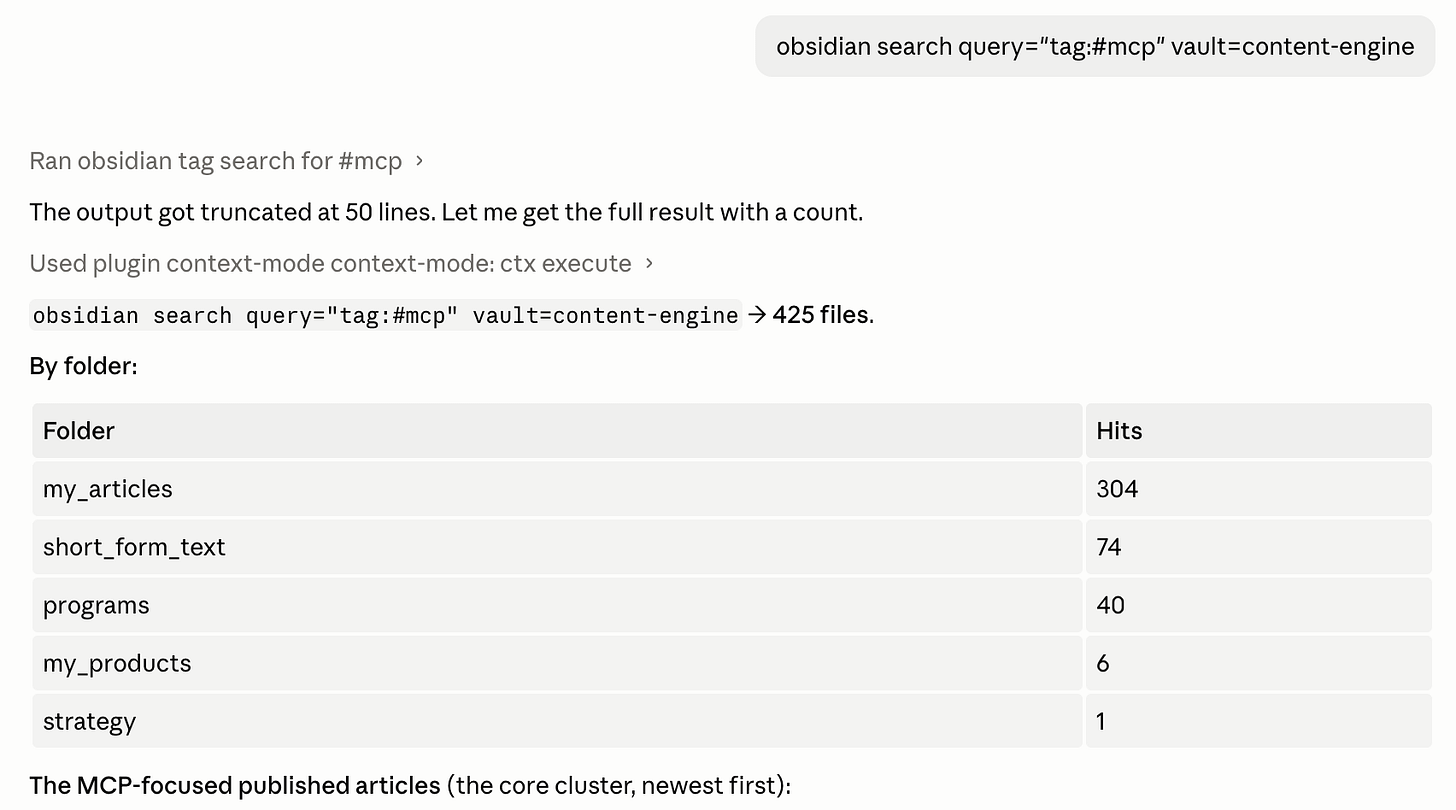
One question gives me the synthesis. One tag gives me the whole cluster.
Turn a cluster into a dashboard
A tag search is useful, but 428 notes is still a wall.
So I asked Claude to build me a Base. The structure was already there: status, category, date, tier, tags, folder. Claude turned those fields into a sortable table in one pass.
Now the MCP cluster is a dashboard. I can sort by status, scan stale drafts, filter by category, and decide what to do next.
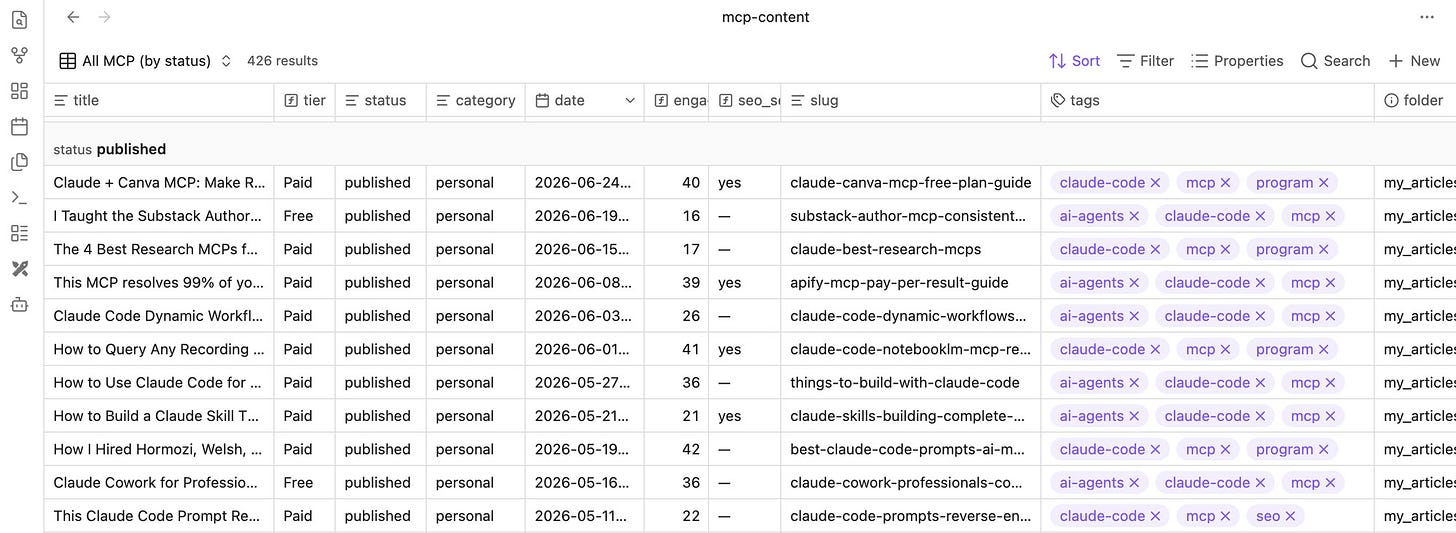
The notes stay the source of truth. The table is just a view.
Let the graph connect itself
I did not link those notes by hand.
Claude linked as it worked. The graph changed from scattered dots into clusters, then those clusters started connecting across topics.
That is the part I wanted: the vault getting more useful every time work passes through it.
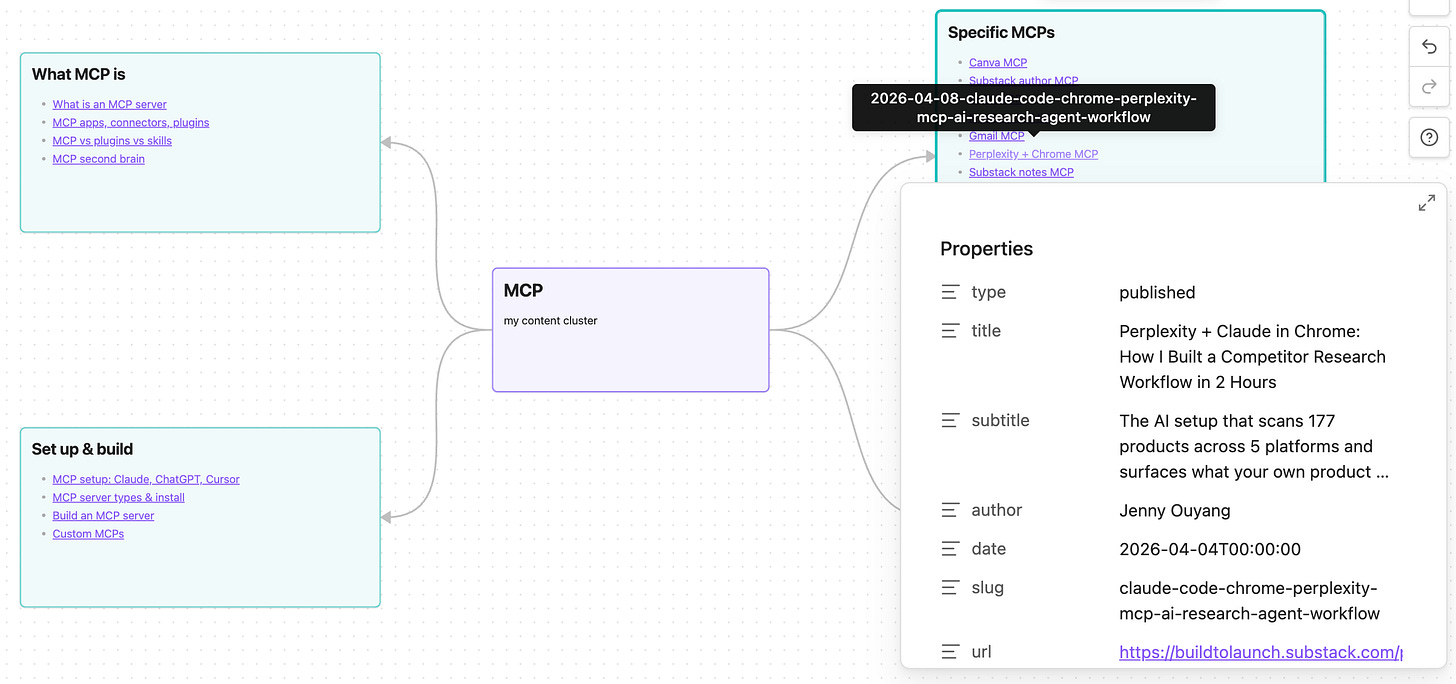
Turn the same cluster into a map
Same notes, different shape.
I asked Claude to lay the MCP cluster out as a mind map. Because the links were already in the vault, it could build the map from the structure: central topic, themes, and the articles under each theme.
Every title is still a real note. Hover to preview. Click to open.
The map is not separate from the vault. It is another way through it.
What changed in my day
The screenshots are the easy part to show.
The real change is the workday.
Before, I was the memory. I guided the AI step by step. I reminded it where to look, what mattered, and what connected.
Now I hand more of that to Claude. It files the note. It links what relates. It pulls old decisions back when I need them. When I write, it drafts from my notes, my past work, and my voice instead of a blank page.
And it does it cheaply without burning tokens, because the index does the work instead of a full re-read.
That is the second brain working.
Something that remembers for you.
You have seen the shape now: Obsidian gives Claude a memory it can read, update, and move through.
The rest is the build.
Connect Claude to your vault: the setup that lets Claude read your notes through Obsidian’s index.
Give Claude the right jobs: the prompts that connect, clean, and organize the vault without breaking it.
Install the skills: so Claude knows how to search, link, write, build Bases, and make maps.
Set the vault structure: folders, hubs, tags, and note shapes that still work after hundreds of files.
Keep it alive: the output contract and cleanup loop that stop new captures from becoming clutter.
The Obsidian Second Brain Kit packages that system: the pre-built vault, the skills, the prompts, the setup sheet, and the weekly cleanup. Build it by hand from the steps below, or start from the kit and customize it from there.
How Do You Connect Obsidian and Claude?
This article continues for members
Join Build to Launch to read the full article, access all cohort content, and connect with other AI builders.