How to Choose Where Your Claude Automation Should Run
A five-part system, four runtime lanes, 15 paste-ready prompts, and the live scheduling mistake that made the choice visible.
A practical guide to choosing among Claude’s cloud tasks, local Code tasks, temporary loops, repository routines, browser shortcuts, hosted workflow tools, and code-owned schedules. You will map the job before choosing the runner, prove it manually, and add repetition only when the useful result and off switch both work.

On the last live call of the sprint, I asked Claude in Chrome to analyze the top-performing Instagram Reels on one profile and run the analysis weekly.
The analysis worked. But the schedule landed as a normal Claude task instead of a Chrome shortcut, because “schedule this weekly” named the cadence and not the runner.
That is the problem with Claude right now. It has too many scheduling tools. With six ways to run a job on repeat, each built for a different place the job lives: /loop for the session you are in, /schedule and Cowork tasks for Claude’s cloud, local Routines for your machine, Remote Routines for a repository, and Chrome shortcuts for a signed-in page.
Same request, six different objects.
Turns out I did not ship this write-up last Friday, because I went down the rabbit hole of testing Jev with the automations after our session ended, and can’t stop thinking of building around it. The images in this article represent a small preview of what I had explored, I’ll share more of those with you in future articles.
Back to Day 5: how do all these Claude automations work, why do they even exist, and what kind of jobs fit your context?
On Day 1, we built a visible local routine.
On Day 2, we connected its Inputs and Output destinations.
On Day 3, we moved the working routine into a versioned cloud environment.
On Day 4, we added human decisions before drafting and publication.
Day 5 keeps the same five system parts, compares four runtime lanes, and chooses the smallest lane that can reach the job, leave visible evidence, and stop safely.
What’s inside:

A Five-Part System That Survives Every Automation
Six types of Claude automation for one job is a lot of choices. The live call showed even Claude itself could get confused with those options and pick a convenient one instead of the right one.
So before comparing any of them, let’s go back to the map the sprint has been using since Day 1.
The map consists of five parts of an automation:
Inputs: The approved material the job may read.
Connections: The routes that let the runner reach those Inputs and deliver the result.
Instructions: The procedure, decision rules, and boundaries.
Output: The useful result a person needs.
Controls: The permissions, proof, duplicate rule, schedule, off switch, and recovery path.
You might choose one Claude automation type over the other, but it’ll always work the best when you design each in the same shape.
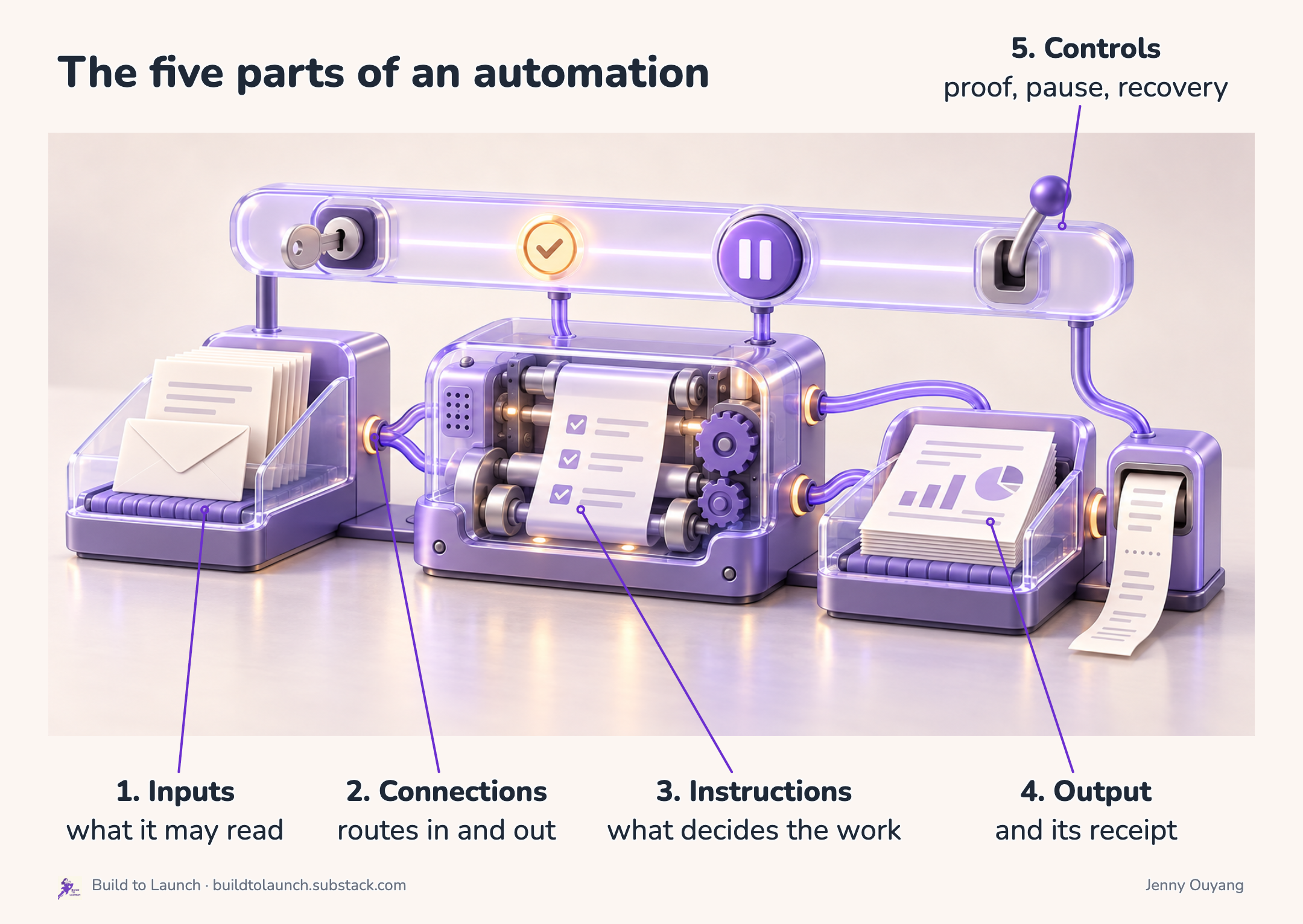
For example, a weekly research brief might run in Claude’s cloud, from a repository Routine, inside n8n, or from a serverless function. The product labels and setup screens will change. But the five-part contract remains readable:
Inputs
  Approved sources from the previous seven days

Connections
  Search service + Slack

Instructions
  Filter, rank, summarize, and cite

Output
  One dated brief a person can use

Controls
  Source limit + manual proof + run receipt + pause switch
This structure prevents this common mistake down the road: discovering that the runner cannot reach the files, account, browser state, or approval step the job needs.
The professional term for this is separation of concerns: each system part owns one clear responsibility, so a runner change does not force you to redesign the whole job.
Once the five parts are written down, it’s much easier to see what the job needs and which type of Claude automation should run it.
Why the Second Automation Feels Harder Than the First
One successful prompt makes automation feel easy.
On Day 1, the local routine runs while you are there. The files are nearby, the right accounts are already open, and you quietly fill any small gaps. When the result works, you feel good about these two at once: your confidence in building automations and your expectation of what AI can do.
As you add another Input, Connection, account, machine, or approval step. You start to sense one or many of these:
Hidden dependencies become active.
A cloud runner cannot see a local file.
A remote repository does not carry the Connections from your laptop.
A job reports completion without producing a useful Output.
A repeated run creates a duplicate.
From inside the experience, these failures can feel random. Your confidence falls, and your expectations of AI fall with it.
The Kruger and Dunning’s curve describes that change in personal confidence.
The Gartner Hype Cycle tracks your expectations similarly. Early excitement rises, limitations become visible, and repeated use reveals where the technology produces dependable value.
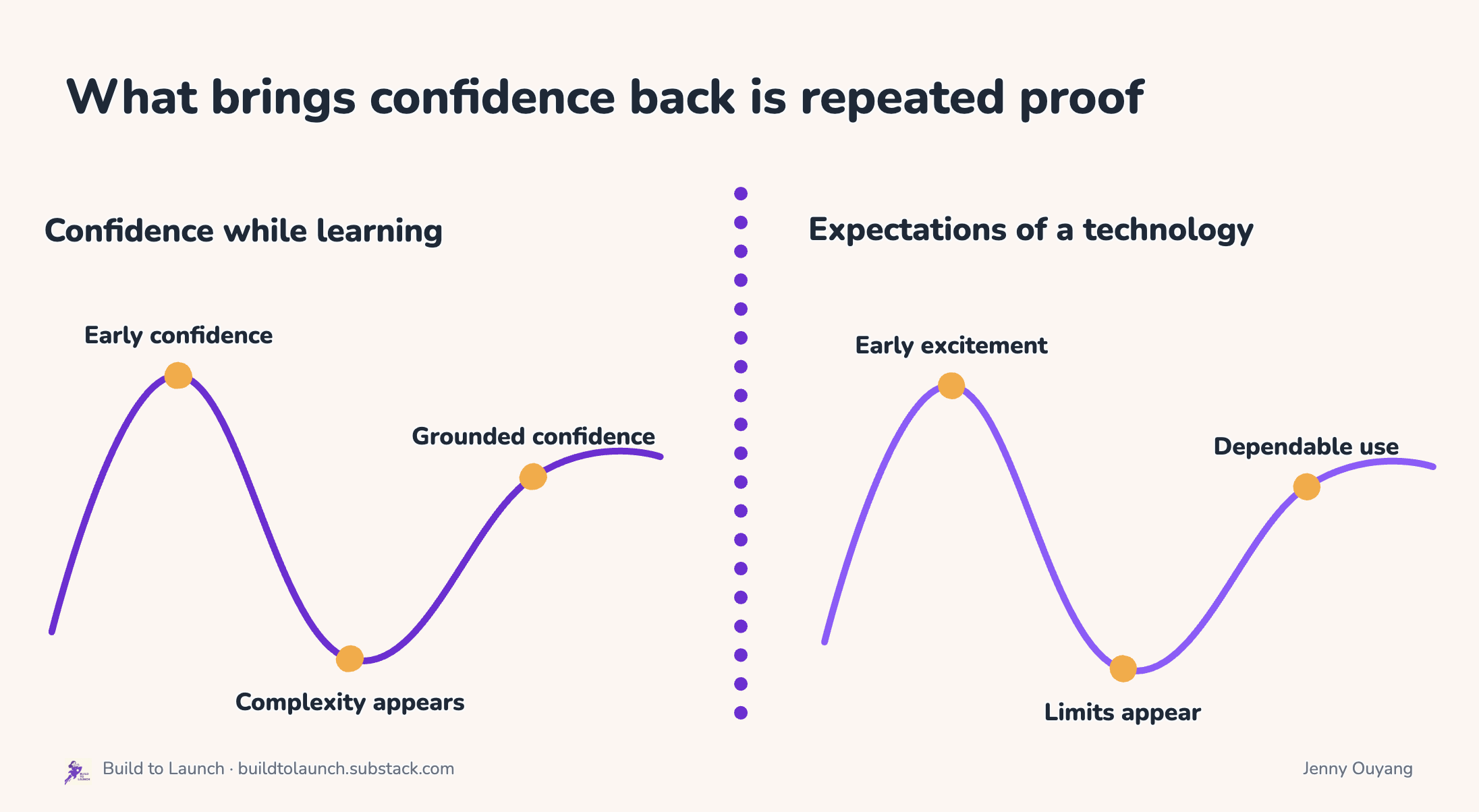
The five-part system helps you move through both drops. It turns a vague feeling that “the automation stopped working” into a specific diagnosis:
Inputs: Could the runner read the approved material?
Connections: Could it reach every required place?
Instructions: Did it make the intended decisions?
Output: Did it produce something useful?
Controls: Did it leave proof, handle duplicates, and stop safely?
Confidence returns through evidence. Expectations become more precise through the same evidence.
The six automation types below make those differences visible. Each places the same five-part job in a different environment, with different access, evidence, and stop controls.
Six Types of Claude Automation, and the Jobs That Fit Each
Three tests decide which type runs a job, and they come straight from the five parts.
Access: can it reach every Input and deliver the Output through Connections it has?
Evidence: does it leave a receipt you can open, separate from the result?
Stop: can you turn it off without rebuilding?
Each of the six answers them differently.
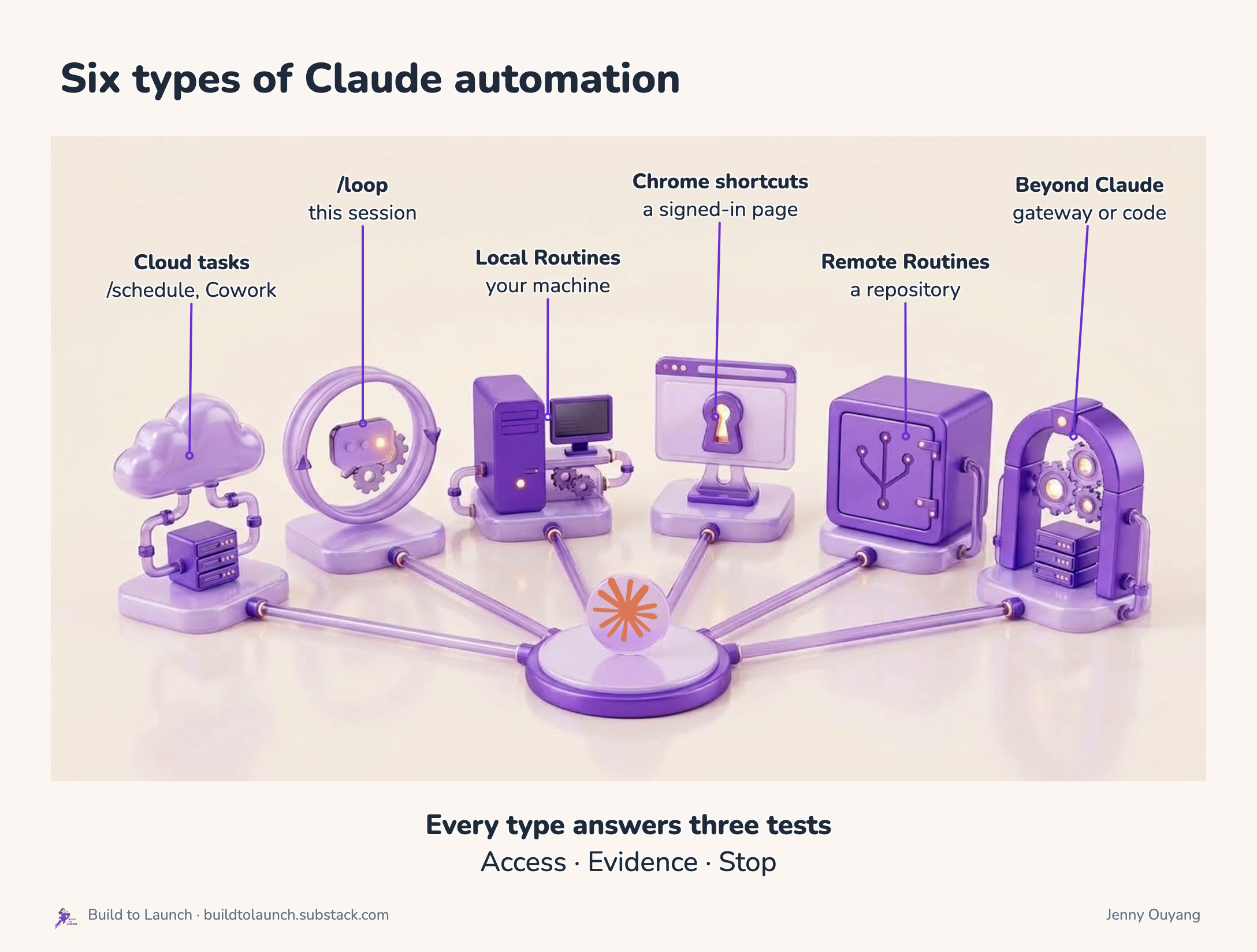
1. /schedule and Cowork scheduled tasks: Claude’s cloud
These two types of automations run on a clock in Claude’s cloud, laptop open or not.
They’re for jobs whose Inputs and Output already have cloud routes: a search service, Slack, a cloud file, or a GitHub repo.
Jobs that fit: a weekday research brief with a dated Output and a Slack notice, a recurring report saved to a Google file, monitoring that reads services rather than files.
Drawback: it cannot see a folder on your machine or a local-only MCP server, so a job that needs either stops at Access.
Examples:
A scheduled task in Claude Desktop reads my subscribed newsletters in Gmail and files product ideas into one file.
My shared AI second brain keeps every recurring job’s definition, runs, and receipts in one place. Starting with one intake, it pulls Substack feeds, platform news, Hacker News, Reddit, GitHub, email, websites, and YouTube into cards.
2. /loop: the session you are in
Keeps the current Claude Code session working on a timer or until a stop condition you wrote holds
Jobs that fit: build or deployment monitoring that reports only success, failure, or a decision you need to make, and any fix-until-done job with a finish line.
Drawback: it ends with the session, so it is not a persisted schedule. And without a turn cap, it continues to run until you kill it.
Examples:
The self-paced loop keeps Claude working until the finish line you wrote holds. It’s got a writing loop, a coding loop, a research loop, and a safety net for a loop that cannot verify itself.
3. Local Routines: your machine
A scheduled task in Claude Code Desktop that runs on your computer with the files, repos, configs, and MCPs already connected there. Some Inputs live on one machine and should stay there.
Jobs that fit: a read-only Friday review of your Downloads folder, inbox triage across several accounts, a weekly digest of one local folder.
Drawback: the machine has to be awake, so a job meant to run while you sleep only runs if the laptop does.
Examples:
My daily inbox triage sweeps four Gmail accounts, archives the noise, and posts one Slack digest. Routines in that guide include a weekly research digest, a GSC opportunity review, daily notes generation, doc sync, and a weekly strategy review.
4. Chrome shortcuts: a signed-in page
A saved browser prompt with its own clock, in the extension settings under Shortcuts, for Inputs only visible on a page you are logged into.
Jobs that fit: a read-only dashboard snapshot with named metrics, a weekly check of a page that changes, a competitor page you keep meaning to look at.
Drawback: it runs from the start URL you set, so a signed-out session fails silently, and the save is still a manual click.
Examples:
My scheduled browser shortcut visits three Anthropic pages at 9:00 AM and returns one paragraph on what changed. The five usecase in that guide: read and extract from any page, fill forms that need your background, evaluate a page against your criteria, test your own product, run browser tasks on a schedule.
5. Remote Routines: a repository
It clones a private repository into a fresh cloud session and runs with the cloud Connections you attach, for procedures that belong with versioned files and need a review path: a branch, a pull request, a run log. A GitHub Action running Claude is the same idea on GitHub’s computer.
Jobs that fit: repository-owned weekday automation with a review-branch boundary, a maintenance report on named repositories, a nightly job that must run with the laptop shut.
Drawback: repository access does not bring your local Connections with it, so the first remote run usually fails at Access.
Examples:
A GitHub Action clears promotional mail from my inbox on a Slack message, with the laptop shut. One of the three things GitHub gives a non-programmer: a filing system that remembers every version, one job in one thread with its own address, and a free computer that runs while you sleep.
The Day 3 Remote Routine runs the sprint’s research brief from a private repository, after its local sources were swapped for Tavily.
6. When a job outgrows Claude’s own tools
Some jobs cross several services, need a browsable run history, have to live on a server that never sleeps, or belong inside a product. That is when an agent needs its own gateway and cron (OpenClaw, Hermes), a workflow tool (n8n, Make, Zapier, Pipedream), or a code-owned schedule (Cloudflare Workers, Vercel, AWS). They handle retries, state, logs, and alerts.
Drawback: they hand you the operating work with the power: credentials, cost, repeat protection, failure handling, and a documented off switch.
Examples:
My OpenClaw on an Oracle ARM instance ran 12 cron jobs for weeks: briefings, content research, engagement monitoring, social posts.
The live OpenClaw setup went through 18 cron jobs: autonomous social media in three phases, weekly SEO analysis, skills kept on GitHub, memory management, and a partner updating the website from Telegram.
Hermes ran three jobs for me: X research on the subscriptions you already pay for, one rolling 47-task backlog that survives fresh sessions, and skills that correct themselves through use.
Four lanes, one rule
Seen from the job’s side, the number of automation types collapse into four places a job can live.
Claude’s cloud:
/scheduleand Cowork tasks.Your computer:
/loop, local Routines, Chrome shortcuts.A repository: Remote Routines and GitHub Actions.
Beyond Claude’s own tools: an agent gateway, a workflow tool, or your own code.
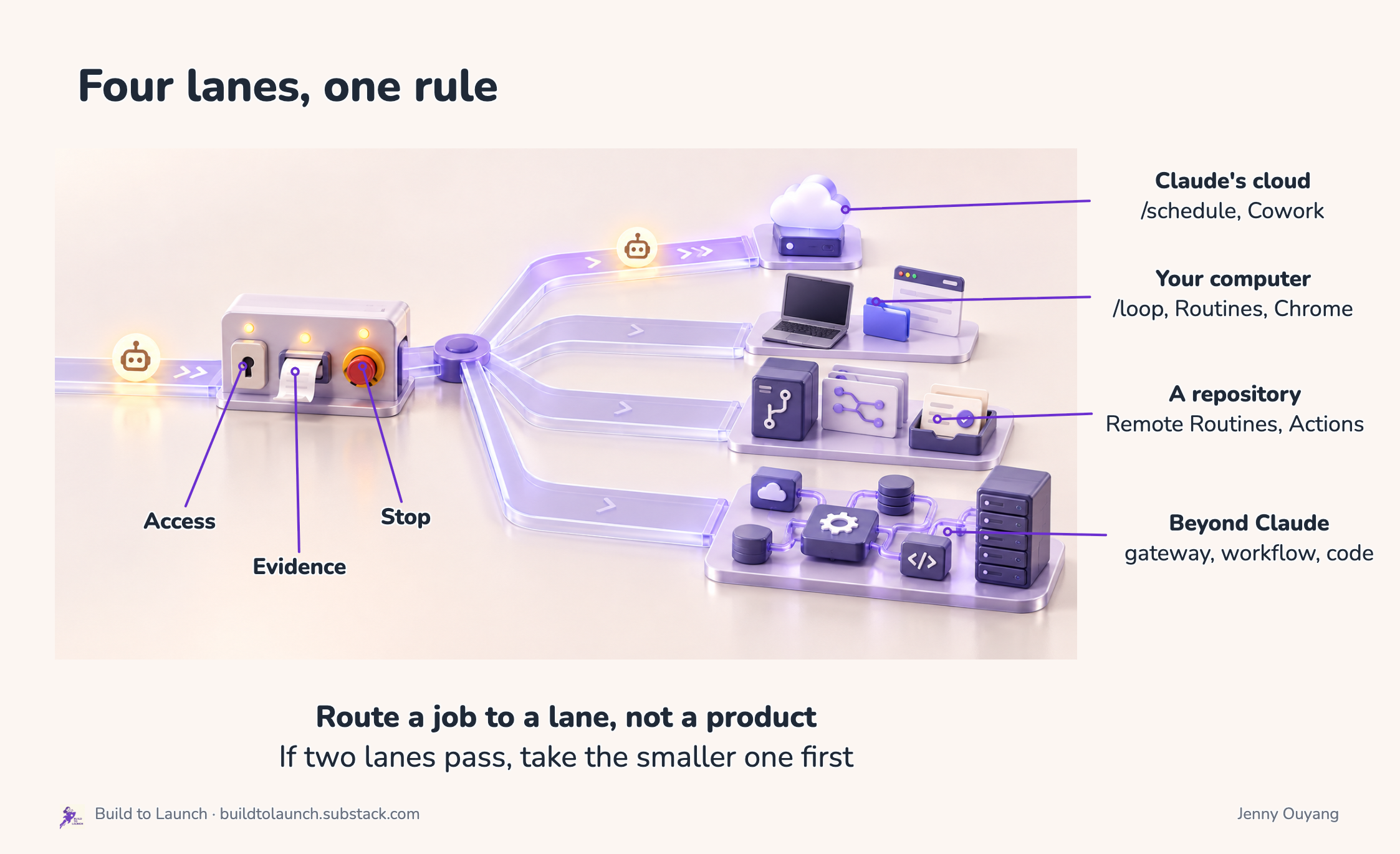
Route a job against a lane, not a product. If two lanes pass the three tests, take the smaller one for the first proof. If none passes, the plan is missing a Connection or a Control, and that gets fixed before any schedule exists.
When Is an Automation Ready for a Schedule?
You have a lane. The one thing not to do yet is give it a clock.
A recurring job earns its schedule after one bounded proof: run it once on demand, open the useful Output, read the receipt, and test the off switch.
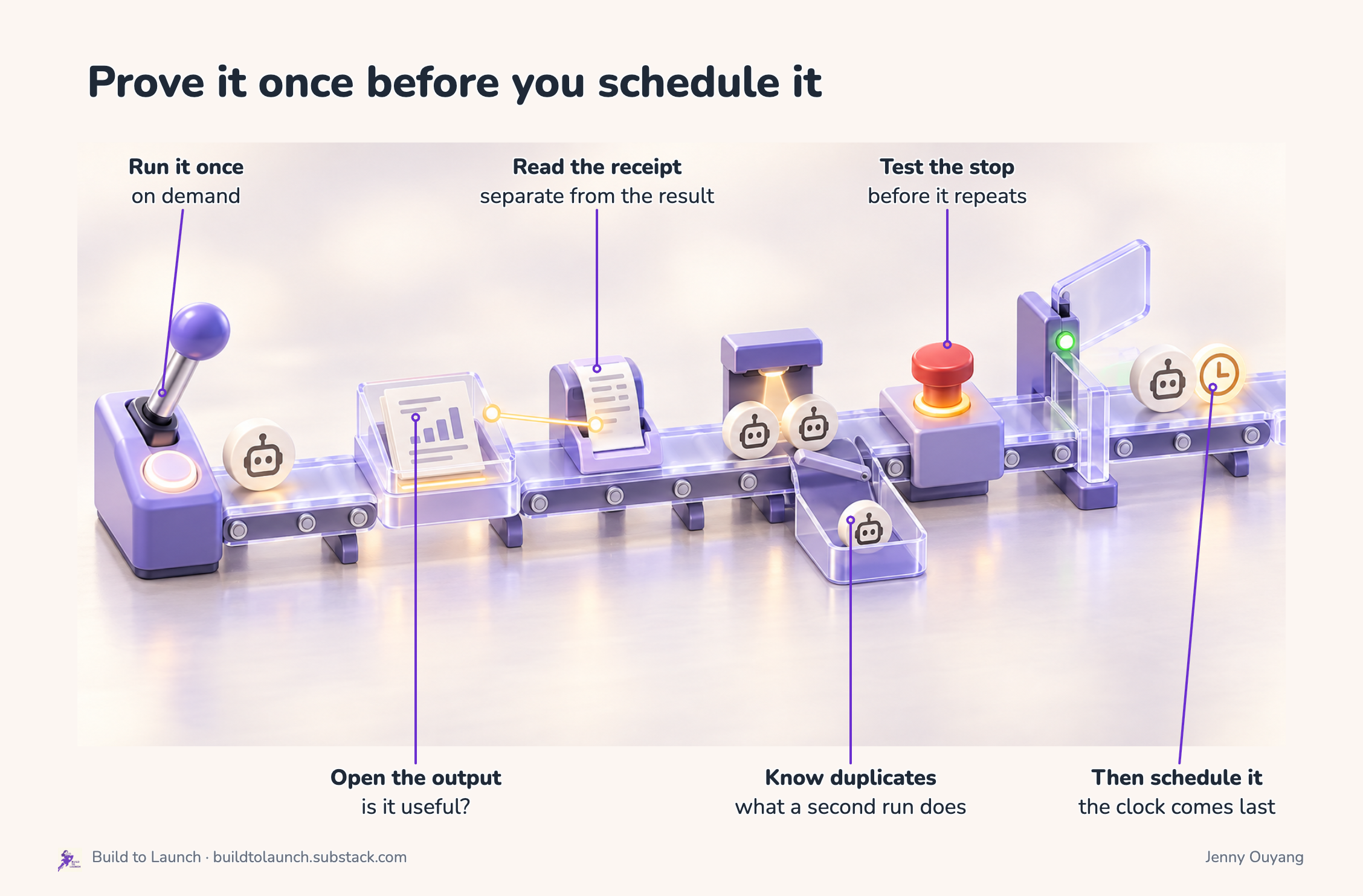
The Output is what a person uses: the brief, the report, the cleaned inbox. The receipt is how it was produced: run time, source count, failures, version, and where the Output landed. A “completed” badge proves that a process ended. It does not prove that the result helped anyone.
I have a folder of jobs that ran perfectly for months while measuring almost nothing, and every one of them reported success the entire time. A schedule multiplies whatever you gave it. If the route is unproven, the schedule makes you confidently wrong on a timetable.
So the threshold, in a sentence you can copy into any plan:
Repeat this job only after one manual run produces the expected Output, the receipt points to that Output, duplicate behavior is known, and the owner has tested the pause control.
Every one of the 15 prompts in the Day 5 pack ends in that same order, which is what makes them safe to paste.
The Day 5 Take-Home
The pack is released, and everything in it is linked below.
Day 5 learner guide: close the existing automation with an operating proof, compare the four lanes, and choose one bounded next experiment.
Runtime examples and starting prompts: 11 surfaces, 15 paste-ready prompts, proof checks, boundaries, and stop controls.
Automation Expansion Plan: name the next useful result, define the five parts, choose a lane, and set the rollout threshold.
Runtime Decision Guide: compare two remaining runtime choices after the job is mapped.
Build-Your-Own Swap Map: adapt one Input, Connection, Instruction, Output, or Control at a time.
Automation Control Pack: blank five-part files plus feedback, receipt, recovery, and operating-summary templates.
Claude Automation Kit: the clean starting folder and complete review-gated example from topic proposal through publication decision.
Day 5 slides: the complete 31-slide interactive deck.
Day 5 member page: the released resources in one place. The protected replay link will be added after the Day 5 recording is registered in Community.
This article continues for members
Join Build to Launch to read the full article, access all cohort content, and connect with other AI builders.