Claude Code Mods: What They Are and How to Build Your Own
What a Claude Code mod is, what people build with them, how to build your own, the four questions to ask before you install one, and 69 mods worth trying
Claude Code mods are small add-ons that change what Claude Code shows you or does for you. This guide explains what a mod is, file by file, how to install one, and what the community builds with mods in three groups. It shows one mod by others in each group and two of my own builds, then how to build your own, the catches, and a collection of every mod I found.

Is there something Claude Code does not show you that you wish it did?
Plenty of people have said yes, in public.
“Let the user see (even if optional) where they are in the context usage at all times.” A GitHub request from March 2025, with 130 thumbs-up.
“User must expand every single Read to see the path.” Another GitHub request, with 185 thumbs-up.
A Reddit post about running several sessions says “somewhere around 15 open tabs i lost track of which session was on which branch.”
On Hacker News, someone used up a whole usage window “in a few minutes multiple times” before building their own warning.
Different asks point to one wish: show me what is going on.
Anthropic’s own presenter wanted the same thing. In the official mods video, the presenter says “I always wanted more visibility into my context, so I made one that renders a live breakdown of it right above my prompt.”
The presenter did not wait for a feature. The view was built as a mod.
Claude Code now lets you add the missing view yourself.
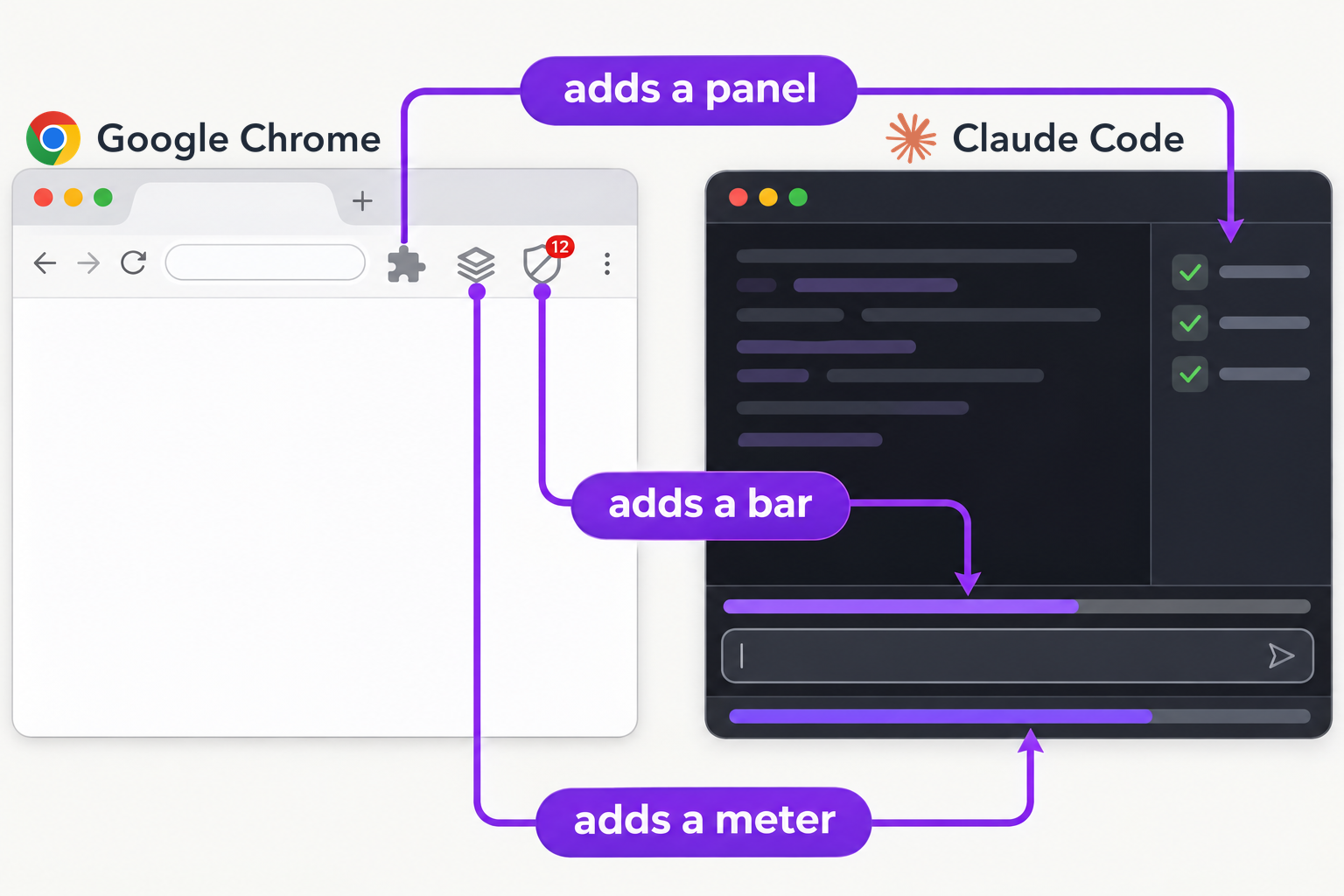
A mod is to Claude Code what an extension is to Chrome. Chrome ships plain, and you add the ad blocker or the password filler you want. Think of Claude Code working the same way now. You add a pane, a progress bar above your prompt, a line at the bottom, or a guard that stops a bad command.
The comparison carries a warning too. A Chrome extension can read every page you open. A mod runs as you, and Anthropic’s docs say mods are not sandboxed.
I have tried dozens of mods, installed more than ten, and built a handful of my own.
Somewhere in the middle, I realized mods bring the controls out into the room. For more than two years, I’ve been adapting to the technical side of Claude Code: the hooks, the settings, the files. Now I don’t need to know how the wiring works to see the results.
This guide walks through what that looks like, and what to watch for once you start changing things.
What’s inside:
What Claude Code mods are, the folder, file by file, and why it matters to you
What people build, the three categories of mods
I also built a handful of my own
How to build your own mods, step by step, and where to keep it
What can go wrong, four catches I hit, how to fix them, and the costs and drawbacks of mods
Every mod idea worth trying, 69 mod examples, and the BTL MCP guide for building and using mods

What is Claude Code mods and why it matters to you
A Claude Code mod is a plugin with one code file that Claude Code runs on its own events, with your permissions. It can draw on your screen, change what Claude is told, or stop an action before it runs.
On disk, a mod is a small folder. These are all the parts one can have, and only three are required.
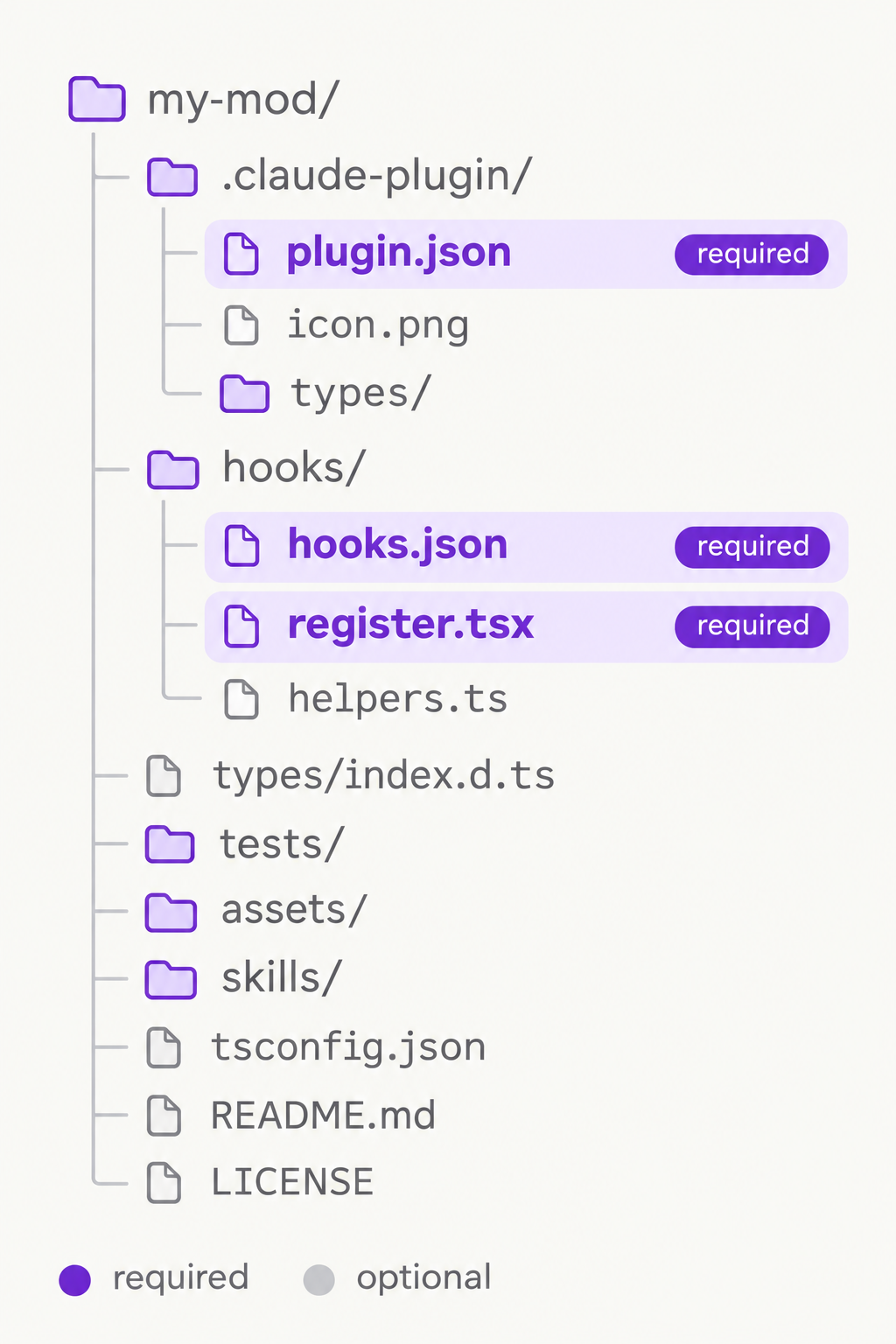
Anthropic’s own sample mod, Replay Theater, uses just the three required files plus a README and screenshots.
plugin.json makes the folder a plugin, the same kind of package that carries skills and commands. hooks.json with a modules key points Claude Code to register.tsx, and that one line is what makes the plugin a mod.
What Claude Code controls
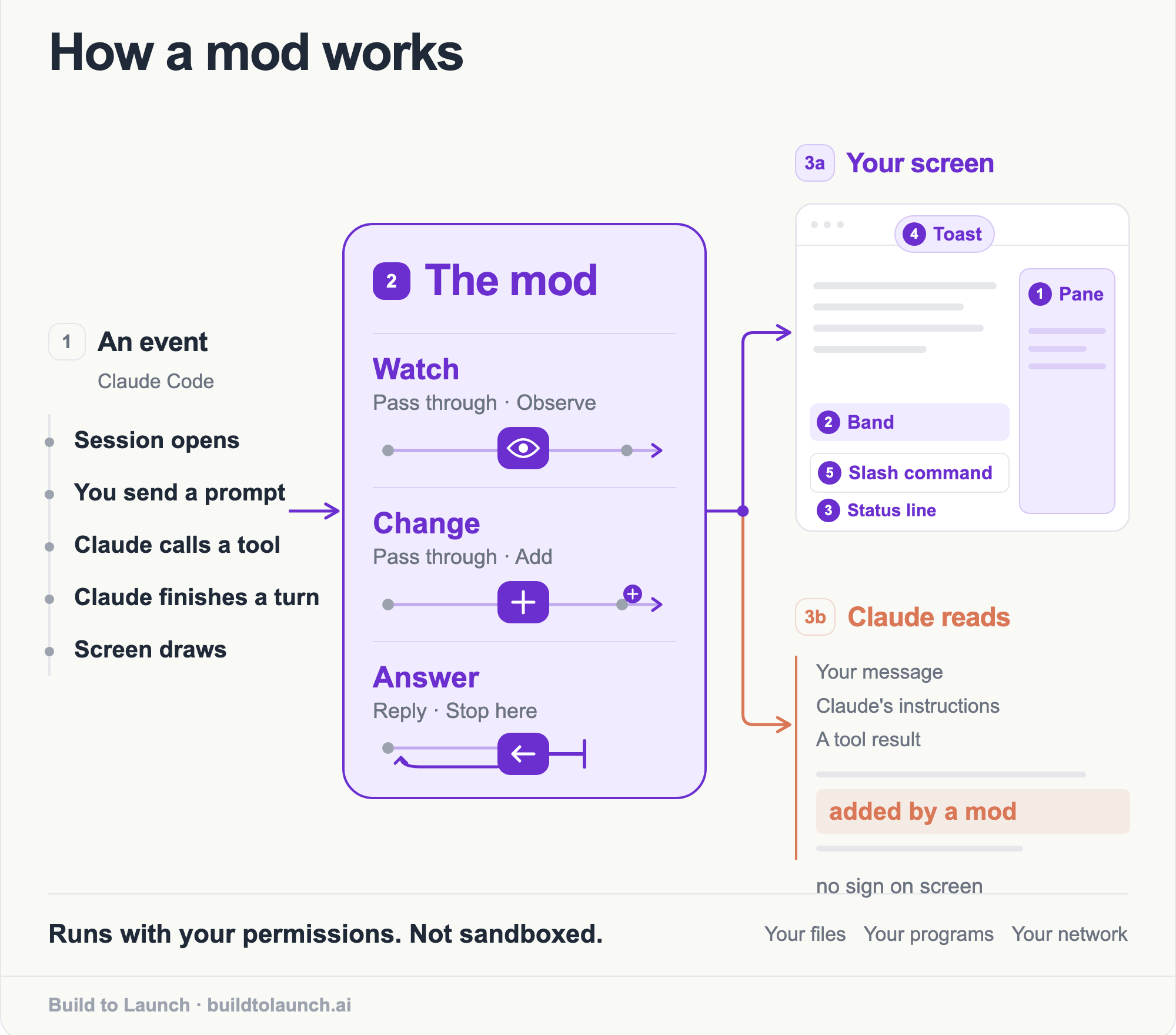
Claude Code is in charge. It loads the code file at the start of each session and calls its functions on events: a session opens, Claude calls a tool, Claude finishes a turn, the screen draws a pane. Each function gets the event and a choice.
Watch. Let the event pass and look at it. Anthropic’s sample Token Weather (about 80 lines) watches your context and draws a forecast above the prompt.
Change. Pass the event on with something added. Claude Code’s own AGENTS.md loading works this way: it adds your file’s text to what Claude reads.
Answer. Reply for Claude Code and stop the event there. File Tree, later in this guide, refuses Claude’s edits on a file you guard.
Claude Code is built from mods too. Its own /diff, its AGENTS.md loading and its security guard ship as built-in mods.
What you see, and what you don’t
A mod reaches your screen through a pane beside the chat, a band above the prompt, the status line, a short toast, or a slash command of its own.
It reaches Claude through text. A mod can add a line to your message, a section to Claude’s instructions, or text to a tool result. Claude reads every line of it. You see none of it (#102030).
Be wary about that hidden text part. A mod you installed for a meter can also change what Claude is told, and the screen gives you no sign.
It runs as you
The mods overview says it in three words: “Mods aren’t sandboxed.” A mod reads your files, runs programs and uses the network with your permissions. Your deny rules do not stop it. With Read(.env) denied, a mod still reads that file with $.fs.read.
Mods are on by default. They work in the terminal from Claude Code, in the desktop app’s Code tab, and in the VS Code chat panel. Installing the plugin is the only consent Claude Code asks for.
If you already use skills or MCP servers, a rough test tells them apart.
If the job is “tell Claude how to do X”, write a skill.
If the job is “give Claude a new tool”, that is an MCP server.
If the job is “run this script when Claude edits a file”, a settings hook does it with no screen of its own.
If the job is “show me X on screen” or “stop Claude from doing X”, that is a mod.
What do people build with Claude Code mods?
There are a few major sources of Claude Code mods.
Claude, as usual, has its own collection of official mods. In my mind, they are mostly for inspiration.
There are also lots of open-source mods on GitHub, some are really useful. The biggest catalogue, mods.aidojo.si, lists over 7,000 of them.
When you sort the biggest catalogue, the mods fall into three groups, depending on what you want to do.
How to install a Claude Code mod
But before we go into the details, let’s talk about how you install an existing mod, the simple way.
First, add the repo that lists the mod.
claude plugin marketplace add {{mod-repo}}
Then install the mod.
claude plugin install {{mod@mod-repo}}
Type /reload-plugins, or start a new session, to load it.
If you’re extra cautious about installing others’ mods, try this. Before any install, clone the repo and run one check:
claude plugin validate {{mod-repo}}
It lists what the mod can reach on your computer, such as your files or programs. If anything on that list surprises you, skip that mod.
Now onto the mods examples.
Group 1: Mods that let you watch cost and usage
Often, you find out you hit your usagelimit only after it happens, or that an old chat cost more to pick up again. These mods warn you before that.
Cache Tax
A good example in this group is Cache Tax.
I leave long chats open all the time, and come back to them hours later.
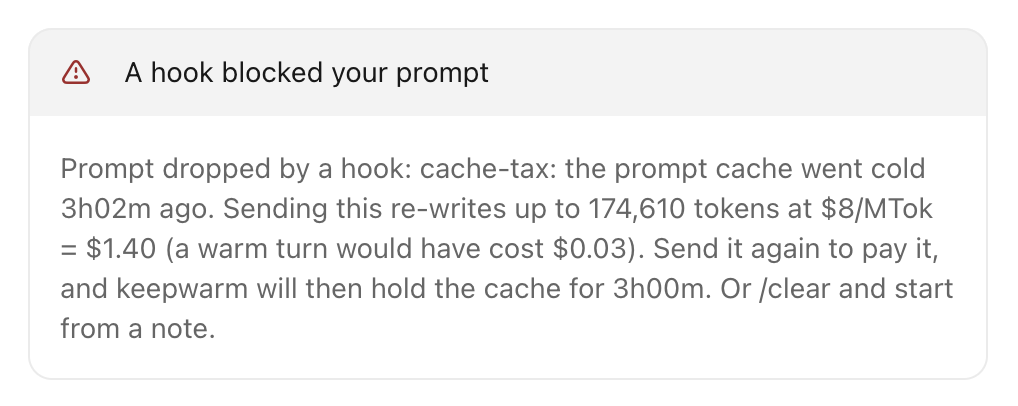
The catch: every message sends the whole chat to Claude again. Anthropic keeps a cheap copy of your chat for a while, called the prompt cache, so that resend costs little. But the copy expires after some time. So when I come back after hours, my next message has to send the whole chat at full price, and that one line can cost many times more than usual.
Cache Tax catches that moment. It stops my message once and shows me the cost, so I can pay or start fresh from a note. /keepwarm keeps the cache warm while I’m away.
What I like is that it doesn’t decide for me. It puts the cost in front of me at the one moment it matters.
To install:
claude plugin marketplace add karanb192/claude-code-mods
claude plugin install cache-tax@claude-code-mods
Group 2: Mods that change how Claude works with you
Claude edits, deletes and answers its own way, and you often notice a risky step only after it ran. These mods help you add a guard before that step, a goal to work toward, a cleaner screen for recording, or a shortcut.
Goal Meter
My favorite example in this group is Goal Meter.
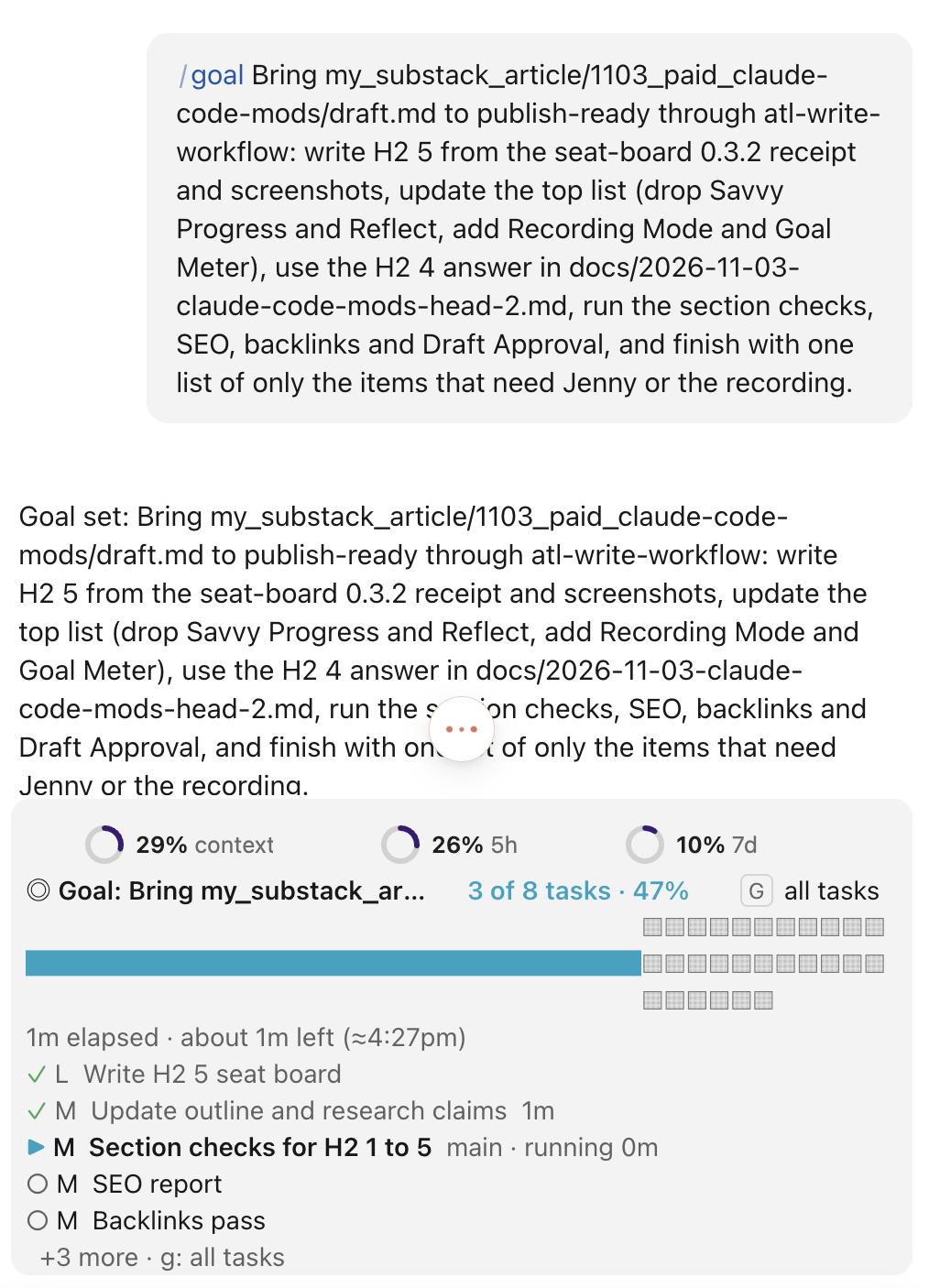
I give Claude long tasks and leave it to work. Claude Code has a built-in /goal for that, but I could not tell how far a goal had got until it stopped.
Goal Meter asks Claude to break the goal into small tasks first, then shows a progress bar above the prompt that fills as each task is done. /goals shows the goals of all my chats in one place.
What I like is that I can see the plan. When I gave this article a goal, Claude broke it into 8 tasks, and I could watch it reach 3 of 8 while I worked on something else.
To install:
claude plugin marketplace add nateherkai/claude-code-mods
claude plugin install goal-meter@nateherk-mods --scope user
Group 3: Mods that change what you see on screen
Most of the time, you cannot see which files Claude opened, what its helper agents are doing, or what it just changed. These mods help you see it while it happens.
File Tree
I love this example, File Tree, in this group.
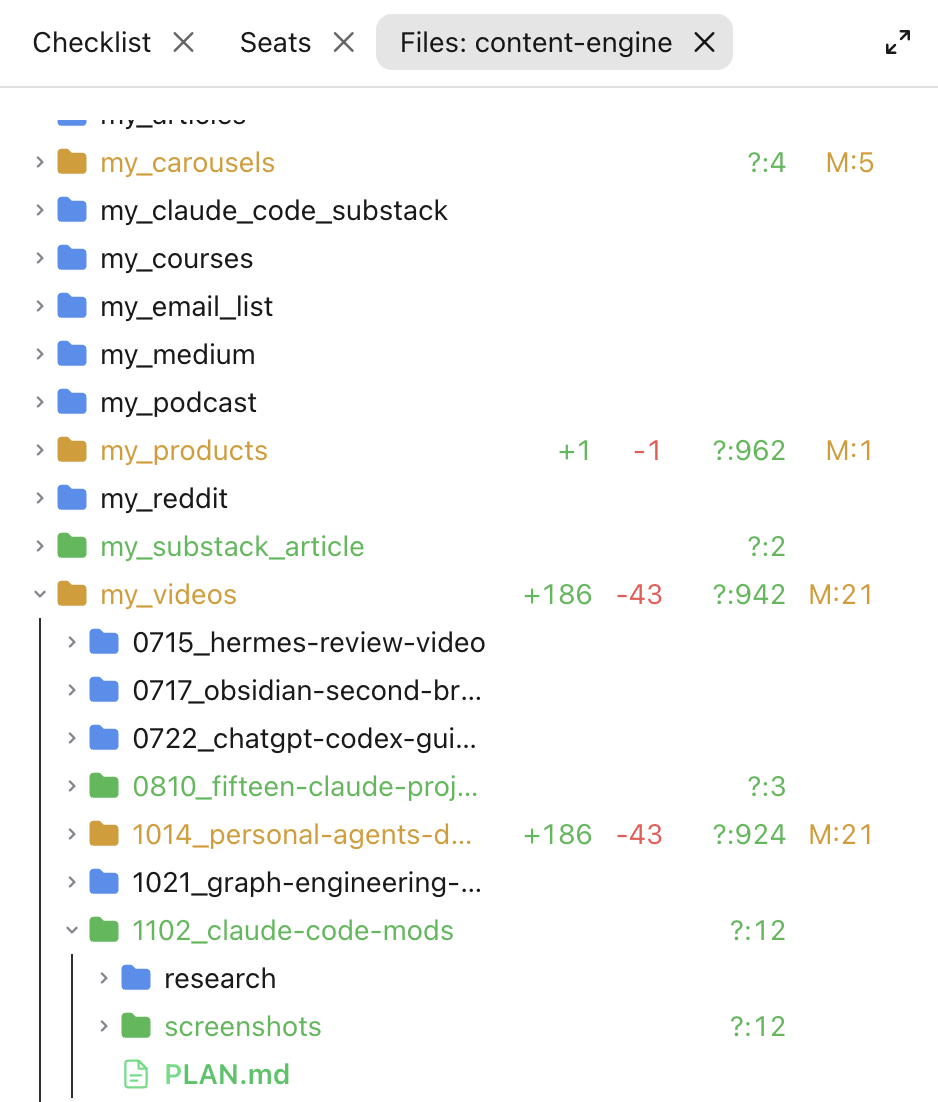
When Claude works, it reads and edits files I never see. I had to expand each step to find out which files it touched.
File Tree shows my folders beside the chat and lights up each file as Claude reads or edits it. Each folder also shows its git counts, so I see what changed at a glance.
What I like is that I always know where Claude is working.
To install:
claude plugin marketplace add data-goblin/claude-code-filetree
claude plugin install filetree@claude-code-filetree
I also built a handful of my own
The mods I use most are the ones I asked Claude to build for a habit of mine. Claude writes them with its built-in plugin skill, and I keep them in one private folder.
Below are my two favorites.
1. checklist-pane
The first one I built, and the simplest, is checklist-pane.
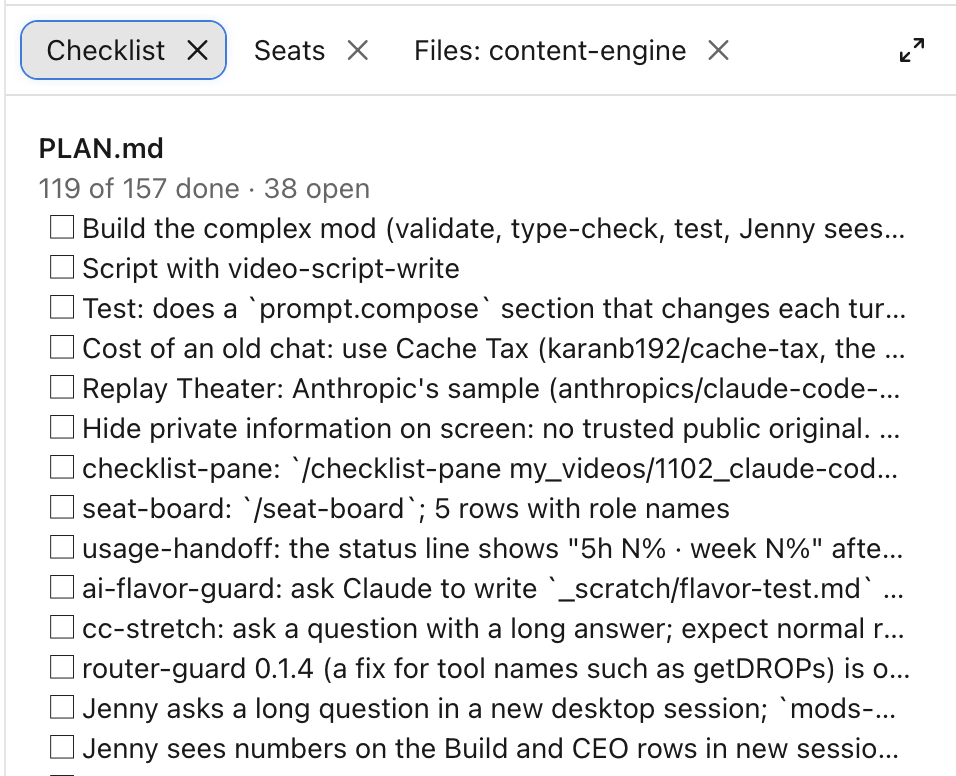
I prefer working with checklists. I create tasks, tick them off, and keep going. In one long session, I might keep many checklists, and I can easily lose track.
checklist-pane brings the checklist up beside the chat. It follows the list Claude last worked on, and /checklist-pane with a file name shows a different one. A press on a box ticks it in the file.
What I like is that I can keep monitoring what I’ve ticked and how things are going, without leaving the chat. While I wrote this guide, it showed my PLAN.md: 119 of 157 done, 38 open.
2. seat-board
The bigger one is seat-board.
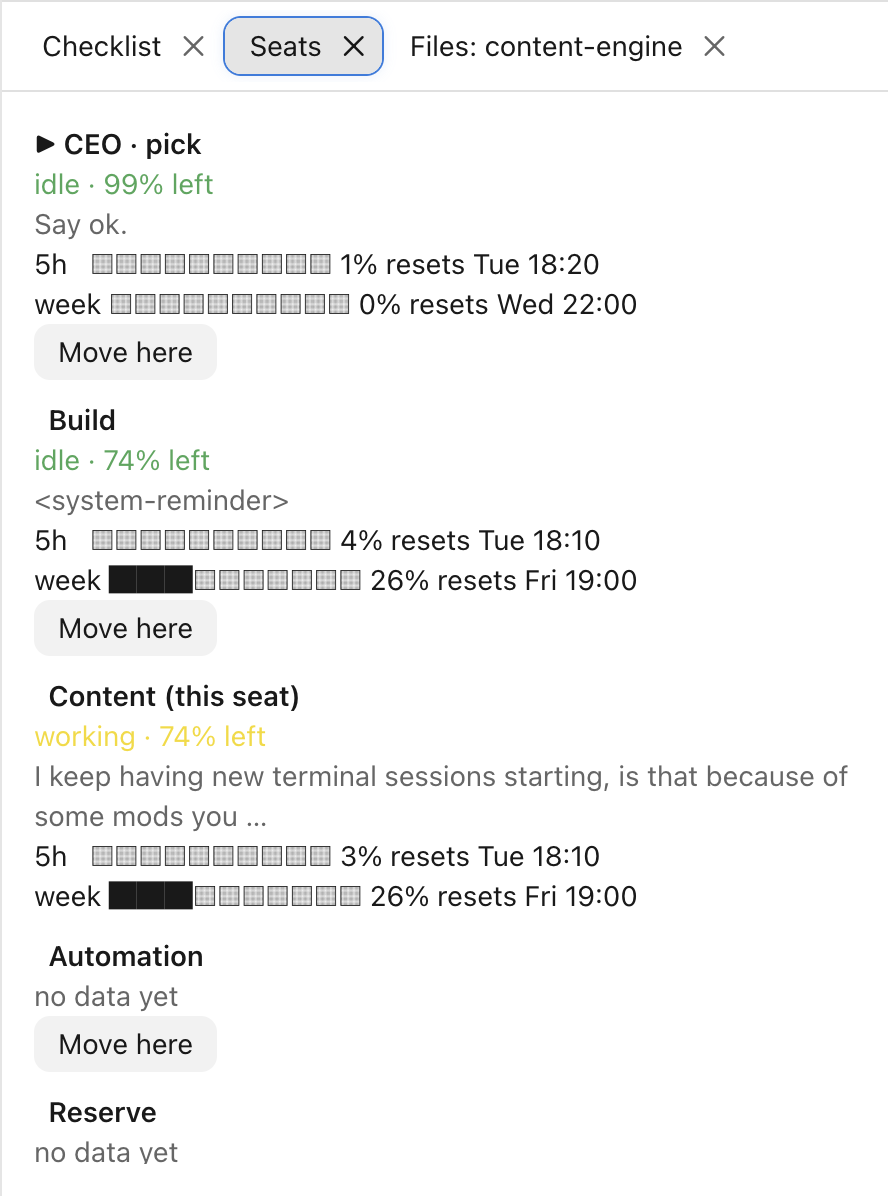
Since joining Claude’s startup program, I’ve been running five Claude seats, named by role, and each one has its own usage limit. When one ran low, I saved a handoff file and started again on another seat by hand.
seat-board saves me that restart.
It shows each seat’s usage left in one pane. One press moves the conversation I am in to the seat I pick.
What I like is that I no longer start over. Today a move opened the same conversation, with its full history, on my Build seat in a new terminal tab.
You have seen the mods. Now let’s build your own.
Below are for paid subscribers. It shares how you can:
Build a mod for your own habit, step by step
Keep it on every seat: and how to maintain it
What can go wrong with mods, and how to fix them
Every mod I collected, in the same 3 groups, with what each one reaches, and how to access the guides and examples through the BTL MCP
This article continues for members
Join Build to Launch to read the full article, access all cohort content, and connect with other AI builders.