CLAUDE.md Token Optimization: Why Claude Ignores Your Rules and Where They Should Live
A five-layer setup for keeping the right project instructions in context, moving the rest, and checking what Claude loads.
Claude Code loads CLAUDE.md at session start and keeps it in the context window. As the file grows, the rules you care about have more instructions to compete with. This guide shows where each instruction should live, when Claude loads it, and how to check your own setup as part of my broader Claude Code token optimization guide.

A few weeks ago, one of my subscribers sent me this question:

My first reaction was: I think I already answered this.
My Claude Code beginner’s guide walks through the setup and recommends creating a CLAUDE.md. I had also written about more general claude onboarding and token optimization.
But when I checked .claudeignore again, I found things had changed. I could no longer find it in the current Claude Code setup, which meant the advice in my earlier article was no longer valid. So I went back and corrected the article. I’ll come back to what changed later.
His question named CLAUDE.md and .claudeignore, but I think he wanted something deeper. He wanted Claude to recognize his project and what mattered in it without filling the context window with instructions for other work.
The token cost mattered. What worried me more was losing control of Claude’s behavior after I had already written the rule.
So I went through the current Claude documentation to see what had changed and what matters now.
The result is a five-layer map for deciding where each instruction belongs, along with the commands for measuring your own setup before and after a change.
What’s inside:
Before you type: what is already in context, and how much of it you wrote
The 5 layers: where an instruction can live, and when each one loads
200 lines: the size target, and why
@imports don’t beat itThe ignore file: why yours does nothing, and the rule that works
Your own number:
/context,/doctor, and the hook that logs what loadedThe audit prompt: the layer call
/doctorleaves to youThe complete project: where every file goes, what each one contains, and how to reload it

What Claude loads before your first prompt, and how much you control
A CLAUDE.md is a plain Markdown file Claude Code reads before it starts working in your project. If you do not have one, run /init. Claude reads the repo and creates a starter with build commands, test instructions, and project conventions.
There is no fixed template. After /init, the file grows with the project. You add a database note, a naming rule, then another instruction after Claude breaks something once. Claude loads the whole file again at the start of every session.
Depending on your setup, the project file may load alongside parent-directory CLAUDE.md files, your user file at ~/.claude/CLAUDE.md, CLAUDE.local.md, and auto memory. Together, they form the instruction stack already sitting in context before your first prompt.
(This guide focuses on Claude Code. Cowork handles standing instructions separately.)
To see how much of the context window you control, you first have to separate your files from everything Claude Code brings into the session. The context window documentation gives a representative 200,000-token session with this breakdown:
What Claude brings to the session:
system prompt: 4,200 tokens
skill descriptions: 450
environment info: 280
MCP tool names, with schemas deferred: 120
What comes from your setup:
project
CLAUDE.md: 1,800 tokensauto-memory
MEMORY.md: 680user
~/.claude/CLAUDE.md: 320
Add the published numbers and the session starts with 7,850 tokens already in use, about 3.9 percent of the 200,000-token window. The 7,850 total and the 3.9 percent are my calculations from the individual amounts in the documentation.
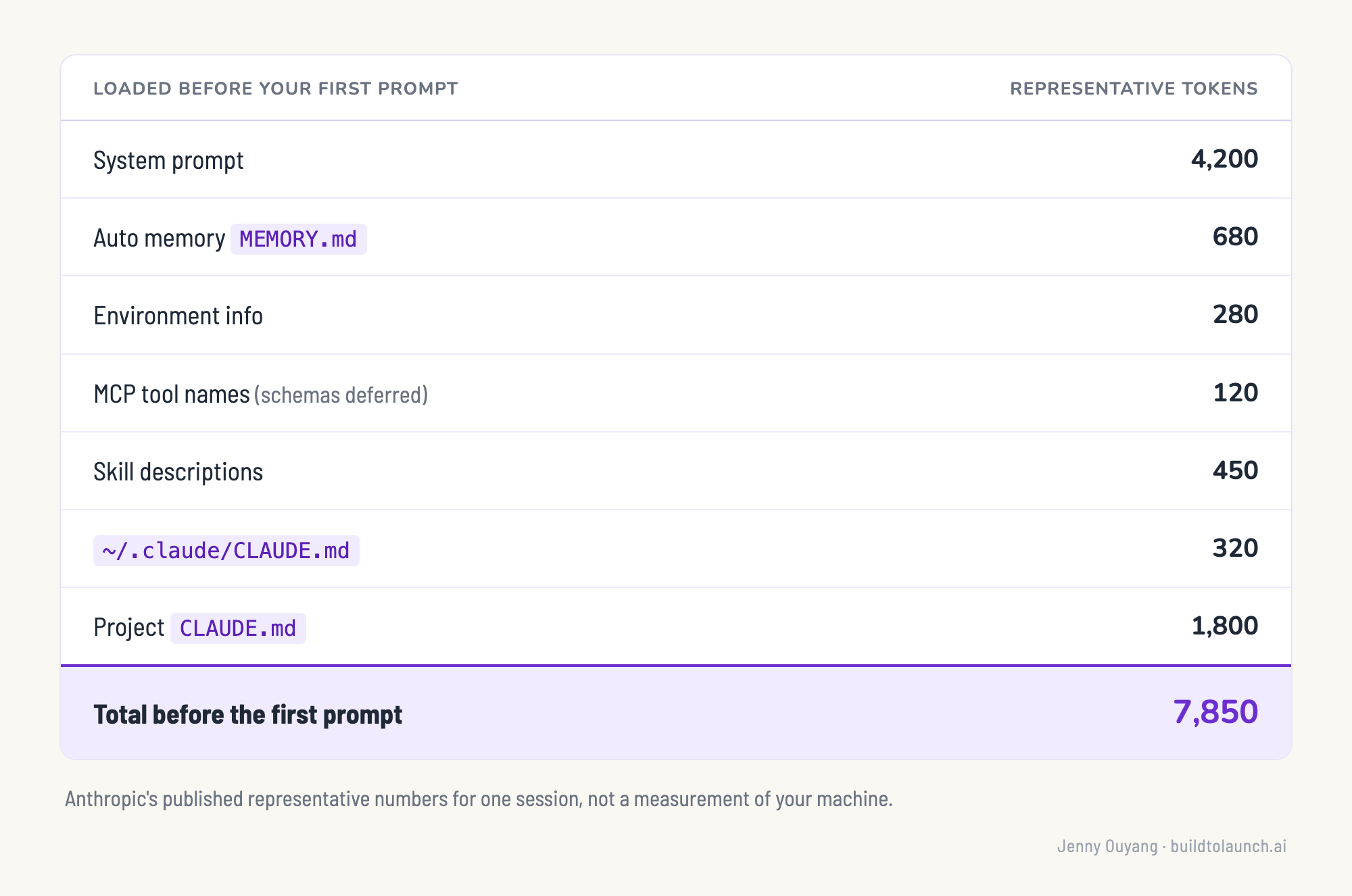
Of those 7,850 tokens, 2,800 come from the three files in your setup. The project CLAUDE.md accounts for 1,800 by itself, which makes it the largest single item you control.
Those 2,800 tokens occupy the context window on every request, although prompt caching changes how much you pay for the repeated context.
Each request has three layers: the system prompt, your project context (CLAUDE.md, auto memory, and unscoped rules), then the conversation. The middle layer stays the same until you start a new session or run /clear or /compact. After the first turn, the repeated project context comes from cache at roughly 10 percent of the standard input rate.
Prompt caching lowers the price. The same 2,800 tokens still take up space in the window, leaving less room for the file Claude is working on during the rest of the session.
So I started sorting the instructions inside CLAUDE.md by when Claude needs them.
The 5 instruction layers, sorted by when Claude loads them
Take a rule about database migrations. You need it when you are changing the database, but Claude also loads it while you are editing a CSS file. The instruction is useful, but it is loading before the work needs it.
That leaves one question: when should Claude load each instruction?
The features overview compares CLAUDE.md, skills, MCP servers, subagents, and hooks by when they load. CLAUDE.md is the only one whose full content stays in every request. The others load some or all of their content later.
When I sorted them by when they load, I ended up with five groups. Most of the instructions in your own setup will also fit into one of them.
The always bucket is the one you already know. A rule file under .claude/rules/ lands here too if you forget the frontmatter, since the memory docs say a rule without paths: loads at launch at the same priority as .claude/CLAUDE.md.
Some instructions only matter in one part of your repo. Put them in .claude/rules/ and add the matching path:
---
paths:
  - "src/api/**/*.ts"
---

- Validate every API input.
- Use the standard error response.
This rule loads when Claude reads an API file. While you are editing CSS, it stays out of the context window.
Use a skill for instructions you only need sometimes, such as deployment steps or a review checklist. Claude loads the skill description at startup and the full instructions when the skill is used.
MCP follows the same pattern for tools. Claude sees tool names at startup, then loads the full schema when it needs a tool.
A subagent works in its own context window and sends back a summary. The files it reads do not fill your main window.
Most non-fork subagents also load the same CLAUDE.md hierarchy in their own window. A 400-line CLAUDE.md therefore loads again each time you spawn one. Explore and Plan are the documented exceptions.
The free bucket costs nothing at all. A hook runs outside the model, and it only spends context if it returns some.
Each skill, MCP server, subagent, or hook inside a plugin follows the matching row above.
A nested CLAUDE.md behaves differently depending on where you start Claude Code. Start above its directory and Claude waits to load it until it reads a file there. Start inside the directory and Claude loads it at launch. A paths: rule waits for a matching file either way.
This is also how Anthropic recommends reducing token use: keep workflow instructions out of CLAUDE.md when you only need them for certain tasks. Otherwise, those instructions remain in context even while you’re doing unrelated work.
Some rules still need to load in every session, so they have to stay in CLAUDE.md. The 200-line target gives you a practical limit for what remains.
The 200-line target, and why @ imports still take up context
Anthropic gives a practical target for a CLAUDE.md: keep the file under 200 lines. The memory documentation explains why: “Size: target under 200 lines per CLAUDE.md file. Longer files consume more context and reduce adherence.”
Line 201 does not trigger a cutoff. Claude Code will still load a larger file, up to 4 MiB. The 200-line target is about how reliably Claude follows the instructions as the file grows.
CLAUDE.md enters the request as a user message after the system prompt. Claude treats those instructions as context. No separate mechanism forces every rule to run. If two rules contradict each other, the documentation says Claude may choose one arbitrarily. A longer file gives Claude more instructions to weigh against one another.
This explains why repeating my rule made the problem worse. I added more words to a file Claude was already struggling to follow.
If a rule must run every time, move the rule into a PreToolUse hook. The hook runs before the matching tool action, so enforcement no longer depends on Claude remembering one sentence inside a long file.
Splitting a long CLAUDE.md into topic files only helps if those files stay out of the startup context. Pulling them back through @ imports organizes the files without reducing what Claude loads.
The memory documentation states this directly: “Splitting into @path imports helps organization but doesn’t reduce context, since imported files load at launch.”
A plain path pointer works differently. The pointer tells Claude where the file lives without importing its contents at launch. Claude reads the file later when the task needs it.
For the instructions remaining in CLAUDE.md, the best-practices page gives you a useful test: “Keep it concise. For each line, ask: ‘Would removing this cause Claude to make mistakes?’ If not, cut it. Bloated CLAUDE.md files cause Claude to ignore your actual instructions!”
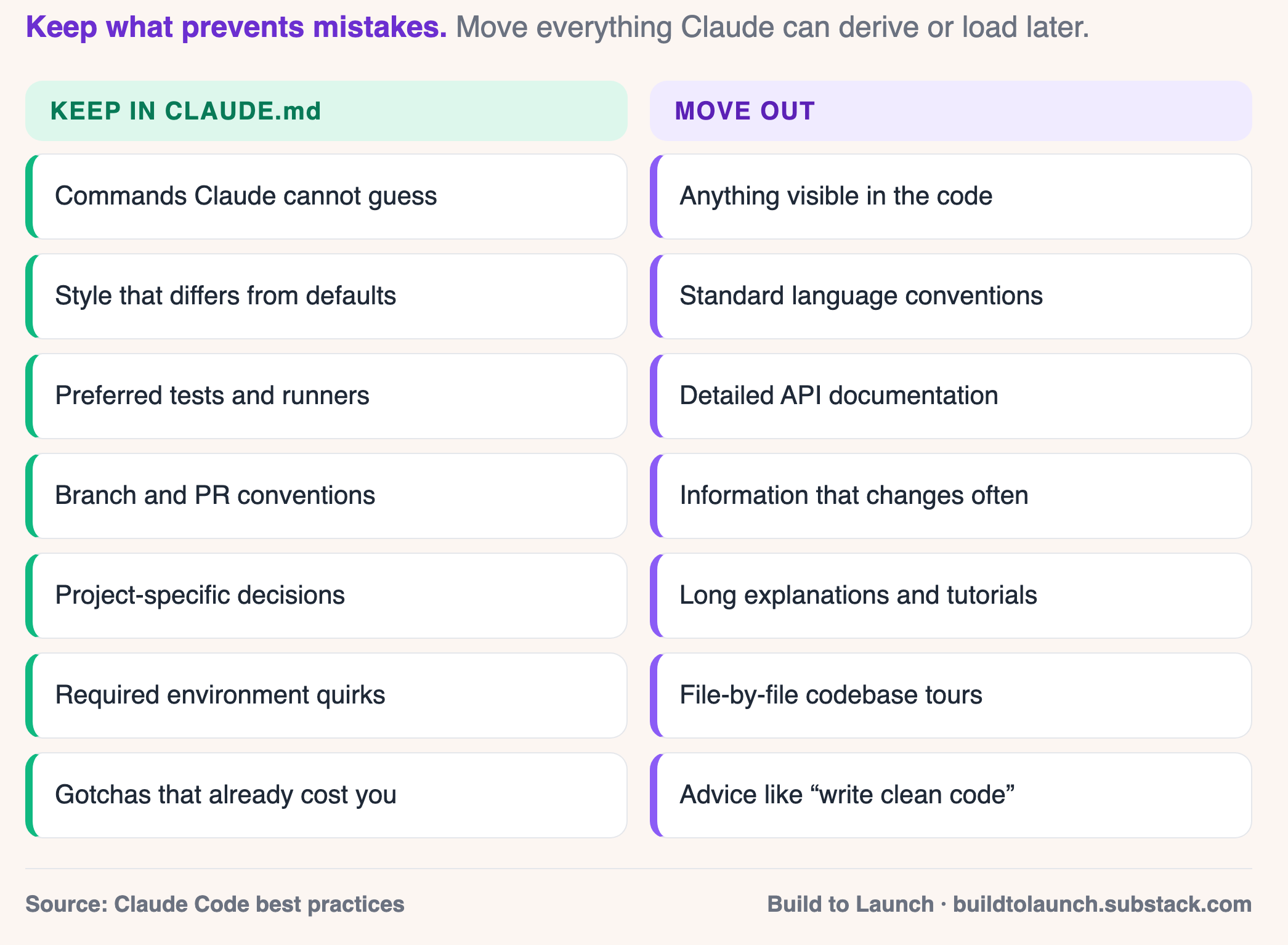
Once you remove those unnecessary lines, the next question is what Claude loads on its own.
What Claude Code uses instead of .claudeignore
A Claude Code user opened issue #56997 after a .claudeignore file failed to block an .env file:
I added a .claudeignore... It didn’t work... There is no warning. No error. No mention in the docs. The file just sits there doing nothing, while I think my secrets are safe.
The issue was closed as a duplicate. The current Claude Code permissions documentation directs you to permissions.deny for controlling which files its tools read.
Add the rules to .claude/settings.json when the team should share them. Use .claude/settings.local.json when they only apply to your machine.
{
  "permissions": {
    "deny": [
      "Read(./.env)",
      "Read(./secrets/**)",
      "Read(./node_modules/**)"
    ]
  }
}
The rules use gitignore pattern syntax. A single * stays within one path segment, while ** crosses directories. Read(.env) and Read(**/.env) both match .env files at any depth below the working directory. In current Claude Code versions, a Read deny also blocks Edit and Write on the same path.
These rules cover Claude’s built-in file tools and file commands Claude Code recognizes in Bash, including cat, head, tail, and sed. The permissions documentation warns that they do not catch arbitrary subprocesses reading files indirectly. For secrets, treat the deny rule as one access control instead of the entire security boundary.
Three settings sound related, but each does a different job:
respectGitignorekeeps gitignored files out of the@file picker. It does not stop the Read tool or Bash.ignorePatternsis deprecated.permissions.denyreplaced it.additionalDirectoriesgives Claude access to directories outside the working directory. It does not remove access.
If you need to skip a CLAUDE.md from another part of a large repo, use claudeMdExcludes. Its patterns are matched against absolute file paths. A managed policy CLAUDE.md cannot be excluded through individual settings.
Moving instructions reduces what Claude loads at startup. Deny rules limit which repo files Claude reads later while working. The next step is checking whether both changes reduced your context.
Measure your instruction load before and after the change
Before moving anything, run /context. It shows what is using the current context window. Under Memory files, note which instruction files loaded and how much space each one takes.
Run /context all for the expanded breakdown, including connected MCP tools. This helps you spot a server using context even when the current task does not need it. Claude Code documents both forms of the command.
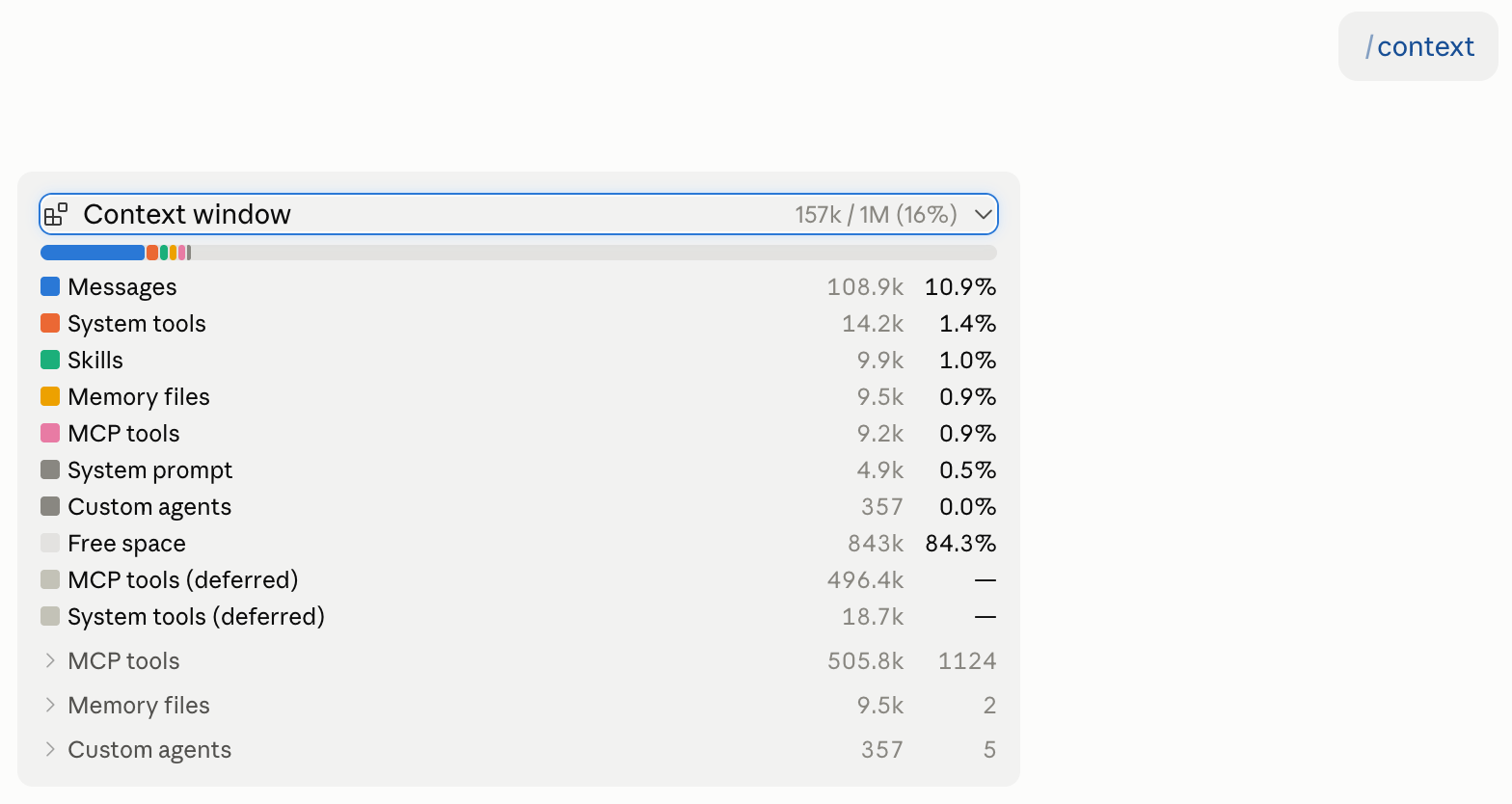
/usage measures something different. It shows session cost, plan limits, and activity. /cost and /stats open the same information. Use /context to inspect the window and /usage to inspect account usage.
Then run /doctor. In current Claude Code versions, it reviews a checked-in CLAUDE.md, proposes removing information Claude can derive from the repo, and suggests moving some remaining guidance into skills or nested instruction files. It shows you the plan and asks for confirmation before changing anything.
If you want a record of which instruction files loaded and why, set up an InstructionsLoaded hook. It runs when a CLAUDE.md or path-scoped rule enters context, including files loaded later in the session. The hook is for logging. It cannot block or change what loads.
Write down your /context reading before making changes. Run the same command in the same repo afterward. That gives you a useful before-and-after comparison without borrowing someone else’s percentage.
By this point, you know what Claude loads and where each type of instruction belongs. You have enough to rebuild the setup yourself.
The slow part is reviewing every line, resolving contradictions, and deciding which rules need enforcement. Claude does not warn you when one lands in the wrong place.
For paid members, I put together two gifts to handle that part:
🎁 The Claude Code Project Setup Kit includes a finished example project and blank files for your own setup:
CLAUDE.md, path-scoped rules, skills,.claude/settings.json, and a working hook.🎁 The
CLAUDE.mdaudit prompt reviews every instruction, flags contradictions and vague rules, and recommends what should stay, move, or be removed before writing any files.
This article continues for members
Join Build to Launch to read the full article, access all cohort content, and connect with other AI builders.